How to Connect Anthropic Claude with Zendesk (With or Without an AI Agent)
Connect Anthropic Claude and Zendesk in FlowRunner so an AI agent reads, classifies, and routes tickets automatically, then pauses for a human before any bulk change affects your whole queue.
How do you connect Anthropic Claude to Zendesk?
You connect them in FlowRunner by setting the On Ticket Event trigger to fire whenever a ticket lands or changes, then giving an AI agent Send Messages or Analyze Document as tools to classify the ticket, and Update Ticket or Add Comment To Ticket to act on it. FlowRunner is a visual AI-agent orchestration platform where automations run autonomously and pause for human judgment on the steps that carry real consequence. The same connection that routes a single ticket can scale to a reasoning agent that reads every conversation, decides what each ticket needs, and stops for a person only when the action is too broad or too risky to apply automatically.
The problem support operations teams are solving
Right now, most Zendesk queues run on human triage. A ticket arrives. Someone opens it, reads it, judges the priority, figures out which team owns it, sets the fields, and moves on to the next one. When volume spikes, tickets wait. When staff are in meetings, escalations age. The ones that fall through the cracks are always the ones that mattered.
Attaching Claude to Zendesk manually means someone still builds the prompt, runs the call, reads the output, and copies the result into the ticket. It is faster than reading from scratch, but the work still flows through a person. That person becomes the bottleneck, and the queue grows faster than the team can process it.
How it works: the connection between Anthropic Claude and Zendesk
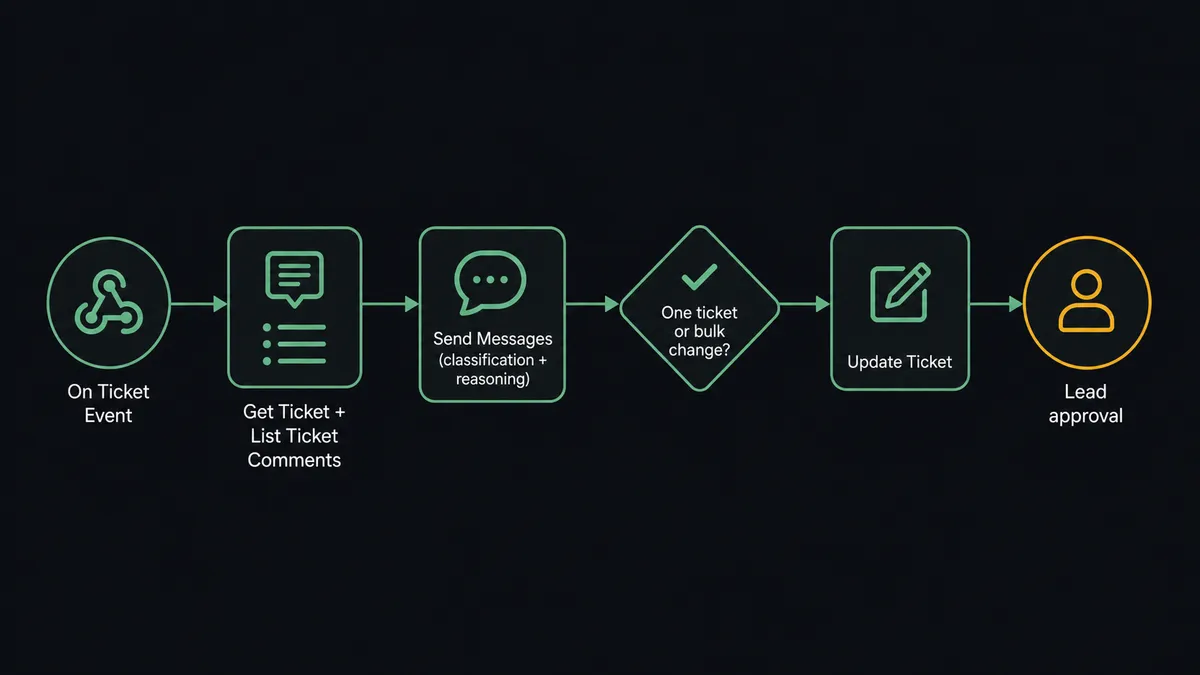
The On Ticket Event trigger in Zendesk fires the moment a ticket is created or updated. It is delivered via a webhook and a business-rule that FlowRunner provisions and removes automatically, so there is no manual configuration inside Zendesk beyond connecting the account.
Once the trigger fires, the workflow calls Get Ticket to retrieve the full ticket record: subject, status, priority, requester, assignee, tags, and custom fields. For tickets with conversation history, List Ticket Comments returns all messages in chronological order so the agent has the full thread before it acts.
The classification step calls Send Messages with a structured system prompt and the ticket content as input. The agent reads the subject and conversation, scores the urgency, identifies the account tier, and returns a schema-enforced JSON object with recommended assignee group, priority setting, and whether to add a public reply or an internal note. Because output is schema-enforced, the next step reads a reliable data structure, not free text.
If the ticket includes an attached PDF, such as a contract, a screenshot, or an error log, the agent calls Analyze Document with citations enabled. The citations link each extracted finding back to the exact passage it came from, so the internal note the agent adds to the ticket is traceable, not a summary from memory.
The agent then calls Update Ticket with the classified fields and Add Comment To Ticket with an internal note for the assignee. The ticket arrives at the right team already prioritized, with context attached. Agents spend their time responding rather than sorting.
Can an AI agent run it? (And why a human stays in the loop)
The plain connection routes every ticket the same way based on rules. An agent routes each ticket based on what is actually in it.
Here is the difference in practice. A ticket comes in at default priority from a customer your team has never seen before. The subject line is “Urgent billing issue.” The body is two sentences. Without Claude in the loop, the routing rule sets the priority based on the word “Urgent” in the subject or defaults to Normal and assigns it to the general queue. With Claude reading the conversation, the agent catches that the body mentions a charge three times the customer’s stated contract amount. It flags the ticket as high priority, assigns it to the billing team, and adds an internal note: “Customer claims $4,250 charge; contract terms on file state $1,400 per month. Recommend reviewing before responding.”
That is not a threshold. The agent evaluated context. It would handle a $4,250 charge from a customer with a five-year clean billing history differently, because the context is different.
The moment the action moves from a single ticket to a batch, the agent stops. A bulk reassignment across 30 or more open tickets is not low stakes. Zendesk’s human-in-loop highlight is direct: moving dozens of tickets to a new owner or status can miss an SLA, orphan a conversation, or bury an escalation. So when the agent’s triage run would reassign a batch of tickets, it invokes the human-in-loop subflow as a tool, not a fallback condition.
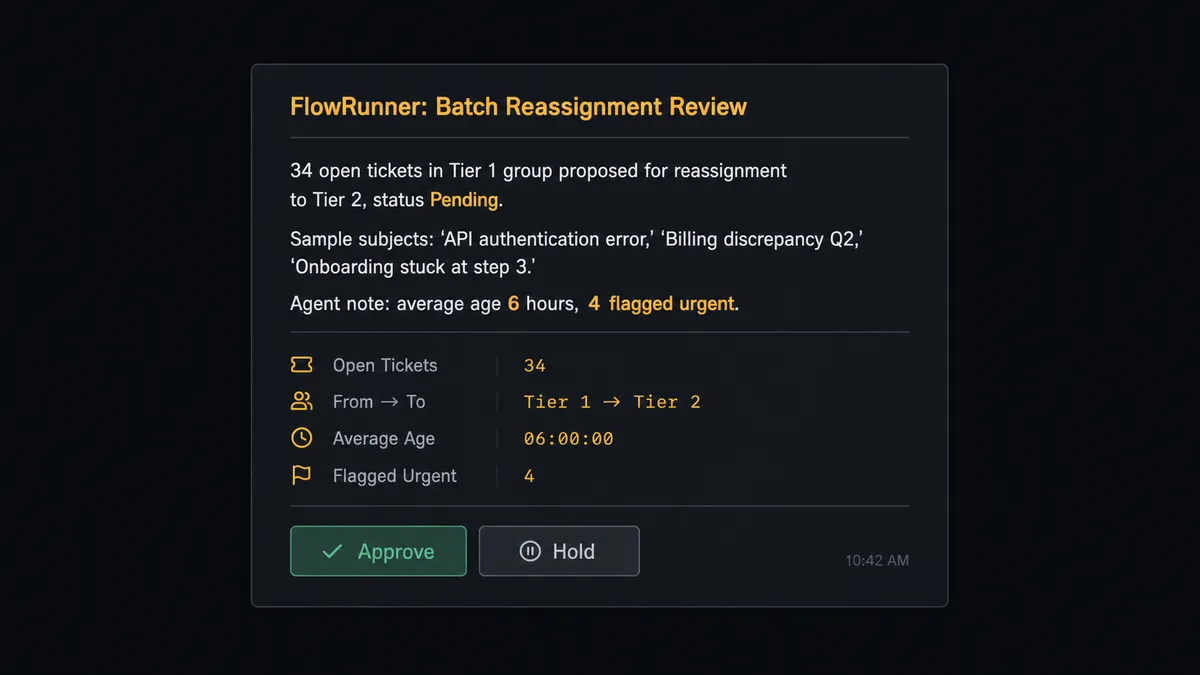
The agent packages the ticket count, the current and target assignee, the proposed status change, and a sample of the affected subjects. It sends that to the support lead through Slack or email. The lead sees exactly what would move and why. On approval, the agent applies Update Ticket to each record. On hold, nothing changes. The lead’s decision, identity, and timestamp go into the audit trail.
This is the digital andon cord. The agent runs the queue continuously. It stops the line when the action is too broad for a machine to own alone.
FlowRunner vs Zapier for Claude and Zendesk
Zapier handles this integration well for teams that want a straightforward trigger-action connection. A Zap can fire on a new ticket, call the Claude API with a fixed prompt, and update a Zendesk field with the response. For teams with a simple, stable classification rule, that works.
The limits appear when the use case grows. Zapier does not have an AI agent that reasons about each ticket differently. Every ticket gets the same prompt and the same action sequence. Zapier does not have a native human-in-loop mechanism that pauses the workflow, routes context to a person, waits for a response, and resumes. And Zapier’s pricing counts each step execution, so a classification run across a high-volume queue generates cost that is hard to predict.
| Feature | Zapier | FlowRunner |
|---|---|---|
| AI agent that reasons per ticket | No, fixed prompt per zap | Yes, agent reads context and decides |
| Human-in-loop as a callable agent tool | No native support | Built in; agent invokes it based on its own judgment |
| Unlimited users on every tier | No, seat-based pricing | Yes, all tiers |
| Bring your own Anthropic key | No, provider is bundled | Yes, BYOK; you pay Anthropic directly |
| Audit trail on human decisions | No | Yes, Professional tier and above |
| Self-hosted option | No | Yes, Community Edition is free |
Before and after
| Category | Before | After |
|---|---|---|
| Ticket triage speed | Agents open and sort tickets manually; queue waits on availability | On Ticket Event routes each ticket the moment it lands |
| Classification accuracy | Subject-line rules and keyword filters miss context in the body | Claude reads the full conversation and reasons about priority |
| Document handling | Attachments sit unread until an agent opens the ticket | Analyze Document extracts and cites key findings in an internal note |
| Bulk changes | Mass reassignments happen with no review step | Agent pauses and routes batch changes to a lead before applying them |
| Escalation lag | Urgent tickets age in the queue before someone spots them | Agent alerts the on-call channel in real time on arrival |
| Audit trail | Who changed what, and when, lives in email threads | Every agent action and human decision is logged in FlowRunner |
What you can build
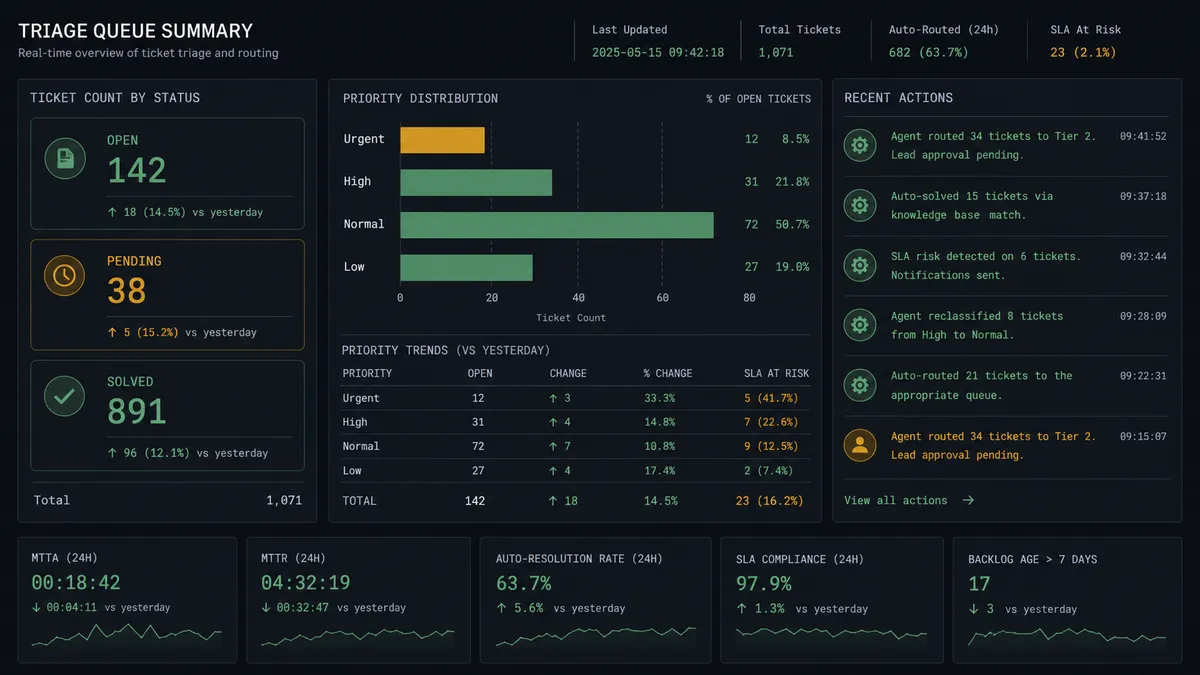
Automatic triage on arrival. On Ticket Event fires, the agent calls Get Ticket and Send Messages to classify priority and group, then calls Update Ticket to set the fields before any human opens the queue. Tickets arrive sorted.
Document-aware support notes. When a ticket includes an attached PDF (contract, invoice, error log), the agent calls Analyze Document with citations enabled and uses Add Comment To Ticket to post an internal note with the key findings linked back to their source passages. The assignee opens the ticket with context already prepared.
Real-time escalation to on-call. For any ticket the agent classifies as urgent, a parallel step uses the Slack integration to send a message to the on-call channel with the subject, requester, and a link. The response starts before the ticket ages against the SLA.
Batch review before bulk moves. When triage logic would reassign more than a configured threshold of tickets, the agent stops, packages the proposed change with a sample of affected subjects, and routes it to a lead for approval through the human-in-loop subflow. On approval, the agent applies Update Ticket to each record in the batch.
Customer record creation from other systems. When an order system or CRM signals a new customer, the agent calls Search Users to check whether the customer already exists in Zendesk, then calls Create User and Create Organization if not, and uses Create Ticket to open a support record with full context before the customer contacts support themselves.
Getting started
FlowRunner has a free plan with 100 executions a month, every integration included, and no credit card required, and new accounts get 14 days of Professional on top.
Connect both integrations to start building: Anthropic Claude and Zendesk are both available in the FlowRunner integration library.
Start your free trial at flowrunner.ai or book a 30-minute walkthrough at calendly.com/flowrunner/intro to see the triage agent running against a live Zendesk queue.
Frequently asked questions
Is it free to connect Anthropic Claude and Zendesk on FlowRunner?
FlowRunner has a free plan with 100 executions a month, every integration included, and no credit card required, and new accounts get 14 days of Professional on top. Beyond the free plan, Growth is $45 per month. All tiers include unlimited users and unlimited workflows.
Do I need my own Anthropic API key to use Claude in FlowRunner?
Yes. FlowRunner uses a bring-your-own-key model for AI providers. You connect your Anthropic account using your API key, and you pay Anthropic directly for inference. FlowRunner never marks up token costs.
What happens when the agent is not sure what to do with a ticket?
The agent stops and routes the ticket to a human through Slack, email, or another channel you configure. It packages the ticket subject, conversation history, priority, and its own reasoning before escalating. The workflow resumes only after a person responds.
Can I self-host FlowRunner?
Yes. FlowRunner offers a free Community Edition for self-hosted single-instance deployments. The Enterprise tier adds multi-instance clustering, full compliance features, and dedicated support. Cloud-hosted plans start free, with paid plans from $5 a month and Growth at $45 a month.
Does FlowRunner support bulk ticket changes through Zendesk?
The agent can apply Update Ticket across multiple records, but FlowRunner's human-in-loop step gates any bulk reassignment before it runs. The agent shows the ticket count, the current and target assignee, and a sample of affected subjects, and a support lead approves or holds the batch.
How is this different from a simple Zapier trigger-action connection?
A Zapier zap applies the same action to every ticket the same way. A FlowRunner AI agent reads each ticket, reasons about it, chooses which actions to take, and decides independently when to escalate to a human. The agent can call Get Ticket, List Ticket Comments, Analyze Document, and Update Ticket in whatever order the situation calls for, not in a fixed sequence.