How to Connect Chargebee with QuickBooks Online (With or Without an AI Agent)
Connect Chargebee and QuickBooks Online so subscription invoices and payments sync to your books automatically, with an AI agent that pauses for a human before posting disputed charges or issuing credits above threshold.
How do you connect Chargebee to QuickBooks Online?
When a Chargebee invoice is created or a payment is collected, FlowRunner uses List Invoices or Get Invoice together with QuickBooks Online’s Create Invoice and Create Payment actions to write the transaction to your books automatically. FlowRunner is a visual AI-agent orchestration platform where automations run autonomously and pause for human judgment on the steps that carry real consequence. The same connection that posts routine transactions can run as an AI agent that reads each transaction’s context and pauses for a human before recording a disputed charge, voiding an invoice, or applying a credit above your review threshold.
The problem it solves
Most finance teams manage a gap between their billing system and their books. Chargebee handles the subscription logic: creating customers, spinning up recurring plans, issuing invoices, and running lifecycle events like pauses and cancellations. QuickBooks handles the accounting: the invoice ledger, revenue recognition, AR aging, and reporting. Between those two systems sits a person, usually a billing manager or AP clerk, whose job is to re-key data, match records, and catch discrepancies before they become reconciliation problems at month end. That work expands with every new customer added.
The failure mode is not dramatic. It is slow. An invoice goes out in Chargebee but the QuickBooks record is created two days later, after someone has time to do the entry. A credit is issued but not reflected in the books until the next batch run. A cancellation happens on a paying account and the accounting team finds out when they reconcile. Exceptions fall through the cracks not because the team is careless but because the data lives in two places and moving it between them depends on available time.
How it works: the connection
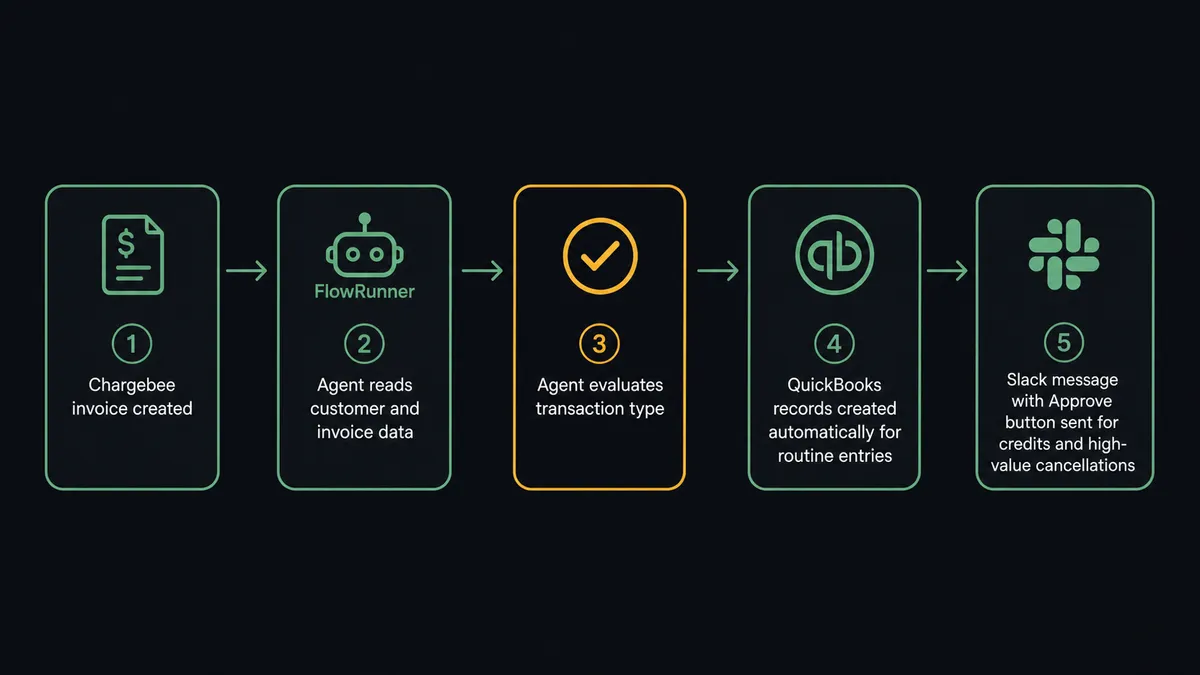
The direct integration maps Chargebee’s billing events to QuickBooks Online write operations. Here is the sequence for the most common case, subscription invoicing and payment recording:
- A trigger fires: either a scheduled List Invoices sweep from Chargebee or a webhook signaling a new invoice or payment event.
- The agent calls Get Customer in Chargebee to read the subscriber’s details.
- The agent checks QuickBooks for an existing customer record using List Customers or Get Customer. If the customer does not exist in QuickBooks, it creates one with Create Customer.
- The agent creates the corresponding invoice in QuickBooks with Create Invoice, mapping the Chargebee line items and amounts.
- When payment is confirmed in Chargebee (via Collect Payment or a payment event), the agent records it in QuickBooks with Create Payment and marks the invoice closed.
- The agent calls Get Invoice PDF in Chargebee to retrieve the billing document and delivers it to the customer via email.
Every step uses named actions from both connectors. There is no manual re-keying. The books reflect the billing system in near real time.
For credit notes, the agent uses List Credit Notes and Get Credit Note in Chargebee to read the credit details, then decides whether to apply a corresponding Void Invoice or adjustment in QuickBooks.
Can an AI agent run it? (And why a human stays in the loop)
A direct sync handles routine transactions. An AI agent handles the cases where the data requires judgment.
The difference is this: a sync tool runs the same action every time a trigger fires. An AI agent reads what it found and decides what to do. It has the full set of Chargebee and QuickBooks actions as tools. Get Invoice, Get Customer, List Subscriptions, Create Invoice, Create Payment, Void Invoice, Cancel Subscription, Pause Subscription. It picks the right combination based on the transaction in front of it, not a hardcoded sequence.
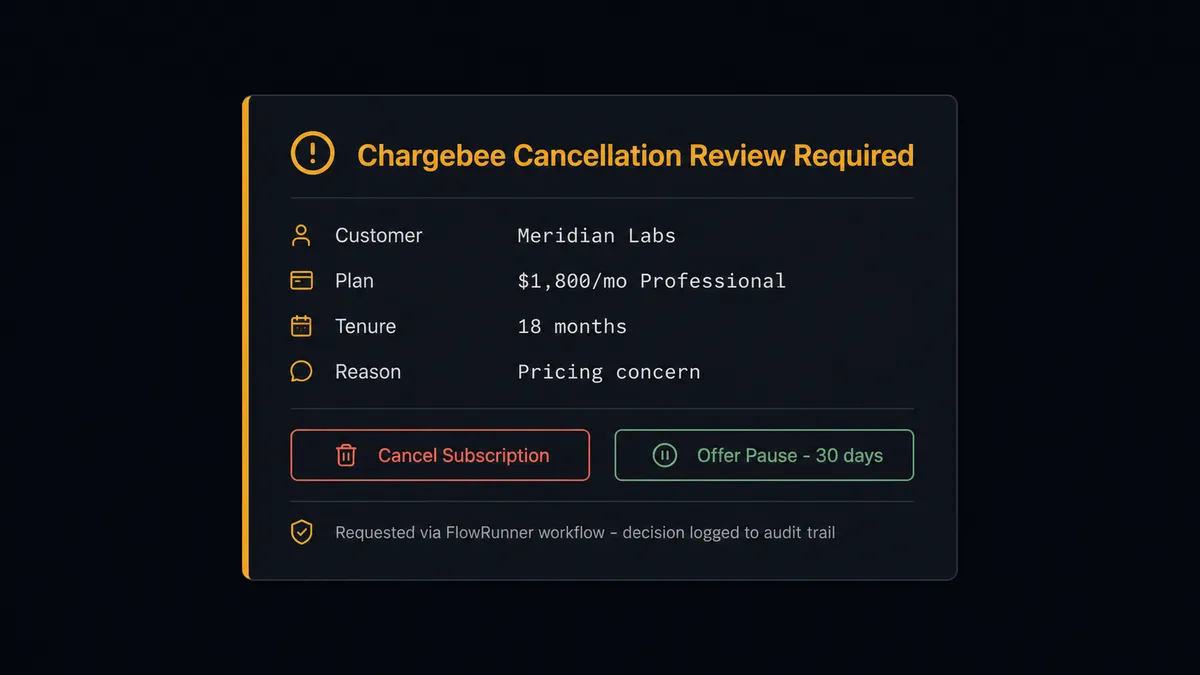
Here is a real decision moment. A cancellation request arrives for a customer on a $1,800 per month plan with 18 months of clean payment history. The agent reads the subscription value with Get Subscription, checks whether a credit note or retention offer applies, and identifies that this account sits above the revenue manager’s review threshold. Instead of cancelling automatically, it invokes the human-in-loop flow as a callable tool.
The revenue manager receives a Slack message with the full context: customer name, subscription value, months of history, the cancellation reason if captured, and two options: Cancel Subscription or Pause Subscription as a retention path. The manager clicks one. The agent executes the action. The decision, the approver, and the timestamp land in the audit trail.
That same agent, two minutes earlier, processed 14 routine invoice-to-QuickBooks postings without any human involvement. The routing is not a hardcoded threshold. The agent evaluated whether each transaction required a decision. Fourteen did not. One did.
This is the digital andon cord: the agent stops the line when it hits a transaction that carries real consequence. It does not stop for the predictable ones.
FlowRunner vs Zapier
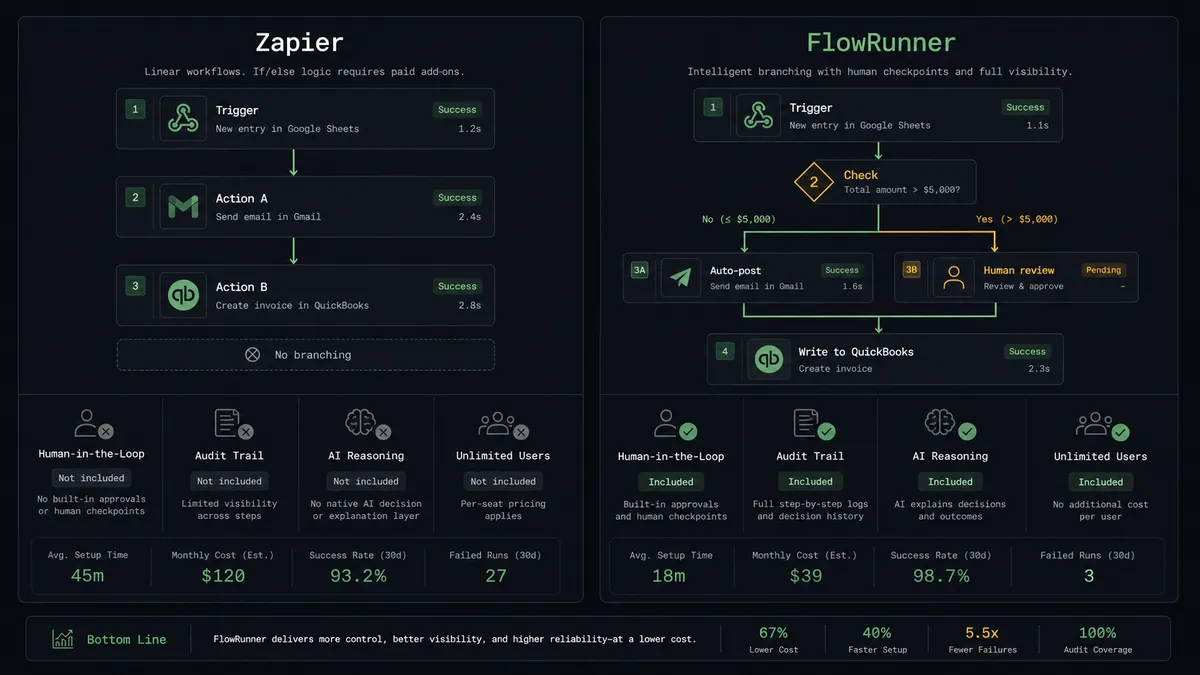
If your team is already using Zapier to connect Chargebee and QuickBooks Online, here is an honest comparison.
Zapier is genuinely good for straightforward point-to-point automation: trigger fires, action runs. For simple billing sync where every invoice follows the same path, Zapier works and the setup takes minutes. It has a large integration library and most finance teams can build basic workflows without technical help.
The limits show when your workflows need judgment. Zapier runs a fixed sequence. It cannot read transaction context and decide whether to escalate. There is no native human-in-loop capability where an agent pauses and routes to a person based on what it found in the data. Approval gates in Zapier require separate workarounds, not a built-in pattern.
| Feature | Zapier | FlowRunner |
|---|---|---|
| Basic Chargebee to QuickBooks sync | Yes | Yes |
| AI agent that reasons about each transaction | No | Yes |
| Native human-in-loop as a callable tool | No | Yes, Slack, email, WhatsApp, phone |
| Unlimited users on every paid tier | No, per-task pricing scales with volume | Yes, all tiers |
| Bring your own AI provider key | No | Yes |
| Self-hosted deployment option | No | Yes, Community and Enterprise |
| Audit trail with approver identity and timestamp | No | Yes, Professional tier and above |
The right tool depends on what you are automating. If every Chargebee invoice maps to a QuickBooks entry by the same rule every time, Zapier handles it. If your billing has exceptions, credits, cancellations, and high-value accounts that deserve a human review, the agent model fits better.
Before and after
| Category | Before | After |
|---|---|---|
| Invoice posting to QuickBooks | Billing manager re-keys Chargebee invoices into QuickBooks manually, typically in batches | Invoices post to QuickBooks automatically when created in Chargebee, no manual entry |
| Payment recording | AR stays open until someone logs the Chargebee payment confirmation in QuickBooks | Payment recorded in QuickBooks when Chargebee confirms collection; AR closes in near real time |
| Credit and cancellation oversight | Credits issued and subscriptions cancelled without accounting team visibility until reconciliation | Credits and high-value cancellations pause for manager approval; decision logged to audit trail |
| Customer record sync | New Chargebee customers added to QuickBooks by hand during onboarding | Agent creates the QuickBooks customer record at the same time the Chargebee subscription starts |
| Invoice delivery and filing | AP clerk manually pulls invoice PDFs from Chargebee and forwards to customers | Agent retrieves invoice PDF with Get Invoice PDF and delivers to customer as part of the same workflow |
What you can build
Subscription signup to QuickBooks customer in one flow. When a new subscriber signs up and the agent creates a Chargebee customer with Create Customer and starts the subscription with Create Subscription, it simultaneously creates the matching QuickBooks customer with Create Customer and queues the first invoice with Create Invoice. Both systems stay in step from day one.
Dunning and collection with automatic QuickBooks updates. The agent uses List Invoices in Chargebee to find past-due accounts, calls Collect Payment to attempt collection, and records the result in QuickBooks with Create Payment. Failed attempts escalate to the billing manager. Successful collections post to the books without intervention.
Credit note workflow with human gate. When a credit note appears in Chargebee (List Credit Notes, Get Credit Note), the agent reads the credit value and the customer’s subscription tier. Credits below threshold post directly to QuickBooks via the appropriate adjustment action. Credits above threshold route to the revenue manager for approval before anything is recorded.
Cancellation-to-books close with retention path. A cancellation event triggers the agent to read the account value, subscription tenure, and payment history. High-value accounts surface to a revenue manager with a retention option (Pause Subscription). Accounts approved for cancellation proceed through Cancel Subscription in Chargebee and the corresponding QuickBooks adjustment. All decisions are logged.
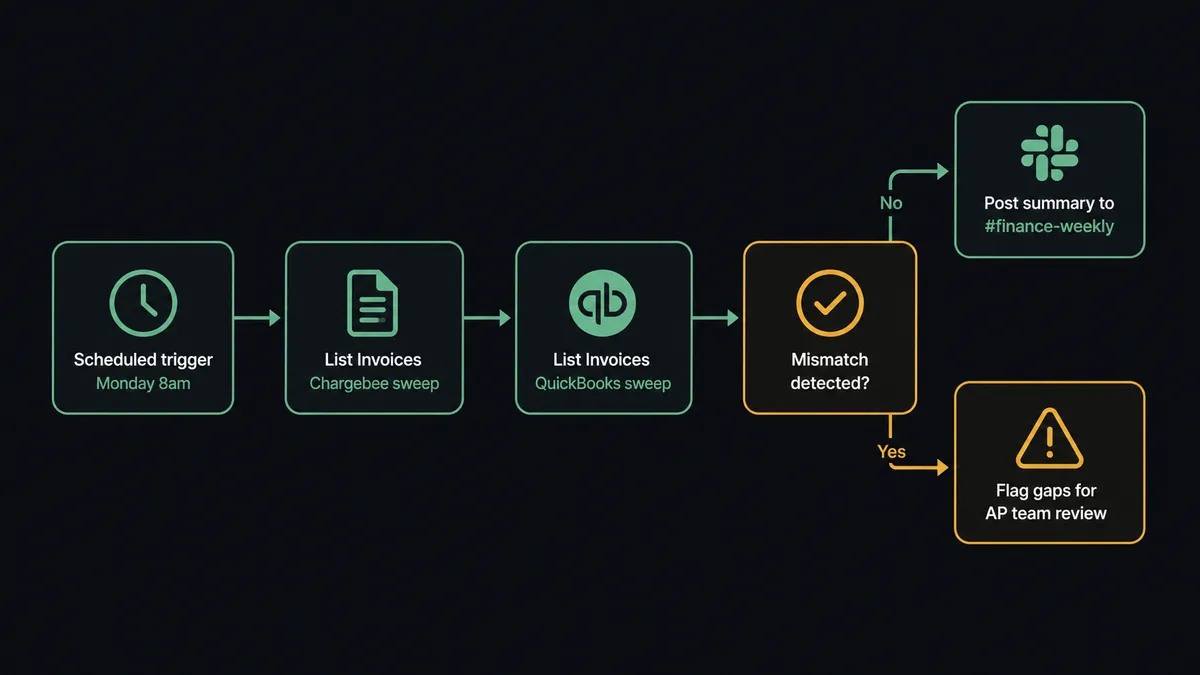
Weekly billing reconciliation report. Every Monday, the agent sweeps List Invoices in Chargebee against List Invoices in QuickBooks, identifies mismatches, and posts a reconciliation summary to the finance Slack channel. Gaps are flagged for the accounting team to review before the week starts.
Getting started
FlowRunner has a free plan with 100 executions a month, every integration included, and no credit card required, and new accounts get 14 days of Professional on top. Corporate email gets you started in under five minutes.
Connect both integrations first: Chargebee and QuickBooks Online. The FlowRunner integration library verifies both connections against each platform’s API before you build anything.
Start a free trial at flowrunner.ai or book a 30-minute walkthrough at calendly.com/flowrunner/intro to see the billing sync and human-in-loop pattern running on a real account.
Frequently asked questions
Is it free to connect Chargebee and QuickBooks Online on FlowRunner?
FlowRunner has a free plan with 100 executions a month, every integration included, and no credit card required, and new accounts get 14 days of Professional on top. Beyond the free plan, Growth starts at $45 per month for 12,000 workflow executions.
Can I self-host FlowRunner for this integration?
Yes. FlowRunner offers a self-hosted Community Edition at no cost for single-instance deployments, and a self-hosted Enterprise tier with multi-instance clustering and full compliance features.
Does the AI agent need my own API key for AI features?
FlowRunner uses a bring-your-own-keys model for AI providers. You connect your own key from Claude, OpenAI, or another provider. FlowRunner does not charge separately for AI model usage.
What happens when the agent is not sure about a transaction?
The agent invokes a human-in-loop flow as a callable tool. It pauses the workflow, packages the context (customer, invoice amount, subscription history), and routes the decision to a revenue or accounting manager via Slack, email, or WhatsApp. The workflow resumes after the human responds.
Does this replace my bookkeeper?
No. The agent handles routine transaction posting so your bookkeeper focuses on exceptions and judgment calls. Credits above threshold, disputed charges, and subscription cancellations for high-value accounts still reach a person before anything is recorded.
How many users can access FlowRunner workflows?
All FlowRunner tiers include unlimited users. There is no per-seat charge.