How to Connect DocuSign with Google Drive (With or Without an AI Agent)
Connect DocuSign and Google Drive so every completed envelope is automatically downloaded and filed in the right Drive folder, optionally as an AI agent that pauses for human approval before granting external access.
How do you connect DocuSign to Google Drive?
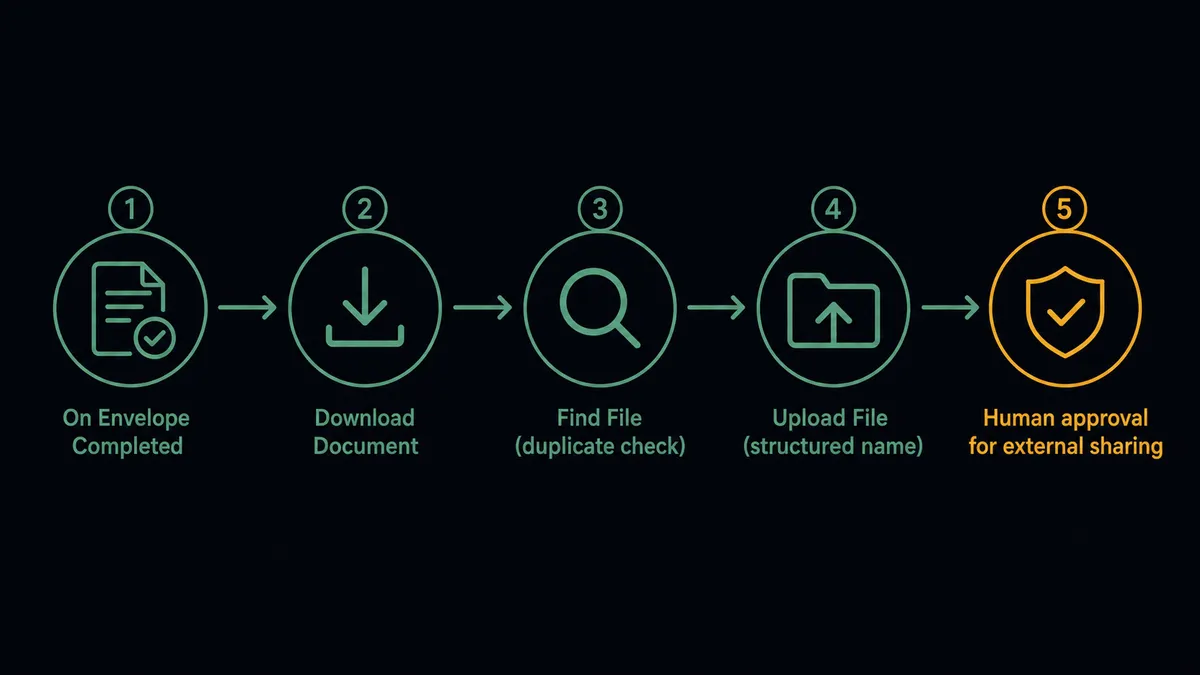
Use the DocuSign On Envelope Completed trigger in FlowRunner to fire a Download Document action, then pass the file to a Google Drive Upload File action that stores it in the correct folder with a structured name. FlowRunner is a visual AI-agent orchestration platform where automations run autonomously and pause for human judgment on the steps that carry real consequence. The same connection can run as an AI agent that reads the envelope metadata, decides where the file belongs, and pauses for a human before granting access to anyone outside your organization.
The problem it solves
Right now, someone on your team is monitoring the DocuSign dashboard and manually downloading signed contracts. They rename the file, drag it to the right Google Drive folder, set the sharing permission, and notify the relevant people. If they are out of office, the file sits in DocuSign unclaimed. If they use an inconsistent naming convention, the file becomes unfindable six months later. If they forget to set sharing before sending the link, the recipient hits an access error and emails back. Every step of that process is manual and fragile.
For teams that sign dozens or hundreds of documents a month, the work compounds quickly. An ops lead spending fifteen minutes per signed contract is spending days of calendar time on file management. The exceptions, a voided contract that still has an active Drive folder, a signed NDA filed in the wrong client directory, a shared link sent with the wrong permissions, fall through the cracks because there is no system checking each one.
How it works: the connection
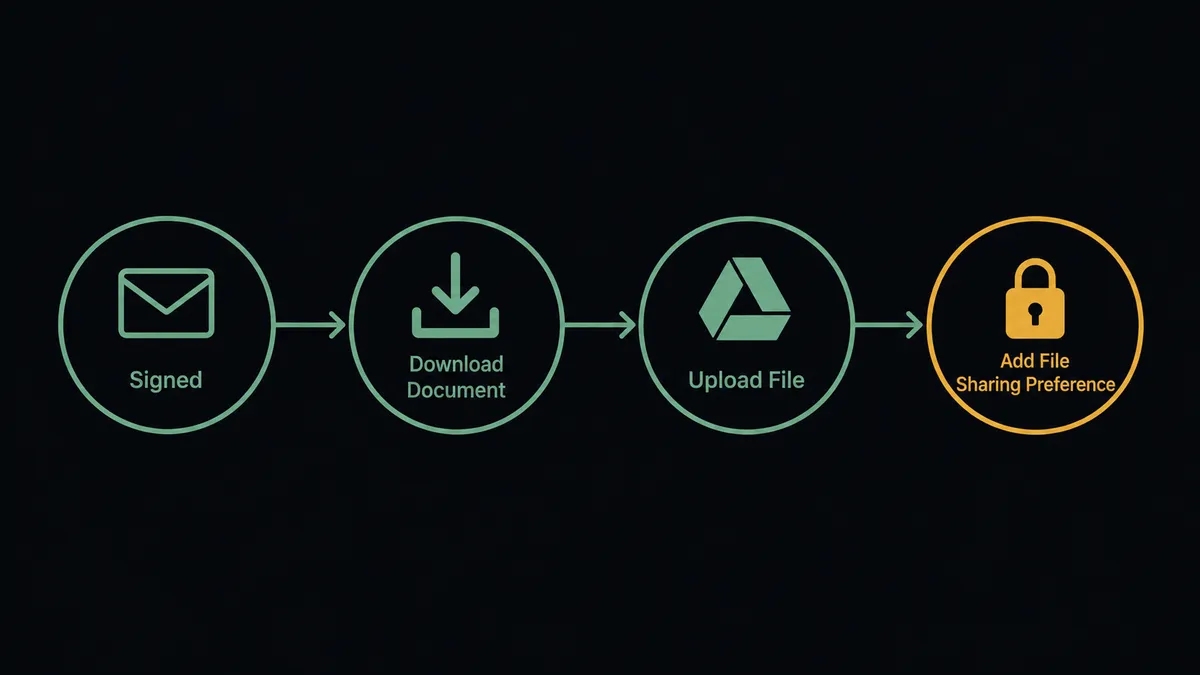
When a DocuSign envelope is completed, the On Envelope Completed trigger fires. The workflow begins immediately, with no polling delay.
The first action is Download Document. FlowRunner pulls the fully executed document from DocuSign into the workflow as a file payload. The envelope ID, signer name, and completion timestamp come along as metadata.
Before filing, the agent runs Find File in Google Drive to confirm no duplicate already exists in the destination folder. This prevents the same contract from being filed twice when a workflow runs unexpectedly.
Upload File then places the document in the correct Drive folder. The filename is built from envelope metadata: client name, document type, and date. A contract signed by Acme Corp on July 17 might land as acme-corp_msa_2026-07-17.pdf rather than DocuSign_Envelope_9a3f.pdf.
After upload, the workflow can apply sharing with Add File Sharing Preference. Internal recipients are granted access automatically. External recipients get a different path.
Can an AI agent run it? (and why a human stays in the loop)
The plain trigger-action connection handles the routine case well. The AI agent handles everything else.
The agent reads the envelope metadata before deciding what to do. It checks the deal value, the signer, the document type, and the destination. For a standard internal contract, it files the document, applies internal sharing, and sends a brief confirmation. For a contract going to an external recipient or a folder marked sensitive, it stops.
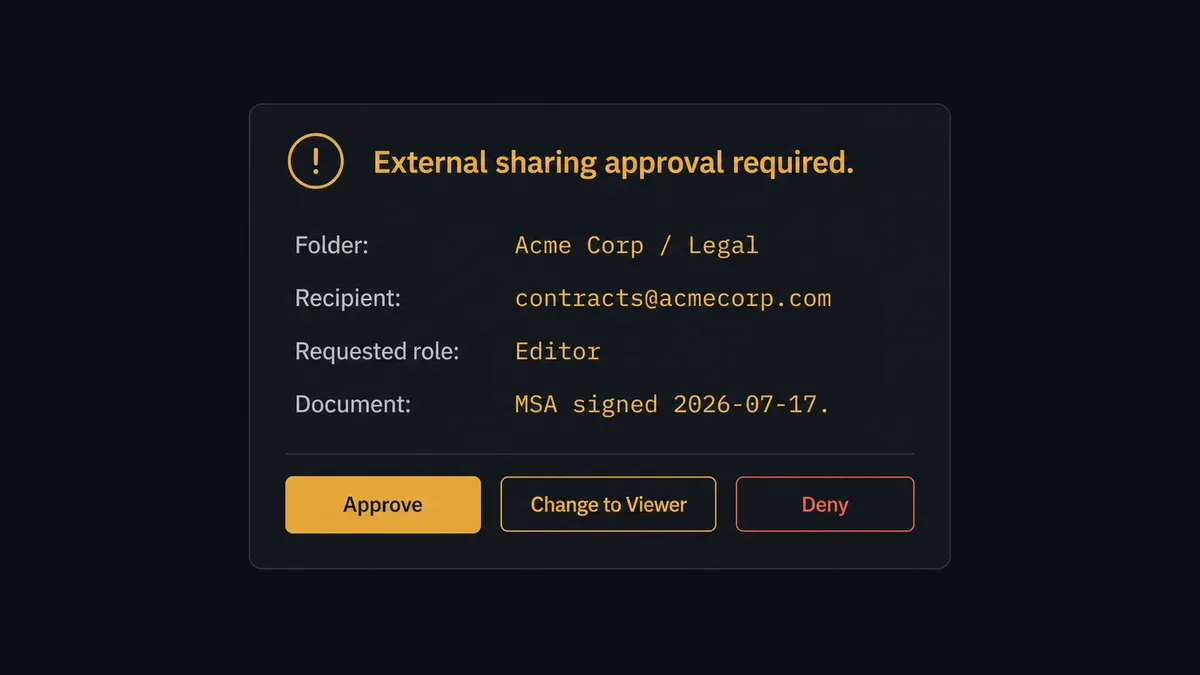
Granting external access to a Google Drive folder is exactly where the agent should pull the digital andon cord. The agent does not apply the sharing preference on its own. It stages the request and routes a decision card to the data owner:
“Request to share folder ‘Acme Corp / Legal’ with external recipient contracts@acmecorp.com as Editor. Envelope: MSA, signed July 17. Approve, change the role to Viewer, or deny?”
The data owner responds in Slack. The agent applies the approved scope and records the approver’s name, the timestamp, and the decision in the audit trail. If the owner denies, the agent files the document internally and sends a note explaining that external sharing was not granted. The file lands in the right place either way. The access decision belongs to a person.
This is not a threshold. The agent evaluates context: who the external recipient is, what the folder contains, what access level was requested. A contractor who has been shared into ten previous folders gets less scrutiny than a new external party requesting Editor access to a sensitive legal directory.
FlowRunner vs Zapier
Zapier is the right comparison for most non-technical teams connecting DocuSign and Google Drive. It has a large library of DocuSign and Google Drive actions, a straightforward setup experience, and a large user base that has documented common patterns.
The differences that matter for this specific connection:
| Feature | Zapier | FlowRunner |
|---|---|---|
| Human-in-loop for external sharing | No native step; requires a third-party approval tool | Built-in human-in-loop subflow with Slack, email, or WhatsApp channels |
| AI agent reasoning on envelope metadata | No; Zapier follows fixed step sequences | Yes; the agent reads metadata and decides which actions to invoke |
| Audit trail for sharing decisions | Not captured in Zapier | Every human decision is recorded with approver, timestamp, and outcome |
| Unlimited users on every tier | Per-user pricing on some plans | Unlimited users on Growth ($45/mo), Professional ($299/mo), Business ($999/mo) |
| Bring Your Own Key for AI model | Not available | Yes; connect your own key for Claude, GPT-4, or any supported provider |
| Self-host option | No | Yes; Community Edition free, Enterprise self-hosted available |
Before and after
| Category | Before | After |
|---|---|---|
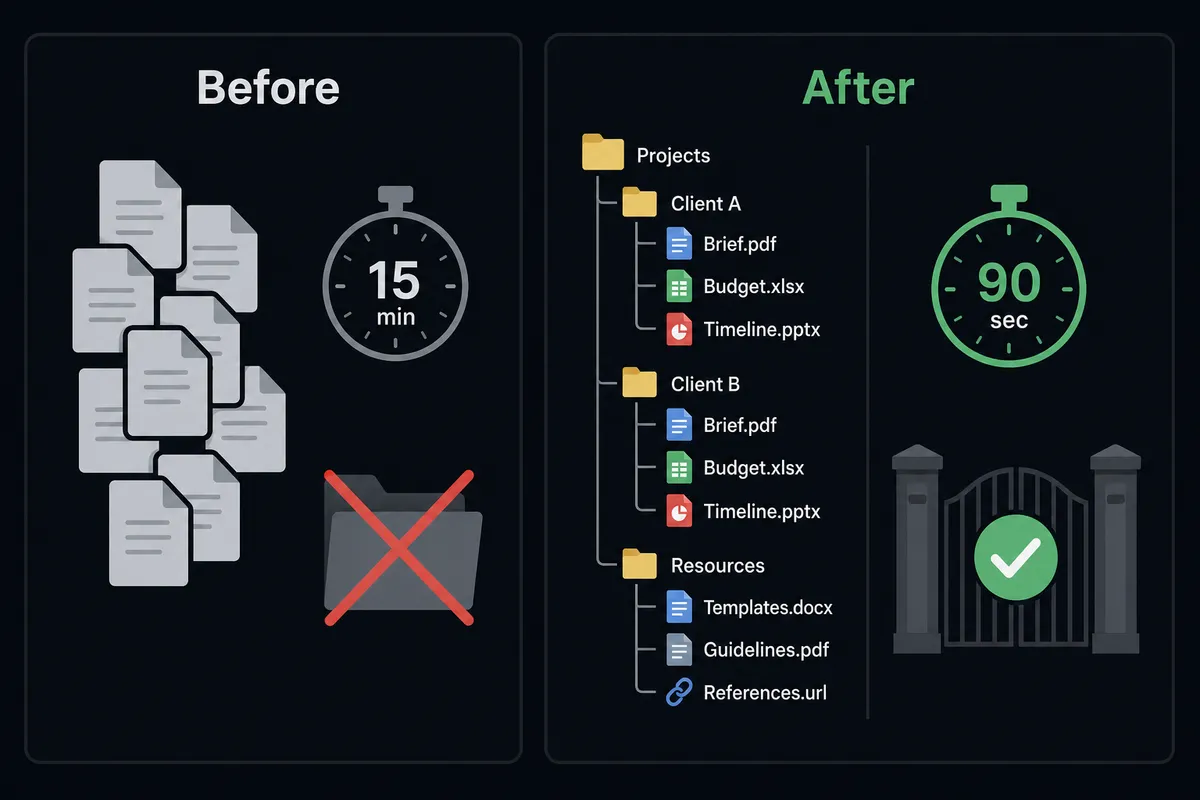
| File naming | Files downloaded as DocuSign defaults; renamed by hand each time | Structured names built from envelope metadata applied automatically on upload |
| Filing time | 10-15 minutes per signed document, done manually by a team member | Filing completes in under 90 seconds from signature, with no manual steps |
| Duplicate risk | Relies on the person filing to check for an existing file | Find File runs before every upload; duplicates are caught before they land |
| External sharing | Shared by whoever files the document; no consistent record of who approved | Agent stages external access requests; every decision recorded with approver and timestamp |
| Voided envelope cleanup | Archived Drive folders stay active when the corresponding contract is voided | On Envelope Voided triggers a Move File or rename flow to flag the folder automatically |
| Visibility | Team checks DocuSign and Drive separately to confirm both are in sync | Execution log shows every step: download, find, upload, share, and any human decision |
What you can build
Contract archive with structured naming on every close. Trigger on On Envelope Completed, run Download Document, then Upload File with a name built from deal ID and signer. Every signed contract lands in the right client folder with a consistent name the moment the signature arrives.
Stalled signing recovery with Drive audit. Trigger on On Envelope Sent, wait three days, check Get Envelope Status. If still pending, run Resend Envelope and log the follow-up in a Google Drive audit sheet using Create File with the date and signer. The ops lead sees a real-time record of every outstanding envelope without opening DocuSign.
External collaboration setup on deal close. On Envelope Completed fires for a client onboarding agreement. The agent creates a client folder with Create Folder, uploads the signed agreement with Upload File, and routes an Add File Sharing Preference request for the client’s email through the human-in-loop step. The client folder is ready before the rep sends the welcome email.
Declined contract escalation with Drive record. Trigger on On Envelope Declined, run Get Envelope Recipients to identify who declined, and Upload File to a “declined contracts” Drive folder with the envelope details. The agent posts a decision card to the deal owner’s Slack. Nothing disappears quietly.
Getting started
FlowRunner has a free plan with 100 executions a month, every integration included, and no credit card required, and new accounts get 14 days of Professional on top.
Both integrations are ready to connect in the FlowRunner catalog: DocuSign and Google Drive.
Create your first workflow at flowrunner.ai or book a 30-minute intro at calendly.com/flowrunner/intro to walk through the connection and the human-in-loop setup with the team.
Frequently asked questions
Is it free to connect DocuSign and Google Drive on FlowRunner?
FlowRunner has a free plan with 100 executions a month, every integration included, and no credit card required, and new accounts get 14 days of Professional on top. No credit card is required to start. Beyond the free plan, Growth continues at $45/month with 12,000 executions included.
Can I self-host this connection?
Yes. FlowRunner offers a self-hosted Community Edition at no cost for single-instance deployments, and a self-hosted Enterprise tier for organizations that need multi-instance clustering and a full compliance suite.
Does the AI agent need my own API key for the AI model?
Yes. FlowRunner uses a Bring Your Own Key model, so you connect your own API key from whichever AI provider you prefer. You are not locked into a specific model, and the cost of inference stays with your provider account.
What happens when the agent is not sure whether to grant external access?
The agent does not proceed on its own. It stages the request and sends a decision card to the data owner via Slack or email showing the folder name, the external recipient, and the proposed role. The owner approves, modifies, or denies. The agent acts only after the human responds, and the decision is recorded in the audit trail.
Can I use this connection without building an AI agent?
Yes. The plain trigger-action connection, On Envelope Completed fires, Download Document, Upload File to Drive, works without any AI agent node. You can start with the simple automation and add the AI agent and human-in-loop layer later.
What happens to the Drive file when a DocuSign envelope is voided?
You can build a separate flow triggered by On Envelope Voided that uses Move File or Rename File/Folder in Google Drive to flag or relocate the archived document. FlowRunner handles the voided-envelope event as a distinct trigger so cleanup logic runs automatically.