How to Connect GitLab with Slack (With or Without an AI Agent)
Connect GitLab and Slack so issues, merge requests, and pipeline events post to your team's channels automatically, with an AI agent that pauses for a human before any code touches production.
How do you connect GitLab to Slack?
You connect GitLab to Slack by building a FlowRunner flow that fires when an event happens in GitLab (a new issue, a merge request ready for review, a pipeline completing) and calls Send Message to Channel or Send Direct Message in Slack to route the update to the right people. FlowRunner is a visual AI-agent orchestration platform where automations run autonomously and pause for human judgment on the steps that carry real consequence. The same connection can run as an AI agent that files deduplicated issues, posts structured Slack updates, and stops for a named engineer before any code merges to production.
The problem teams run into today
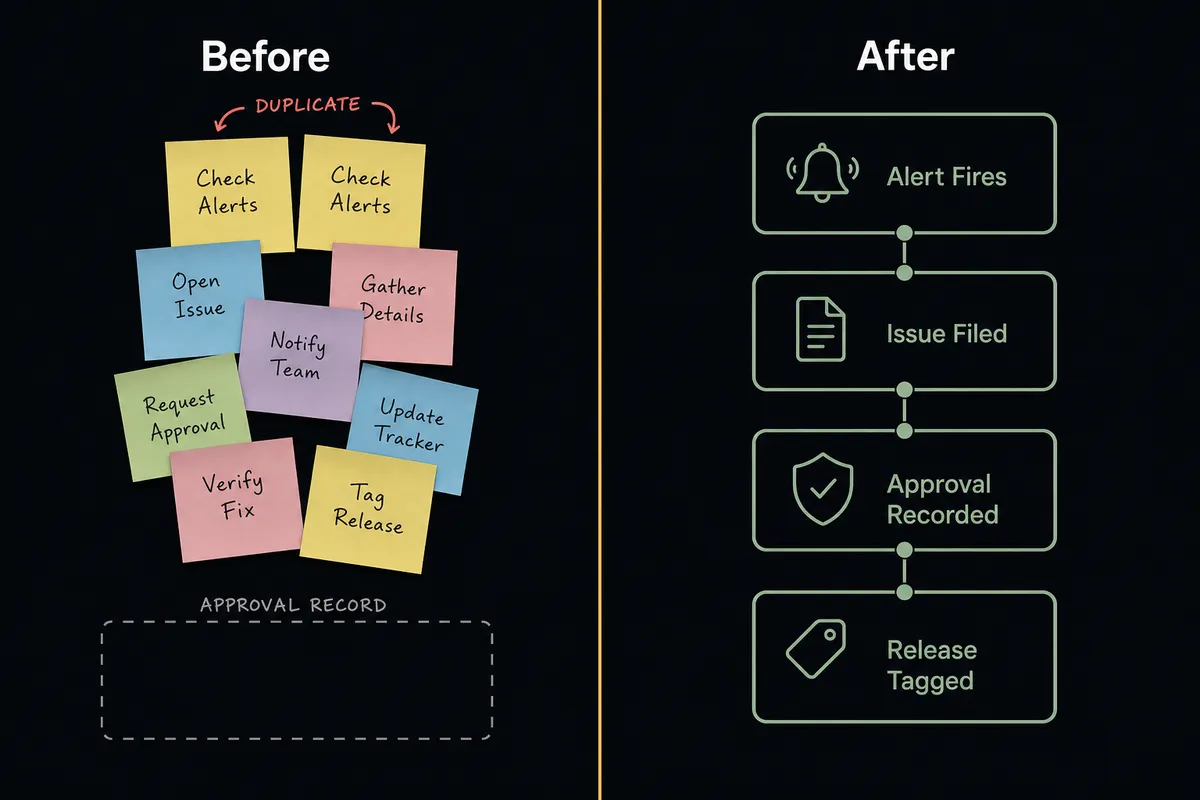
When GitLab and Slack are not connected, engineers and ops leads spend time shuttling information between them by hand. A monitoring alert fires, someone reads it, copies the relevant details into a new GitLab issue, picks the right project and labels, and posts the link in the team channel. That is three manual steps that happen after hours, on weekends, and during incidents when speed matters most. The same alert often lands twice because two people on different shifts both filed an issue before checking.
Release gates are worse. A merge request sits green and ready for days while the reviewing engineer waits for a Slack nudge that never came, or comes buried under thirty other messages. The decision to ship gets made in someone’s head without a record of who made it or why. When something goes wrong in production, nobody can reconstruct the approval chain.
How it works: the connection
A FlowRunner flow connects GitLab and Slack in a sequence driven by real actions from both integrations.
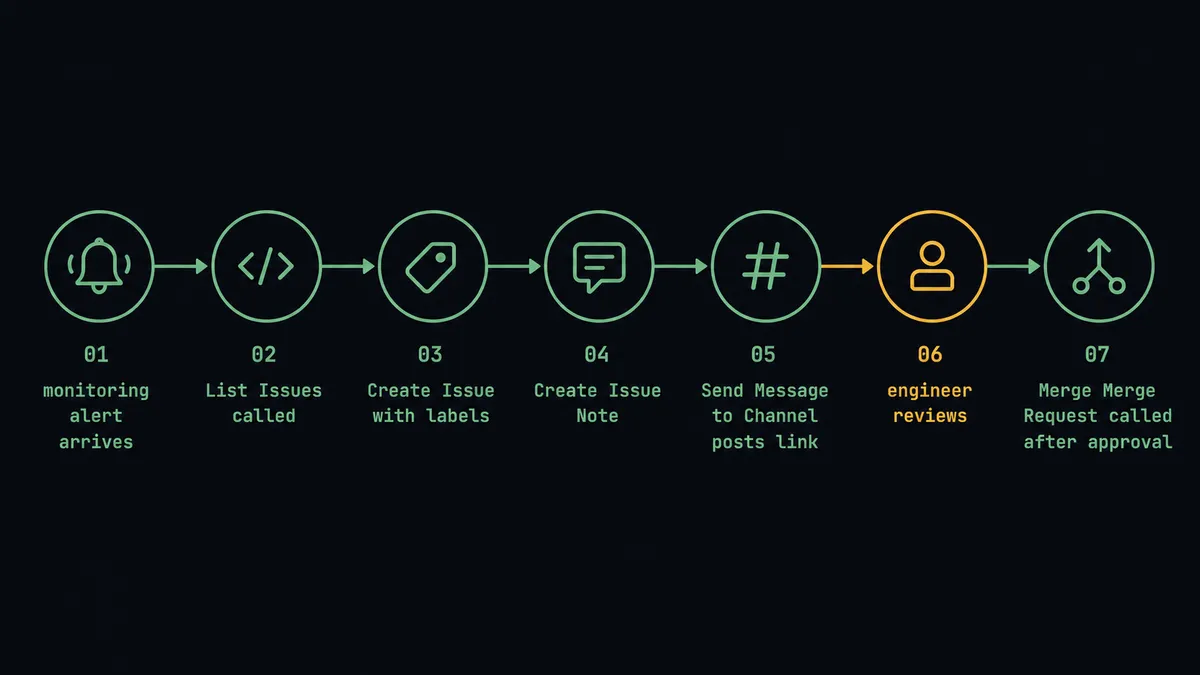
For issue tracking, the flow starts when a monitoring alert or support ticket enters FlowRunner. The agent calls List Issues against the target GitLab project to check whether the same alert has already filed an issue. If no duplicate exists, it calls Create Issue with the alert details, the correct labels, and a link back to the source. It then calls Create Issue Note to stamp the first-seen timestamp on the issue, and posts the issue link to the engineering channel using Send Message to Channel. Engineers open GitLab to a tracker that is already labeled and deduped.
For release gates, the flow starts when a merge request is ready for review. The agent calls Get Merge Request to retrieve the current pipeline status and diff summary, then posts that information to the release channel using Send Message to Channel. The message includes the MR number, the pipeline result, and a summary of what changed. Engineers see everything they need to make a decision without opening GitLab.
Can an AI agent run it? (and why a human stays in the loop)
A standard Zapier or n8n connection moves data from GitLab to Slack when a condition is met. An AI agent running the same connection reads the data, reasons about it, and picks its next action based on what it finds.
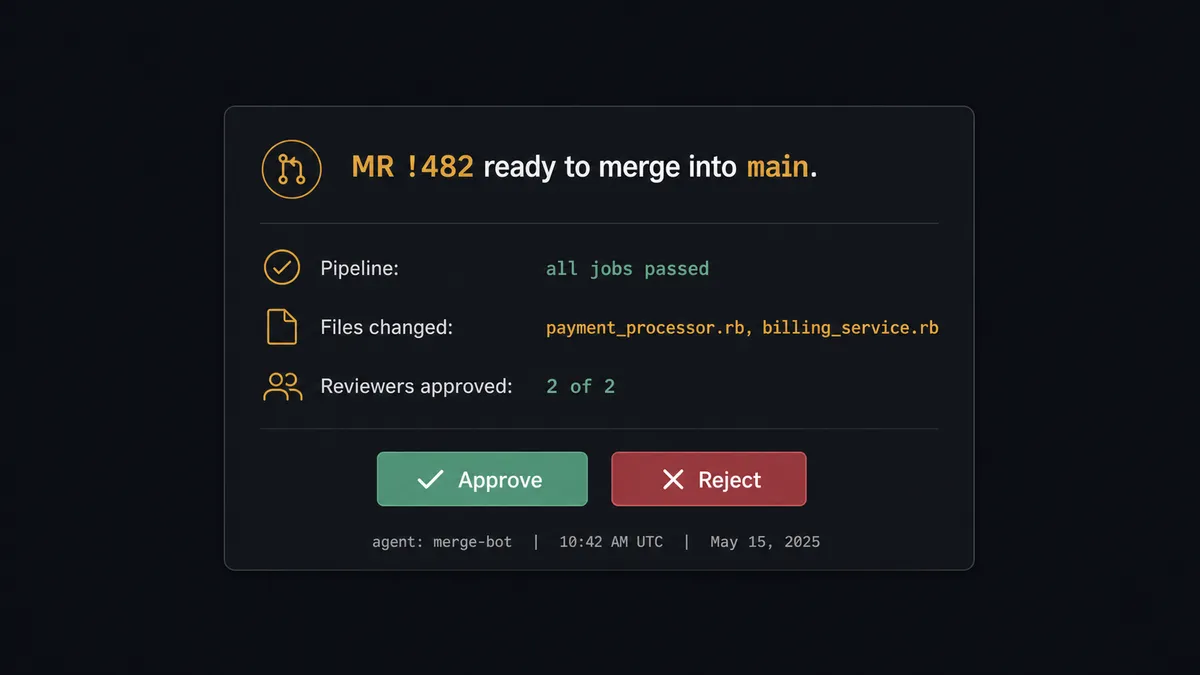
Here is what that looks like on a production merge gate. The agent calls Get Merge Request and reads the result. It sees that the MR targets the default branch, that all CI jobs passed, and that two other engineers have already reviewed and approved. It also reads that the change touches the payment processing module. Based on its instructions, it knows that any change to that module goes to a person before it ships, regardless of CI status or peer review count. The agent does not merge. It invokes the human-in-loop subflow as a callable tool.
The subflow sends a Slack message to the release channel using Send Message to Channel: “MR !482 is green and ready to merge into main. It modifies the payment processing module. Approve the production merge?” The message includes the pipeline status, the list of changed files, and two buttons: Approve and Reject. The On Block Action trigger catches the engineer’s response and routes it back to the main flow. If approved, the agent calls Merge Merge Request and then Create Release to tag the version. If rejected, it posts a note to the MR using Add Merge Request Note and routes the context back to the team. Either way, the approver’s identity and the timestamp are captured in the audit trail.
This is not a threshold rule. The agent would process a low-risk CSS change to the same module autonomously if its instructions defined that scope. The decision to involve a human is itself an agent decision. That is the “digital andon cord”: the agent stops the line when it hits a step that a person should own.
FlowRunner vs the tool you’re probably comparing
If your team already uses Zapier for Slack notifications, you know it handles simple triggers well. Zapier’s library is large, its setup is fast, and for straightforward “event in A posts to B” patterns it works without friction. For a team that wants to post GitLab pipeline completions to Slack and nothing more, Zapier is a reasonable starting point.
The gaps show up when the connection needs to reason instead of just relay.
| Capability | Zapier | FlowRunner |
|---|---|---|
| Post GitLab events to Slack | Yes | Yes |
| Deduplicate before filing an issue | No (linear trigger-action only) | Yes (agent calls List Issues, evaluates, then decides) |
| Human approval before production merge | No native mechanism | Native: agent invokes a human-in-loop subflow as a callable tool |
| Interactive Slack buttons that resume the workflow | No | Yes (On Block Action trigger routes the decision back) |
| Audit trail with approver identity and timestamp | No | Yes, on every human decision |
| Unlimited users on every plan | No (seat-based pricing) | Yes |
| Self-hosted deployment | No | Yes (Community Edition free, Enterprise custom) |
n8n users will recognize some of these capabilities. n8n can build multi-step flows and has LangChain-based agent nodes. The difference is architectural: in FlowRunner, the human-in-loop step is a first-class flow component that any agent can invoke as a tool, not a pattern you assemble from webhook nodes and wait loops. Ops teams without a developer to maintain the n8n instance also report that FlowRunner’s no-code builder gets them to production faster.
Before and after
| Metric | Before | After |
|---|---|---|
| Issue filing | Engineer copies alert details into GitLab by hand after every incident | Agent files a labeled, linked issue the moment the alert fires |
| Duplicate issues | Same alert files the same issue twice because nobody checked first | Agent calls List Issues before filing; duplicates do not reach the tracker |
| Production merge approval | MR sits green for days; approval happens in someone’s head with no record | Agent posts MR to Slack, waits for named engineer approval, records the decision |
| Release tagging | Engineer assembles release notes and tags the version manually after merge | Agent calls Create Release immediately after approval; notes are auto-generated |
| Stakeholder notification | Engineering lead sends a manual message to stakeholders after each release | Agent posts to the stakeholder channel via Send Message to Channel automatically |
What you can build
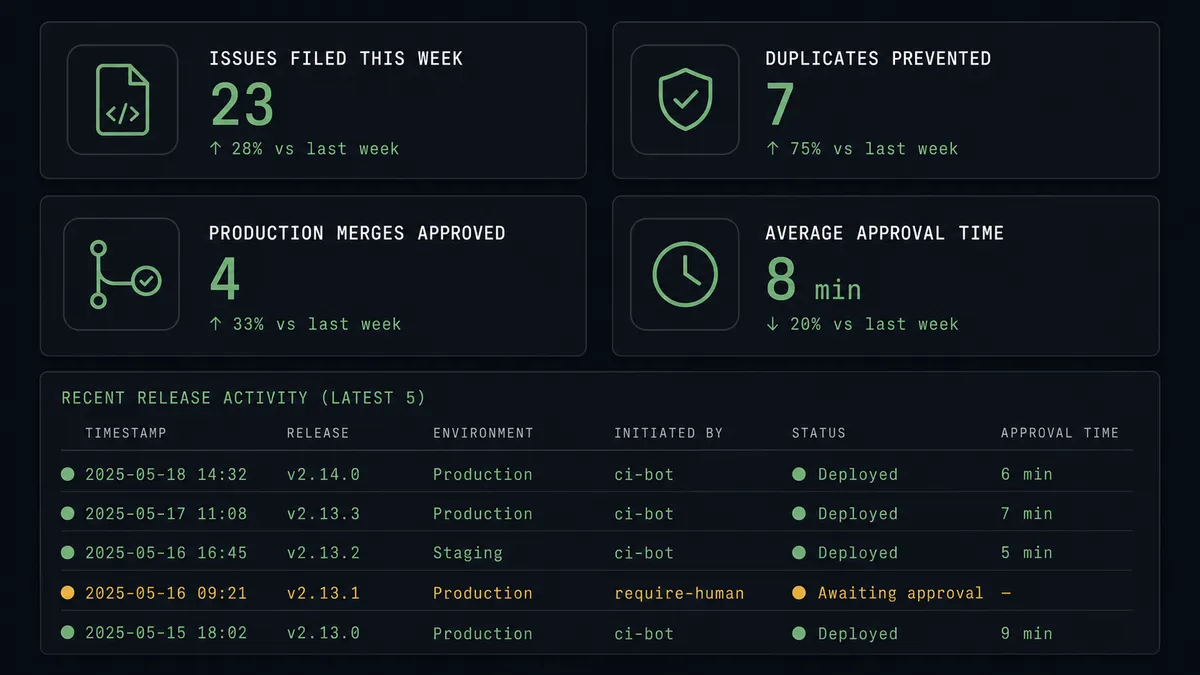
Alert-to-issue with Slack confirmation. When a monitoring tool fires an alert into FlowRunner, the agent calls List Issues to check for duplicates, calls Create Issue with the alert details and labels, and posts the issue link to #engineering via Send Message to Channel. Engineers see a labeled, linked issue and a Slack message in under a minute.
Production merge gate. When a merge request is ready, the agent calls Get Merge Request, posts the MR details and pipeline status to #releases via Send Message to Channel with Approve and Reject buttons, and waits. After an engineer approves via On Block Action, the agent calls Merge Merge Request and Create Release. Every step is in the audit trail.
Branch and CI status updates. When a CI pipeline completes, the agent calls Get Pipeline to read the result and posts a structured status update to the team channel. If a pipeline fails, it adds a note to the related MR using Add Merge Request Note and routes a Direct Message to the commit author via Send Direct Message.
Release announcement flow. After a release merges and the agent calls Create Release, it posts a formatted announcement to #product-updates using Send Message to Channel. The message includes the version tag, the key changes, and a link to the release page. Stakeholders get the announcement without anyone writing it by hand.
Getting started
FlowRunner has a free plan with 100 executions a month, every integration included, and no credit card required, and new accounts get 14 days of Professional on top. All plans include unlimited users and unlimited workflows.
Start by connecting both integrations in your FlowRunner workspace:
- GitLab integration page for setup instructions and the full action list
- Slack integration page for OAuth2 setup and trigger documentation
When you are ready to build, sign up at flowrunner.ai or book a 30-minute walkthrough at calendly.com/flowrunner/intro to see the production merge gate and human-in-loop flow live.
Frequently asked questions
Is it free to connect GitLab and Slack on FlowRunner?
FlowRunner has a free plan with 100 executions a month, every integration included, and no credit card required, and new accounts get 14 days of Professional on top. Any real email address works; disposable domains are not accepted. Paid plans start at $5 a month for Starter, with Growth at $45 a month.
Can I self-host the GitLab and Slack connection?
Yes. FlowRunner's Community Edition is free for self-hosted single-instance deployments. Enterprise self-hosted plans add multi-instance clustering, full compliance features, and dedicated support.
Does the agent need my own API keys for GitLab and Slack?
Yes. FlowRunner uses a bring-your-own-keys model. You authenticate GitLab with a personal access token scoped to the api scope, and Slack via OAuth2. Both connect in the FlowRunner credentials panel before you build any flow.
What happens when the agent is not sure whether to merge?
The agent does not guess. It posts the merge request details, its pipeline status, and a diff summary to the designated Slack channel and waits for a named engineer to approve. Only after approval does it call Merge Merge Request. The approver's identity and timestamp are captured in the audit trail.
Can the agent work with a self-managed GitLab instance?
Yes. The GitLab connector runs against both GitLab SaaS and self-managed instances over the GitLab REST API v4. You point the connector at your instance URL during setup.
Does this replace my existing GitLab notification emails?
It can supplement or replace them. FlowRunner agents post structured Slack messages with interactive buttons, which give your team more actionable context than a plain notification email. You choose which events route through FlowRunner and which go through GitLab's native notifications.