How to Connect Gmail with HubSpot (With or Without an AI Agent)
Connect Gmail and HubSpot so inbound emails create contacts, open deals, and update your CRM automatically, with a human on the steps that carry real consequence.
How do you connect Gmail to HubSpot?
Connect Gmail’s “On New Thread” trigger to HubSpot’s Create Contact and Create Deal actions in FlowRunner, and every new inbound email thread creates or updates a CRM record automatically. FlowRunner is a visual AI-agent orchestration platform where automations run autonomously and pause for human judgment on the steps that carry real consequence. That same connection can run as an AI agent that reads the email, reasons about whether the sender is new or existing, and invokes a human review before creating any record it is not confident about.
The problem with doing this manually
Every inbound email that looks like a lead passes through a person before it reaches your CRM. An SDR or operations coordinator reads the message, checks whether the contact exists, creates the record, associates it to the right company, and opens a deal. If they are in a meeting, on vacation, or simply overwhelmed, the message waits. If they forget the dedup check, you get a duplicate. If they create the deal in the wrong pipeline stage, the forecast is wrong.
The problem is not that your team is careless. The problem is that this work lands in an inbox, which means it competes with everything else in that inbox. There is no queue, no SLA, and no visibility into what fell through the cracks until a prospect follows up asking why nobody responded. The manual process scales with headcount, not with volume. A busy day for your marketing team becomes a late night for whoever owns CRM hygiene.
How it works: the connection
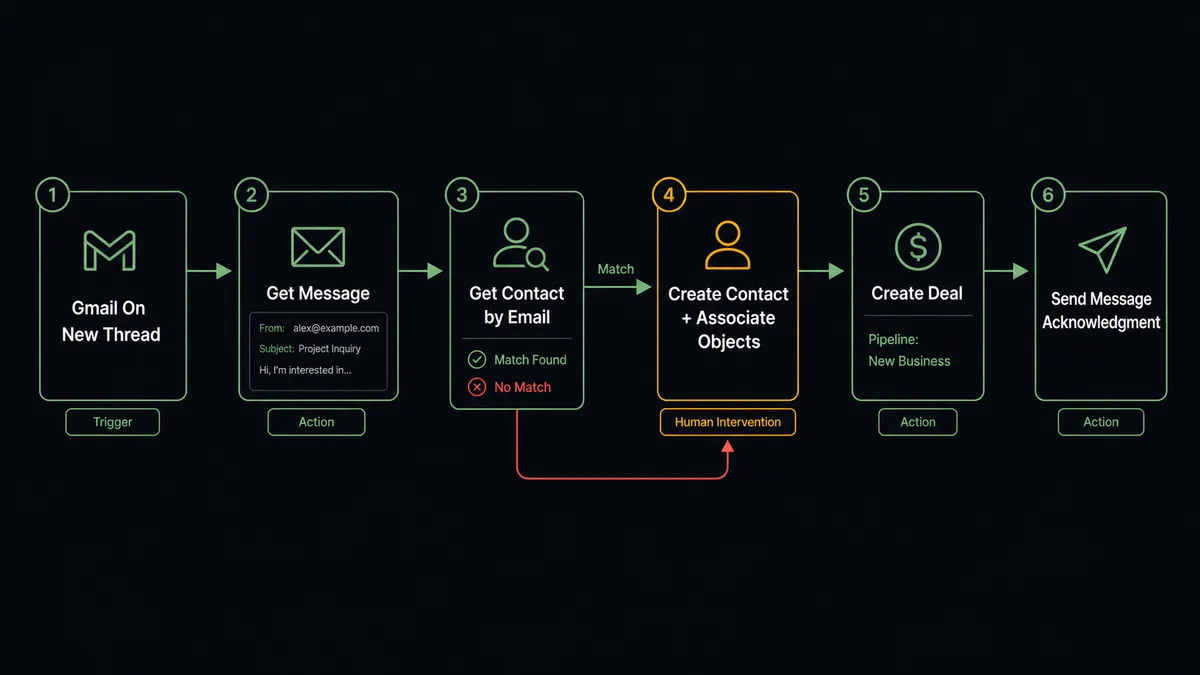
The flow starts with a Gmail trigger. “On New Thread” fires the moment a new email conversation begins in the configured mailbox. “On New Email” fires on every inbound message matching your filter criteria. “On New Attachment” fires specifically when an email carries a file, which covers inbound proposals, intake forms, and vendor documents.
After the trigger, the agent calls Gmail’s Get Message action to read the full email body and extract the sender’s address, name, and any relevant text. That email address feeds directly into HubSpot’s Get Contact by Email action, which checks whether a record already exists. If it does, the agent updates the existing contact with any new information from the email. If it does not, the agent calls Create Contact to create a fresh record, then calls Associate Objects to link the new contact to the correct company record.
Once the contact is resolved, the agent calls Create Deal to open an opportunity in the right pipeline stage with the deal owner mapped from territory rules. Finally, Gmail’s Send Message delivers a templated acknowledgment to the sender and Add Label To Message marks the thread as handled so no one picks it up again by hand.
Can an AI agent run it? (And why a human stays in the loop)
A basic Zapier or n8n connection maps fields and runs a fixed sequence. That is useful for straightforward cases. But inbound email is not always straightforward. The sender is often a known contact at a company already in HubSpot, in which case creating a new contact produces a duplicate. The sender is sometimes a vendor, not a prospect. The email subject can indicate buying intent or a support question bound for a different team. A fixed automation cannot tell the difference. It executes the sequence and creates the record regardless.
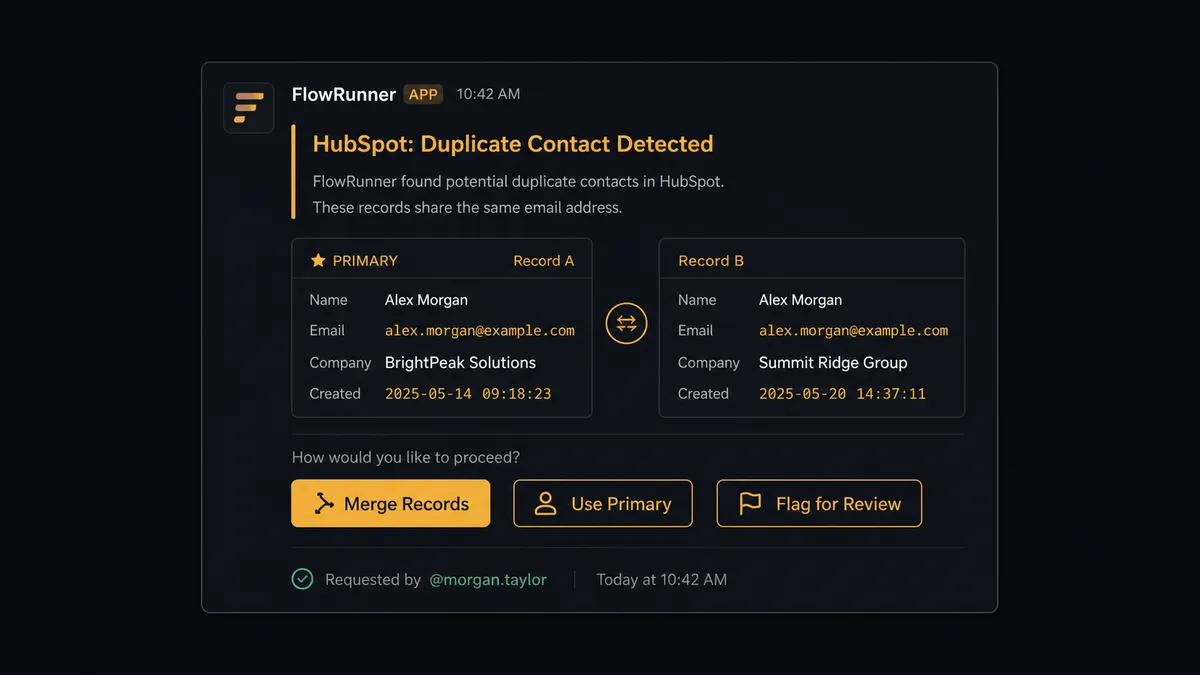
An AI agent in FlowRunner reads the email, evaluates what it finds, and picks the right path. It checks HubSpot with Get Contact by Email and, if it finds two records with the same email address, it does not silently pick one. It pauses. It packages the full context: both contact records, the email that triggered the review, and the proposed action. It sends that context to a CRM admin via Slack with three options: merge, associate with the primary record, or flag for manual review. The admin responds. The agent resumes with the decision as input. The decision, who made it, and when are all captured in the audit trail.
The same judgment applies to emails that do not match any intake pattern. If a message arrives from a domain the agent does not recognize with a subject that does not match any of the configured intake rules, the agent does not guess. It applies a triage label, holds the thread, and routes the message to the right person: “Email from [sender] with subject ‘[subject]’ does not match any intake rule. Process as a new lead, route to support, or ignore?” The person decides. Recognized mail flows through automatically.
This is what prospects call the digital andon cord: the agent stops the line when it hits something it should not decide alone.
FlowRunner vs Zapier
Zapier is the right choice for teams that need a fast, reliable sync between two apps and do not need the connection to reason about the data. Its library of pre-built Zaps is deep, its setup time is short, and its reliability record is strong. If “new Gmail email creates a HubSpot contact” is the full requirement, Zapier can do that in under 10 minutes.
The gap shows when the connection needs to handle exceptions. Zapier runs fixed sequences. When the sequence encounters a duplicate, an unknown sender, or an email that should go somewhere other than HubSpot, the Zap either errors out, skips the record, or creates the wrong record silently. There is no in-sequence judgment. Human oversight means building a separate notification step that fires every time, not an agent that decides when to escalate based on context.
| Feature | Zapier | FlowRunner |
|---|---|---|
| Gmail to HubSpot basic sync | Yes | Yes |
| Deduplication check before creating contact | Requires filter step, runs every time | Agent calls Get Contact by Email and evaluates the result |
| Human escalation on exceptions | Separate notification Zap, fires on all exceptions | Agent invokes human-in-loop as a callable tool, only when it judges escalation is warranted |
| Audit trail of human decisions | Not included | Every escalation, decision, and decider captured in the audit trail |
| Unlimited users on every tier | No, per-seat pricing | Yes, all tiers include unlimited users |
| Self-hosted option | No | Yes, Community Edition is free |
Before and after
| Metric | Before | After |
|---|---|---|
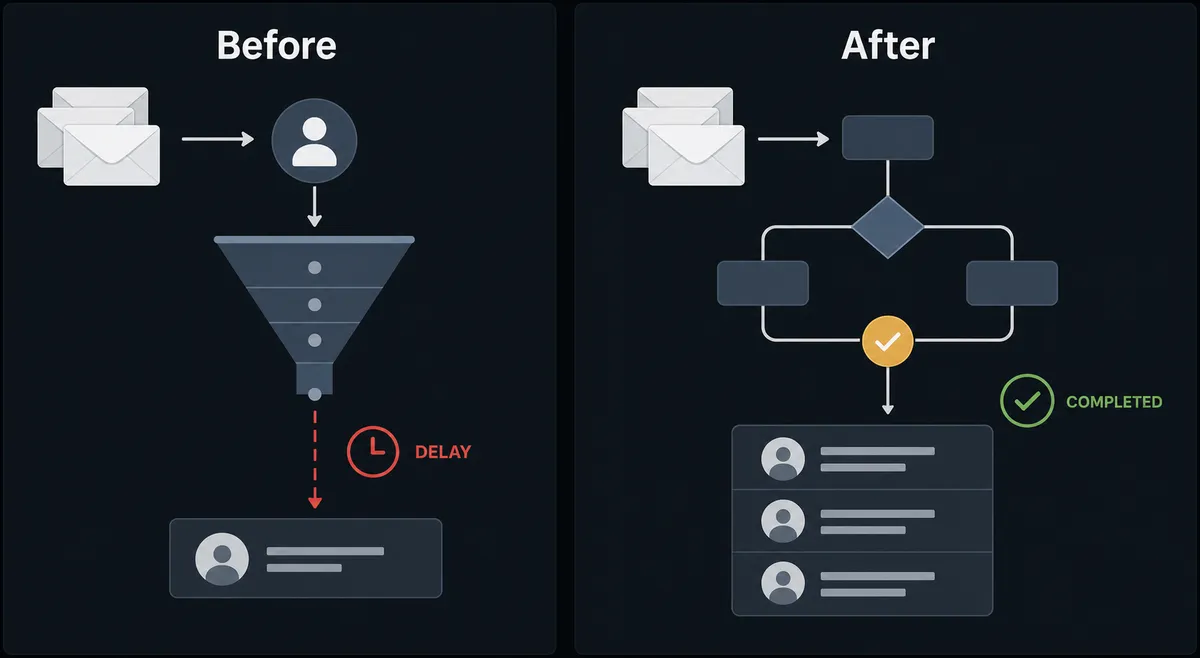
| Time from email to CRM record | Hours, depends on team availability | Under 30 seconds from trigger to deal created |
| Duplicate contact rate | Uncontrolled without a systematic dedup step | Agent checks Get Contact by Email before every create |
| Exception handling | Silently skipped or created wrong | Routed to the right person with full context before the agent acts |
| CRM hygiene visibility | No audit trail of who entered what or when | Every create, update, and human decision logged with identity and timestamp |
| Team effort per lead | Manual review, data entry, dedup check per inbound email | Team only handles escalations the agent judges it should not resolve alone |
What you can build
Inbound lead capture from any email. Gmail’s On New Thread trigger fires when a prospect emails your general inbox. The agent reads the message with Get Message, checks HubSpot with Get Contact by Email, creates the contact and deal if none exists, and sends a templated acknowledgment with Send Message. The whole sequence runs before anyone on your team sees the notification.
Attachment intake to CRM record. A vendor or partner emails a proposal or intake form. Gmail’s On New Attachment trigger fires. The agent saves the file with Save Attachment, extracts key fields, and creates or updates the HubSpot contact and deal with the data from the attachment. No manual download and re-upload.
Starred email follow-up flow. A sales rep stars an email to flag it for follow-up. Gmail’s On Email Starred trigger fires. The agent reads the thread with Get Threads to gather full context, looks up the contact in HubSpot with Get Contact by Email, and either creates a follow-up task or updates the deal stage based on what the thread contains.
Stalled deal re-engagement. Every Monday morning, the agent calls HubSpot’s Get All Deals to find deals that have not been updated in 10 days. For each stalled deal, it finds the associated contact with Get Contacts at Company, and drafts a re-engagement email with Gmail’s Create Draft for the deal owner to review and send when ready with Send Draft.
CRM enrichment from support threads. A customer emails support. Gmail’s On New Email trigger fires. The agent identifies the sender, calls HubSpot Get Contact by Email, and if the contact exists, updates the record with Update Contact to log the support interaction. It also calls Update Deal if the message indicates a renewal risk or expansion signal.
Getting started
FlowRunner has a free plan with 100 executions a month, every integration included, and no credit card required, and new accounts get 14 days of Professional on top. Corporate email required for signup.
Connect both integrations in FlowRunner:
- Gmail integration: /integrations/gmail-service
- HubSpot integration: /integrations/hubspot
Start a free trial at flowrunner.ai or book a 30-minute walkthrough at calendly.com/flowrunner/intro to see the Gmail to HubSpot agent running on a live workflow.
Frequently asked questions
Is it free to connect Gmail and HubSpot on FlowRunner?
FlowRunner has a free plan with 100 executions a month, every integration included, and no credit card required, and new accounts get 14 days of Professional on top. The Growth tier is $45 per month beyond the free plan.
Can I self-host FlowRunner?
Yes. FlowRunner offers a free Community Edition for self-hosting on a single instance. Enterprise self-hosting with multi-instance clustering and the full compliance suite is available at a custom price.
Does the agent need my own OpenAI or AI provider key?
FlowRunner uses a bring-your-own-key model. You connect your preferred AI provider and the agent uses your key directly. No AI costs are bundled into the platform subscription.
What happens when the agent is not sure how to handle an email?
The agent applies a triage label to the message, holds it, and sends a Slack or email message to a team member with the full context and a choice of paths. It does not guess. The human decides and the agent resumes.
Will the agent create duplicate contacts in HubSpot?
No. The agent calls Get Contact by Email before creating any new record. If a match exists, it updates the existing contact. If two matches exist, it pauses and routes the conflict to a CRM admin for resolution.
Can FlowRunner connect to other tools beyond Gmail and HubSpot?
Yes. FlowRunner has integrations with Slack, WhatsApp, Acumatica, NetSuite, Salesforce, Airtable, QuickBooks, and dozens of other platforms. Any action in any integration can be added to the same agent as a tool.