How to Connect GoCardless with Xero (With or Without an AI Agent)
Connect GoCardless bank-to-bank payments to Xero accounting with a FlowRunner flow that records collections automatically and pauses for human approval before issuing refunds or voiding invoices.
How do you connect GoCardless to Xero?
When a GoCardless payment is confirmed, FlowRunner triggers on the When a Payment Event Happens event, retrieves the payment with Get Payment, finds the matching invoice in Xero with Find Invoices, and records the collection with Create Payment, closing the receivable without anyone touching a spreadsheet. FlowRunner is a visual AI-agent orchestration platform where automations run autonomously and pause for human judgment on the steps that carry real consequence. The same connection can run as an AI agent that decides when to reconcile automatically and when to stop and ask a human before issuing a refund or voiding a posted invoice.
The problem it solves
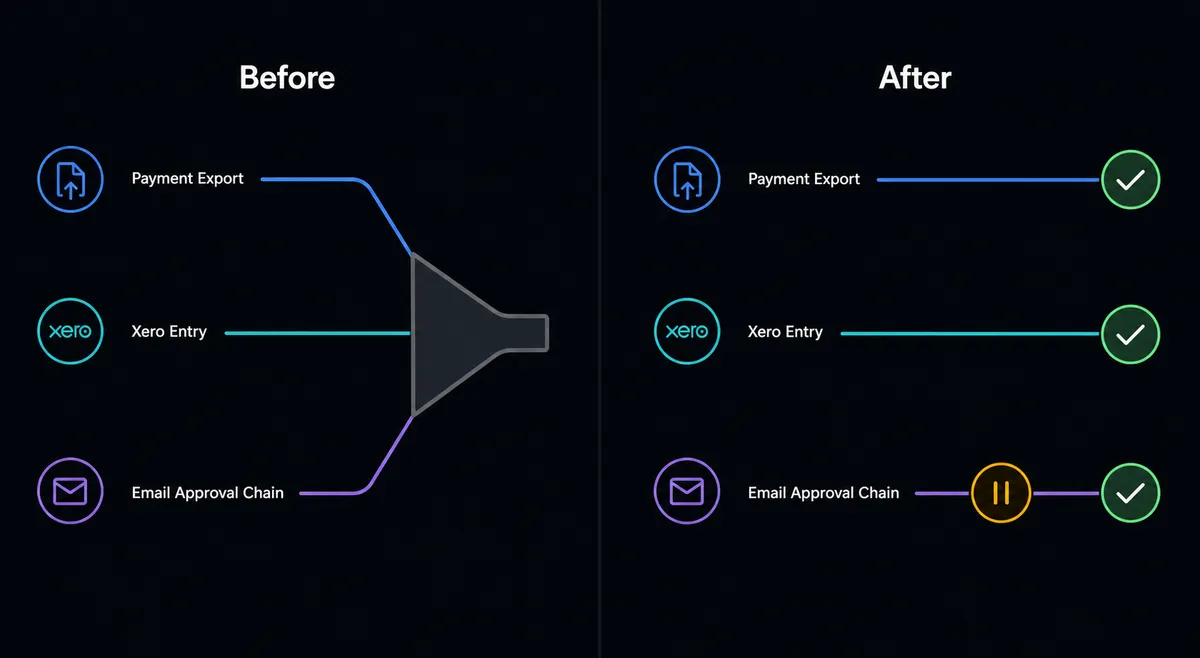
Finance teams running GoCardless alongside Xero spend a surprising amount of time matching records that should match themselves. A payment lands in GoCardless. Someone exports a CSV or checks a report. They open Xero, find the invoice, mark it paid, and move on. Multiply that by the volume of a subscription or instalment business and you have a billing manager spending an afternoon every week on data entry that produces zero value. Failures make it worse: a failed collection has to be found, assessed, and either retried or written off, all manually, often long after the window to retry has narrowed.
The exceptions fall through the cracks in a different way. Refunds require someone to approve them, but that approval often happens in an email thread or a verbal confirmation, with no audit record. Voiding an invoice in Xero, an irreversible accounting action, depends on whoever has Xero access remembering to check with a manager. The routine work is high-volume and low-risk. The exception work is low-volume and high-stakes. Manual processes treat both the same.
How it works: the connection
The GoCardless to Xero connection starts with the When a Payment Event Happens trigger. This trigger fires on any payment state change: submitted, confirmed, failed, charged back, refund created. You configure it to filter for the states that drive your workflow.
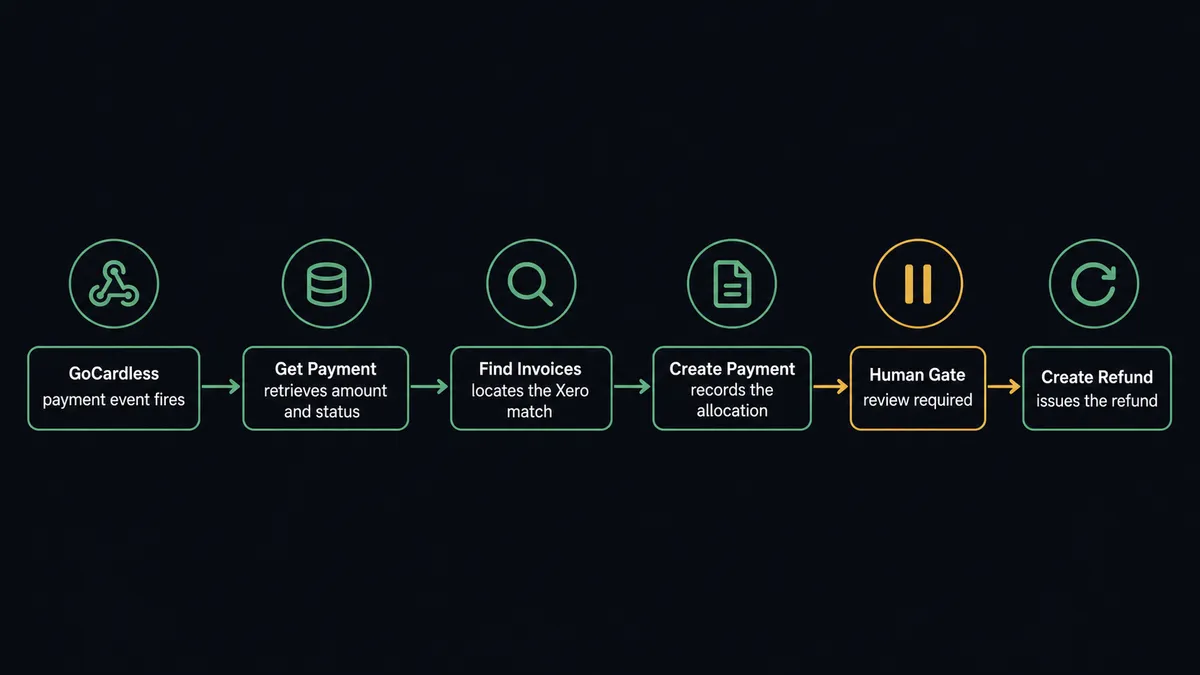
For a confirmed payment, the agent calls Get Payment to read the amount, the charge date, and the linked customer. It then calls Find Invoices in Xero, filtering by the contact name or reference to locate the open receivable. When it finds a match, it calls Create Payment in Xero to record the allocation. The invoice closes. The contact record updates. The whole sequence completes in seconds.
For a failed payment, the agent reads the failure reason from Get Payment. Retryable failures, such as insufficient funds on a day the payer’s balance was low, trigger Retry Payment. Non-retryable failures, such as a cancelled mandate, go to a different branch where the agent sends a failed-payment notice and logs the outcome.
For subscriptions, the When a Subscription Event Happens trigger in GoCardless covers state changes such as pauses, resumes, and cancellations. The agent can mirror those states by updating the corresponding Xero contact or creating a credit note when a subscription is cancelled mid-period.
Can an AI agent run it? (and why a human stays in the loop)
A basic integration tool runs a fixed sequence. GoCardless payment confirmed, Xero invoice marked paid, done. An AI agent in FlowRunner does something different: it reads the data in front of it, reasons about what it means, and picks the right tools in the right order. It also decides when the situation warrants stopping and asking a person.
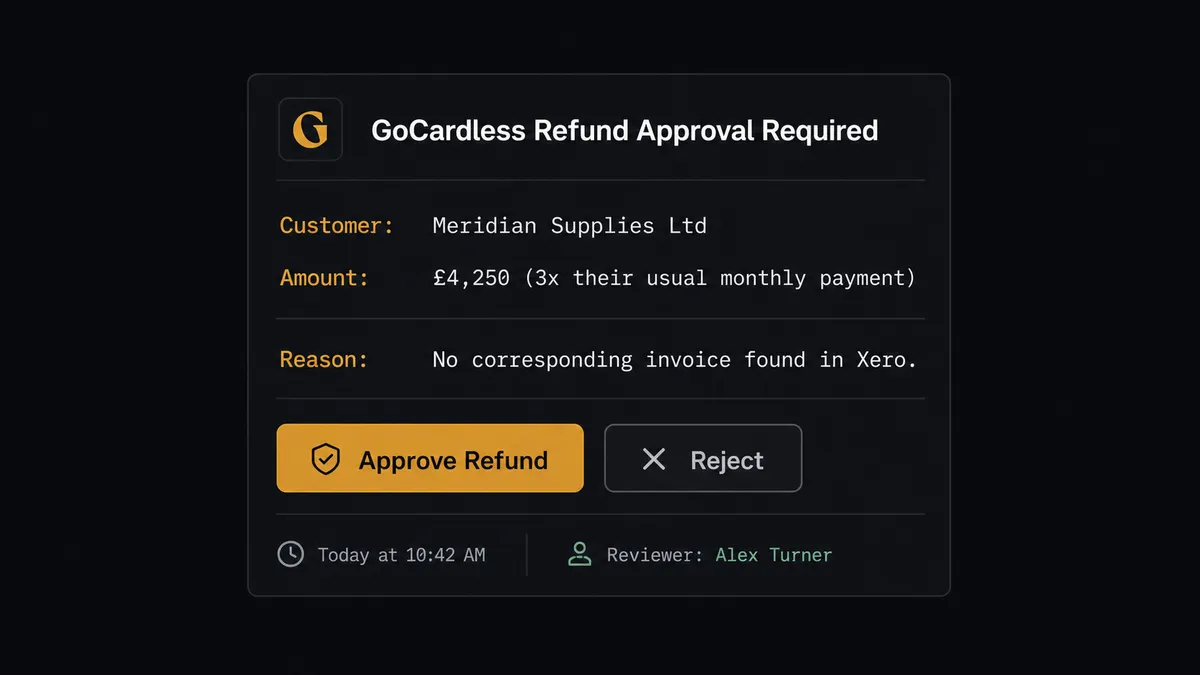
Consider a subscription business with 400 active mandates. Most months, collections run clean: the agent processes every confirmed payment into Xero without interruption. Then a refund request comes in. The agent retrieves the original payment, checks the amount against the customer’s history, and finds the refund is three times the payer’s usual monthly charge with no corresponding invoice in Xero. That combination, unusual amount plus missing accounting record, is not a threshold in a rule. The agent evaluates it as context and decides: this needs a human.
It invokes the human-in-loop flow as a callable tool. The flow sends the finance reviewer a Slack message with the original payment, the refund amount, the customer’s transaction history, and a note on why the agent flagged it. The reviewer sees “£4,250 from Meridian Supplies, 3x their usual payment, no Xero invoice match” and has two options: approve the refund or reject it with a note. The agent resumes the moment the reviewer responds. The decision, the decider’s identity, and the timestamp go into the audit trail. No email thread. No verbal handoff.
This is the digital andon cord: the agent stops the line when it hits uncertainty, provides full context to the person who can resolve it, and continues on instruction. It is not a hardcoded threshold. It is the agent’s judgment, running on the data it actually sees.
The same pattern applies to Void Invoice in Xero. Voiding a posted invoice is irreversible. The agent pauses before executing it, sends the accounting manager the invoice details and the reason for the void, and waits. On confirmation, it voids the invoice and creates a Credit Note in Xero if a refund needs to be issued on the GoCardless side.
FlowRunner vs the tool you are probably comparing
If your team is non-technical, you have probably looked at Zapier. Zapier is genuinely good at fixed, sequential automations: trigger A fires action B. It has a large library of pre-built steps and a low barrier to getting started. For simple payment-to-accounting syncs with predictable data and no exceptions, Zapier works.
The gap shows up at the decision points. Zapier does not run an AI agent that reads data, reasons about it, and decides which action to call. Conditional logic in Zapier is a filter or a path branch, not judgment. Human-in-loop in Zapier requires building it yourself with webhooks and external services. And per-task pricing means that high-volume collection businesses pay more as they grow, with no clear ceiling.
| Feature | Zapier | FlowRunner |
|---|---|---|
| Human-in-loop (native) | No, requires external build | Yes, invoked as a callable tool by the agent |
| AI agent reasoning | No | Yes, agent picks actions based on data |
| Unlimited users | No (seat-based pricing) | Yes, all tiers |
| BYOK for AI provider | No | Yes |
| Self-host option | No | Yes, Community and Enterprise |
| Pricing model | Per task (scales with volume) | Per workflow execution, transparent tiers |
Before and after
| Category | Before | After |
|---|---|---|
| Payment reconciliation | Manual CSV export, open Xero, find invoice, mark paid | Agent records Create Payment in Xero on every GoCardless confirmation, automatically |
| Failed payment handling | All failures treated the same: retry or write off | Agent reads failure reason, retries retryable ones with Retry Payment, routes others for review |
| Refund approvals | Email thread or verbal confirmation, no audit record | Agent pauses before Create Refund, routes to reviewer with full context, logs decision |
| Invoice voids | Anyone with Xero access can void without review | Agent pauses before Void Invoice, sends accounting manager for approval, records the approver |
| Subscription state sync | Cancelled or paused subscriptions updated in Xero by hand | When a Subscription Event Happens triggers the agent to update the Xero contact or create a credit note |
What you can build
Subscription collection with automatic Xero reconciliation. When a GoCardless subscription payment confirms, the agent retrieves the payment, finds the open invoice in Xero with Find Invoices, and records it with Create Payment. Every collection closes its receivable in real time.
Failed payment triage and retry. When a payment fails, the agent reads the reason from Get Payment. Retryable failures trigger Retry Payment automatically. Non-retryable ones create a Xero credit note or update the contact status and route to the AR team via Slack with the failure detail.
Refund gate with audit trail. Any refund request in GoCardless triggers the human-in-loop flow before Create Refund executes. The reviewer gets the original payment, the refund amount, and the customer history. Approval goes into the audit trail. The agent issues the refund and creates a matching Credit Note in Xero.
Mandate onboarding into Xero contact creation. When a Billing Request Event Happens fires on a completed onboarding, the agent calls Finalise Billing Request to confirm the mandate, then calls Create Contact in Xero so the payer’s billing record is ready before the first charge.
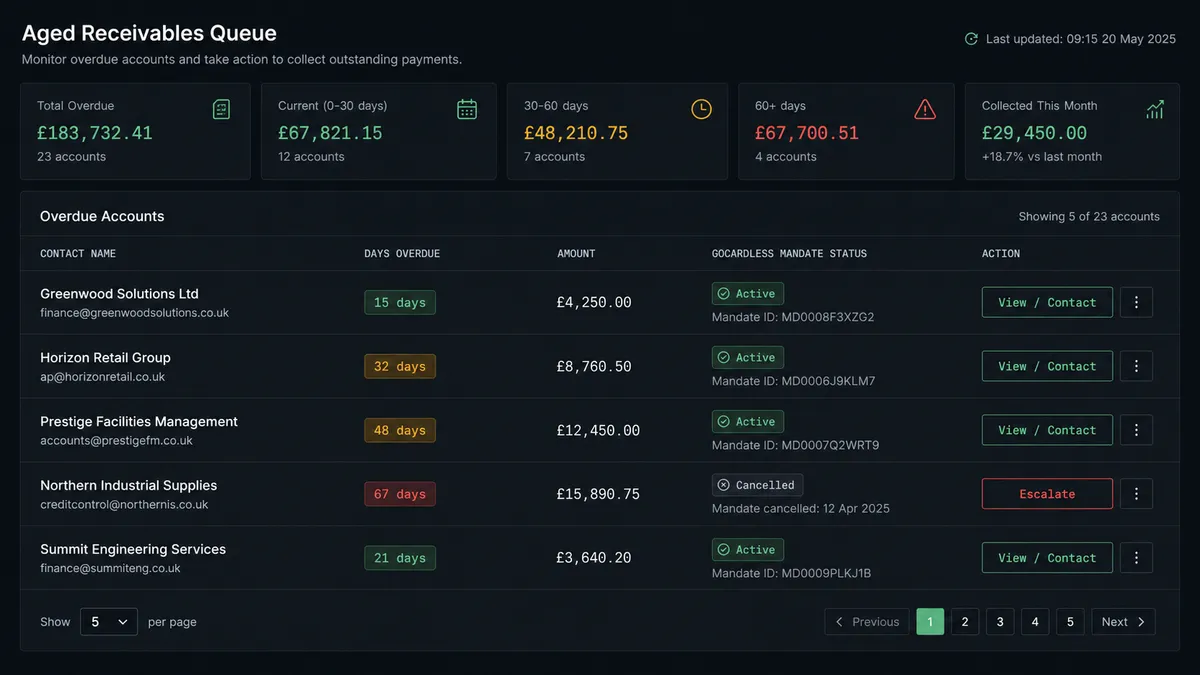
Aged receivables escalation. On a schedule, the agent pulls Get Aged Receivables from Xero. Invoices 30 to 60 days overdue get an automated reminder. Invoices over 60 days and still tied to an active GoCardless mandate get escalated to the AR manager with a note on the mandate status and the next scheduled charge date.
Getting started
FlowRunner’s Growth tier starts at $45 per month and includes unlimited users, unlimited workflows, the full GoCardless and Xero integrations, and the human-in-loop orchestration layer. Start on the free plan: 100 executions a month, every integration included, no credit card required, plus 14 days of Professional for new accounts.
Connect both integrations at /integrations/gocardless and /integrations/xero, then build the collection reconciliation flow in minutes using the visual builder.
Ready to get your Direct Debit collections reconciling automatically while keeping a human in the loop on refunds and voids? Start at flowrunner.ai or book a 30-minute walkthrough at calendly.com/flowrunner/intro.
Frequently asked questions
Is it free to connect GoCardless and Xero on FlowRunner?
FlowRunner has a free plan with 100 executions a month, every integration included, and no credit card required, and new accounts get 14 days of Professional on top. Beyond the free plan, Growth is $45 per month.
Can I self-host FlowRunner?
Yes. FlowRunner offers a free Community Edition for self-hosted single-instance deployments and an Enterprise self-hosted tier with multi-instance clustering and the full compliance suite.
Does the agent need my own OpenAI or AI provider key?
FlowRunner uses a bring-your-own-key model. You connect your preferred AI provider, such as OpenAI, Anthropic, or others, and the agent uses that key. You control the model and the cost.
What happens when the agent is not sure about a refund or void?
The agent pauses the workflow and sends the reviewer the full transaction details through Slack, email, or another channel you configure. The reviewer approves or modifies the action, and the agent resumes with that decision. The approver identity and timestamp are written to the audit trail.
Can FlowRunner handle recurring Direct Debit collections and match them to Xero invoices automatically?
Yes. The When a Payment Event Happens trigger fires on each GoCardless collection. The agent retrieves the payment, matches it to the corresponding Xero invoice using Find Invoices, and records a payment with Create Payment. Mismatches pause for a person.
How is FlowRunner different from connecting GoCardless and Xero through Zapier?
Zapier executes fixed action sequences. FlowRunner runs an AI agent that reads the payment data, reasons about it, and decides which actions to call and in what order. The key difference is the human-in-loop step: the agent invokes it as a callable tool based on its own judgment, not a hardcoded rule.