How to Connect Google Ads with Google Sheets (With or Without an AI Agent)
Connect Google Ads and Google Sheets so campaign performance writes to your spreadsheet automatically, with an AI agent that pauses for human approval before pausing any live campaign.
How do you connect Google Ads to Google Sheets?
Use the Google Ads integration’s List Campaigns or Search (GAQL) action as the data source, and the Google Sheets Add Rows action to write each campaign’s performance into your reporting spreadsheet on a schedule. FlowRunner is a visual AI-agent orchestration platform where automations run autonomously and pause for human judgment on the steps that carry real consequence. That same connection can run as an AI agent that reads campaign performance, writes daily rows to Sheets, and invokes a human approval before pausing any live campaign when spend crosses your threshold.
The problem with pulling campaign data by hand
Most marketing teams have a version of the same morning routine. Someone logs into Google Ads, exports the previous day’s figures, pastes them into a spreadsheet, and compares the numbers against last week. If a campaign looks off, they flag it in Slack and wait for the account owner to log in and act. By the time the pause happens, the campaign has spent an extra four or five hours at full rate.
The spreadsheet is not the problem. The spreadsheet is the operations team’s system of record for campaign performance, and it should be. The problem is that someone has to be the bridge. A campaign that crosses its spend threshold at 7 a.m. does not get caught until the next manual review. Exceptions fall through the cracks not because no one is watching, but because the watching is done on a human schedule, not the campaign’s schedule.
How it works: the connection
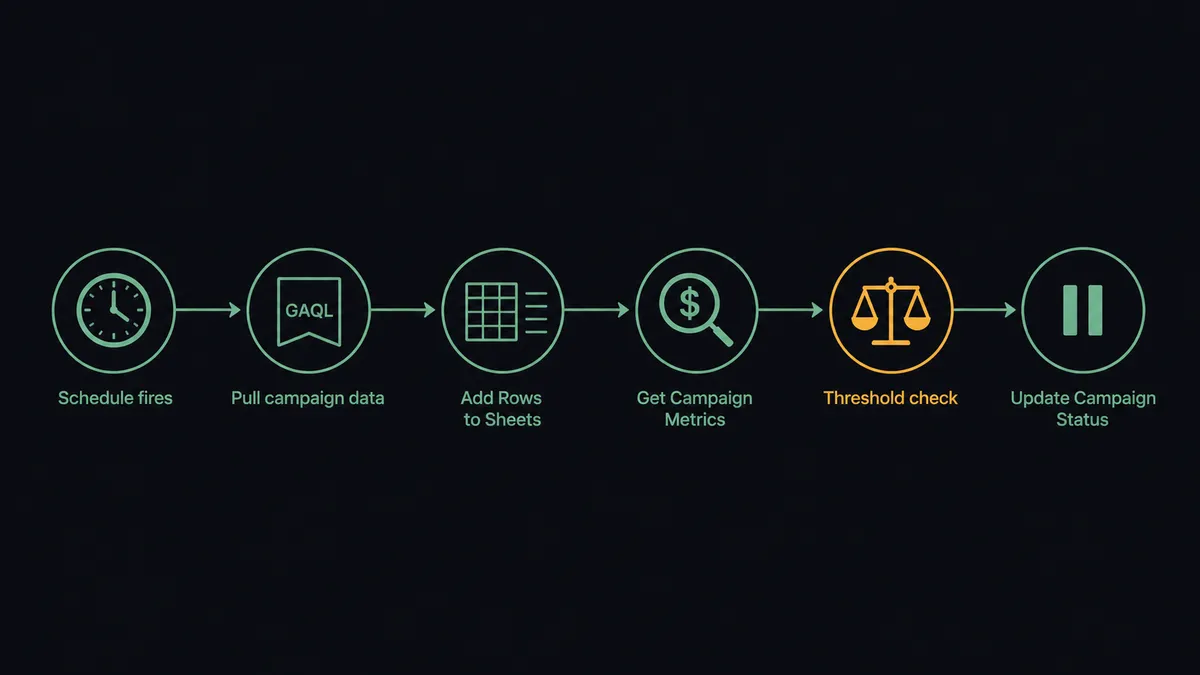
The flow runs on a daily schedule. The agent calls List Campaigns to pull all active campaigns in the connected Google Ads account, or runs a Search (GAQL) query for a more targeted report. Each campaign row returns clicks, impressions, cost, and conversions for the prior day. The agent passes those rows to the Google Sheets Add Rows action, which appends one row per campaign to your reporting spreadsheet. Columns map directly to the campaign fields: campaign name, status, channel type, daily spend, click-through rate, and conversion count.
For multi-account setups, the agent first calls List Accessible Customers to enumerate all linked accounts, then loops through each account’s campaigns and writes them into a combined sheet or separate tabs. The sheet that used to require a manual export each morning writes itself before anyone opens a browser.
After the reporting write, the agent calls Get Campaign Metrics for campaigns that had significant spend, compares the figures against your configured thresholds, and flags anything that crossed the line. The flag is not a notification. It is the input to the next decision.
Can an AI agent run it? And why a human stays in the loop.
Yes. But the upgrade is not just speed. An AI agent treats the Google Ads and Google Sheets actions as tools it chooses from, not a fixed sequence it executes. That distinction matters when a campaign hits an unusual pattern.
A rule-based automation pauses any campaign that crosses $500 in daily spend. An AI agent pauses campaigns that cross $500 in daily spend AND show a conversion rate below 1%. But it holds when a campaign that crossed $500 yesterday was also responsible for 80% of the account’s conversions. The agent reads the data, evaluates context, and makes a judgment. A threshold alone cannot do that.
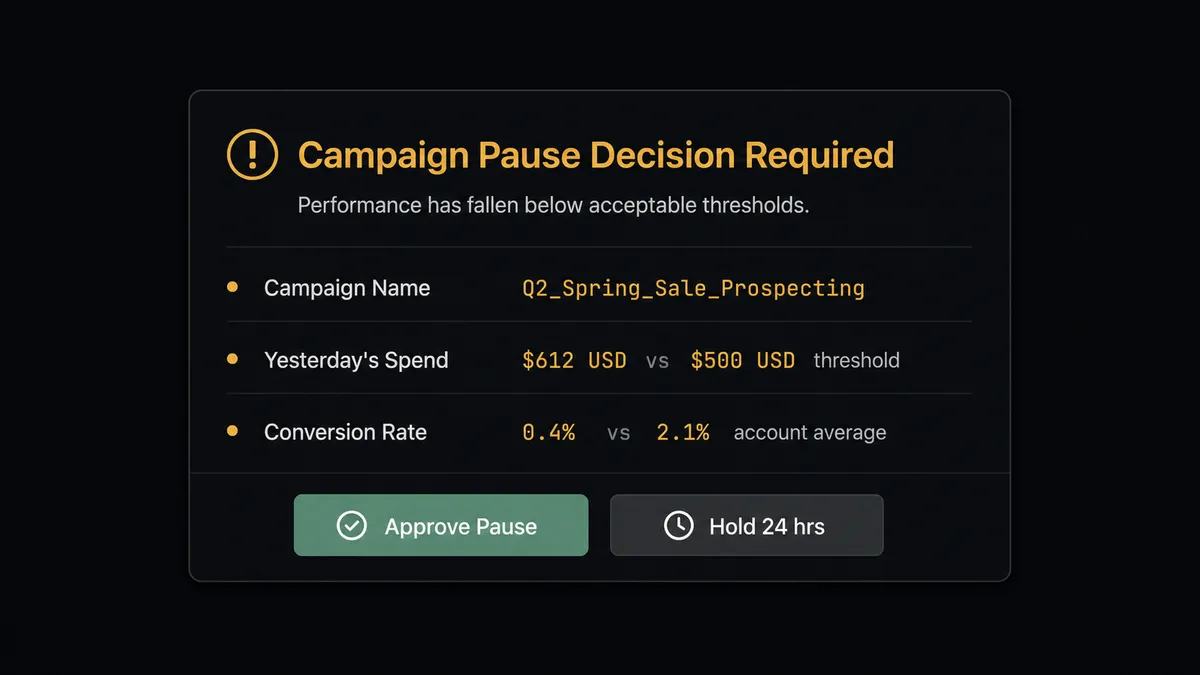
Here is where the digital andon cord matters. Pausing a live campaign stops spend immediately. A wrong pause on a high-value campaign costs conversions the moment it takes effect. The agent does not make that call unilaterally. When it determines a campaign should be paused, it invokes a human-in-loop flow as a callable tool. The workflow pauses. The account owner receives a structured message through Slack or email:
“Campaign: [Campaign Name]. Yesterday’s spend: $612 (threshold: $500). Conversion rate: 0.4% (account average: 2.1%). Rule triggered: spend above threshold with below-average conversion rate. Approve to pause. Hold to keep running for another 24 hours.”
The owner sees the same data the agent used. They approve, and the agent calls Update Campaign Status to pause. They hold, and the agent writes a note to the sheet row and skips the pause. Either way, the agent writes the outcome back to the spreadsheet with Update Row so the sheet reflects what happened. The decision, the decider, and the timestamp are all in the audit trail.
This is not a sync tool. The agent knows when to stop and ask.
FlowRunner vs Zapier
Zapier is the tool non-technical marketing teams reach for first, and that makes sense. The interface is approachable, the Google Ads and Google Sheets connectors are established, and simple two-step zaps require no technical knowledge. For a one-directional sync where every new Sheets row triggers a fixed Google Ads action, Zapier works.
The difference shows when the workflow needs judgment. Zapier applies rules, not reasoning. You can set a threshold filter, but the filter does not read conversion context or hold a campaign for human review based on account history. Every automation is a fixed path. Human-in-loop is not a native concept; you implement it as a separate conditional branch, and it covers a hardcoded condition, not an AI-evaluated one.
| Feature | Zapier | FlowRunner |
|---|---|---|
| Google Ads and Google Sheets connectors | Yes, both supported | Yes, both supported, verified against Google APIs |
| AI agent with reasoning | No, rule-based only | Yes, agent reads context and chooses actions |
| Human-in-loop approval | Conditional branch, hardcoded threshold | Native tool the agent invokes based on judgment |
| Unlimited users on every tier | No, user limits apply | Yes, all tiers |
| Bring your own AI key | No | Yes |
| Self-hosted option | No | Yes, Community Edition and Enterprise |
| Pricing model | Per-task execution, charges accumulate | Workflow-based tiers, transparent execution limits |
Before and after
| Before | After | |
|---|---|---|
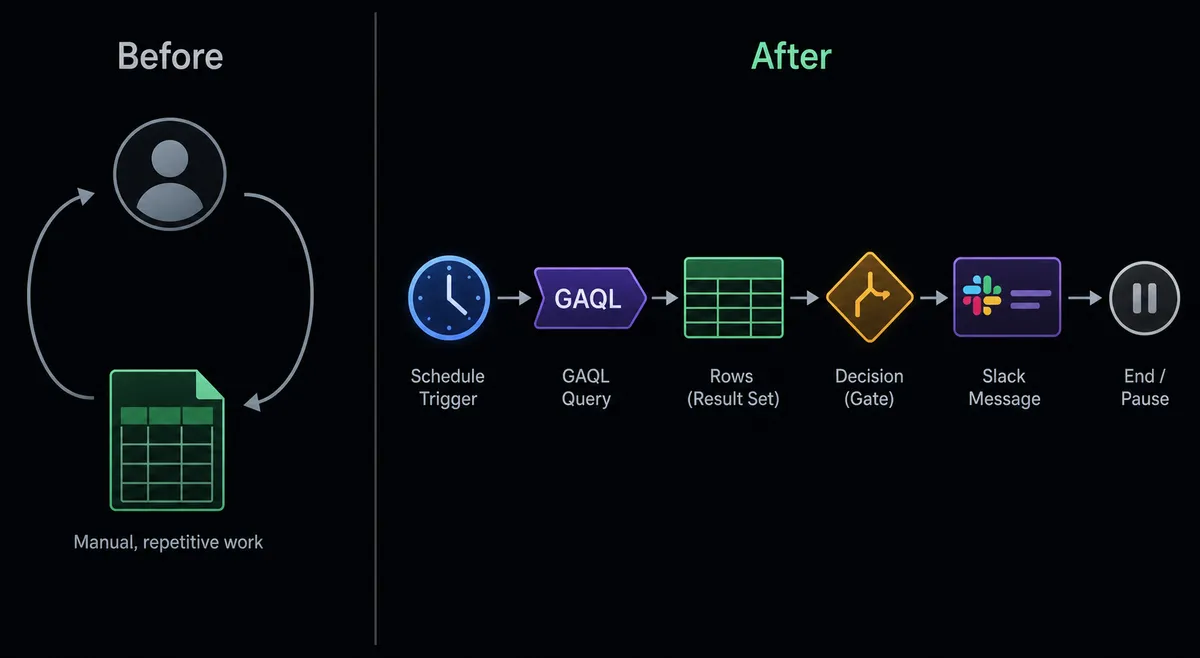
| Daily reporting | Manually exported from Google Ads and pasted into a spreadsheet each morning | Agent writes campaign rows to Sheets automatically on schedule with Add Rows |
| Overspend detection | Caught at the next manual review, hours or days after the threshold crossed | Agent calls Get Campaign Metrics and flags campaigns the moment they cross the line |
| Campaign pauses | Account owner logs in manually after being notified | Agent calls Update Campaign Status, but only after the account owner approves via Slack or email |
| Multi-account reporting | Separate export for each account, combined manually | Agent loops across accounts with List Accessible Customers and writes all data into one sheet |
| Audit trail | None. Decisions happened in conversations or email | Every pause decision, approver identity, and timestamp captured in the flow’s audit trail |
What you can build
Daily campaign performance digest. The agent runs List Campaigns each morning, appends the prior day’s performance to a reporting sheet with Add Rows, then calls Export Sheet to generate an Excel file and delivers it as an email attachment. The marketing team has their daily report before they check their inbox.
Spend threshold monitor with human approval. The agent calls Get Campaign Metrics for every active campaign, compares spend against your configured limits, and routes any campaign that crossed the threshold to the account owner via Slack for an approve-or-hold decision before calling Update Campaign Status.
Cross-account performance dashboard. The agent calls List Accessible Customers to enumerate all linked Google Ads accounts, pulls campaign metrics for each, and writes them into a consolidated Sheets dashboard with one row per campaign per account. A Rename Sheet action keeps tabs organized by date.
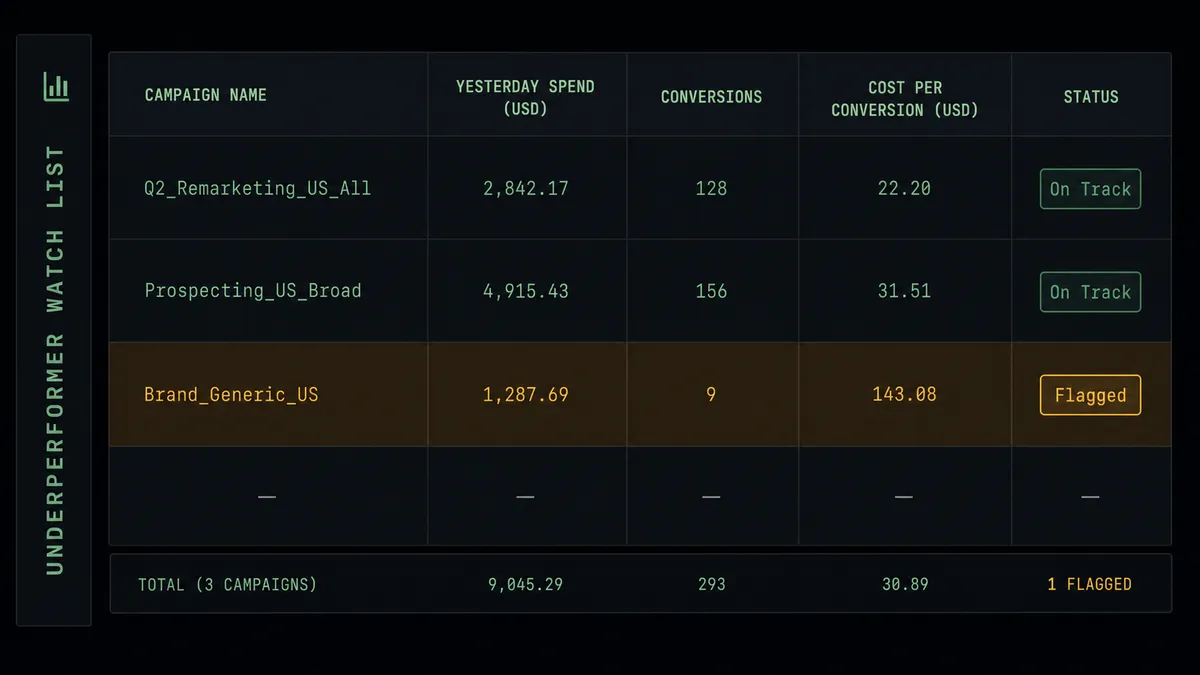
Underperformer watch list. The agent runs a Search (GAQL) query to find campaigns with cost-per-conversion above a ceiling, writes those campaigns to a flagged tab with Add Rows, formats those rows with Format Row to mark them visually, and notifies the media team. The watch list builds itself; the team reviews exceptions, not the full account.
Getting started
FlowRunner has a free plan with 100 executions a month, every integration included, and no credit card required, and new accounts get 14 days of Professional on top. Both integrations are available at the Growth tier, including the AI agent and the human-in-loop flow.
Start with the Google Ads integration and the Google Sheets integration pages to see the full action lists. When you are ready to build:
- Start your free trial at flowrunner.ai
- Book a 30-minute intro call at calendly.com/flowrunner/intro
Your team stops being the bridge between Google Ads and your spreadsheet. The agent handles the routine data flow. Your account owners make decisions on campaigns that actually need a human judgment call.
Frequently asked questions
Is it free to connect Google Ads and Google Sheets on FlowRunner?
FlowRunner has a free plan with 100 executions a month, every integration included, and no credit card required, and new accounts get 14 days of Professional on top. After that, Growth is $45 per month. All tiers include unlimited users and workflows.
Does the agent need my own Google or OpenAI key?
Google Ads and Google Sheets both authenticate via OAuth2, so you connect your Google account directly. For AI reasoning inside the agent, FlowRunner uses a bring-your-own-key model, so you supply the API key for whichever AI provider you prefer.
Can I self-host FlowRunner?
Yes. FlowRunner offers a free Community Edition for self-hosted single-instance deployments and an Enterprise tier for multi-instance clustering with the full compliance suite.
What happens when the agent is not sure whether to pause a campaign?
The agent invokes a human-in-loop flow as a callable tool, packages the campaign name, recent spend trend, conversion rate, and the rule that flagged it, then routes the decision to the account owner through Slack or email. The campaign stays live until the owner approves the pause.
Can the agent handle multiple Google Ads accounts?
Yes. The List Accessible Customers action returns all accounts linked to the connected user, so the agent can loop across accounts and write each account's performance data into the same reporting spreadsheet or separate tabs.
Does this work with campaigns I already have in Google Ads?
Yes. The Google Ads integration manages status on campaigns you built in the Google Ads UI. Campaign and budget creation is handled in Google Ads directly; FlowRunner reads performance and controls campaign status from there.