How to Connect Intercom with HubSpot (With or Without an AI Agent)
Connect Intercom and HubSpot so every new conversation, contact, and ticket flows into your CRM automatically, with an AI agent that pauses for human judgment before touching a record that carries real consequence.
How do you connect Intercom to HubSpot?
When a new contact appears in Intercom, FlowRunner fires the New Contact trigger, calls Get Contact by Email in HubSpot to check for an existing record, and then either creates a new HubSpot contact and deal or updates the record that already exists. FlowRunner is a visual AI-agent orchestration platform where automations run autonomously and pause for human judgment on the steps that carry real consequence. The same connection can run as an AI agent that reads context, decides whether to create or update, and pauses for a CRM admin before touching any record where it finds conflicting data.
The problem it solves
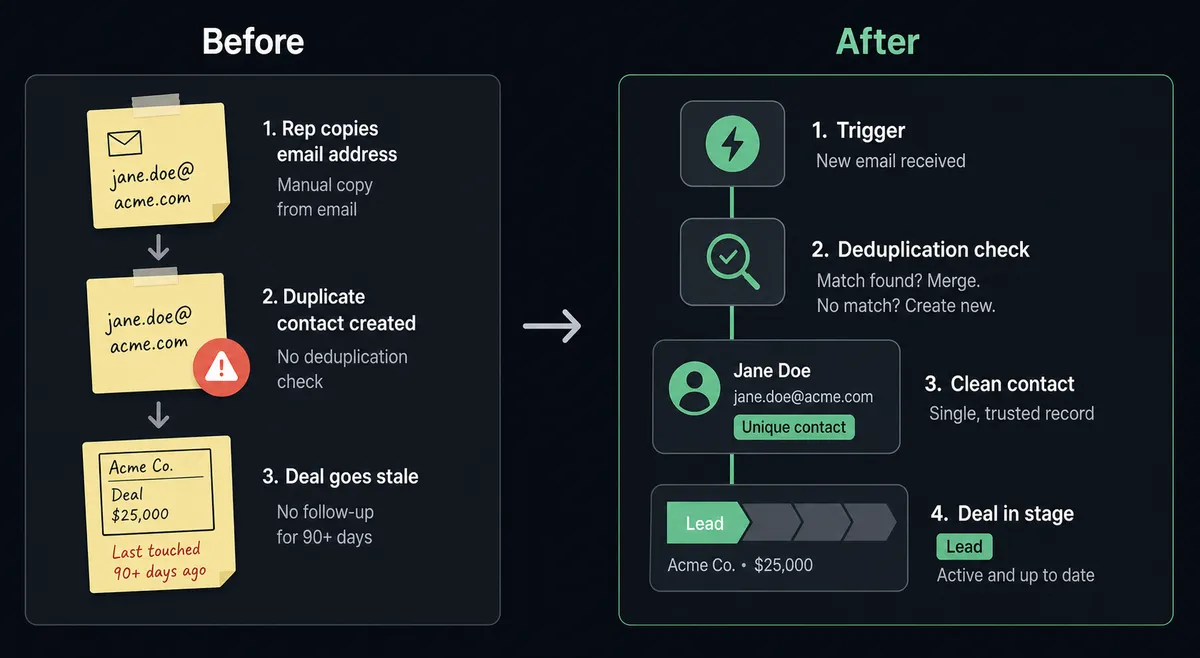
Right now, most teams keep Intercom and HubSpot synchronized the hard way. A support conversation opens in Intercom. The rep checks whether the customer is in HubSpot. They copy the email, search the CRM, and if the record is missing they create it by hand, attach the company, set the lifecycle stage, and open a deal. If there is already a record, they update it, sometimes missing fields because there is no checklist. The process runs differently for every rep. Records go stale between conversations. Deals sit at the wrong stage because nobody updated them after a support exchange confirmed the customer renewed.
The failure mode is not that the work is hard. It is that the work is invisible. When a contact falls through the cracks between Intercom and HubSpot, nobody knows until a sales rep chases a customer who churned six weeks ago, or a support rep misreads a situation because the HubSpot deal history never reached Intercom. Two systems, two teams, one manual bridge that breaks under volume.
How it works: the connection
The FlowRunner workflow starts with the New Contact trigger in Intercom. The moment a contact is created in your Intercom workspace, the flow fires. The agent’s first move is Get Contact by Email in HubSpot. It takes the Intercom contact’s email address and checks whether that person already exists in your CRM.
From there, the path forks on what it finds. If no HubSpot record exists, the agent runs Create Contact, maps the name, email, company, and any custom attributes you’ve defined, then calls Associate Objects to link the contact to the correct company record. It creates a Deal in your inbound pipeline and sets the lifecycle stage to Lead. If a record already exists, it calls Update Contact with any new information from Intercom and leaves the deal stage untouched.
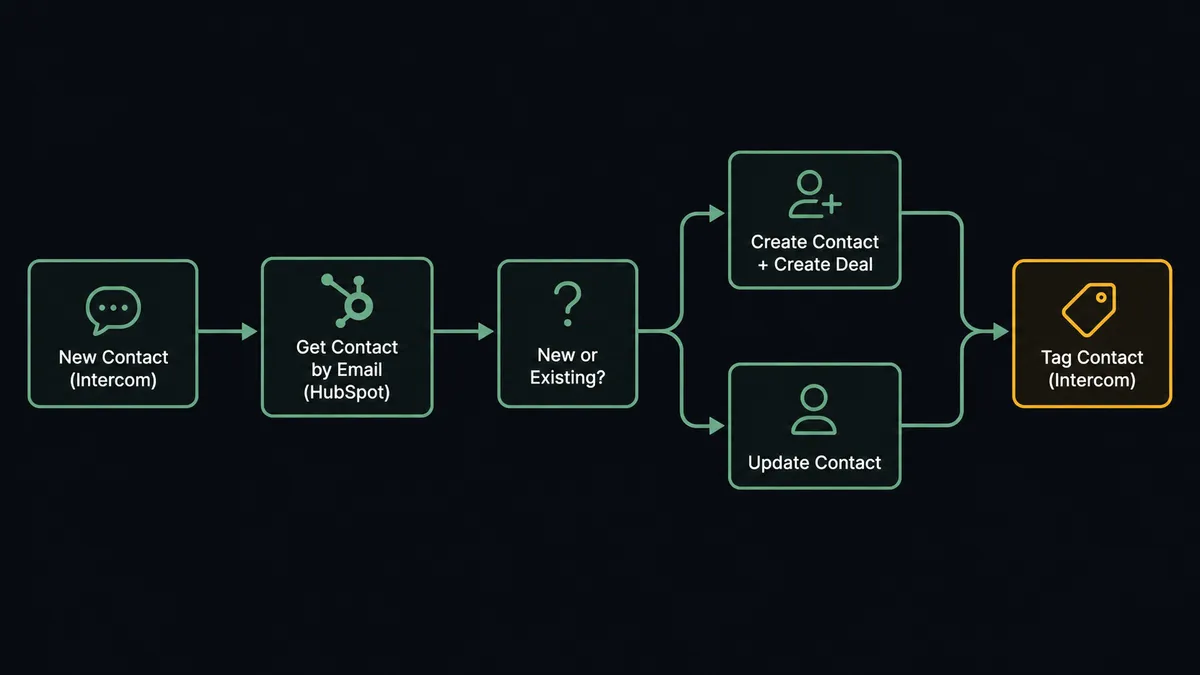
The Intercom side of the sync runs in parallel. The agent calls Tag Contact in Intercom to apply a segment label that marks the person as CRM-synced, and it submits a Submit Event to record the lifecycle transition. The next time a support rep opens that conversation, they see a contact profile that reflects what sales knows. The next time a sales rep opens HubSpot, the deal reflects what support knows.
Can an AI agent run it? (and why a human stays in the loop)
A standard connection syncs records. An AI agent decides which action each record actually needs, and it knows when it does not have enough information to decide safely.
The agent’s toolbox for this workflow includes Get Contact by Email, Create Contact, Update Contact, Create Deal, Associate Objects, Tag Contact, and Submit Event from both integrations. It also has a human-in-loop flow as a callable tool. The agent reads its instructions, evaluates the contact data in front of it, and picks the right sequence. It does not follow the same branch every time.
The moment where the agent stops and asks a person is not a threshold. It is a judgment call. Consider this situation: a new Intercom contact arrives with the email address mark@example.com. The agent runs Get Contact by Email and finds two HubSpot contacts that match, one created manually by a sales rep and one imported from a CSV six months ago. Both have deal history. The agent does not guess which record is authoritative. It does not silently merge them. It invokes the human-in-loop flow.
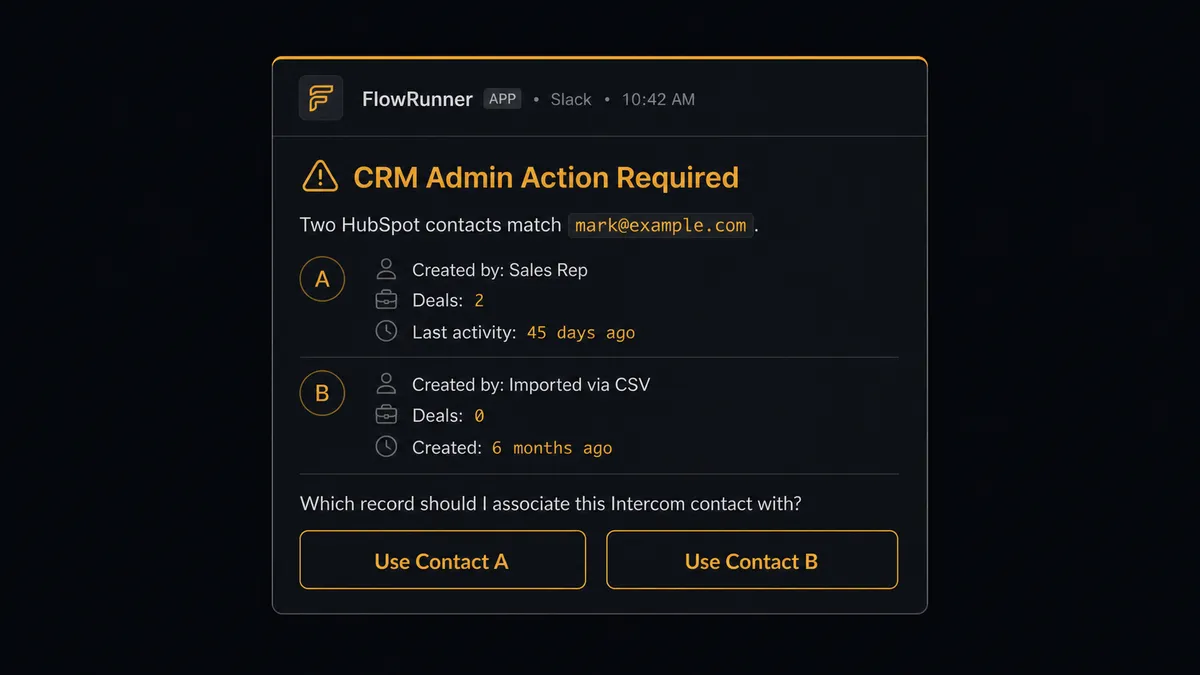
The admin sees both records with full context: who created them, when, what deals are attached, when each was last touched. They pick one. The agent associates the Intercom contact with the chosen HubSpot record, documents the decision in the audit trail, and continues. This is not a sync tool. The agent knows when to stop and ask.
FlowRunner vs the tool you’re probably comparing
If your team is already on Zapier, you have probably built a Zap that connects Intercom to HubSpot. Zapier deserves credit for what it does well: it is fast to set up for simple event-to-action triggers, it has a clean no-code interface, and its library of pre-built Zaps covers the most common combinations. For a team that needs a contact to appear in HubSpot when one appears in Intercom, a Zap works.
The gap shows up at the edges. Zapier’s logic runs a fixed path. It cannot reason about what it finds. It cannot decide whether a contact should be created or updated based on deal history. It cannot escalate a duplicate to a human and wait for a response before continuing. Every edge case becomes a support ticket or a broken record.
| What matters | Zapier | FlowRunner |
|---|---|---|
| Simple trigger-to-action sync | Yes, fast to configure | Yes, same capability |
| Agent reasoning about each record | No, fixed logic paths | Yes, agent evaluates context per record |
| Human-in-loop on exceptions | No, workflow continues regardless | Yes, agent pauses and routes to a person with full context |
| Unlimited users on every plan | No, per-seat pricing on higher tiers | Yes, all tiers |
| Bring your own AI provider key | No | Yes, BYOK across supported providers |
| Self-hosted deployment | No | Yes, Community Edition free; Enterprise custom |
Before and after
| Category | Before | After |
|---|---|---|
| Contact sync speed | Manual copy-paste after each Intercom conversation | New contact synced to HubSpot in under 30 seconds |
| Duplicate handling | No check before creating; duplicates accumulate and distort deal counts | Agent calls Get Contact by Email on every inbound; duplicates routed to admin before creation |
| Deal creation | Rep creates the deal manually when they remember | Agent creates the deal in the inbound pipeline automatically with lifecycle stage set to Lead |
| Record accuracy | Each rep maps fields differently; data quality depends on habits | Agent maps the same fields the same way every time |
| Exception visibility | Ambiguous records silently resolved or ignored | Every ambiguous record surfaced to CRM admin with full context before resolution |
What you can build
Intercom conversation to HubSpot deal update. When a Conversation Closed event fires in Intercom, the agent calls Get Contact by Email, retrieves the linked HubSpot deal with Get Deal by ID, and updates the deal stage or logs a note. Your pipeline reflects every resolved support conversation without a rep touching HubSpot.
New ticket to deal association. When New Ticket fires in Intercom, the agent checks HubSpot for the contact, finds the open deal, and uses Associate Objects to link the ticket to the deal. Sales can see active support tickets on the deal record without leaving HubSpot.
Proactive message from deal stage change. When an external trigger updates a HubSpot deal stage to Closed Won, the agent retrieves the contact and calls Create Message in Intercom to send a proactive onboarding or welcome message. Customer success gets the first touch out automatically.
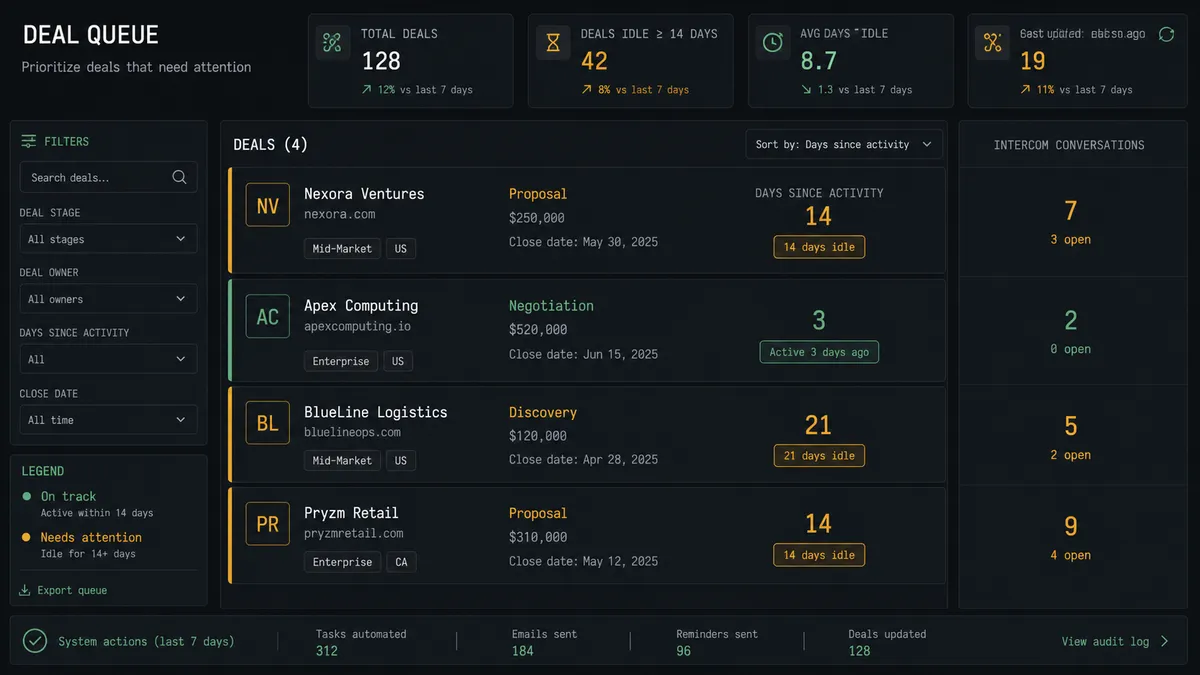
Stale-deal support escalation. An agent queries Get All Deals in HubSpot for deals in Negotiation that have been idle for 14 days. For each stalled deal, it Search Contacts to find the associated person, then opens a new Conversation in Intercom to check in. The rep sees the conversation in Intercom with the deal context already attached.
Contact enrichment loop. When New Contact fires in Intercom, the agent creates or updates the HubSpot record and then calls Tag Contact and Submit Event to mark the person as CRM-synced in Intercom. Both systems stay current from a single trigger without any manual step.
Getting started
FlowRunner has a free plan with 100 executions a month, every integration included, and no credit card required, and new accounts get 14 days of Professional on top. Corporate email gets you in.
Connect both integrations and build your first workflow at flowrunner.ai. See the full capability list for each connector at /integrations/intercom and /integrations/hubspot. To talk through your specific Intercom and HubSpot setup before you build, book a 30-minute session at calendly.com/flowrunner/intro.
Frequently asked questions
Is it free to connect Intercom and HubSpot on FlowRunner?
FlowRunner has a free plan with 100 executions a month, every integration included, and no credit card required, and new accounts get 14 days of Professional on top. No credit card is required to start. Beyond the free plan, Growth starts at $45 per month.
Can I self-host FlowRunner?
Yes. FlowRunner offers a free Community Edition for single-instance self-hosting and an Enterprise tier for multi-instance clustering with full compliance features. Cloud plans are also available.
Does the agent need my own OpenAI or Claude API key?
FlowRunner uses a bring-your-own-key model. You connect your own key from any supported AI provider. FlowRunner orchestrates the agent; your key controls which model it runs on.
What happens when the agent is not sure what to do?
The agent invokes a human-in-loop flow as a callable tool. It pauses the workflow, sends the person full context through Slack, email, or another channel, and waits for a decision. The agent resumes after the human responds. The decision, decider, and timestamp are recorded in the audit trail.
Will the agent create duplicate contacts in HubSpot?
No. Before creating any HubSpot contact, the agent calls Get Contact by Email to check for an existing record. If it finds a match, it updates the existing record. If it finds two possible matches, it stops and routes the ambiguity to a CRM admin rather than guessing.
How many users can connect to the Intercom and HubSpot integration?
Every FlowRunner tier includes unlimited users and unlimited workflows. There is no per-seat charge.