How to Connect Jira with Aircall (With or Without an AI Agent)
Turn Aircall support calls into Jira issues automatically, with an AI agent that files routine reports on its own and pauses for a human before a critical escalation pages the on-call engineer.
How do you connect Jira to Aircall?
You connect Jira to Aircall by polling finished calls with List Calls on a schedule and turning each qualifying call into a tracked issue: the workflow reads the detail with Get Call, files the report with Create Issue, stores the ticket reference back on the call with Comment on Call, and marks the call processed with Add Tags to Call. FlowRunner is a visual AI-agent orchestration platform where automations run autonomously and pause for human judgment on the steps that carry real consequence. Run the same connection as an AI agent and it triages every call-reported problem on its own, files routine reports directly, and pauses for a support lead before Assign Issue pages the on-call engineer for what it believes is a critical outage.
The problem it solves
Problems reported by phone are the leakiest input a support process has. A customer explains a failure to whoever answered, the phone agent scribbles a note in Aircall or a side doc, and the handoff to engineering depends on that person remembering to open Jira after the next call ends. On a busy day, the next call starts in seconds. The report survives as a half-sentence in a call log nobody rereads, and the customer’s next contact starts with “I already reported this.”
Teams that overcorrect create the opposite failure: every phone complaint becomes an urgent Jira ticket, filed with whatever severity the phone agent felt in the moment. Engineering learns to distrust phone-sourced tickets, real outages sit in the same queue as font complaints, and the on-call engineer gets paged for issues that needed a business-hours fix. Neither mode gives you the thing that matters: a reliable path from a customer’s spoken report to a correctly weighted engineering response.
How it works: the connection
The connection reads Aircall and writes Jira. Here is the plain version, grounded in the real connector actions.
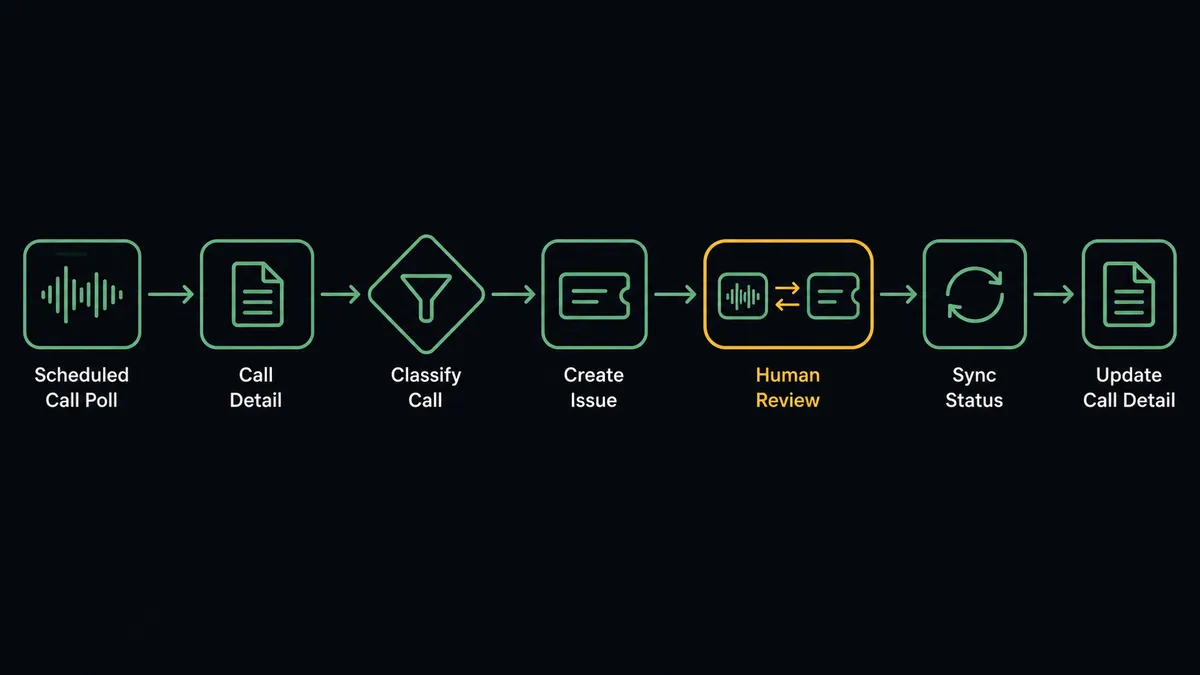
- Trigger: On a schedule, the workflow calls List Calls and picks up finished calls not yet tagged as processed.
- Read: Get Call pulls the caller, the duration, the agent’s notes, and the recording link.
- Resolve the destination: Get Project confirms the support project the issue belongs in.
- File the report: Create Issue writes the ticket with the notes as the description and the caller as the reporter.
- Link both ways: Add Link to Call attaches the Jira ticket to the call record, and Comment on Call stores the reference for the phone team.
- Mark it done: Add Tags to Call tags the call as processed, so it is never filed twice.
- Sync status back: When the issue is resolved, Transition Issue moves it and Comment on Call tells the phone team, so they can close the loop with the customer.
That is the “just connect them” answer. Every phone-reported problem becomes a ticket with its evidence attached, and the call log and the issue tracker stop being parallel universes.
Can an AI agent run it? (and why a human stays in the loop)
Yes, and severity judgment is exactly what the agent adds. A rule can file every tagged call as a ticket. It cannot read the notes from three calls in one afternoon and recognize they describe the same login failure from different angles, or notice that a calm customer casually described total data loss. The agent can. It holds the actions as tools: List Calls, Get Call, Create Issue, Search Issues, Add Comment, Transition Issue, Assign Issue, Comment on Call, Add Tags to Call. For each call it reasons about what was reported, checks Search Issues for an existing ticket to update with Add Comment instead of duplicating, and weighs how bad this actually is.
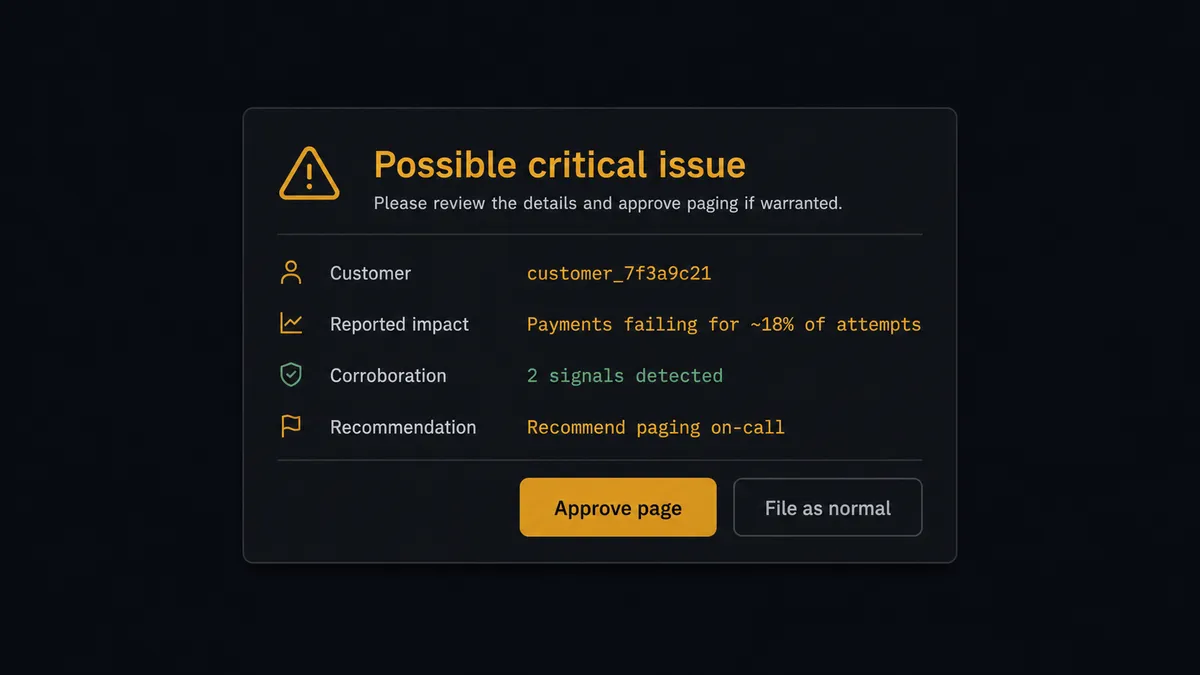
The consequential step is the page. Assign Issue routed to the on-call engineer is not a data write; it interrupts a human, often outside working hours, and it starts an incident clock that pulls in other people. False pages burn real goodwill and dull the response to true ones. So when the agent concludes a call describes a critical failure, it does not assign anyone. It assembles the case: the call link, the customer, the reported impact, whether other recent calls corroborate it, and its own severity reasoning. Then it invokes a human-in-loop flow it holds as a callable tool. The workflow pauses and posts to the support lead: “Possible critical issue from [customer] call: [summary]. Corroborating calls: [yes or no]. Recommend paging on-call. Approve?” Only after a named person confirms does the agent run Assign Issue and Transition Issue to move the ticket into the incident lane. Declined escalations stay filed at normal severity with the reasoning preserved.
Prospects call this the digital andon cord: like Toyota’s production line pull cord, the workflow stops the line the moment the stakes jump, and the person accountable for the escalation decides whether the line stops for everyone else too.
FlowRunner vs Zapier
Zapier is the tool most support teams reach for first here, and honestly, the reach makes sense. Its connector library is enormous, its editor is genuinely approachable for non-technical phone-team leads, and its template gallery includes call-logging patterns that stand up in minutes. For “every tagged call creates a Jira ticket,” Zapier works.
The gap appears at judgment and at the page. A Zap executes the steps you configured; it does not weigh severity, merge corroborating calls, or hold an escalation for approval as a native behavior. Here is the honest side-by-side.
| What matters for this pair | FlowRunner | Zapier |
|---|---|---|
| Human-in-the-loop on paging on-call | Native. The agent invokes an approval flow as a callable tool before Assign Issue interrupts an engineer | Available via added approval steps or paths, not a native agent decision |
| Who runs the flow | An AI agent reads call notes, weighs severity, and picks actions as tools | Predefined step sequence you configure per Zap |
| Users included | Unlimited users on every tier | Priced by task volume; seats vary by plan |
| Bring your own AI keys | Yes, BYOK. Connect the AI provider key you already have | AI features tied to Zapier’s own AI offering |
| Self-hosted option | Yes, cloud-hosted or self-hosted | Cloud only |
| Pricing model | Transparent workflow-based tiers with clear execution limits | Per-task pricing that can be hard to predict as call volume grows |
If you need a simple call-to-ticket push and your volume is modest, Zapier will do it. If phone-reported problems need triage, deduplication, and an escalation gate a support lead controls, this pairing on FlowRunner is the better fit.
Before and after
| Category | Before | After |
|---|---|---|
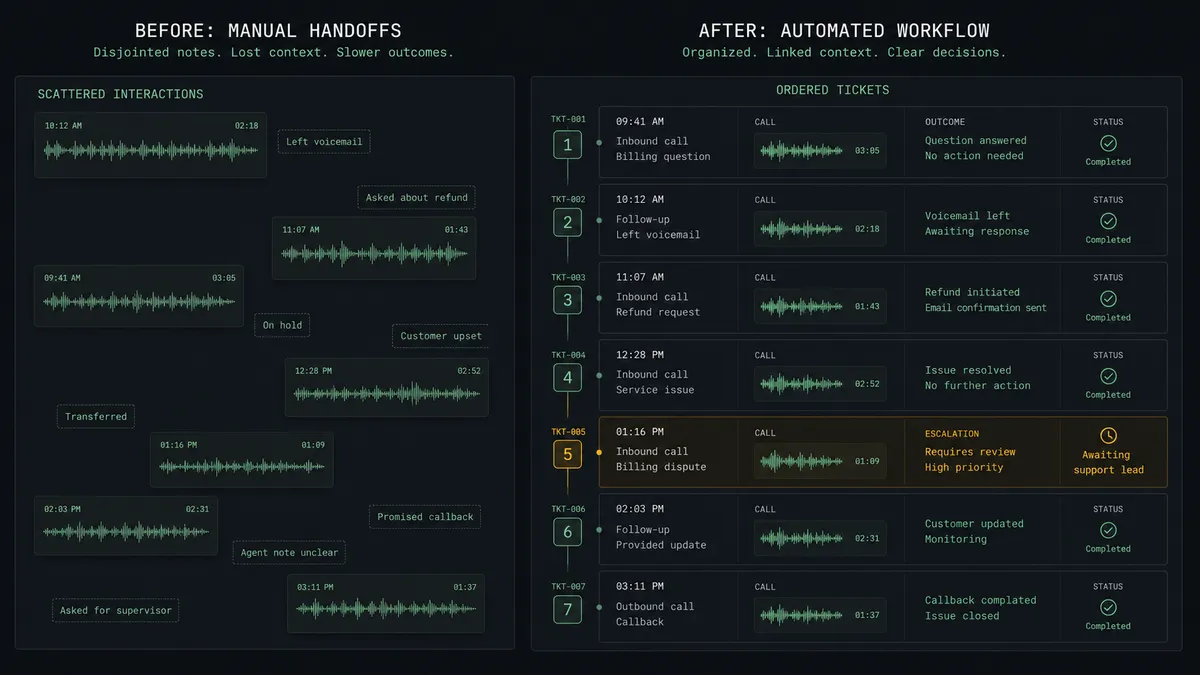
| Report capture | Phone-reported problems survive as notes in a call log, filed to Jira only if someone remembers | Every qualifying call becomes a Jira issue with the recording link attached |
| Severity | Whatever the phone agent felt in the moment becomes the ticket priority | The agent weighs impact and corroboration, and criticals go through a named approval |
| Duplicates | Three calls about one failure become three unlinked tickets | Search Issues finds the existing ticket and Add Comment consolidates the evidence |
| On-call pages | Pages fire on gut feel, and engineering learns to distrust them | The on-call engineer is only paged after a support lead approves the escalation |
| Closing the loop | The phone team never learns whether the reported issue was fixed | Comment on Call writes the resolution back where the phone team lives |
What you can build
Call to evidence-backed ticket, hands off. The schedule fires List Calls, the agent reads Get Call, files Create Issue with the notes and recording link, stores the reference with Comment on Call, and tags the call processed. No report leaks between the phone and the tracker.
Critical escalation gate. The agent concludes a call describes an outage, packages the call, impact, and corroboration, invokes the human-in-loop tool, and only runs Assign Issue to on-call after the support lead approves. Every page has a named approver behind it.
Corroboration merging. Several calls report the same failure. The agent finds the original with Search Issues, adds each new call’s context with Add Comment, and raises the corroboration count in its escalation case instead of filing duplicates.
Resolution callback queue. When Transition Issue moves a ticket to Done, the agent writes the fix summary onto the source call with Comment on Call and tags it for callback, so the phone team can tell the customer their report led somewhere.
Recurring-issue radar. On a weekly schedule, the agent reviews processed call tags with List Tags and open tickets with Search Issues, and posts a summary of the product areas generating the most phone-reported problems, giving engineering a signal the ticket queue alone does not show.
Getting started
Start on the free plan: 100 executions a month, every integration included, no credit card required, plus 14 days of Professional for new accounts. Both connectors are available on every tier, and every tier includes unlimited users and unlimited workflows.
Explore the integration details:
- Jira integration (13 actions covering issues, comments, transitions, and attachments)
- Aircall integration (33 actions covering calls, contacts, tags, teams, and webhooks)
Start building free at flowrunner.ai or book a demo to see a live Jira to Aircall workflow, escalation gate and all.
Frequently asked questions
Is it free to connect Jira and Aircall on FlowRunner?
You can build and run the connection on FlowRunner's free plan, which includes 100 executions a month and every integration with no credit card required, and new accounts also get 14 days of Professional. Both connectors are available on every FlowRunner tier, and every tier includes unlimited users and unlimited workflows.
Can I self-host the Jira to Aircall workflow?
Yes. FlowRunner offers a cloud-hosted option and a self-hosted option, so the connection can run inside your own environment.
Does the AI agent need my own OpenAI or Claude key?
FlowRunner uses a bring-your-own-keys model, so you connect the AI provider key you already have. You are not locked to one model.
What happens when the agent thinks a call describes a critical outage?
It does not page anyone on its own. The agent files the issue, then posts the call link, the customer, the reported impact, and its severity reasoning to the support lead. Assign Issue only routes to the on-call engineer after a named person confirms the escalation.
Which actions turn an Aircall call into a Jira issue?
The workflow polls List Calls on a schedule, reads each call with Get Call, files the report with Create Issue, attaches the recording link with Add Link to Call on the Aircall side, and tags the call with Add Tags to Call so it is never processed twice.
Does the phone team see what happened to the issue?
Yes. When the Jira issue moves, the workflow writes the status back with Comment on Call, so anyone opening the call in Aircall sees the ticket reference and its current state without leaving their tool.