How to Connect Jotform with HubSpot (With or Without an AI Agent)
Connect Jotform to HubSpot so every form submission automatically becomes a validated contact and deal in your CRM, with a human in the loop before any incomplete or duplicate record is created.

How do you connect Jotform to HubSpot?
You connect Jotform to HubSpot by using FlowRunner’s Get Form Submissions action to pull new entries from your Jotform form and then calling Create Contact, Associate Objects, and Create Deal to build the full CRM record in HubSpot. FlowRunner is a visual AI-agent orchestration platform where automations run autonomously and pause for human judgment on the steps that carry real consequence. That same connection can run as an AI agent that validates every submission before it writes to your CRM and pauses for a human reviewer when it finds incomplete data or a potential duplicate.
The problem it solves
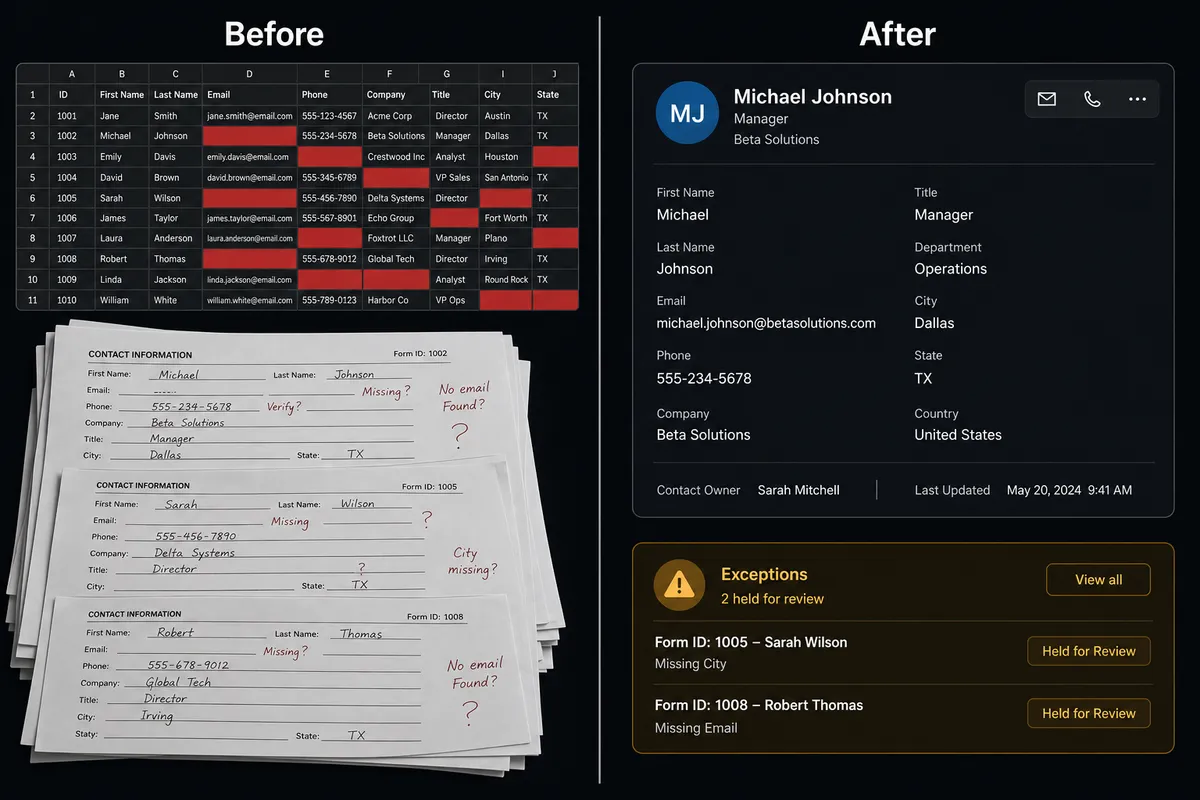
Right now, Jotform and HubSpot are disconnected. Someone fills out your intake form. That data sits in Jotform until an ops person logs in, exports the responses, and creates the contact and deal records by hand. If the form has missing fields, the incomplete record goes into HubSpot anyway. If the email address already exists, a duplicate gets created. By the time a sales rep touches the lead, the CRM entry might be three days old and missing half the data it should have.
The people doing this work are not slow or careless. The process itself is the problem. Checking Jotform, cross-referencing HubSpot, validating fields, and routing exceptions takes focused time that ops teams do not have to spare. Leads fall through the cracks not because anyone forgot, but because the manual handoff breaks down at volume.
How it works: the connection
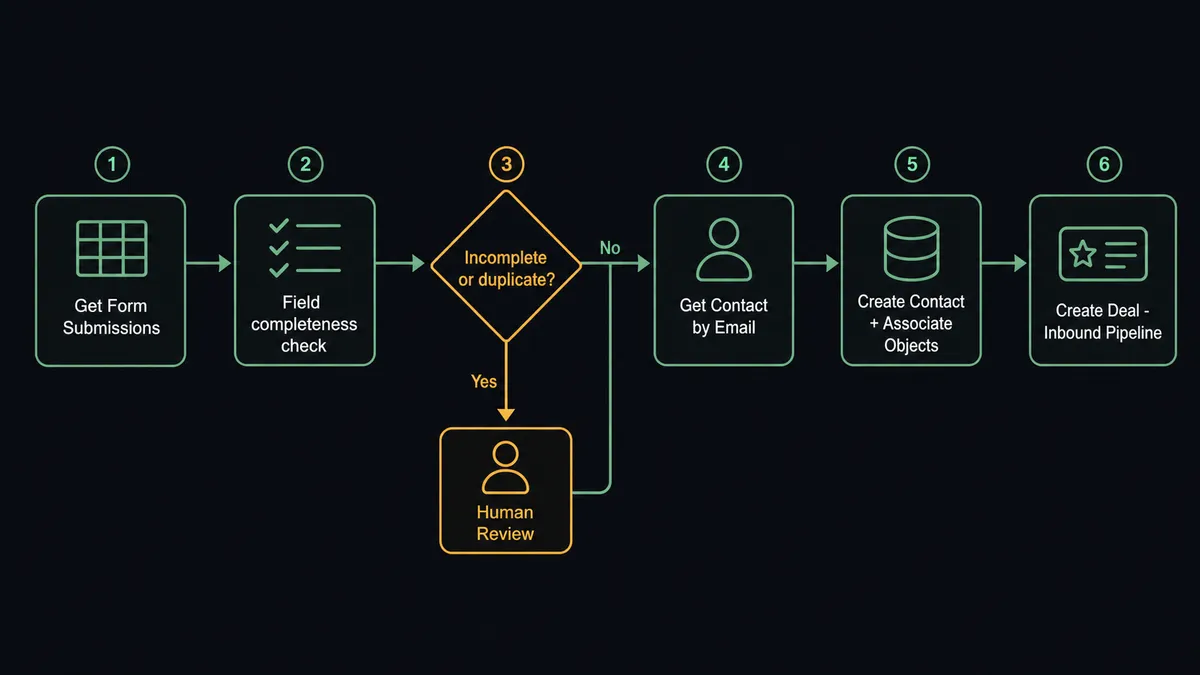
The workflow starts with Get Form Submissions. FlowRunner calls this action on a schedule you define, pulling every new Jotform entry since the last run. Each submission becomes a data object the agent works with individually.
For each submission, the agent first calls Get Contact by Email against HubSpot. If no match exists, it proceeds to Create Contact, then calls Associate Objects to link the contact to the right company record, and finally calls Create Deal to open an inbound pipeline opportunity with the lifecycle stage set to Lead. The full record is in HubSpot in under 30 seconds from form submission, with no one touching a keyboard.
If the submission maps to an existing contact, the agent calls Update Contact to apply any new information from the form response, then checks whether a new deal should be created or whether the existing deal record needs a stage update.
Can an AI agent run it? (and why a human stays in the loop)
A plain automation runs the same sequence every time. An AI agent reads the data, reasons about what it finds, and decides what to do. That distinction matters when your Jotform submissions are not all clean.
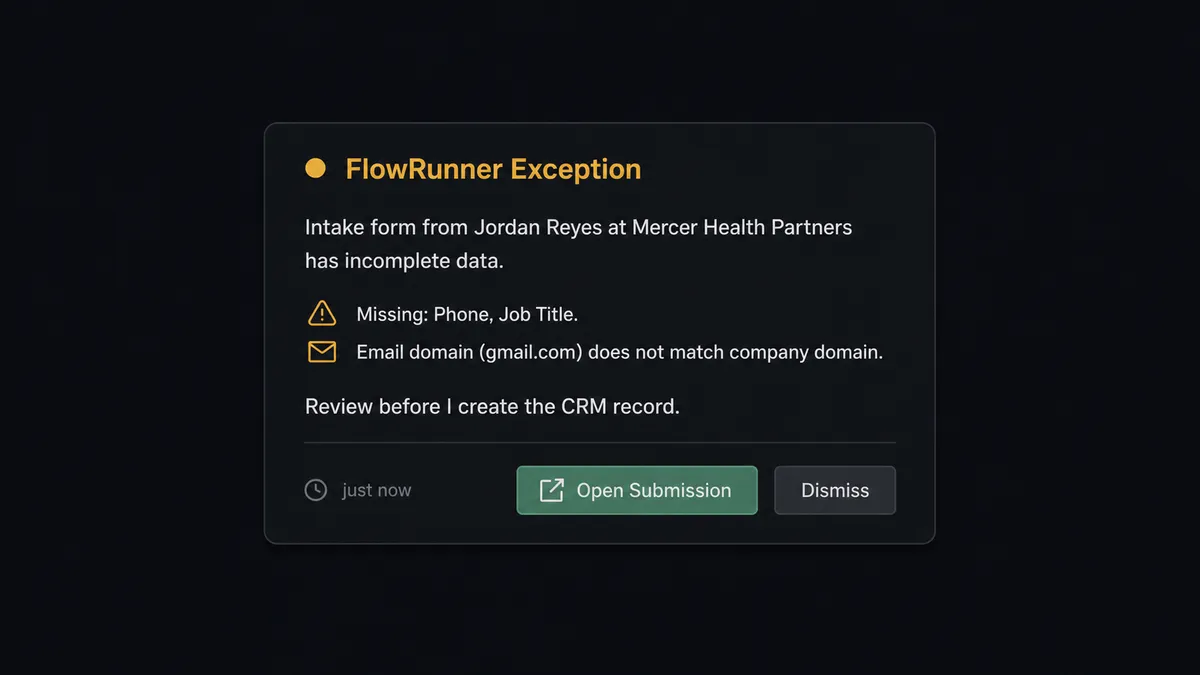
The agent is not applying a rule that says “if field X is empty, stop.” It is evaluating the submission as a whole. A submission with a missing phone number but a complete company name and a business email might be worth creating. A submission where the email domain does not match the company name, the phone number is clearly fictional, and three required fields are blank is a different situation. The agent assesses the combination and makes a call.
When the agent decides a submission needs a human look, it invokes a separate human-in-loop flow as a tool. That flow sends a notification to the ops manager or CRM admin with the specific submission data and the specific problem: “Intake form from [Name] at [Company] is missing: job title, phone number. The email domain does not match the company name provided. Review before I create the CRM record.” The reviewer sees the full context. They can correct the data, contact the submitter, or dismiss the record. The agent waits for the decision and resumes with the outcome as input.
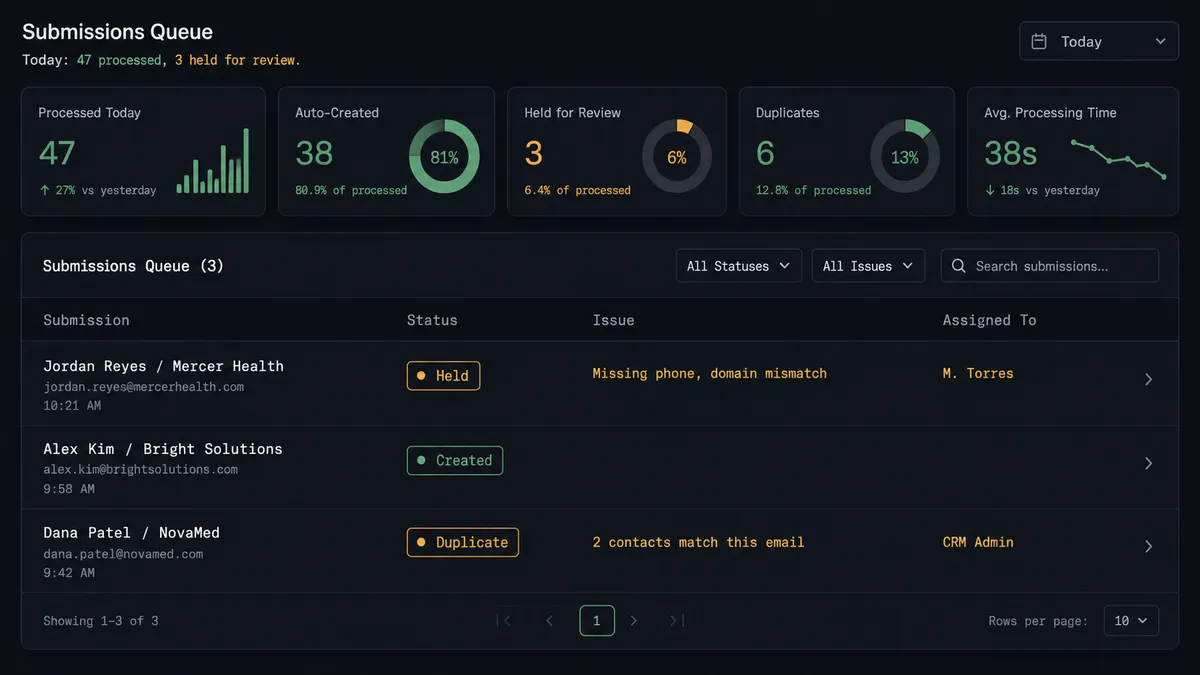
The same logic applies to duplicates. When Get Contact by Email returns a match, the agent does not blindly update the existing record. It evaluates whether this is a clear match or an ambiguous one. A clear match gets updated. An ambiguous match, two contacts with the same email at different companies, or a case where the existing deal is already in a late stage, gets paused and routed to a CRM admin via Slack: “I found two contacts matching this email. Which should I associate this new deal with?” The admin decides. The agent associates and documents the choice.
This is the digital andon cord in practice. The agent stops the line when the data is uncertain. It does not guess and create a mess you find two weeks later.
FlowRunner vs Zapier
Zapier is the right comparison here. It is the most widely used tool for connecting Jotform to HubSpot for non-technical teams, and it genuinely does the job for straightforward, clean-data flows. If every Jotform submission is complete, the emails are always unique, and you never need a human in the loop, Zapier handles the connection well.
The differences appear when the work gets messier.
| Feature | Zapier | FlowRunner |
|---|---|---|
| Basic Jotform to HubSpot sync | Yes, works well | Yes, plus validation logic |
| Deduplication before record creation | Requires multi-step Zap setup with filters | Native agent reasoning: Get Contact by Email runs first, every time |
| Human-in-loop on exceptions | Not available natively; requires external workaround | Built-in: agent invokes human review as a callable tool with full context |
| Incomplete submission handling | Field mapping fails silently or creates partial record | Agent evaluates completeness and pauses for review before writing |
| Unlimited users on every tier | Limited by plan | All FlowRunner tiers include unlimited users |
| AI agent decision-making | Not available | Agent reasons about each submission; rules replace guesswork |
Zapier is a connection tool. FlowRunner is an orchestration layer. For clean, high-volume, low-exception flows, Zapier is a reasonable choice. For intake workflows where bad data in HubSpot costs real money in wasted sales effort, the difference is significant.
Before and after
| Category | Before | After |
|---|---|---|
| Time to CRM record | 1 to 3 days (manual export and entry) | Under 30 seconds from form submission |
| Incomplete records in HubSpot | Form data imported as-is regardless of missing fields | Incomplete submissions held for review before any record is created |
| Duplicate contacts | No check before creation; deduplication done manually later | Get Contact by Email runs on every submission; duplicates paused for admin |
| Ops team involvement | Required for every submission | Required only for exceptions |
| Sales rep data quality | Contacts often missing key fields; deal creation inconsistent | Clean, complete records with deal opened in the right pipeline stage |
What you can build
New client intake to full CRM record. A professional services firm runs intake through Jotform. Get Form Submissions runs each morning. For each complete submission, the agent calls Create Contact, Associate Objects, and Create Deal. The sales rep arrives to a pipeline with the day’s new leads already built out.
Event registration with automatic lead routing. A Jotform event registration form collects attendee information. The agent calls Get Form Submissions hourly, calls Get Contact by Email to check for existing contacts, and calls Update Contact or Create Contact depending on the result. New contacts get a deal created in the conference follow-up pipeline. Existing contacts get tagged with the event name using Update Contact.
Vendor survey responses to qualified lead records. Procurement sends a Jotform qualification survey to potential vendor-partners. The agent retrieves Get Form Submissions after the deadline, evaluates each response for completeness, and creates the company and contact records in HubSpot for qualified respondents. Responses that fall short of qualification criteria are flagged for human review before any record is created.
Form-driven deal stage updates. A customer fills out a Jotform renewal intent form. The agent calls Get Form Submissions, uses Get Contact by Email to find the existing HubSpot contact, calls Get All Deals to find the open deal, and calls Update Deal to move it to the Renewal stage. The account manager sees the deal updated without touching HubSpot.
Getting started
The Growth tier at $45 per month includes full AI agents with BYOK, all integrations, and human-in-loop orchestration. FlowRunner has a free plan with 100 executions a month, every integration included, and no credit card required, and new accounts get 14 days of Professional on top.
Connect both integrations from the FlowRunner integrations panel: Jotform and HubSpot. Build the workflow, map your fields, and add the human-in-loop step for exceptions. You can have submissions flowing into HubSpot within an afternoon.
Start your trial at flowrunner.ai or book a 30-minute walkthrough at calendly.com/flowrunner/intro.
Frequently asked questions
Is it free to connect Jotform and HubSpot on FlowRunner?
FlowRunner has a free plan with 100 executions a month, every integration included, and no credit card required, and new accounts get 14 days of Professional on top. After that, Growth is $45 per month for 12,000 executions. All tiers include unlimited users and unlimited workflows.
Can I self-host FlowRunner?
Yes. FlowRunner offers a self-hosted Community Edition at no cost and a self-hosted Enterprise tier with multi-instance clustering and a full compliance suite. Pricing for the Enterprise tier is custom.
Does the AI agent need my own OpenAI key?
FlowRunner uses a BYOK (Bring Your Own Keys) model. You connect your own AI provider key, whether that is OpenAI, Anthropic, or another supported provider. You control the model choice and the cost.
What happens when the agent finds an incomplete Jotform submission?
The agent does not create a partial or dirty record in HubSpot. It pauses the workflow and routes the submission to a human reviewer with the specific missing fields called out. The reviewer corrects or dismisses the record before anything is written to the CRM.
What happens when the agent finds a duplicate contact in HubSpot?
The agent uses Get Contact by Email to check for an existing record before it ever calls Create Contact. If a duplicate is detected, the agent pauses and routes the conflict to a CRM admin via Slack or email. The admin decides which record to associate. The agent documents the decision and resumes.
Can I run this workflow on a schedule instead of in real time?
Yes. You can configure the FlowRunner workflow to call Get Form Submissions on a schedule, such as every hour or once each morning, rather than polling continuously. The agent processes each new submission in the batch and routes exceptions to the appropriate reviewer.