How to Connect Keap with QuickBooks Online (With or Without an AI Agent)
Connect Keap to QuickBooks Online so every new order, contact, or opportunity triggers the right accounting action automatically, with a human on any transaction that carries real financial consequence.
How do you connect Keap to QuickBooks Online?
You connect Keap to QuickBooks Online by using the On Keap Event trigger to fire a flow the moment an order or contact record changes, then running a QuickBooks action such as Create Invoice, Create Customer, or Create Payment against that data. FlowRunner is a visual AI-agent orchestration platform where automations run autonomously and pause for human judgment on the steps that carry real consequence. The same connection that syncs a new Keap order to a QuickBooks invoice can run as an AI agent that reads the order context, matches or creates the customer record, and routes large transactions to an accounting manager before anything posts.
The problem it solves
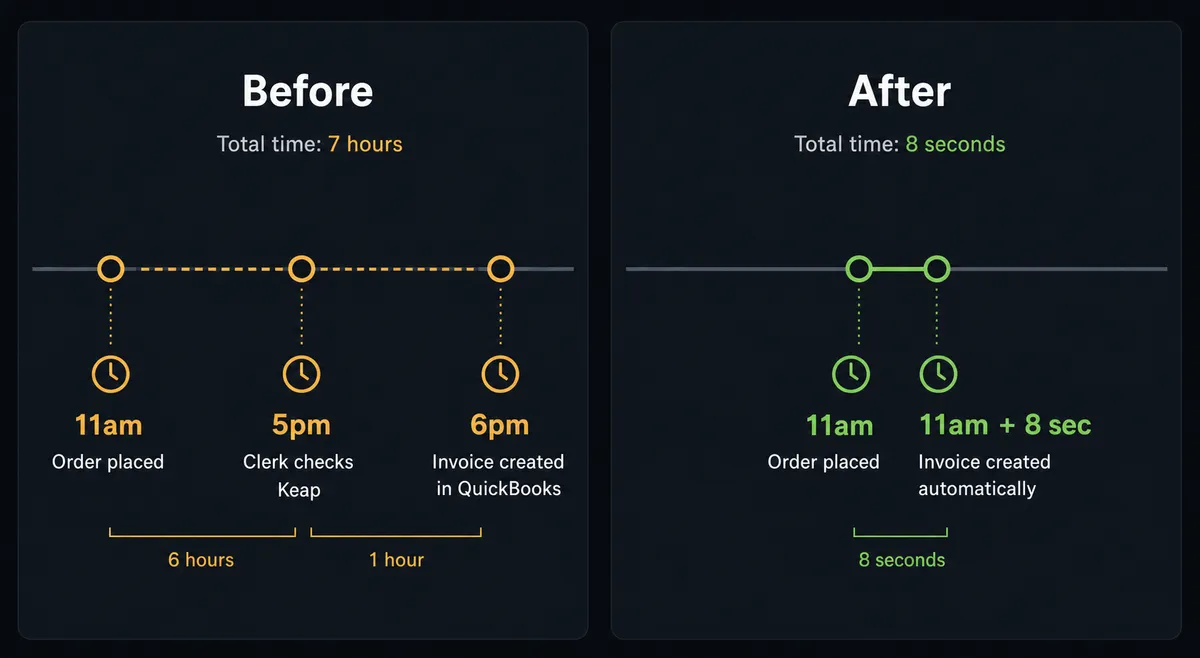
Right now, the gap between Keap and QuickBooks is a manual job. An AP clerk or billing manager logs into Keap to see what orders came in, then logs into QuickBooks to create the invoice or record the payment. Neither system knows the other exists. A contact added to Keap does not automatically become a QuickBooks customer. An order placed does not automatically generate an invoice. That work falls to a person, usually at the end of the day or the end of the week, which means your books are always behind and exceptions fall through the cracks.
The downstream effects compound. When billing runs on a lag, AR aging reports are wrong. When customer records are typed by hand, errors accumulate. When a sales rep closes a deal and expects an invoice to go out, nothing happens until someone checks the order queue. The team spends hours each week on data entry that carries zero strategic value, and the spreadsheet that tracks “what needs to be posted” becomes its own reconciliation risk.
How it works: the connection
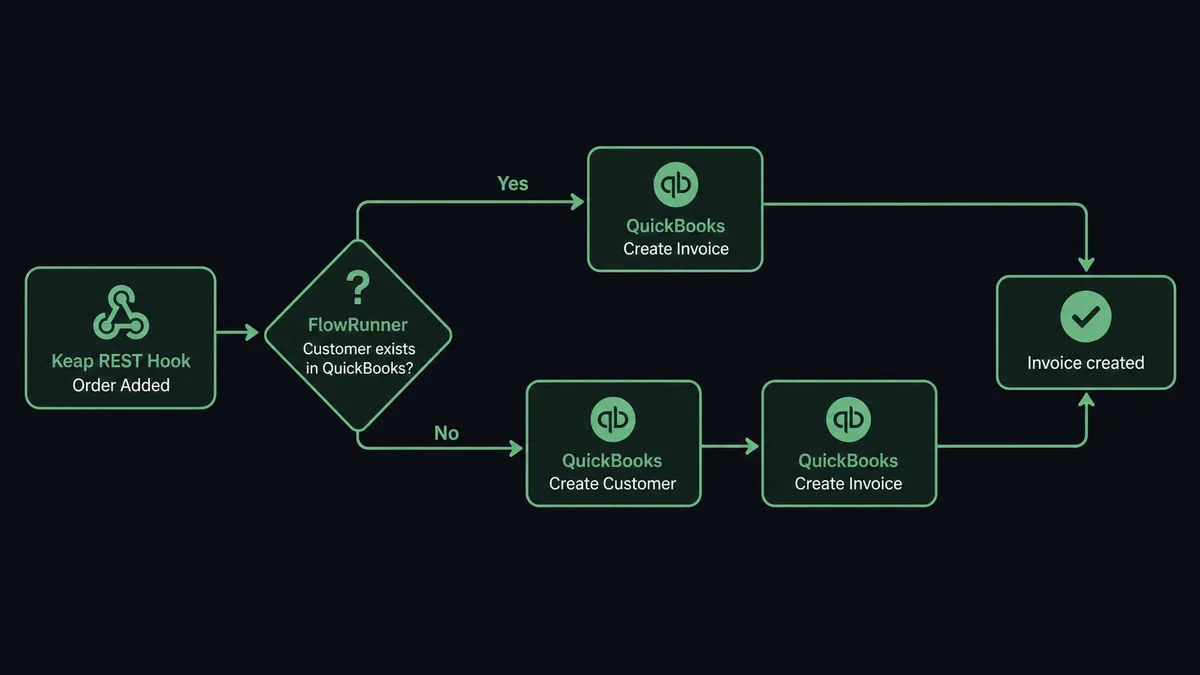
The On Keap Event trigger starts the flow the moment a record changes in Keap. No polling. No scheduled batch. When a contact is added, when an order is placed, or when an opportunity is updated, Keap fires a REST Hook that lands in FlowRunner in real time.
From that event, the agent reads the contact and order details: name, email, order total, products, and any existing tags. It then queries QuickBooks with Get Customer or List Customers to find a matching record. If one exists, the agent proceeds with the existing QuickBooks customer ID. If none is found, it calls Create Customer to create the record before any invoice or payment action runs.
With the customer matched, the agent calls Create Invoice in QuickBooks, mapping the Keap order line items to the invoice line items. When a payment has already been collected in Keap, the agent follows up with Create Payment to mark the invoice paid immediately. The whole sequence takes seconds. By the time the sales rep closes a browser tab, the invoice exists in QuickBooks.
Can an AI agent run it? (and why a human stays in the loop)
A simple trigger-to-action connection handles routine transactions without context. An AI agent handles the ones that require judgment.
The agent running the Keap-to-QuickBooks flow does not just call actions in sequence. It reads the order, evaluates the data, and decides what to do. It knows which customer this is. It can check the customer’s billing history. It notices when an order is three times the vendor’s usual amount, or when the billing email on the Keap contact does not match the QuickBooks customer record. It picks the right tools from its toolbox and uses them in the order that makes sense for the data in front of it.
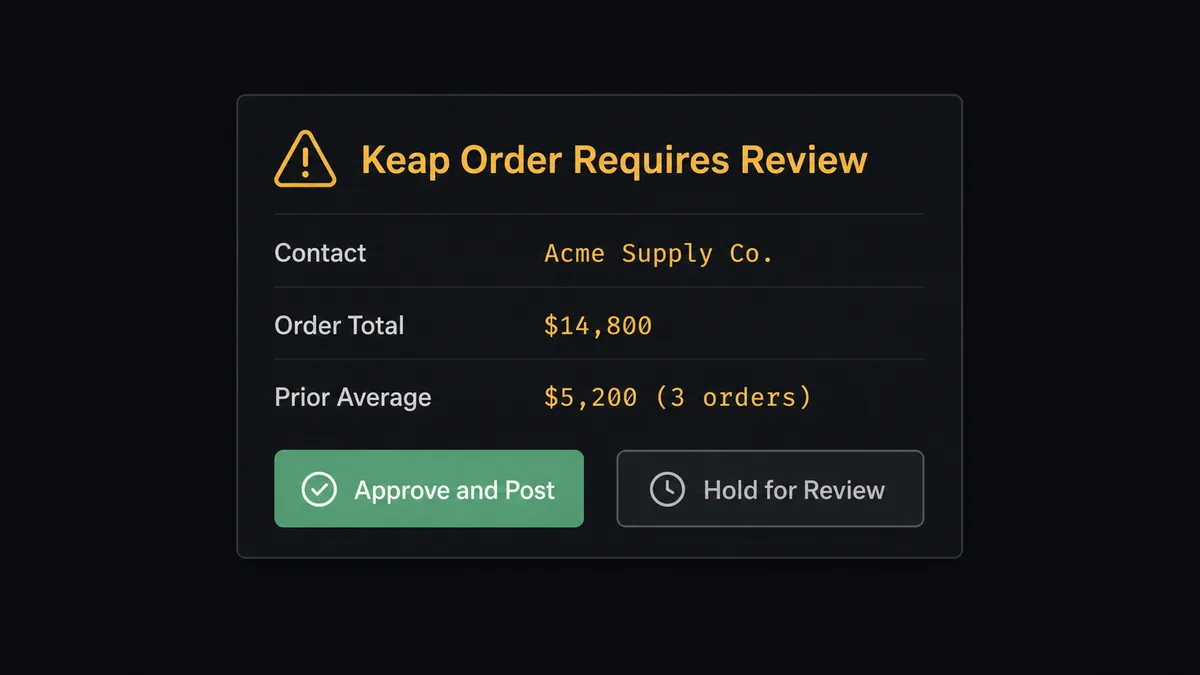
The moment where human judgment matters is a specific one. A Keap order arrives for $14,800. The agent checks the order total against the account’s history and confirms this is more than double any prior order for this contact. It does not post the invoice automatically. Instead, it invokes the human-in-loop flow as a callable tool, the same way it would call Create Invoice or Create Payment. The flow pauses.
The accounting manager receives a Slack message with the full context: the contact name, the order total ($14,800), the product line items, the contact’s prior order history (three orders averaging $5,200), and two options: Approve and Post, or Hold and Review. The manager approves. The agent calls Create Invoice and sends it. The manager holds. Nothing posts. The decision, the manager’s name, and the timestamp are captured in the audit trail.
This is not a rule. The agent does not escalate every order above a threshold you set in a configuration file. It evaluates the context and makes the call. A $14,000 order from a customer with a two-year billing history and a clean record flows through automatically. A $3,000 order from a contact the agent has never seen before gets a second look. That is the difference between a sync tool and an AI agent.
FlowRunner vs the tool you’re probably comparing
If you are using Zapier to connect Keap and QuickBooks today, the setup works and the maintenance is minimal. Zapier has a mature library of Keap and QuickBooks actions, a familiar interface, and a large user base. For simple one-trigger-one-action flows, it is a reasonable choice.
The real differences show when the connection needs to do more than move data.
| Feature | Zapier | FlowRunner |
|---|---|---|
| Human-in-loop on high-value orders | Not available natively; requires workarounds or Zapier Tables | Native: agent invokes a human flow as a callable tool at the decision point |
| AI agent with contextual reasoning | Not available; Zapier executes a fixed sequence | Available: agent reads data, reasons, picks tools, and adapts based on context |
| Unlimited users on every tier | Per-seat pricing on most plans | Unlimited users on every tier, including Growth at $45/mo |
| Bring your own AI provider key | Not applicable | Yes; BYOK model, no markup on model usage |
| Audit trail with decision provenance | Basic task history | Full audit trail including human decisions, decider identity, and timestamps |
| Self-hosting option | Not available | Community Edition (free) and Enterprise self-hosted available |
Before and after
| Category | Before | After |
|---|---|---|
| Invoice creation | AP clerk creates QuickBooks invoices manually after checking Keap orders | Agent creates the invoice in QuickBooks within seconds of the Keap Order Added event |
| Customer record sync | Billing manager types new Keap contacts into QuickBooks by hand | Agent calls Get Customer and Create Customer to match or create records automatically |
| High-value order review | Large orders processed with the same speed as small ones, no additional scrutiny | Agent routes orders above the context threshold to accounting via Slack before posting |
| AR accuracy | Books updated in batches; status lags behind actual order state | AR reflects real order status in real time; invoices created and paid without manual entry |
| Tag-driven follow-up | Tags applied inconsistently; follow-up sequences misfire | Agent applies the correct Keap tag after the QuickBooks action confirms, driving the right campaign |
| Audit trail | No record of who created what, or when | Every action logged with the triggering event, agent decision, and any human approval |
What you can build
New Keap contact becomes a QuickBooks customer instantly. When the On Keap Event trigger fires for a Contact Added event, the agent runs Get Contact to read the full record, then Create Customer in QuickBooks with the mapped name, email, and billing address. From that point, the customer is ready for invoicing without anyone touching QuickBooks.
Order placed in Keap, invoice created and sent in QuickBooks. When an Order Added event fires, the agent reads the order line items with Get Order, matches the QuickBooks customer, creates the invoice with Create Invoice, and calls Send Invoice to email it from QuickBooks. The customer receives the invoice within seconds of placing the order.
High-value order routed to sales before anything ships or bills. For orders above a context threshold the agent determines from history, the flow pauses. The agent uses the human-in-loop tool to send the order, the contact record, and product details to the sales channel. Sales confirms or holds. The agent proceeds or stops based on the response.
Opportunity won in Keap, customer and invoice created in QuickBooks. When an Opportunity Updated event marks a deal as won, the agent creates or updates the QuickBooks customer, creates a draft invoice for the project amount, and creates a Task in Keap reminding the account manager to review the invoice before it sends. Both systems stay in sync without anyone switching tabs.
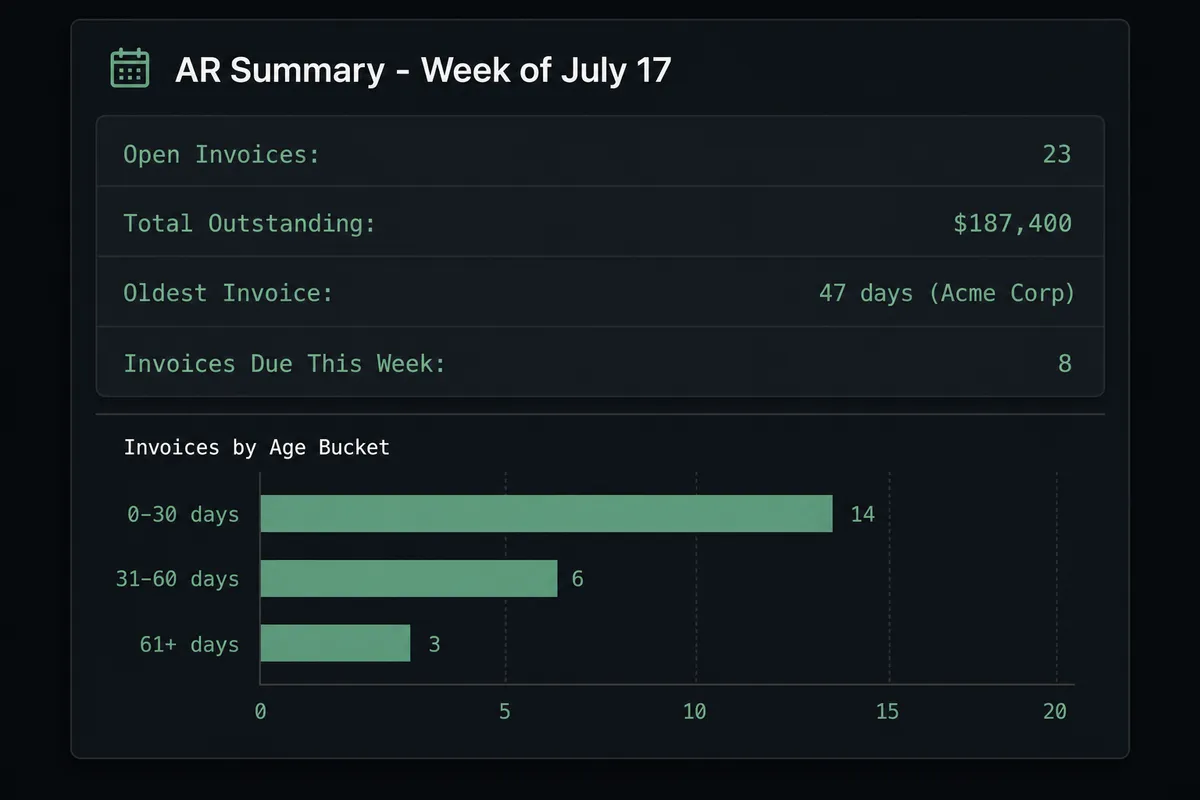
Weekly AR summary posted to the finance channel. On a Monday morning schedule, the agent pulls List Invoices from QuickBooks filtered by open status, formats the outstanding balance and oldest invoice date, and posts a structured summary to the finance Slack channel. The team sees the AR picture before the first standup.
Getting started
FlowRunner has a free plan with 100 executions a month, every integration included, and no credit card required, and new accounts get 14 days of Professional on top. Corporate email required.
Start by connecting both integrations:
To try it yourself, go to flowrunner.ai. To talk through your specific use case first, book a 30-minute call at calendly.com/flowrunner/intro. The call covers your current Keap and QuickBooks workflow, where the exceptions happen, and what a production agent would look like for your team.
Frequently asked questions
Is it free to connect Keap and QuickBooks Online on FlowRunner?
FlowRunner has a free plan with 100 executions a month, every integration included, and no credit card required, and new accounts get 14 days of Professional on top. Beyond the free plan, Growth starts at $45 per month with 12,000 executions included. All tiers include unlimited users and unlimited workflows.
Can I self-host FlowRunner?
Yes. A free Community Edition supports single-instance self-hosting. Enterprise self-hosting with multi-instance clustering and full compliance features is available on custom pricing.
Does the AI agent need my own OpenAI or AI provider key?
FlowRunner uses a bring-your-own-keys model. You connect your preferred AI provider and the agent uses that key. FlowRunner does not add a markup on model usage.
What happens when the agent is not sure about a transaction?
The agent pauses and invokes a human-in-loop flow as a callable tool. It packages the full context, sends it to a designated person via Slack or email, and waits for a decision. The decision, the decider's identity, and the timestamp are captured in the audit trail.
Does FlowRunner verify Keap and QuickBooks actions against the real APIs?
Yes. Every action in the Keap and QuickBooks Online integrations is built and verified against the official APIs. Keap uses a Bearer API key; QuickBooks Online uses OAuth2.
Can the integration handle both new customers and existing ones?
Yes. The Create Customer action in QuickBooks and the Duplicate Option on Keap's Create Contact action both support upsert logic, so the agent matches on existing records before creating new ones.