How to Connect MySQL with Google BigQuery (With or Without an AI Agent)
Connect MySQL to Google BigQuery with FlowRunner: sync rows from your operational database into the warehouse, run analytical queries, and let an AI agent pause for a human before any write that cannot be undone.
How do you connect MySQL to Google BigQuery?
You connect MySQL to Google BigQuery by using a FlowRunner flow that reads rows from MySQL with Select Rows (or Execute Query for SQL with joins), then streams the results into BigQuery with Insert Rows. FlowRunner is a visual AI-agent orchestration platform where automations run autonomously and pause for human judgment on the steps that carry real consequence. The same connection can run as an AI agent that decides when to escalate a bulk write for approval before the rows move.
The problem it solves
Your operational data lives in MySQL. Your analytics live in BigQuery. Between them sits a process that probably looks like this: someone exports a CSV, pastes it into a spreadsheet, reviews it manually, and loads it into the warehouse, or a developer maintains a bespoke pipeline that breaks quietly when the schema shifts. Exceptions fall through the cracks. By the time the warehouse reflects what happened in production, the data is hours or days old.
The cost is not just time. Bulk writes against a production MySQL table with a forgotten WHERE clause rewrite every row. A DELETE in BigQuery that removes the wrong dataset cannot be undone from within the flow. Operations leads who have lived through one of these incidents do not want automation that moves fast. They want automation that moves right, stops when something looks off, and leaves a record of who approved what.
How it works: the connection
The basic connection has three parts.
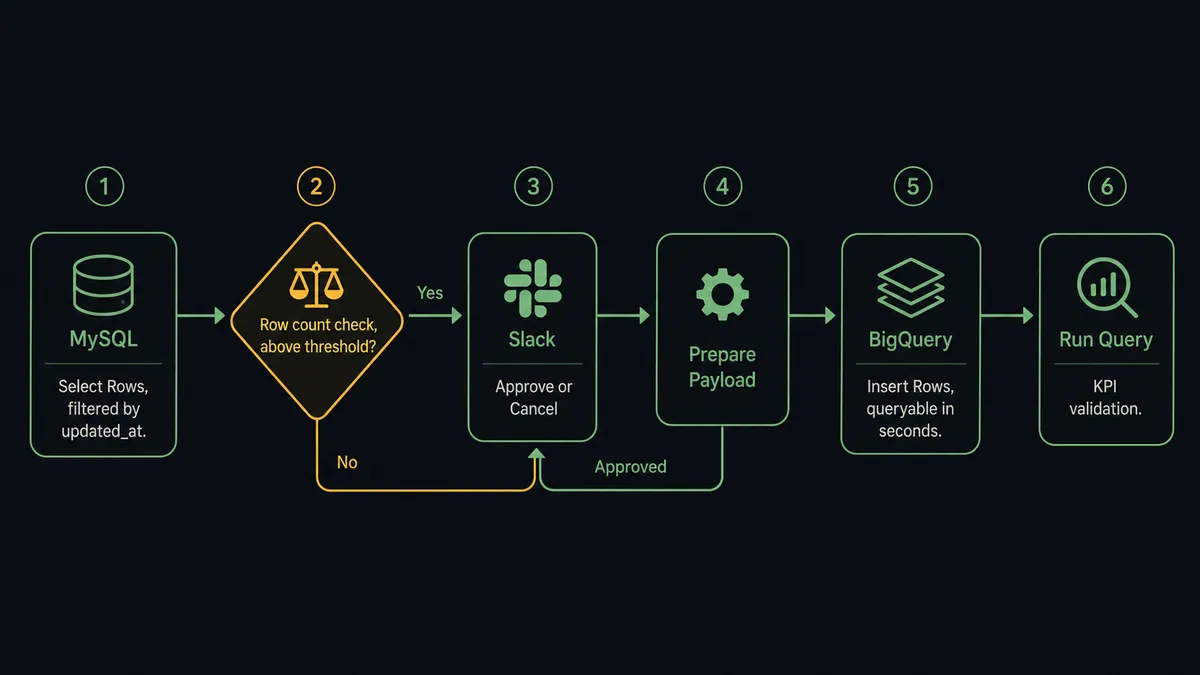
Read from MySQL. The agent calls Select Rows with column selection, equality filters, and pagination to pull the records you want. If you need a join, a CTE, or aggregation logic that the row helper does not cover, Execute Query runs any single SQL statement with ? placeholders bound via the Parameters array, so values are never interpolated. The output is an array of row objects the rest of the flow can use directly.
Stream into BigQuery. The agent calls Insert Rows with the mapped row objects. Streaming inserts are queryable within seconds. If the job is large, Get Query Results pages through the result set by job id once the job completes. No custom ingestion pipeline. No waiting for a batch window.
Validate with a query. After the rows land, the agent can call Run Query with a named @name parameter to compute a validation check or a KPI on the freshly loaded data, and return the result as plain JSON for downstream logic or a Slack notification.
The connection itself is the easy part. The hard part is knowing which writes to run unattended and which to stop and verify.
Can an AI agent run it? (and why a human stays in the loop)
Yes, and this is where FlowRunner differs from a plain sync tool.
In FlowRunner, an AI agent is a workflow node that reads its instructions, evaluates the data in front of it, and picks the best tools from its toolbox. The MySQL and BigQuery actions are those tools. The agent does not blindly execute Select Rows then Insert Rows in sequence. It reasons about what it finds.
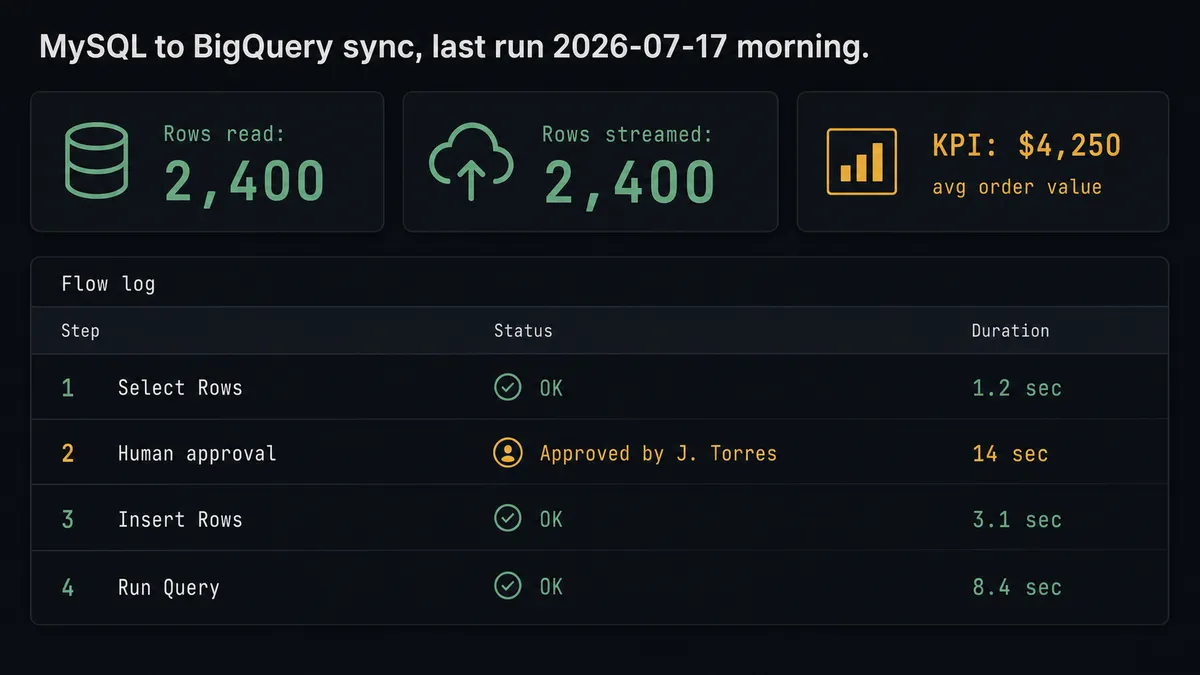
Here is a real decision moment. The flow reads 2,400 rows from the orders table in MySQL. Before calling Insert Rows to stream them into BigQuery, the agent checks the row count against the configured threshold and notices the table is flagged as production. It does not proceed on its own. It invokes the human-in-loop subflow as a callable tool, not a hardcoded branch, but an AI decision based on context.
The Slack message the human receives looks like this: “Ready to stream 2,400 rows from orders (production) into analytics.orders_staging. Where object: updated_at > 2026-07-16. Sample: [order_id 88231, $4,250, status: pending]. Approve, adjust the filter, or cancel?”
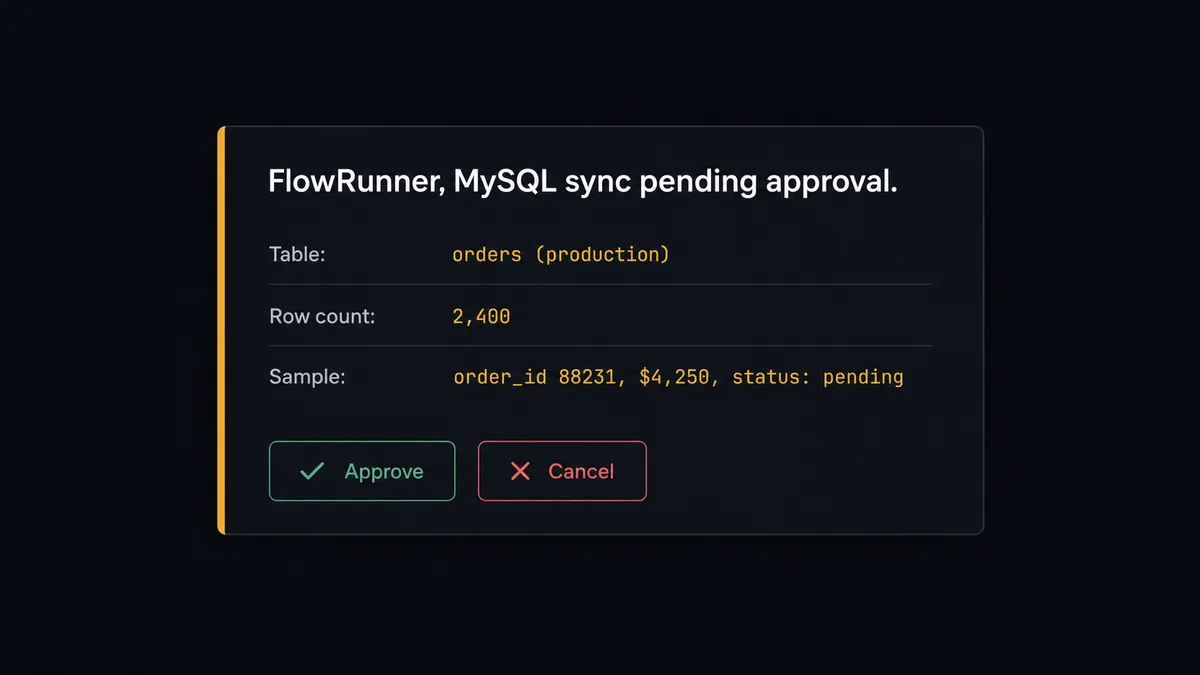
The agent resumes only after a person responds. The approver’s identity and the timestamp are captured in the run log. A connector can move any rows; an orchestration layer knows which moves should stop and ask. Prospects call this a “digital andon cord.” The agent stops the line when it hits uncertainty.
The same logic applies to BigQuery’s destructive actions. If a flow reaches Delete Table or Delete Dataset, the agent pauses and asks through Slack before executing. A table drop cannot be undone; the audit trail can always show it was approved.
FlowRunner vs Zapier for MySQL and BigQuery
Zapier is a strong choice if your team needs simple, reliable connectors with minimal setup and you are not running analytical workloads or bulk database writes. Its ecosystem is broad, its UI is approachable for non-technical users, and it handles straightforward row-by-row triggers well.
The differences become relevant when the work gets more complex.
| Capability | Zapier | FlowRunner |
|---|---|---|
| AI agent as decision-maker (not a fixed sequence) | No | Yes. Agent chooses which actions to run based on data. |
| Human approval as a callable tool the agent invokes by judgment | No | Yes. Agent decides when to escalate, not a hardcoded threshold. |
| Bulk SQL and parameterized queries | Limited | Execute Query runs any SQL with bound parameters |
| BigQuery streaming (Insert Rows, Run Query, Get Query Results) | Partial | Full: streaming, pagination, named parameters |
| Audit trail with approver identity and timestamp | No | Yes, on Professional and above |
| Unlimited users and workflows on every paid tier | No | Yes |
| Self-hosted option | No | Yes. Community Edition free; Enterprise custom. |
Before and after
| Category | Before | After |
|---|---|---|
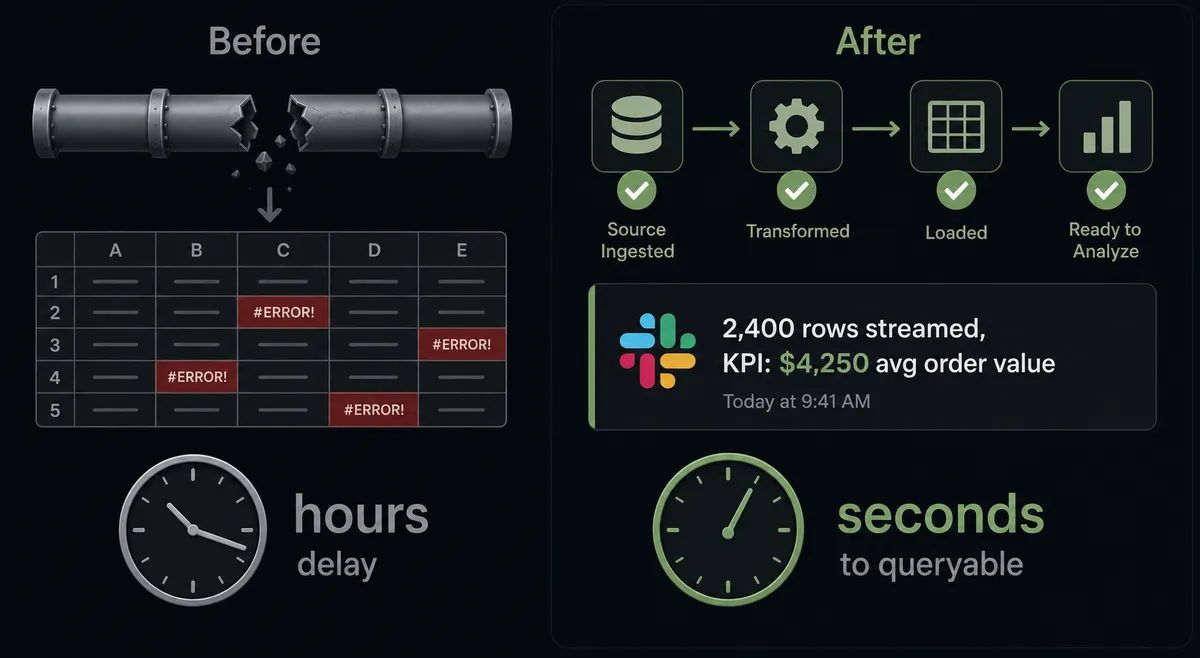
| Data freshness | CSV export and manual load, hours or days behind | Insert Rows streams records; rows queryable within seconds of the flow run |
| Bulk write safety | An UPDATE with a missing WHERE rewrites every row | Update Rows requires a non-empty Where object; full-table writes are blocked |
| Destructive actions | Delete Dataset or Delete Table runs immediately with no checkpoint | Agent pauses, routes context to Slack, and runs only after human approval |
| Audit trail | No record of who ran what or when | Every run logs the MySQL rows read, BigQuery rows streamed, and human decisions with approver and timestamp |
| Validation | Manual spot-check after load, if anyone checks at all | Agent runs Run Query on the loaded data and posts the result to the metrics channel |
What you can build
Operational-to-analytical sync with a human gate on bulk writes. The agent reads updated records from MySQL with Select Rows, checks the row count, and streams them into BigQuery with Insert Rows. If the count exceeds the threshold, it pauses for approval before any data moves. The warehouse stays current without a custom pipeline or a surprise.
Schema-aware migration assistant. The agent calls Get Table Schema on the MySQL table and Get Table on the BigQuery destination, compares the column definitions, and identifies mismatches before attempting a load. It reports discrepancies to the team and waits for confirmation before proceeding.
KPI pipeline with Slack delivery. On a schedule, the agent runs Run Query in BigQuery with a named @name parameter to compute the day’s key metrics, reads the rows as JSON, and posts the numbers to the metrics channel. Numbers that used to sit in a BI dashboard now show up where the team already works.
Idempotent event ingestion. Records arrive from an external connector. The agent calls Upsert Row in MySQL (keyed on the primary key) to keep the operational table current, then calls Insert Rows in BigQuery to stream the same event into the analytics table. Re-running the flow updates existing rows rather than creating duplicates.
Guarded dataset cleanup. When an obsolete BigQuery dataset needs to be dropped, the agent calls List Tables to summarize what it contains, assembles the table names, row counts, and last-modified times, and routes the summary for approval before calling Delete Dataset. The cleanup runs only after a person confirms.
Getting started
Start on the free plan: 100 executions a month, every integration included, no credit card required, plus 14 days of Professional for new accounts. Corporate email gets you in.
Connect both systems from the FlowRunner integrations panel: MySQL and Google BigQuery. The MySQL connector uses your existing connection string; the BigQuery connector uses your Google service account JSON key.
Build the first flow in the visual builder. Add Select Rows, wire it to Insert Rows, and run it against a non-production table to verify the column mapping. Then add the AI agent node and the human-in-loop subflow for any bulk or destructive step. The entire setup takes under an hour.
Start at flowrunner.ai or book a 30-minute walkthrough at calendly.com/flowrunner/intro.
Frequently asked questions
Is it free to connect MySQL and Google BigQuery on FlowRunner?
FlowRunner has a free plan with 100 executions a month, every integration included, and no credit card required, and new accounts get 14 days of Professional on top. No credit card is required to start. After the trial, Growth costs $45 per month with 12,000 executions included.
Can I self-host FlowRunner for a MySQL-to-BigQuery integration?
Yes. FlowRunner offers a self-hosted Community Edition at no cost for a single instance. Enterprise self-hosting with multi-instance clustering and full compliance is available under a custom plan.
Does the agent need my own API keys to query BigQuery or MySQL?
Yes. FlowRunner uses a bring-your-own-keys model. You supply your Google service account JSON key for BigQuery and your MySQL connection credentials. FlowRunner never stores or shares your keys outside your account.
What happens when the agent is not sure whether to run a bulk MySQL write?
The agent pauses before executing and routes the question to a human on their preferred channel, typically Slack. It packages the Where object, a row count estimate, and a sample of affected rows. The write runs only after a person approves, with the approver identity and timestamp recorded in the audit trail.
Can the agent handle long-running BigQuery queries?
Yes. If a Run Query job exceeds the timeout, FlowRunner returns a job id. The agent then polls Get Query Results by job id until the rows are ready. No manual retry is needed.
Does connecting MySQL and BigQuery work without writing SQL?
Partially. For MySQL, Select Rows, Insert Rows, Update Rows, Delete Rows, and Upsert Row all work without SQL. For complex joins or analytics logic in BigQuery, you write GoogleSQL with named parameters. The agent handles both within the same flow.