How to Connect Odoo with Google Sheets (With or Without an AI Agent)
Connect Odoo and Google Sheets so order and contact records sync automatically, optionally as an AI agent that pauses for human approval before posting high-value commitments.
How do you connect Odoo to Google Sheets?
You connect Odoo to Google Sheets by triggering a FlowRunner flow on a Google Sheets event (On New Row, On New or Updated Row) or on a schedule, then using the Odoo connector’s Search Read, Create, Update, and Add Row actions to move records between the two systems. FlowRunner is a visual AI-agent orchestration platform where automations run autonomously and pause for human judgment on the steps that carry real consequence. That same connection can run as an AI agent that reads each record, reasons about whether it should proceed or escalate, and calls a human-in-loop flow as a callable tool before posting any commitment that warrants review.
The problem: your ERP and your spreadsheets are out of sync by default
The gap between Odoo and Google Sheets costs operations teams real time. An AP clerk exports an order report from Odoo on Monday morning, pastes it into a tracking sheet, and by Tuesday afternoon the sheet is already wrong because three orders have been updated and two new contacts have been added. Someone else checks the sheet to answer a question and makes a decision on stale data. The exception the sheet was supposed to catch fell through the cracks because no one saw the row until Thursday.
The fix that teams reach for is a manual sync ritual: scheduled exports, copy-paste, hand-keyed updates. It scales linearly with volume, which means it does not scale at all. When a business processes 200 orders a week instead of 20, the ritual either consumes two people’s afternoons or gets skipped. The spreadsheet becomes a liability instead of a tool.
How it works: the connection
The Odoo connector in FlowRunner is a generic ORM client built and verified against Odoo’s External API. It works against any Odoo model, standard or custom, by passing the model’s technical name. The Google Sheets connector covers the full spreadsheet surface: five triggers and 34 actions for reading, writing, and managing rows, sheets, and documents.
A basic Odoo-to-Sheets sync works like this. A schedule fires on a set interval. The agent calls Search Read on sale.order with a domain filter for the time window, for example orders created or updated in the last hour. Each matching record is mapped to the target sheet columns, and the agent calls Add Row to append new entries or Find Row followed by Update Row to update existing ones. The sheet stays current without anyone opening Odoo.
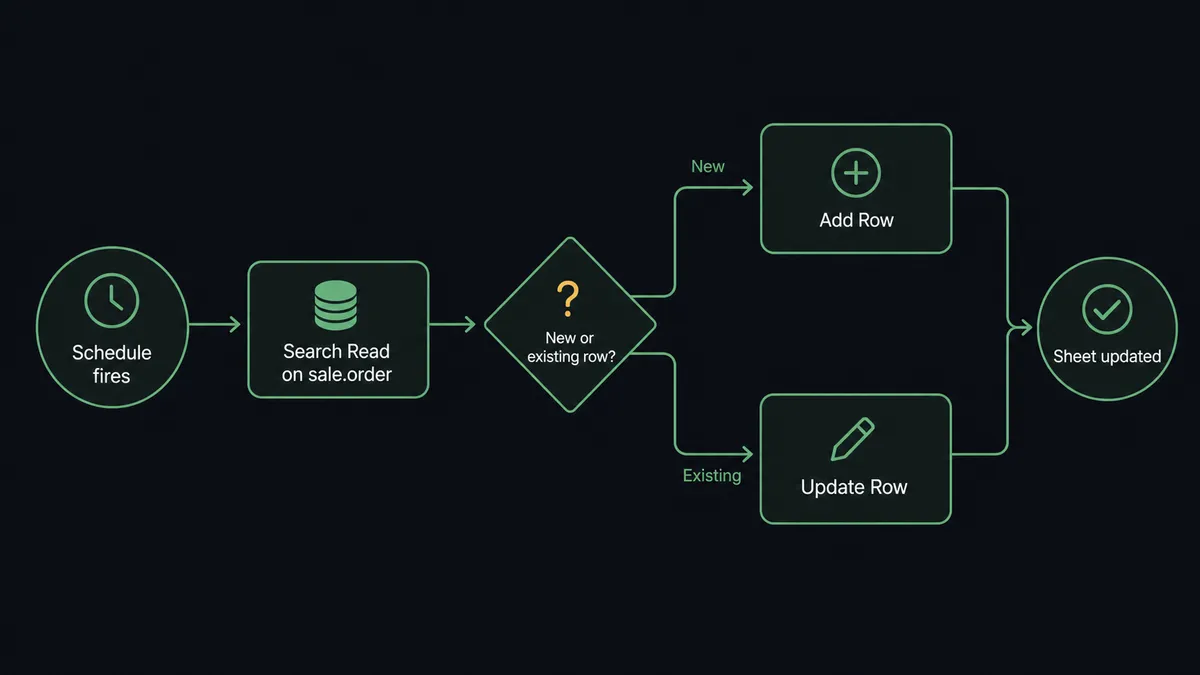
The reverse flow runs on the On New Row trigger. When a row lands in a tracked sheet, the agent reads the row values, calls Search Read on res.partner to check for an existing contact by email, and calls Create if no match is found or Update if one is. It runs Fields Get first to confirm the model fields, which keeps the write correct against custom Odoo modules without hardcoding assumptions. After writing, it calls Update Cell to write a status value back to the sheet row: “Synced to Odoo, record ID 4821.”
Real action names used: Search Read, Fields Get, Create, Update, Add Row, Update Row, Find Row, Update Cell.
Can an AI agent run it? (And why a human stays in the loop)
A standard sync tool moves data on a fixed schedule. An AI agent reads the data and decides what to do with it, including deciding when to stop and ask a person.
The difference matters most at the consequential step. In the Odoo context, confirming a sales order via Call Method with action_confirm is a commitment. It posts the order, triggers fulfillment, and starts the clock on payment terms. A sync tool would run that action for every order that meets a hardcoded threshold. An agent reads the full record before deciding.
Here is a real decision moment. An order for Acme Inc comes in at $84,000. The agent checks the record. Acme’s usual order size is $12,000. The account has a past-due balance of $6,200. The agent’s instructions say to confirm routine orders automatically, but this order is not routine. It is 7x the customer’s typical volume, and the account has open debt. The agent does not confirm the order. It invokes the human-in-loop flow.
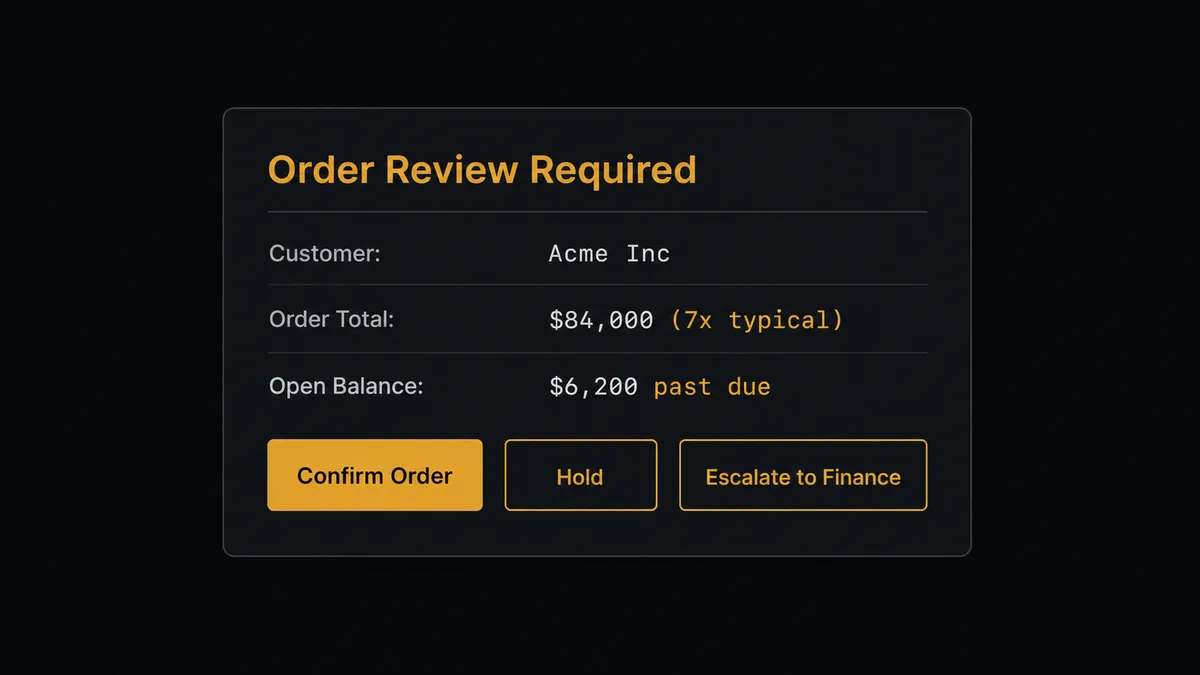
The account owner receives the card in Slack with full context: customer name, order total, how it compares to the customer’s history, the open balance, and three options. Confirm. Hold. Escalate. The owner decides. On approval, the agent runs Call Method with action_confirm, records the decision and the decider’s identity in the audit trail, and logs the confirmed order to the tracking sheet with Update Row. The flow resumes.
This is not a threshold check. The agent evaluated the combination of factors: order size relative to history, account standing, and the instruction to route exceptions to a person. A $90,000 order from a customer with a decade of clean history and zero open balance would have confirmed automatically. Prospects call this a “digital andon cord.” The agent stops the line when it hits real uncertainty.
FlowRunner vs Zapier for Odoo and Google Sheets
Zapier is the tool most operations teams reach for first when they want to connect Odoo and Google Sheets without writing code. It is genuinely easy to set up, has a large template library, and handles simple trigger-and-action flows well. For a team that wants a form submission to append a row or a new Odoo contact to land in a sheet, Zapier works.
The differences appear when the work gets more complex.
| Feature | Zapier | FlowRunner |
|---|---|---|
| Human-in-loop orchestration | Not available as a native agent tool; requires a separate approval app | Native: agent invokes human oversight as a callable tool and resumes on the response |
| AI agent with reasoning | Not available; Zapier runs fixed step sequences | Native: agent reads data, reasons about it, picks actions based on context |
| Odoo custom model support | Limited to standard models in the template | Fields Get discovers any model’s fields at runtime |
| Pricing model | Per-task pricing that grows with volume | Workflow-based execution tiers; Growth starts at $45/mo for 12,000 executions |
| Unlimited users | Seat-based pricing on most plans | Unlimited users on every tier |
| Self-hosted option | No | Yes, free Community Edition |
Zapier does not offer a native AI agent layer that can reason about data and invoke human approval as a tool. If the connection needs to make a judgment call before writing to Odoo or committing a row to a sheet, Zapier routes around that decision rather than making it.
Before and after
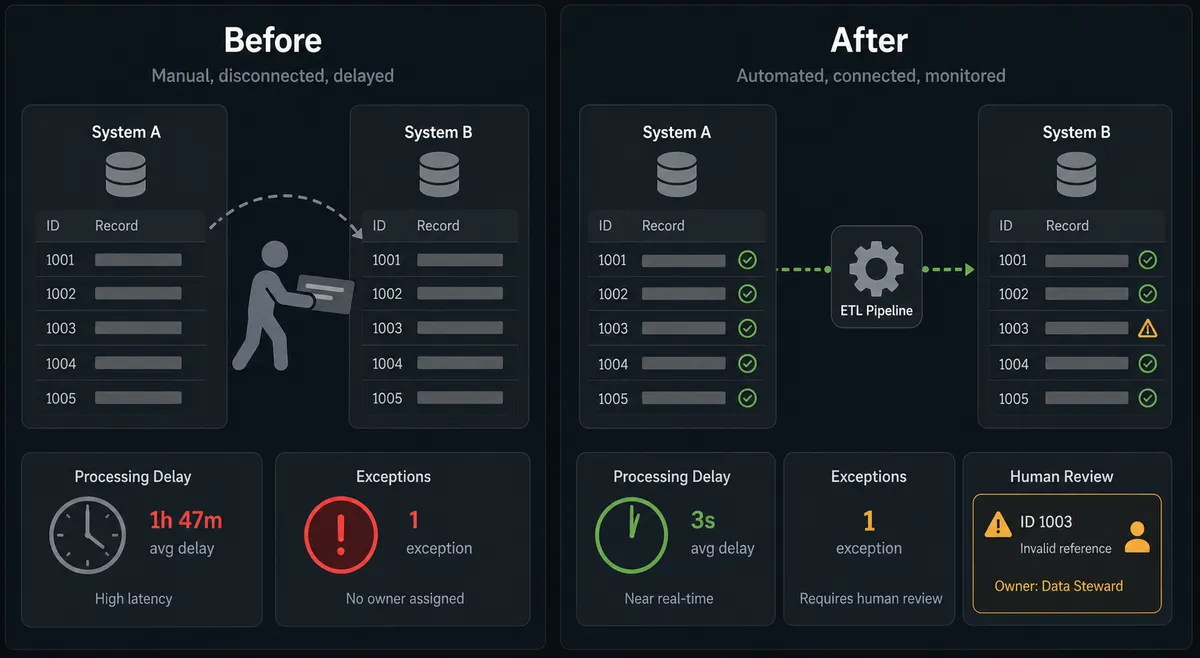
| Category | Before | After |
|---|---|---|
| ERP sync frequency | Weekly export and paste by hand | Continuous: records sync the moment an event fires |
| Duplicate contacts | New records created without checking for existing matches | Search Read runs before every create; existing partners are matched, not duplicated |
| High-value order review | Orders confirmed without checking account standing | Agent evaluates history and balance; consequential orders pause for human approval |
| Sheet accuracy | Sheet is out of date within hours of the last export | Agent writes status and outcome back to the sheet row after every operation |
| Exception visibility | Exceptions fall through the cracks until a person notices | Failed rows are flagged in the sheet and routed to the owner before they reach Odoo |
| Reporting | Manual export and file delivery | Export Sheet runs on schedule and delivers the file without anyone opening the spreadsheet |
What you can build
Order intake to reporting sheet. When orders arrive from an external source, the agent maps each to sale.order using Create, adds the line items, and logs every order to a Google Sheet with Add Row. The ERP and the tracking sheet stay in sync without a person exporting once a week.
Contact dedup and sync. A new row in a CRM intake sheet triggers the flow. The agent calls Search Read on res.partner to check for an existing match by email. If a match exists, it calls Update. If not, it calls Create. It writes the Odoo record ID back to the sheet with Update Cell.
Scheduled order report delivery. On a schedule, the agent calls Search Read on sale.order for recent activity, calls Export Sheet to generate a file of the reporting tab, and delivers the URL to the team. No one opens the spreadsheet.
Row validation with human fix. A new row triggers downstream processing. The agent validates required fields. Rows that pass are written to Odoo and marked complete with Update Cell. Rows that fail are flagged with Format Row and routed to the data owner with full context before they reach the ERP.
Custom model sync. An operation runs a custom Odoo module. Before writing, the agent calls Fields Get to read the model’s available fields, builds a Create payload that matches, then logs the outcome in Google Sheets. When the module changes, the flow adapts without breaking on hardcoded assumptions.
Getting started
FlowRunner has a free plan with 100 executions a month, every integration included, and no credit card required, and new accounts get 14 days of Professional on top. Corporate email required.
Start at flowrunner.ai or book a 30-minute walkthrough at calendly.com/flowrunner/intro to see the Odoo and Google Sheets connection with a real agent running against your data.
Integration pages: Odoo and Google Sheets.
Frequently asked questions
Is it free to connect Odoo and Google Sheets on FlowRunner?
FlowRunner has a free plan with 100 executions a month, every integration included, and no credit card required, and new accounts get 14 days of Professional on top. Beyond the free plan, Growth starts at $45 per month. All tiers include unlimited users and workflows.
Can I self-host FlowRunner?
Yes. FlowRunner offers a free Community Edition for self-hosted single-instance deployments and an Enterprise self-hosted tier with multi-instance clustering and a full compliance suite.
Does the AI agent need my own OpenAI key?
FlowRunner uses a bring-your-own-keys model. You connect the AI provider of your choice, whether that is OpenAI, Anthropic, or another supported provider, using your own API key. The platform does not lock you into one model.
What happens when the agent is not sure what to do?
The agent invokes a human-in-loop flow as a callable tool. It packages the relevant context, routes it to the right person via Slack, email, or another channel, and pauses until it receives a decision. The decider's identity, their response, and the timestamp are recorded in the audit trail.
Does FlowRunner handle Odoo custom models?
Yes. The Odoo connector includes a Fields Get action that discovers the fields a model exposes before any write. This keeps flows correct against custom modules and version differences without hardcoding field names.
What Google Sheets triggers can start a flow?
FlowRunner supports five Google Sheets triggers: On New Row, On New or Updated Row, On Document Changed, On New Sheet, and On New Document. Any of these can start a flow that writes to Odoo or runs further processing.