How to Connect OpenAI with Qdrant (With or Without an AI Agent)
Connect OpenAI's embedding and generation APIs to Qdrant's vector database in FlowRunner, optionally as an AI agent that pauses for human approval before any bulk write rewrites your collection at scale.
How do you connect OpenAI to Qdrant?
You connect OpenAI and Qdrant in FlowRunner by chaining the Create Embeddings action from OpenAI directly into the Upsert Points action in Qdrant, with no code required. FlowRunner is a visual AI-agent orchestration platform where automations run autonomously and pause for human judgment on the steps that carry real consequence. The same connection that runs autonomously for standard embeds and retrieval can run as an AI agent that decides when to stop before a filter-based bulk write rewrites thousands of points at once.
What breaks when you manage vector stores manually
Every team building a RAG pipeline or a semantic search feature eventually hits the same wall. The embedding step lives in one script. The Qdrant write lives in another. The retrieval logic is a third function somebody wrote six months ago. When a new content type comes in, three people need to coordinate before the store gets updated, and nobody remembers which fields belong in the payload.
The operational cost is not just the setup. It’s the ongoing maintenance. Points drift from the source as documents change. Metadata corrections require a filter-based bulk write that nobody wants to run blindly because a misconfigured filter can overwrite thousands of records. Ops leads end up as manual gatekeepers on writes they can’t fully inspect, approving changes through Slack messages with no audit trail on the other end.
The retrieval side is no cleaner. When a user gets a bad answer, tracing it back to a stale embedding, a misconfigured filter, or a missing payload field takes time nobody has. The failures fall through the cracks between the teams who own each piece.
How it works: the OpenAI and Qdrant connection
The core flow has two legs: write and retrieve.
On the write side, a trigger fires when new content is ready. That could be a webhook from your CMS, a scheduled batch for a document corpus, or an upstream step in a larger flow. The OpenAI Create Embeddings action takes the content chunk and returns a dense vector. The Qdrant Upsert Points action writes the vector to the named collection along with a payload, source, author, date, category, or any fields your retrieval logic will filter on. Upsert Points waits until the change applies before the flow moves on, so the next step always reads a consistent store.
On the retrieval side, the flow embeds the user’s question with Create Embeddings, then runs Qdrant’s Query Points. Query Points is the universal similarity search: query by the raw embedding, apply payload filters to scope the results to approved sources or date ranges, set a score threshold to cut off weak matches, and return the top-K passages. Those passages feed directly into an OpenAI Create Response action, which generates a grounded answer with the retrieved context.
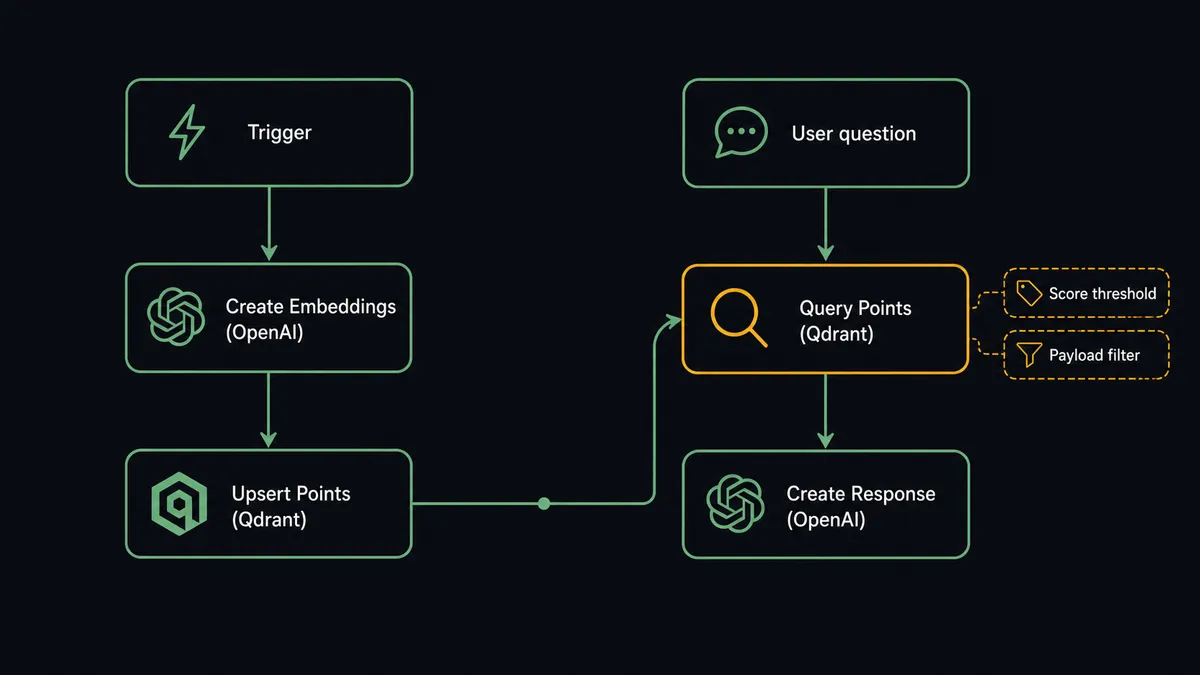
The data mapping is direct. The embedding vector from Create Embeddings maps to the vector field in Upsert Points. The payload carries whatever metadata the calling system provides. On retrieval, the payload filter values come from the user’s context or a configuration step earlier in the flow. The agent chooses which fields to filter on based on its instructions and the data in front of it.
Can an AI agent run it, and why a human stays in the loop
A plain connection runs the same sequence every time. An AI agent reads the situation and decides what to do.
Give the agent access to Create Embeddings, Upsert Points, Query Points, Count Points, and Overwrite Payload as its tools. The agent can embed a document, write it to the store, run a retrieval test against the new point, and report the collection state, all in one pass. For standard per-document operations, it runs fully autonomously. It doesn’t need a human for an upsert that adds one point at a time.
The decision to involve a human is where the agent earns its value.
A filter-based write is different from a single-point operation. When the agent needs to run Overwrite Payload or Delete Points by filter, it first calls Count Points to find out how many records the filter would touch. Say the filter returns 3,900 points. The agent does not proceed. It pauses, assembles the context, and routes to the data owner through a human-in-loop flow configured as a callable tool.
The message the owner receives looks like this: “This overwrite would replace the payload on 3,900 points matched by the archived filter. Previous payload fields are removed. The affected collection is product-knowledge. The filter is: category equals archived AND updated_before equals 2025-01-01. Proceed or cancel?”
The owner sees the match count, the filter, the collection name, and the change type before they decide anything. This is not a hardcoded threshold. The agent evaluated the blast radius of the operation and made the call that a filter touching nearly 4,000 records is not something it owns unilaterally. A bulk write that touched 12 points in a test collection might proceed without escalation, because the agent’s instructions describe what constitutes a material scope. The agent reasons about the situation; it doesn’t just check a number.
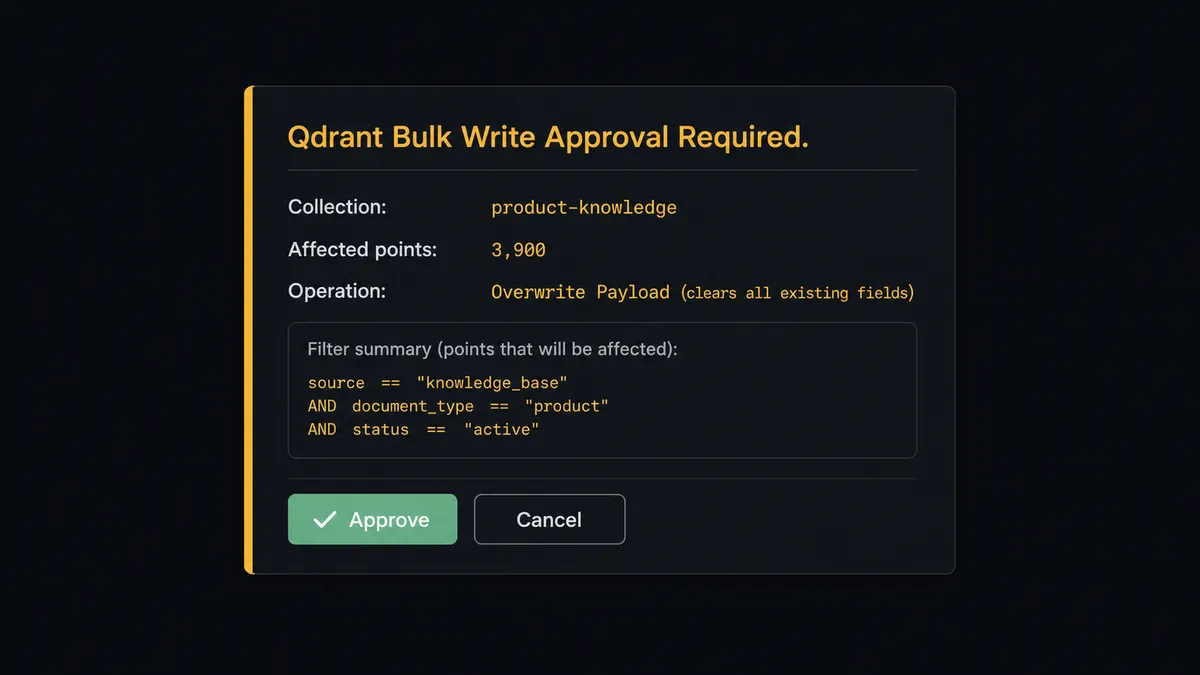
The approval, the approver’s identity, and the timestamp are written to FlowRunner’s audit trail. If the operation is rejected, the agent logs the rejection and stops. If it’s approved, the write runs and the outcome is logged against the same event.
Prospects running knowledge-base maintenance workflows call this the “digital andon cord.” The agent stops the line when the operation’s scope crosses a threshold it can’t verify by inspection.
FlowRunner vs n8n for OpenAI and Qdrant
n8n is a capable automation tool and a reasonable starting point for developers who want to connect OpenAI and Qdrant with code-level control. It has a large community, hundreds of integrations, and a self-hosted option that gives engineering teams full control over infrastructure.
The differences that matter for this use case:
| Feature | n8n | FlowRunner |
|---|---|---|
| Human-in-loop before bulk writes | Conditional branch with fixed threshold | Agent decides based on context; callable human-in-loop flow with full audit capture |
| Qdrant bulk write gate | Requires custom code to count and pause | Count Points + Human-in-Loop step, no code |
| Unlimited users on every tier | No (user limits apply on lower tiers) | Yes, all tiers |
| BYOK for AI providers | Supported | Supported |
| Self-hosted option | Yes (fair-code license) | Yes (Enterprise tier) |
| Audit trail for approval decisions | DIY or external logging | Built in at Professional tier ($299/mo) |
For teams who need a developer to build and maintain their automation stack, n8n is a reasonable fit. For operations teams who need the data owner, not a developer, to approve bulk writes without touching a workflow editor, FlowRunner puts the gate in the flow and routes the decision directly to the right person.
Before and after
| Category | Before | After |
|---|---|---|
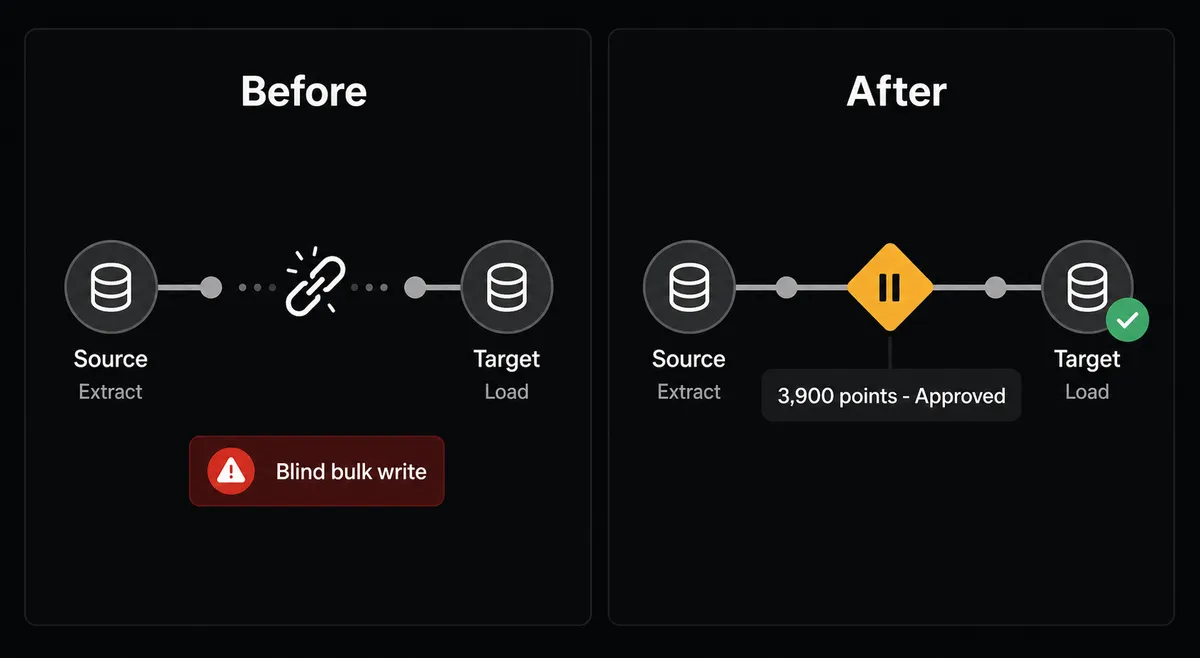
| Vector store updates | Manual embedding script plus separate Qdrant write, coordinated across teams | Single flow: Create Embeddings into Upsert Points, triggered automatically when content changes |
| Bulk write risk | Filter-based rewrites run without preview; misconfigured filters overwrite records silently | Agent counts matches with Count Points, routes to approver, write runs only after explicit approval |
| Retrieval quality | Stale points from missed updates produce wrong answers; no alert mechanism | Upsert Points waits for write confirmation before flow proceeds; store stays current with source |
| Audit trail | No record of who approved which bulk change or when | Every human approval captured with approver identity and timestamp |
| Team access | Embedding and retrieval logic locked to the developer who built the scripts | Data owners approve changes through Slack or email; no workflow editor access needed |
What you can build
Knowledge base with freshness control. When a document is updated in your CMS, the flow re-embeds the content with Create Embeddings and overwrites the point in Qdrant via Upsert Points. Set Payload attaches a last_updated timestamp to the payload. Query Points filters by recency at retrieval time so stale chunks never rank above fresh ones.
Support ticket classifier and responder. An incoming support ticket triggers Create Chat Completion to classify the intent and extract the key entities. The agent embeds the ticket body, runs Query Points with a payload filter scoped to the relevant product area, and pipes the top matches into Create Response to draft a grounded reply. A human reviews and approves before the reply sends.
Segment reclassification with approval gate. A scheduled flow uses Scroll Points to page through a collection and find records where a metadata field has changed in the source system. The agent assembles the affected point IDs, counts them with Count Points, and routes a summary to the data owner. After approval, Set Payload applies the updated metadata only to the confirmed set.
Retrieval-grounded Q&A for internal teams. Employees ask questions through a Slack command. The flow embeds the question, runs Query Points against your internal knowledge collection, and generates a grounded answer with citations using Create Response. Questions that touch policy or compliance route to the owning team instead of auto-answering.
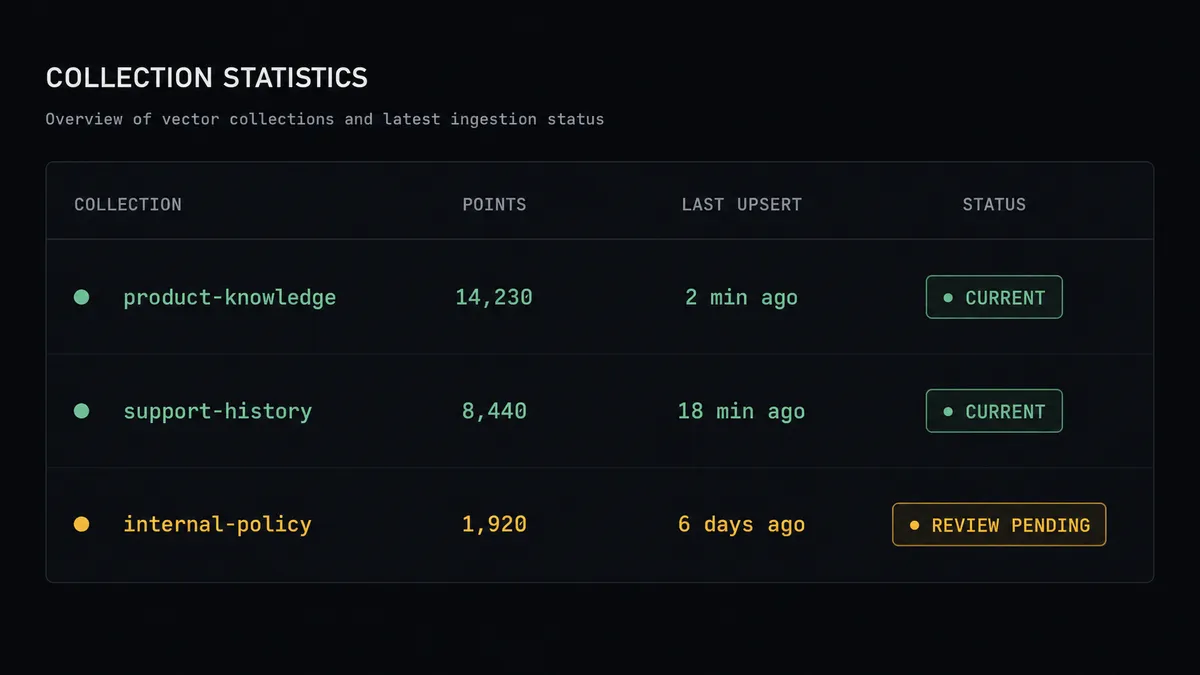
Multimodal ingestion pipeline. A flow accepts images and documents. Speech to Text handles audio attachments. Generate Image or Edit Image handles visual content. Each output is embedded and written to a named Qdrant collection with a media-type payload field. Query Points can then filter by media type at retrieval time, so a question about a product image retrieves image-adjacent chunks rather than text-only records.
Getting started
FlowRunner has a free plan with 100 executions a month, every integration included, and no credit card required, and new accounts get 14 days of Professional on top.
Start by connecting both integrations:
Build your first flow at flowrunner.ai, or book a 30-minute walkthrough with the team at calendly.com/flowrunner/intro to see the human-in-loop gate and the Qdrant bulk write approval in a live demo.
Frequently asked questions
Is it free to connect OpenAI and Qdrant on FlowRunner?
FlowRunner has a free plan with 100 executions a month, every integration included, and no credit card required, and new accounts get 14 days of Professional on top. Both the OpenAI and Qdrant connectors are available on every tier, including the free trial.
Do I need my own OpenAI API key?
Yes. FlowRunner uses a BYOK (Bring Your Own Keys) model. You connect your own OpenAI API key in the connector settings. You pay OpenAI directly for token usage; FlowRunner charges only for workflow executions.
Can I self-host FlowRunner with a self-hosted Qdrant instance?
Yes on both counts. The Qdrant connector works against both Qdrant Cloud and self-hosted instances. FlowRunner itself is available as a self-hosted Enterprise deployment if your compliance requirements prohibit cloud-hosted automation.
What happens when the agent isn't sure about a bulk write?
The agent runs Count Points to determine how many records the filter would touch, then pauses execution and routes the summary to a designated person via Slack, email, or WhatsApp. The bulk write doesn't run until that person explicitly approves it. The decision, the approver's identity, and the timestamp are captured in the audit trail.
Does FlowRunner store my vectors or embeddings?
No. FlowRunner orchestrates the calls between OpenAI and Qdrant but does not store vector data. Embeddings are generated by OpenAI and written directly to your Qdrant collection. FlowRunner stores only the execution log.
Can I use this to build a RAG pipeline without writing code?
Yes. The FlowRunner visual builder lets you chain Create Embeddings from OpenAI and Upsert Points into Qdrant, then Query Points and Create Response in a single flow, without any code. You add a human-in-loop step to the payload write operations that affect collections at scale.