How to Connect Pipedrive with Google Sheets (With or Without an AI Agent)
Connect Pipedrive and Google Sheets so every new or updated deal, person, or organization writes to your tracker automatically, with an AI agent that pauses for a human on any row that fails validation or triggers a destructive change.

How do you connect Pipedrive to Google Sheets?
Use FlowRunner’s Google Sheets On New Row trigger to fire a flow each time a row is added to your tracker, then call Pipedrive’s Create Person, Create Organization, and Create Deal actions to write the record into your pipeline automatically. FlowRunner is a visual AI-agent orchestration platform where automations run autonomously and pause for human judgment on the steps that carry real consequence. The same connection can run as an AI agent: the agent reads the row, searches for existing Pipedrive records, resolves duplicates, and calls a human when it encounters a row it cannot confidently process without oversight.
The problem this connection solves
Sales and operations teams track inbound leads, signed contracts, and prospect lists in Google Sheets. Someone adds a row. Then someone else has to open Pipedrive, create the person, create the organization, create the deal, and set the stage and owner manually. That sequence takes 4 to 8 minutes per record on a good day. On a bad day, the rep is on a call, the row sits for hours, and the deal lands in the wrong pipeline stage because the manual entry was rushed.
The compounding problem is that manual CRM entry produces duplicates. There is no systematic check before someone creates a new person or organization record. Two reps can create the same contact with slightly different names and no one notices until the sales lead runs a reconciliation. The reconciliation is its own manual process, usually done on a Friday, usually incomplete. Records fall through the cracks not because the team is careless but because the systems were never connected.
How it works: the connection
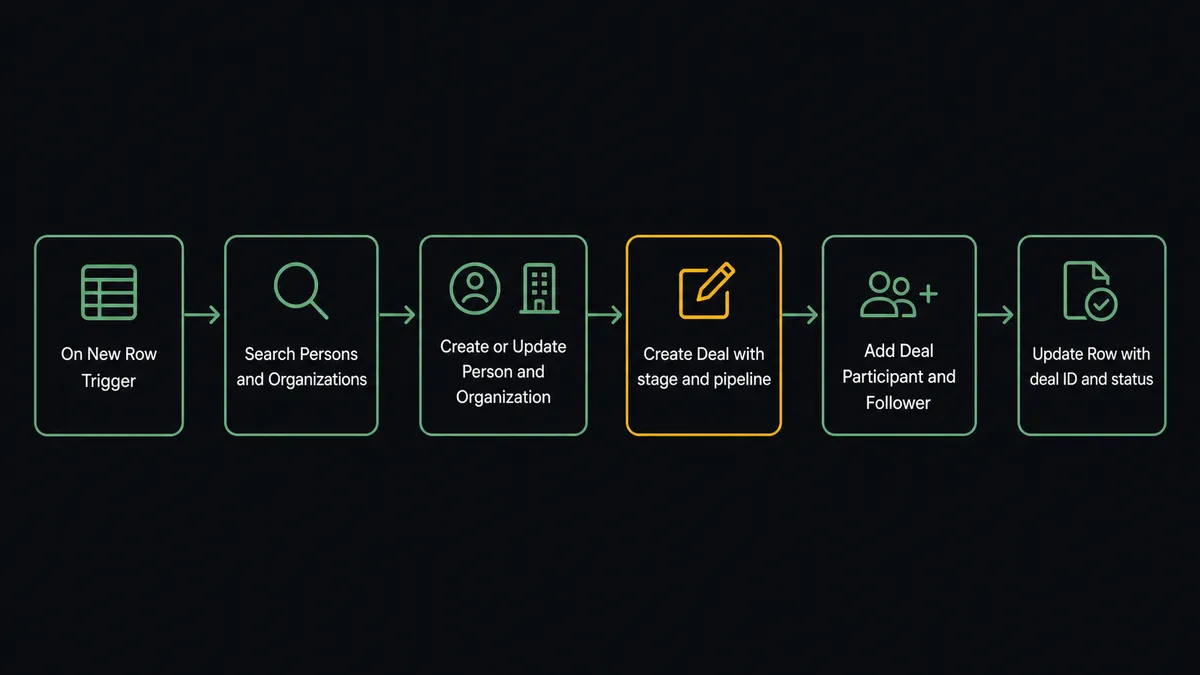
Google Sheets’ On New Row trigger fires the moment a row is added to the watched sheet. The agent reads the row values against the mapped header columns using Load Header Row, then works through the Pipedrive object hierarchy.
The first stop is deduplication. The agent calls Search Persons with the email from the row. If a match exists, it calls Update Person with any new data. If no match exists, it calls Create Person. The same pattern runs for organizations: Search Organizations by company name, then Create Organization or Update Organization. This happens before any deal is created, so the pipeline stays clean.
With the person and organization resolved, the agent calls Create Deal and sets the pipeline, stage, and owner from the mapped columns in the row. It then calls Add Deal Participant to attach any buying-committee contacts and Add Deal Follower to assign the rep. Create Activity schedules the first follow-up. The entire sequence runs under a minute.
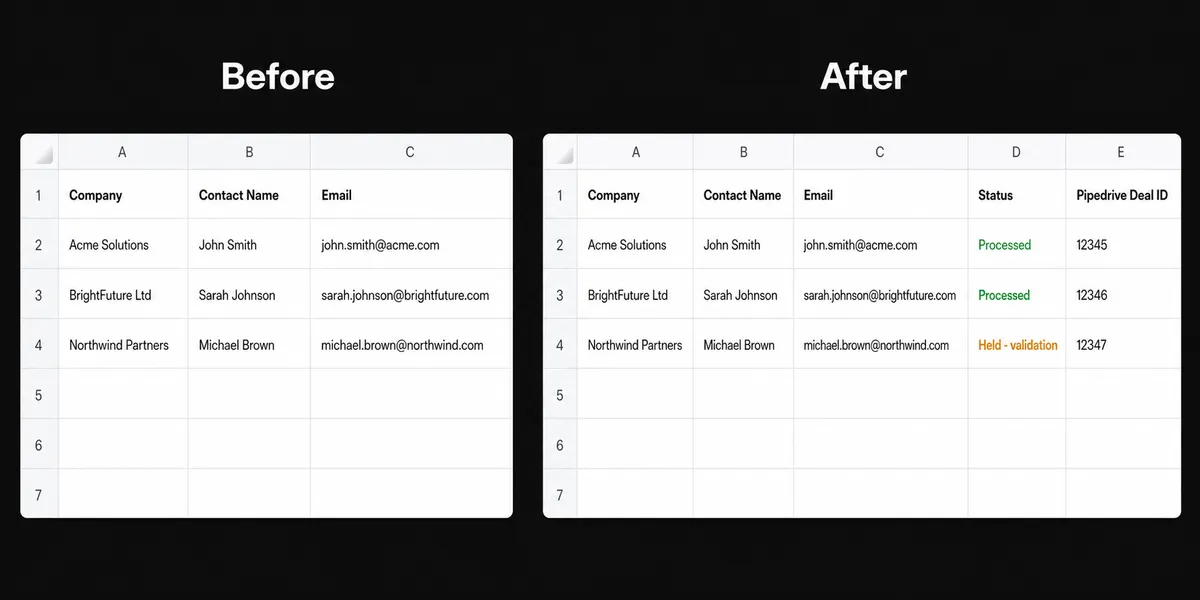
The last step writes back to the sheet. The agent calls Update Row to record the Pipedrive deal ID and a “processed” status in the source row. The sheet becomes the audit record: every row either shows a deal ID or shows why the row was held.
Can an AI agent run it? (and why a human stays in the loop)
A plain Zapier or n8n connection runs the same sequence every time regardless of what the row contains. The agent does not. It reads the data, evaluates it, and decides what to do.
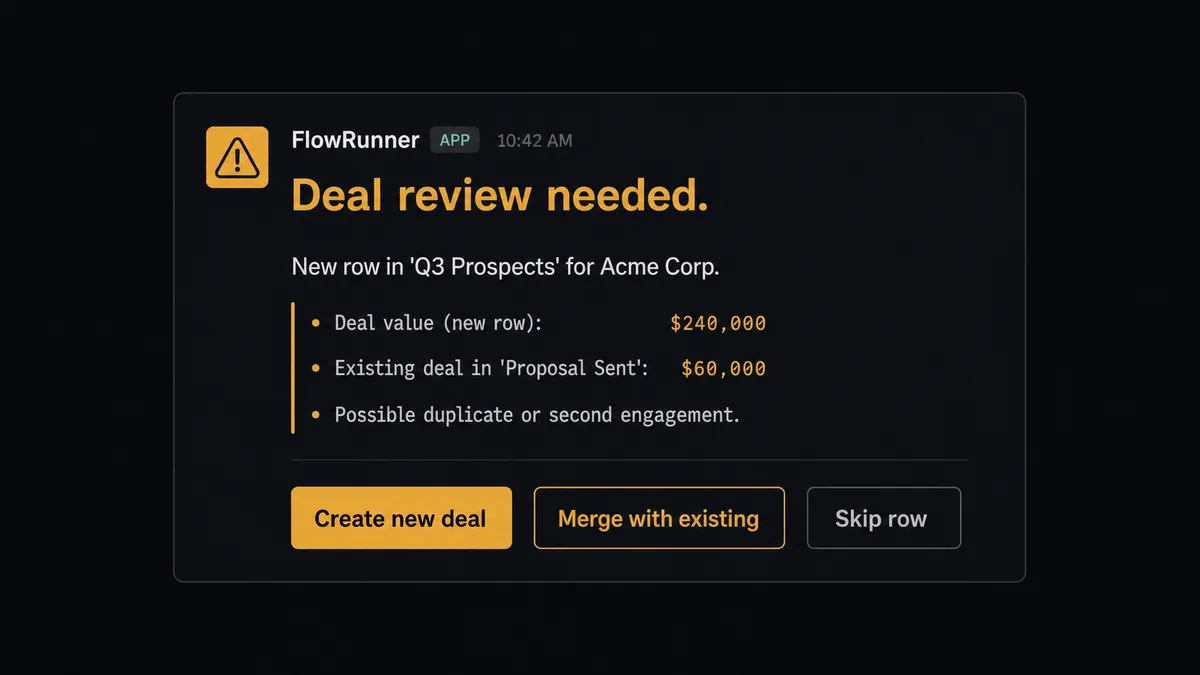
Consider a prospect sheet where most rows contain a company name, a contact email, and a deal value between $5,000 and $30,000. A new row arrives: company name is present, email is present, deal value is $240,000. The agent does not blindly create the deal. It calls Search Deals to check whether any active deal exists for that organization. It finds one, already in a late stage, for $60,000. The new row’s $240,000 value is four times the existing deal with the same company. The agent stops.
It invokes the human-in-loop flow as a callable tool. The ops lead receives a Slack message: “New row in ‘Q3 Prospects’ sheet for Acme Corp. A deal for $240,000 is being created, but an existing Acme deal ($60,000) is already in ‘Proposal Sent’. This may be a duplicate or a second engagement. Options: create the new deal, merge into the existing deal, or skip and mark the row for manual review.” The lead responds. The agent resumes with the decision as input and records the approver’s choice and timestamp.
FlowRunner has a free plan with 100 executions a month, every integration included, and no credit card required, and new accounts get 14 days of Professional on top. The agent evaluated the organization’s existing deal history and the magnitude of the discrepancy. A $240,000 deal for a company with no prior history would not trigger the same escalation; the agent would process it and flag it for rep assignment. The decision to involve a human was the agent’s own judgment call.
Prospects call this a “digital andon cord.” FlowRunner stops the line when the agent hits genuine uncertainty. The sheet keeps flowing; the exceptions get a human in the loop.
FlowRunner vs Zapier
If your team found this page, they are probably already using Zapier or have evaluated it. Zapier deserves credit for what it does well: a large library of integrations, a fast setup experience for simple two-step flows, and broad adoption that means most Pipedrive and Google Sheets users have already connected the two systems this way.
The differences that matter for this use case:
| Feature | Zapier | FlowRunner |
|---|---|---|
| Human-in-loop on exceptions | Not available natively; requires a separate approval app and manual wiring | Native: the agent invokes a human-oversight flow as a callable tool at the step that needs it |
| Agent reasoning on row data | Fixed action sequence; every row runs the same path | Agent reads the row, evaluates context, and decides which actions to call and when to escalate |
| Unlimited users on every tier | Per-seat pricing on most plans | Unlimited users on every tier; whole team collaborates from day one |
| BYOK for AI models | No native AI agent layer; Zapier AI is provider-locked | Bring your own key for OpenAI, Anthropic, or any supported provider |
| Pricing model | Per-task execution pricing; costs scale with volume in unpredictable ways | Workflow-based tiers with clear execution limits; $45/mo Growth, $299/mo Professional |
| Self-hosted option | No | Yes; Community Edition at no cost, Enterprise with full compliance suite |
Before and after
| Category | Before | After |
|---|---|---|
| CRM entry time per lead | 4 to 8 minutes of manual data entry per row | Under 60 seconds; agent handles search, create or update, deal creation, and status write-back |
| Duplicate records | No systematic dedupe; two reps can create the same person with different spellings | Search Persons and Search Organizations run before every create; duplicates caught before they land |
| Row status visibility | Row sits in the sheet with no indication of whether it was processed | Update Row writes deal ID and processing status back to the source row on completion |
| Exceptions | Bad rows are either ignored or pushed into Pipedrive with missing data | Rows that fail validation are held, marked with Format Row, and routed to the owner before reaching Pipedrive |
| Deal history accuracy | Stage updates happen when the rep remembers to update Pipedrive | Deal stage, participants, and activities are created as part of the same flow that processed the sheet row |
What you can build
Inbound lead intake with dedupe and deal creation. A web form submits to a tracking sheet. On New Row fires, the agent calls Search Persons by email, Create Person or Update Person with enriched data, Search Organizations, Create Organization if new, then Create Deal in the inbound pipeline. The rep receives a Create Activity notification with the deal context. The row updates with the deal ID.
Signed contract sync from Pipedrive to a reporting sheet. A Pipedrive webhook triggers when a deal stage changes to “Closed Won.” The agent calls Get Deal to retrieve the full record and Get Deal Products to pull line items, then calls Add Row to write the contract to a revenue tracker sheet. Month-end reporting pulls from the sheet without anyone exporting data manually.
Bulk prospect import with validation gate. A prospect list arrives as a CSV. The agent calls Import from CSV to load it into a staging sheet, then reads each row with Get Rows. Rows that pass validation move to Pipedrive via Create Lead. Rows missing a company name or with an unrecognized lead source are marked with Format Row and routed to the ops lead for correction before reprocessing.
Weekly pipeline export to a management report. On a schedule, the agent calls List Deals filtered by stage and owner, writes each deal to a report sheet with Add Rows, then calls Export Sheet to produce a PDF and delivers it to the leadership channel. The report runs without anyone opening Pipedrive or Sheets.
Deal participant and activity log. When a deal advances past a threshold stage, the agent calls List Deal Persons to retrieve the buying committee, then writes each participant and their role to a coordination sheet with Add Row. It calls Create Activity to schedule the next follow-up and Create Note to log the stage-change context. The sheet becomes the coordination record the account team works from.
Getting started
FlowRunner has a free plan with 100 executions a month, every integration included, and no credit card required, and new accounts get 14 days of Professional on top. Corporate email address needed to sign up.
Connect both integrations from the FlowRunner integration library: Pipedrive and Google Sheets. Both authenticate over OAuth2. The connectors are available on every tier, including the trial.
Start your free trial at flowrunner.ai or book a 30-minute walkthrough at calendly.com/flowrunner/intro. The walkthrough covers the Pipedrive and Google Sheets connection and shows how the human-in-loop step works in a live flow.
Frequently asked questions
Is it free to connect Pipedrive and Google Sheets on FlowRunner?
FlowRunner has a free plan with 100 executions a month, every integration included, and no credit card required, and new accounts get 14 days of Professional on top. Beyond the free plan, Growth is $45 per month and includes the Pipedrive and Google Sheets connectors, AI agents, and unlimited users and workflows.
Can I self-host FlowRunner to keep data on my own infrastructure?
Yes. FlowRunner offers a self-hosted Community Edition at no cost for a single instance, and an Enterprise tier with multi-instance clustering and full compliance features. The Pipedrive and Google Sheets connectors work the same way in both deployment models.
Does the agent need my own OpenAI key to run?
FlowRunner uses a bring-your-own-key model for AI providers. You connect your preferred provider key directly in the platform. The agent uses your key and your model of choice; FlowRunner is the orchestration layer that coordinates the tools and the human oversight steps.
What happens when the agent is not sure what to do with a row?
The agent holds the row, marks it in Google Sheets with Format Row, and routes it to the data owner via Slack or email with full context: which row, which field is problematic, and the options. The row is not pushed to Pipedrive until the human approves or corrects it. This is not a threshold rule; the agent evaluates the data and makes the escalation decision.
Does FlowRunner have a native Google Sheets trigger, or does it poll?
FlowRunner's Google Sheets connector includes native triggers: On New Row fires when a row is added to a watched sheet, and On New or Updated Row fires on any change. No polling interval to configure; the trigger fires on the event.
Can the same flow write back to Sheets after creating a deal in Pipedrive?
Yes. The agent calls Create Deal or Update Deal in Pipedrive and then calls Update Row or Update Cell in Google Sheets to record the outcome in the same row that started the flow. The sheet becomes the audit record of what happened and when.