How to Connect Pipedrive with Slack (With or Without an AI Agent)
Connect Pipedrive and Slack so deal events automatically surface in your team's channels, optionally running as an AI agent that pauses for human judgment before merging records or restructuring your pipeline.
How do you connect Pipedrive to Slack?
You connect Pipedrive to Slack by building a FlowRunner workflow that calls Pipedrive actions (Search Deals, Create Deal, Update Deal, Create Person) and then routes the results to Slack via Send Message to Channel or Send Direct Message. FlowRunner is a visual AI-agent orchestration platform where automations run autonomously and pause for human judgment on the steps that carry real consequence. The same connection can run as an AI agent that reads deal data, reasons about what to do next, and invokes your team in Slack only when a merge, delete, or pipeline change needs a human call.
The problem it solves
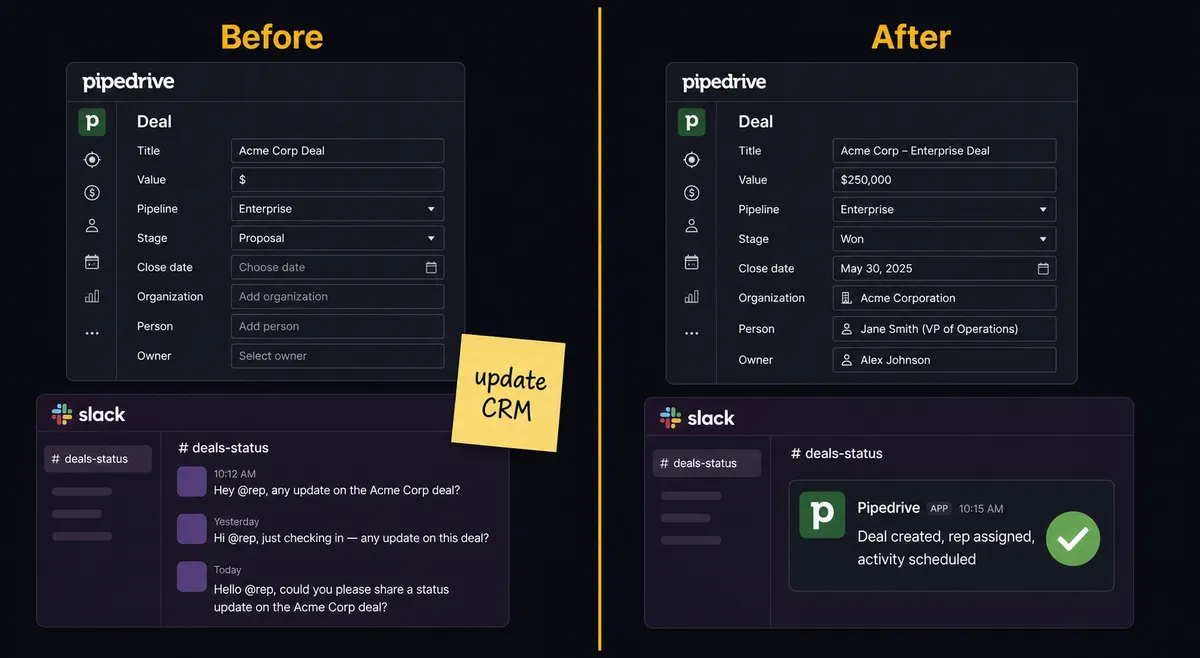
Sales operations teams manage a gap between Pipedrive and Slack that nobody has formally designed. Reps update Pipedrive when they get to it, often on Friday afternoon. The team finds out about a new deal or a stage change from a direct message or a hallway conversation, not from the system. Exceptions, like duplicate persons, an organization that needs merging, or a deal that stalled in the wrong stage, fall through the cracks because there is no systematic check before a new record gets created and no structured way to route the exception to the person who can fix it.
The cost is not just data hygiene. Duplicate persons mean duplicate outreach. Stale stages mean inaccurate pipeline reports. A billing manager or operations lead who needs a clean Pipedrive export for the board review is working from a spreadsheet patched together from two data sources because nobody had time to clean the CRM. The work piles up manually, and the reps who should be selling are the ones doing the cleanup.
How it works: the connection
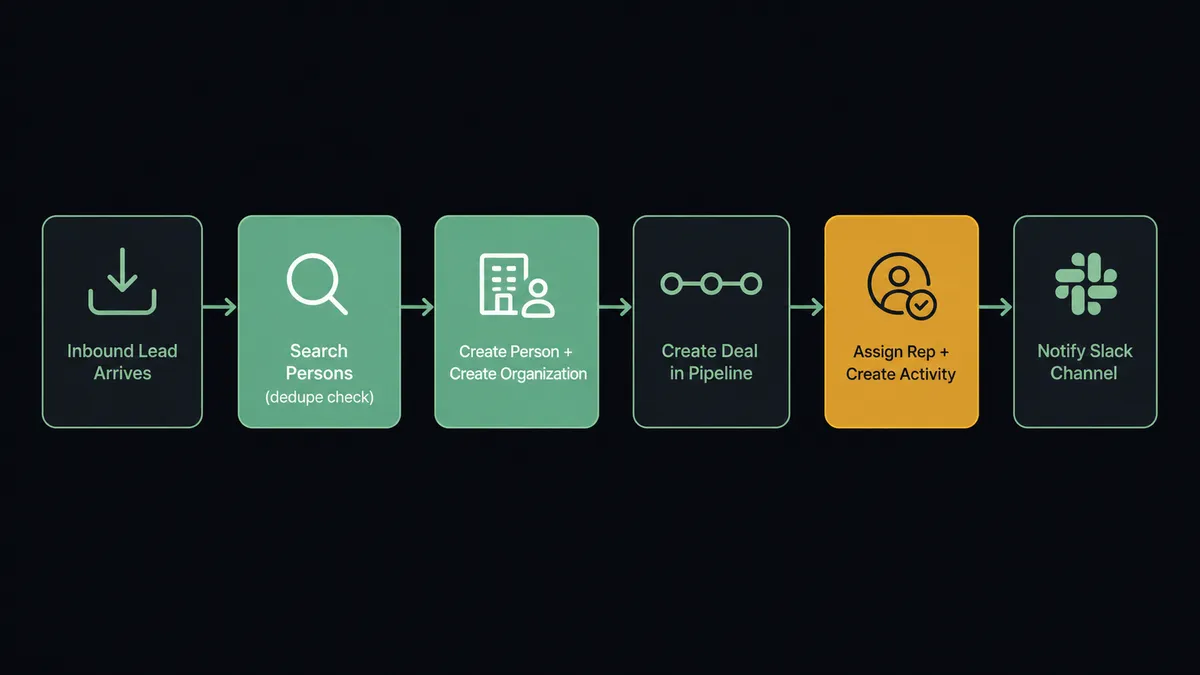
The Pipedrive connector in FlowRunner gives an agent access to the full object model. A typical lead intake flow runs like this:
- The flow starts on a schedule or from an external trigger (a form submission, a webhook from another system).
- The agent calls Search Persons to check whether the contact already exists by email.
- If the person is new, it calls Create Person with the enriched data. If a match exists, it calls Update Person.
- It calls Search Organizations to find or create the account, then Create Deal in the right pipeline and stage.
- Add Deal Participant attaches buying-committee contacts. Add Deal Follower assigns the rep.
- Create Activity schedules the first call or task on the deal.
- The agent calls Send Message to Channel in Slack with the deal summary: company, value, source, assigned rep, and the link to the Pipedrive record.
The assigned rep gets the context in Slack before they would have opened Pipedrive to check. The CRM is updated at the moment the event happens, not when someone remembers to log it.
For stage progression, the flow works from the other direction. An ERP signals a signed contract. The agent calls Search Deals, then Update Deal to advance the stage to Closed Won and set the contract value. Get Deal Products attaches the line items. Create Note records the contract reference. Send Message to Channel posts the win to #wins or #sales. The deal advances from a data signal, not from a rep’s memory.
Can an AI agent run it? (and why a human stays in the loop)
A standard Zapier or n8n connection between Pipedrive and Slack sends a notification. The agent reads a deal and posts a message. That is beat one. FlowRunner adds beat two: the agent evaluates what it found and decides what to do next, including when to stop and ask.
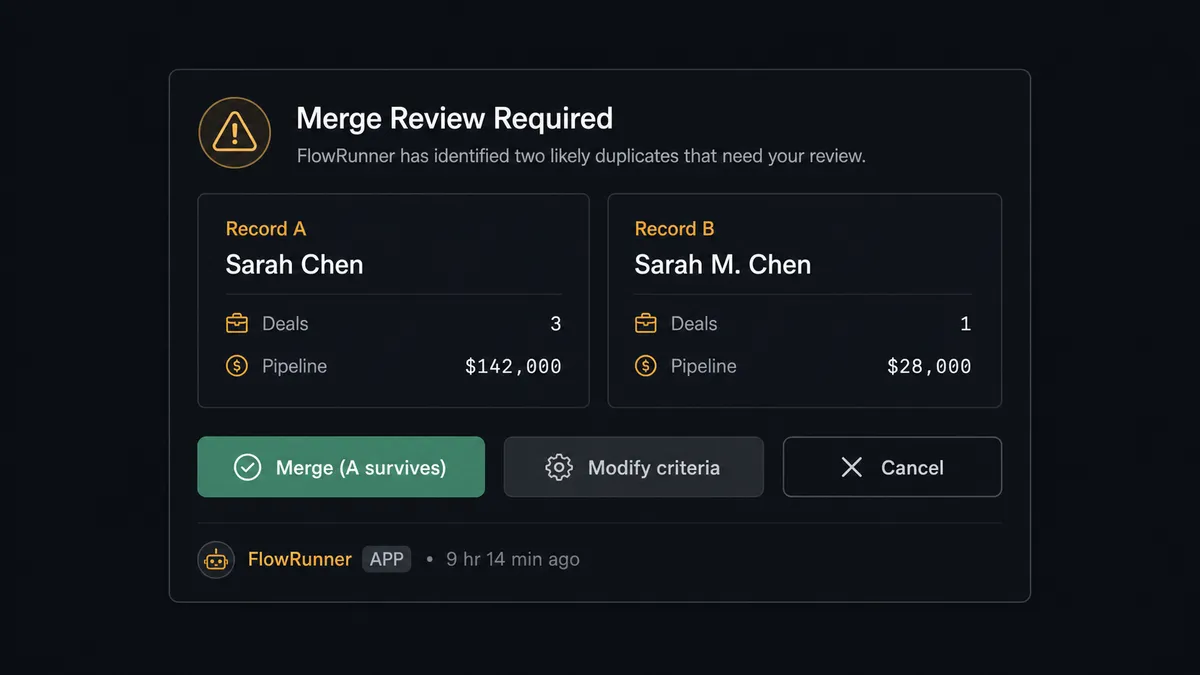
Here is a concrete example. Your ops lead is cleaning up duplicate persons in Pipedrive after a batch import. The agent runs through the list, calls Search Persons, and finds two contact records with the same email but different names and deal histories. Merging them is not a data question. It is a judgment call: which record is the survivor, what happens to the deal history on the merged record, and does the rep assigned to the secondary record need to know?
The agent does not execute Merge Persons on its own. It assembles the merge request: both person records, the deals attached to each, the activity history, and a count of affected records. It invokes the human-in-loop flow as a callable tool and posts a Slack message to the sales lead via Send Direct Message: “Merge requested for two persons matching [email]. Record A has 3 deals, Record B has 1 deal. Choose the survivor record, modify the merge criteria, or cancel.” The message includes interactive buttons powered by Slack’s On Block Action trigger.
The workflow pauses. The sales lead decides from their phone. The agent resumes with the decision as input, calls Merge Persons with the chosen survivor, creates a Note recording the approver and the timestamp, and posts a confirmation to the channel. This is not a hardcoded threshold. The agent recognized that a merge carries consequence and made the call to involve a human. That is the digital andon cord: the agent stops the line when it hits something it should not decide alone.
FlowRunner vs the tool you are probably comparing
If you are a non-technical team, you likely considered Zapier. Zapier is genuinely good at simple, linear two-system connections. It has a large library of pre-built Zaps, a polished no-code interface, and a large community of templates. For straightforward notification flows (deal created in Pipedrive, message posted to Slack), it works.
The comparison shifts when you need the agent to reason, or when a step carries real consequence.
| Feature | Zapier | FlowRunner |
|---|---|---|
| Human-in-loop decisions | Not available natively; requires external tools or workarounds | Native: agent invokes a human-in-loop flow as a callable tool; workflow pauses and resumes on decision |
| Interactive Slack buttons that resume a workflow | Not supported | On Block Action trigger resumes the agent with the human’s decision |
| Agent reasoning before acting | Not available; Zaps follow a fixed sequence | AI Agent node reads data, reasons, selects tools, and decides when to escalate |
| Pipedrive connector depth | Core objects (deals, contacts, activities) | Full object model: deals, leads, persons, organizations, pipelines, stages, call logs, projects, configuration fields |
| Unlimited users on every paid tier | Per-task pricing; team size affects cost | Yes, all tiers include unlimited users and unlimited workflows |
| Self-hosted option | No | Yes, Community Edition free; Enterprise self-hosted available |
Before and after
| Before | After | |
|---|---|---|
| CRM update timing | Reps log deals and activities when they get to it, often days after the event | Deals, persons, and activities created at the moment the trigger fires |
| Duplicate prevention | No systematic check before creating a new person or organization | Search Persons and Search Organizations run before every create; duplicates caught before they land |
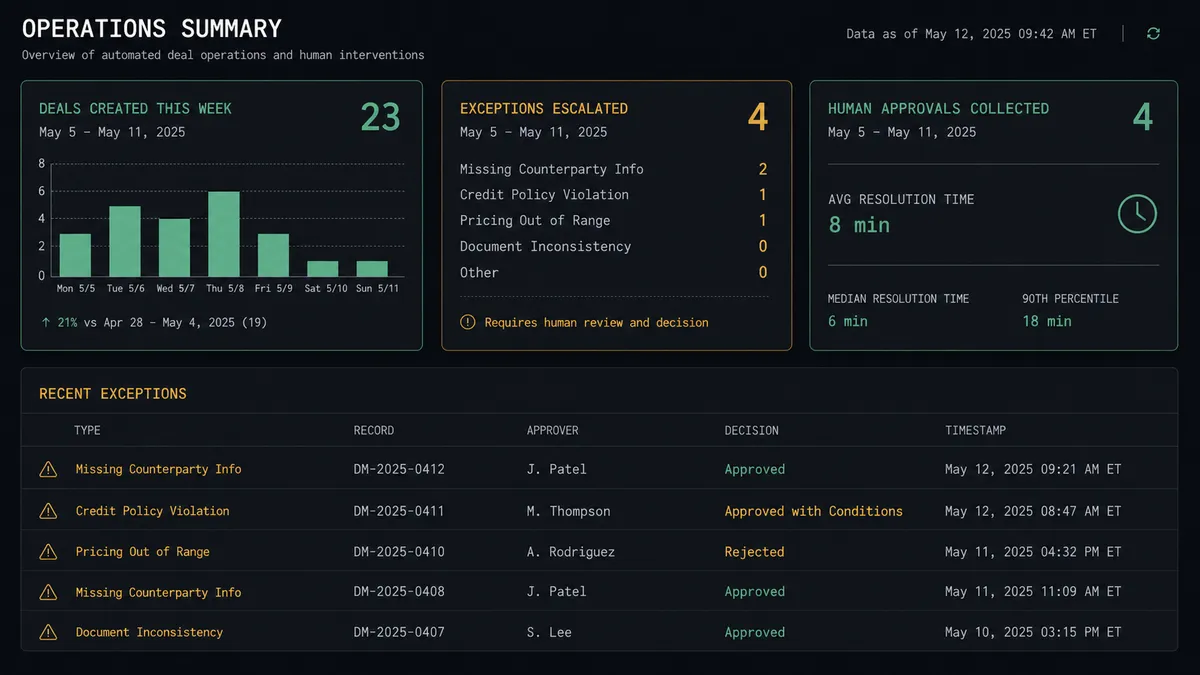
| Exception routing | Duplicate or merge issues raised in Slack threads or email, tracked manually | Agent surfaces exception in Slack with full context and interactive buttons; resolved in one session |
| Stage progression | Reps advance stages manually after remembering to log the signal | External signals (signed contract, ERP update) drive stage changes automatically via Update Deal |
| Merge and delete safety | Anyone with CRM access can merge or delete records without review | Agent requires human approval via Slack before executing any Merge Persons, Merge Deals, or Delete Pipeline |
| Audit visibility | No record of who changed what or when | Every agent action, every human decision, and every approver identity logged in the audit trail |
What you can build
Inbound lead intake with dedupe and Slack assignment alert. The agent calls Search Persons, creates or updates the person and organization, creates the deal in the right pipeline, assigns the rep via Add Deal Follower, and posts the deal summary to #new-deals with a link. The rep opens Slack to find a fully built CRM record waiting.
Stage-change digest posted to #sales every morning. A scheduled flow calls Get Deals Timeline overnight, filters for stage changes in the last 24 hours, and posts a structured summary to your sales channel via Send Message to Channel. Leadership sees pipeline movement without pulling a report.
Controlled bulk import with a Slack confirmation gate. A list of prospects from a tracker runs through the agent. For each row, Search Persons checks for a match. New records go through Create Person and Create Lead automatically. Rows that match an existing person by email but have conflicting data get flagged. The agent batches the conflicts and posts a Slack message: “14 records need review. Conflicts attached.” The ops lead reviews and approves the merge or skip for each. Routine rows process without touching anyone’s inbox.
Deal won notification with product line attachment. When an ERP signals a signed contract, the agent calls Search Deals, Update Deal to Closed Won, Get Deal Products to attach the line items, Create Note with the contract reference, and Send Message to Channel with the win announcement. No rep has to remember to update Pipedrive or post to #wins.
Pipeline restructure under approval. When a sales leader requests a pipeline rename or stage deletion, the agent calls Get Pipeline Deals to count active deals in the affected stage, then invokes the human-in-loop flow: “Delete Stage requested. 7 active deals in this stage. Confirm target stage for migration, or cancel.” On approval, it runs Update Deal across the affected records, then Delete Stage.
Getting started
FlowRunner has a free plan with 100 executions a month, every integration included, and no credit card required, and new accounts get 14 days of Professional on top. Corporate email required. Your trial starts when you connect your first integration, not when you sign up.
Connect both integrations and build your first flow:
Start your free trial at flowrunner.ai or book a walkthrough at calendly.com/flowrunner/intro. The walkthrough covers your specific Pipedrive pipeline structure and how the human-in-loop step maps to your team’s approval process.
Frequently asked questions
Is it free to connect Pipedrive and Slack on FlowRunner?
FlowRunner has a free plan with 100 executions a month, every integration included, and no credit card required, and new accounts get 14 days of Professional on top.
Can I self-host this connection?
Yes. FlowRunner offers a self-hosted Community Edition at no cost and an Enterprise self-hosted option for teams that need multi-instance clustering and a full compliance suite.
Does the agent need my own OpenAI or AI provider key?
FlowRunner uses a BYOK (Bring Your Own Keys) model. You connect your preferred AI provider directly. The platform orchestrates the agent; you control which model it runs on and the cost goes to your account.
What happens when the agent is not sure what to do?
The agent invokes a human-in-loop flow as a callable tool. It packages what it found, why it is escalating, and the available options, then sends a Slack message with interactive buttons. The workflow pauses until a human decides. Then it resumes.
Does this replace Pipedrive's native Slack integration?
No. Pipedrive's native Slack notification is a one-way alert. FlowRunner adds two-way orchestration: the agent reads Pipedrive data, reasons about it, posts to Slack with interactive decision buttons, and writes back to Pipedrive based on the human's response.
What Pipedrive objects can the agent work with?
The FlowRunner Pipedrive connector covers deals, leads, persons, organizations, activities, notes, tasks, products, pipelines, stages, call logs, files, and the configuration fields behind them. That is the full Pipedrive object model.