How to Connect Salesforce Pro with Aha! (With or Without an AI Agent)
Pipe feature gaps from Salesforce opportunities into Aha! as ideas with pipeline dollars attached, optionally as an AI agent that builds the revenue case per gap and pauses for the product lead before Create Feature commits the roadmap.
How do you connect Salesforce Pro to Aha!?
You connect Salesforce Pro to Aha! by having a scheduled workflow run Find Records by Query with a SOQL filter for opportunities carrying new product-gap or loss-reason entries, then file each gap into the product portal: Create Idea logs it in the right Aha! product with the account and deal amount as evidence, and Create Enhanced Note writes the idea’s reference number back onto the opportunity. FlowRunner is a visual AI-agent orchestration platform where automations run autonomously and pause for human judgment on the steps that carry real consequence. The same connection can run as an AI agent that dedupes gaps by meaning, totals the open pipeline each one blocks, and pauses for the product lead before Create Feature converts sales evidence into a roadmap commitment.
The problem it solves
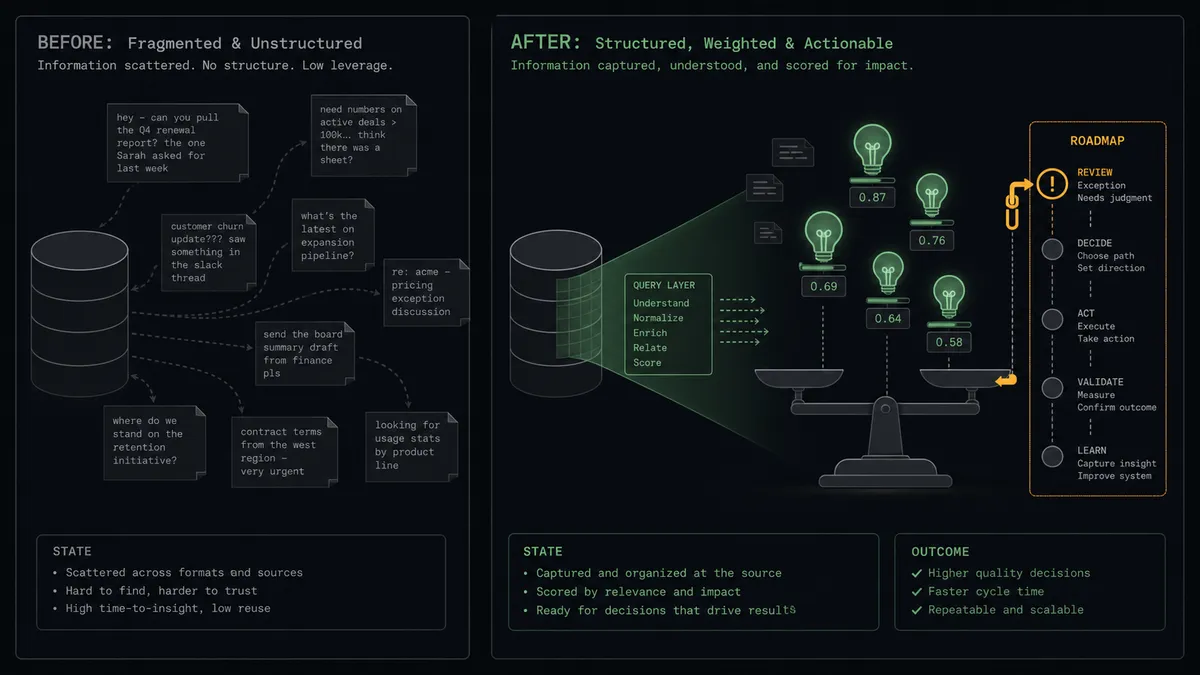
In most Salesforce shops, the connection between lost revenue and the product roadmap is a quarterly meeting and a shared memory. Reps record gaps in opportunity fields and loss reasons, then the data sits. Product asks “what is sales hearing?” and gets the three stories the sales leader happens to remember, weighted by recency and volume rather than dollars. Someone eventually exports a report, spends an afternoon grouping free-text gap descriptions by hand, and produces a slide that is outdated before the meeting ends. The pipeline knows exactly which gaps cost money. Nobody is querying it.
The edges are where the real damage hides. Five mid-size opportunities stall on the same missing capability, described five different ways, and no single loss looks big enough to matter, so the pattern never surfaces. Meanwhile one large account’s request gets promoted straight to the roadmap through an escalation thread, with no comparison against the quieter gaps blocking more total pipeline. And when a gap finally ships, nobody walks the pipeline backward to find the opportunities that stalled on it, so the win-back revenue is left on the table.
How it works: the connection
The connection polls Salesforce and writes to Aha!. Here is the plain version, grounded in the real connector actions.
- Trigger: On a schedule, the workflow runs Find Records by Query with a SOQL query for opportunities whose product-gap or loss-reason fields changed since the last run.
- Read: It calls Find Record to retrieve the account, amount, and stage behind each flagged opportunity.
- Check for duplicates: It calls List Ideas with a full-text query, plus List Features for anything already promoted, to find whether this gap is already on file.
- File the idea: For new gaps, it calls Create Idea in the right product, located with List Products, embedding the account and amount as evidence in the description.
- Close the loop: It calls Create Enhanced Note on the opportunity with the idea’s reference number, so the link is visible from the record the rep works in.
- Keep score: For matched gaps, it updates the existing idea’s evidence rather than duplicating it, so each idea accumulates its true weight.
That is the “just connect them” answer. Every gap a rep records becomes a deduplicated, revenue-attributed entry in the portal, without anyone exporting a report or grouping free text by hand.
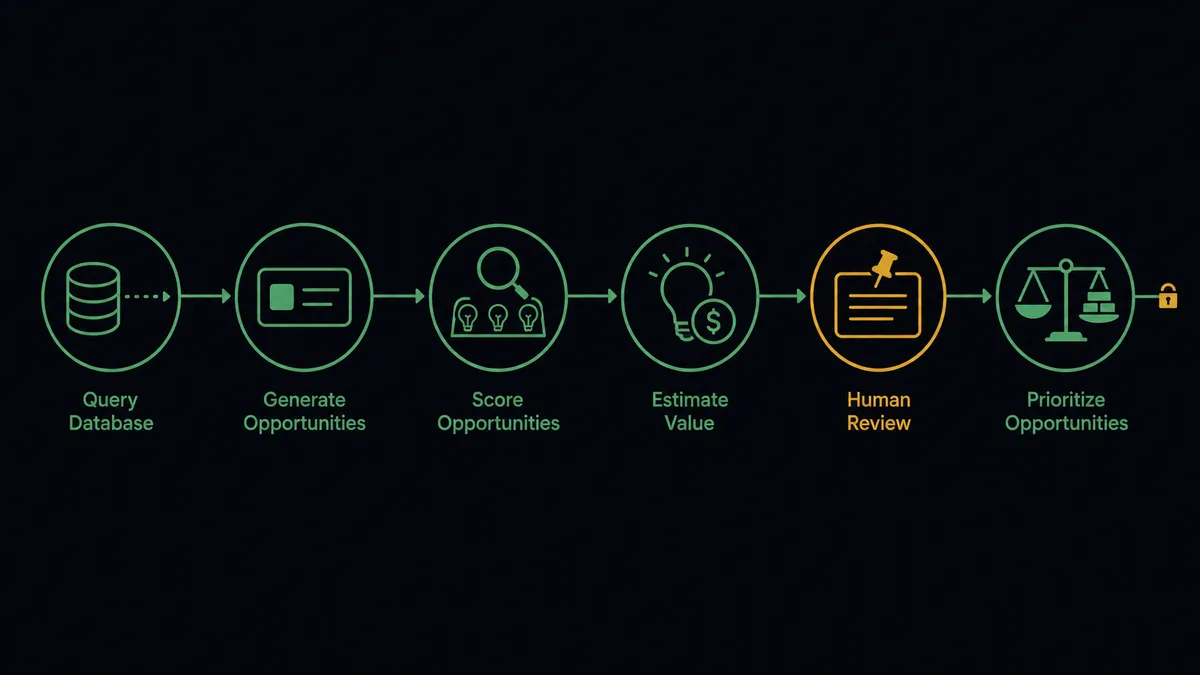
Can an AI agent run it? (and why a human stays in the loop)
Yes, and this is the pair where the agent’s ability to query, not just move, data pays off. The agent holds Find Records by Query, Find Record, List Ideas, List Features, Get Feature, Create Idea, Create Enhanced Note, and Create Feature as tools. When a new gap arrives, it does what a good product ops analyst would do: it matches the gap by meaning against the existing portal, then turns around and runs Find Records by Query again, this time asking Salesforce a sharper question: which open opportunities are linked to this same gap, and what do they add up to? The answer becomes evidence written into the idea, refreshed as the pipeline moves.
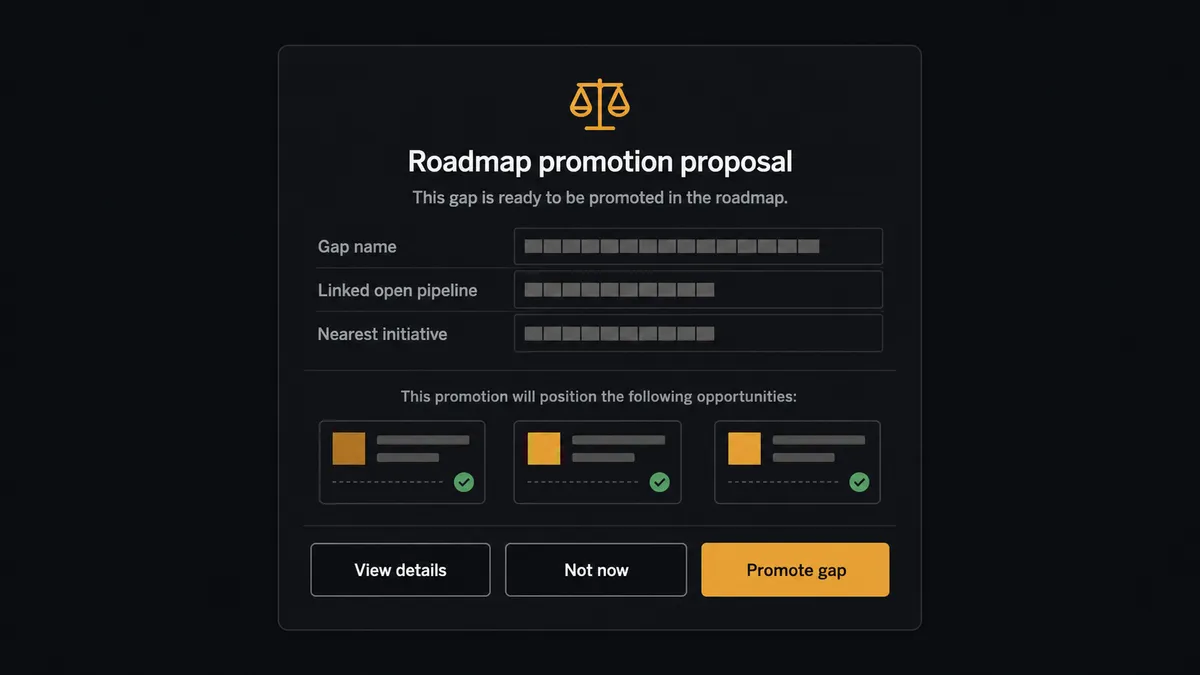
The consequential step is Create Feature. Promoting an idea in Aha! signals engineering and leadership that this is getting built, and once said, that is expensive to unsay. So the agent never promotes on its own. When a gap’s accumulated evidence crosses the threshold you set, or when the agent judges the pattern significant, it assembles the full case: the idea, every linked opportunity with amount and stage, and where the work would land against List Releases and List Initiatives. Then it invokes a human-in-loop flow it holds as a callable tool and the workflow pauses. The product lead receives: “This gap is now linked to [affected opportunities] in open pipeline, totaling [queried amount]. Nearest initiative: [initiative]. Promote to a feature, keep accumulating, or decline?” Only after a named person approves does Create Feature run, and the decision plus its evidence lands in the audit trail.
That is the digital andon cord between sales and product: like Toyota’s line, the workflow stops the line exactly where data ends and strategy begins, and the person accountable for the roadmap pulls it forward.
FlowRunner vs n8n
If your revenue operations team includes engineers, n8n deserves a look for this pair. It self-hosts under a fair-code license, its node library and community template gallery are among the largest in the category, and both the Salesforce and Aha! APIs can be orchestrated from its nodes with fine-grained control over batching and retries. That developer control is real.
The gap is in who owns the judgment layer, and where the human decision lives.
| What matters for this pair | FlowRunner | n8n |
|---|---|---|
| Human-in-the-loop on Create Feature | Native. The agent invokes an approval flow as a callable tool before anything reaches the roadmap | Approval patterns exist as wait and form nodes a developer wires into the graph |
| Who runs the flow | An AI agent matches gaps by meaning, queries pipeline, picks actions as tools | A node graph you design and maintain; AI runs inside nodes you configure |
| Users included | Unlimited users on every tier | Cloud plans meter by executions and plan level; unlimited on self-hosted |
| Bring your own AI keys | Yes, BYOK | Yes, n8n also connects your own model keys |
| Self-hosted option | Yes, cloud-hosted or self-hosted | Yes, self-hosting is a genuine n8n strength |
| Pricing model | Transparent workflow-based tiers with clear execution limits | Execution-based cloud pricing that teams find hard to predict; full cloud compliance sits in custom-priced Enterprise |
If an engineer will own this pipeline and your gap taxonomy is stable enough to encode in rules, n8n can run it. If product operations should own it directly, matching should improve without code, and every roadmap promotion should pass through the product lead with pipeline evidence and an audit trail attached, this pairing is the better fit.
Before and after
| Category | Before | After |
|---|---|---|
| Gap visibility | Product gaps live in free-text fields nobody queries | Every recorded gap becomes a deduplicated Aha! idea within minutes |
| Revenue attribution | Anecdotes stand in for pipeline impact | Each idea carries queried opportunity evidence via Find Records by Query, refreshed as pipeline moves |
| Prioritization | The loudest escalation reaches the roadmap first | Promotion proposals rank on accumulated pipeline weight, decided by the product lead |
| Sales-product trust | Reps stop recording gaps because nothing comes back | The Aha! reference on each opportunity shows reps their input landed somewhere real |
| Win-back motion | Shipped features never reconnect to the deals they would reopen | Linked opportunities are findable from the idea when its feature status changes |
What you can build
Gap capture to weighted idea, hands off. Find Records by Query surfaces the flagged opportunity, the agent pulls context with Find Record, matches against List Ideas, files or reinforces the idea with Create Idea, and links it back via Create Enhanced Note.
Pipeline-weighted promotion. The agent totals open pipeline per gap with fresh SOQL queries and brings the product lead a documented promotion case before Create Feature runs, evidence attached.
Loss-reason autopsy. On a weekly schedule the agent queries closed-lost opportunities, extracts product-gap loss reasons, and folds them into the portal so lost revenue keeps counting toward the case even after the deal dies.
Ship-and-reopen list. When a promoted feature’s status changes, the agent reads it with Get Feature, walks the linked opportunities back through Find Records by Query, and delivers sales a re-engagement list of accounts that stalled on exactly that gap.
Strategy-versus-demand digest. The agent maps accumulating ideas against List Initiatives and posts a recurring digest of which strategic bets incoming evidence supports and which gaps are growing weight outside any initiative, so planning starts from the data.
Getting started
Start on the free plan: 100 executions a month, every integration included, no credit card required, plus 14 days of Professional for new accounts. Both connectors are available on every tier, and every tier includes unlimited users and unlimited workflows.
Explore the integration details:
- Salesforce Pro integration (26 actions covering leads, contacts, records, SOQL queries, and email)
- Aha! integration (10 actions covering products, features, ideas, releases, and initiatives)
Start building free at flowrunner.ai or book a demo to see a live Salesforce Pro to Aha! workflow, pipeline-weighted promotion gate and all.
Frequently asked questions
Is it free to connect Salesforce Pro and Aha! on FlowRunner?
You can build and run the connection on FlowRunner's free plan, which includes 100 executions a month and every integration with no credit card required, and new accounts also get 14 days of Professional. Both connectors are available on every FlowRunner tier, and every tier includes unlimited users and unlimited workflows.
Can I self-host the Salesforce Pro to Aha! workflow?
Yes. FlowRunner offers a cloud-hosted option and a self-hosted option, so the connection can run inside your own environment.
Does the AI agent need my own OpenAI or Claude key?
FlowRunner uses a bring-your-own-keys model, so you connect the AI provider key you already have. You are not locked to one model.
What happens when the agent cannot tell whether two opportunities describe the same product gap?
It pauses and shows its work. The agent posts both request texts and the candidate match from List Ideas side by side, and a person rules merge or separate. The portal never accumulates silent duplicates and never loses a distinct request to a bad merge.
Which events start the Salesforce Pro to Aha! workflow?
Neither connector publishes a catalog trigger, so the workflow runs on a schedule. It polls Salesforce with Find Records by Query, using a SOQL query for opportunities whose product-gap or loss-reason fields changed since the last run.
How does pipeline value get attached to an Aha! idea?
The agent runs Find Records by Query to pull every open opportunity linked to the same gap, sums the amounts, and writes the evidence into the idea's description when it files or updates it. When it proposes promotion, that queried pipeline total is part of the approval message.