How to Connect ShipBob with Aircall (With or Without an AI Agent)
Connect ShipBob shipment events to Aircall contacts and insight cards so support answers 'where is my order' calls with live fulfillment status, optionally as an AI agent that pauses for a human before a stuck order is canceled and reshipped.
How do you connect ShipBob to Aircall?
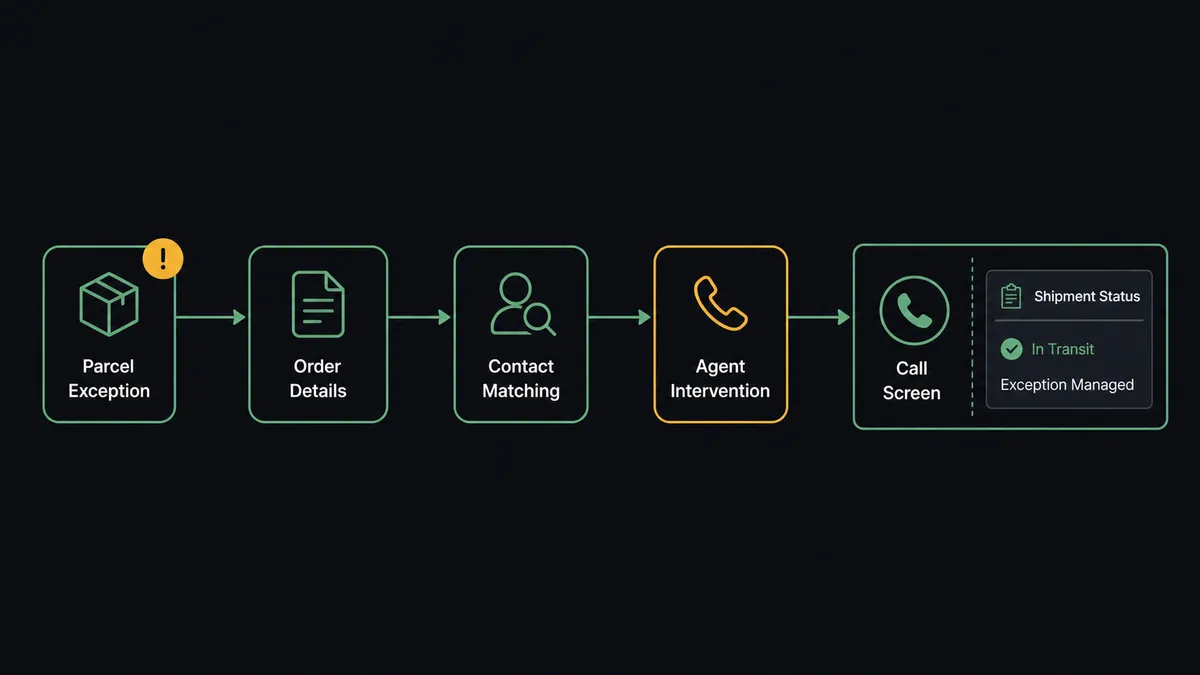
You connect ShipBob to Aircall by having ShipBob’s shipment triggers drive Aircall actions: On Shipment Exception fires, the workflow pulls the order with Get Order and Get Shipment, matches the customer in Aircall with List Contacts, and pushes the status onto the call screen with Add Insight Cards, so when the customer calls asking where their order is, the rep already knows. FlowRunner is a visual AI-agent orchestration platform where automations run autonomously and pause for human judgment on the steps that carry real consequence. The same connection can run as an AI agent that keeps support armed with live fulfillment status and pauses for a human before a stuck order is canceled and reshipped at real cost.
The problem it solves
“Where is my order” is the most common support call in commerce, and today your team answers it blind. The customer is on the line, the rep opens the ShipBob dashboard in another tab, searches the order, deciphers the shipment status, and narrates it back while the customer waits. Multiply by every delayed parcel in peak season. The information exists; it just lives one system away from the person who needs it mid-conversation.
The exceptions are where blindness gets expensive. A shipment throws an exception on Tuesday, nobody notices, and the customer’s Friday call is the first the team hears of it, which means the rep is apologizing for a three-day-old problem with zero context. Under pressure, the improvised fix is often the costly one: cancel the order, reship it overnight, eat the double fulfillment cost, and then watch the original parcel arrive anyway because the exception was a carrier scan hiccup. The recovery move was right sometimes and wasteful often, and nobody priced it before pulling the trigger.
How it works: the connection
The connection listens to ShipBob and writes to Aircall. Here is the plain version, grounded in the real connector actions.
- Trigger: ShipBob fires On Shipment Exception when a shipment hits a problem, and On Shipment On Hold when one stalls.
- Read: The workflow calls Get Order and Get Shipment to pull the items, recipient, and the latest carrier status behind the exception.
- Match: It calls List Contacts in Aircall to find the customer by phone and email, with Create Contact or Update Contact keeping the record current.
- Arm the team: It calls Add Insight Cards so the order number, shipment status, and exception detail sit on the call screen before the customer ever dials.
- Track the lifecycle: On Order Shipped and On Shipment Delivered refresh the card, and On Return Completed closes the loop when a return lands back at the warehouse.
- Record the conversation: After the call, Add Tags to Call and Comment on Call capture the disposition, so the next rep sees what was promised.
That is the “just connect them” answer. The warehouse and the phone system finally share one picture, and the rep answers “where is my order” before the customer finishes asking.
Can an AI agent run it? (and why a human stays in the loop)
Yes, and the agent changes this from a notification feed into an operations layer. It holds the actions as tools: Get Order, Get Shipment, Get Inventory, Estimate Fulfillment Cost, Cancel Order, Create Order, Create Return on the ShipBob side; List Contacts, Update Contact, Add Insight Cards, Add Tags to Call, Comment on Call on the Aircall side. When an exception fires, the agent does not just forward it. It classifies the problem: a carrier scan gap that usually self-resolves, an address failure that needs the customer on the phone, a package genuinely lost. It checks Get Inventory to see whether a replacement is even in stock before anyone promises one.
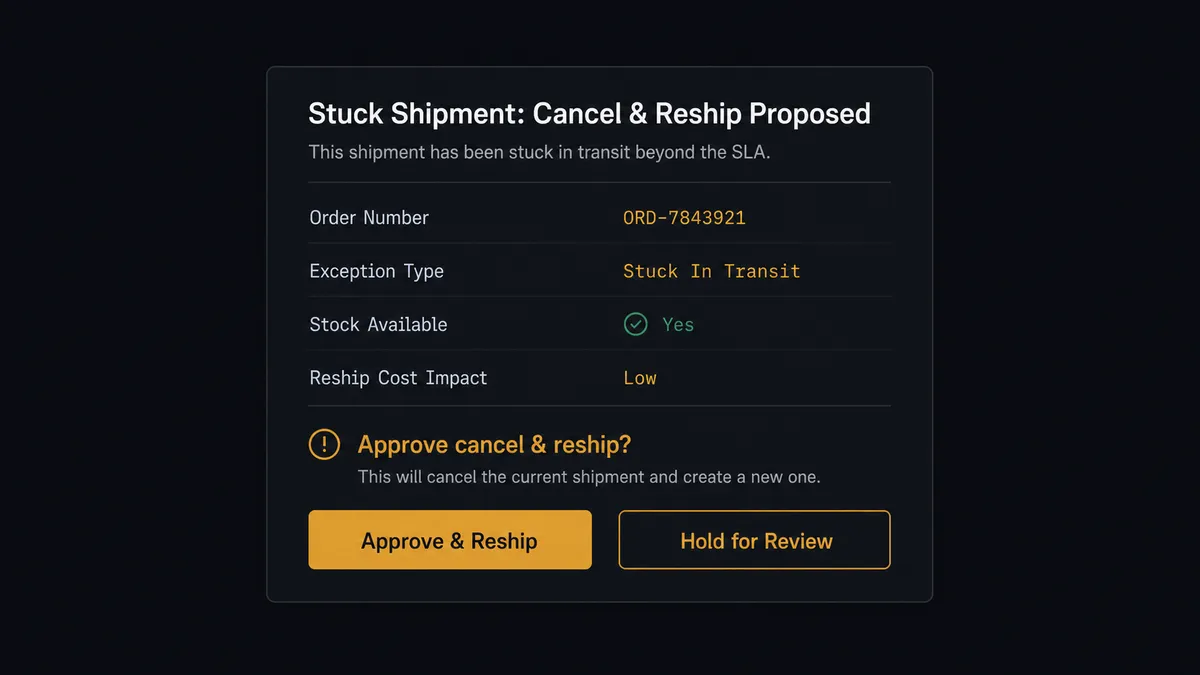
The consequential step is Cancel Order followed by a replacement Create Order. That move spends real money twice, cancellation is irreversible, and done hastily it double-ships to a customer whose original parcel was one scan from moving. So the agent drafts the play instead of running it. It invokes a human-in-loop flow it holds as a callable tool, and the workflow pauses and posts to the ops lead: “Order [number] for [customer]: exception [type], no carrier movement since [date]. Replacement is in stock per Get Inventory, reship priced at [estimate] per Estimate Fulfillment Cost. Customer called [when], promised a callback. Cancel and reship?” Only on approval does the agent call Cancel Order and Create Order, then log the resolution with Comment on Call. The evidence, the approver, and the timestamp land in the audit trail.
Prospects call this a digital andon cord: like Toyota’s production line pull cord, the workflow stops the line before the expensive, irreversible move. Status flows to the call screen at machine speed. Spending the second fulfillment fee waits for a person who saw the price.
FlowRunner vs Celigo
Teams running ShipBob at scale will meet Celigo in their evaluation, and Celigo has earned its place: it is a mature iPaaS with prebuilt integration apps, deep NetSuite and ERP integration expertise, and a strong record standardizing high-volume data sync for e-commerce operations. If your project is wiring ShipBob into an ERP-centered data architecture, Celigo belongs on the shortlist.
This pair is a different kind of problem: it is about a phone call, a judgment, and a cost decision, not a data pipeline.
| What matters for this pair | FlowRunner | Celigo |
|---|---|---|
| Human-in-the-loop before Cancel Order and reship | Native. The agent invokes an approval flow as a callable tool and pauses mid-run | Exception management surfaces errors in dashboards; approval conversations happen outside the flow |
| Who runs the flow | An AI agent classifies exceptions, checks stock and cost, picks actions as tools | Prebuilt integration apps and flows configured by an integration team |
| Users included | Unlimited users on every tier | Licensed per edition; expanding access is a commercial conversation |
| Bring your own AI keys | Yes, BYOK | AI capabilities are Celigo’s own platform features |
| Self-hosted option | Yes, cloud-hosted or self-hosted | Cloud iPaaS |
| Pricing model | Transparent workflow-based tiers starting at $45/mo | Endpoint and edition based, quote-driven |
If you are consolidating a large ERP data architecture, Celigo is a genuine fit. If the job is getting live shipment truth in front of the people answering the phone, with the expensive recovery move gated and audit-trailed, this pairing on FlowRunner is the better fit, and it starts at a price an ops team can approve without procurement.
Before and after
| Category | Before | After |
|---|---|---|
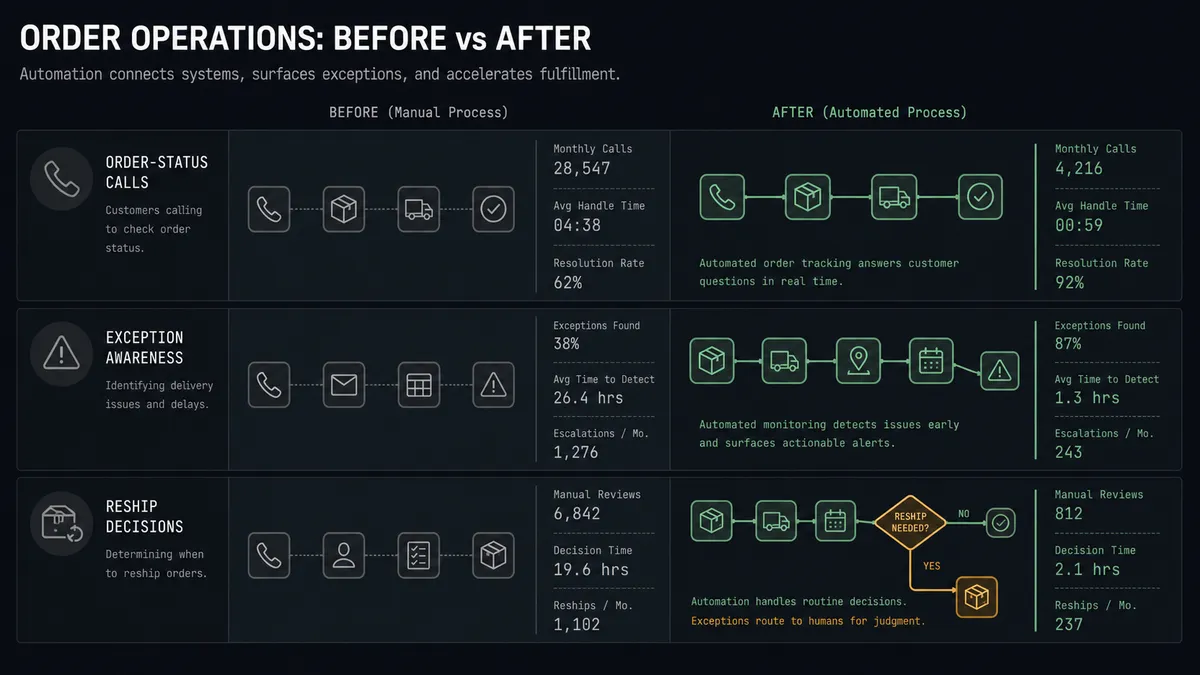
| ”Where is my order” calls | Reps search the ShipBob dashboard while the customer waits | The shipment status is on the call screen before the phone is answered |
| Exception awareness | Problems surface when the customer complains days later | On Shipment Exception arms the team the moment it fires |
| Cancel-and-reship decisions | Improvised under pressure, unpriced, sometimes double-shipped | Drafted with stock and cost evidence, executed only on approval |
| Promise tracking | Callback promises live in individual reps’ memories | Tags and comments keep every promise visible on the account |
| Returns | Completed returns sit unnoticed until reconciliation | On Return Completed updates the card and prompts the closing call |
What you can build
Answer-ready support. Every On Order Shipped, On Shipment Exception, and On Shipment Delivered event refreshes Add Insight Cards, so any rep who picks up sees the parcel’s live status without opening another tab.
Exception-to-callback motion. On Shipment Exception, the agent matches the customer, arms the card, and tags the account for a proactive callback, so your team calls the customer before the customer calls you.
Gated cancel-and-reship. For genuinely stuck orders, the agent packages the exception evidence, Get Inventory stock check, and Estimate Fulfillment Cost price, then waits for the ops lead before Cancel Order and the replacement Create Order run.
Phone-initiated returns. When a customer calls about a damaged item, the rep resolves it live: the agent creates the RMA with Create Return and logs it with Comment on Call, and On Return Completed later confirms the warehouse received it.
Hold-queue digest. On a schedule, the agent sweeps On Shipment On Hold events still unresolved, cross-references call tags to show which customers already phoned, and posts one prioritized digest to ops instead of a drip of alerts.
Getting started
Start on the free plan: 100 executions a month, every integration included, no credit card required, plus 14 days of Professional for new accounts. Both connectors are available on every tier, and every tier includes unlimited users and unlimited workflows, so the whole support floor and the ops lead who approves reships are covered without seat math.
Explore the integration details:
- ShipBob integration (5 triggers and 20 actions covering orders, shipments, inventory, and returns)
- Aircall integration (33 actions covering calls, contacts, tags, and insight cards)
Start building free at flowrunner.ai or book a demo to see a live ShipBob to Aircall workflow, reship approval and all.
Frequently asked questions
Is it free to connect ShipBob and Aircall on FlowRunner?
You can build and run the connection on FlowRunner's free plan, which includes 100 executions a month and every integration with no credit card required, and new accounts also get 14 days of Professional. Both connectors are available on every FlowRunner tier, and every tier includes unlimited users and unlimited workflows.
Can I self-host the ShipBob to Aircall workflow?
Yes. FlowRunner offers a cloud-hosted option and a self-hosted option, so the connection can run inside your own environment.
Does the AI agent need my own OpenAI or Claude key?
FlowRunner uses a bring-your-own-keys model, so you connect the AI provider key you already have. You are not locked to one model.
What happens when a shipment is stuck and the customer wants a replacement?
The agent drafts the recovery: it pulls the order with Get Order, prices the redo with Estimate Fulfillment Cost, and posts the plan to your ops channel. Cancel Order and the replacement Create Order only run after a named approval, so nobody double-ships on a shipment that was about to move.
Which ShipBob events can trigger an Aircall action?
ShipBob offers five triggers: On Order Shipped, On Shipment Delivered, On Shipment Exception, On Shipment On Hold, and On Return Completed. On Shipment Exception and On Shipment On Hold are the two that matter most for support readiness.
How do reps see fulfillment status during a call?
The workflow uses Add Insight Cards in Aircall. Each shipment event refreshes the card on the matched contact with the order number, status, and latest exception, so whoever answers sees the same picture the warehouse sees.