How to Connect ShipBob with Base64.ai (With or Without an AI Agent)
Connect ShipBob fulfillment events to Base64.ai document intelligence so shipment exceptions and delivery disputes resolve on evidence, with an AI agent that pauses for a human before a replacement order spends real money.
How do you connect ShipBob to Base64.ai?
You connect ShipBob to Base64.ai by having ShipBob’s On Shipment Exception trigger drive Base64.ai actions: the workflow pulls context with Get Shipment and Get Order, runs Scan Document on the carrier paperwork, and checks proof-of-delivery signatures with Detect Signatures, so every exception arrives as structured evidence instead of a PDF attachment nobody opens. FlowRunner is a visual AI-agent orchestration platform where automations run autonomously and pause for human judgment on the steps that carry real consequence. When the connection runs as an AI agent, the agent reads the evidence and recommends a resolution, and it stops for a named human before Create Order ships a replacement at your expense.
The problem it solves
Every shipment exception opens a small investigation, and today a person runs it by hand. A package shows an exception, and someone in ops downloads the carrier’s paperwork, squints at a scanned proof-of-delivery, compares the address against the order, checks whether the signature looks like anything, and decides: reship, refund, or fight the carrier. Each investigation is minutes of judgment work buried under minutes of document handling, and exceptions arrive in bursts precisely when the team is busiest.
The edges cost real money in both directions. Move too fast and you reship orders that were actually delivered, eating the cost of goods and shipping twice while training bad actors that a “never arrived” email works. Move too slow and genuine victims of a lost package wait a week for a replacement, then tell everyone about it. Returns have the same shape: On Return Completed says a box came back, but whether the paperwork matches what is inside is a document question nobody consistently asks.
How it works: the connection
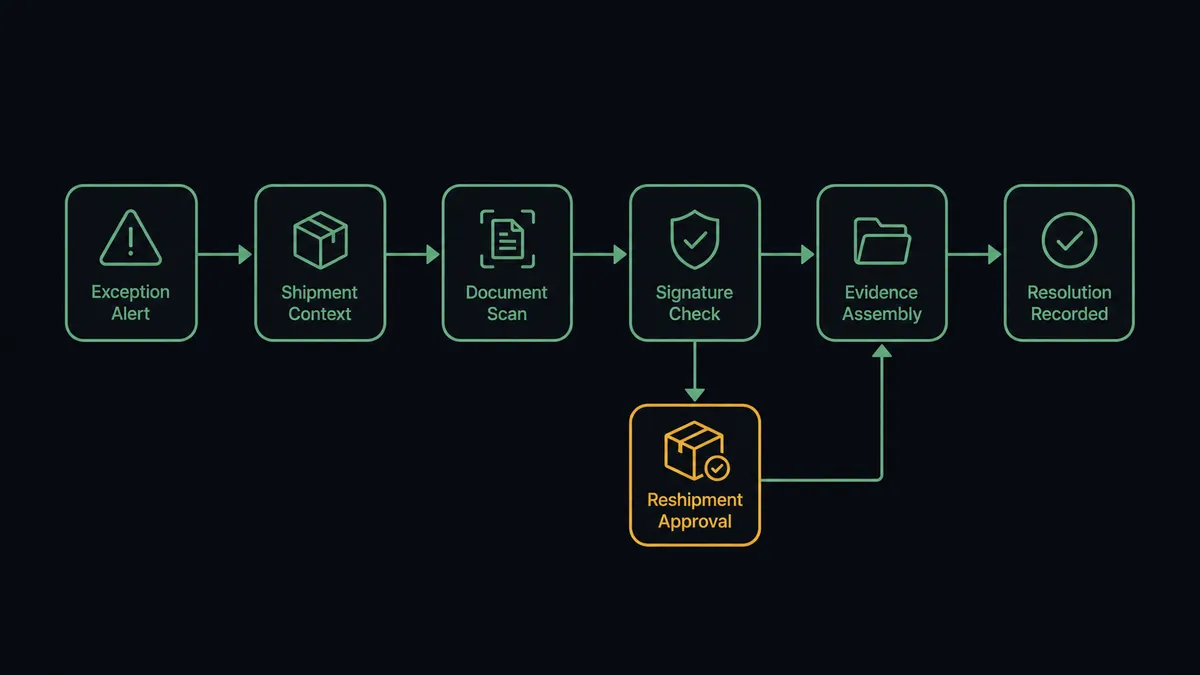
The connection listens to ShipBob and reads with Base64.ai. Here is the plain version, grounded in the real connector actions.
- Trigger: ShipBob fires On Shipment Exception when a shipment goes sideways.
- Read: The workflow calls Get Shipment for the tracking history and Get Order for what was promised to whom.
- Scan: It calls Scan Document on the carrier paperwork, turning the exception documents into labeled fields: dates, addresses, disposition codes.
- Verify: Where proof of delivery is in question, it calls Detect Signatures, and Verify Signature (Match) when there is a reference to compare against.
- Assemble: It builds an exception record: what ShipBob says happened, what the paperwork says happened, and where they disagree.
- Resolve: The clean cases proceed: a confirmed-lost package flows toward Create Order for reshipment, a refused delivery flows toward Create Return.
That is the “just connect them” answer. Exceptions arrive pre-investigated, with the document work already done. On Return Completed runs the same pattern for inbound boxes, scanning the return paperwork so mismatches surface before restocking. The person who used to run each investigation by hand now starts from an assembled file instead of a blank tracking number, and the judgment part of the job is the only part left.
Can an AI agent run it? (and why a human stays in the loop)
Yes, and exception handling is agent territory by nature, because no two exceptions are identical. The agent holds Get Shipment, Get Order, Scan Document, Detect Signatures, Verify Signature (Match), Create Order, Create Return, and Cancel Order as tools, and it reasons across them: the carrier scan says delivered, the proof-of-delivery has no detectable signature, the customer claims non-receipt, and this address has two prior claims. A rules engine sees four unrelated facts. The agent sees a pattern that deserves a person.
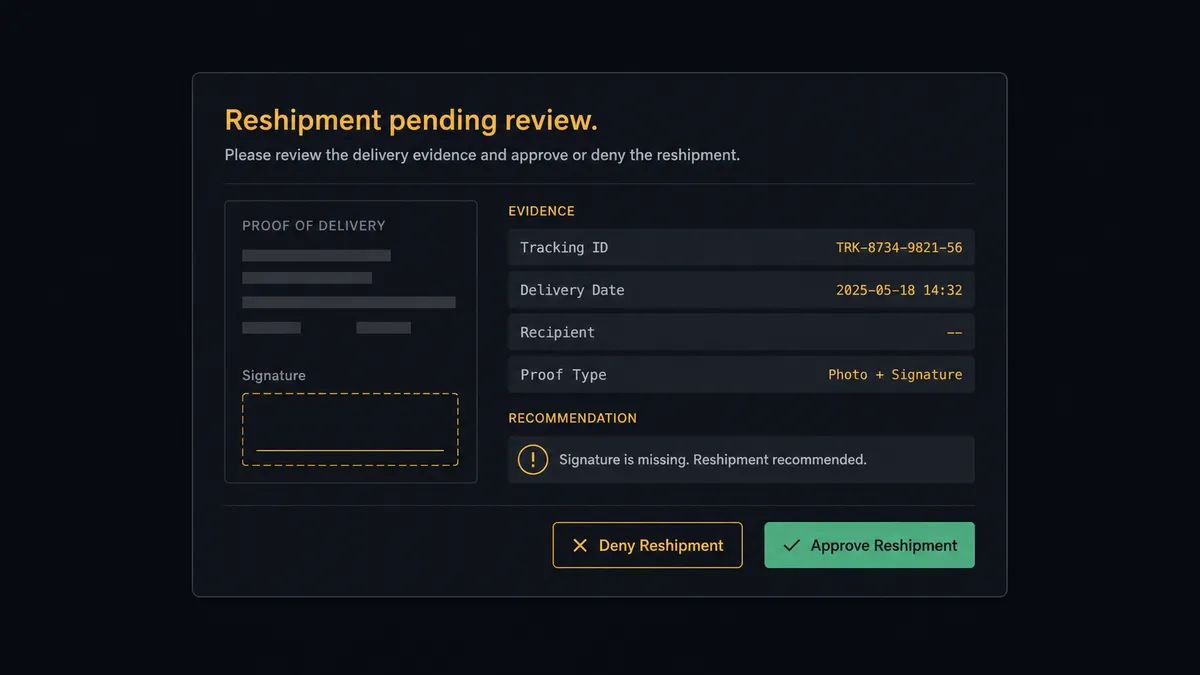
The consequential step is Create Order, because a replacement spends the cost of goods and fulfillment a second time. Before it, the agent invokes a human-in-loop flow it holds as a callable tool. The workflow pauses and posts to the ops channel: “Shipment [ID] shows delivered, but Detect Signatures found no signature on the proof-of-delivery and the customer disputes receipt. Order history is clean. Recommend reshipment. Approve Create Order, or route to a carrier claim instead?” A named approver decides, the chosen action runs, and the decision, the evidence set, and the timestamp land in the audit trail.
Routine paths stay fast. A package crushed in transit with photographed damage and a clean history is an easy reship the approver clears in one click, and genuinely unambiguous cases can be configured to flow through. The gate exists for the ambiguous middle, which is exactly where money leaks. Prospects call this the digital andon cord: like Toyota’s cord on the line, the workflow stops itself when the evidence disagrees, and a person restarts it with the whole file in front of them.
FlowRunner vs Celigo
Celigo is a serious platform for fulfillment stacks, and its strengths deserve naming: prebuilt integration apps that sync commerce systems at enterprise depth, mature error management, and a strong track record wiring 3PL data into ERPs, especially NetSuite-centric stacks. If your problem is keeping an ERP and a fulfillment network in perfect record-level sync, Celigo has purpose-built products for it.
The difference is what this pair actually needs: judgment over documents, and a human gate before spend. FlowRunner is built around native human-in-the-loop and AI-agent orchestration, where evidence reading and the pause before Create Order are the core of the platform, not a custom flow you script.
| What matters for this pair | FlowRunner | Celigo |
|---|---|---|
| Human-in-the-loop before Create Order reships | Native. The agent invokes an approval flow as a callable tool with the evidence attached | Error and exception queues exist; approval-gated actions are yours to build |
| Who runs the flow | An AI agent reads scanned evidence, reasons, picks actions as tools | Prebuilt integration apps and flows you configure |
| Users included | Unlimited users on every tier | Seat and endpoint licensing by plan |
| Bring your own AI keys | Yes, BYOK | Platform AI features are Celigo’s own |
| Self-hosted option | Yes, cloud-hosted or self-hosted | Cloud iPaaS |
| Pricing model | Transparent workflow-based tiers starting at $45/mo | Enterprise iPaaS pricing, quoted per stack |
If you run a large ERP-centered operation and need deep record sync across a dozen systems, Celigo is genuinely built for that job. If the job is an exception desk that reads paperwork and holds spend for approval, this pairing does it at mid-market weight and price.
Before and after
Here is what changes operationally when the connection is live.
| Category | Before | After |
|---|---|---|
| Exception intake | Exceptions pile up in a queue until someone opens each PDF | On Shipment Exception arrives pre-scanned with evidence attached |
| Document handling | Ops squints at carrier scans and proof-of-delivery images by hand | Scan Document and Detect Signatures structure the paperwork automatically |
| Reshipment decisions | Reship-or-refuse calls are made inconsistently under time pressure | Every replacement passes a named approver with the full evidence file |
| Claim leakage | Deliveries disputed without evidence get reshipped to end the conversation | Signature checks separate weak claims from real losses before money moves |
| Return verification | Returned boxes are restocked on faith in the label | On Return Completed paperwork is scanned and mismatches surface first |
What you can build
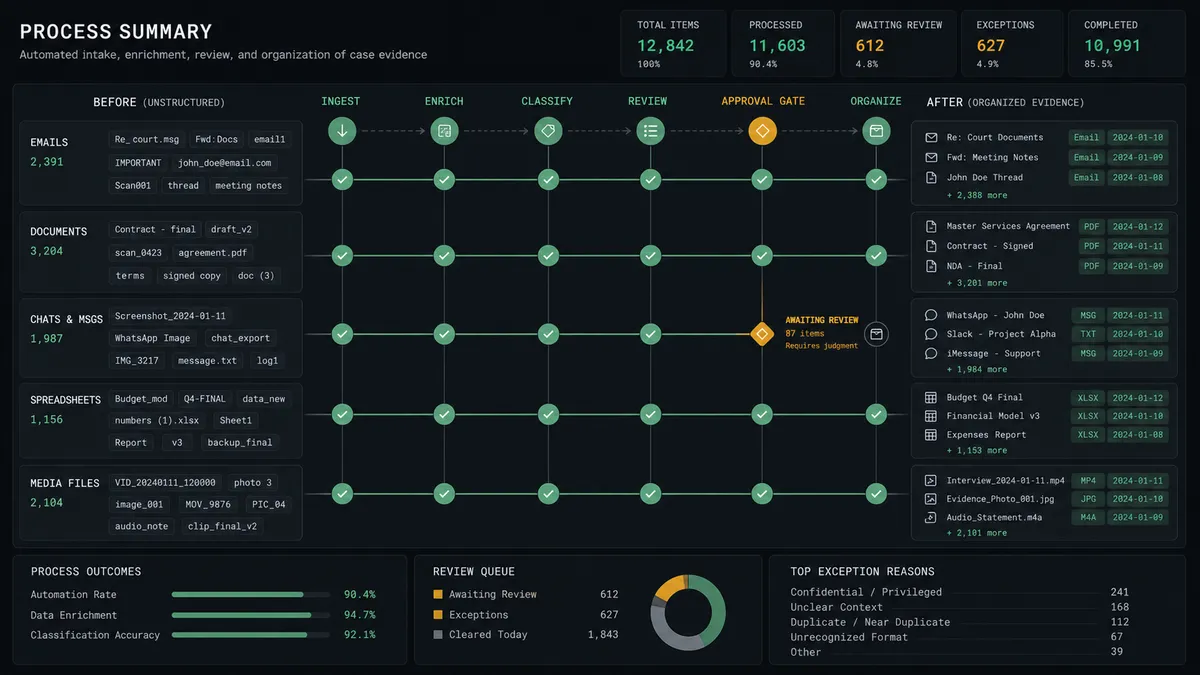
Exception desk with evidence. On Shipment Exception fires. The agent pulls Get Shipment and Get Order, scans the paperwork with Scan Document, and delivers a classified, evidence-backed exception to the queue instead of a bare alert.
Disputed-delivery investigator. When a customer disputes a delivered shipment, the agent runs Detect Signatures on the proof of delivery, compares against reference with Verify Signature (Match), and routes the reshipment call through the approval gate.
Return paperwork verification. On Return Completed fires. The agent scans the return documents, checks them against the original order, and flags mismatches before Create Return credit logic or restocking proceeds.
Carrier claim builder. For confirmed losses, the agent assembles the claim file, the scanned paperwork, the tracking history from Get Shipment, and the order value, and creates the follow-up so claims stop dying of paperwork fatigue.
Hold-and-release triage. On Shipment On Hold fires. The agent scans whatever document caused the hold, resolves the routine cases, and escalates the ones where the paperwork and the order genuinely disagree.
Getting started
Start on the free plan: 100 executions a month, every integration included, no credit card required, plus 14 days of Professional for new accounts. Both connectors are available on every tier, and every tier includes unlimited users and unlimited workflows, so the whole exception desk shares one queue and one audit trail from day one.
Explore the integration details:
- ShipBob integration (5 triggers and 20 actions across orders, shipments, and returns)
- Base64.ai integration (11 actions for document extraction and verification)
Start building free at flowrunner.ai or book a demo to see a live ShipBob to Base64.ai workflow, reshipment gate and all.
Frequently asked questions
Is it free to connect ShipBob and Base64.ai on FlowRunner?
You can build and run the connection on FlowRunner's free plan, which includes 100 executions a month and every integration with no credit card required, and new accounts also get 14 days of Professional. Both connectors are available on every FlowRunner tier, and every tier includes unlimited users and unlimited workflows.
Can I self-host the ShipBob to Base64.ai workflow?
Yes. FlowRunner offers a cloud-hosted option and a self-hosted option, so the connection can run inside your own environment.
Does the AI agent need my own OpenAI or Claude key?
FlowRunner uses a bring-your-own-keys model, so you connect the AI provider key you already have. You are not locked to one model.
What happens when the delivery evidence is ambiguous?
The agent does not guess. It posts the scanned documents, the signature check result, and the shipment history to your ops channel, and a named approver decides between reshipment, refund escalation, or a carrier claim before anything is created.
Which ShipBob events can trigger the document workflow?
ShipBob offers five triggers: On Order Shipped, On Shipment Delivered, On Shipment Exception, On Shipment On Hold, and On Return Completed. On Shipment Exception and On Return Completed are the two that carry paperwork worth scanning.
Can the agent ship a replacement order on its own?
No. Create Order spends real fulfillment money, so it sits behind the human-in-loop step. The agent assembles the evidence and recommends, and a named approver releases the replacement.