How to Connect Shopify with ShipBob (With or Without an AI Agent)
Connect Shopify's On New Order trigger to ShipBob's Create Order action so every confirmed sale goes to fulfillment automatically, with a human on exceptions that carry real consequence.
How do you connect Shopify to ShipBob?
You connect Shopify to ShipBob by using Shopify’s On New Order trigger to fire a ShipBob Create Order action the moment a customer checks out. FlowRunner is a visual AI-agent orchestration platform where automations run autonomously and pause for human judgment on the steps that carry real consequence. The same connection can run as an AI agent that checks fraud signals, validates inventory, and invokes a human decision on the orders that need one before anything ships.
What breaks when orders move manually between Shopify and ShipBob
The Shopify admin queue is not a fulfillment system. It is a waiting room. Orders pile up there until someone opens the dashboard, decides each one is real, and either keys it into ShipBob manually or exports a CSV for a scheduled upload. For a store doing modest volume that is a daily grind; for a store doing hundreds of orders in a peak window it is a bottleneck that translates directly into late shipments and WISMO tickets.
The exceptions make it worse. A flagged order, a variant that went out of stock in the last hour, a high-value order from an account that has never bought before: these require a judgment call that a manual process handles inconsistently. Some get routed to a supervisor. Some get approved on gut feel. Some fall through the cracks and ship anyway, creating a return and a chargeback. There is no record of who looked at what, no audit trail, and no way to know whether the pattern is improving or getting worse.
ShipBob’s own exception handling adds a second layer of monitoring. When a shipment hits a delivery failure or an address issue, someone on the ops team has to catch the ShipBob dashboard alert, look up the order, contact the customer, and then go back to ShipBob to execute a resolution. Every one of those steps is a handoff that can drop.
How it works: the Shopify to ShipBob connection
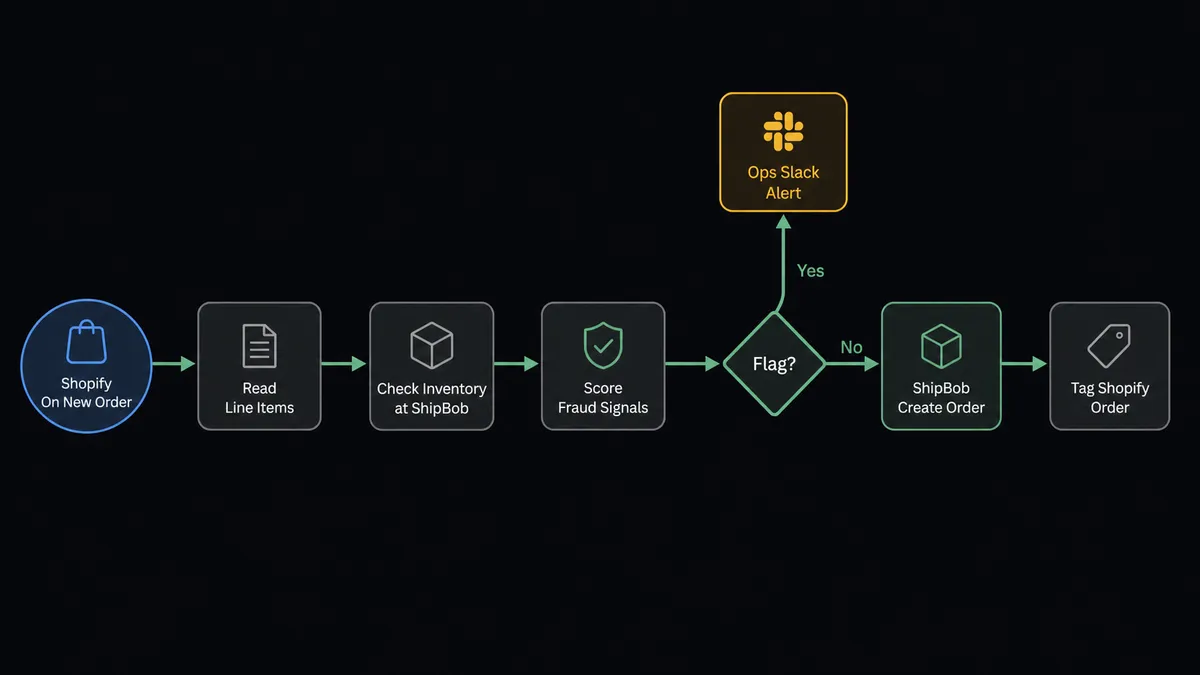
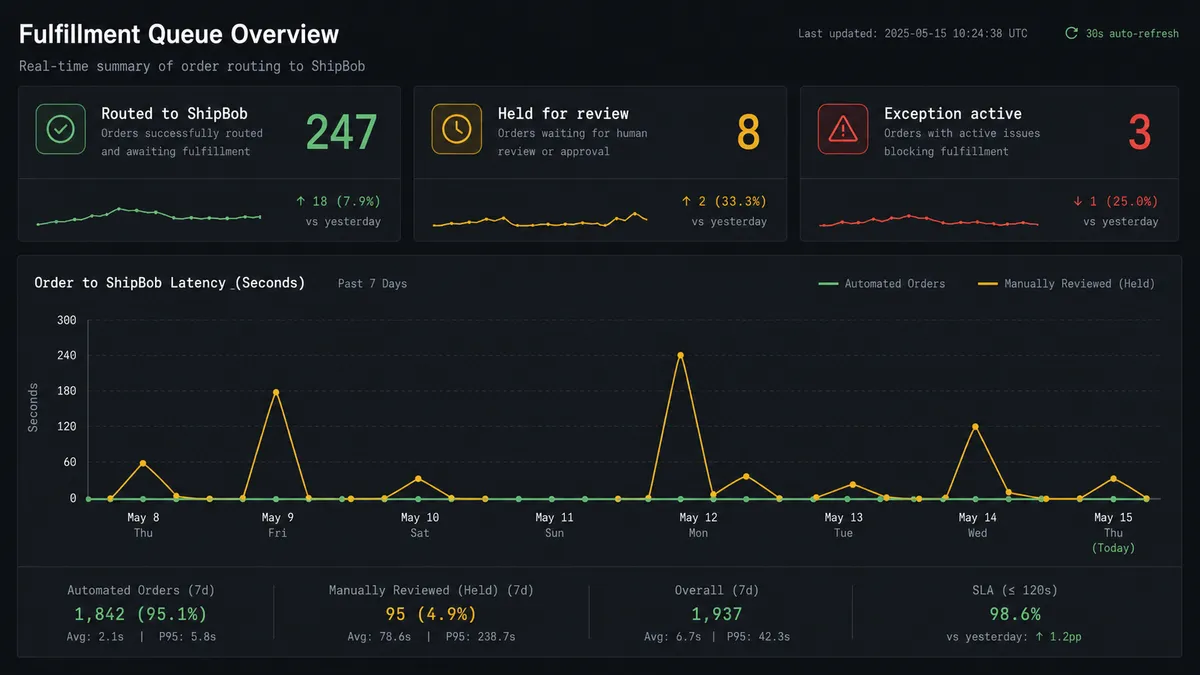
The Shopify On New Order trigger fires the instant a customer completes checkout. FlowRunner reads the order’s line items, shipping address, and total. It calls ShipBob Get Inventory to confirm the SKUs are available at the right fulfillment center. For a clean order it calls ShipBob Create Order, mapping the Shopify order fields directly to ShipBob’s required fields, and tags the Shopify order to mark it as routed.
From that point, ShipBob manages the physical movement. When ShipBob marks the order shipped, the On Order Shipped trigger fires and FlowRunner sends the customer a shipping confirmation with the tracking number. When a return completes in ShipBob, On Return Completed fires and FlowRunner checks the return condition, triggers the Shopify refund workflow for resalable items, and routes damaged returns to an operations manager.
The data that maps across: order number, SKU and quantity per line item, shipping name and address, customer email, and order total. Shopify’s Get Order action fills in anything the trigger payload does not include. ShipBob’s Estimate Fulfillment Cost action can run before Create Order if margin validation matters for a particular product line.
Can an AI agent run it? (And why a human stays in the loop)
The plain connection runs every order through the same sequence. The AI agent reads the data and decides.
When an order arrives, the agent does not just map fields and call Create Order. It reads the line items, the customer’s order history if available, the shipping address against known fraud patterns, and the order total against a configurable threshold. An order from a new customer shipping to a freight-forward address with an unusually high cart value gets different treatment than a repeat buyer checking out a standard item. A sync tool cannot make that distinction. The agent can.
When the agent decides an order needs a human, it invokes the human-in-loop sub-flow as a callable tool. It packages the order context: the order number, the customer name, the flagged signals, the order total, and the specific question it needs answered. It posts that context to the operations Slack channel. The ops manager sees exactly what the agent found and selects: approve to fulfill, hold pending review, or cancel. The agent resumes with the decision. The decision, the decider’s name, and the timestamp are all captured in the run log.
This is the digital andon cord. The agent stops the line when it hits something it should not decide alone. A $3,200 order from a customer with a decade of clean history ships without interruption. A $420 order shipping to an address that failed verification three times this month goes to a person. The agent made both calls based on what it read, not a hardcoded rule.
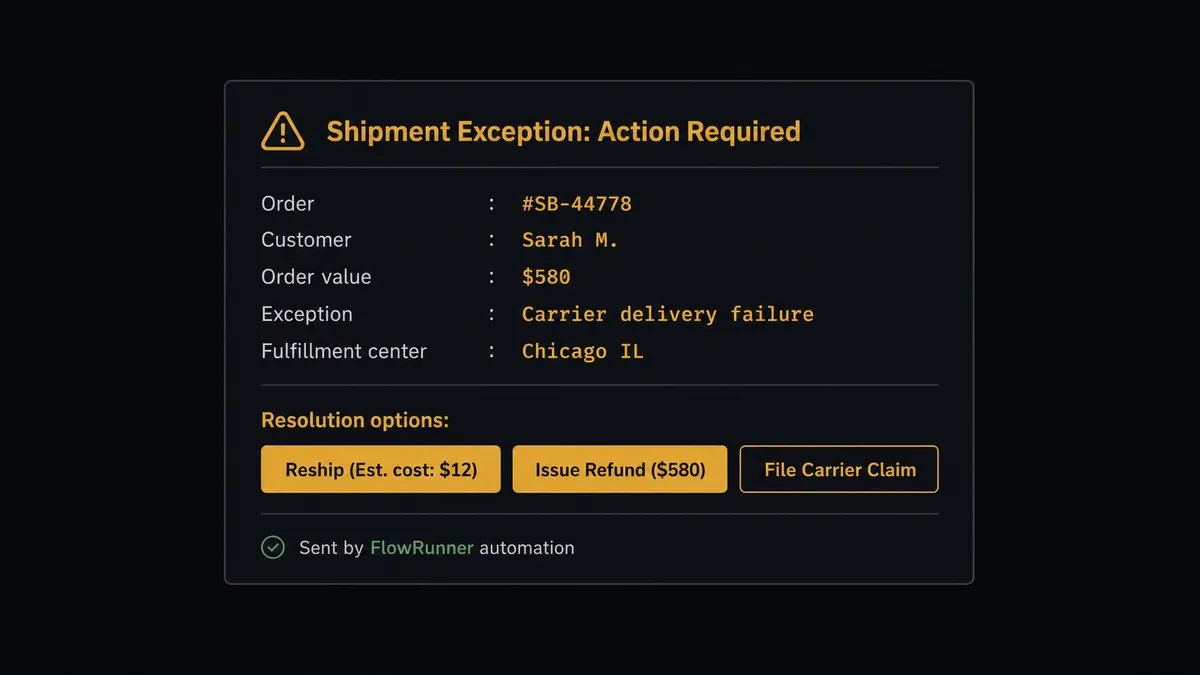
The same logic applies in the ShipBob exception layer. When On Shipment Exception fires, the agent retrieves the exception type, the order value, and the customer contact information. An address correction needed on a $60 order gets an automated email to the customer with a correction form. A carrier delivery failure on a $600 order goes to the operations team via Slack: the agent presents the order value, the customer history, and the resolution options (reship, refund, or file a claim). The ops manager selects. The agent executes.
FlowRunner vs Zapier (the tool you are probably comparing)
Zapier handles the straightforward case well. It is the fastest way to build a basic Shopify to ShipBob order sync, and its library of pre-built Zaps means you can be running in under an hour. For a store with predictable, low-exception volume, Zapier does the job.
The gap opens when the workflow needs to reason. Zapier runs a fixed sequence of steps. It does not read data and decide. It cannot invoke a human as a tool based on its own assessment of the situation. It does not maintain context across the interaction when a human responds to an approval request. And when a Zap fails on a complex flow, the debugging experience is a flat log that does not tell you why the agent reasoned the way it did.
| Feature | Zapier | FlowRunner |
|---|---|---|
| Order sync trigger to action | Yes, via pre-built Zap | Yes, with full action and trigger library |
| AI agent reasoning on order data | No | Yes, agent reads context and decides |
| Human-in-loop as callable tool | No | Yes, agent invokes it based on its own judgment |
| Unlimited users on every tier | No (user limits on lower tiers) | Yes, all tiers |
| BYOK for AI providers | No | Yes |
| Self-host option | No | Yes, Community Edition free |
| Audit trail on human decisions | No | Yes, who decided, when, and what |
Before and after
| Category | Before | After |
|---|---|---|
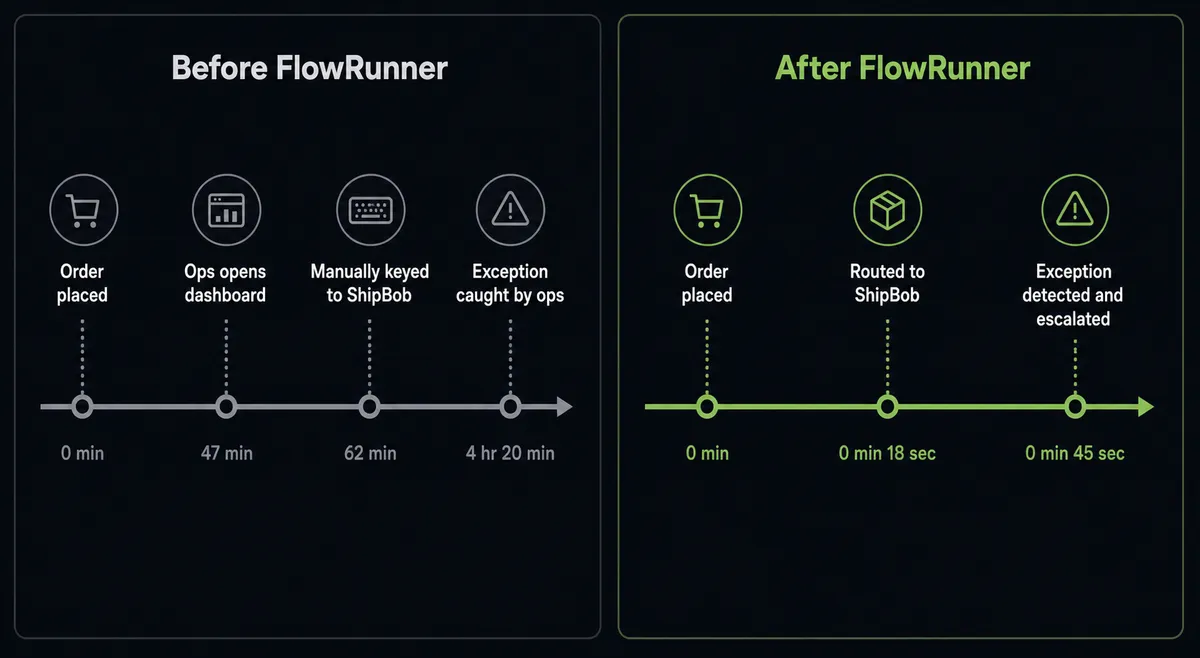
| Order routing time | Orders wait in the Shopify queue until ops opens the dashboard, typically 45 to 90 minutes during off-peak hours | Orders route to ShipBob within seconds of checkout |
| Exception handling | Ops team monitors the ShipBob dashboard throughout the day for exception flags; response time varies by who is on shift | On Shipment Exception fires instantly; the agent classifies the exception and either resolves it automatically or routes it to ops with full context |
| Fraud and threshold review | High-value or flagged orders reviewed inconsistently based on who is handling the queue | Agent scores every order on checkout; flagged orders go to ops with the same context package every time |
| Returns processing | Returns require staff to check condition, decide on refund eligibility, and update ShipBob manually | On Return Completed fires; resalable items trigger the refund workflow automatically; damaged returns route to a manager with the return details |
| Audit trail on decisions | Decisions made in DMs, Slack threads, or verbal approval; no consistent record | Every human decision captured: the approver’s name, the context they saw, and the timestamp |
| Inventory visibility | Stock counts checked manually before committing inventory to a fulfillment order | Agent calls Get Inventory before every Create Order; orders with insufficient stock route to a separate branch before ShipBob is touched |
What you can build
Order fraud review with hold-or-release. The agent scores every Shopify order on checkout against configurable signals. Orders that trip the threshold get a Shopify Add Tags call to mark them as held, and the agent posts to the ops Slack channel with the order total, the customer account age, and the shipping address risk score. The ops manager approves or cancels. Nothing ships until a person signs off.
Inventory-gated fulfillment. Before the agent calls ShipBob Create Order, it calls ShipBob Get Inventory at the target fulfillment center. If the SKU is below the quantity needed, the agent routes the order to a back-order branch: it tags the Shopify order, emails the customer an estimated ship date, and posts a low-stock alert to the buying team. When inventory restores, a separate flow picks up the held orders and routes them to fulfillment.
Shipment exception resolution by type. On Shipment Exception fires. The agent reads the exception type. Address correction needed: the agent emails the customer with a correction form linked to the order. Carrier delivery failure on an order above $250: the agent routes to ops with resolution options (reship, refund, file claim) and executes whatever the manager selects. Under $250: the agent issues the Shopify refund automatically and logs the resolution.
Returns processing with condition routing. On Return Completed fires. The agent retrieves the return details including SKU, condition code, and reason. Resalable condition: the agent records the inventory receipt via ShipBob Get Inventory and triggers the Shopify Create Refund workflow. Damaged: the agent pauses and routes to the operations manager with the SKU, the order value, and the options (refund, exchange, damage claim). The manager decides. The agent processes.
Dispute evidence assembly. Shopify On New Dispute fires when a cardholder challenges a charge. The agent pulls the Shopify order, the customer record, and the ShipBob shipment details including the tracking number and the delivery confirmation. It assembles the evidence package and posts it to the finance channel with the dispute amount, the reason code, and the evidence deadline. The finance team submits the evidence or accepts the chargeback. The agent logs the outcome and the timestamp.
Getting started
FlowRunner has a free plan with 100 executions a month, every integration included, and no credit card required, and new accounts get 14 days of Professional on top. Corporate email gets you in.
Connect both integrations: Shopify authenticates via OAuth2 in one click. ShipBob connects with your API key. Both are live in under five minutes.
From there, build the Shopify to ShipBob order flow, add the inventory check, and configure the human-in-loop sub-flow for the exception cases that need a person. The visual builder handles all of it.
Start at flowrunner.ai or book a walkthrough at calendly.com/flowrunner/intro if you want to see the agent reasoning layer before committing time to setup.
Frequently asked questions
Is it free to connect Shopify and ShipBob on FlowRunner?
FlowRunner has a free plan with 100 executions a month, every integration included, and no credit card required, and new accounts get 14 days of Professional on top. Beyond the free plan, Growth is $45 per month for 12,000 executions with unlimited users and workflows.
Does FlowRunner require a developer to set up the Shopify and ShipBob connection?
No. Both connectors use point-and-click setup: Shopify authenticates via OAuth2 in a single click, ShipBob via API key. The visual workflow builder requires no code.
Does the AI agent need my own OpenAI key?
FlowRunner uses a BYOK (Bring Your Own Keys) model for AI providers. You connect whichever AI provider you already use. FlowRunner does not bill you for AI tokens separately.
What happens when the agent is not sure what to do?
The agent invokes a human-in-loop flow as a callable tool. It pauses the workflow, packages the full context for the relevant person, routes it through the channel they use (Slack, email, or WhatsApp), and resumes the moment they respond. Nothing is dropped.
Can I self-host FlowRunner?
Yes. FlowRunner offers a self-hosted Community Edition at no cost and a self-hosted Enterprise tier for organizations that need multi-instance clustering and a full compliance suite.
What is the difference between the Shopify and ShipBob native integration and FlowRunner?
The native Shopify and ShipBob connection syncs orders but does not reason about them. FlowRunner adds an AI agent layer that checks fraud signals, validates inventory, routes exceptions to a human, and assembles evidence for disputes before anything is submitted.