How to Connect Slack with Backendless (With or Without an AI Agent)
Operate your Backendless backend from Slack and route backend events into your channels, with an AI agent that queries and fixes records on request and pauses for a developer before any bulk delete or bulk update runs.
How do you connect Slack to Backendless?
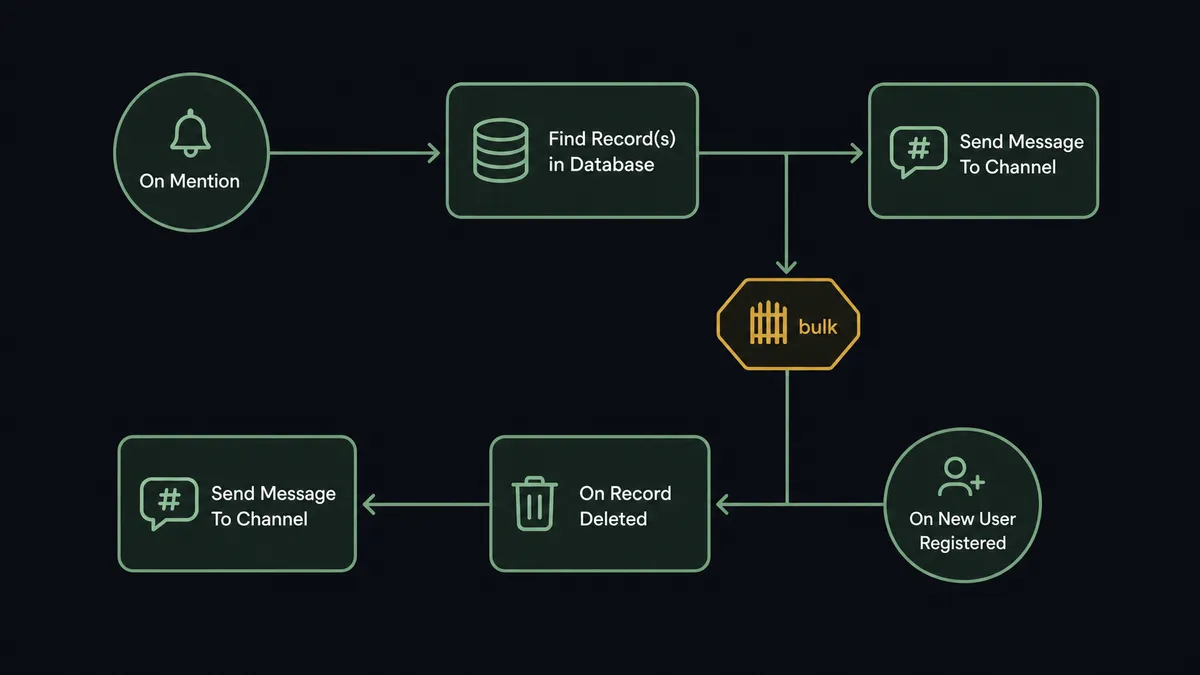
You connect Slack to Backendless in both directions. Slack’s On Mention trigger lets a developer ask the agent about production data, and the workflow answers with Find Record(s) in Database and posts results back with Send Message To Channel. In the other direction, Backendless’s own triggers, On New User Registered, On Record Deleted, File Uploaded, and seventeen more, stream backend events into your channels as they happen. FlowRunner is a visual AI-agent orchestration platform where automations run autonomously and pause for human judgment on the steps that carry real consequence. Run as an AI agent, the connection answers data questions and applies single-row fixes on its own, and pauses for a named developer before Delete Records In Database or Update Records With Query touches rows in bulk.
The problem it solves
Every team running an app on Backendless has a support-to-console pipeline made of people. A customer reports a broken account. Someone asks in Slack, “can anyone check what’s in the users table for this email?” A developer stops what they are doing, opens the Backendless console, runs the query, screenshots the result into the thread, and, if a fix is needed, edits the record by hand. The console becomes the bottleneck, and the two or three people with access become the interrupt handlers for the whole company.
The dangerous edge is the bulk fix. A bad deploy writes a wrong status onto a few hundred rows, and the correction is an Update Records With Query with a hand-typed where clause, run from the console, by one person, with nobody else looking. Get the clause slightly wrong and you have updated the wrong rows; there is no approval step and often no record of what ran. Meanwhile the events that would give the team early warning, deletions they did not expect, registration spikes, files landing in storage, scroll past unseen because nobody watches the console for fun.
How it works: the connection
The connection runs Slack-to-Backendless for requests and Backendless-to-Slack for events. Here is the plain version, grounded in the real connector actions.
- Trigger: Slack fires On Mention when a developer asks: “what’s the plan field for user with email X?”
- Read: The workflow calls Find Record(s) in Database on the named table with the where clause the request implies.
- Answer: It calls Send Message To Channel with the matching records formatted into the thread.
- Fix a single row: When the request is a one-row correction, it calls Save Record In Database, which creates or updates the record.
- Event direction: Backendless fires On New User Registered, and the workflow posts the new signup into the growth channel with Send Message To Channel.
- Watch the risky events: On Record Deleted and File Deleted post into the dev channel, so unexpected removals surface within seconds instead of during the next incident.
- Scheduled digest: Timer: Execute fires on your Cloud Code schedule, and the workflow assembles a daily table-health digest into Slack.
That is the “just connect them” answer. Data questions get answered in the thread where they were asked, and the backend narrates its own activity into the channels where the team already lives.
Can an AI agent run it? (and why a human stays in the loop)
Yes, and the agent is what turns a query relay into a backend operator. It holds the Backendless actions as tools: Find Record(s) in Database, Save Record In Database, Update Records With Query, Delete Records In Database, Create File, Generate PDF, Send Email, Send Push Notification. Asked “clean up the accounts stuck in pending since the outage,” the agent does not need a pre-built path for that exact sentence. It reasons: find the affected rows, show them, propose the mutation, and only then act.
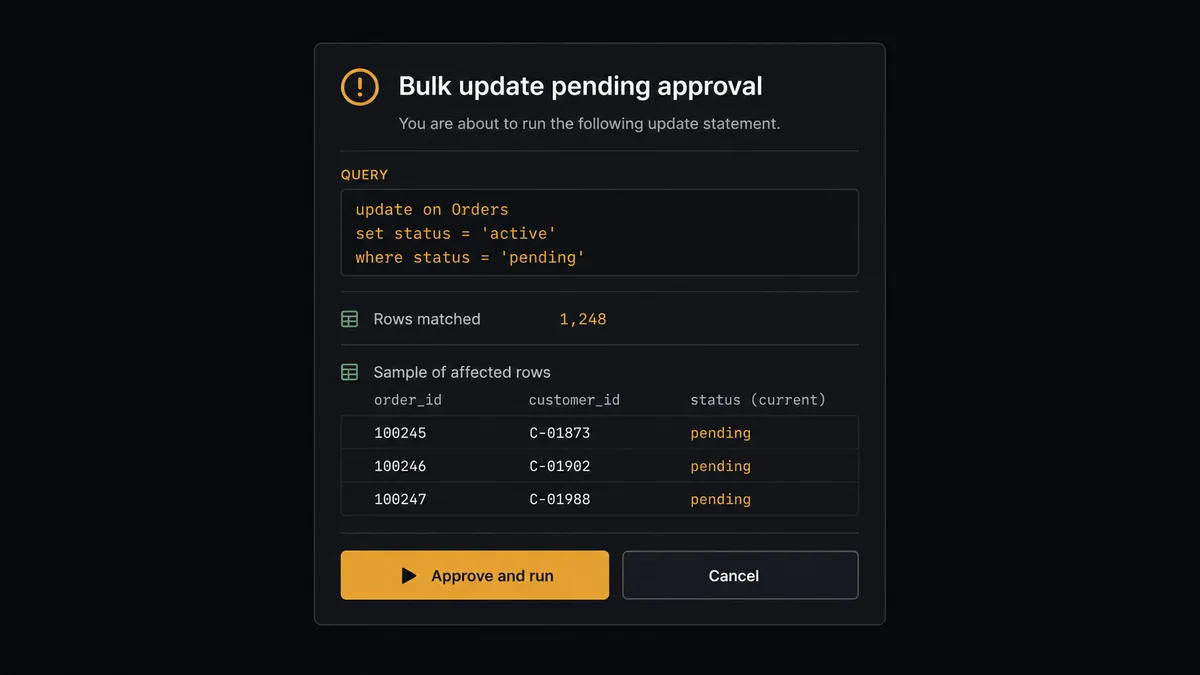
The consequential step is any query that mutates in bulk. Update Records With Query and Delete Records In Database execute a where clause against production data, and a slightly wrong clause is a production incident. So the agent’s discipline is fixed: before either action runs, it first executes the same where clause through Find Record(s) in Database, counts the matches, and invokes the human-review flow it holds as a callable tool. The card in Slack reads: “Proposed: Update Records With Query on [table], set [field] to [value] where [clause]. Matches [n] rows, sample attached. Approve to run?” A named developer approves, the mutation executes, and the query, approver, and timestamp land in the audit trail. The same gate covers Delete File and any Send Email or Send Push Notification that reaches real users in volume.
This is the digital andon cord for your backend: the line runs on its own through reads, digests, and single-row fixes, and stops the moment a change would touch many rows or many users. The developer stops being the console bottleneck and becomes the judgment at the gate.
FlowRunner vs n8n
n8n is a credible way to wire Slack to Backendless if you have developers who enjoy owning the plumbing: it is fair-code, self-hostable, and its node library and community templates cover both HTTP APIs comfortably. For a team that wants to hand-assemble each path and maintain it as code-adjacent infrastructure, it works.
The difference is who does the assembling and where judgment lives. In n8n you predefine every branch; the flow does what its nodes say. In FlowRunner the agent holds the Backendless actions as tools and decides, per request, what to run, and human approval is a native flow the agent invokes as a tool, not a pattern you construct yourself.
| What matters for this pair | FlowRunner | n8n |
|---|---|---|
| Human-in-the-loop on bulk deletes and updates | Native. The agent shows the query and row count, then waits for a named developer | Buildable with wait nodes and custom wiring; approval logic is yours to construct and maintain |
| Who runs the flow | An AI agent reads the request, reasons, picks actions as tools | Node graph you design per path; agent nodes exist but the graph stays fixed |
| Users included | Unlimited users on every tier | Cloud plans price by executions; unlimited self-host means running it yourself |
| Bring your own AI keys | Yes, BYOK | Yes, own keys in its AI nodes |
| Self-hosted option | Yes, cloud-hosted or self-hosted | Yes, fair-code self-host |
| Pricing model | Transparent workflow-based tiers | Execution-based cloud pricing; self-host costs move to your infrastructure and time |
If your team wants full control of every node and is happy to build and maintain approval logic by hand, n8n can get there. If you want the operator model out of the box, an agent that works the database and a gate that holds every bulk mutation for a named developer, this pairing is the better fit.
Before and after
| Category | Before | After |
|---|---|---|
| Data questions | Wait for a developer with console access to run the query and screenshot it | Ask in the thread; Find Record(s) in Database answers in seconds |
| Single-row fixes | Hand-edited in the console, invisible to the rest of the team | Applied via Save Record In Database with the request and result in the thread |
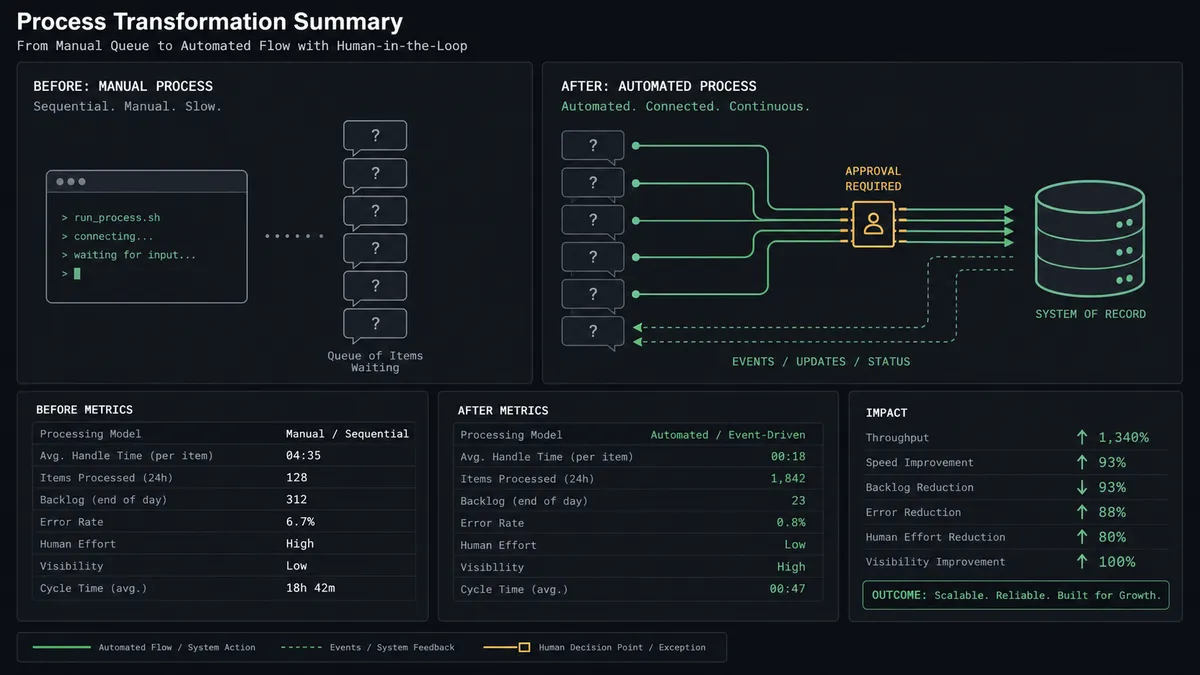
| Bulk mutations | One person, one hand-typed where clause, no second pair of eyes | Query and matched-row count approved by a named developer before execution |
| Backend visibility | Deletions and registration spikes discovered after the fact | On Record Deleted and On New User Registered post to Slack as they happen |
| Accountability | No record of what ran against production or who ran it | Every bulk operation logged with query, approver, and timestamp |
What you can build
Data desk in the dev channel. On Mention takes the question, Find Record(s) in Database answers it, Send Message To Channel posts it. Console access stops being a bottleneck.
Signup pulse. On New User Registered fires and the workflow posts each new account to the growth channel, with Save Record In Database tagging the source campaign on the user’s record.
Deletion tripwire. On Record Deleted and File Deleted post every removal to Slack with who and what. Unexpected deletions surface in seconds, not in the next incident review.
Gated cleanup crew. After a bad deploy, the agent finds affected rows, posts the count and sample, and runs Update Records With Query only after approval. Delete Records In Database gets the same gate, every time.
Report on demand. Asked for “this week’s signups as a PDF,” the agent queries the tables, calls Generate PDF from your template, stores it with Create File, and drops the link in the thread. Send Email delivers it to stakeholders after a one-click approval of the recipient list.
Getting started
Start on the free plan: 100 executions a month, every integration included, no credit card required, plus 14 days of Professional for new accounts. Both connectors are available on every tier, and every tier includes unlimited users and unlimited workflows.
Explore the integration details:
- Slack integration (8 triggers and 16 actions covering messages, reactions, files, and channel management)
- Backendless integration (20 triggers and 13 actions covering database, files, users, email, and push)
Start building free at flowrunner.ai or book a demo to see a live Slack to Backendless workflow, bulk-mutation gate and all.
Frequently asked questions
Is it free to connect Slack and Backendless on FlowRunner?
You can build and run the connection on FlowRunner's free plan, which includes 100 executions a month and every integration with no credit card required, and new accounts also get 14 days of Professional. Both connectors are available on every FlowRunner tier, and every tier includes unlimited users and unlimited workflows.
Can I self-host the Slack to Backendless workflow?
Yes. FlowRunner offers a cloud-hosted option and a self-hosted option, so the connection can run inside your own environment.
Does the AI agent need my own OpenAI or Claude key?
FlowRunner uses a bring-your-own-keys model, so you connect the AI provider key you already have. You are not locked to one model.
What happens when the agent is asked to fix records but the query looks risky?
The agent never runs a bulk mutation blind. It first runs Find Record(s) in Database with the same where clause, posts the matched-row count and a sample of affected records to Slack, and waits. Only after a developer approves does Update Records With Query or Delete Records In Database execute.
Which Backendless triggers can post into Slack?
Backendless offers 20 triggers, including On New User Registered, On Record Created, On Record Updated, On Record Deleted, File Uploaded, On Push Notification Published, and Timer: Execute. Any of them can drive Send Message To Channel or Send Direct Message in Slack.
Can the agent send emails or push notifications from a Slack request?
Yes. The agent holds Send Email and Send Push Notification as tools, and because both reach real users, it posts the audience and content to Slack for approval before sending to more than a single test recipient.