How to Connect Stripe with Aircall (With or Without an AI Agent)
Route Stripe payment events into Aircall so reps see billing context on every call, with an AI agent that pauses for a human before Create Refund or Cancel Subscription moves money or ends revenue.
How do you connect Stripe to Aircall?
You connect Stripe to Aircall by having Stripe’s Parse Webhook Event trigger drive Aircall actions: when a payment event fires, the workflow pulls the account with Get Customer, finds the matching contact with List Contacts, and writes the billing context onto the phone system with Comment on Call, Add Tags to Call, and Add Insight Cards, so the rep who answers the next call already knows about the failed charge or the open dispute. FlowRunner is a visual AI-agent orchestration platform where automations run autonomously and pause for human judgment on the steps that carry real consequence. The same connection can run as an AI agent that handles the whole loop, including the reverse direction: when a call ends in a refund or cancellation request, the agent packages it and pauses for a named person before Create Refund or Cancel Subscription runs in Stripe.
The problem it solves
Right now your phone team and your billing system do not speak. A customer calls about a charge, and the rep answers blind: no idea the card failed twice this week, no idea a dispute opened yesterday, no idea this is a customer on your largest plan. So the rep puts the caller on hold, opens Stripe in another tab, searches by email, misreads which of three similar customers is on the line, and comes back with half an answer. Meanwhile the customer repeats the story they already told someone else, because the last call’s context lives in a rep’s memory, not on the record.
The reverse direction is where money actually leaks. A rep de-escalates a tough call by promising a refund or agreeing to cancel. That promise now travels by sticky note: maybe it becomes a Stripe refund today, maybe Friday, maybe twice because two people saw the note. There is no consistent record of who authorized what, no link between the refund in Stripe and the call that caused it, and no gate between a stressful conversation and money leaving the business.
How it works: the connection
The connection listens to Stripe and writes to Aircall. Here is the plain version, grounded in the real connector actions.
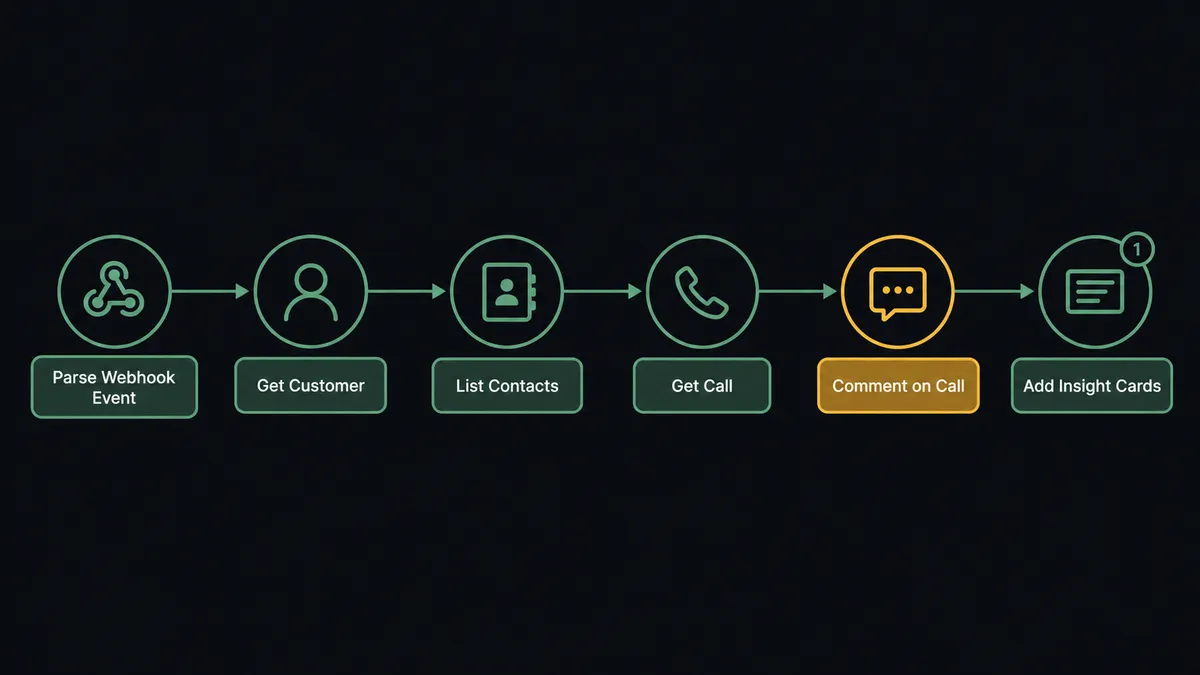
- Trigger: Stripe fires Parse Webhook Event on the payment events you subscribe to: a failed charge, a new dispute, a subscription change.
- Read: The workflow calls Get Customer to pull the account behind the event, including email and phone.
- Match the contact: It calls List Contacts in Aircall to find the person by email or phone, and Create Contact if no record exists yet.
- Find the conversation: It calls List Calls filtered to that contact and Get Call to pull the most recent conversation.
- Write the context: It calls Comment on Call with the event details and Add Tags to Call so the record is filterable by billing state.
- Surface it live: It calls Add Insight Cards so the customer’s plan, payment status, and open issues appear during the next live conversation.
That is the “just connect them” answer. Billing events stop being invisible to the phone team: the call record carries the payment story, and the rep answering knows who is calling and why before saying hello.
Can an AI agent run it? (and why a human stays in the loop)
Yes, and the agent is what makes the connection bidirectional. A fixed sync can copy an event into a comment. An agent reads the situation and picks the right tools: Get Customer, List Payment Intents, and List Subscriptions on the Stripe side to build the money picture; List Calls, Get Call, Comment on Call, Add Tags to Call, and Add Insight Cards on the Aircall side to build the conversation picture. When a dispute webhook arrives, the agent does not just log it. It pulls the customer’s recent calls, reads the comments reps left, and assembles the story: charged Tuesday, called Wednesday, disputed Thursday.
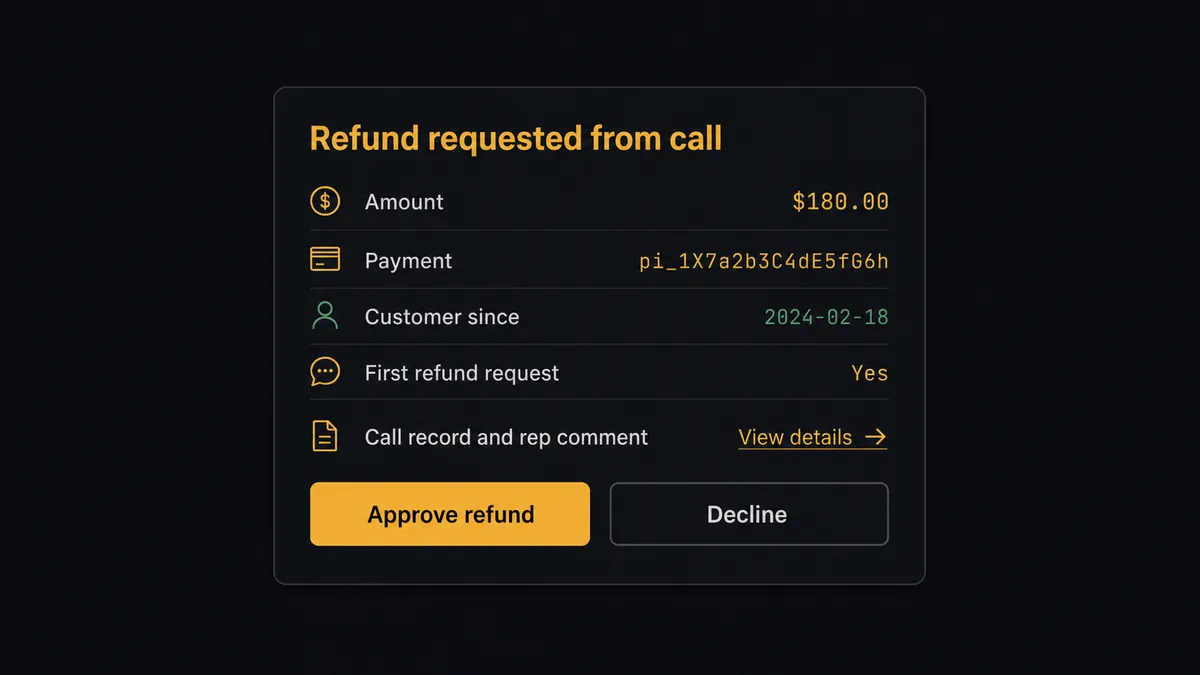
The consequential step is money moving or revenue ending. When a call resolves into “refund this charge” or “cancel my subscription,” the agent prepares but does not execute. It invokes a human-in-loop flow it holds as a callable tool, and the workflow pauses. The approver gets the whole picture in one message: “Refund requested from today’s call with [contact]. Amount: $[amount] on payment [id]. Customer since [date], first refund request. Call and rep comment linked. Approve to issue?” One click, and only then does the agent call Create Refund or Cancel Subscription in Stripe, closing the loop with Comment on Call so the phone record shows the outcome. The approver’s name and the timestamp land in the audit trail, tied to both the payment and the call.
The agent also knows what not to escalate. A routine card-update event becomes a tag and nothing more. A first-time small refund for a shipping error might auto-clear under your policy while a cancellation from a top-plan account always goes to a person. Prospects call this pattern a digital andon cord: like Toyota’s production line pull cord, the workflow stops the line at the moment of consequence, a person decides in seconds, and the line moves again with the decision on record.
FlowRunner vs Zapier
Zapier deserves its reputation for this kind of pairing. Its connector library is enormous, its template gallery almost certainly has a Stripe and Aircall starting point, and a simple one-way Zap, new Stripe event creates an Aircall note, can be live in minutes. For a straight notification bridge, it is a fast, proven choice.
The difference shows up when the workflow has to make judgment calls and when it touches money. Here is the honest side-by-side.
| What matters for this pair | FlowRunner | Zapier |
|---|---|---|
| Human-in-the-loop on Create Refund and Cancel Subscription | Native. The agent packages the call and payment context and pauses for a named approver | Available via added approval steps you wire per Zap, not a decision the workflow makes in context |
| Who runs the flow | An AI agent reads the event and the call history, reasons, picks actions as tools | Predefined step sequences you configure per Zap |
| Users included | Unlimited users on every tier | Priced by task volume; seats vary by plan |
| Bring your own AI keys | Yes, BYOK | AI features tied to Zapier’s own AI offering |
| Self-hosted option | Yes, cloud-hosted or self-hosted | Cloud only |
| Pricing model | Transparent workflow-based tiers with clear execution limits | Per-task pricing that gets harder to predict as call and payment volume grow |
If all you need is “Stripe event posts a note,” Zapier will do it well. If you want billing context written onto live calls and a named human between a phone promise and money leaving Stripe, this pairing on FlowRunner is the better fit.
Before and after
| Category | Before | After |
|---|---|---|
| Answering billing calls | Rep answers blind, puts the caller on hold to search Stripe in another tab | Add Insight Cards puts plan, payment status, and open disputes in front of the rep during the call |
| Failed payments | The customer discovers the failure before your team does | Parse Webhook Event tags the contact and comments the latest call the moment the charge fails |
| Refund promises | Promised on a call, executed from memory, sometimes twice | Packaged with the call link and issued through Create Refund only after a named approver signs off |
| Cancellations | Processed straight from a heated conversation with no review | Cancel Subscription held at the gate, with account history in front of the approver first |
| The paper trail | Refunds in Stripe with no link to the conversation that caused them | Every approved action carries the approver, timestamp, and linked Aircall call |
What you can build
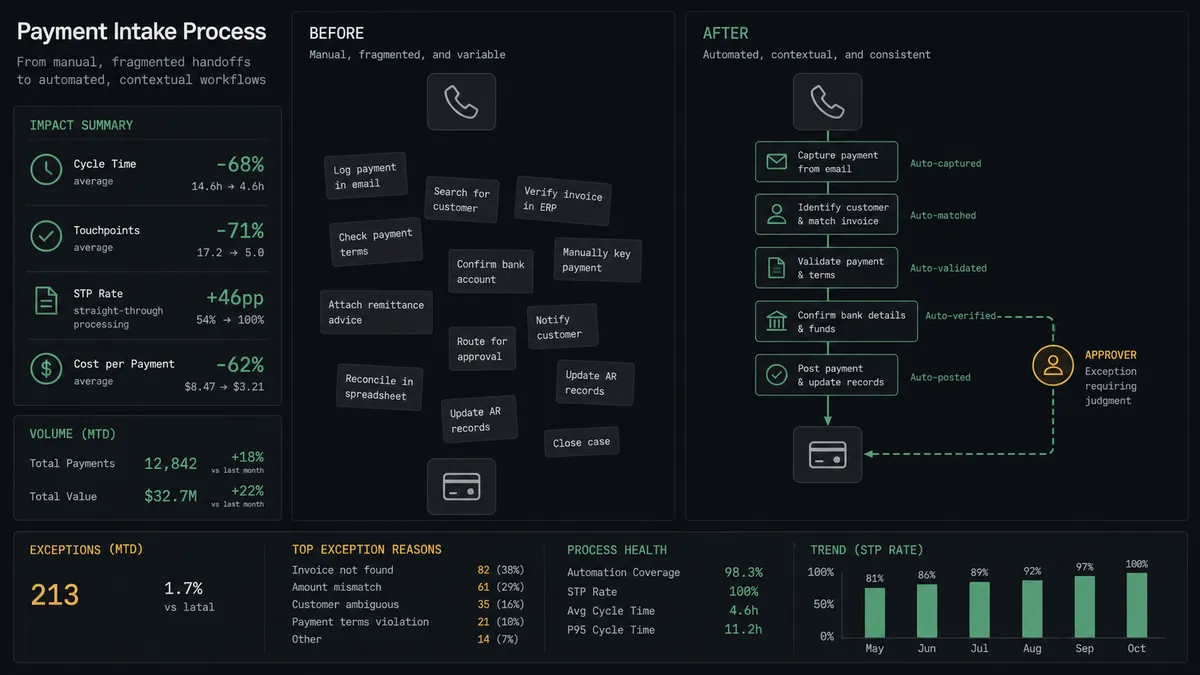
Failed-payment call prep. Parse Webhook Event fires on a failed charge. The agent calls Get Customer, matches with List Contacts, then Add Tags to Call and Comment on Call so the next rep who talks to this customer opens with the fix instead of a surprise.
Dispute war room. A dispute event arrives. The agent pulls List Calls for the contact, reads recent comments with Get Call, assembles the timeline of charge, call, and dispute, and posts it to operations so a person decides the response with the full story.
Refund with named approval. A rep promises a refund on a call. The agent packages amount, reason, payment history from List Payment Intents, and the call link, then holds at the gate until an approver clicks. Only then does Create Refund run.
Save-the-account gate. A cancellation request comes in from a high-value subscriber. The agent checks List Subscriptions, flags the account tier, and routes to a retention owner before Cancel Subscription, so the save attempt happens before the revenue ends.
New-customer welcome call list. A new subscription event fires. The agent calls Create Contact in Aircall with the customer’s details and tags it for the onboarding team’s call queue, so every new account gets a human welcome within the week.
Getting started
Start on the free plan: 100 executions a month, every integration included, no credit card required, plus 14 days of Professional for new accounts. Both connectors are available on every tier, and every tier includes unlimited users and unlimited workflows.
Explore the integration details:
- Stripe integration (1 trigger and 67 actions covering payments, subscriptions, refunds, and invoices)
- Aircall integration (33 actions covering calls, contacts, tags, comments, and insight cards)
Start building free at flowrunner.ai or book a demo to see a live Stripe to Aircall workflow, refund approval and all.
Frequently asked questions
Is it free to connect Stripe and Aircall on FlowRunner?
You can build and run the connection on FlowRunner's free plan, which includes 100 executions a month and every integration with no credit card required, and new accounts also get 14 days of Professional. Both connectors are available on every FlowRunner tier, and every tier includes unlimited users and unlimited workflows.
Can I self-host the Stripe to Aircall workflow?
Yes. FlowRunner offers a cloud-hosted option and a self-hosted option, so the connection can run inside your own environment.
Does the AI agent need my own OpenAI or Claude key?
FlowRunner uses a bring-your-own-keys model, so you connect the AI provider key you already have. You are not locked to one model.
What happens when a rep promises a refund on a call?
The agent does not just fire Create Refund. It pulls the call with Get Call, the customer's payment history with List Payment Intents, and posts the amount, reason, and call link to the approver. The refund is issued only after a named person approves, and the approval is captured in the audit trail.
Which Stripe trigger starts the Aircall workflow?
Parse Webhook Event is Stripe's trigger in FlowRunner. It fires on the payment events you subscribe to, such as a failed charge, a new dispute, or a subscription change, and each event carries the customer and amount the workflow needs to find the matching Aircall contact.
How do reps see billing context during a live call?
The agent writes it onto the call itself. Add Insight Cards surfaces the customer's plan, payment status, and any open dispute during the conversation, and Comment on Call plus Add Tags to Call leave the billing history on the record for whoever picks up next.