How to Connect Stripe with Bland AI (With or Without an AI Agent)
Connect Stripe payment failures to Bland AI outbound phone calls, with an AI agent that prepares the recovery call and pauses for a named human before Send Call dials a real customer.
How do you connect Stripe to Bland AI?
You connect Stripe to Bland AI by having Stripe’s Parse Webhook Event trigger drive Bland AI actions: a renewal payment fails, the workflow pulls the account with Get Customer and Get Subscription, and dispatches a recovery call with Send Call, then collects the transcript and outcome with Get Call Details and Analyze Call. FlowRunner is a visual AI-agent orchestration platform where automations run autonomously and pause for human judgment on the steps that carry real consequence. In this pair the consequential step is unusually concrete: Send Call places a real phone call to a real customer, billed per minute, so the agent prepares everything and a named human approves before anyone’s phone rings.
The problem it solves
Right now, failed payments get emails, because emails are cheap and calls are expensive. The dunning sequence fires, three polite messages land in a promotions tab, the card keeps declining, and thirty days later the subscription cancels itself. Everyone knows a two-minute phone conversation recovers accounts that email never will, and almost nobody staffs for it. The accounts worth calling get called late or not at all.
The edges are the reason this pair needs care, not just plumbing. An automated dialer with no judgment calls the wrong tier of customer about a card hiccup that would have retried fine, at a bad hour, in the wrong tone. It calls someone who already paid this morning. It burns per-minute credits on voicemails. A phone call is the highest-consequence channel a business has: done carelessly it ends the relationship faster than the failed payment would have.
How it works: the connection
The connection listens to Stripe and drives Bland AI. Here is the plain version, grounded in the real connector actions.
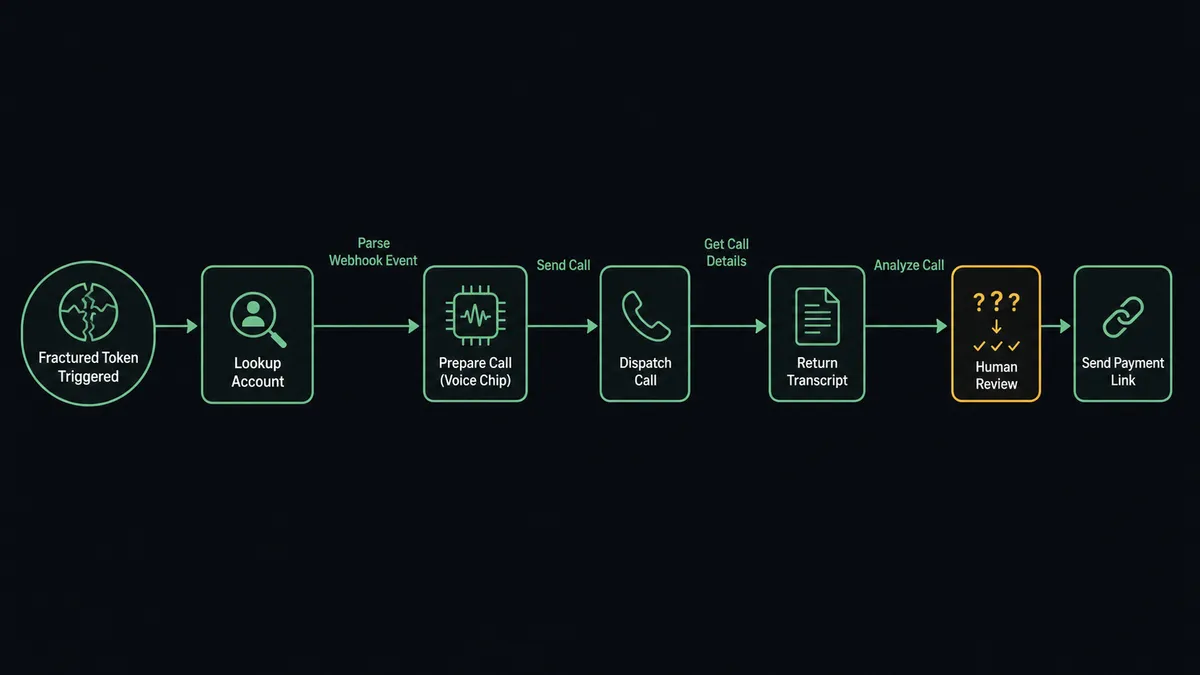
- Trigger: Stripe fires Parse Webhook Event when a renewal invoice payment fails at the connected endpoint.
- Read: The workflow calls Get Customer for the payer’s details and phone number, and Get Subscription for the plan and amount at stake.
- Prepare the call: It selects a voice with List Voices and, where you have built one in the Bland dashboard, loads a conversational pathway with Get Pathway so the call follows deterministic branching instead of a free-form prompt.
- Dispatch: It calls Send Call with the destination number and a task built from the account context: who the customer is, what failed, what resolving it looks like. The call runs asynchronously.
- Collect: When the call ends, Get Call Details returns the transcript, the AI-generated summary, the answered_by determination, and the recording URL when recording is enabled.
- Extract: Analyze Call runs your questions against the transcript, such as whether the customer committed to update their card, and returns structured answers.
- Follow through: It calls Create Payment Link in Stripe and sends the customer a fresh way to pay, then posts the outcome to your team.
That is the “just connect them” answer. A failed charge becomes a prepared, executed, and documented recovery call, with the result written down instead of living in someone’s memory.
Can an AI agent run it? (and why a human stays in the loop)
Yes, and the agent is what separates judgment from a dialer. The agent holds Get Customer, Get Subscription, List Payment Intents, Send Call, Get Call Details, Analyze Call, Stop Call, and Create Payment Link as tools, and it reasons about each failure before proposing anything. A first-time decline on an annual account two days before the retry gets no call at all. A third consecutive failure on a high-value account gets a drafted call with the history baked into the objective.
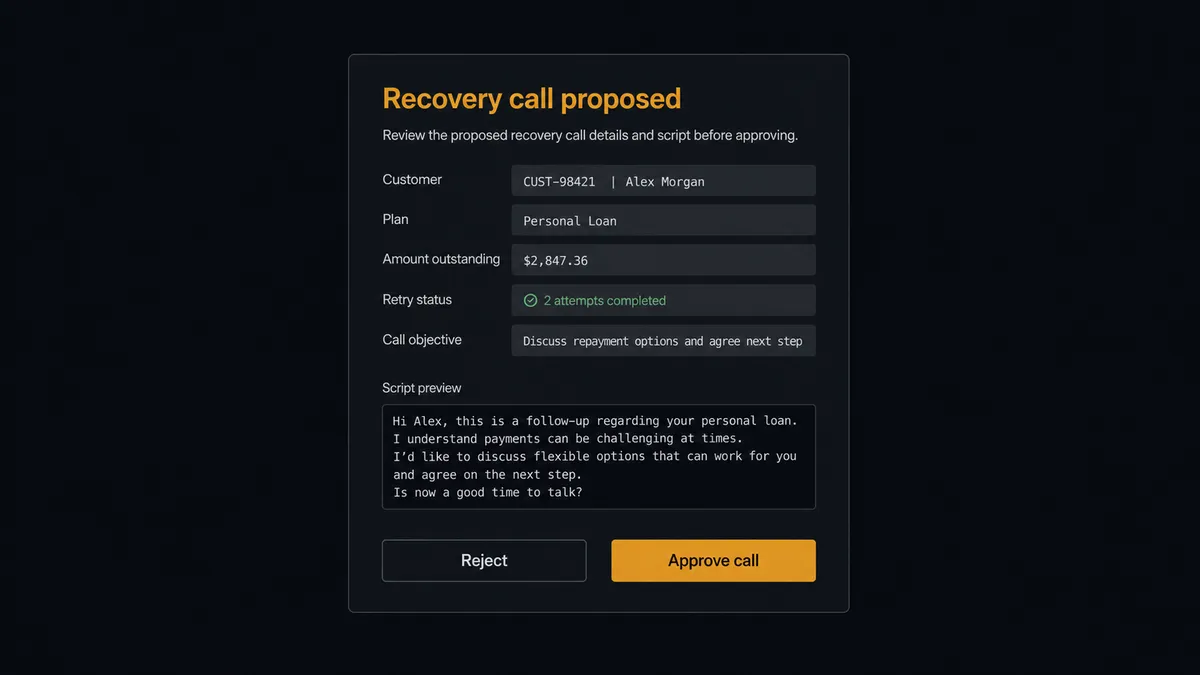
The consequential step is Send Call, and the catalog itself is unambiguous about why: it dispatches a real outbound phone call to a live number over the public phone network, consuming paid per-minute credits the moment it is queued. There is no undo for a phone call. So the agent never dials on its own. It packages the destination number, the customer’s plan and history, the call objective, and the exact opening framing, then invokes the human-in-loop flow it holds as a callable tool. The workflow pauses and posts: “Recovery call proposed: [customer], [plan], [amount] outstanding, retries exhausted. Objective and script attached. Approve to dial?” Only after a named approver signs off does Send Call run, and if anything sounds wrong in flight, Stop Call ends it immediately. The approval, the approver, and the timestamp land in the audit trail next to the transcript.
This is the digital andon cord, the framing our own prospects gave us: like Toyota’s pull cord on the production line, the workflow stops the line before the single step that cannot be taken back. Preparation, analysis, and follow-through run untouched. The moment a phone is about to ring, a human owns it.
FlowRunner vs Zapier
Zapier can wire Stripe events to outbound actions, and its strengths are real: the largest app directory in the category, a deep template gallery, and the fastest first-Zap experience for a newcomer. It also ships a native Request Approval step on paid plans, so a pause exists there too.
This pair is not low-stakes. The approval is the workflow, and the two platforms treat it differently. Zapier’s approval is a step you place in the sequence, acted on by a signed-in Zapier user inside Zapier’s interface. FlowRunner’s agent decides case by case whether a call is even warranted, then invokes the approval as a tool in the channel your team already reads, with the full account context in the card.
| What matters for this pair | FlowRunner | Zapier |
|---|---|---|
| Human-in-the-loop on Send Call | Native. The agent invokes an approval flow as a callable tool before any call is dialed | Native Request Approval step on paid plans; the reviewer signs in to Zapier to act on it |
| Who runs the flow | An AI agent weighs each failure and decides whether a call is warranted at all | A step sequence you configure; every matching event follows the same path |
| Users included | Unlimited users on every tier | Per-seat pricing until Enterprise |
| Bring your own AI keys | Yes, BYOK | AI runs through Zapier’s own AI products and billing |
| Self-hosted option | Yes, cloud-hosted or self-hosted | Cloud only |
| Pricing model | Transparent workflow-based tiers, priced per execution | Per-task; each action step in a run consumes a task |
If you want a simple notification when a payment fails, Zapier handles it. If you are putting an autonomous phone call between your business and your customer, and you want a named human owning every dial with the full context in front of them, this pairing is where FlowRunner is the better fit.
Before and after
| Category | Before | After |
|---|---|---|
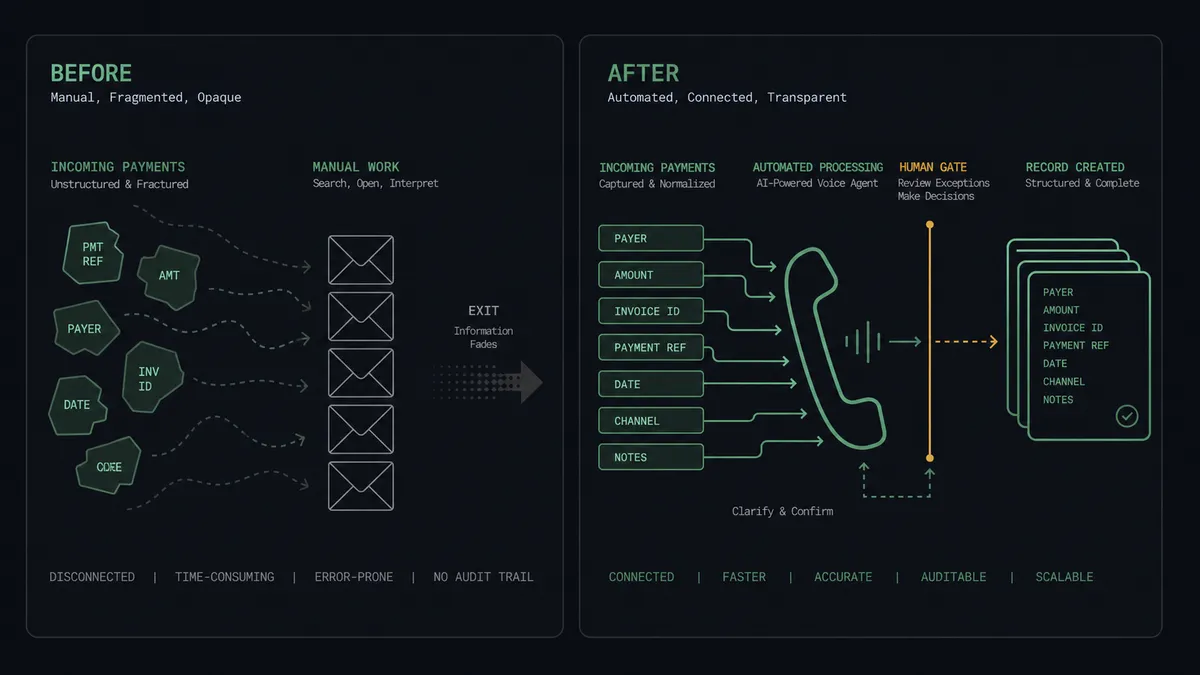
| Failed payments | Three dunning emails, then silent churn | High-value failures become prepared recovery calls with the account history assembled |
| Who gets called | Whoever someone remembers to call, whenever there is time | The agent proposes calls based on retry history and account value, case by case |
| Call quality | Depends on who picks up the phone and what they remember | Every call follows an approved objective or a pre-built pathway, with a chosen voice |
| Outcomes | Live in the caller’s memory or a hasty note | Get Call Details and Analyze Call write the transcript, summary, and commitments down |
| Control | An unattended dialer is an unbounded risk | Every dial has a named approver, and Stop Call ends anything mid-flight |
What you can build
Dunning rescue calls. Parse Webhook Event fires on a failed renewal, the agent assembles the account with Get Customer and Get Subscription, and a named approver releases Send Call. The transcript and commitment come back through Get Call Details and Analyze Call.
Post-call payment follow-through. When Analyze Call confirms the customer agreed to pay, the agent calls Create Payment Link in Stripe and delivers it while the conversation is still fresh.
Cancellation save conversations. A subscription cancellation event proposes a retention call with the customer’s tenure and plan in the objective, gated by the same approval.
Pathway-driven collections. For accounts far past due, the agent dispatches approved calls against a pre-built Bland pathway from List Pathways, giving the conversation deterministic branching, and files the recording with Get Call Recording for the account record.
Call-outcome operations digest. A scheduled flow sweeps recent activity with List Calls, pulls summaries for completed recovery calls, and posts one digest of outcomes and committed payments.
Getting started
Start on the free plan: 100 executions a month, every integration included, no credit card required, plus 14 days of Professional for new accounts. Both connectors are available on every tier, and every tier includes unlimited users and unlimited workflows.
Explore the integration details:
- Stripe integration (1 webhook trigger and 67 actions across payments, subscriptions, invoices, refunds, and payouts)
- Bland AI integration (11 actions covering call dispatch, transcripts, analysis, and stop controls)
Start building free at flowrunner.ai or book a demo to see a live Stripe to Bland AI workflow, call approval and all.
Frequently asked questions
Is it free to connect Stripe and Bland AI on FlowRunner?
You can build and run the connection on FlowRunner's free plan, which includes 100 executions a month and every integration with no credit card required, and new accounts also get 14 days of Professional. Both connectors are available on every FlowRunner tier, and every tier includes unlimited users and unlimited workflows. Note that Bland AI bills its own per-minute call credits separately.
Can I self-host the Stripe to Bland AI workflow?
Yes. FlowRunner offers a cloud-hosted option and a self-hosted option, so the connection can run inside your own environment.
Does the AI agent need my own OpenAI or Claude key?
FlowRunner uses a bring-your-own-keys model, so you connect the AI provider key you already have. You are not locked to one model.
What happens when a call transcript does not clearly answer whether the customer will pay?
Analyze Call returns structured answers to the questions you define, and returns null for anything the transcript cannot support. When the commitment answer comes back null or ambiguous, the agent does not mark the account recovered or schedule another call on its own. It posts the summary and transcript link to your team and waits for a person to decide the next step.
Which Stripe events can trigger a Bland AI action?
Stripe uses a single trigger, Parse Webhook Event, which receives every Stripe event type from a connected webhook endpoint. For this pair, failed invoice payments and subscription cancellations are the events teams usually route toward a recovery call, and the agent branches on the event type it receives.
What happens if a call needs to be stopped while it is in progress?
The connector includes Stop Call, which immediately ends an in-progress call or cancels a scheduled one, and billing stops when the call ends. There is also Stop All Calls, an account-wide emergency stop that ends every active call dispatched with the same API key.