How to Connect Typeform with Adobe Workfront (With or Without an AI Agent)
Turn Typeform request submissions into Adobe Workfront tasks automatically, with an AI agent that files routine work on its own and pauses for a human before changing a live project's scope or deadline.
How do you connect Typeform to Adobe Workfront?
You connect Typeform to Adobe Workfront by polling the intake form with Get Form Responses on a schedule and turning each new submission into Workfront work: the workflow reads the form structure with Get Form, matches the request to a project with Search Projects, resolves the owner with Search Users, and writes the work item with Create Task. FlowRunner is a visual AI-agent orchestration platform where automations run autonomously and pause for human judgment on the steps that carry real consequence. Run the same connection as an AI agent and it triages every submission on its own, files routine requests directly, and pauses for the project owner before Update Project shifts the scope or deadline of work that is already in flight.
The problem it solves
Teams that run intake through Typeform usually built the form to stop request chaos, and it half worked. Requests now arrive structured, but a coordinator still opens the responses view, reads each submission, decides which Workfront project it belongs to, retypes the answers into a task, and picks an assignee. The form fixed the input format. It did nothing about the transfer, so intake still moves at the speed of whoever checks the responses tab.
The failure mode that actually hurts is not the routine request. It is the submission that quietly changes running work. A stakeholder submits “same campaign, but we need it a week earlier” or “add a second deliverable to the launch project.” Handled as a new task, that request buries a deadline change in a task description where nobody who plans capacity will see it. The project ships late or over scope, and the postmortem finds the warning sitting in row 40 of a form export. Structured intake without triage just gives you neatly formatted surprises.
How it works: the connection
The connection reads Typeform and writes Workfront. Here is the plain version, grounded in the real connector actions.
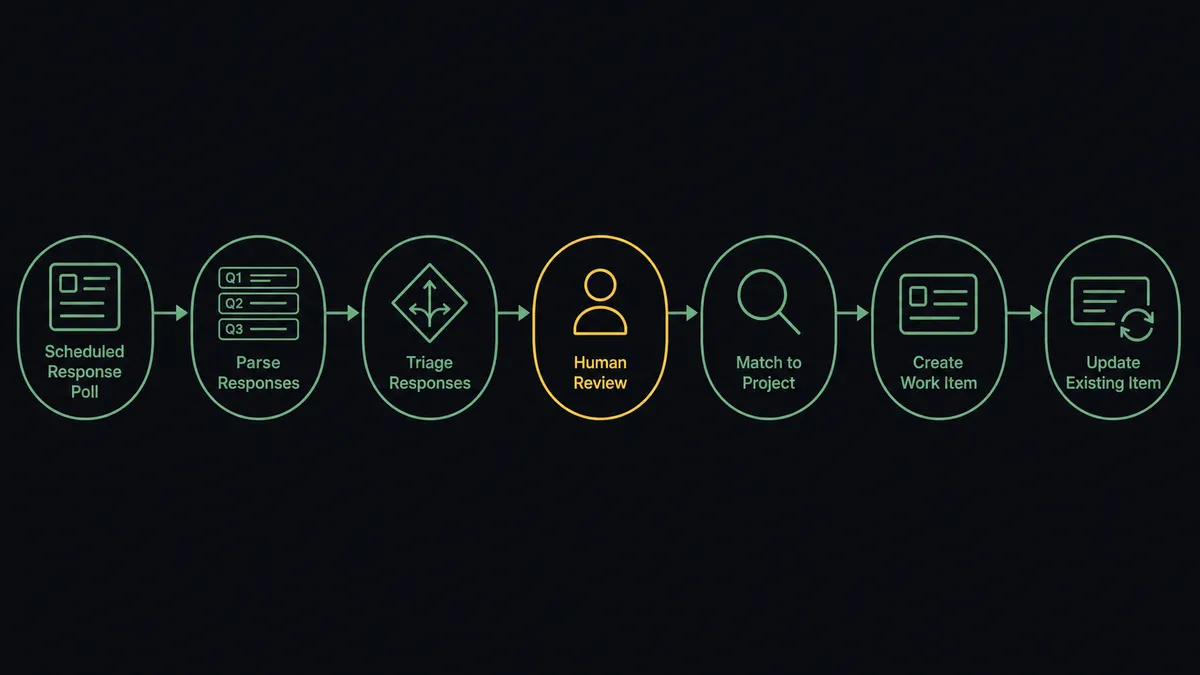
- Trigger: On a schedule, the workflow calls Get Form Responses on the intake form and picks up new submissions.
- Read: Get Form pulls the question structure, so each answer maps to a named field instead of a column index.
- Match the project: Search Projects finds the destination using the client or program answer on the form.
- Resolve the assignee: Search Users maps the request type to the right owner on the project team.
- Write the work: Create Task adds the request to the matched project, with the description answer as the task description and the requested date as the due date.
- Handle revisions: When a submission references existing work, Search Tasks finds the original task and Update Task appends the new detail instead of duplicating it.
- Keep the form honest: When your service catalog changes, Update Question Options refreshes the form’s choices so requesters pick from current offerings.
That is the “just connect them” answer. Submissions become tasks, revisions land on the right work item, and the responses tab stops being a queue someone has to remember to check.
Can an AI agent run it? (and why a human stays in the loop)
Yes, and triage is exactly where an agent earns its place. A fixed mapping can route a form answer to a project field. It cannot read “we need to move the launch date up and fold in the partner assets” and understand that this single submission is three things: a deadline change, a scope addition, and a risk to two other tasks. The agent can. It holds the Workfront actions as tools: Search Projects, Search Tasks, Create Task, Update Task, Update Project, Search Users. For each submission it reasons about what the request actually touches, then picks the actions that fit.
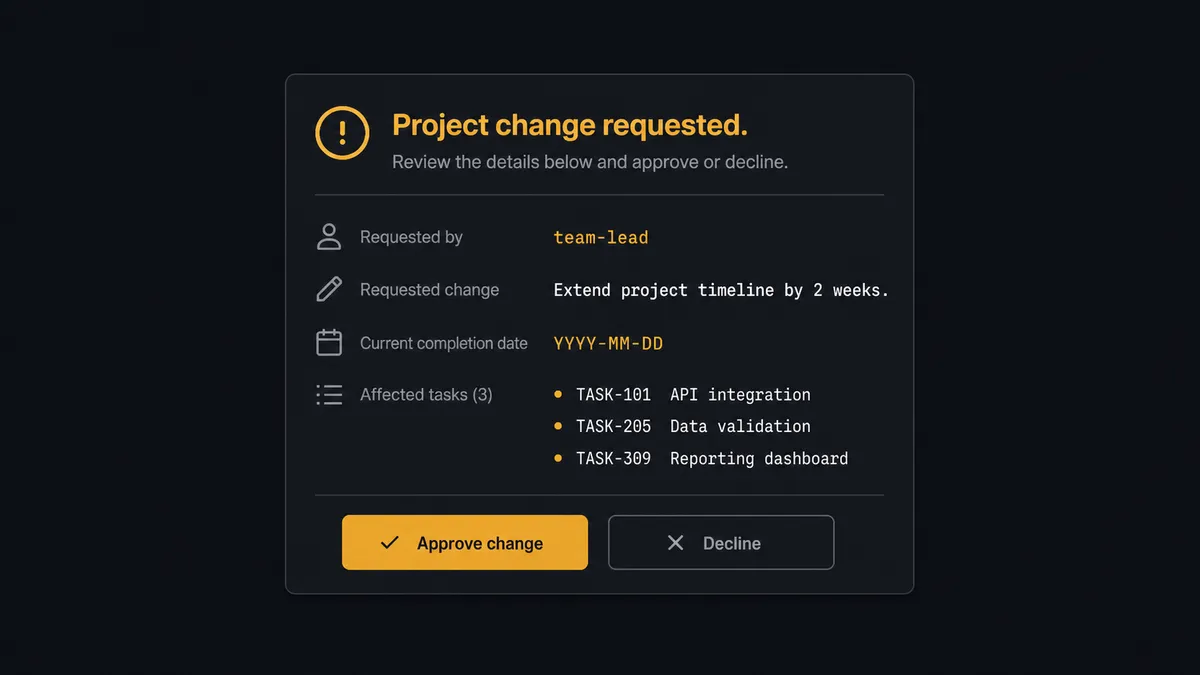
The consequential step is Update Project. Changing a live project’s dates or scope in Workfront reroutes real people’s weeks. Downstream tasks inherit new deadlines, capacity plans shift, and at agencies the change often has billing implications. So when a submission would alter running work, the agent does not touch the project. It assembles the decision package: who submitted the request, what they asked to change, the project’s current dates from Get Project, and which tasks the change would affect from Search Tasks. Then it invokes a human-in-loop flow it holds as a callable tool. The workflow pauses and posts to the project owner: “[Requester] asked to change [project]: [summary of change]. Current completion date: [date]. Tasks affected: [list]. Approve the change?” Only after the owner approves does the agent call Update Project and adjust the affected tasks with Update Task.
Routine requests never wait on this. A standard task in an active project flows straight through Create Task. The gate exists only where the consequence lives. Prospects call this the digital andon cord: like Toyota’s production line pull cord, the workflow stops the line the moment a request would rewire running work, and the person who owns that work restarts it.
FlowRunner vs n8n
For a technical team, n8n is a legitimate way to wire this pair. Its node library covers both services, its fair-code self-hosting model is genuinely good, and its community has published thousands of templates, including form-to-task patterns a developer can adapt in an afternoon. If your engineers want to own every branch of the intake logic in a node graph, n8n will get there.
The difference is who operates the triage and what guards the live projects. FlowRunner is built so the operations lead who owns intake can run this without engineering time, and the pause before Update Project is a native agent decision rather than plumbing someone has to build and maintain. Here is the honest side-by-side.
| What matters for this pair | FlowRunner | n8n |
|---|---|---|
| Human-in-the-loop on Update Project | Native. The agent invokes an approval flow as a callable tool before a live project’s dates or scope change | Buildable with wait nodes and webhooks; you assemble and maintain the approval logic yourself |
| Who runs the flow | An AI agent reads each submission, reasons, and picks actions as tools | A node graph you design and debug, with AI available as LangChain nodes |
| Users included | Unlimited users on every tier | Cloud plans meter executions and gate collaboration features by tier |
| Bring your own AI keys | Yes, BYOK | Yes, via your own credentials in AI nodes |
| Self-hosted option | Yes, cloud-hosted or self-hosted | Yes, fair-code self-hosting is a core n8n strength |
| Pricing model | Transparent workflow-based tiers with clear execution limits | Execution-based cloud pricing; self-hosting shifts cost to your own infrastructure and upkeep |
If you have developers who enjoy owning the node graph and are happy building the approval mechanics, n8n is a credible choice. If intake is owned by an operations team and the thing you cannot afford is a silent change to a live project, this pairing on FlowRunner is the better fit.
Before and after
| Category | Before | After |
|---|---|---|
| Submission handling | A coordinator reads the responses tab and retypes each submission into Workfront | Every submission becomes a matched, assigned Workfront task within minutes |
| Change requests | Deadline and scope changes hide inside task descriptions until they surface as slipped dates | Changes to live projects pause at the project owner before Update Project runs |
| Revisions | Follow-up submissions spawn duplicate tasks reconciled at the weekly review | Search Tasks finds the original and Update Task folds the revision in |
| Form drift | The intake form offers services the team retired two quarters ago | Update Question Options keeps the form’s choices current automatically |
| Accountability | Nobody can say who agreed to move a deadline | Every project change carries a named approver and timestamp in the audit trail |
What you can build
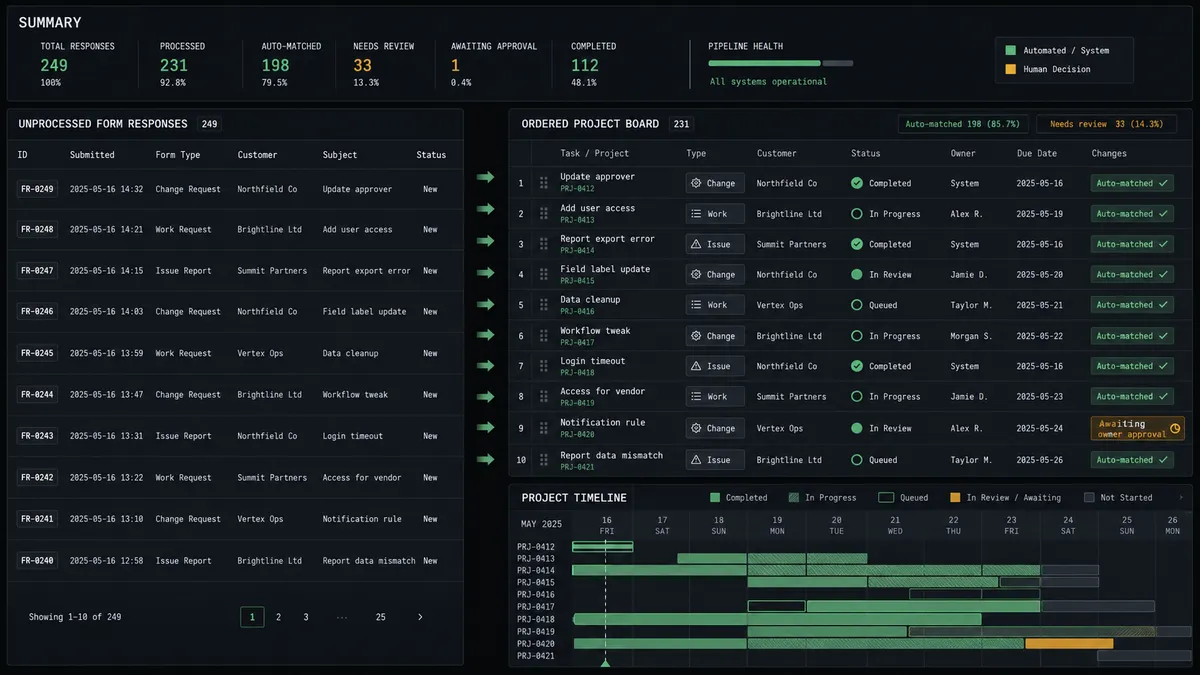
Form to assigned task, hands off. The schedule fires Get Form Responses, the agent triages the submission, Search Projects and Search Users find the destination and owner, and Create Task writes the work with the due date mapped. The responses tab stops being anyone’s job.
Live-project change gate. A submission asks to move a launch date. The agent pulls current dates with Get Project, lists affected work with Search Tasks, invokes the human-in-loop tool, and only calls Update Project after the owner approves. The decision lands in the audit trail.
Revision folding. A requester submits a follow-up on work already in flight. The agent finds the original with Search Tasks and appends the new detail with Update Task, so one deliverable stays one task instead of three.
Intake quality loop. On a weekly schedule, the agent calls Get Form Insights to see where requesters drop off, then proposes wording changes and applies approved ones with Update Question Options, so the form itself keeps improving.
Localized intake. When a regional team needs the request form in their language, the agent copies the master with Copy Existing Form and localizes it with Auto-Translate Form, keeping one canonical intake structure across markets.
Getting started
Start on the free plan: 100 executions a month, every integration included, no credit card required, plus 14 days of Professional for new accounts. Both connectors are available on every tier, and every tier includes unlimited users and unlimited workflows.
Explore the integration details:
- Typeform integration (36 actions covering forms, responses, themes, translations, and workspaces)
- Adobe Workfront integration (10 actions covering projects, tasks, issues, users, and documents)
Start building free at flowrunner.ai or book a demo to see a live Typeform to Adobe Workfront workflow, project-change approval and all.
Frequently asked questions
Is it free to connect Typeform and Adobe Workfront on FlowRunner?
You can build and run the connection on FlowRunner's free plan, which includes 100 executions a month and every integration with no credit card required, and new accounts also get 14 days of Professional. Both connectors are available on every FlowRunner tier, and every tier includes unlimited users and unlimited workflows.
Can I self-host the Typeform to Adobe Workfront workflow?
Yes. FlowRunner offers a cloud-hosted option and a self-hosted option, so the connection can run inside your own environment.
Does the AI agent need my own OpenAI or Claude key?
FlowRunner uses a bring-your-own-keys model, so you connect the AI provider key you already have. You are not locked to one model.
What happens when a submission would change a project that is already in flight?
The agent stops before touching the live project. It posts the requester, the requested change, and the affected project's current dates to your team channel, then waits for the project owner to approve before Update Project or Update Task runs.
Which Typeform events start the Workfront workflow?
Typeform's connector is action-based, so the workflow runs on a schedule. It calls Get Form Responses on the intake form every few minutes, and each new submission flows through triage into Search Projects and Create Task, or into the change approval path.
Can the workflow keep the intake form itself up to date?
Yes. When your service list changes, the workflow updates the form's choices with Update Question Options, so requesters always pick from current offerings instead of a stale dropdown.