How to Connect Typeform with Aircall (With or Without an AI Agent)
Turn Typeform callback requests into prepared Aircall calls automatically, with an AI agent that builds contacts and briefing cards on its own and pauses for a human before Delete Contact removes a record during dedupe.
How do you connect Typeform to Aircall?
You connect Typeform to Aircall by polling the callback request form with Get Form Responses on a schedule and preparing each submission for the phone team: the workflow checks List Contacts for an existing record, writes new callers with Create Contact, and stages the form’s answers on the rep’s screen with Add Insight Cards so the callback starts informed. FlowRunner is a visual AI-agent orchestration platform where automations run autonomously and pause for human judgment on the steps that carry real consequence. Run the same connection as an AI agent and it resolves each submission against your contact base on its own, and pauses for a named owner before Delete Contact removes a record while merging duplicates, because contact history is the one thing a phone team cannot re-create.
The problem it solves
A “request a call” Typeform is one of the highest-intent forms a business runs, and most teams waste it twice. First on speed: submissions collect in the responses view until someone exports the list, so the person who asked for a call on Tuesday morning hears a ringtone on Thursday, after their urgency has cooled or their search has moved on. Second on context: the rep dials from a bare name and number, and opens with “how can I help you?” to someone who already answered that question, in writing, on the form.
Underneath both sits the quiet mess of contact data. Every submission is a chance to create a duplicate: the same person with a mobile this time and a work line last time, a nickname here and a full name there. Reps either create yet another record or, worse, clean up on the fly, deleting whichever entry looks older. In a phone system, the contact record carries the call history, and deleting the wrong one erases the relationship’s memory. So the contact base decays in both directions at once: duplicates multiply, and careless merges destroy history nobody can restore.
How it works: the connection
The connection reads Typeform and writes Aircall. Here is the plain version, grounded in the real connector actions.
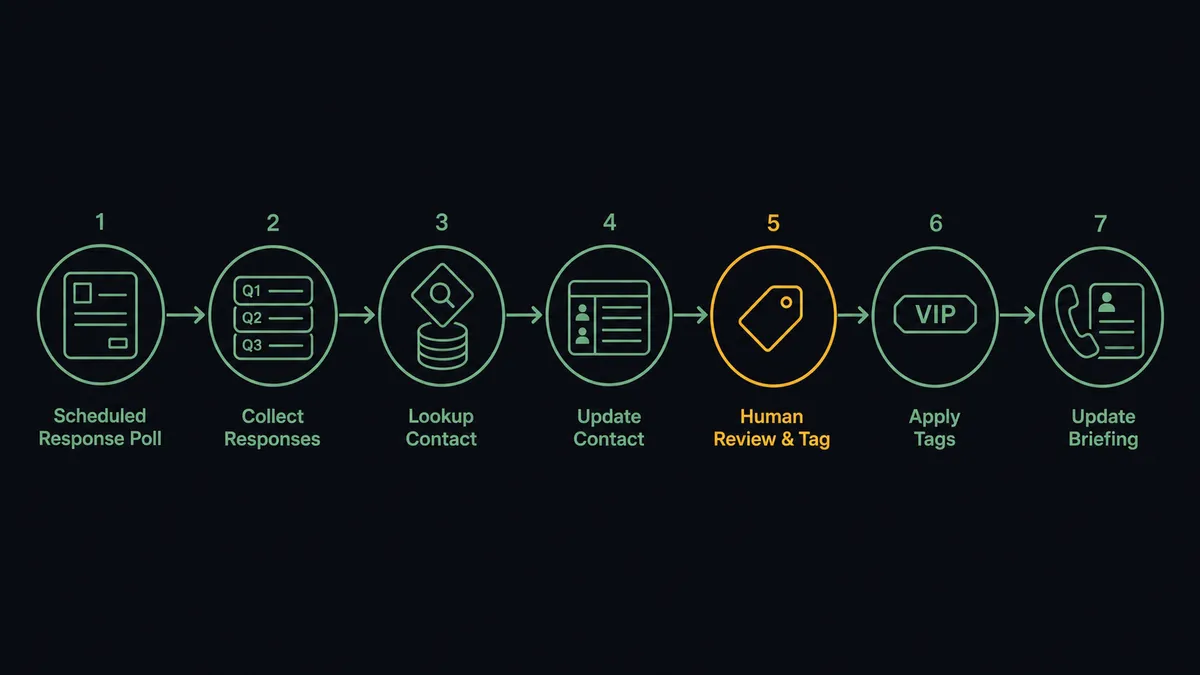
- Trigger: On a schedule, the workflow calls Get Form Responses on the callback form and picks up new submissions.
- Read: Get Form pulls the question structure, so each answer maps to a named field instead of a column index.
- Check the base: List Contacts looks for an existing record by phone number and name.
- Write the contact: Create Contact adds new callers; Update Contact refreshes a clear match with the newer details.
- Tag the request: Create Tag and Add Tags to Call label the callback by topic, so the queue can be routed by team.
- Stage the context: Add Insight Cards posts the form’s answers, topic, and preferred time to the rep’s screen for the callback.
- Record the outcome: After the call, Comment on Call captures the disposition against the request, closing the loop on the submission.
That is the “just connect them” answer. High-intent requests become prepared calls instead of a stale export, and every callback starts with the context the requester already provided.
Can an AI agent run it? (and why a human stays in the loop)
Yes, and identity resolution is where the agent earns its keep. A mapping can match a phone number exactly. It cannot decide that “Kate M, mobile, asking about upgrade pricing” and “Katherine Moore, office line, spoke to sales in spring” are the same person, or that two records sharing a company switchboard number are two different people. The agent can weigh those cues the way a careful human would. It holds the actions as tools: Get Form Responses, List Contacts, Get Contact, Create Contact, Update Contact, Delete Contact, Add Insight Cards, Add Tags to Call, Comment on Call. For each submission it reasons about who this is, then picks the write that keeps the contact base clean.
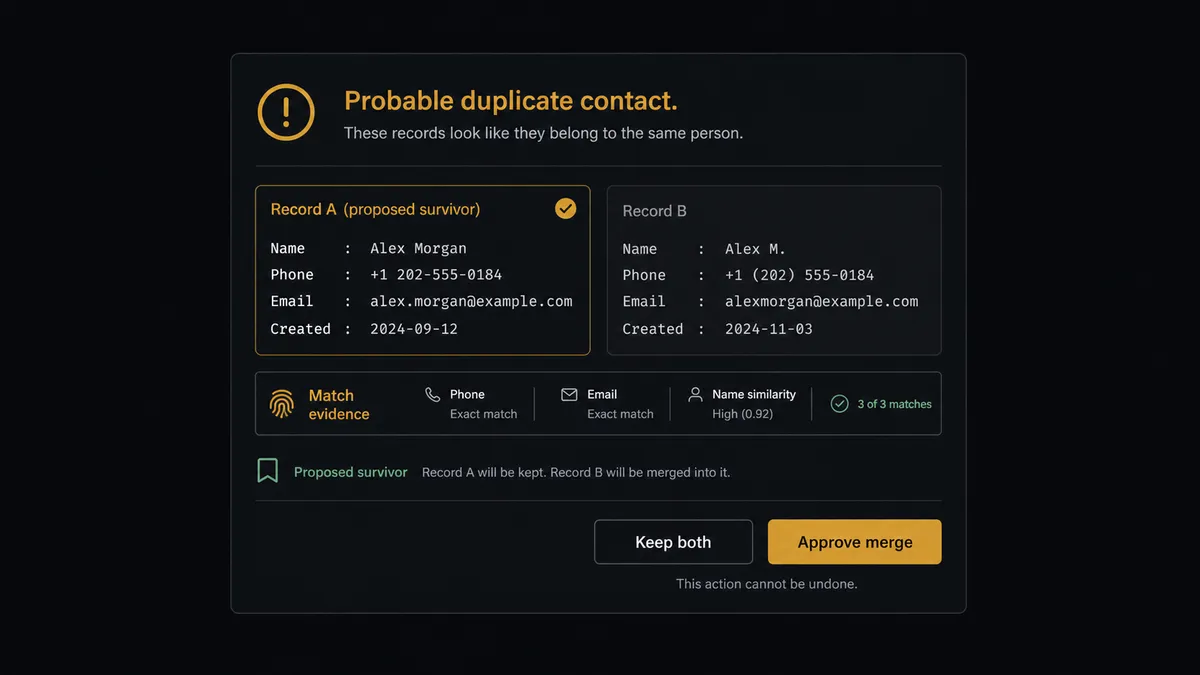
The consequential step is Delete Contact. Merging duplicates means one record survives and one is removed, and in a phone system the removed record takes its call history, comments, and tags with it. That loss is permanent and invisible until someone needs the history that is gone. So the agent never deletes on its own judgment. When it concludes two records are the same person, it prepares the merge: both records side by side, the evidence for the match, which record it proposes as survivor and why, and what would transfer. Then it invokes a human-in-loop flow it holds as a callable tool. The workflow pauses and posts to the data owner: “Probable duplicate: [record A] and [record B]. Match evidence: [summary]. Proposed survivor: [record]. Approve merge?” Only after a named person approves does the agent copy details across with Update Contact and run Delete Contact on the duplicate, with the approval and both record snapshots in the audit trail.
Prospects call this the digital andon cord: like Toyota’s production line pull cord, the workflow stops the line before the irreversible step, and a person decides which memory the system keeps.
FlowRunner vs Zapier
Zapier is the natural first try for this pair, and it deserves the credit: the connector catalog is vast, the editor is comfortable for the marketing or revenue ops person who owns the callback form, and form-to-phone Zaps exist as ready templates. For “new submission creates a contact and a task,” Zapier is fast and dependable.
The difference is judgment about identity and the guardrail on deletion. A Zap executes the mapping you configured; deciding whether two similar records are one person is not a mapping, and holding a destructive merge for approval is not its native shape. Here is the honest side-by-side.
| What matters for this pair | FlowRunner | Zapier |
|---|---|---|
| Human-in-the-loop on Delete Contact | Native. The agent invokes an approval flow as a callable tool before any record is removed in a merge | Available via added approval steps or paths, not a native agent decision |
| Who runs the flow | An AI agent resolves identity, reasons, and picks actions as tools | Predefined step sequence you configure per Zap |
| Users included | Unlimited users on every tier | Priced by task volume; seats vary by plan |
| Bring your own AI keys | Yes, BYOK. Connect the AI provider key you already have | AI features tied to Zapier’s own AI offering |
| Self-hosted option | Yes, cloud-hosted or self-hosted | Cloud only |
| Pricing model | Transparent workflow-based tiers with clear execution limits | Per-task pricing that can be hard to predict as submission volume grows |
If your callback volume is light and your contact base is young, Zapier will serve you well. If every submission has to resolve cleanly against years of contact history, and no merge should ever silently destroy a record, this pairing on FlowRunner is the better fit.
Before and after
| Category | Before | After |
|---|---|---|
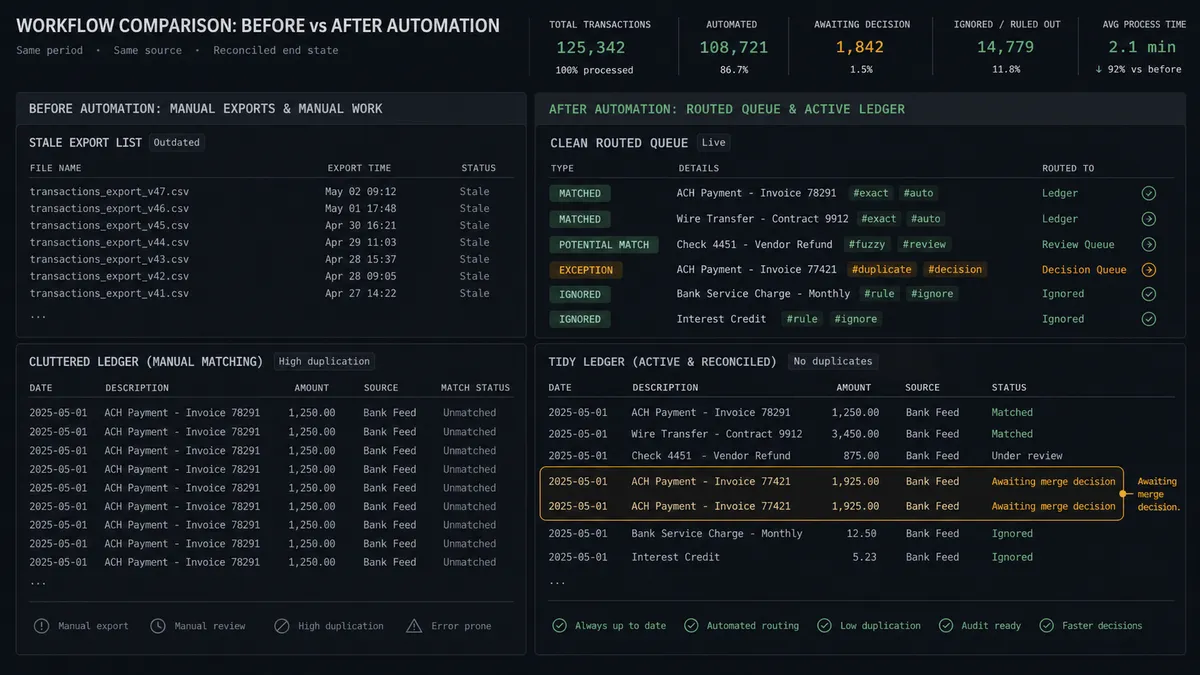
| Response time | Callback requests sit in the responses view until someone exports the list | Each submission becomes a tagged, routed callback within minutes |
| Call context | Reps dial from a bare name and number and ask what the form already answered | Add Insight Cards puts the topic, answers, and preferred time on screen |
| Duplicates | Every submission is a coin flip toward another duplicate record | List Contacts is checked and identity is resolved before anything is written |
| Merge safety | Reps delete whichever record looks older, taking its call history with it | Delete Contact runs only after a named owner picks the survivor |
| Follow-through | Nobody knows which requests were called back | Comment on Call records the disposition against every submission |
What you can build
Callback request to prepared call, hands off. The schedule fires Get Form Responses, the agent resolves the requester against List Contacts, writes Create Contact or Update Contact, tags the topic, and stages Add Insight Cards. The rep dials warm within minutes of the submission.
Merge gate. The agent finds two records that look like one person, lays them side by side with its evidence, invokes the human-in-loop tool, and only runs Delete Contact after the owner picks the survivor. Contact history never dies by accident.
Topic-routed queues. The agent maps the form’s topic answer to tags with Create Tag and Add Tags to Call, so billing questions land with the billing team and demo requests with sales, without a dispatcher reading every submission.
Callback follow-through audit. On a daily schedule, the agent cross-checks recent submissions against List Calls, flags requests with no completed callback, and posts the misses so no high-intent request quietly expires.
Form tune-up loop. The agent reads Get Form Insights weekly, spots where requesters abandon the form, proposes shorter wording, and applies approved changes with Update Question Options, so the callback form keeps converting.
Getting started
Start on the free plan: 100 executions a month, every integration included, no credit card required, plus 14 days of Professional for new accounts. Both connectors are available on every tier, and every tier includes unlimited users and unlimited workflows.
Explore the integration details:
- Typeform integration (36 actions covering forms, responses, themes, translations, and workspaces)
- Aircall integration (33 actions covering calls, contacts, tags, teams, and webhooks)
Start building free at flowrunner.ai or book a demo to see a live Typeform to Aircall workflow, merge approval and all.
Frequently asked questions
Is it free to connect Typeform and Aircall on FlowRunner?
You can build and run the connection on FlowRunner's free plan, which includes 100 executions a month and every integration with no credit card required, and new accounts also get 14 days of Professional. Both connectors are available on every FlowRunner tier, and every tier includes unlimited users and unlimited workflows.
Can I self-host the Typeform to Aircall workflow?
Yes. FlowRunner offers a cloud-hosted option and a self-hosted option, so the connection can run inside your own environment.
Does the AI agent need my own OpenAI or Claude key?
FlowRunner uses a bring-your-own-keys model, so you connect the AI provider key you already have. You are not locked to one model.
What happens when a submission looks like a contact that already exists?
A clear match gets updated in place with Update Contact. When the match is ambiguous, or when merging would mean removing a record with Delete Contact, the agent stops and posts both records side by side to a named owner. Nothing is deleted until a person picks the survivor, and the decision is logged.
Which actions turn a Typeform submission into an Aircall call?
The workflow polls Get Form Responses on a schedule, checks List Contacts for an existing record, writes new callers with Create Contact, tags the request with Create Tag and Add Tags to Call, and puts the form answers on the rep's screen with Add Insight Cards when the callback happens.
Does the caller's form context actually reach the rep?
Yes, that is the point of the connection. The submission's answers, the topic, and the preferred time are posted to the call as insight cards, so the rep opens the conversation already knowing what the person asked for.