How to Connect WordPress with Slack (With or Without an AI Agent)
Connect WordPress and Slack so every new published post sends a Slack message automatically, or run the connection as an AI agent that stages drafts, routes editorial approvals in Slack, and holds publishing for a human.
How do you connect WordPress to Slack?
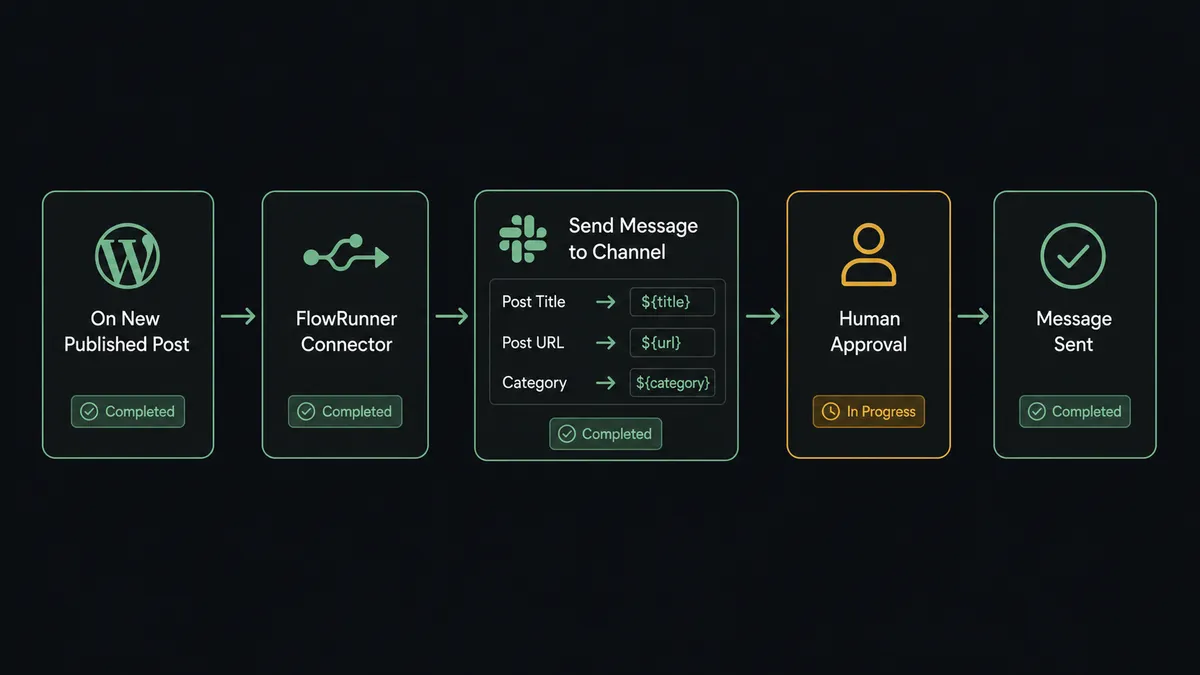
You connect WordPress to Slack by using the On New Published Post trigger in WordPress to fire a Send Message to Channel action in Slack, passing the post title, URL, and category automatically the moment an article goes live. FlowRunner is a visual AI-agent orchestration platform where automations run autonomously and pause for human judgment on the steps that carry real consequence. That same connection can run as an AI agent that stages drafts from a content brief, routes editorial approvals through Slack, and holds the publish button for a person.
The problem with the manual process
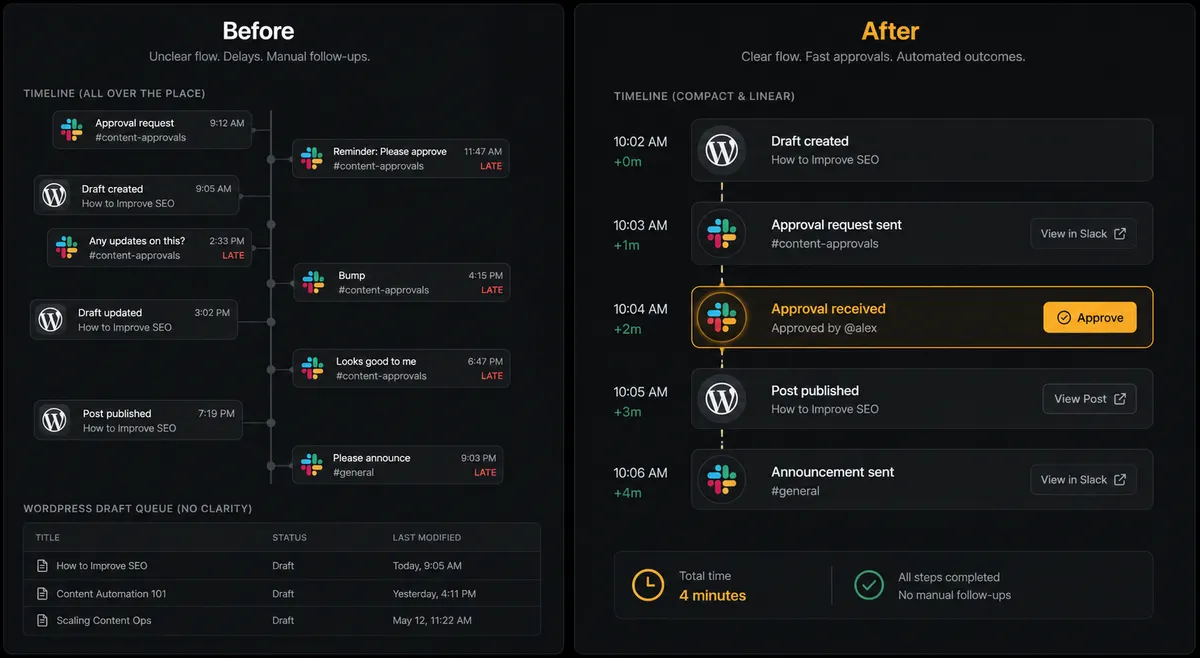
Right now, someone on your team publishes a WordPress post and then remembers to tell Slack about it. Sometimes that happens immediately. Sometimes it happens hours later, after the post has already been live and the window for early traffic has closed. Sometimes it does not happen at all, and the content team finds out a piece went live when someone mentions it in a meeting. That gap between publish and announcement is a manual step that falls through the cracks every time someone is busy or distracted.
The editorial workflow has the same problem upstream. A writer finishes a draft. It sits in WordPress waiting for an editor who does not know it is there. The editor is not checking WordPress constantly. They find out about drafts through Slack messages, emails, or direct pings, each tracked in a different thread with no shared record of who approved what, or when. Your content operation runs on spreadsheets and Slack threads instead of a system.
How it works: the connection
The basic connection uses WordPress’s On New Published Post trigger and Slack’s Send Message to Channel action. When a post is published on your WordPress site, FlowRunner detects it within seconds and posts a message to the Slack channel you designate. The message carries the post title, the live URL, the categories, and any other fields you map from the WordPress post data.
You can filter the trigger by category, so only posts in specific sections of your site fire the notification. A site with multiple content types can send editorial posts to one channel and product updates to another, all from a single workflow configuration. The On New Comment trigger works the same way: new comments fire a Slack message so your moderation team sees them in real time instead of logging into WordPress to check.
Can an AI agent run it? (and why a human stays in the loop)
A basic Zapier or n8n connection fires a Slack message when a post publishes. That serves the announcement use case. It does not help with the upstream editorial problem, because there is no decision to be made in Zapier: it always fires, it always posts, it never asks.
A FlowRunner agent changes the architecture. Instead of reacting to a published post, the agent starts from a content brief. It reads the brief, calls Upload Media From URL to pull the cover image into the WordPress media library, calls Create Post at status draft to stage the article with the title, HTML body, categories, and tags already set, and then reviews the staged draft before doing anything else.
That review is where the agent’s judgment comes in. The agent evaluates whether the content is complete, the categories are correct, and the excerpt reads clearly. If something looks off, it surfaces the specific issue in Slack before escalating to an editor. But even when everything looks right, the agent does not publish on its own. Publishing is consequential. Moving a post from draft to live fires WordPress’s own publish hooks, updates RSS feeds, and makes the content visible to every reader immediately. The agent knows this step carries real consequence.
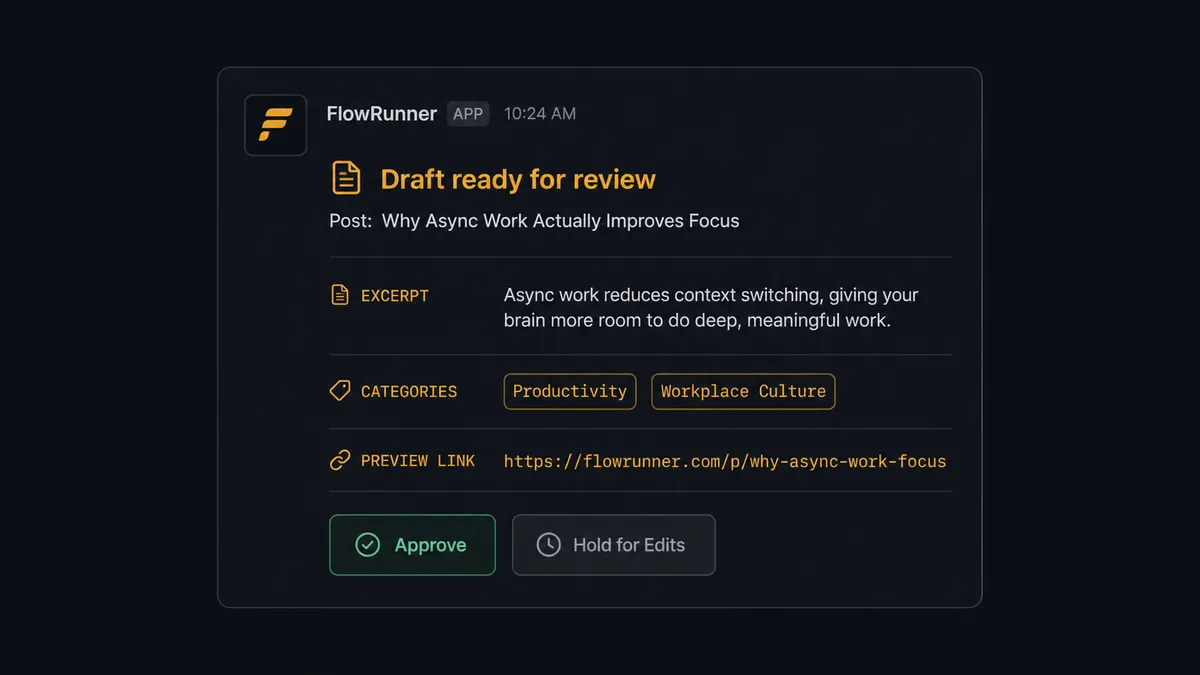
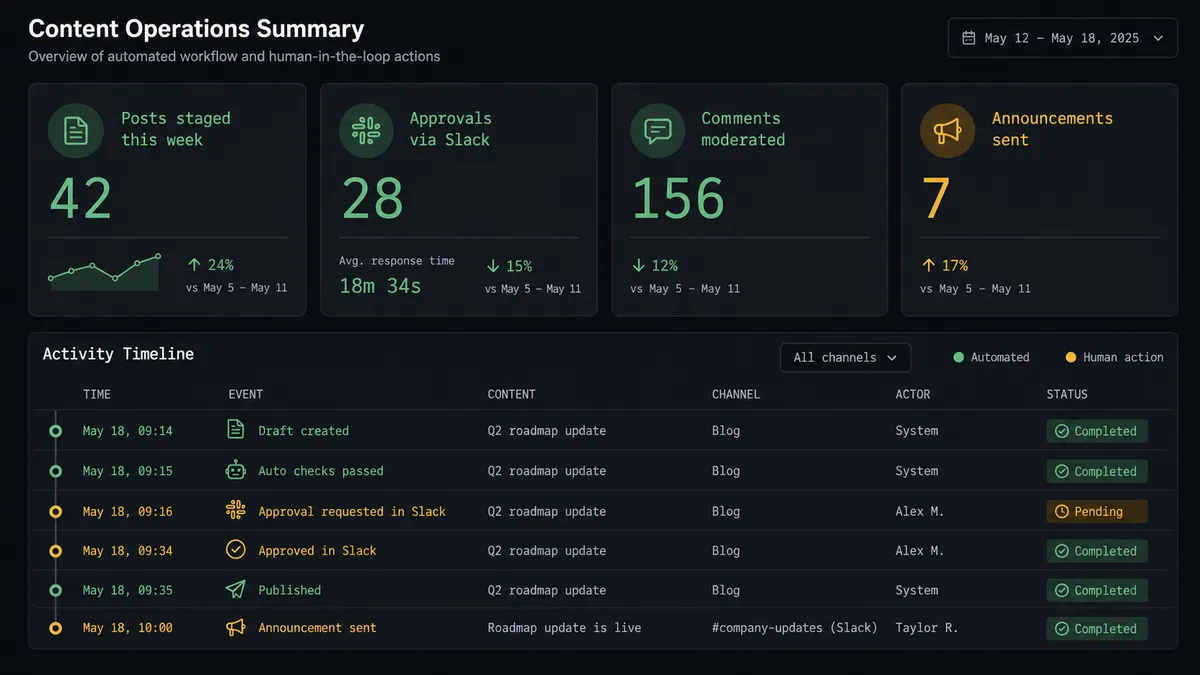
So the agent invokes a human-in-loop flow as a tool. It sends a Slack message to the editorial channel with the draft title, the rendered excerpt, the categories and tags, and a direct preview link. The message has two interactive buttons: Approve and Hold. An editor reviews the draft from their phone or desktop without leaving Slack. On Approve, the On Block Action trigger fires and routes the decision back to the workflow. The agent calls Update Post to set the status to publish. On Hold, the draft stays staged and nothing goes public.
The decision to publish gets a person. The agent handles everything else.
This is not a hardcoded rule. A standard automation would say “always ask before publishing.” The FlowRunner agent evaluates the content, the context, and the configuration. If you build a workflow for a news site that publishes 40 posts a day with a streamlined brief-to-publish pipeline, the agent can be configured to auto-publish posts that meet all quality criteria and only escalate exceptions. If you run a B2B blog where every post represents a strategic editorial decision, the agent always escalates to a person. The decision logic lives in the agent’s instructions, not in a fixed threshold.
Prospects who use this call it a digital andon cord. The agent stops the line when it hits something that should not be automated. The editorial team only sees exceptions and approvals, not every post in the queue.
FlowRunner vs Zapier: what are the real differences?
Zapier is the right comparison for WordPress plus Slack. Most teams using WordPress are non-technical. They chose Zapier because it is simple, has a large template library, and works without developer help. That is a genuine strength. Zapier’s WordPress and Slack connectors are reliable, and the setup takes minutes.
The differences become visible when you move past simple trigger-action pairs.
| Feature | Zapier | FlowRunner |
|---|---|---|
| Basic post-to-Slack notification | Yes, works well | Yes, same capability |
| AI agent with reasoning and tool use | No | Yes, native. The agent picks actions, evaluates data, and decides what to do |
| Human-in-loop as a callable tool | No native approval flow | Yes. The agent invokes a Slack approval sub-flow as a tool and resumes on response |
| Interactive Slack buttons for decisions | Not in standard automations | Yes, via On Block Action trigger and Block Kit messages |
| Unlimited users on every tier | No, Zapier charges per user on higher tiers | Yes, all FlowRunner tiers include unlimited users |
| BYOK for AI | No | Yes, bring your own OpenAI, Anthropic, or other provider key |
| Self-hosted deployment | No | Yes, Community Edition free; Enterprise for clustering |
Zapier handles the simple connection well. FlowRunner handles the editorial workflow end to end, including the approval step that Zapier leaves as a manual process.
Before and after
| Metric | Before | After |
|---|---|---|
| Post announcement timing | Someone remembers to post in Slack, sometimes hours after publish | Slack message fires within seconds of On New Published Post |
| Draft discovery | Editor finds out about drafts through pings and emails, no shared record | Agent stages draft and sends Slack notification with preview link automatically |
| Publish approval | Ad hoc email threads or verbal approvals with no audit trail | Interactive Slack button captures approver identity and timestamp in the audit trail |
| Media handling | Cover images downloaded and re-uploaded manually for each post | Agent calls Upload Media From URL, image is in the library before the draft is created |
| Category and tag assignment | Set manually in WordPress for each post | Agent assigns categories and tags from the brief at draft creation time |
What you can build
New post announcement pipeline. When On New Published Post fires, the agent posts a formatted Slack message to your marketing channel with the title, URL, excerpt, and categories. Cross-post the article to other platforms as a follow-on action. The launch checklist that used to run by hand runs the instant the post goes live.
Editorial approval workflow. The agent stages articles as drafts from a content brief, then sends a Slack approval message to the editorial channel with Approve and Hold buttons. Editors approve from Slack without opening WordPress. The agent publishes on approval and leaves the draft staged on hold.
Comment moderation queue. When On New Comment fires, the agent evaluates the comment for moderation status and posts it to a #moderation channel in Slack. The moderation team approves or rejects comments from Slack using interactive buttons, and the agent calls Update Comment to set the status.
Contributor onboarding flow. When a new contributor application arrives, the agent calls Create User to provision the WordPress account with the author role and Create Post to seed their first draft. It then sends a Direct Message in Slack to the new contributor with their login link and draft URL.
On-demand content search. When someone @mentions the FlowRunner agent in a Slack channel, the agent calls Search Site to find posts matching the query and replies in the thread with the top results including titles and URLs. Your team finds WordPress content without leaving Slack.
Getting started
Start on the free plan: 100 executions a month, every integration included, no credit card required, plus 14 days of Professional for new accounts.
Connect your integrations at /integrations/wordpress and /integrations/slack. Both connectors are available on every FlowRunner tier, including the trial.
Start the trial at flowrunner.ai or book a 30-minute walkthrough at calendly.com/flowrunner/intro to see the editorial approval workflow running against a real WordPress site.
Frequently asked questions
Is it free to connect WordPress and Slack on FlowRunner?
FlowRunner has a free plan with 100 executions a month, every integration included, and no credit card required, and new accounts get 14 days of Professional on top. The Growth tier costs $45 per month beyond the free plan and includes unlimited users and unlimited workflows.
Can I self-host FlowRunner?
Yes. FlowRunner offers a free Community Edition for self-hosting on a single instance. Enterprise self-hosting adds multi-instance clustering and the full compliance suite.
Does the agent need my own AI API key?
Yes. FlowRunner uses a Bring Your Own Keys model, so you connect your OpenAI, Anthropic, or other provider account. Your data does not pass through FlowRunner's AI infrastructure.
What happens when the agent is not sure whether to publish?
The agent pauses and sends a Slack message to the editorial channel with the draft title, excerpt, categories, tags, and a preview link. An editor responds with an interactive button. The agent resumes on approval or leaves the post as a draft on hold.
Can I filter which WordPress posts trigger a Slack notification?
Yes. The On New Published Post trigger accepts an optional category filter, so you can limit notifications to specific content categories rather than firing on every post.
Does FlowRunner require a developer to set up?
No. FlowRunner is a visual no-code platform. You connect WordPress with an Application Password and Slack with OAuth2, then configure triggers and actions through a drag-and-drop interface. No code required.