How to Connect Xero with Adobe Sign (With or Without an AI Agent)
Connect Xero invoices to Adobe Sign so engagement letters and payment authorizations go out for signature the moment the billing exists, with an AI agent that pauses for a human before a signature request reaches a client.
How do you connect Xero to Adobe Sign?
You connect Xero to Adobe Sign by having Xero’s On Invoice Created trigger drive Adobe Sign’s agreement actions: when a new invoice enters the books, the workflow pulls the client and terms with Get Invoice and Get Contact, stages the engagement letter with Upload Transient Document, builds it with Create Draft Agreement, and sends it for signature with Send Agreement, so the paperwork goes out the moment the billing exists instead of whenever someone remembers. FlowRunner is a visual AI-agent orchestration platform where automations run autonomously and pause for human judgment on the steps that carry real consequence. Run as an AI agent, the same connection prepares every agreement on its own and stops for a named person before a legal signature request reaches a client’s inbox.
The problem it solves
In most firms, the books and the paperwork run on separate clocks. The invoice for a new engagement gets raised in Xero on Monday. The engagement letter, the direct debit authorization, or the updated terms document goes out days later, assembled by hand: someone finds the right template, retypes the client name and amounts from Xero, uploads it to the signing tool, and sends it. Every retyped field is a chance for the legal document to disagree with the books, and every day of lag is a day the firm does work that no signed agreement covers.
The follow-through leaks just as badly. Unsigned agreements sit in the signing tool with nobody chasing them, because reminders are a human task and humans have client work. When a signed PDF finally arrives, it lives in the signing tool’s archive while the invoice lives in Xero, and eighteen months later, when a dispute or an audit asks “where is the signed authorization for this billing,” the answer is a twenty-minute search across two systems. Worst case, the wrong version goes out: an agreement quoting last month’s draft amounts, sent to a client whose invoice was corrected after the template was filled.
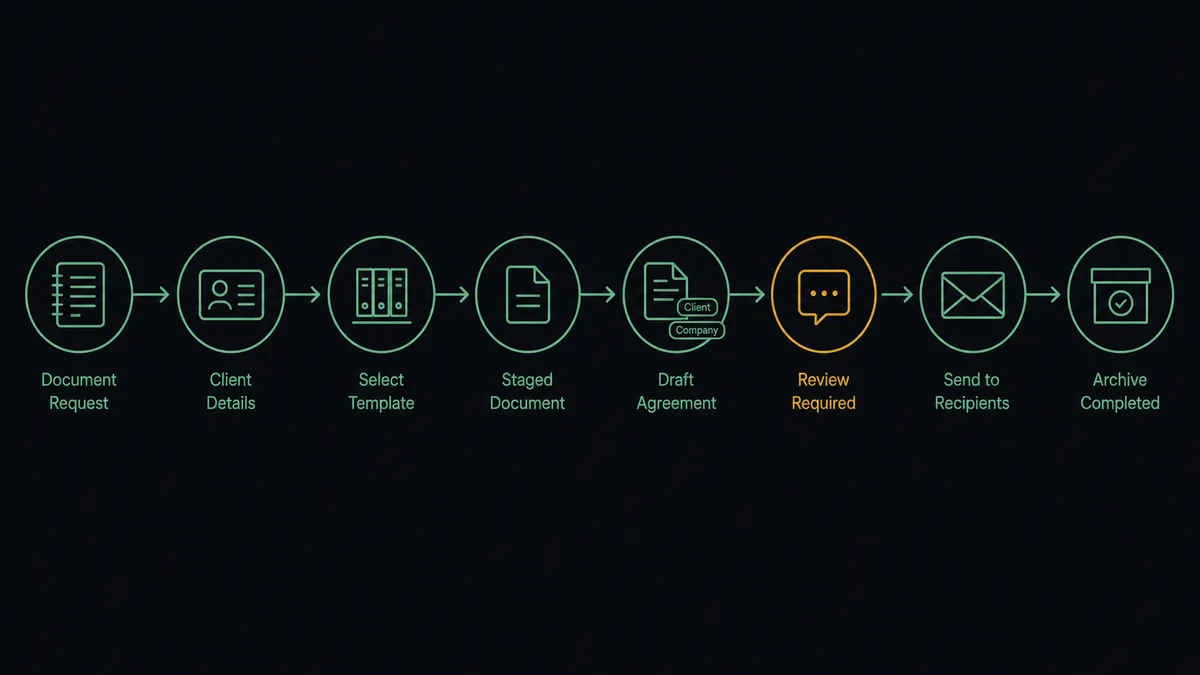
How it works: the connection
The connection listens to Xero and writes to Adobe Sign. Here is the plain version, grounded in the real connector actions.
- Trigger: Xero fires On Invoice Created when the engagement invoice enters the books.
- Read: The workflow calls Get Invoice and Get Contact in Xero to pull the amounts, terms, and the client’s name and email.
- Pick the template: It calls List Library Documents in Adobe Sign and selects the agreement template for this engagement type.
- Stage the file: It calls Upload Transient Document with the filled document.
- Build the agreement: It calls Create Draft Agreement with the recipient, signing order, and field values taken from the books.
- Send and track: It calls Send Agreement, then follows progress with Get Agreement and nudges via Send Reminder until signing completes.
- File the evidence: On completion, it calls Download Agreement PDF and Download Audit Trail so the signed document and its proof live with your records.
That is the “just connect them” answer. The paperwork leaves the building the day the billing exists, the amounts in the agreement are the amounts in Xero, and the signed evidence files itself.
Can an AI agent run it? (and why a human stays in the loop)
Yes, and the agent’s contribution is that the paperwork becomes prepared rather than merely automated. It holds the real actions as tools: Get Invoice, Get Contact, List Library Documents, Upload Transient Document, Create Draft Agreement, Send Agreement, Get Agreement, Send Reminder, Cancel Agreement, Download Agreement PDF, Download Audit Trail. For each new invoice it reasons about which template applies, fills the fields from the books rather than from memory, and cross-checks its own work: does the recipient match the invoice contact, do the amounts agree, is this a fresh engagement or an amendment to a running one via Find Invoices.
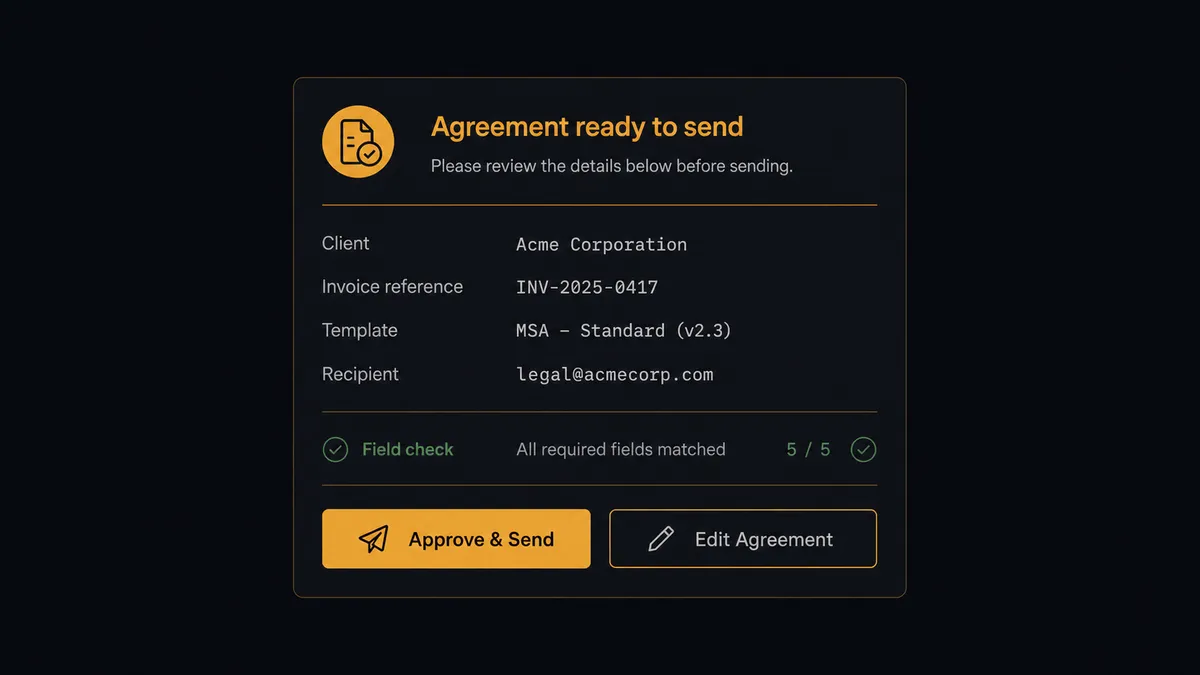
The consequential step is Send Agreement, because the moment it fires, a legal document bearing your firm’s name is in a client’s inbox, and a mistake there is not an internal correction, it is an apology. So the agent never sends alone. It invokes a human-in-loop flow it holds as a callable tool. The workflow pauses and posts to your channel: “Agreement drafted for [client] against invoice [number]: [template name], amounts pulled from Xero. Recipient: [email]. Review the draft and approve to send?” A named person approves or edits. Only then does Send Agreement fire, and the decision, the approver, and the timestamp join Adobe Sign’s own signing evidence in the audit trail. The same gate guards Cancel Agreement, because withdrawing a live signature request is also a message to the client.
Prospects call this pattern a digital andon cord. Like Toyota’s line, where the cord stops production the instant a worker spots a defect, the workflow stops the line at the moment before the document speaks for the firm, and a person clears it to proceed.
FlowRunner vs n8n
n8n’s strengths are real: a very large node library, a fair-code license that lets technical teams self-host at minimal cost, and deep flexibility for developers who want to shape every branch themselves. An engineering team can wire Xero webhooks to the Adobe Sign API in n8n and make it work.
The question is whether the people responsible for client paperwork should depend on an engineer to change it. FlowRunner is built so the operations lead owns this workflow end to end, with the approval gate as a native step the agent invokes and compliance features included at the mid tier.
| What matters for this pair | FlowRunner | n8n |
|---|---|---|
| Human-in-the-loop before Send Agreement | Native. The agent drafts, a named person approves, the trail records it | Wait and approval patterns exist; assembling them per flow is developer work |
| Who runs the flow | An AI agent reads the invoice, picks the template, and holds actions as tools | Node graphs you design and maintain, with agent nodes available to wire in |
| Users included | Unlimited users on every tier | Self-host is free for those who run it; cloud tiers meter executions |
| Bring your own AI keys | Yes, BYOK | Yes, BYOK as well |
| Self-hosted option | Yes, cloud-hosted or self-hosted | Yes, a genuine strength of the fair-code model |
| Built-in compliance | Audit trails and RBAC from the $299/mo Professional tier | Full cloud compliance suite sits at the custom-priced Enterprise tier |
If you have engineers who want full control of the automation stack, n8n is a legitimate choice. If legal paperwork should be prepared by an agent, approved by a named person, and auditable without an enterprise contract, that is the case for this pairing.
Before and after
| Category | Before | After |
|---|---|---|
| Agreement turnaround | Paperwork follows the invoice by days, assembled by hand | Drafted the moment On Invoice Created fires |
| Data accuracy | Names and amounts retyped from Xero into templates | Fields filled from Get Invoice and Get Contact, checked before sending |
| Send discipline | Whoever built the document sends it, reviewed or not | Send Agreement fires only on a named approval |
| Chasing signatures | Reminders happen when someone remembers | Send Reminder runs on cadence until signing completes |
| Evidence filing | Signed PDFs live in one archive, invoices in another | Download Agreement PDF and Download Audit Trail file with the books |
What you can build
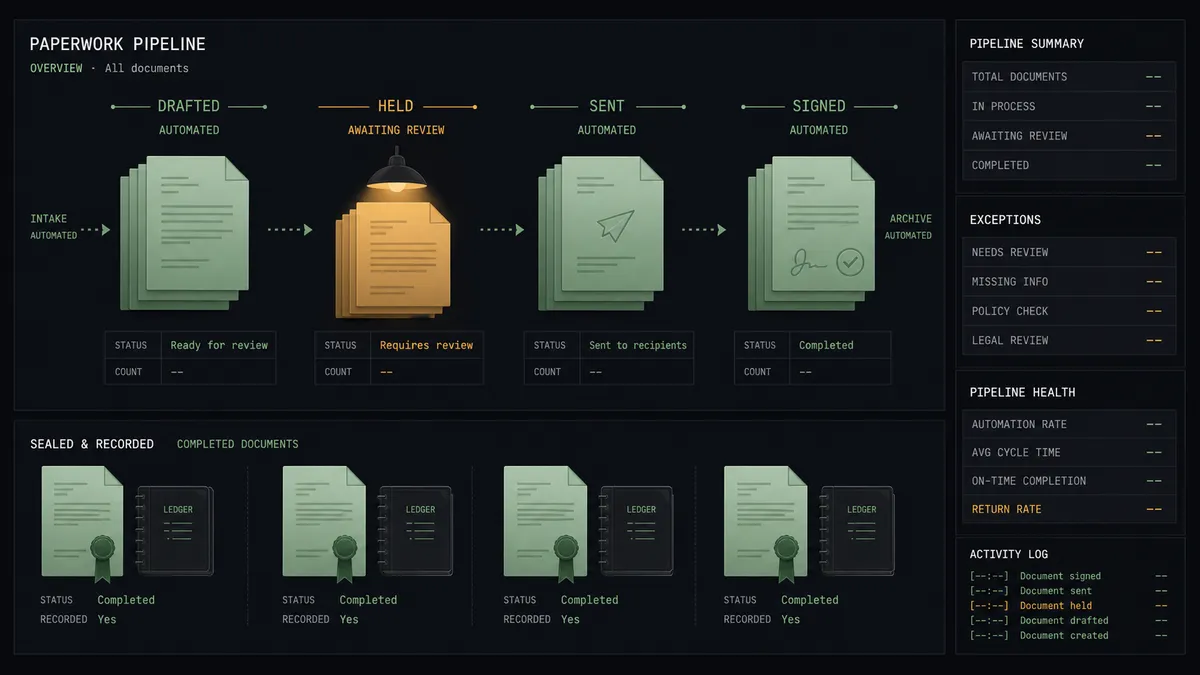
Invoice to engagement letter. On Invoice Created fires, the agent fills the template from Get Invoice and Get Contact, stages it with Upload Transient Document, and a named person approves before Send Agreement reaches the client.
Direct debit authorization on new clients. On Contact Created fires, the agent drafts the payment authority form from the client record, holds it for approval, and tracks it to signature with Get Agreement.
Signature chasing that never sleeps. The agent reviews List Agreements on a schedule, sends Send Reminder on the stalled ones, and escalates agreements unsigned past your threshold to a person instead of nagging forever.
Signed-evidence filing. On completion, the agent pulls Download Agreement PDF and Download Audit Trail and files both against the engagement, so any future dispute or audit starts with the evidence in hand.
Amendment control. On Invoice Updated fires on a materially changed invoice, and the agent flags the live agreement, proposing Cancel Agreement plus a corrected draft, with both steps waiting on a named approver.
Getting started
Start on the free plan: 100 executions a month, every integration included, no credit card required, plus 14 days of Professional for new accounts. Both connectors are available on every tier, and every tier includes unlimited users and unlimited workflows.
Explore the integration details:
- Xero integration (8 triggers and 38 actions covering invoices, contacts, payments, and reports)
- Adobe Sign integration (21 actions covering agreements, signing, reminders, and audit trails)
Start building free at flowrunner.ai or book a demo to see a live Xero to Adobe Sign workflow, send approval and all.
Frequently asked questions
Is it free to connect Xero and Adobe Sign on FlowRunner?
You can build and run the connection on FlowRunner's free plan, which includes 100 executions a month and every integration with no credit card required, and new accounts also get 14 days of Professional. Both connectors are available on every FlowRunner tier, and every tier includes unlimited users and unlimited workflows.
Can I self-host the Xero to Adobe Sign workflow?
Yes. FlowRunner offers a cloud-hosted option and a self-hosted option, so the connection can run inside your own environment.
Does the AI agent need my own OpenAI or Claude key?
FlowRunner uses a bring-your-own-keys model, so you connect the AI provider key you already have. You are not locked to one model.
Can the agent send an agreement to a client without review?
No. Send Agreement always sits behind a human-in-loop step. The agent uploads the document, builds the draft with Create Draft Agreement, and posts the summary to your channel. The request only reaches the client after a named person approves, and that approval is captured in the audit trail.
Which Xero events can start the Adobe Sign workflow?
Xero offers eight triggers, including On Invoice Created, On Invoice Updated, On Contact Created, and On New Payment Received. On Invoice Created is the natural start for engagement letters and payment authorizations, and On New Payment Received closes the loop after signing.
What happens after the client signs?
The workflow watches the agreement with Get Agreement and Get Agreement Events, then pulls Download Agreement PDF and Download Audit Trail so the signed document and its evidence live with your records, and follow-up on unsigned agreements goes out via Send Reminder.