How to Connect Zoho CRM with Mailchimp Marketing (With or Without an AI Agent)
Connect Zoho CRM and Mailchimp Marketing so every new lead, tag, and lifecycle change syncs automatically, with an AI agent that pauses for a human before sending to large audiences.
How do you connect Zoho CRM to Mailchimp Marketing?
You connect Zoho CRM to Mailchimp Marketing by triggering a FlowRunner workflow from an upstream signal, such as an inbound email or form submission, and running Create or Update Record in Zoho CRM to capture or update the lead, then Add Or Update List Member in Mailchimp to sync the contact to the right audience. FlowRunner is a visual AI-agent orchestration platform where automations run autonomously and pause for human judgment on the steps that carry real consequence. The same connection can run as an AI agent that reads lead data, applies behavioral tags, and routes large-audience campaigns or strategic account conversions to a manager before they execute.
The problem it solves
Most marketing and sales teams maintain two systems that were never designed to talk to each other. A new lead lands in Mailchimp from a form. A rep manually searches Zoho CRM to see if the contact already exists, then copies the details, creates a record, and maybe updates the Mailchimp audience later, or forgets. The same lead appears twice. The wrong email sequence fires. The Mailchimp list reflects a snapshot from last month, not today.
The damage compounds quietly. A contact opts out but the CRM record stays active. A qualified lead sits unconverted for a week because the conversion step is manual and the rep is behind. Behavioral signals, a click on a pricing page, an event registration, go untagged because there is no automated path from the action to the audience. Managers see stale data in both systems and cannot trust either. This is the spreadsheet problem: manual, fragile, and invisible until something important falls through the cracks.
How it works: the connection
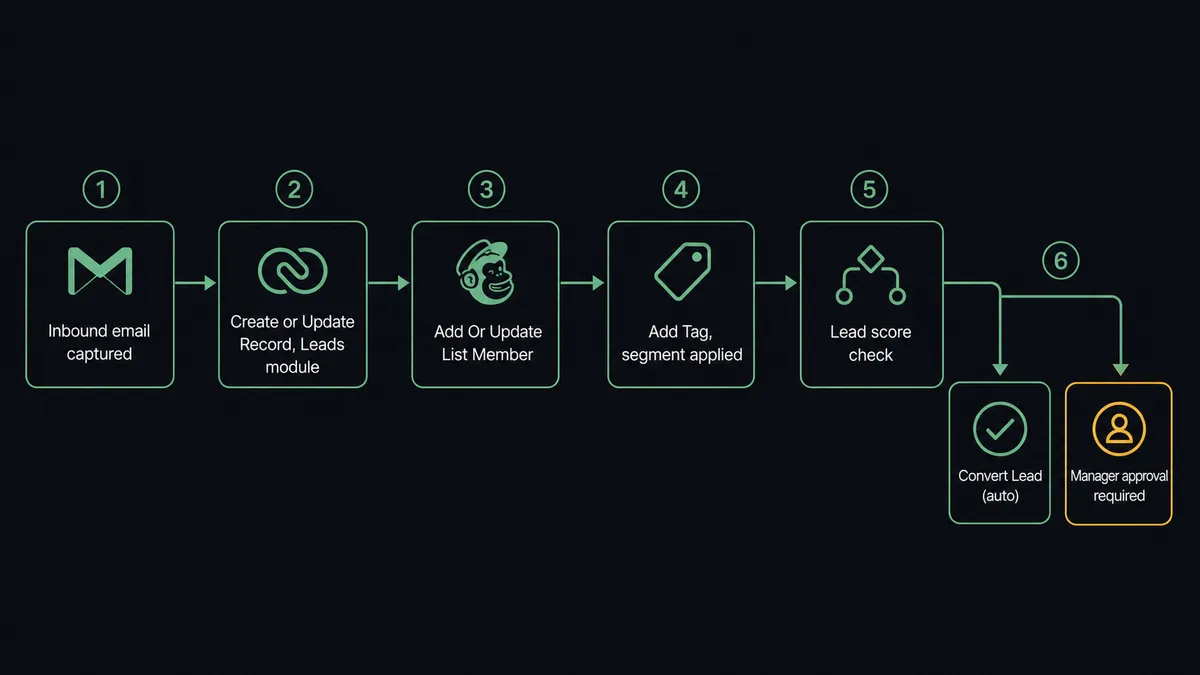
The core connection runs in three steps. First, an upstream trigger fires: an inbound email captured in Gmail, a form submission from a landing page, or a scheduled sweep that checks for new CRM records.
Second, the flow calls Create or Update Record in Zoho CRM on the Leads module. This action matches on the contact’s email before creating. If the lead already exists, the record is updated with whatever new data came in. If the lead is new, a clean record is created with the right lead source, name, and contact details. The same prospect can email twice and only one lead record forms.
Third, the flow calls Add Or Update List Member in Mailchimp. This action mirrors the same idempotent logic: it checks for an existing subscriber before adding. Once the subscriber is in place, Add Tag applies a segment tag based on lead source, lifecycle stage, or any field from the CRM record. The Mailchimp audience now reflects the current state of the CRM in real time.
Additional steps extend the workflow as needed. Search Records in Zoho CRM can look up existing contacts before deciding whether to create a new lead or update an existing one. Get Campaign Report in Mailchimp can pull performance data and post it to a Slack channel on a Monday morning schedule. Search Customer in Mailchimp can confirm whether a contact exists before triggering any list operation.
Can an AI agent run it? (and why a human stays in the loop)
A plain connection is deterministic: trigger fires, steps run, data lands. An AI agent is different. The agent reads the data, reasons about what it finds, and decides which actions to use and in what order. It does not just call Add Or Update List Member. It evaluates the lead: source, score, account flags, and any history the agent can retrieve from the CRM. Then it decides.
For a routine inbound lead from a web form, the agent creates the CRM record, syncs the Mailchimp subscriber, applies the right tag, and moves on. The whole sequence runs untouched.
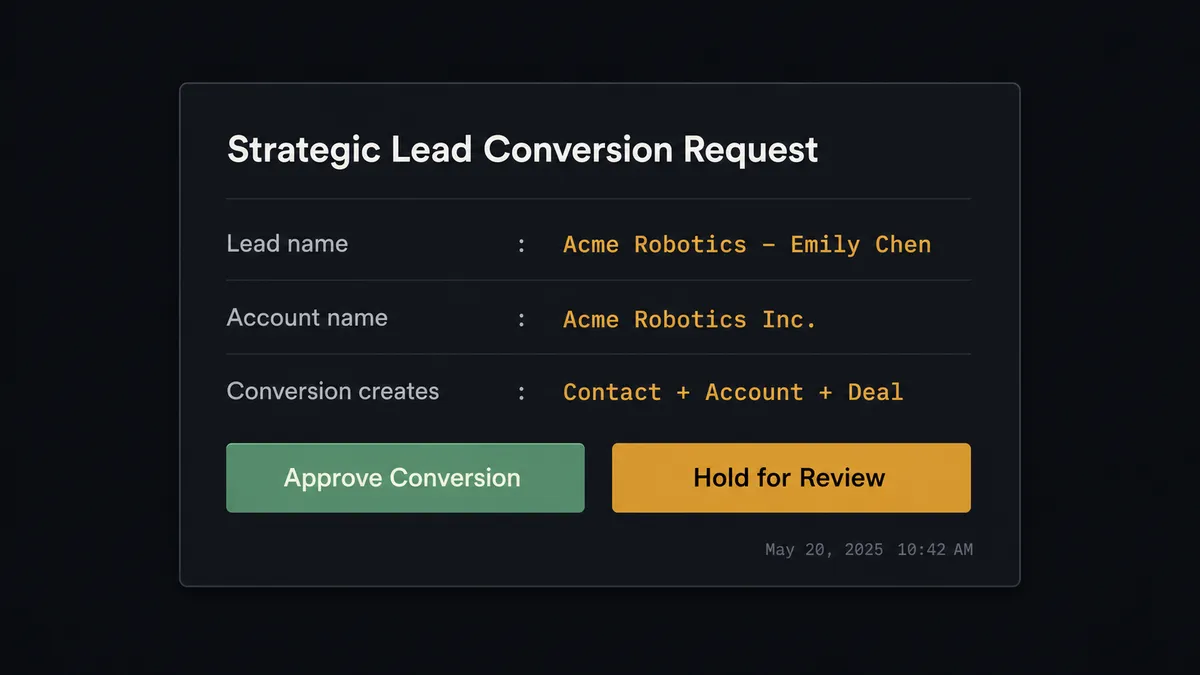
For a lead that matches a named account flagged in Zoho CRM as strategic, the agent pauses before running Convert Lead. It packages the lead details, the records the conversion will create (contact, account, deal), and the account’s history, and routes the decision to a sales manager through Slack. The manager sees: “Lead from Acme Corp matches your strategic account list. Converting will create a Contact, Account, and Deal. Approve or hold?” The manager approves. The agent converts and creates a note in Zoho CRM with the manager’s name and timestamp. The manager holds. The lead waits. This is not a threshold rule. The agent made that call because the account was flagged, not because the dollar amount crossed a number.
The same logic applies to Mailchimp campaigns. When the agent is about to send a campaign using Send Campaign and the audience size is above the configured threshold, the agent treats the send as a consequential step. It routes through Slack: “Campaign [Name] is ready to send to 6,200 subscribers. Subject line: [subject]. Approve send or review content first?” The marketing manager confirms. The campaign sends. The execution log captures who approved it, when, and what the campaign looked like at approval time.
This is the digital andon cord. The agent stops the line when it hits a decision that carries real consequence. Routine work runs autonomously. The exceptions reach a human with full context.
FlowRunner vs the tool you are probably comparing
If you are connecting Zoho CRM and Mailchimp Marketing today, you are likely evaluating Zapier. Zapier is a reliable, well-documented tool with a large library of pre-built Zaps. It handles simple one-to-one triggers and actions well, and non-technical users can set it up in minutes. That is the honest picture.
The differences become visible when the workflow gets more complex.
| Feature | Zapier | FlowRunner |
|---|---|---|
| AI agent with reasoning | No (rules-based Zaps only) | Yes, agents read data and decide which actions to use |
| Human-in-loop as a callable tool | No (no native pause-and-ask) | Yes, agent invokes a human flow at the step it judges consequential |
| Unlimited users on every plan | No (user limits vary by tier) | Yes, all tiers include unlimited users and unlimited workflows |
| Bring Your Own Key for AI models | No | Yes, BYOK for Claude, OpenAI, and other supported providers |
| Self-hosted option | No | Yes, Community Edition and Enterprise self-hosted |
| Audit trail of human decisions | No | Yes, approver identity, timestamp, and context captured on every escalation |
Zapier is the right choice if you need a fast, no-code connection with no agent reasoning and no compliance requirement. FlowRunner is the right choice if the workflow involves decisions, exceptions, large-audience campaigns, or strategic accounts where a human needs to stay in the loop.
Before and after
| Category | Before | After |
|---|---|---|
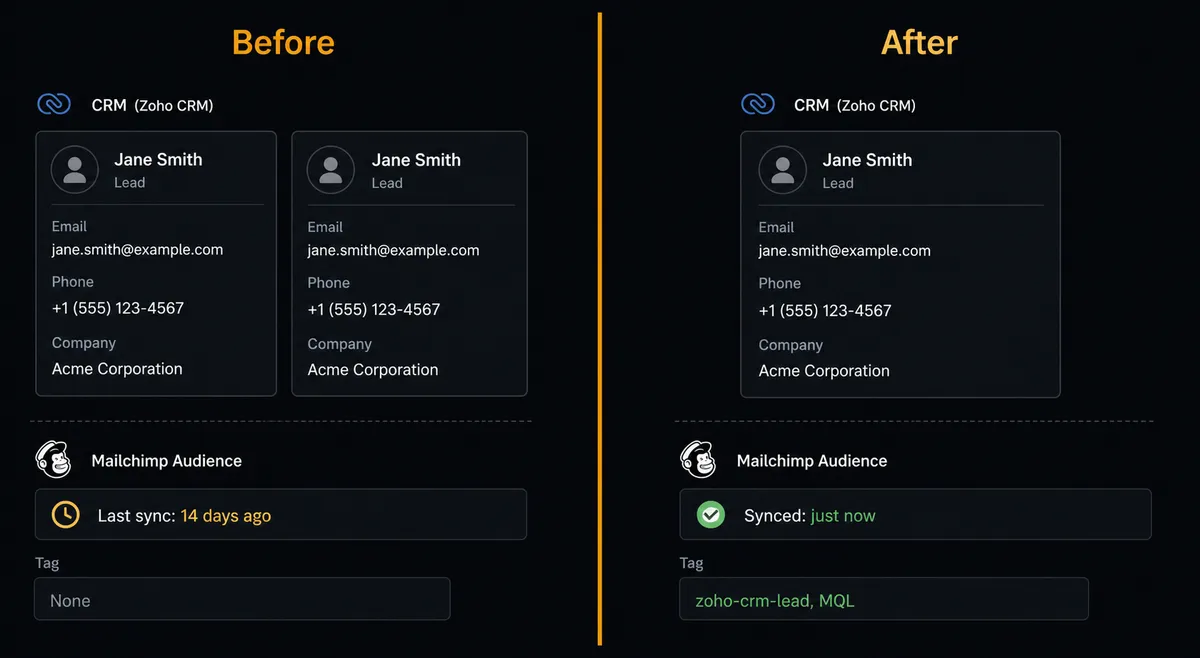
| Lead capture | Rep manually copies inbound lead details into Zoho CRM, record by record | Agent creates or updates the CRM record the moment a lead appears, using Create or Update Record |
| Audience sync | Mailchimp lists reflect CRM state from the last manual export, days or weeks old | Add Or Update List Member syncs every new lead to Mailchimp in real time |
| Duplicate leads | Same prospect emails twice and lands as two separate CRM records | Create or Update Record matches on email before creating; no duplicates form |
| Segmentation | Tags applied by hand when a marketer remembers to do it | Add Tag fires automatically on lead source, lifecycle stage, or behavioral signal |
| Strategic conversions | Convert Lead runs unsupervised; strategic accounts converted without manager input | Agent holds Convert Lead on flagged accounts and routes to manager via Slack before executing |
| Campaign sends | Large campaigns sent without a checkpoint | Campaigns above audience threshold require Slack approval before Send Campaign executes |
What you can build
Inbound lead sync with deduplication. Every new lead captured from a web form, email, or ad lands in Zoho CRM via Create or Update Record. The same contact syncs to Mailchimp via Add Or Update List Member with a lead-source tag applied by Add Tag. No manual exports. No duplicate records. The CRM and the email list stay in step.
Behavioral tagging from CRM events. When a contact in Zoho CRM reaches a new lifecycle stage, an Update Record action fires and the agent reads the new status. The agent then calls Add Tag in Mailchimp to apply the matching behavioral tag (MQL, SQL, Closed-Won, Churned). The subscriber’s email journey updates automatically based on where they are in the sales process.
Strategic account conversion with human approval. The agent monitors leads against a flagged account list using Search Records in Zoho CRM. When a lead matches a strategic account, the agent pauses Convert Lead and routes the decision to a sales manager via Slack. On approval, the agent converts the lead and creates a note in Zoho CRM recording the manager’s decision and the timestamp.
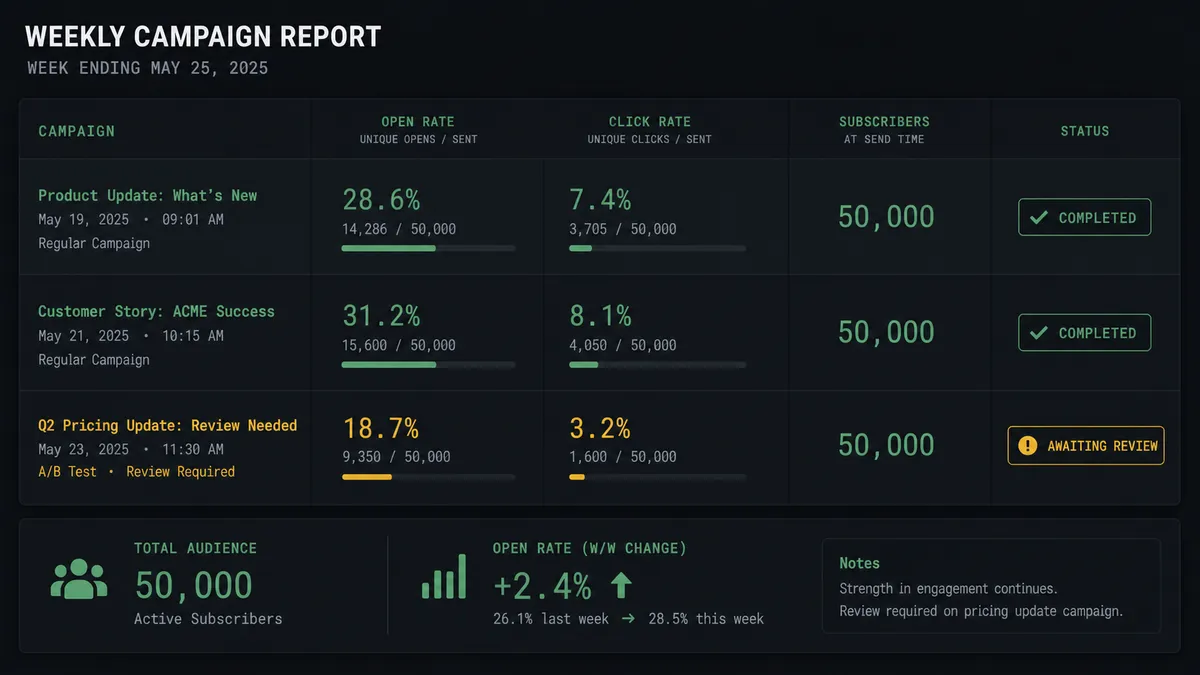
Weekly performance digest. Every Monday, the agent calls Get Campaign Report for each active Mailchimp campaign and formats a summary table with open rate, click rate, and audience size. The report posts to a Slack channel. Marketing leadership sees last week’s performance before the first standup without pulling Mailchimp manually.
Opt-out compliance sweep. A scheduled flow uses Search Records in Zoho CRM to find contacts with an opt-out flag. The agent calls Unsubscribe Or Delete List Member in Mailchimp for each, then adds a note via Add Member Note recording when the opt-out was processed. The audit trail is complete without a human touching either system.
Getting started
Connect Zoho CRM and Mailchimp Marketing to FlowRunner using your Zoho OAuth2 authorization and your Mailchimp API key. Both integrations are available on all FlowRunner plans.
The Growth plan at $45 per month includes 12,000 executions, unlimited users, unlimited workflows, full AI agents with BYOK, and human-in-loop orchestration. FlowRunner has a free plan with 100 executions a month, every integration included, and no credit card required, and new accounts get 14 days of Professional on top.
Start at flowrunner.ai or book a 30-minute walkthrough at calendly.com/flowrunner/intro. The consultation is free. Bring your current Zoho and Mailchimp setup and walk away with a workflow design for your specific use case.
Frequently asked questions
Is it free to connect Zoho CRM and Mailchimp Marketing on FlowRunner?
FlowRunner has a free plan with 100 executions a month, every integration included, and no credit card required, and new accounts get 14 days of Professional on top. No credit card is required to start.
Can I self-host FlowRunner?
Yes. FlowRunner offers a self-hosted Community Edition at no cost. The Enterprise self-hosted tier adds multi-instance clustering, audit trails, and SSO.
Does the AI agent need my own OpenAI or Claude key?
Yes. FlowRunner uses a Bring Your Own Key model for AI providers. You connect your own API key from Claude, OpenAI, or another supported provider. FlowRunner orchestrates the agent; you control the model.
What happens when the agent is not sure what to do?
The agent invokes a human-in-loop flow as a callable tool. It pauses execution, packages the relevant context, and routes the decision to a team member through Slack or email. The workflow resumes only after a response is received.
Does this integration support large audience campaigns?
Yes. The agent can create and send Mailchimp campaigns programmatically using Add Campaign and Send Campaign. For audiences above a configured threshold, the agent holds the send and routes approval through Slack before deploying.
Can the agent handle duplicate CRM leads?
Yes. The agent uses Create or Update Record in Zoho CRM to match on identity before creating. If a lead already exists, the record is updated. Duplicates do not form.