How to Connect Acumatica with Slack (With or Without an AI Agent)
Connect Acumatica and Slack so AP bills, exceptions, and approvals move automatically between your ERP and your team, with a human on every step that carries real consequence.
How do you connect Acumatica to Slack?
You connect them by setting a trigger in one system that drives a named action in the other. For example, a vendor PDF shared in a Slack channel fires the On File Shared trigger, and FlowRunner’s agent calls Validate Vendor and Create Bill in Acumatica without anyone logging into the ERP. FlowRunner is a visual AI-agent orchestration platform where automations run autonomously and pause for human judgment on the steps that carry real consequence. That same connection can run as an AI agent: it reads the invoice data, decides whether the bill is safe to post, and invokes a Slack approval message with interactive buttons when something does not look right.
The problem with the current process
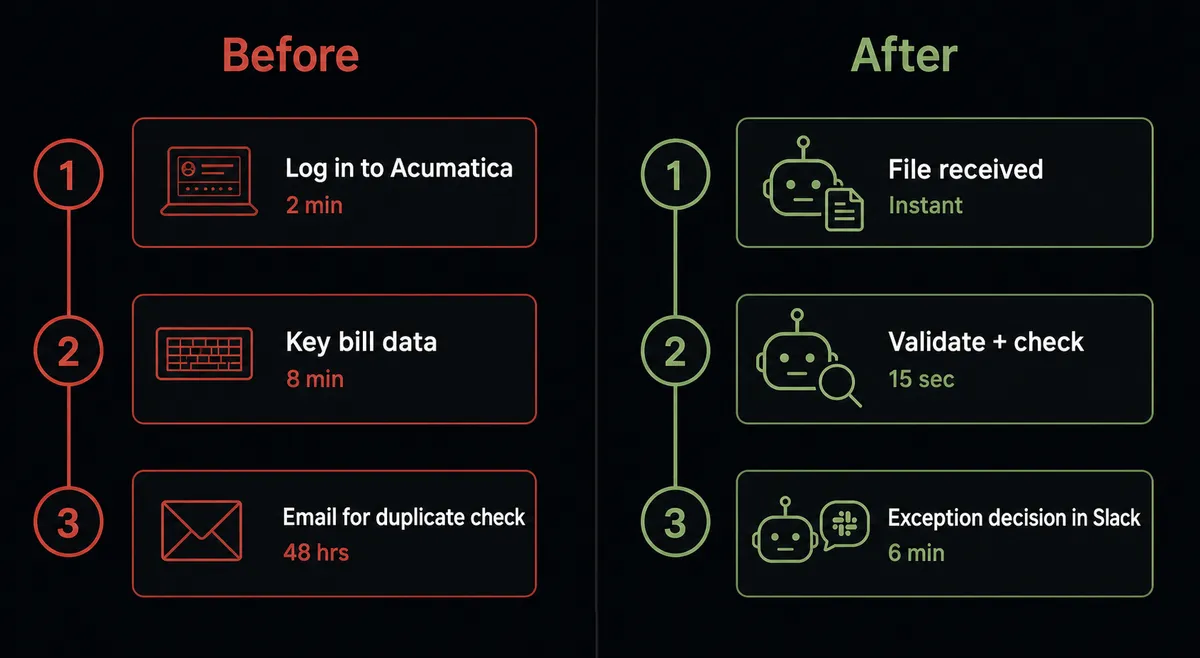
Most AP teams manage two disconnected systems. Acumatica holds the financial record. Slack is where the team actually works. Every exception, approval request, and status update has to travel between them manually. An AP clerk logs into Acumatica, enters the bill, notes a potential duplicate, screenshots the details, pastes them into a Slack thread, waits for a response, goes back to Acumatica, and enters the decision. On a good day, that round trip takes 20 minutes per exception. On a day with 12 exceptions, the clerk does nothing else.
The deeper problem is what falls through the cracks. Bills sit in Hold status with no one checking them. Duplicate invoices make it through because the check depends on someone remembering to look. The AP manager discovers overdue payables from a vendor call, not from a morning report. The information exists in Acumatica. The team is in Slack. Nothing connects them.
How it works: the connection
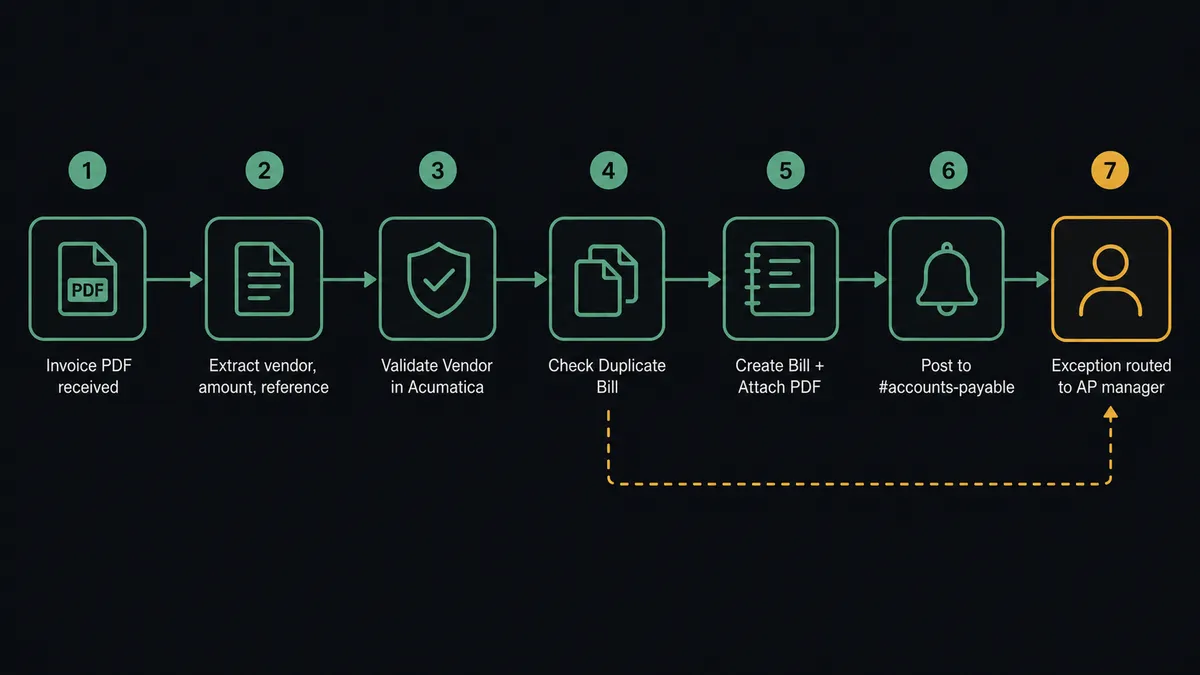
FlowRunner bridges the two systems at the trigger level. On the inbound side, Slack’s On File Shared trigger fires when a vendor drops an invoice PDF into a designated channel, such as #vendor-docs. The agent picks up the file, extracts the vendor name, invoice number, amount, and due date, and immediately calls Acumatica’s Validate Vendor action to confirm the supplier is active and approved.
If the vendor clears, the agent calls Check Duplicate Bill using the extracted reference number. Acumatica checks whether a bill with that vendor and reference already exists. If no duplicate is found, the agent calls Create Bill to create the AP record in Acumatica and then Attach File to Bill to store the original PDF against the bill for audit purposes.
Once the bill is created, the agent posts a confirmation to #accounts-payable using Send Message to Channel: the vendor name, amount, due date, and Acumatica bill reference. The AP clerk sees what was processed without opening the ERP.
For the morning AP review, a scheduled flow calls List Bills to pull everything in Hold status. It groups them by vendor and posts a structured summary to #finance-ops: how many bills are waiting, the total dollar amount, and a link to review individually. Bills are organized, the team knows exactly where things stand, and no one had to log in.
Can an AI agent run it? (And why a human stays in the loop)
A standard connection follows the same path every time. An AI agent running this workflow makes decisions at each step.
The distinction matters most when something is ambiguous. A plain Zapier or n8n automation would either create the bill or fail. The FlowRunner agent evaluates what it found and decides what the situation warrants.
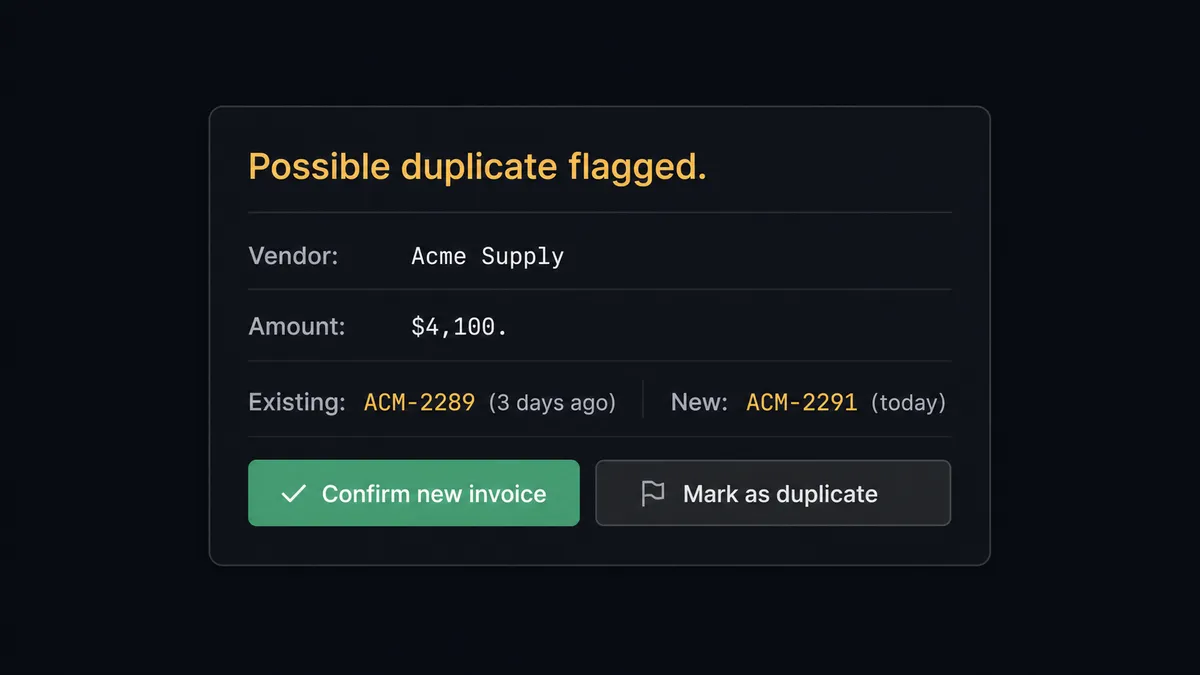
Here is a real decision moment: the agent calls Check Duplicate Bill and finds a bill from the same vendor for $4,100. The reference number is different: ACM-2289 was entered three days ago, and the new invoice shows ACM-2291. Same vendor, same amount, different reference. The agent does not silently create the bill, and it does not silently skip it. It reasons: same vendor, identical amount, close dates, different reference numbers. This looks like a resubmission, not a new invoice. It should not process this without a person confirming.
The agent invokes the human-in-loop flow as a tool. That flow sends a direct Slack message to the AP manager: “Possible duplicate: Acme Supply, $4,100, Reference ACM-2291. Existing bill ACM-2289 was entered 3 days ago for $4,100. Is this a new invoice or a resubmission? [Confirm new invoice] [Mark as duplicate]”
The AP manager responds from their phone. Slack’s On Block Action trigger fires with the decision. The agent resumes: if confirmed new, it creates the bill. If duplicate, it skips and notes the outcome. Either way, the decision, the decider’s identity, and the timestamp are captured in the audit trail.
Prospects call this a digital andon cord. The agent stops the line when it hits something it should not decide alone.
FlowRunner vs Zapier (the tool you are probably comparing)
If your team is non-technical, Zapier is probably the first tool you considered. That is a fair starting point. Zapier has a polished UI, a large integration library, and fast setup for simple connections. If you want “when X happens in Acumatica, send a Slack message,” Zapier handles that well.
The gap shows up when the process gets more complex or the stakes get higher.
| Capability | Zapier | FlowRunner |
|---|---|---|
| Simple trigger-action connection | Yes, fast and easy | Yes, comparable setup |
| AI agent that reasons about what to do | No (rule-based Zaps only) | Yes, native agent with tool use |
| Human-in-loop with interactive Slack buttons | Not native; requires workarounds | Native: agent invokes it as a callable tool |
| Audit trail with approver identity and timestamp | No | Yes, on every human decision |
| Unlimited users on every tier | No (seat-based pricing on higher plans) | Yes, all tiers |
| Bring Your Own AI Key | No | Yes |
| Self-hosted option | No | Yes (Community Edition free; Enterprise custom) |
Zapier is the right tool if your connection is simple and stays simple. FlowRunner is the right tool when the agent needs to make judgment calls, and when someone in your company needs to be able to answer “who approved that bill and when.”
Before and after
| Category | Before | After |
|---|---|---|
| Invoice entry | AP clerk logs in, keys each bill by hand | Agent creates bill in Acumatica from the Slack-shared PDF without manual entry |
| Duplicate risk | No systematic check before a bill is created | Check Duplicate Bill runs on every invoice before creation |
| Exception resolution | Email thread, 24-48 hours for a response | Slack interactive card, median 6 minutes to decision |
| AP visibility | Team discovers overdue payables reactively | Daily summary posted to #finance-ops each morning |
| Audit trail | Approval captured in email if at all | Every decision logged with approver identity and timestamp |
| ERP access required | AP clerk must log in for every bill | Team manages AP from Slack; Acumatica updated automatically |
What you can build
Invoice intake from Slack to Acumatica. A vendor emails an invoice PDF. Your ops team forwards it to #vendor-docs. The On File Shared trigger fires, and the agent validates the vendor, checks for duplicates, creates the bill in Acumatica, and posts a confirmation back to the thread. No ERP login required.
Morning AP review digest. Each day at 9am, the agent calls List Bills to pull everything in Hold status, groups by vendor, and posts a structured message to #finance-ops with the count, total value, and a prompt for the AP manager to approve or flag items individually.
Bulk approval with interactive buttons. For the morning review, the agent sends individual Slack cards for each bill in Hold with Approve and Release buttons. The AP manager approves from their phone. For each approval, the agent calls Release Bill from Hold in Acumatica automatically. Reviewed and released in one Slack session.
Proactive duplicate escalation. The agent flags near-duplicates: same vendor, similar amount, close dates. It routes each one to the AP manager via Send Direct Message with full context and a resolution choice. No double payments.
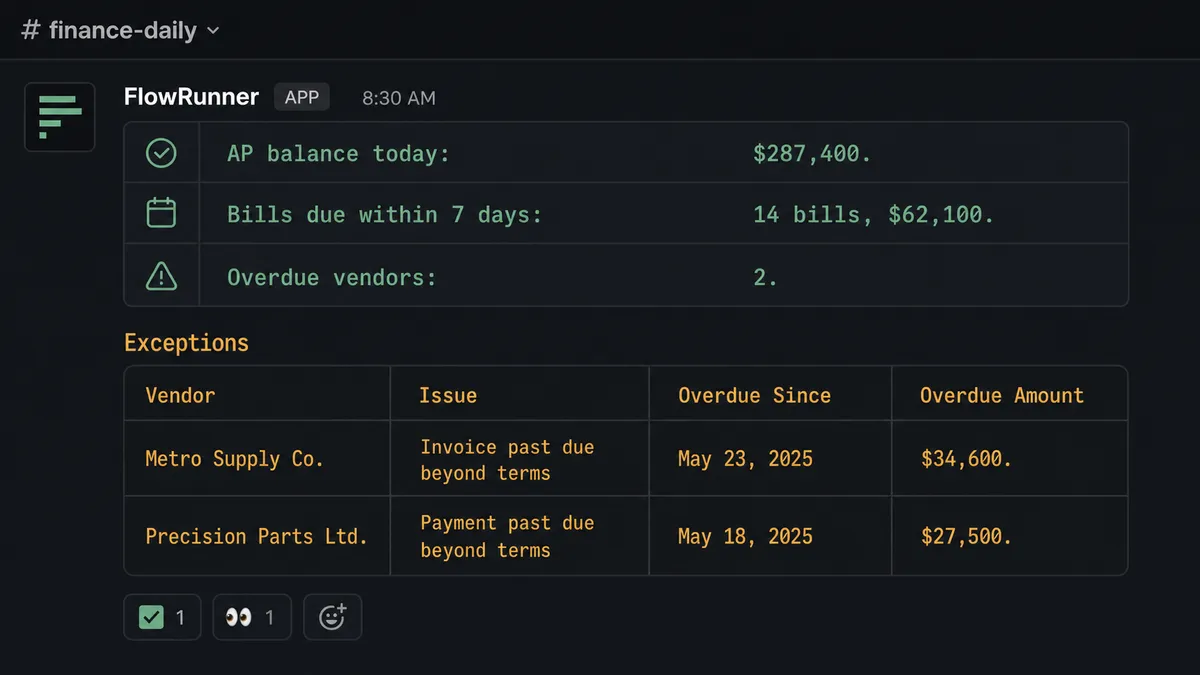
Daily AP health report. A scheduled agent calls Get AP Account Balance and List Bills with a due-date filter, then posts a formatted daily summary to #finance-daily showing what is due within 7 days and which vendors carry overdue balances. The finance team starts the day informed.
Getting started
FlowRunner has a free plan with 100 executions a month, every integration included, and no credit card required, and new accounts get 14 days of Professional on top. Any real email address works; disposable domains are not accepted.
Connect both integrations from the FlowRunner integrations library: Acumatica and Slack. The AP workflow described here can be live in an afternoon.
Start your free trial at flowrunner.ai or book a 30-minute walkthrough at calendly.com/flowrunner/intro. Bring your AP process and your Slack setup. We will build the first workflow together.
Frequently asked questions
Is it free to connect Acumatica and Slack on FlowRunner?
FlowRunner has a free plan with 100 executions a month, every integration included, and no credit card required, and new accounts get 14 days of Professional on top. Beyond the free plan, Growth starts at $45 per month.
Does the agent need my own OpenAI key?
FlowRunner uses a bring-your-own-key model. You connect the AI provider of your choice, such as Anthropic Claude or OpenAI, and FlowRunner orchestrates your agents using that key. You are never locked into a specific model.
What happens when the agent is not sure what to do?
The agent pauses and sends a Slack message with the full context of what it found, the options available, and what it needs from you. When you respond using the interactive buttons, the workflow resumes with your decision recorded in the audit trail.
Can I self-host FlowRunner?
Yes. FlowRunner offers a free Community Edition for single-instance self-hosting, and an Enterprise self-hosted option with multi-instance clustering, full compliance features, and dedicated support.
Do unlimited users come with every plan?
Yes. Every FlowRunner tier, from Growth at $45 per month to Enterprise, includes unlimited users and unlimited workflows. You pay for execution volume, not seat count.
Can the Slack connection trigger a workflow, or only receive messages?
Both. Slack triggers in FlowRunner include On File Shared, On Block Action, On Channel Message, and On Mention. A vendor dropping an invoice PDF into a Slack channel can kick off full Acumatica AP processing automatically.