How to Connect BambooHR with Okta (With or Without an AI Agent)
Connect BambooHR's On Employee Changed trigger to Okta provisioning actions, optionally as an AI agent that runs onboarding automatically and pauses for a human before any identity write that carries real consequence.
How do you connect BambooHR to Okta?
When BambooHR’s On Employee Changed trigger fires, a FlowRunner workflow reads the changed employee record and runs the matching Okta actions: Create User, Add User to Group, Assign User to Application, and Enroll Factor for a new hire, or Suspend User, Revoke All User Grants, and Revoke All User Sessions for a departure. FlowRunner is a visual AI-agent orchestration platform where automations run autonomously and pause for human judgment on the steps that carry real consequence. The same connection that runs a basic sync can run as an AI agent that reads the employee record, decides which Okta actions apply, and stops for a person before any irreversible identity write.
The problem it solves
Right now, someone on your team is watching BambooHR for new hires and then opening an Okta admin ticket. Maybe it is the IT lead. Maybe it is an office manager who was handed the checklist. Either way, the gap between “hired” in HR and “provisioned” in Okta is a manual handoff that takes hours and fails when the person is out sick, swamped, or simply did not see the notification. The tenth new employee of the month gets slower onboarding than the first because nobody rebuilt the checklist before the next hire started.
Offboarding is worse. When someone leaves, every hour their Okta sessions and OAuth grants stay active is an hour of unnecessary exposure. The manual containment process means clicking through Okta’s admin console under time pressure, tab by tab: find the user, suspend the account, revoke the grants, clear the sessions, then document it all for the audit record. A step falls through the cracks and nobody finds out until a compliance review surfaces a stale active grant three months later.
How it works: the BambooHR to Okta connection
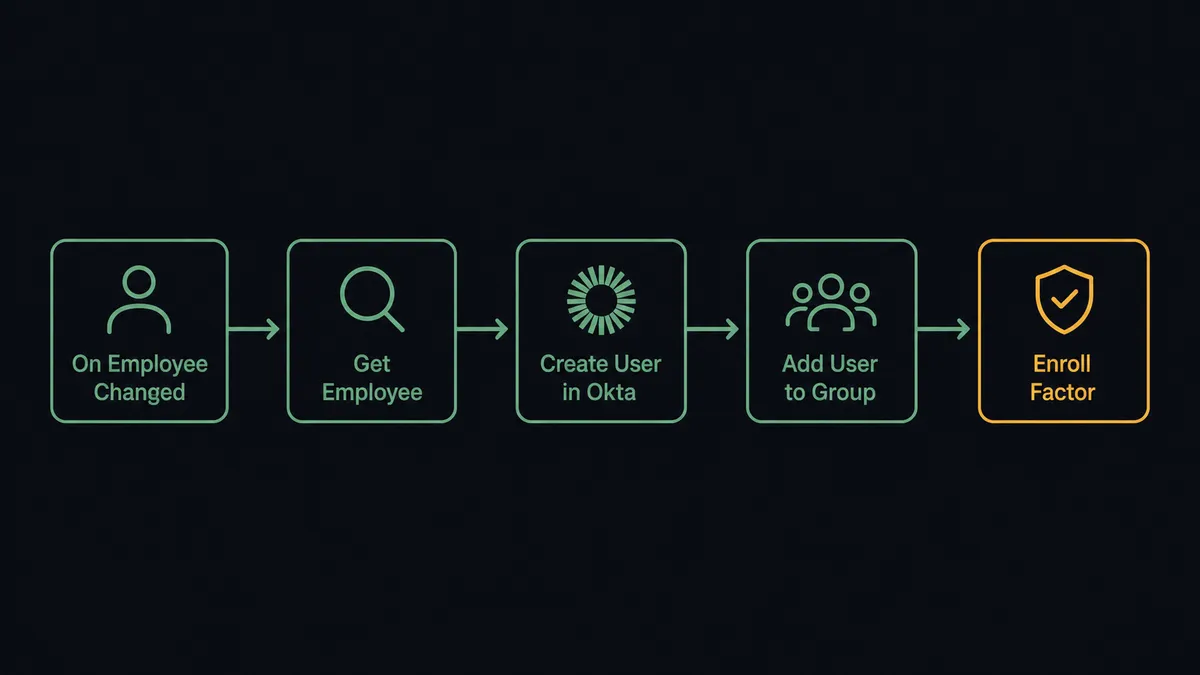
The On Employee Changed trigger is BambooHR’s real-time hook. It fires when any employee record moves: a new hire is created, a job field updates, or employment status changes to terminated. The trigger delivers the changed employee IDs, and the flow immediately calls Get Employee By ID to pull the full record.
From there, the flow branches on what changed. For a new hire:
- Create User in Okta with the employee’s first name, last name, work email, department, and job title from BambooHR.
- Add User to Group based on department, so the employee inherits the group’s application access automatically.
- Assign User to Application for any app that group assignment does not cover.
- Enroll Factor to set up MFA on the new account.
For a termination, the sequence reverses: Suspend User, then Revoke All User Grants, then Revoke All User Sessions. Those three steps are reversible and run automatically. Full Deactivate User waits for a human.
Both directions run from a single workflow. The BambooHR record is the source of truth; Okta receives the change within minutes of the HR record moving, not hours or days after a help-desk ticket is processed.
Can an AI agent run it? (And why a human stays in the loop)
A basic sync tool watches for a trigger and fires a fixed action. An AI agent reads the data, reasons about it, and decides what to do. That distinction matters for identity work, because not every employee record change maps cleanly to a single Okta action.
Consider a mid-career employee whose BambooHR record is updated with a new department and a new job title at the same time. A fixed sync might re-run the full provisioning script and accidentally over-provision access. The agent reads the change, recognizes that this is a lateral move rather than a new hire, removes the user from the old department’s group, adds them to the new one, and updates their app assignments to match. It uses Get Employee Table Data to read the current job information, runs Add User to Group and removes the old membership, then updates the relevant application assignments.
When the agent hits a write that is consequential, it invokes the human-in-loop flow as a tool. This is not a hardcoded threshold. It is the agent reasoning from context.
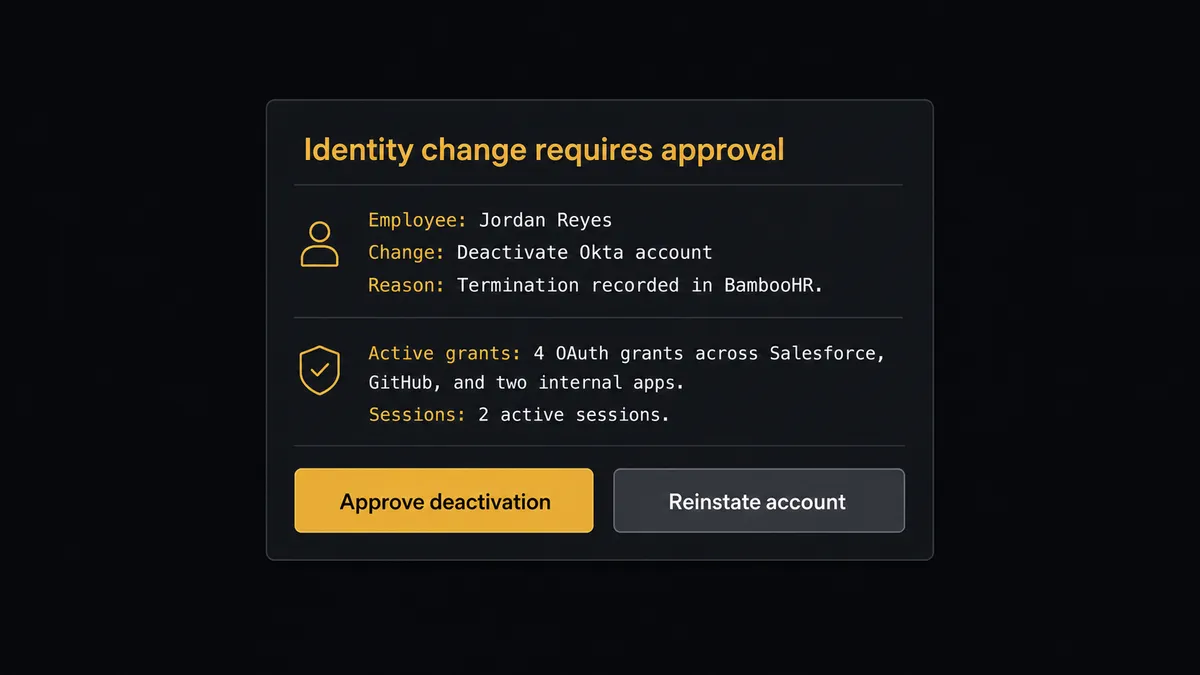
Here is the actual decision moment: an employee’s BambooHR record changes to terminated. The agent suspends the account, revokes the grants, and clears the sessions without waiting for approval, because those steps are reversible. Then it pauses before running Deactivate User, which is not. It assembles the context: the employee’s name, the termination effective date, the number of active OAuth grants and which applications they covered, and the two active sessions that were cleared. It routes this to the security lead via Slack: “Suspended Jordan Reyes and revoked 4 grants and 2 sessions after termination record in BambooHR effective today. Deactivate the account, or reinstate if this was entered in error?” The security lead answers in the channel. The flow resumes with the decision logged, along with the decider’s identity and the timestamp.
This is not a sync tool. The agent knows when to stop and ask. The digital andon cord is what separates an orchestration layer from a point-to-point pipe.
FlowRunner vs Zapier (the tool you’re probably comparing)
Zapier is a solid choice for simple trigger-and-action automations. If you want BambooHR to create an Okta user when a new employee appears and nothing more is needed, Zapier can do that. Its library is large and the setup is fast for straightforward cases.
The comparison breaks down when identity work gets complex.
| Capability | Zapier | FlowRunner |
|---|---|---|
| Basic trigger-to-action sync | Yes | Yes |
| AI agent that reasons about which Okta actions apply | No | Yes |
| Human-in-loop as a callable tool (agent invokes it based on judgment) | No | Yes, native |
| Audit trail with decision, decider identity, and timestamp | No | Yes |
| Unlimited users on every tier | No (per-seat add-ons) | Yes |
| BYOK for AI providers | No | Yes |
| Self-hosted option | No | Yes |
The underlying gap is architectural. Zapier executes a fixed sequence. FlowRunner runs an AI agent that evaluates the employee record, reasons about what it found, picks the right Okta actions from its toolbox, and invokes human oversight when the stakes justify it. The audit trail is built in, not bolted on.
Before and after
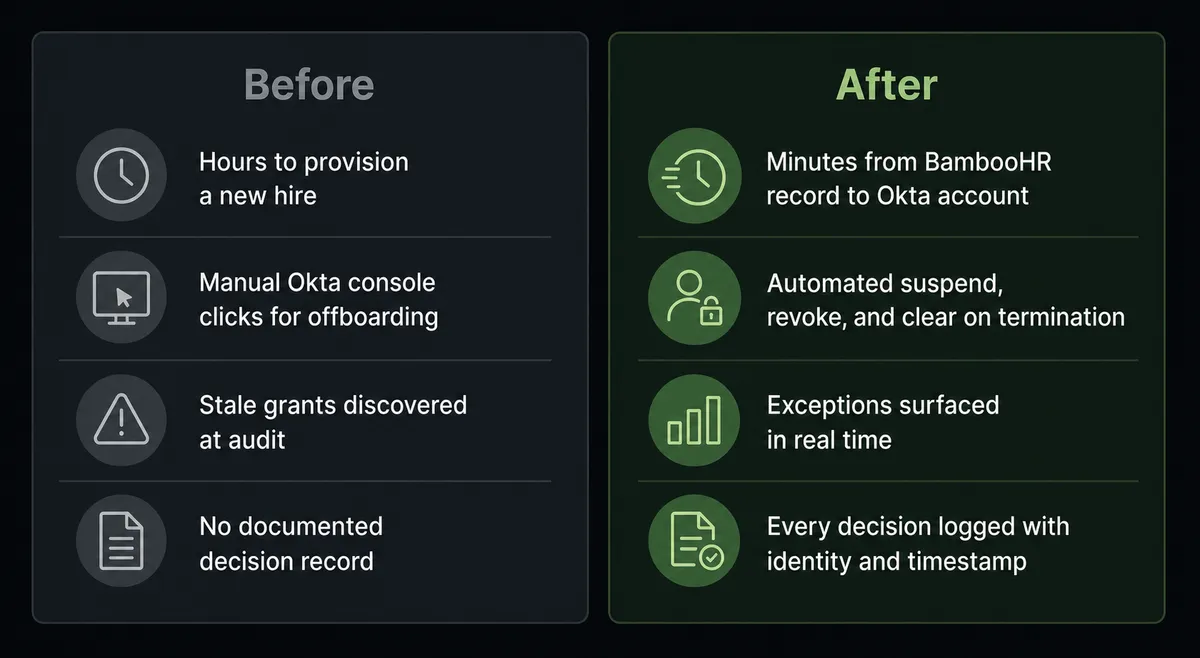
| Metric | Before | After |
|---|---|---|
| Time to provision a new hire | Hours to days, depending on ticket queue depth | Minutes from BambooHR record to active Okta account |
| Offboarding coverage | Manual clicks across Okta console; steps missed under pressure | Suspend, Revoke All User Grants, and Revoke All User Sessions run automatically; Deactivate waits for human sign-off |
| Stale access | Discovered at audit, weeks or months later | Exceptions surfaced as they happen; scheduled recertification flags anything unexpected |
| Audit documentation | Reconstructed from memory after the fact | Every action, decision, approver identity, and timestamp logged in the audit trail |
| Consistency across hires | Varies by who handled the ticket | Same provisioning sequence for every employee, every time |
What you can build
New hire provisioning on the hour of hire. When On Employee Changed fires with a new hire record, the agent calls Create User, Add User to Group by department attribute, Assign User to Application for the role-specific tools, and Enroll Factor. The new employee’s Okta account is ready before their first-day email arrives. The agent uses Get Employee By ID to read the hire’s department and title and maps those directly to the right groups.
Termination containment with human confirmation on the irreversible step. On a termination record, the agent suspends the account and revokes all grants and sessions immediately, then pauses for a human before Deactivate User. The reviewer gets the employee name, the termination date, the count of active grants cleared, and Approve / Reject options in Slack. Nothing irreversible runs on a guess.
Lateral move access realignment. When a department or title change arrives, the agent reads the current group memberships, removes the employee from groups that no longer apply, and adds them to the groups that do. It uses Add User to Group and the reverse for the old membership. Application access follows the groups automatically.
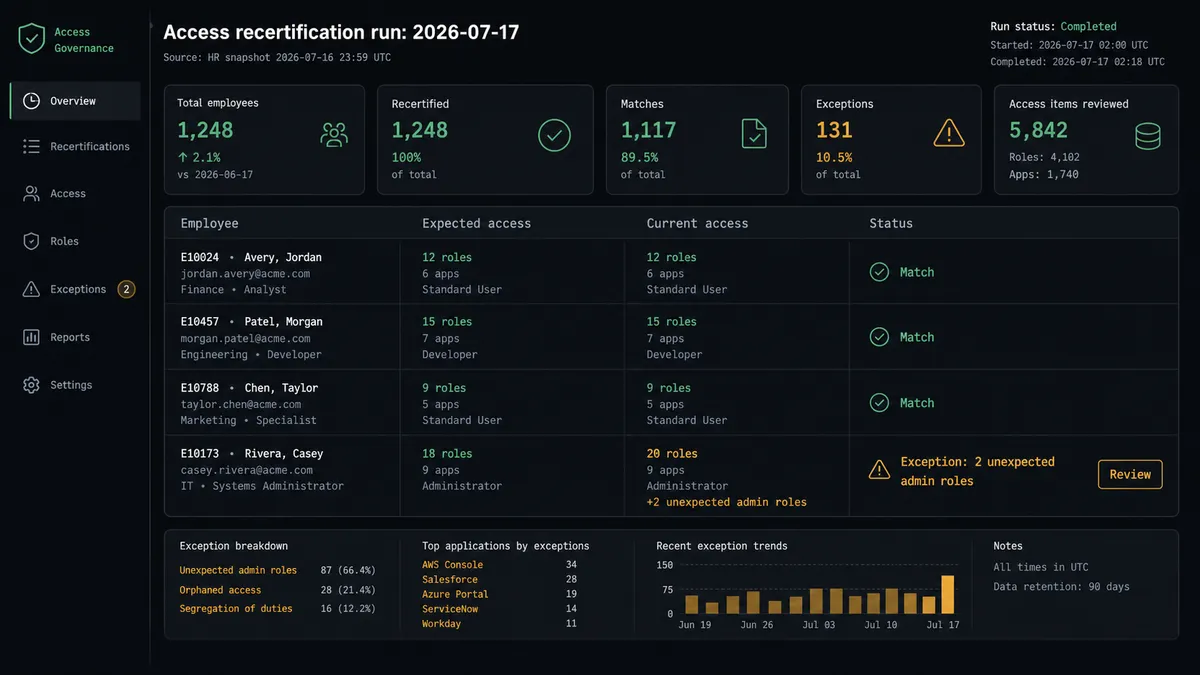
Scheduled access recertification. On a recurring routine, the agent calls Get Employee Table Data on a list of employees and compares their current Okta application assignments and admin roles against expected baselines. Anything that does not match surfaces as an exception for the reviewer. Stale access gets caught on a schedule, not at the next audit.
Compensation change with HR-system gate. When a BambooHR table write touches the compensation table (Create Table Row against the compensation table), the agent pauses before the write, assembles the employee’s current pay, the proposed new value, and the effective date, and routes for sign-off. On approval it completes the write and logs the approver. The routine lookups are automated; the pay change waits for a person.
Getting started
FlowRunner has a free plan with 100 executions a month, every integration included, and no credit card required, and new accounts get 14 days of Professional on top.
To build this workflow, you will connect two integrations: BambooHR and Okta. Both are verified against their official APIs. BambooHR authenticates over OAuth2; Okta authenticates with your SSWS API token.
Start at flowrunner.ai or book a 30-minute walkthrough at calendly.com/flowrunner/intro. The walkthrough covers the provisioning flow, the human-in-loop setup, and the audit trail configuration.
Frequently asked questions
Is it free to connect BambooHR and Okta on FlowRunner?
FlowRunner has a free plan with 100 executions a month, every integration included, and no credit card required, and new accounts get 14 days of Professional on top. Beyond the free plan, Growth is $45 per month and includes unlimited users, unlimited workflows, and BYOK for AI providers.
Can I self-host FlowRunner?
Yes. FlowRunner offers a free Community Edition for single-instance self-hosted deployments and an Enterprise self-hosted tier with multi-instance clustering and the full compliance suite.
Does the AI agent need my own API keys for Okta and BambooHR?
FlowRunner uses BYOK (Bring Your Own Keys) for AI providers such as Claude or OpenAI. The BambooHR and Okta connectors authenticate with your own credentials: OAuth2 for BambooHR and an SSWS API token for Okta. FlowRunner never stores your production credentials in a shared pool.
What happens when the agent is not sure whether to provision or deprovision?
The agent pauses execution, assembles the relevant employee record, the proposed Okta change, and the reason for uncertainty, then routes the decision to a human through Slack, email, or WhatsApp. The flow does not continue until the person responds. The decision, the decider's identity, and the timestamp are all captured in the audit trail.
Does FlowRunner handle offboarding, not just onboarding?
Yes. When BambooHR marks an employee as terminated, the On Employee Changed trigger fires. The agent can Suspend User, Revoke All User Grants, and Revoke All User Sessions in Okta, then pause for a human to confirm full deactivation before running the irreversible Deactivate User step.
How does FlowRunner compare to using Okta Workflows or BambooHR's native integrations?
Okta Workflows and BambooHR's native partner integrations handle simple point-to-point syncs. FlowRunner sits above both: it coordinates multi-step logic, routes exceptions to humans through any channel, and maintains a full audit trail. You keep your existing Okta and BambooHR accounts and add the orchestration layer.