How to Connect Okta with ServiceNow (With or Without an AI Agent)
Connect Okta's System Log trigger to ServiceNow incidents and change requests in FlowRunner, optionally as an AI agent that suspends the user, files the record, and pauses for a human before any irreversible action.
How do you connect Okta to ServiceNow?
In FlowRunner, the On New System Log Event trigger in Okta fires whenever a security event is recorded, and the agent uses that event to call Create Incident in ServiceNow with the impact and urgency already set from the alert. FlowRunner is a visual AI-agent orchestration platform where automations run autonomously and pause for human judgment on the steps that carry real consequence. The same connection can run as a plain trigger-action sync or as a full AI agent that suspends the Okta user, files the ServiceNow record, and holds for a human before touching anything irreversible.
The problem it solves
When Okta logs a suspicious event today, the people who need to act on it are in different systems. The security analyst is in Okta looking at the log. The ITSM team is in ServiceNow waiting for an incident. Someone has to bridge them, manually opening a ticket, copying the actor and IP, setting the urgency, and then running through the Okta console to suspend sessions and revoke grants. Under time pressure, steps fall through the cracks. A session stays live while someone hunts for the right menu. A ticket gets filed with incomplete context because the person doing it had to move fast.
On the provisioning side, the same fragmentation applies. When a new employee needs access set up in both Okta and ServiceNow, the help desk opens a requested item in ServiceNow, works through a checklist, and separately clicks through Okta to create the user, assign groups, and enroll an MFA factor. Inconsistency is the rule, not the exception. The tenth new hire of the month rarely gets exactly the same access configuration as the first, because the process lives in someone’s memory and a half-updated spreadsheet.
How it works: the connection
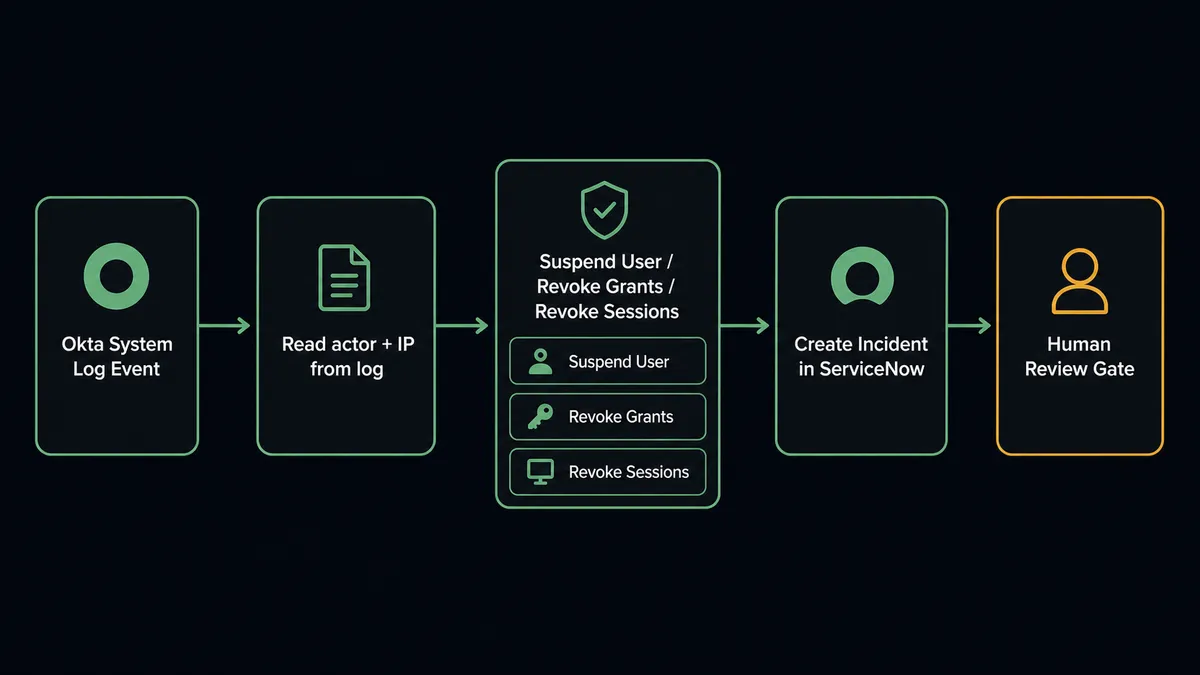
The On New System Log Event trigger in Okta polls the System Log and fires the moment a new event is recorded. A suspicious sign-in, an impossible-travel flag, a policy violation. The flow does not wait for a scheduled review.
From the log event payload, the agent reads the actor, the target user, the client IP, and the event type. It then calls Get Logs to pull the full event record and List Incidents in ServiceNow to check whether an incident is already open for this user or service. If no existing incident matches, it calls Create Incident with the impact and urgency derived from the Okta event severity and the description populated from the log details.
On the Okta side, the agent calls Suspend User immediately, which is reversible. It then calls Revoke All User Grants to clear the user’s OAuth tokens and Revoke All User Sessions to terminate every active sign-in. The containment sequence runs before any human is involved because each of those actions can be undone if the alert turns out to be a false positive.
Can an AI agent run it? (And why a human stays in the loop)
A plain trigger-action sync handles the mechanics. An AI agent handles the judgment.
The difference shows up the moment the agent looks at what it found. A Suspend User call is reversible. Full Deactivate User is not. Delete User is not. A miscategorized alert that leads to an irreversible action locks out a legitimate employee or destroys an audit-critical record. This is where a rule-based automation fails: you either hardcode a threshold and get it wrong at the edges, or you leave a human doing the same triage work the automation was supposed to eliminate.
The FlowRunner AI agent reads the Okta log event, lists the user’s admin roles and application assignments, and evaluates what the event pattern actually means. It does not make an irreversible decision on a single data point. If it suspended the user and revoked their sessions, it has already done what it safely can. Then it invokes the human-in-loop flow as a callable tool, the same way it would call Create Incident or Revoke All User Grants: as a tool in its toolbox, chosen based on context.
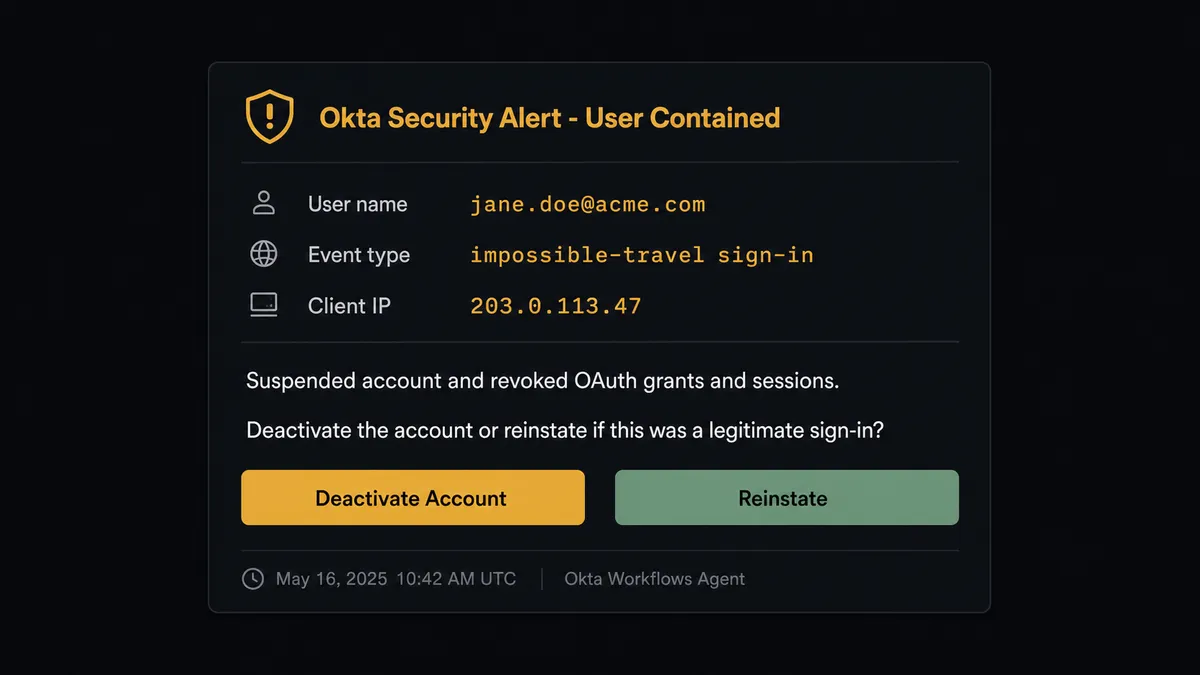
What the human receives is not just a yes/no prompt. The agent packages the event type, the affected user, the IP, the list of admin roles, the OAuth grants that were revoked, and a direct question: “Suspended [user] and revoked their grants and sessions after [event type] from [IP]. Deactivate the account, or reinstate it if this was a legitimate sign-in?” The analyst answers in Slack or email. The agent resumes with the decision as input, advances the ServiceNow incident state, and captures the decision with the decider’s identity and timestamp on the record.
Prospects call this the digital andon cord. Like Toyota’s quality control pull cord that stops the assembly line when a problem appears, FlowRunner stops the automation when the cost of being wrong is too high. The agent knows when to stop and ask. That is not a workaround. That is the design.
FlowRunner vs the tool you are probably comparing
Most teams connecting Okta and ServiceNow are working with a middleware layer, either a no-code tool like Zapier or a developer-first platform like n8n. Both are competent at the basic trigger-action layer: fire on event, create a record, done.
Zapier handles the “just connect me” case well. Its interface is approachable, its Okta and ServiceNow integrations are mature, and setup takes minutes. If you need a Zap that opens a ServiceNow incident whenever an Okta event fires, Zapier does that without friction.
n8n is more capable for technical teams. It handles branching logic, loops, and custom code, and its self-hosted option keeps costs predictable at scale.
What neither offers is what matters most for identity and ITSM work: a human-in-loop layer that is itself an AI decision, not a hardcoded conditional. In both tools, you can add an approval step, but that approval fires based on a rule you wrote (if X then ask human). The FlowRunner agent decides when to invoke the human based on what it finds. It might auto-process a routine access recertification and pause on a containment action for a user with six active OAuth grants and three admin roles. The rule was never written. The agent reasoned.
| Zapier | n8n | FlowRunner | |
|---|---|---|---|
| Basic Okta + ServiceNow trigger-action | Yes | Yes | Yes |
| Human-in-loop native (agent-invoked) | No | No | Yes |
| AI agent decides when to escalate | No | No | Yes |
| Unlimited users on every paid plan | No | No | Yes |
| Bring Your Own Key for AI providers | No | Limited | Yes |
| Self-host option | No | Yes | Yes |
| Audit trail on every human decision | No | No | Yes |
Before and after
| Metric | Before | After |
|---|---|---|
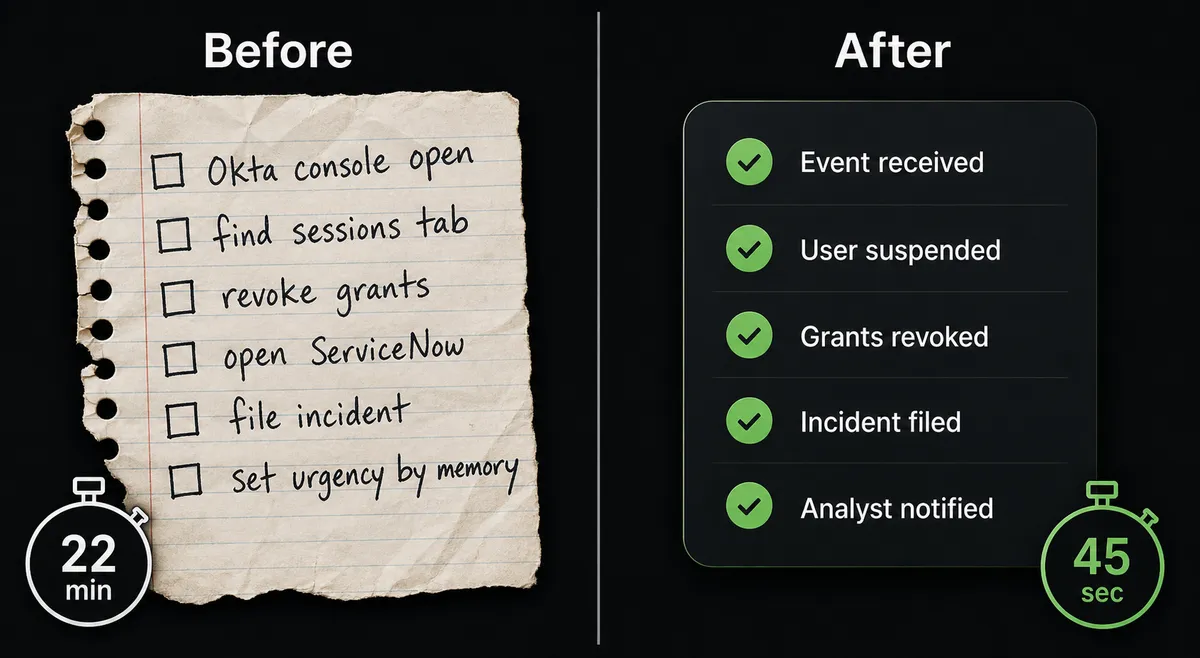
| Session containment time | 15-30 minutes clicking through Okta console under pressure | Suspend, revoke grants, revoke sessions run in one flow as soon as the log event fires |
| ServiceNow incident quality | Ticket filed manually with context the analyst had time to copy | Incident created with actor, IP, event type, impact, and urgency set from the log payload |
| Human decision point | Analyst decides everything, including steps that are safe to automate | Analyst decides only deactivate vs reinstate; agent handles all reversible containment |
| Audit trail | Decision in a Slack thread, no record on the ServiceNow ticket | Decider identity, timestamp, and decision captured on the incident record |
| Onboarding consistency | Help-desk checklist reconstructed from memory for each new hire | Create User, Add User to Group, Assign User to Application, Enroll Factor run the same way every time |
What you can build
Security incident triage from the Okta System Log. The On New System Log Event trigger fires on an impossible-travel sign-in. The agent reads the event, calls Suspend User and Revoke All User Grants in Okta, calls Create Incident in ServiceNow with the urgency set from the event severity, and routes to the on-call analyst for the deactivate-or-reinstate decision. Containment runs at machine speed; the irreversible call stays with a person.
Automated onboarding with a ServiceNow requested item. A Create Requested Item record in ServiceNow starts the flow when a new hire is approved. The agent creates the Okta user, calls Add User to Group to apply the right department access, calls Assign User to Application for their required tools, and calls Enroll Factor to complete MFA setup. The RITM state in ServiceNow updates to complete when every step finishes.
Scheduled access recertification with exception surfacing. A recurring flow lists users’ admin roles, application assignments, and OAuth grants in Okta, compares them against an expected baseline, and creates ServiceNow incidents for anything unexpected. Access that should have been removed at a role change surfaces as a ticketed exception rather than sitting in drift until an audit finds it.
Change request lifecycle tied to Okta policy changes. When an agent updates a Network Zone or Sign-On Policy in Okta, it calls Create Change Request in ServiceNow with the change type, risk rating, and a description of the policy modification. The change approver reviews a complete record before the policy change goes live. Update Change Request advances the state after approval.
Help-desk MFA recovery with an audit record. A ServiceNow requested item for MFA reset triggers the flow. The agent calls Reset Factors in Okta to clear the user’s enrolled factors, then updates the RITM in ServiceNow to complete. The factor reset and the fulfiller identity are both captured on the service record.
Getting started
FlowRunner has a free plan with 100 executions a month, every integration included, and no credit card required, and new accounts get 14 days of Professional on top.
Connect both integrations from the FlowRunner integrations library: Okta and ServiceNow. The Okta connector authenticates with your org base URL and SSWS token. ServiceNow authenticates with OAuth2 against your instance.
Once both connections are live, the On New System Log Event trigger is ready. Set your event type filter, add the AI Agent node with your chosen Okta and ServiceNow actions as tools, and build the human-in-loop subflow for the escalation channel your team uses. The whole setup takes less than a day for a team that already has both systems in place.
Start at flowrunner.ai or book a 30-minute walkthrough at calendly.com/flowrunner/intro if you want to see the identity and ITSM flow running against a live environment before you configure your own.
Frequently asked questions
Is it free to connect Okta and ServiceNow on FlowRunner?
FlowRunner has a free plan with 100 executions a month, every integration included, and no credit card required, and new accounts get 14 days of Professional on top. Beyond the free plan, Growth starts at $45 per month.
Can I self-host FlowRunner?
Yes. FlowRunner offers a free Community Edition for single-instance self-hosting and an Enterprise tier for multi-instance clustering with the full compliance suite.
Does the agent need my own OpenAI key to run these workflows?
FlowRunner uses a Bring Your Own Key model. You connect the AI provider you already have (OpenAI, Anthropic, or others) through your account settings. FlowRunner does not mark up model costs.
What happens when the agent is not sure about an identity action?
The agent pauses and routes the question to a named reviewer through their preferred channel, Slack, email, or WhatsApp. It attaches the full context and waits for a response before resuming. Nothing irreversible runs on a guess.
Can the agent open a ServiceNow incident automatically from an Okta alert?
Yes. The On New System Log Event trigger in Okta fires the flow, and the agent calls Create Incident in ServiceNow with the impact and urgency derived from the alert severity. The whole sequence runs without manual intervention unless the agent decides escalation is warranted.
How many users or workflows does FlowRunner allow on the Growth plan?
Every FlowRunner tier includes unlimited users and unlimited workflows. The Growth plan limits executions to 12,000 per month, not seats or workflow count.