How to Connect BigCommerce with QuickBooks Online (With or Without an AI Agent)
Connect BigCommerce to QuickBooks Online so every new order triggers an invoice or payment record automatically, with a FlowRunner AI agent that pauses for human approval before posting refunds or large transactions.
How do you connect BigCommerce to QuickBooks Online?
You connect BigCommerce to QuickBooks Online by triggering a flow on BigCommerce’s On Order Created event and running QuickBooks Online’s Create Invoice and Create Payment actions on the resulting order data. FlowRunner is a visual AI-agent orchestration platform where automations run autonomously and pause for human judgment on the steps that carry real consequence. The same connection can run as an AI agent that evaluates each order, matches or creates the customer record in QuickBooks, and invokes a human review step before posting refunds or transactions above a defined threshold.
The problem it solves
Right now, every BigCommerce order that needs an accounting entry generates a task for someone. An AP clerk opens QuickBooks, finds the customer record, keys in the amount and line items, and marks the invoice. When order volume is light, that is manageable. When it grows, the queue grows with it, and the gaps between when an order is placed and when the books reflect it widen from hours to days. Finance teams running a Friday reconciliation discover that a week of orders landed without matching entries, or that a refund was issued without a corresponding credit memo.
The deeper problem is exceptions. Not every order maps cleanly to an existing customer. Refunds require accounting review. Large orders sit in ambiguity because no one wants to post them incorrectly. These exceptions fall through the cracks not because anyone is careless but because there is no system to catch them. The spreadsheet that tracks “orders pending accounting” is itself a manual process built on top of a manual process.
How it works: the connection
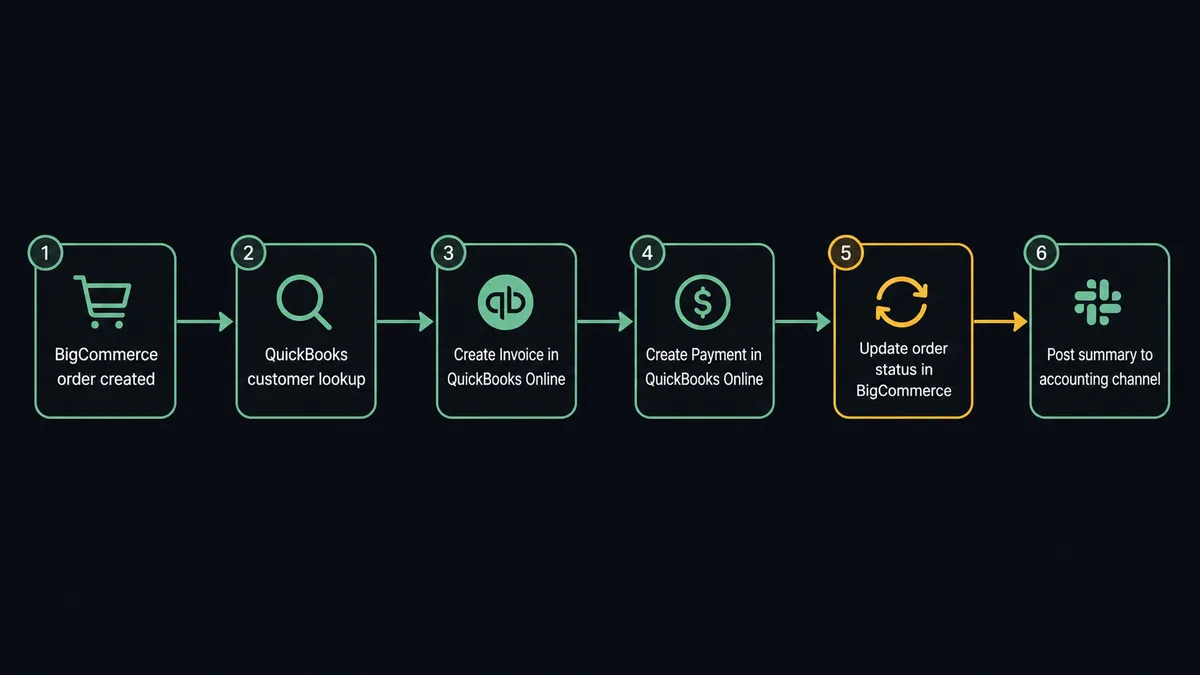
When a new order is placed in BigCommerce, the On Order Created trigger fires and passes the full order payload to the FlowRunner flow. The agent reads the line items, billing details, customer email, and order total from that payload.
The first action downstream is a QuickBooks Online Get Customer or List Customers call to check whether the customer already exists in the books. If they do not, the agent runs Create Customer to build the record before anything else happens. This single step eliminates the most common reconciliation error: an invoice posted to a customer record that does not exist yet.
With the customer confirmed, the agent runs Create Invoice in QuickBooks Online, mapping the BigCommerce line items to the invoice line items and the order total to the invoice amount. If payment was already collected at checkout, the agent follows immediately with Create Payment to mark the invoice paid. The QuickBooks record is current before anyone on the finance team has opened their laptop.
Finally, the agent calls Update Order Status in BigCommerce to mark the order as processed and posts a summary to the accounting channel: order number, customer name, invoice ID, and amount.
Can an AI agent run it? (And why a human stays in the loop)
A plain trigger-action connection handles the clean cases. The AI agent handles everything else.
The agent reads the full order context before it takes any action. It is not following a fixed sequence. It evaluates the order against criteria it was given in its instructions: Is this customer new? Is the amount above the review threshold? Are there refund line items that need a credit memo? Does anything look like a duplicate order? Based on what it finds, it decides which actions to run and in which order, choosing from its toolbox: Get Customer, Create Customer, Create Invoice, Create Refund Quote, Create Refund, Update Order Status, and the human-in-loop flow.
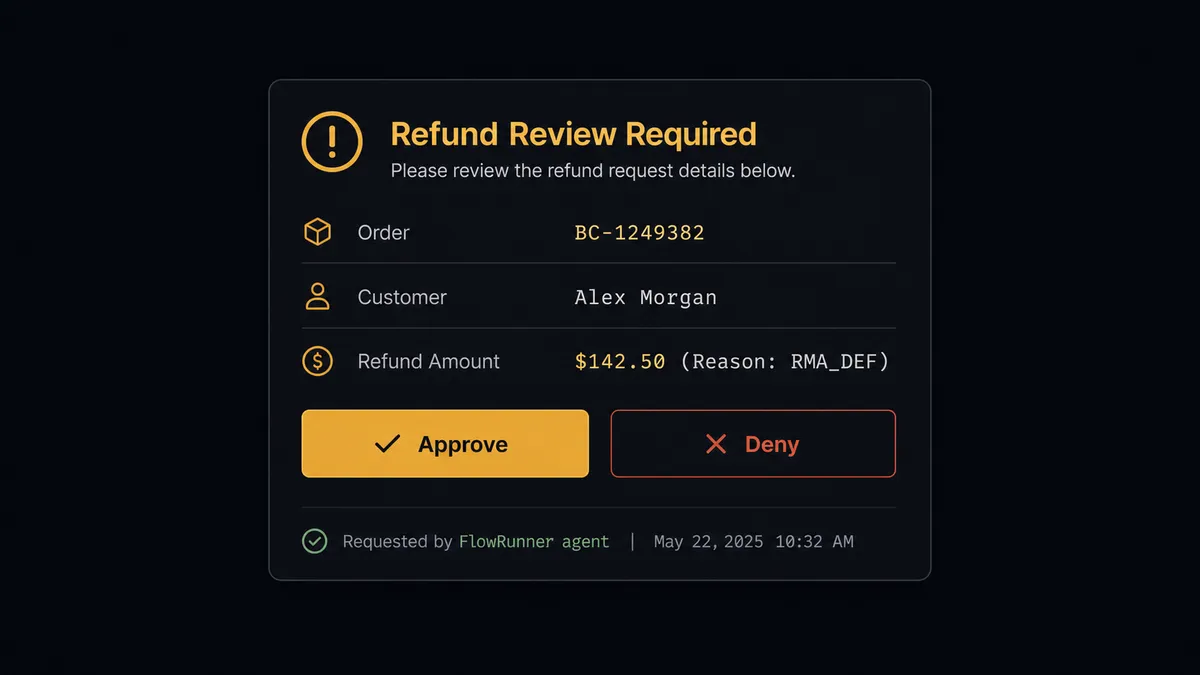
The refund case is where the agent’s judgment matters most. When a customer-service flow routes a refund decision to the agent, the agent runs Create Refund Quote in BigCommerce to calculate the amount. It does not immediately run Create Refund. Instead, it invokes the human-in-loop flow as a callable tool, packaging the full context: order number, customer name, refund amount, reason, and the quote. That package goes to the accounting manager via Slack with two options: Approve or Deny. The agent pauses. The manager responds. The agent resumes with the decision as input. If approved, it runs Create Refund and creates the corresponding credit memo in QuickBooks Online. If denied, it logs the decision and closes the case.
This is the “digital andon cord” in practice. The agent stops the line when it hits a step that carries real financial consequence. It is not a hardcoded threshold that fires on every transaction over $500. The agent might auto-process a $12,000 order from a customer with a two-year clean history and pause on a $900 order from a new account with a mismatched billing address. The decision to involve a human is itself an AI decision, made on the data in front of it.
FlowRunner vs the tool you are probably comparing
If you are a non-technical team managing BigCommerce orders, Zapier is likely the first tool you looked at. Zapier’s Zap builder is fast to set up, widely documented, and handles the clean cases reliably. That is a genuine strength, and for straightforward trigger-to-action connections, it works.
The differences show up when the work gets more complex:
| Capability | Zapier | FlowRunner |
|---|---|---|
| Human-in-loop on consequential steps | Not available natively; requires workarounds | Native: a separate flow added to the agent as a callable tool |
| AI agent that reasons about order context | Not available | Native: the agent reads the data, picks actions, and decides when to escalate |
| Refund workflow with quote-then-approve pattern | Requires multi-step Zap with manual handoffs | Built-in: Create Refund Quote, pause for human, then Create Refund |
| Unlimited users on every tier | Per-task pricing, no native user-seat limit | Unlimited users on every tier, including Growth at $45/mo |
| Audit trail for human approvals | Not captured | Decision, decider identity, and timestamp in every audit trail entry |
| Bring your own AI provider key | Not available | Yes, BYOK across all AI providers |
For teams that only need a direct order-to-invoice sync without exceptions or escalations, Zapier covers the use case. For teams where refunds, large transactions, or new-customer mismatches need a review process, FlowRunner is where the comparison shifts.
Before and after
| Category | Before | After |
|---|---|---|
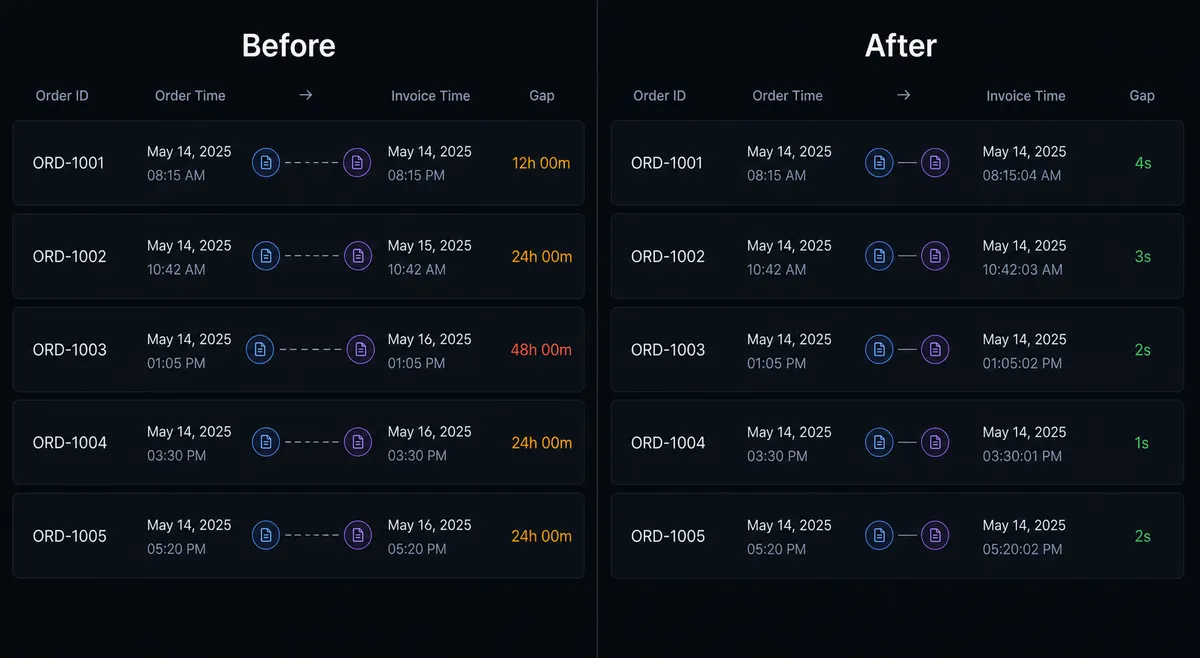
| Order-to-invoice lag | Finance team enters invoices in batches, often 24-48 hours behind order volume | Invoice created in QuickBooks Online within seconds of the BigCommerce order |
| Customer record errors | Invoices posted to missing or duplicate customer records during reconciliation | Agent checks for existing customer record and creates one if missing, before any invoice is created |
| Refund review process | Refunds issued inconsistently; some go out without accounting review | Every refund is quoted, routed to accounting for approval, then issued; approval captured in audit trail |
| New-customer onboarding | Clerk manually creates QuickBooks customer after the first order arrives | Agent creates the QuickBooks customer record automatically when On Customer Created fires in BigCommerce |
| Financial visibility | AR status checked manually; books updated whenever someone has time | AR reflects real-time order and payment status; no bookkeeper involvement on routine transactions |
What you can build
Order-to-invoice sync with customer auto-creation. On Order Created fires in BigCommerce. The agent checks QuickBooks Online for the customer record using Get Customer, creates one with Create Customer if it does not exist, then creates the invoice with Create Invoice and records the payment with Create Payment. Clean orders post without any manual entry.
Refund approval workflow with audit trail. A customer service flow routes a refund decision to the agent. The agent calls Create Refund Quote in BigCommerce and packages the quote for the accounting manager via a human-in-loop Slack flow. On approval, it calls Create Refund in BigCommerce and Void Invoice or Create Payment in QuickBooks Online to keep the books accurate. Every step is logged.
New customer onboarding across both systems. When On Customer Created fires in BigCommerce, the agent creates a matching QuickBooks Online customer record with Create Customer. Billing details, customer group, and address are mapped across. The first invoice for that customer posts without any lookup friction.
Low-stock alert with financial impact summary. On Inventory Updated fires when a variant drops below threshold. The agent calls Get Profit and Loss from QuickBooks Online to show recent revenue from that product line and posts a combined alert to the operations channel: variant SKU, stock level, and revenue context. The team knows which stockouts matter most.
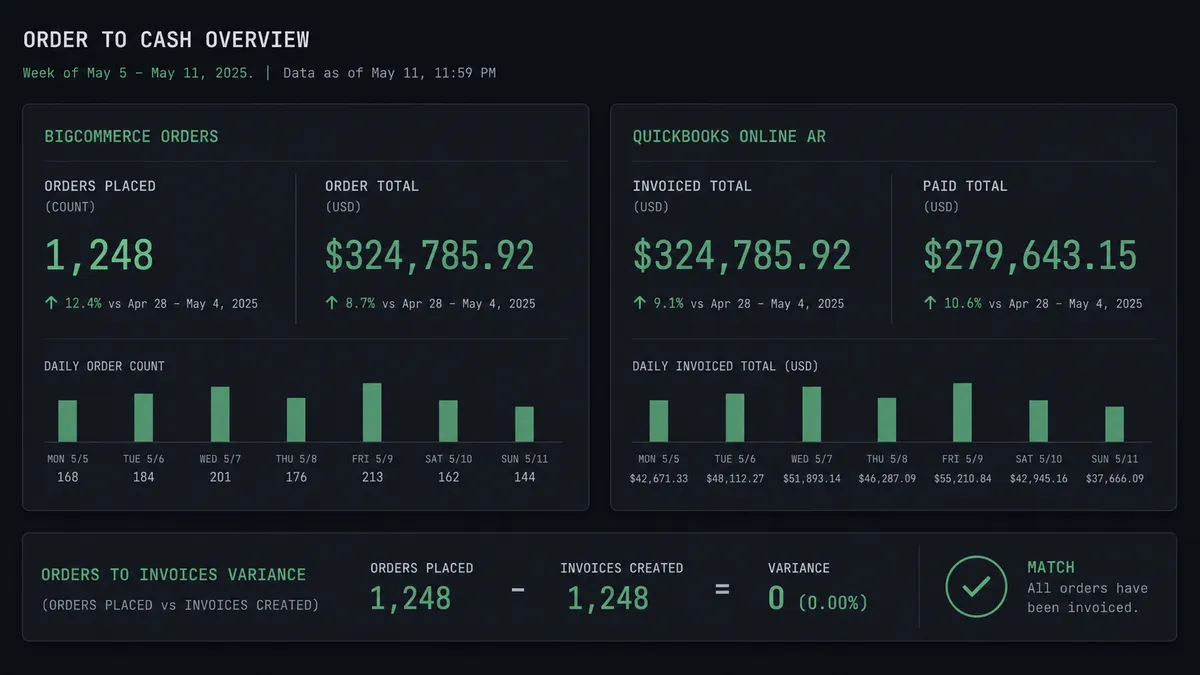
Weekly P&L digest with order volume context. Every Monday, the agent pulls Get Profit and Loss from QuickBooks Online alongside List Orders from BigCommerce for the same period. It formats a combined summary: revenue recognized in QuickBooks, orders placed in BigCommerce, and the gap if any. Leadership sees both the financial picture and the operational picture in one place.
Getting started
FlowRunner has a free plan with 100 executions a month, every integration included, and no credit card required, and new accounts get 14 days of Professional on top. Any real email address works; disposable domains are not accepted.
Both connectors are ready to use:
- BigCommerce integration: triggers, actions, and setup guide
- QuickBooks Online integration: full accounting action library
Start building at flowrunner.ai or book a 30-minute walkthrough at calendly.com/flowrunner/intro if you want to see the refund approval workflow running against your own data before you commit.
Frequently asked questions
Is it free to connect BigCommerce and QuickBooks Online on FlowRunner?
FlowRunner has a free plan with 100 executions a month, every integration included, and no credit card required, and new accounts get 14 days of Professional on top. No credit card is required to start. Beyond the free plan, Growth is $45 per month.
Can I self-host the BigCommerce and QuickBooks Online integration?
Yes. FlowRunner offers a self-hosted Community Edition at no cost and an Enterprise self-hosted tier for organizations that need multi-instance clustering and the full compliance suite.
Does the AI agent need my own OpenAI or Anthropic key?
FlowRunner uses a bring-your-own-key model. You supply the API key for whichever AI provider you prefer. FlowRunner does not mark up model costs.
What happens when the agent is not sure how to handle an order or transaction?
The agent invokes a human-in-loop flow as a callable tool. It pauses execution, sends the full context to the right person via Slack, email, or another channel, and resumes only after the human responds. The decision, the decider, and the timestamp all land in the audit trail.
Does FlowRunner limit the number of users who can access the integration?
No. Every FlowRunner tier includes unlimited users and unlimited workflows. You can give your entire operations, finance, and fulfillment team access without paying per seat.
Can FlowRunner handle refunds that need accounting review before they are issued?
Yes. The BigCommerce connector has a two-step refund pattern: Create Refund Quote followed by Create Refund. A human-in-loop step sits between the two. The agent prepares and quotes; the accounting manager approves; the agent issues. The approval is captured in the audit trail.