How to Connect Calendly with Slack Using FlowRunner
Stop losing high-value prospects to missed follow-ups and silent cancellations. Connect Calendly scheduling with Slack notifications and human decisions through FlowRunner.
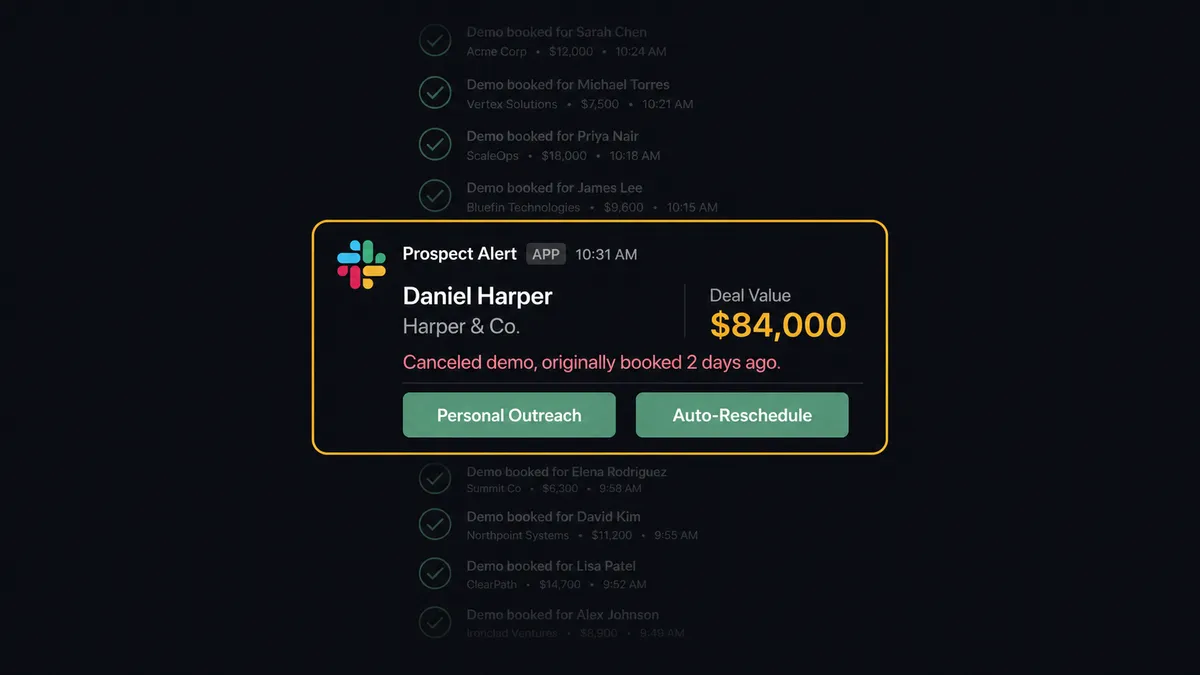
The Problem: Bookings Happen, But Nobody Knows Until It Is Too Late
A prospect books a demo on Calendly. The calendar invite goes out. And then nothing. The sales rep finds the booking when they check their calendar that morning, with no context about who the prospect is, what they care about, or what stage of the pipeline they are in. They spend 10 minutes pulling up the CRM, cross-referencing email threads, and building context that should have been there from the start.
That is the good scenario. The worse ones happen quietly. A high-value prospect cancels their demo and nobody on the team notices for two days. A no-show goes unfollowed for a week because the rep assumed someone else was handling it. A routing form submission from a qualified lead sits in a queue because there is no system connecting the form response to the next step. Every one of these gaps costs pipeline.
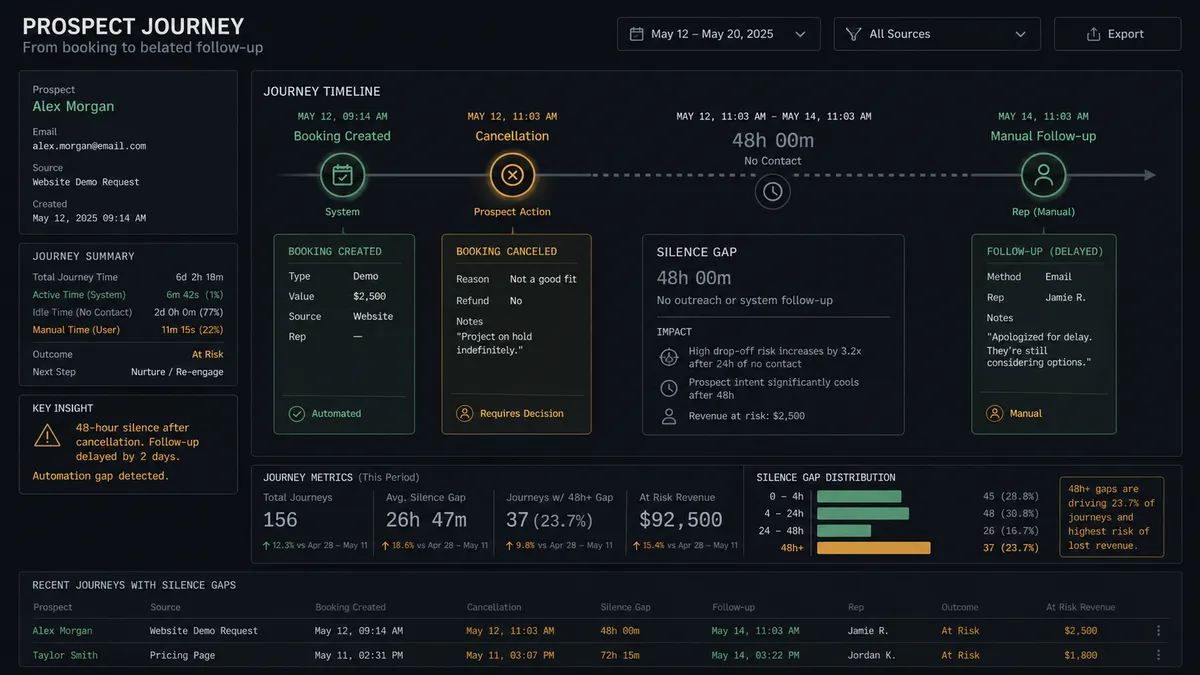
The scheduling tool does its job. It books meetings. But everything that should happen around that booking, the CRM update, the rep notification, the cancellation response, the no-show recovery, is either manual or missing entirely. Your team is the glue holding the process together, and glue does not scale.
The Solution: Every Booking Triggers the Right Response, Every Cancellation Gets a Decision
When Calendly and Slack are connected through FlowRunner, the entire lifecycle of a scheduled meeting is coordinated end-to-end. Bookings trigger CRM updates and context-rich notifications. Cancellations surface to the right person with decision buttons. No-shows launch recovery sequences automatically. Your team only gets involved when a judgment call is needed.
A prospect books a demo. The workflow updates the CRM, enriches the calendar event with deal context, and sends the assigned rep a Slack notification with the prospect’s name, company, deal stage, and any notes from the booking form. The rep walks into the call prepared. No manual lookup required.
When a high-value prospect cancels, the workflow does not just send a notification. It pauses and asks a question. The sales manager gets a Slack message with two buttons: “Personal Outreach” or “Auto-Reschedule.” The manager clicks one. The workflow resumes. If they choose auto-reschedule, the flow calls Create Single-Use Scheduling Link and sends it to the prospect. If they choose personal outreach, the flow logs the task and the manager handles it directly. Every decision is captured in the decision history.
Why Human-in-Loop Matters Here
Not every cancellation is the same. Imagine the difference between a small first-call deal and a six-figure account canceling their third meeting. A blanket “sorry you canceled, here is a new link” email works fine for the first case. For the second, you want your best closer making a personal call within the hour. The difference between those two responses can be worth significant revenue.
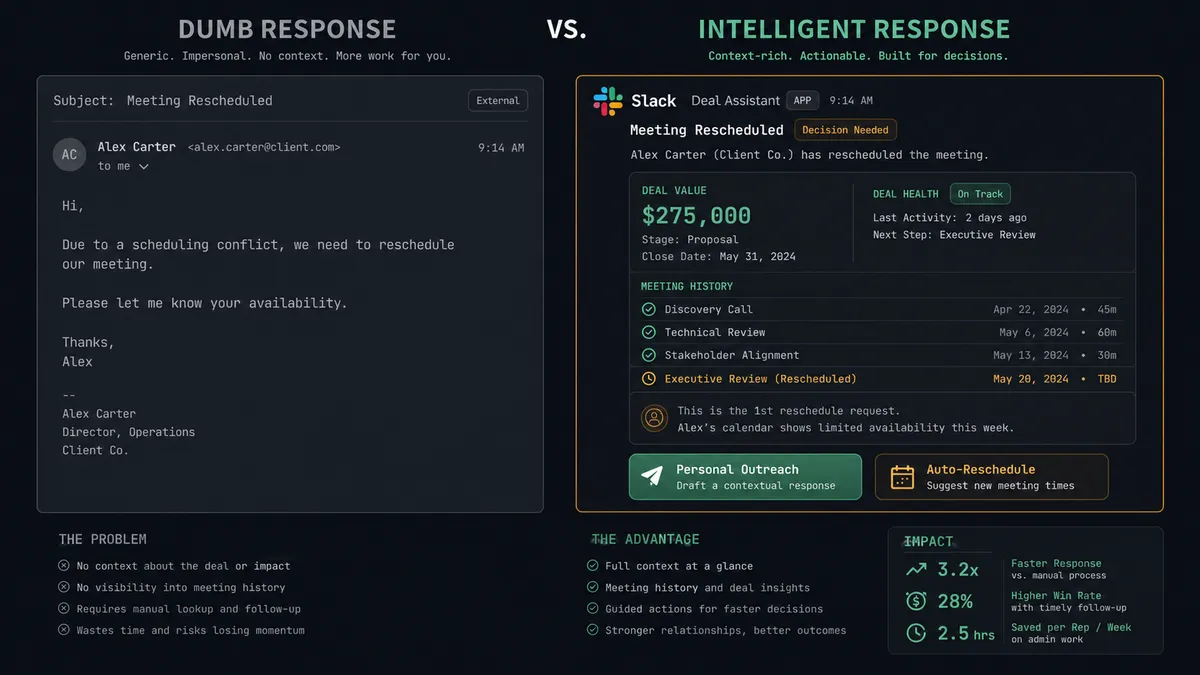
Without human-in-loop built into the workflow, you get one of two outcomes. Either every cancellation gets the same automated response (fast but tone-deaf), or every cancellation requires manual triage (accurate but slow). FlowRunner’s approach is different. The workflow evaluates the context, determines whether this is routine or an exception, and only pauses for human judgment when the stakes justify it. Routine cancellations get an automatic rescheduling link. High-value ones stop the line and route to a decision-maker via Slack. The system knows when to ask.
How It Works
Workflow 1: Booking-to-CRM with Rep Notification
This is the foundation workflow. Every new booking triggers a chain that ensures the sales rep has full context before the meeting happens.
- Trigger: On Invitee Created fires the moment a prospect books through Calendly
- Enrich: The flow pulls the prospect’s CRM record, deal stage, and previous interaction history
- Update: The flow updates the CRM contact with the booking date, meeting type, and any form responses from the Calendly booking
- Calendar: The flow enriches the calendar event with deal notes, key questions from the prospect, and relevant account context
- Notify: The flow calls Send Message to Channel to post to #sales-pipeline with the prospect name, company, opportunity stage, and meeting time.
- Direct: The flow calls Send Direct Message to the assigned rep with a summary card including the prospect’s LinkedIn profile, company size, and specific pain points mentioned in the booking form
The rep sees the notification in Slack, clicks through to the summary, and walks into the call fully prepared. No CRM digging. No guesswork.
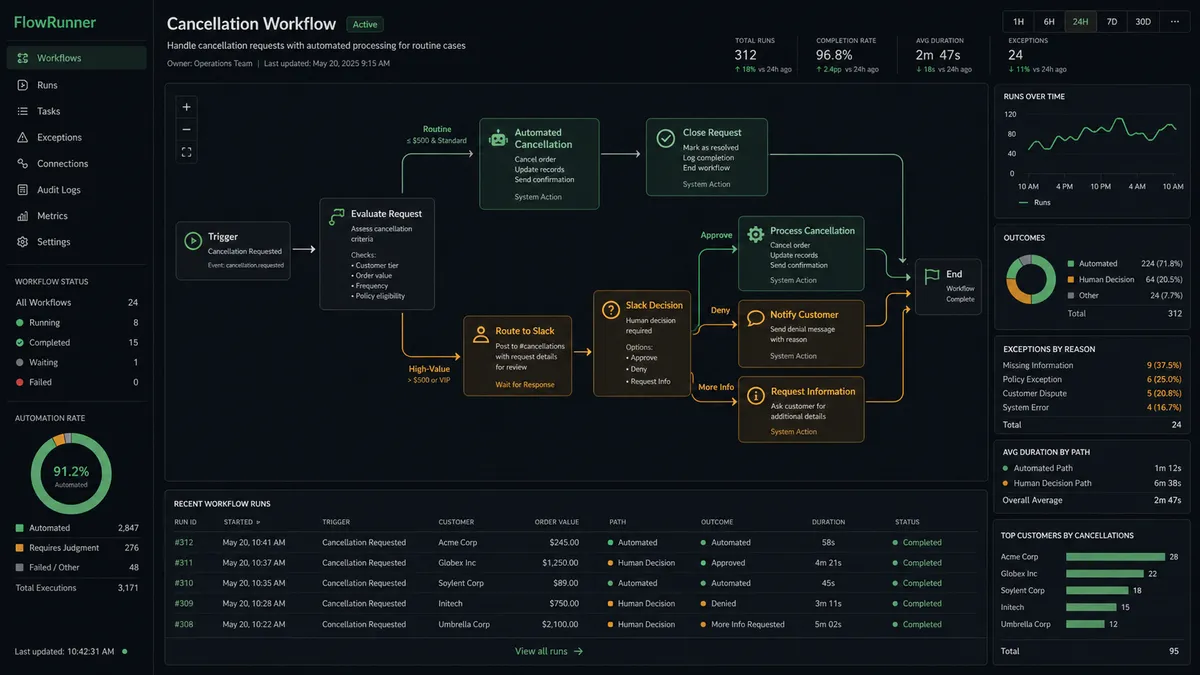
Workflow 2: High-Value Cancellation with Decision Routing
This workflow handles the moment that costs the most pipeline when mishandled: a valuable prospect canceling their meeting.
- Trigger: On Invitee Canceled fires when any scheduled meeting is canceled
- Evaluate: The flow checks the deal value associated with the canceling prospect against a configurable threshold
- Route (routine): If the deal is below threshold, the flow calls Create Single-Use Scheduling Link and sends it to the prospect automatically with a brief “we’d love to reschedule” message. Then it calls Send Message to Channel to notify #sales-pipeline of the cancellation and auto-reschedule.
- Route (high-value): If the deal is above threshold, the flow pauses and calls Send Direct Message to the sales manager with the prospect name, account context, and the question “Personal Outreach or Auto-Reschedule?”
- Human: The sales manager clicks a button. On Block Action fires and the workflow resumes on the chosen path.
- Action: If “Auto-Reschedule,” the flow calls Create Single-Use Scheduling Link and sends a personalized rescheduling message. If “Personal Outreach,” the flow logs a follow-up task in the CRM and notifies the assigned rep via Send Direct Message.
- Decision history: The decision, the decision-maker, and the timestamp are all captured automatically.
Workflow 3: No-Show Recovery Sequence
No-shows are revenue left on the table. This workflow ensures every no-show gets a timely, appropriate follow-up without your team having to remember to do it.
- Trigger: On Mark Invitee as No-Show fires when a rep marks the attendee as absent in Calendly
- Wait: The flow waits 2 hours. An immediate follow-up after a no-show feels aggressive. Two hours allows for genuine scheduling conflicts.
- Action: The flow calls Create Single-Use Scheduling Link to generate a fresh, one-time booking link for the prospect
- Send: The flow sends a brief follow-up email with the new link: “Looks like we missed each other. Here is a one-click link to rebook at a time that works better.”
- Notify: The flow calls Send Message to Channel to post to #sales-pipeline with the prospect name, the action taken, and the link reference.
- Track: If the prospect books using the new link, On Invitee Created fires again and Workflow 1 handles the new booking automatically
Total time from no-show to follow-up: 2 hours, with zero manual effort from the sales team. The rep knows the follow-up happened because they see it in #sales-pipeline.
Before and After
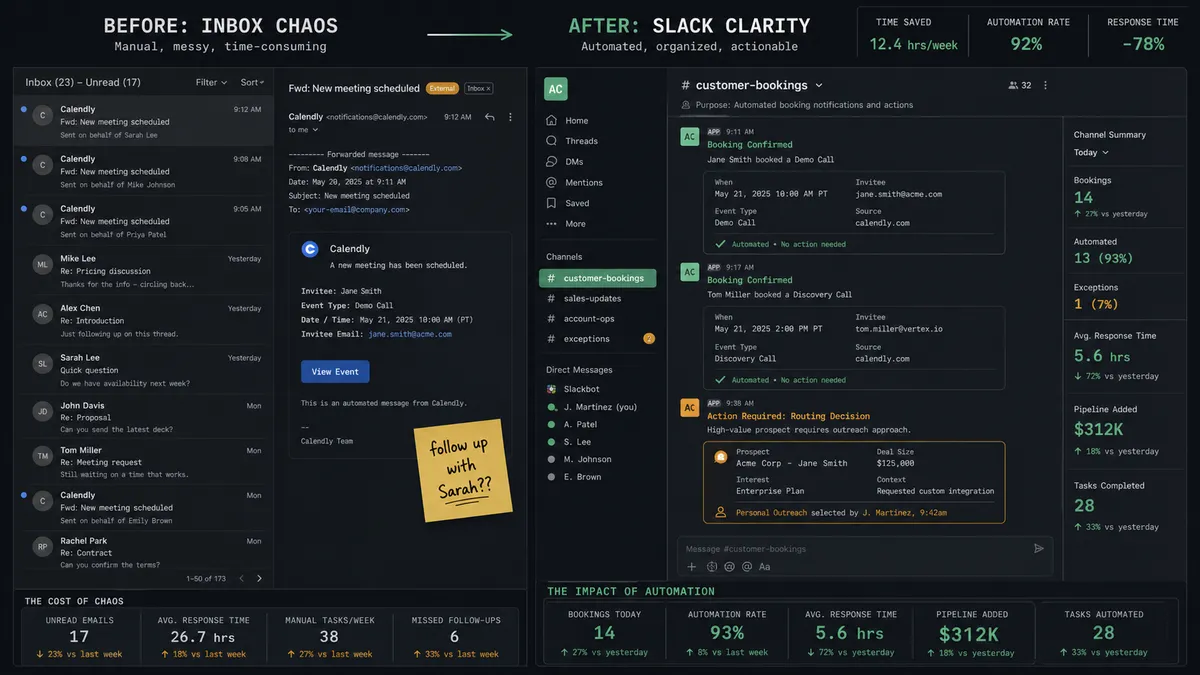
| Before | After | |
|---|---|---|
| CRM updates after bookings | Manual CRM updates after each booking, often forgotten or delayed | CRM sync runs the moment a booking is created |
| Rep meeting prep | Bare calendar entries with no context. Reps spend significant time building context before each call | Context-rich notifications with deal notes, company info, and prospect pain points delivered to Slack automatically |
| No-show follow-ups | Missed no-show follow-ups, often days late or never sent at all | Automated no-show recovery within 2 hours, with a fresh single-use scheduling link |
| Cancellation response | Exception emails that get buried. High-value cancellations treated the same as routine ones | Real-time exception handoff. Sales manager makes the call via Slack buttons with full deal context |
| Decision tracking | No structured approval process. No record of who decided what or when | Decision history is captured for every cancellation routed for review: who chose what, when. |
What You Can Build
Combining Calendly’s scheduling triggers with Slack’s interactive decision capabilities opens up workflows across sales, recruiting, and customer success:
Demo-to-deal pipeline automation. On Invitee Created fires, the flow enriches the CRM, notifies the rep via Send Direct Message, and posts a deal card to #sales-pipeline. Every booking instantly visible to the team with full context.
High-value cancellation triage. On Invitee Canceled fires, the flow evaluates deal value, and high-value cancellations land in Slack with Personal Outreach and Auto-Reschedule buttons. On Block Action routes the decision back to the workflow. Routine cancellations get an automatic Create Single-Use Scheduling Link without human involvement.
No-show recovery with tracking. On Mark Invitee as No-Show fires, the flow waits 2 hours, generates a Create Single-Use Scheduling Link, sends the follow-up, and notifies the rep in Slack. Automatic re-entry into the booking workflow if the prospect rebooks.
Routing form qualification with scoring. On New Routing Form Submitted fires, the flow scores the responses. High scores get an immediate scheduling link via Create Single-Use Scheduling Link. Low scores enter a nurture sequence. Borderline cases route to the sales manager via Send Direct Message with Approve and Nurture buttons.
Weekly meeting performance digest. The flow compiles the week’s bookings, cancellations, no-shows, and conversion rates. Posts a formatted summary to #sales using Send Message to Channel with Block Kit structure. Cancellation rate trending up? The team sees it Monday morning without anyone pulling a report.
Getting Started
Both Calendly and Slack are available on every FlowRunner tier, starting at Growth ($45/mo, 12,000 executions). Every tier includes unlimited users and unlimited workflows, with full human-in-loop coordination.
Start on the free plan: 100 executions a month, every integration included, no credit card required, plus 14 days of Professional for new accounts. For teams that need decision history on their scheduling workflows, Professional at $299/mo adds longer log history and role-based access available on Professional and above.
Connect Calendly to start triggering workflows from bookings, cancellations, and no-shows. Connect Slack to give your workflows a voice in your workspace and your team a place to make decisions. Build the workflow that connects them in minutes.
Start building free or book a demo to see it in action.