Preparing Sales Reps Before Every Meeting Automatically
A FlowRunner workflow coordinates scheduling, CRM, and team communication so every sales rep walks into every meeting prepared, with zero manual work.
The Problem: Reps Walk Into Meetings Blind
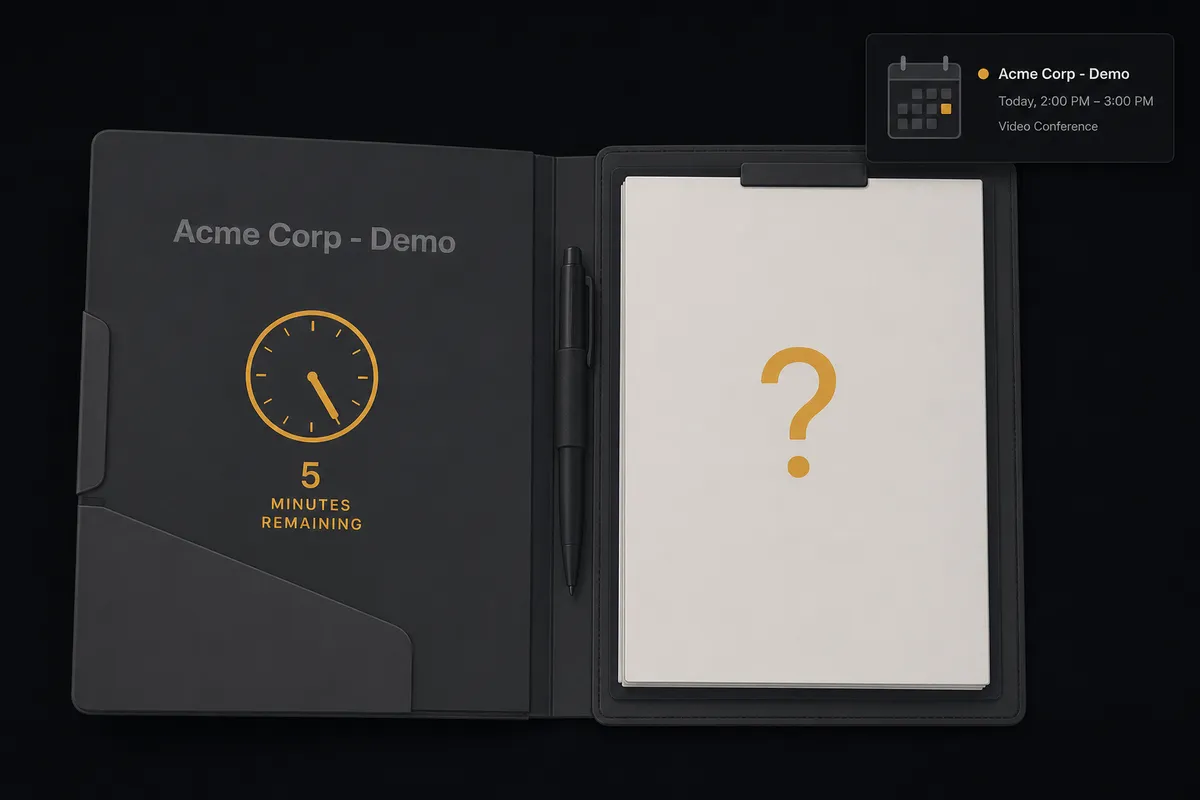
A prospect books a demo. The calendar invite appears. And then nothing happens until five minutes before the call, when the rep scrambles to figure out who they are talking to.
The reality in most sales organizations looks like this: the prospect books through Calendly. Someone (maybe the rep, maybe an SDR) has to open HubSpot, find the contact, check the deal stage, read any notes from prior interactions, and update the deal to reflect that a demo is scheduled. Then they need to look up the company, pull any relevant context about the prospect’s industry or pain points, and build a mental picture of what this meeting should cover. If the rep is diligent, they paste a summary into the calendar event. If they are busy (which is always), they wing it.
The gaps add up. Deal stages go stale because reps forget to update them after booking. Calendar events sit empty with no preparation context. When a prospect no-shows, follow-up happens days later or not at all. When a high-value prospect cancels, the automated rescheduling email goes out the same way it does for every other cancellation. No one notices until the pipeline review on Friday, when the sales manager asks why a six-figure deal went dark. The data lived in three systems. The process depended on a human remembering to stitch it together. Things fell through the cracks.
The Solution: One Workflow, Three Systems, Zero Manual Steps
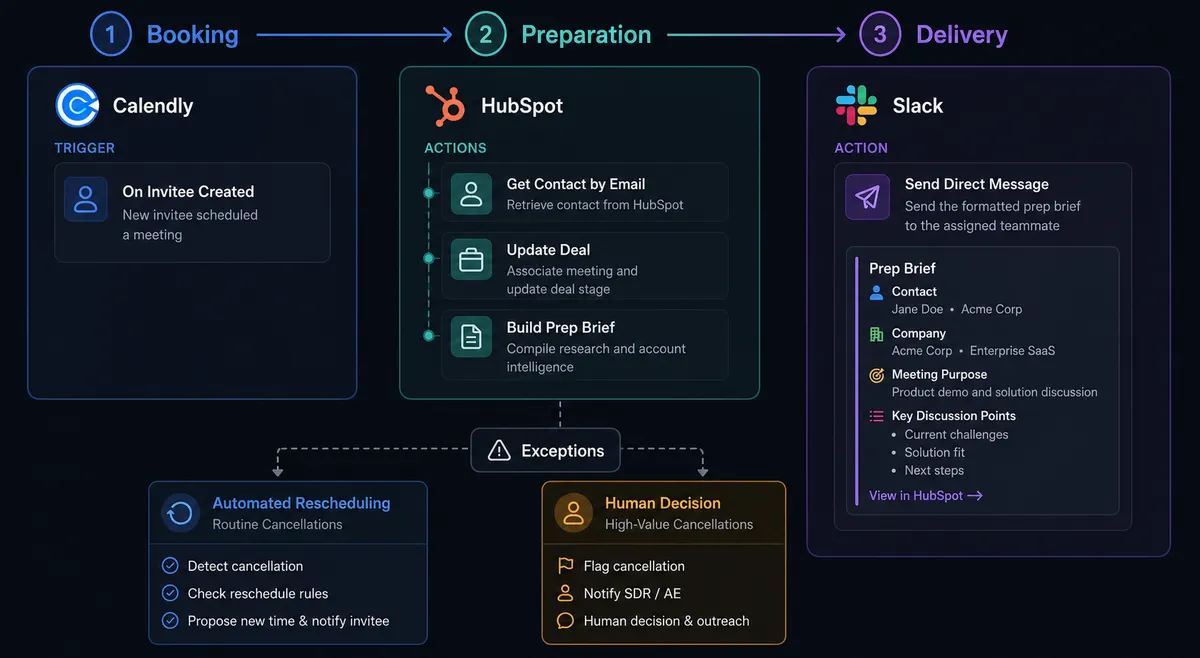
In FlowRunner, a single workflow handles the entire meeting preparation process. It coordinates Calendly, HubSpot, and Slack the way a sales operations coordinator would: checking the CRM before acting, building context-rich calendar events, notifying reps with everything they need, and escalating the situations that require human judgment.
The workflow does not care that your scheduling data lives in Calendly, your customer data lives in HubSpot, and your team communication lives in Slack. It treats them as one environment. When a prospect books a demo, the workflow reads the booking data from Calendly, cross-references the prospect’s record in HubSpot to pull deal history and company context, updates the deal stage, enriches the calendar event with preparation notes, and sends the rep a Slack message with the full picture. The rep opens Slack, reads one message, and walks into the meeting prepared.
The real power shows up in the exceptions. When a prospect cancels or no-shows, the workflow does not just fire off a generic response. It evaluates the situation. It checks the deal value, looks at the prospect’s engagement history, and decides whether this is a routine rescheduling or something that needs a human decision. High-value cancellations get routed to the sales manager with context. The workflow packages everything the manager needs to make the call, and execution pauses until a decision comes back.
Why This Requires Coordination, Not Point Automation
Simple automation can connect Calendly to Slack. Book a meeting, send a notification. That takes care of one step. But the preparation problem spans three systems and requires decisions that depend on data from all of them simultaneously.
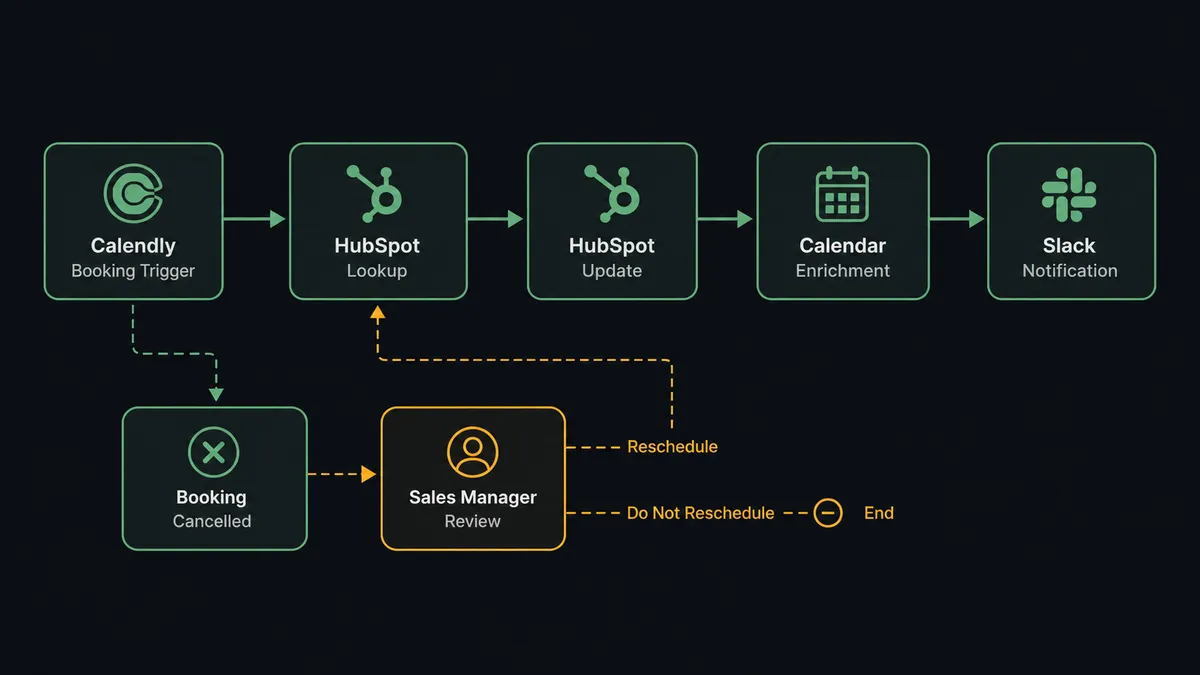
A cancellation in isolation is just a calendar event. But imagine a cancellation from a prospect with a six-figure deal who has already been through two discovery calls and has not responded to the last follow-up. That requires a different response. The workflow knows this because it holds context from Calendly (the cancellation event), HubSpot (the deal value, deal stage, and interaction history), and Slack (where the escalation needs to land with all of that context packaged for the manager). No single integration pair can make that judgment.
FlowRunner’s human-in-the-loop tool is available to the workflow for any decision it cannot make with confidence. When the workflow escalates, it does not just forward raw data. It assembles a summary from all three systems, explains why it is escalating, and presents the options. The manager makes the call. The workflow resumes.
The Complete Workflow
Here is how the full process runs from booking to meeting preparation, including exception handling for cancellations and no-shows.
1. Prospect books a demo. The On Invitee Created trigger fires in Calendly. The workflow receives the prospect’s name, email, and scheduled meeting time.
2. Workflow looks up the prospect in HubSpot. Using Get Contact by Email, the workflow searches for an existing record. If the contact exists, it pulls the full profile: company, deal stage, lifecycle stage, prior notes, and engagement history.
3. Workflow evaluates whether this is a new or existing prospect. If no contact exists, the workflow uses Create Contact to build the record and Associate Objects to link the contact to the correct company. If the contact already exists, the workflow checks for duplicate records or conflicting data.
4. Workflow updates the deal stage. Using Update Deal, the workflow moves the deal to “Demo Scheduled” and logs the meeting date and time. If no deal exists, the workflow uses Create Deal to open one in the inbound pipeline.
5. Workflow builds the preparation brief. The workflow compiles data from HubSpot: company size, industry, deal value, prior interactions, any open notes from the account owner. It also pulls the Calendly booking details: which event type was booked, what questions the prospect answered in the booking form.
6. Workflow posts the brief to the sales rep. Using Send Direct Message in Slack, the workflow delivers a formatted preparation message: “[Prospect Name] at [Company] booked a demo for [date/time]. Deal value: $[amount]. Stage: [current stage]. Last interaction: [date and summary]. Booking form answers: [responses]. Preparation notes: [compiled context].” The rep reads one message and has everything.
7. Workflow handles cancellations. If On Invitee Canceled fires instead, the workflow does not immediately send a rescheduling link. It first checks HubSpot using Get Deal by ID to evaluate the deal value and engagement history. For routine cancellations (low-value deals, early-stage prospects), the workflow uses Create Single-Use Scheduling Link to generate a personalized rescheduling link and sends it via email automatically.
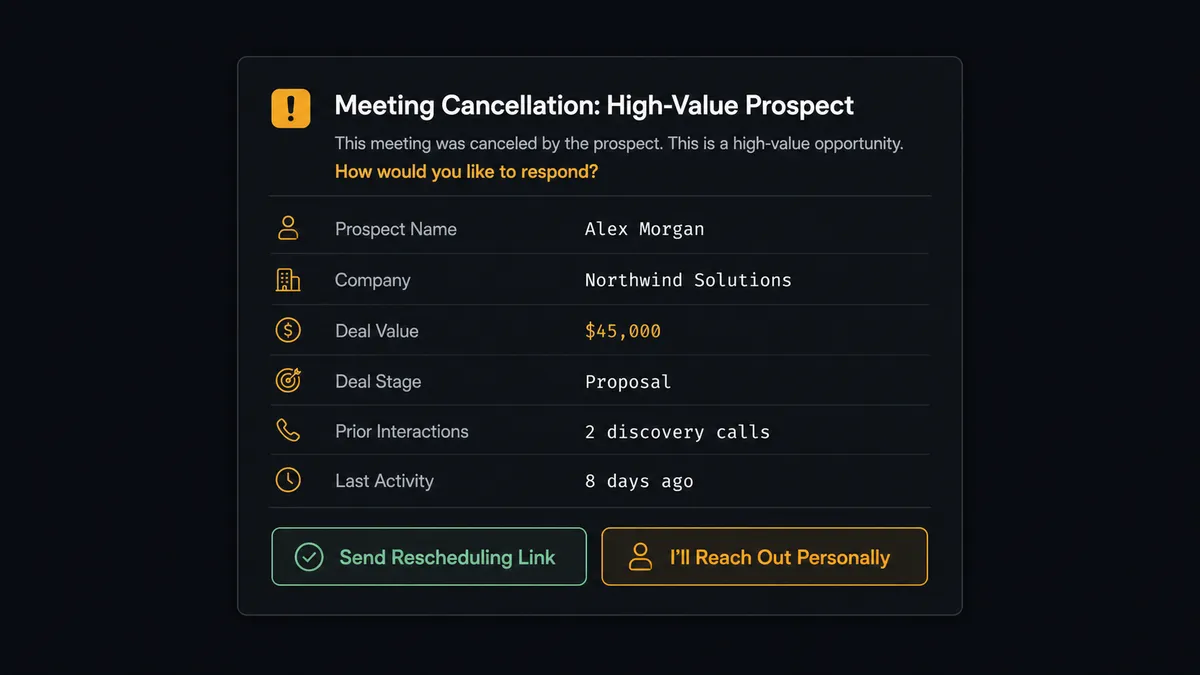
8. Workflow escalates high-value cancellations. When the deal value is significant and the prospect has had multiple prior interactions, the workflow invokes the human-in-the-loop tool. It sends a Slack message to the sales manager with the deal value, stage, and recent activity summary, then asks: should I send the automated rescheduling link, or do you want to reach out personally? The manager clicks a button. The On Block Action trigger captures the decision.
9. Workflow manages no-shows. When On Mark Invitee as No-Show fires, the workflow logs the no-show in HubSpot using Update Contact. After a short wait, it uses Create Single-Use Scheduling Link to generate a recovery link and sends a follow-up message. The rep sees the no-show logged in HubSpot and the follow-up handled without lifting a finger.
What the Workflow Sees vs. What Humans See
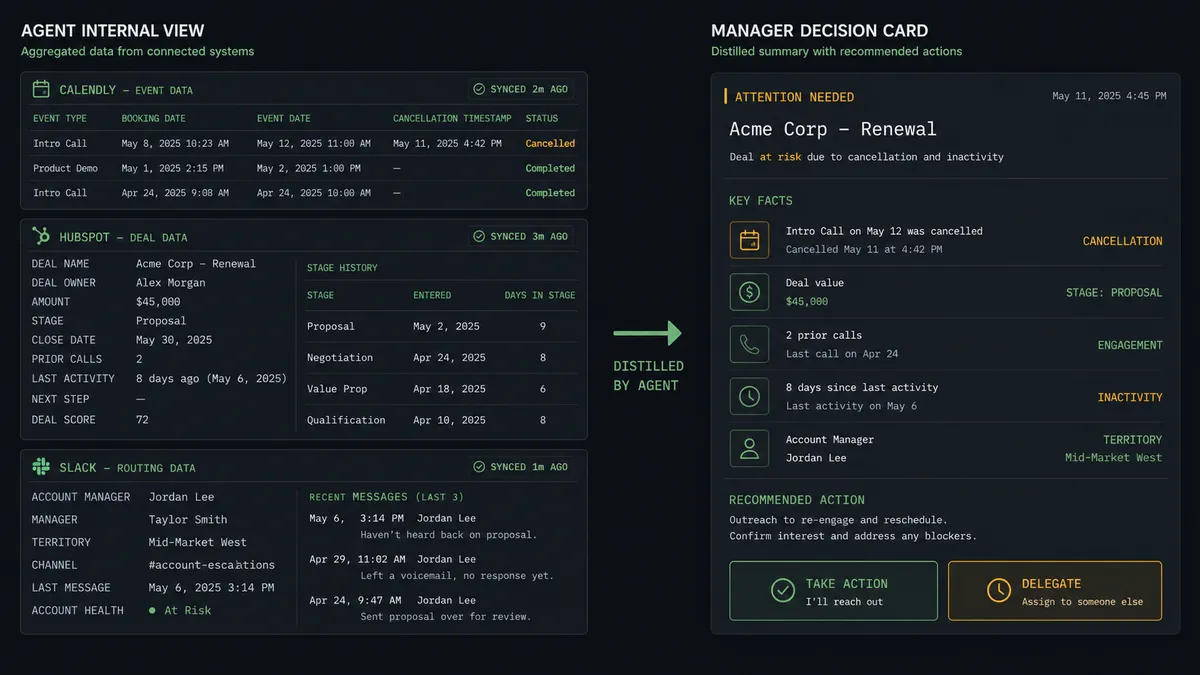
The workflow’s view spans all three systems simultaneously. When a cancellation comes in, the workflow evaluates data points that no human would pull together in real time: the Calendly event metadata (event type, cancellation reason if provided, original booking date), the HubSpot deal record (value, stage, owner, days since last activity, total interactions logged), and the Slack workspace context (which manager owns this territory, which channel to route to).
The workflow processes all of this in seconds. It cross-references the deal value against the engagement history. A six-figure deal in the Proposal stage with declining engagement looks different from the same deal where the prospect just had a productive discovery call. The workflow factors in the pattern, not just the number.
What the sales manager receives is clean and decisive. A single Slack message with the key facts organized for a quick decision. No digging through HubSpot. No checking the calendar for prior meeting history. No asking the rep for context. The workflow did all the research the manager would have done manually and distilled it into a decision card with two buttons.
The manager taps “I’ll Reach Out Personally” from their phone. The On Block Action trigger fires. The workflow logs the decision in HubSpot (who decided, what they decided, when they decided), updates the deal notes, and moves on. Decision history is captured for every approval: who chose what, when.
Before and After
| Before | After | |
|---|---|---|
| Meeting prep | Manual research across systems before each call | Preparation brief delivered to Slack automatically |
| CRM accuracy after booking | Deal stage updated when reps remember, often days later | Deal stage updated automatically on booking |
| No-show follow-up | Reps follow up days later or forget entirely | Personalized rescheduling link sent the same day |
| High-value cancellation response | Discovered at weekly pipeline review | Sales manager notified with context in minutes |
| Calendar event quality | Bare meeting invite with no context | Event enriched with deal notes, company info, and booking form answers |
| Systems touched by reps | Three (Calendly, HubSpot, Slack) with manual copy-paste | Cross-system coordination handled by the workflow |
Getting Started
Every integration used in this workflow is available on all FlowRunner tiers. Calendly, HubSpot, and Slack are included with your account from day one. No add-ons, no premium connectors.
Start on the free plan: 100 executions a month, every integration included, no credit card required, plus 14 days of Professional for new accounts. Corporate email is all you need.
Explore each integration:
Build your first meeting preparation workflow at flowrunner.ai, or book a walkthrough with the team at calendly.com/flowrunner/intro. Your reps will never walk into a meeting unprepared again.