How to Connect Deel with QuickBooks Online (With or Without an AI Agent)
Connect Deel contractor and employee payment events to QuickBooks Online automatically, with an AI agent that pauses for human review before recording large or disputed charges.
How do you connect Deel to QuickBooks Online?
Use the On Deel Event trigger in FlowRunner to fire when a contractor invoice or payslip event arrives in Deel, then call Create Bill or Create Payment in QuickBooks Online to record the entry automatically. FlowRunner is a visual AI-agent orchestration platform where automations run autonomously and pause for human judgment on the steps that carry real consequence. The same connection that syncs a routine contractor payment in seconds can run as an AI agent that pauses for your accounting manager before recording a large or disputed charge.
The problem it solves
Contractors paid through Deel rarely land in QuickBooks without someone doing the work. An AP clerk pulls the invoice from Deel, checks the vendor record, keys the amount into QuickBooks, and files the reference. Multiply that by 20 or 50 contractors in a month and you have a part-time job that exists solely to move numbers from one system to another. The margin for error is wide. An invoice submitted on Friday sits until Monday. A duplicate slips through because the vendor name is formatted differently. A month-end close becomes a search party for entries that fell through the cracks.
The gap is not a data problem. It is a process problem. Deel and QuickBooks are two systems that were never designed to talk to each other, so someone has to be the bridge every time an event happens in one that needs to be reflected in the other. That someone is usually an operations coordinator or bookkeeper who has better things to do. Finance never has a current picture of contractor obligations. Reconciliation is always a cleanup job.
How it works: the connection
The On Deel Event trigger fires the moment Deel publishes an event in your account. The payload carries everything the accounting step needs: the worker identity, the contract type, the invoice number, the amount, and the due date. The flow maps that payload directly to the QuickBooks Online action.
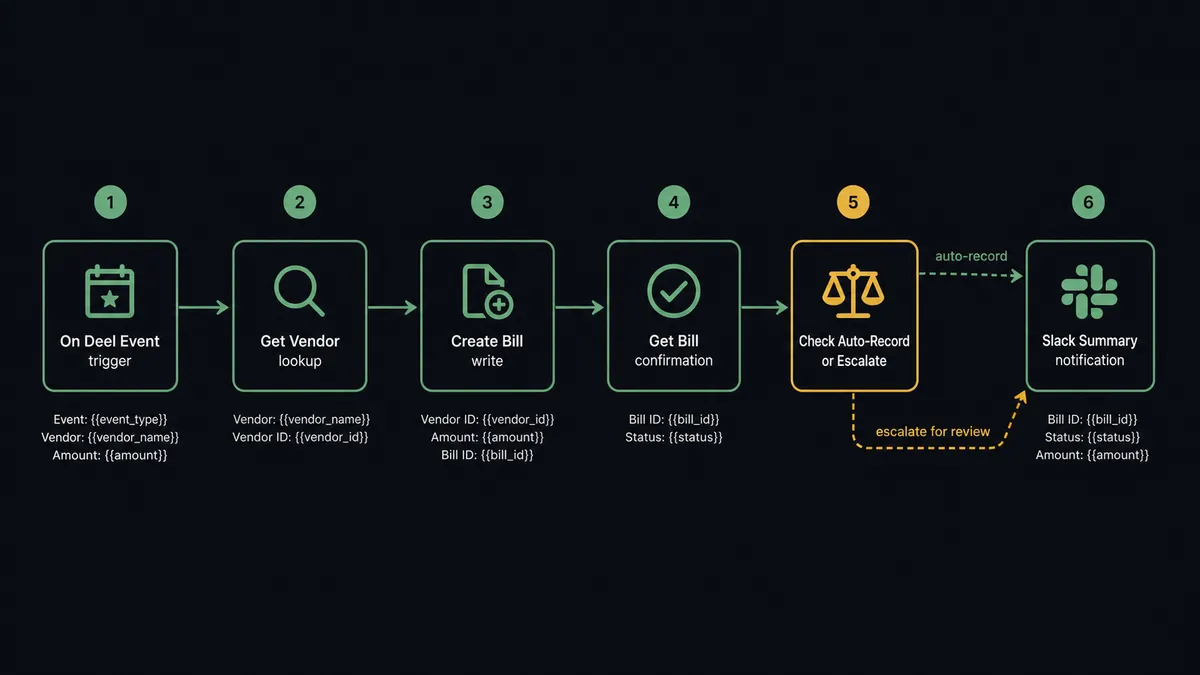
For contractor invoice submissions, the flow runs like this:
- On Deel Event fires for a contractor invoice or a contract milestone payment
- The agent calls Get Vendor in QuickBooks to find the existing record, or Create Vendor if the contractor is new
- The agent calls Create Bill in QuickBooks with the invoice number, vendor, amount, due date, and line items from the Deel payload
- The agent calls Get Bill to confirm the record is correctly written
- A summary posts to the finance Slack channel: “Bill created for [Contractor Name]. Amount: $[X]. Due: [Date]. QBO Bill ID: [Y].”
For payslip events, the flow reads the eor.payslips.available payload, calls List EOR Payslips to enumerate the affected employees, calls Download Payslip PDF for each, and routes the documents to the employee and the finance team.
Both flows run without a bookkeeper touching QuickBooks. The record is there before anyone opens the accounting tab.
Can an AI agent run it? (and why a human stays in the loop)
A basic trigger-action connection records every payment automatically. That is fine for a $400 reimbursement from a contractor with 18 months of clean history. It is not fine for a $22,000 invoice from a vendor you have never paid before, or an invoice where the line-item total does not match the contract value.
An AI agent on this flow does not apply a hardcoded rule. It reads the data and makes a judgment.
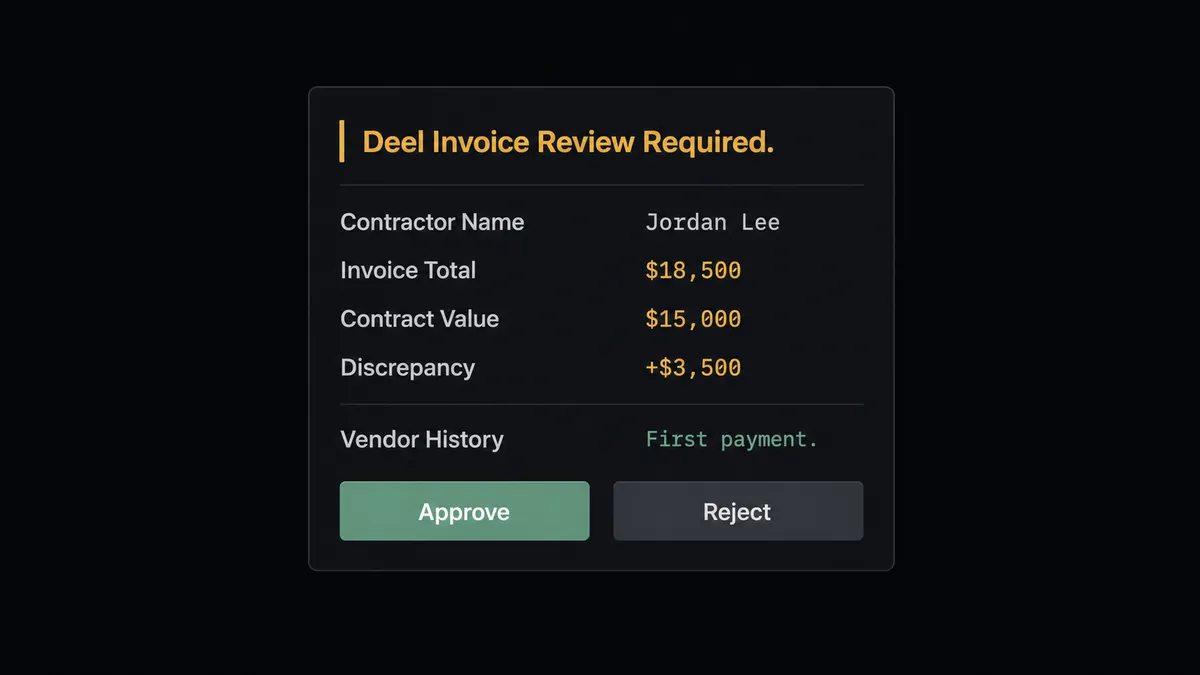
Here is how that judgment works in practice. The On Deel Event trigger fires for a contractor invoice. The agent calls Get Vendor in QuickBooks, sees the vendor was created three weeks ago and has no prior payment history. It calls Get Bill and confirms there is no existing bill for this invoice number. The amount is $18,500. The contract on file in the Deel payload is for $15,000. The agent flags the discrepancy: the invoice exceeds the contract value by 23%. It does not record the bill.
Instead, it invokes the human-in-loop sub-flow. Your accounting manager receives a Slack message:
“New Deel invoice for [Contractor Name] requires review. Invoice total: $18,500. Contract value on file: $15,000. Discrepancy: $3,500. Vendor has no prior payment history. Invoice PDF attached. Approve to create the QuickBooks bill, or reject to hold and notify the submitter.”
The manager reviews the attached PDF, sees an explanation for the overage in the invoice notes, and clicks Approve. The agent calls Create Bill in QuickBooks and records the entry. The approval decision, the manager’s identity, and the timestamp are written to the audit trail.
A contractor with a two-year track record submitting a $1,200 timesheet payment at the expected amount moves through automatically. The agent does not need to ask. This is the “digital andon cord” concept: the line stops when there is genuine uncertainty, and moves when the situation is clear.
FlowRunner vs Zapier
Zapier is the right tool for simple, rule-based connections between apps. If you want every Deel event to create a QuickBooks bill with no conditions, Zapier can do that. Its app catalog is large, its setup is fast, and for straightforward two-step automations it costs less to start.
The differences become meaningful when your accounting process requires more than a rule:
| Capability | Zapier | FlowRunner |
|---|---|---|
| Trigger-action connection for Deel to QBO | Yes | Yes |
| AI agent that reads invoice data and decides | No | Yes |
| Human-in-loop as a callable agent tool | No | Yes, on any step |
| Audit trail with approver and timestamp | No | Yes, every approval |
| Unlimited users on every paid tier | No (seat-based) | Yes |
| BYOK for your AI provider | No | Yes |
| Self-hosted option | No | Yes (Community and Enterprise) |
The honest version: if your Deel-to-QuickBooks volume is low and every invoice is routine, Zapier covers it. If you pay contractors across multiple countries at varying amounts, have an AP review process for large payments, or need an audit trail for compliance, FlowRunner is the better fit.
Before and after
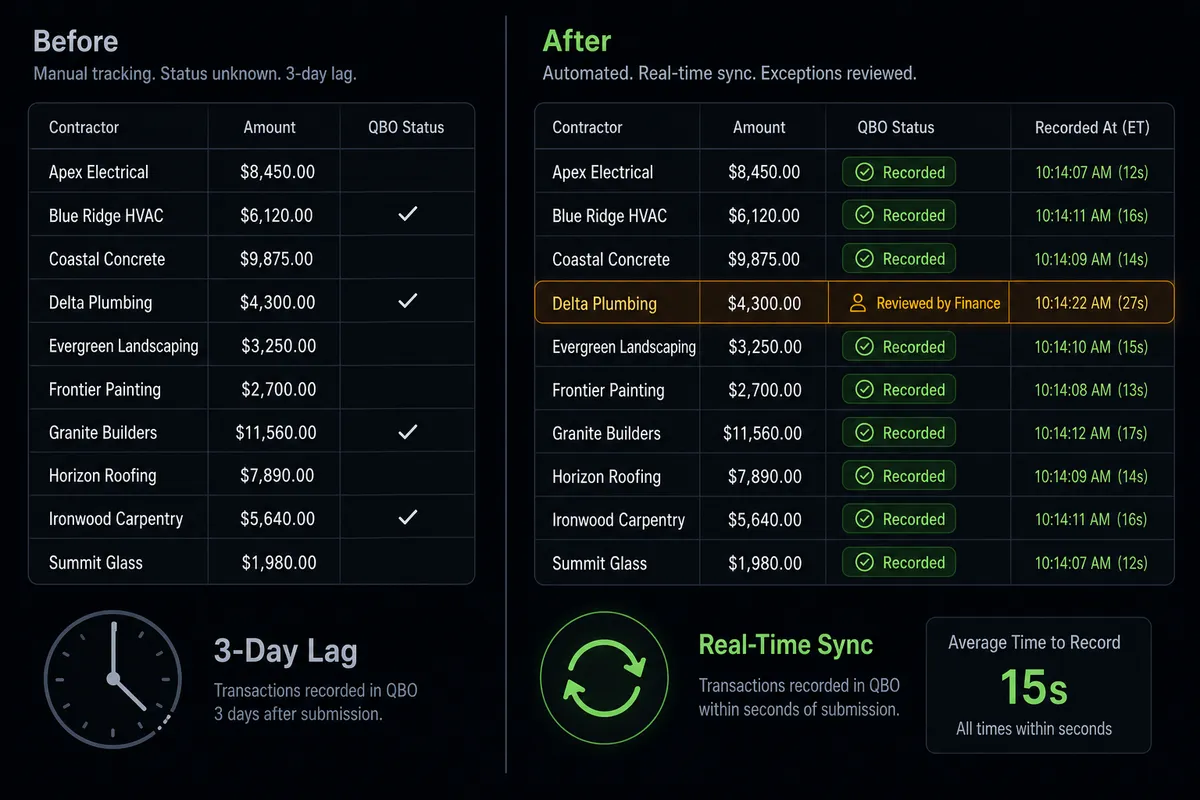
| Metric | Before | After |
|---|---|---|
| Time to record a contractor invoice | 15 to 30 minutes per invoice, done in batches | Bill created in QuickBooks within seconds of Deel event |
| Duplicate detection | Manual check against prior bills | Agent calls Get Bill before creating; duplicates flagged before recording |
| Large payment review | Invoices sit until an AP clerk notices and escalates | Agent pauses automatically and routes to accounting manager via Slack |
| Month-end reconciliation | Multi-day cleanup to match Deel payments to QBO records | Books stay current in real time; reconciliation confirms rather than reconstructs |
| Audit trail | Email threads and manual notes | Every approval logged with approver identity and timestamp |
What you can build
Contractor invoice to QuickBooks bill, with approval for new vendors. When On Deel Event fires for an invoice submission, the agent calls Get Vendor to check history. New vendors with no prior payments trigger the human-in-loop review. Known vendors with matching invoice amounts record automatically via Create Bill.
EOR payslip distribution tied to payroll journal entry. When On Deel Event fires for eor.payslips.available, the agent calls List EOR Payslips, downloads each payslip PDF via Download Payslip PDF, and routes documents to employees. In parallel, it creates the corresponding journal entry in QuickBooks via Create Bill to record the employer payroll obligation.
Off-cycle payment approval with QuickBooks record. When a Create Off-Cycle Payment action is about to fire in Deel, the agent stages the request and invokes the human-in-loop flow first. On approval, it calls Create Off-Cycle Payment in Deel and Create Payment in QuickBooks simultaneously, keeping both systems in sync.
Contract milestone billing. When On Deel Event fires for a contract milestone completion, the agent reads the milestone details, calls Create Invoice in QuickBooks, and calls Send Invoice to deliver it to the client. The milestone, invoice number, and send timestamp are logged for project tracking.
Weekly contractor spend digest. Every Monday morning, the agent calls List Invoices in Deel for the prior week, cross-references with List Bills in QuickBooks, and calls Get Profit and Loss from QuickBooks for the month to date. It posts a structured summary to the finance Slack channel: total contractor spend, number of invoices processed, any pending approvals, and the month-to-date variance against the prior period.
Getting started
Start on the free plan: 100 executions a month, every integration included, no credit card required, plus 14 days of Professional for new accounts. Any real email address works; disposable domains are not accepted.
Both connectors authenticate with OAuth2 through the visual builder. You do not need a developer to get started.
Explore the integration pages for more on what each connector can do: Deel and QuickBooks Online.
When you are ready to try it, start at flowrunner.ai. If you want to walk through the setup with the team, book a session at calendly.com/flowrunner/intro.
Frequently asked questions
Is it free to connect Deel and QuickBooks Online on FlowRunner?
FlowRunner has a free plan with 100 executions a month, every integration included, and no credit card required, and new accounts get 14 days of Professional on top. No credit card is required to start. Beyond the free plan, Growth is $45 per month.
Can I self-host FlowRunner to keep payroll data on my own infrastructure?
Yes. FlowRunner offers a self-hosted Community Edition at no cost and an Enterprise self-hosted tier for multi-instance deployments with full compliance features. Both run on your own infrastructure.
Does the AI agent need my own OpenAI key?
FlowRunner uses a BYOK (Bring Your Own Keys) model. You connect whichever AI provider you prefer. No key is required from FlowRunner itself.
What happens when the agent is not sure whether to record a payment?
The agent pauses the workflow and routes the payment details to your accounting manager via Slack or email. The manager sees the full context: amount, vendor, invoice reference, and the reason for escalation. On approval, the agent records the entry and logs the decision with a timestamp.
Does connecting Deel to QuickBooks Online require a developer?
No. Both connectors authenticate via OAuth2 through the FlowRunner visual builder. You map fields, set conditions, and activate the flow without writing code.
What Deel events can trigger a QuickBooks action?
The On Deel Event trigger fires for any published Deel event, including contractor invoice submissions, payslip availability, and contract milestones. Your flow routes on whichever event type matches the accounting step you want to automate.