How to Connect AWS Textract with QuickBooks Online (With or Without an AI Agent)
Connect AWS Textract to QuickBooks Online so vendor invoice PDFs are automatically extracted, validated, and recorded as bills, with a human in the loop before any uncertain or high-value entry posts.
How do you connect AWS Textract to QuickBooks Online?
You connect them by triggering an AWS Textract extraction when a vendor invoice PDF arrives, then mapping the extracted fields directly into a QuickBooks Online Create Bill action. FlowRunner is a visual AI-agent orchestration platform where automations run autonomously and pause for human judgment on the steps that carry real consequence. The same connection can run as an AI agent that reads confidence scores, reasons about PO matches, and invokes a human reviewer before posting anything it is not certain about.
The problem: invoices that wait and totals that slip through
An AP clerk or billing manager today opens a PDF, reads the vendor name, reads the total, reads the line items, and types them into QuickBooks. One invoice takes two to five minutes. An operation processing fifty invoices a week spends four to eight hours a week on data entry. None of that time produces decisions. It produces copies.
The deeper problem is the quiet errors. A misread digit on a $12,000 invoice becomes a $1,200 bill that clears without anyone noticing until the reconciliation. Invoices that land on a Friday sit in the queue until Monday. Multi-page PDFs with embedded tables lose the line-item structure entirely when printed and re-scanned. The work falls through the cracks not because people are careless, but because the volume is too high and the tooling was never built for it.
How it works: connecting AWS Textract to QuickBooks Online
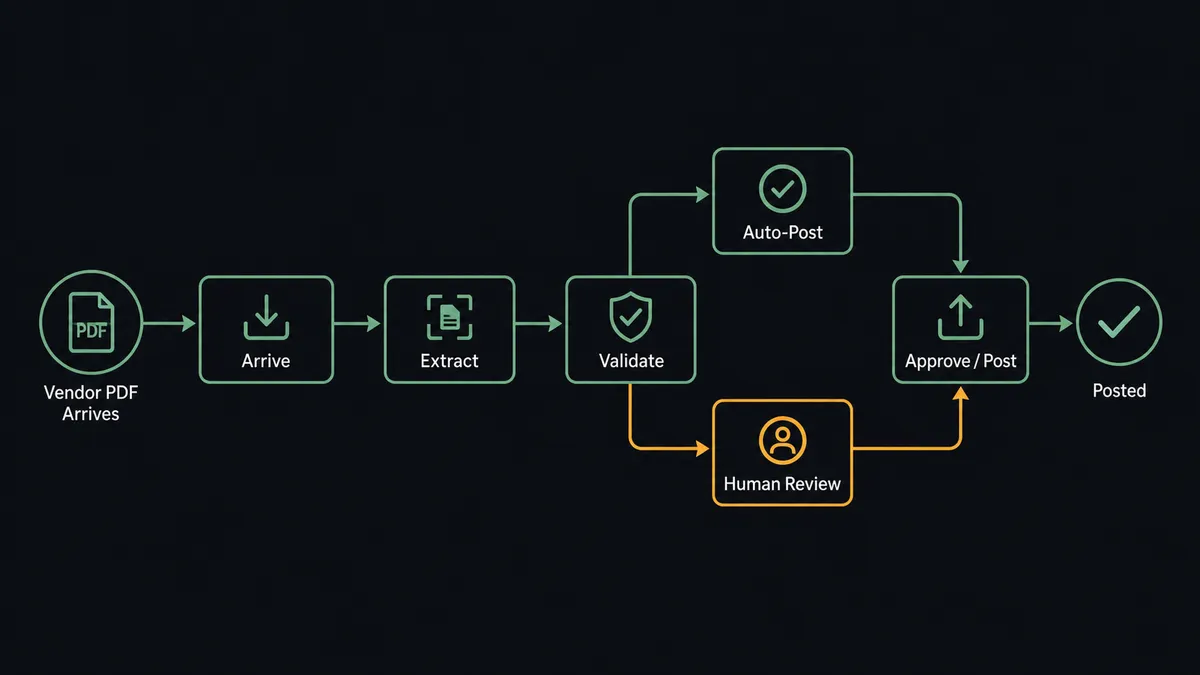
When a vendor invoice PDF lands in your intake folder or an S3 bucket, the workflow fires. The agent calls Analyze Expense in AWS Textract, which is built specifically for invoices and receipts: it extracts the vendor name, invoice number, total, due date, and line-item table as structured fields, each with a confidence score.
With those fields in hand, the agent moves to QuickBooks Online. It calls Get Vendor to check whether the vendor already exists. If the vendor is new, it calls Create Vendor to add the record first. Then it calls Create Bill, mapping the extracted fields into the vendor, amount, due date, and line items. The bill is in QuickBooks within seconds of the PDF arriving.
For multi-page PDFs stored in S3, the agent uses Start Document Analysis to begin an asynchronous extraction job and Get Document Analysis to retrieve the results when the job completes. The downstream QuickBooks steps run identically either way.
The result: invoice data goes from PDF to QuickBooks bill without a person touching a keyboard. The AP team sees a Slack summary confirming each recorded bill, so they know the pipeline is running without having to check it.
Can an AI agent run it? And why a human stays in the loop
A basic connection moves data. An AI agent reasons about it.
The difference matters most at the step where a wrong number quietly becomes a ledger entry. When the FlowRunner agent receives the Textract results, it does not simply pass the fields through. It reads the confidence score on every extracted value. It compares the extracted total against the purchase order in your ERP. And it decides, based on what it finds, whether this invoice is safe to post or whether a person needs to see it first.
An invoice from a vendor with a clean history, a high-confidence extraction, and a total that matches the PO to the cent: the agent creates the bill and moves on. A $14,000 invoice from a vendor the system has never seen, where the line-item table extracted at 71% confidence and the total is 30% above what was on the PO: the agent stops. This is not a rule. The agent evaluated the situation and decided a human needed to be involved.
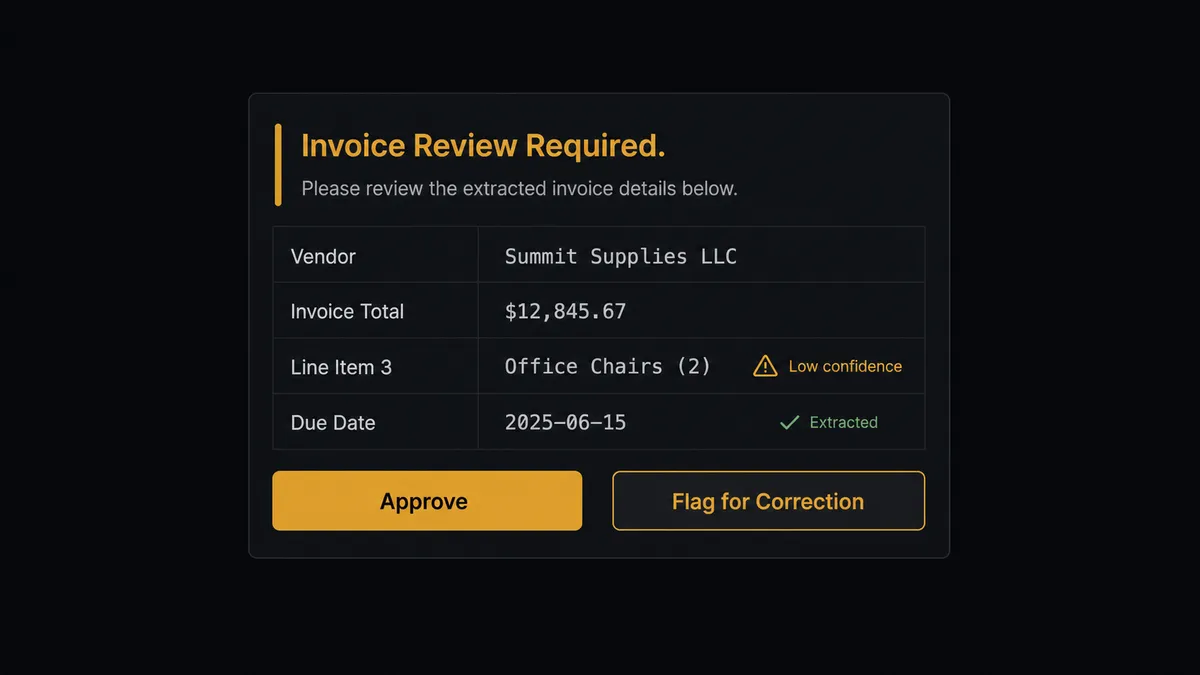
When the agent invokes the human-in-loop step, it packages the full context: the original PDF, the extracted values, the confidence scores for each field, the PO total it compared against, and the specific fields it is uncertain about. The AP reviewer receives a Slack message with that context, an Approve button, and a flag to correct. They act. The agent resumes with the decision as input. The approval, the reviewer’s identity, and the timestamp are captured in the audit trail.
Prospects who run AP operations call this a “digital andon cord.” Like Toyota’s quality pull cord on the assembly line, FlowRunner stops the process the moment the agent hits something it is not confident about. The line does not keep moving with a defect in it.
This is not a threshold-based approval gate. The agent is not executing a rule that says “flag anything below 80% confidence.” It is reasoning about the combination of confidence level, vendor history, and PO variance to make a judgment call about whether a human needs to see this specific invoice. A $500 invoice with a 74% confidence score from a vendor with five years of clean history might auto-post. A $2,000 invoice from a brand-new vendor with the same score might not.
FlowRunner vs Zapier: what is actually different
If you are evaluating this workflow, you are probably already using Zapier or considering it. Zapier is a mature, well-documented platform with thousands of integrations and a large community. For straightforward linear automations, “if A then B,” it works well.
Where the comparison becomes relevant for this specific workflow is the decision layer. Zapier connects systems in sequence. It does not have a native concept of an AI agent that reads confidence scores, reasons about PO variances, and decides whether to invoke a human review. The human approval step is added as a conditional branch, not as a callable tool an agent chooses to invoke based on context.
| Capability | Zapier | FlowRunner |
|---|---|---|
| Connect AWS Textract to QuickBooks | Yes, via Zap steps | Yes, with real action names from both connectors |
| AI agent that reasons about the data | No native agent reasoning | Agent evaluates confidence scores, PO variance, vendor history |
| Human-in-loop as agent tool | Conditional branch only | Separate approval flow the agent calls as a tool based on context |
| Unlimited users on every paid tier | No (per-seat pricing) | Yes, every tier |
| Bring your own AI provider keys | No | Yes (BYOK model) |
| Self-hosted option | No | Yes (Community Edition and Enterprise) |
Before and after
| Category | Before | After |
|---|---|---|
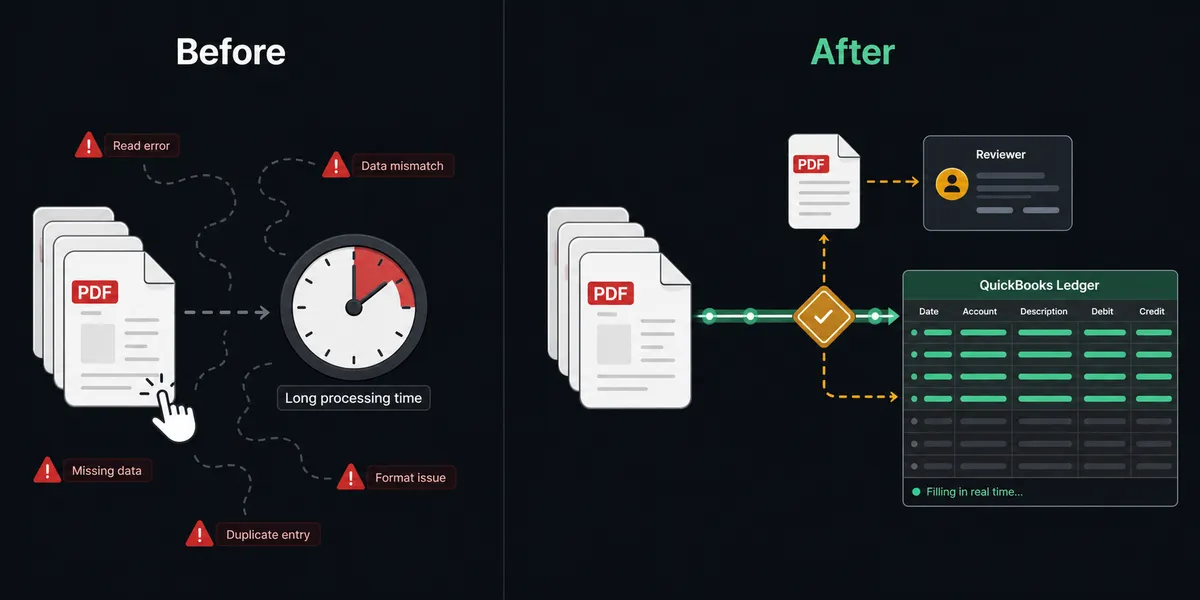
| Invoice entry time | 2-5 minutes per invoice typed by hand | Seconds from PDF arrival to bill in QuickBooks |
| Line-item tables | Collapse into unusable text in OCR | Extracted as structured rows and mapped to bill line items |
| Data quality | Misread digits post silently to the ledger | Low-confidence fields route to a person before posting |
| AP team workload | Every invoice requires hands-on data entry | Team handles exceptions only; routine invoices post automatically |
| Audit trail | No record of who entered what or when | Every approval decision, reviewer, and timestamp captured |
| Multi-page PDFs | Handled manually or skipped | Async extraction handles up to 3,000 pages in S3 |
What you can build
Vendor onboarding with AP automation. When a new vendor’s first invoice arrives, the agent checks QuickBooks for a vendor record, finds none, calls Create Vendor, then proceeds to create the bill. New suppliers flow into your books without manual setup.
Multi-page contract data extraction. For large vendor contracts or lease agreements stored in S3, the agent uses Start Document Analysis with FORMS and QUERIES feature types to pull the effective date, total contract value, and renewal terms. Confident answers populate the record automatically. Uncertain fields route to the document owner for confirmation.
PO-matched three-way invoice validation. The agent extracts the invoice with Analyze Expense, pulls the corresponding PO from your ERP, and compares line items and totals. A matched invoice creates the QuickBooks bill automatically. A mismatch routes to AP with both documents side by side.
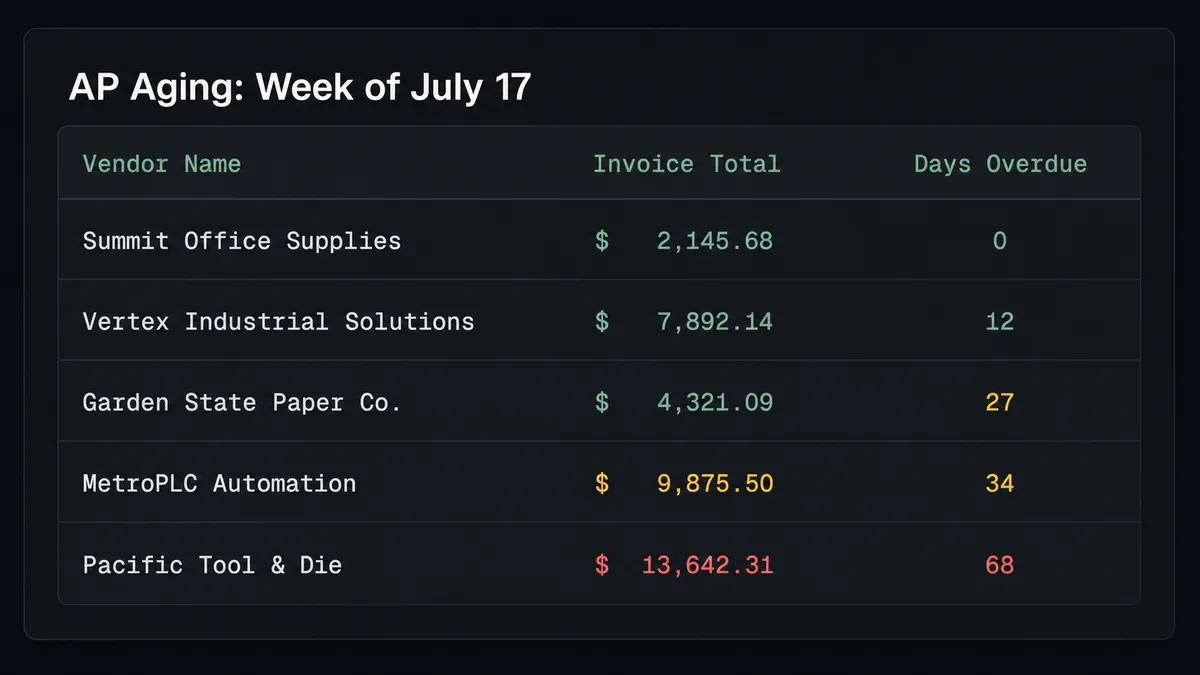
Weekly AP aging report. Every Monday morning, the agent calls List Bills filtered by due date, formats an aging summary by vendor and overdue bucket, and posts it to the finance Slack channel before the workday starts. The AP team starts the week knowing exactly what needs attention.
Expense receipt processing for employee reimbursements. Employees submit receipts as image files. The agent runs Analyze Document with the FORMS feature to extract merchant, amount, and date. Clean receipts that match the expense category policy create the QuickBooks bill for reimbursement automatically. Receipts with missing fields or amounts above the policy threshold go to the manager for review.
Getting started
FlowRunner has a free plan with 100 executions a month, every integration included, and no credit card required, and new accounts get 14 days of Professional on top. Corporate email required.
Start by connecting both integrations: AWS Textract and QuickBooks Online. Both are available on every FlowRunner tier.
To try the platform: flowrunner.ai. To talk through your AP workflow before committing: calendly.com/flowrunner/intro.
Frequently asked questions
Is it free to connect AWS Textract and QuickBooks Online on FlowRunner?
FlowRunner has a free plan with 100 executions a month, every integration included, and no credit card required, and new accounts get 14 days of Professional on top. After that, paid plans start at $5 a month for Starter, with Growth at $45 a month. Both AWS Textract and QuickBooks Online are included connectors on every tier.
Does the agent need my own AWS credentials?
Yes. FlowRunner uses a bring-your-own-keys model for AWS Textract. You connect your own AWS access key or IAM role, so all extraction calls run under your account and your data never passes through a shared API key.
Can I self-host FlowRunner?
Yes. FlowRunner offers a self-hosted Community Edition at no cost and an Enterprise self-hosted option with multi-instance clustering and the full compliance suite. The cloud-hosted tiers start at $45 per month.
What happens when the agent is not sure about an extracted value?
When AWS Textract returns a low confidence score on a field, or when an extracted total does not match its purchase order, the agent pauses the workflow and routes the document to a person. The reviewer sees the original PDF next to the extracted value and either confirms or corrects it before the bill posts in QuickBooks.
Does the agent need my own OpenAI key?
FlowRunner supports a bring-your-own-keys model for all AI providers including OpenAI, Anthropic, and others. You supply the key; FlowRunner orchestrates the agent logic. No vendor lock-in to a single model.
Can the same workflow handle multi-page invoices?
Yes. For multi-page PDFs stored in Amazon S3, the agent uses Start Document Analysis to begin an asynchronous extraction job, then Get Document Analysis to retrieve the results when complete. The rest of the workflow, validation and QuickBooks bill creation, runs the same way regardless of page count.