How to Connect Front with Slack (With or Without an AI Agent)
Connect Front's shared inbox to Slack so new inbound messages trigger Slack alerts and agent-drafted replies pause for human approval before anything reaches the customer.
How do you connect Front to Slack?
You connect Front to Slack by using Front’s On New Inbound Message trigger to start a FlowRunner workflow, which reads the conversation, classifies it, and posts a Slack notification or approval request via Send Message to Channel or Send Direct Message. FlowRunner is a visual AI-agent orchestration platform where automations run autonomously and pause for human judgment on the steps that carry real consequence. The same connection can run as an AI agent that drafts the reply, decides whether a human needs to approve it, and sends the message in Front only after that approval comes back through Slack.
The problem it solves
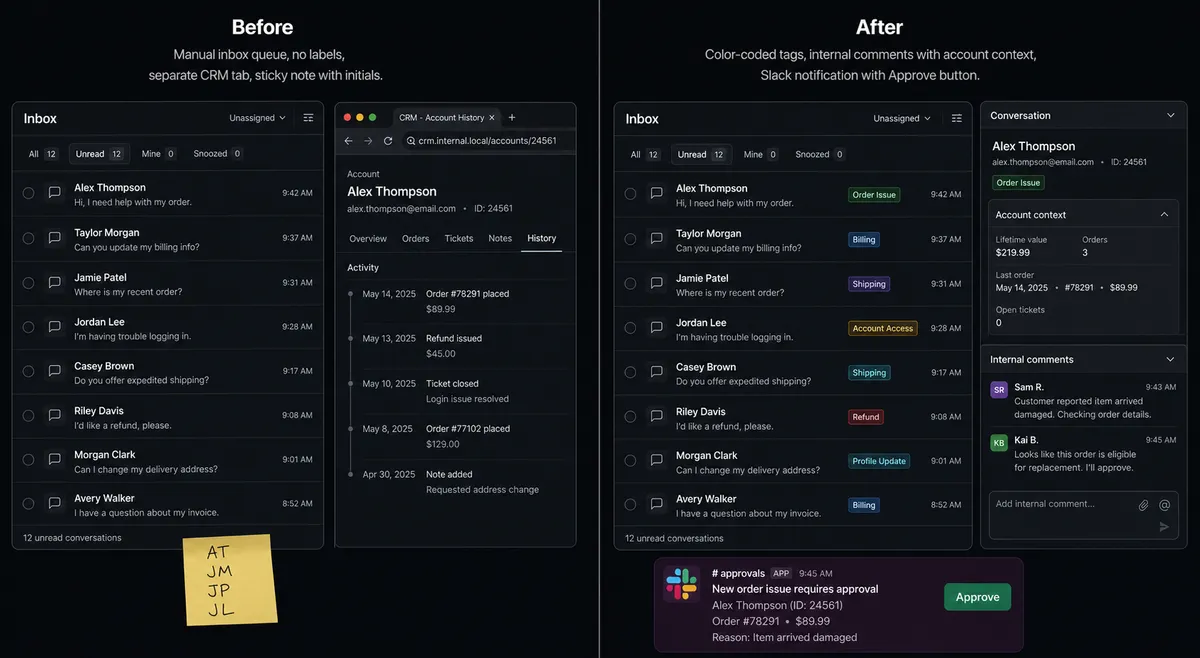
Right now, someone on your team opens Front every morning to a queue. They read each message, decide how urgent it is, figure out who should handle it, look up the customer’s history in a different tab, and then either reply or forward it on. The triage is all manual. If the person who usually handles a VIP account is out, the message sits. If the inbox fills up overnight, the first few hours of the day go to sorting instead of resolving.
The connection between Front and Slack is often worse. Exceptions and escalations get handled over DM or in an ad hoc Slack thread with no record of who decided what. A customer complaint gets flagged in Slack, three people weigh in, and the actual reply gets delayed because nobody has clear ownership. The context lives in too many places and nothing ties the decision back to the conversation.
How it works: the connection
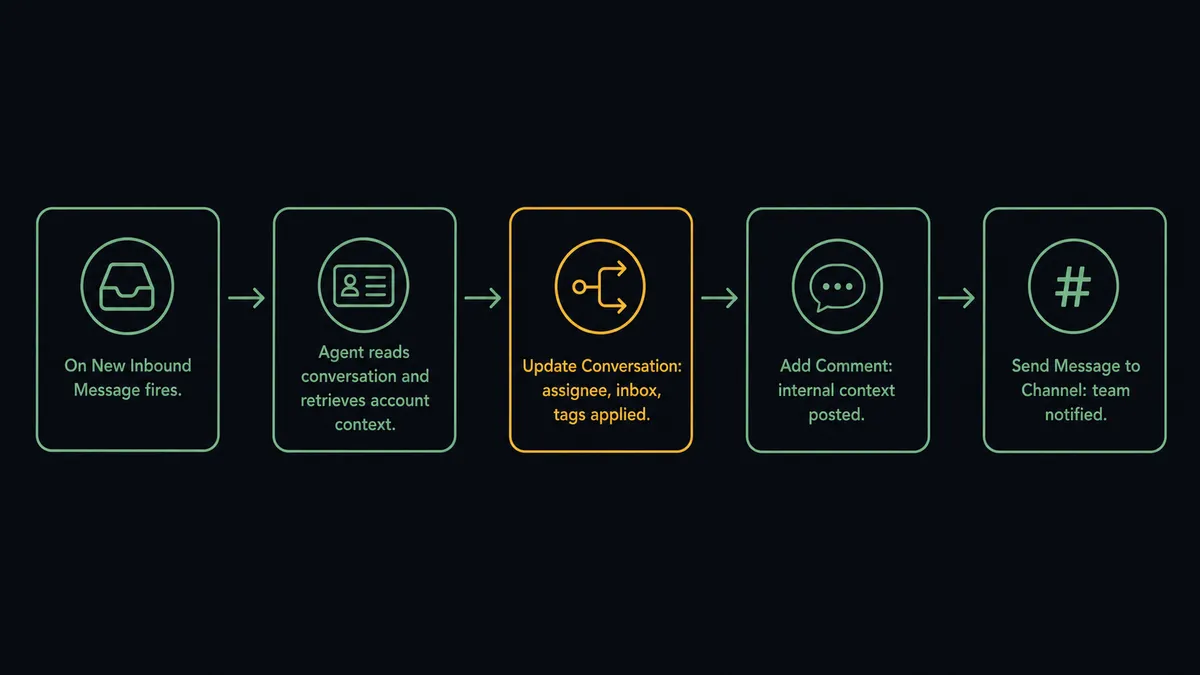
The Front trigger On New Inbound Message fires the moment a customer email, SMS, or chat message lands. The workflow reads the full conversation with Get Conversation and lists any prior messages with List Conversation Messages to understand the thread. It calls Get Account to pull the customer’s account context without switching tabs.
From there, the agent calls Update Conversation to route the conversation to the right inbox, assign it to the right person, and apply the appropriate tags. It posts the customer’s relevant history as an internal comment with Add Comment so the assignee opens the thread with full context, not a blank inbox message.
The Slack side runs in parallel. Send Message to Channel posts a structured alert to the right team channel: conversation subject, account name, assigned team member, and any escalation tags. Send Direct Message routes a personal notification to the assignee. The team is aware before anyone has opened Front.
Can an AI agent run it? (and why a human stays in the loop)
The plain connection moves data. The AI agent reads it and decides what to do with it.
When a message arrives, the agent does not run the same steps every time. It reads the subject and body, evaluates the account context from Get Account, and reasons about the situation. A renewal inquiry from a three-year account gets routed and flagged differently from a first-contact complaint about a billing issue. The agent picks which actions to take based on what it finds.
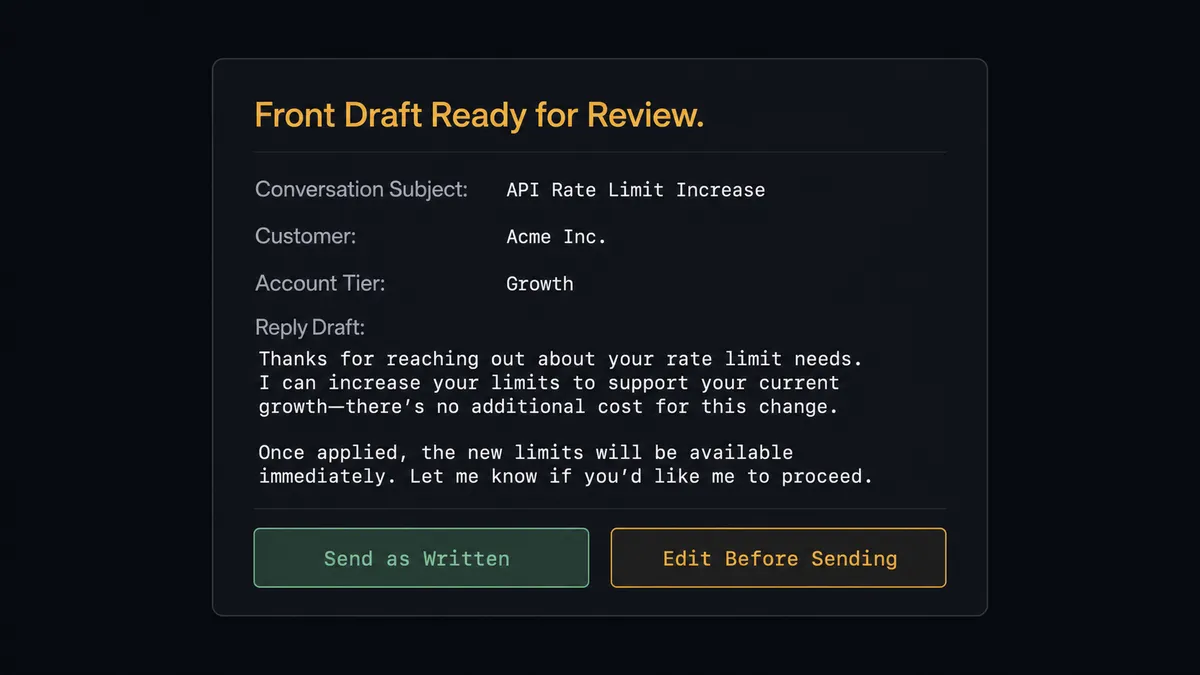
The moment where human judgment genuinely matters is the outbound reply. A message sent in the company’s name should have a person behind it. So instead of calling Reply to Conversation automatically, the agent calls Add Comment to post the draft as an internal Front note, then invokes the human-in-loop flow as a callable tool.
That flow sends a Slack message to the assigned teammate: “I’ve drafted a reply for [Customer Name]‘s question about [Topic]. Account tier: Enterprise. Prior contact: 2 open tickets this quarter. Send as written, edit before sending, or escalate?” The message includes the draft and two interactive buttons powered by Slack’s Block Kit.
This is not a threshold. The agent might escalate a short routine question from an account it has no history on and auto-process a complex renewal inquiry from a known stable account. The decision to involve a human is made by the agent based on context, not a hardcoded rule.
When the teammate clicks Send in Slack, the On Block Action trigger fires, the workflow resumes, and the agent calls Reply to Conversation in Front to send the approved message. The approval, the approver’s identity, and the timestamp are captured in FlowRunner’s audit trail. The teammate made the call; the agent handled everything else.
This is what prospects have started calling a “digital andon cord.” The agent stops the line when it hits a decision that should not be automated, and it does not restart until a human says so.
FlowRunner vs the tool you’re probably comparing
Zapier is the most common starting point for Front and Slack connections. It’s fast to set up, has a large template library, and works well for fixed trigger-action pairs. If you need “when a new Front conversation starts, post to Slack,” Zapier gets you there in under an hour.
The difference shows when you need the connection to reason rather than just relay.
| Feature | Zapier | FlowRunner |
|---|---|---|
| Basic trigger-to-action connection | Yes, fast to configure | Yes, plus conditional logic |
| AI agent reads conversation content | No | Yes, agent classifies and reasons per message |
| Human approval via Slack buttons | No native interactive buttons | Yes, On Block Action collects decisions and resumes the flow |
| Agent decides when to escalate | No, rules must be hardcoded | Yes, agent evaluates context and makes the call |
| Audit trail with approver identity | No | Yes, every decision captured with identity and timestamp |
| Unlimited users and workflows | Per-seat or per-task pricing | Unlimited users on every tier |
Zapier is a better choice if you want a simple relay with no reasoning layer. FlowRunner is the right choice when the agent needs to read what arrived and decide what to do about it.
Before and after
| Category | Before | After |
|---|---|---|
| Triage time | Each inbound message read and routed by hand before action | Conversations classified, assigned, and tagged the moment they land |
| Context availability | Customer history lives in a different tab from the conversation | Account context posted as an internal Front comment automatically |
| Escalation consistency | Depends on who sees the message and when | VIP and urgent messages follow a defined escalation path every time |
| Reply drafting | Written from scratch per message | Agent drafts; human reviews and approves via Slack before sending |
| Decision record | Approval over DM or verbal; no audit trail | Every approval captured with approver identity and timestamp |
| Team visibility | Team learns about exceptions reactively | Slack channel receives structured alerts as conversations arrive |
What you can build
Inbound triage with Slack routing. On New Inbound Message fires in Front. The agent reads the conversation, calls Update Conversation to assign it and apply tags, then posts to the right Slack channel with Send Message to Channel. Routing happens before a human opens the thread.
Draft-and-approve reply flow. The agent drafts a reply to an inbound question, posts it as an internal Front comment with Add Comment, and sends a Slack message with Approve and Edit buttons. The teammate approves from Slack; the agent calls Reply to Conversation in Front to send. Zero context-switching required.
VIP alert with direct escalation. The agent calls Get Account to check account tier. If the account is VIP or has open escalations, the agent sends a Send Direct Message to the account owner in Slack with full conversation context. The account owner is notified before anyone else touches the thread.
New contact sync from CRM. When a new contact is created in the CRM, the agent calls Create Contact in Front to mirror the record and Create Account if the account does not exist yet. The team’s Front directory stays aligned with the system of record without manual entry.
Overnight conversation digest. A scheduled workflow runs at 7am and calls List Conversations to count open threads by inbox and tag. It posts a formatted summary to the team Slack channel with Send Message to Channel: total open, escalations pending, VIPs waiting. Leadership sees the queue before the team starts their day.
Getting started
The Growth plan at $45 per month includes both the Front and Slack connectors, the AI agent node, and human-in-loop orchestration. FlowRunner has a free plan with 100 executions a month, every integration included, and no credit card required, and new accounts get 14 days of Professional on top.
Start by connecting both integrations:
Start your trial at flowrunner.ai or book a 30-minute walkthrough at calendly.com/flowrunner/intro. We’ll show you the triage flow running live with your own Front inbox.
Frequently asked questions
Is it free to connect Front and Slack on FlowRunner?
FlowRunner has a free plan with 100 executions a month, every integration included, and no credit card required, and new accounts get 14 days of Professional on top. Both the Front and Slack connectors are included on every tier, including the trial.
Can I self-host this connection?
Yes. FlowRunner offers a self-hosted Community Edition at no cost and a self-hosted Enterprise tier for multi-instance deployments. You run the orchestration layer on your own infrastructure.
Does the AI agent need my own API key for the language model?
Yes. FlowRunner uses a bring-your-own-key model. You connect your preferred AI provider key directly in the platform. FlowRunner does not mark up model usage.
What happens when the agent is not sure how to handle a message?
The agent does not fail or skip. It posts the full conversation context to a designated Slack channel or direct message with options for the human to choose from. The workflow pauses until a decision comes back, then resumes with the response preserved in the audit trail.
Will the agent ever send a reply to a customer on its own?
Not unless you configure it to. The default pattern is for the agent to post a drafted reply as an internal Front comment and alert the assignee via Slack. The human reviews and sends. You can configure auto-send for specific categories of messages once you trust the patterns.
How is this different from a Zapier or Make connection between Front and Slack?
Zapier and Make create fixed triggers and actions. When the trigger fires, the same action always runs. FlowRunner's AI agent reads the conversation content, reasons about it, and decides which action to take, including when to pause for a human. That decision layer is not available in Zapier or Make.