How to Connect Magento 2 with NetSuite (With or Without an AI Agent)
Connect Magento 2 and NetSuite so every new order flows into your ERP automatically, optionally as an AI agent that creates the sales order, invoices it, and pauses for a human before posting anything a finance team cannot easily undo.
How do you connect Magento 2 to NetSuite?
You connect Magento 2 to NetSuite by scheduling a FlowRunner workflow that calls Magento’s List Orders action on a regular interval, maps each order’s customer and line items to NetSuite, and calls Create Customer and Create Sales Order to create or update the corresponding ERP records. FlowRunner is a visual AI-agent orchestration platform where automations run autonomously and pause for human judgment on the steps that carry real consequence. The same connection can run as an AI agent that reads every order, decides which ones need a record in NetSuite, and pauses for an approver before writing any high-value transaction to your ERP.
The problem ecommerce operations teams live with
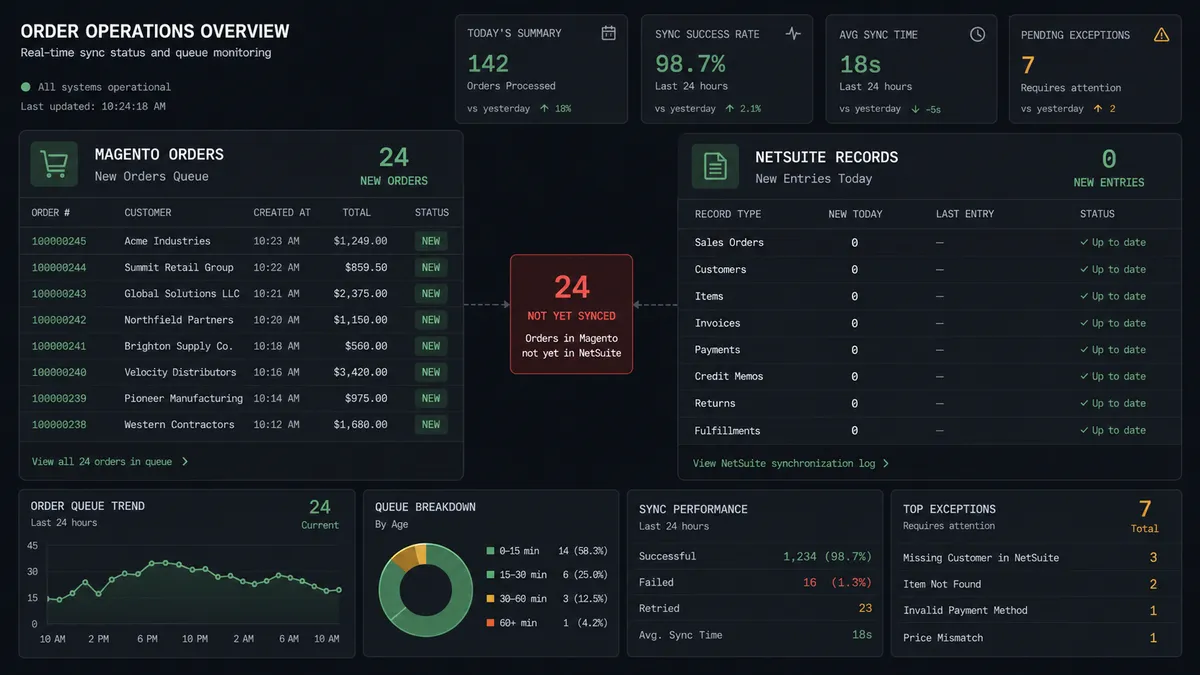
The Magento-to-NetSuite gap is a daily tax on your ops team. Orders land in Magento, but someone on your team, an ops coordinator, an AP clerk, or a billing manager, has to log into NetSuite and manually create the customer, the sales order, and eventually the invoice. On a slow day that is manageable. On a busy day the backlog grows, and by Friday your ERP is several days behind the storefront.
The cost is not just time. When the sync is manual, things fall through the cracks. A new customer in Magento does not get a NetSuite record until someone notices. A high-value order from a business account sits in Magento with no ERP entry while your finance team runs a report and wonders where the revenue is. Reconciliation happens at month-end rather than continuously, which means finance is always looking at history rather than the current state of the business.
How it works: the connection
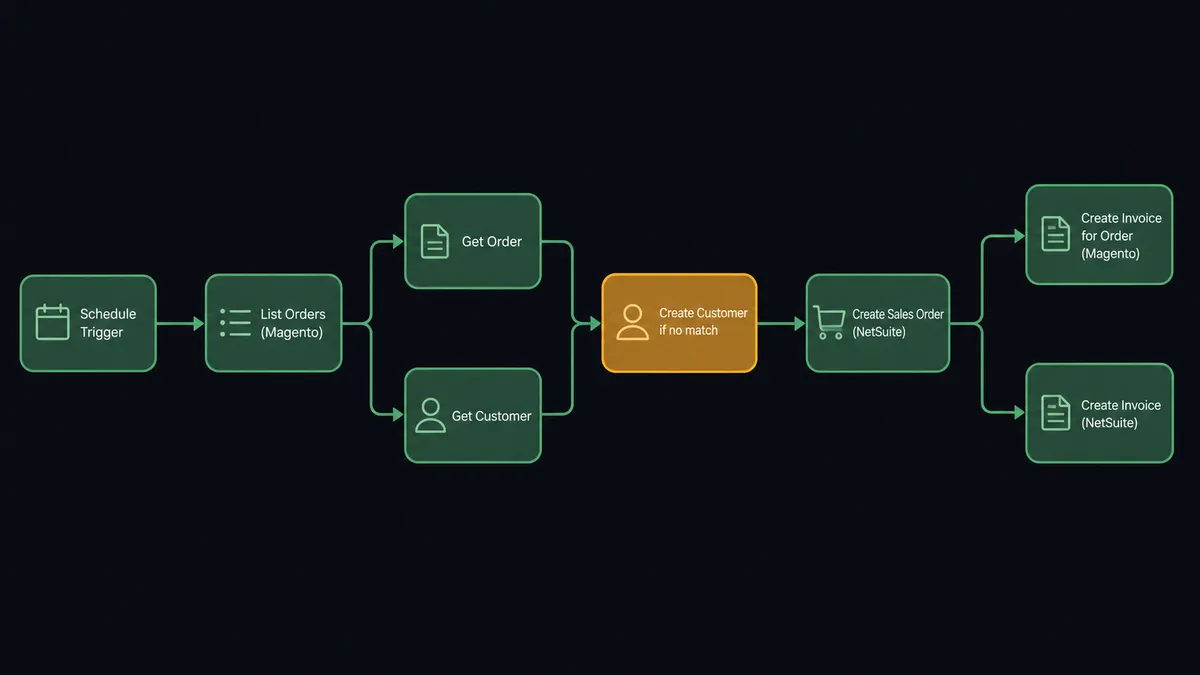
The workflow runs on a schedule, calling Magento’s List Orders action with a created_at filter that covers the window since the last run. Each poll picks up only new orders, so the agent never double-processes.
For each order returned, the agent calls Get Order to retrieve the line items, customer email, billing address, and totals. It then checks NetSuite with Get Customer to determine whether the buyer already has an ERP record. If no match is found, it calls Create Customer to provision one. With the customer resolved, it calls Create Sales Order in NetSuite using the Magento line items, quantities, and pricing data.
Once the sales order exists in NetSuite, the agent calls Create Invoice for Order in Magento to advance the storefront’s fulfillment status. When the NetSuite billing event is ready, it calls Create Invoice in NetSuite to record the transaction against the customer account.
Shipment tracking follows the same pattern. Once Magento confirms a shipment exists, the agent can call Create Shipment and Add Order Comment to notify the customer without any human touching the record.
The entire loop, from new Magento order to NetSuite sales order and invoice, runs unattended for the clean cases. The decisions that a finance team cannot easily undo get pulled to a human before they happen.
Can an AI agent run it? (and why a human stays in the loop)
A scheduled sync handles the clean cases. An AI agent handles the exceptions, which is where the real cost is.
The agent reads each order the same way a billing coordinator would: it checks the line items, the order total, whether the SKU maps cleanly to a NetSuite item, and whether the buyer is a known customer. It picks its tools based on what it finds. If the customer exists in NetSuite and the line items map cleanly, it creates the sales order and moves on. If something does not add up, it stops and asks.
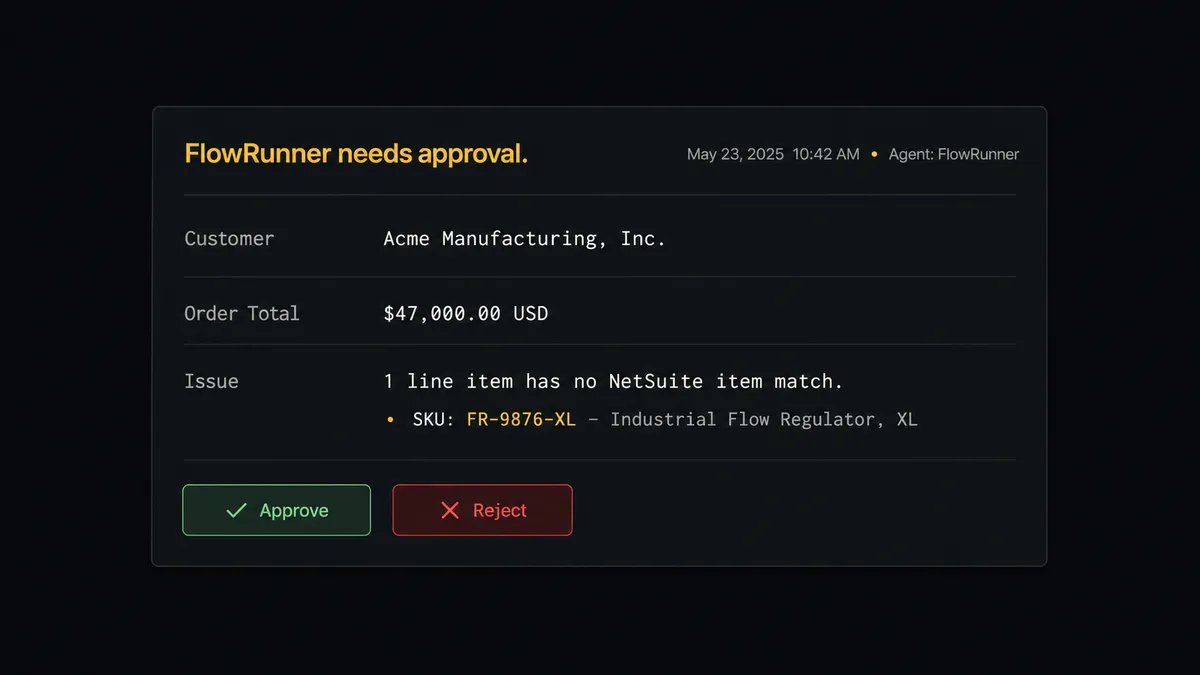
Here is a real decision moment. The agent processes a Magento order for $47,000 from a business account it has seen before, but the line items include a SKU that does not match any NetSuite item on record. A sync tool would either create the sales order with a blank line item or fail silently. The agent escalates. It packages the Magento order details, the unmatched SKU, the customer’s existing NetSuite record, and a proposed resolution, then sends a Slack message to the ops channel: “Sales order for [Customer], $47,000. One SKU has no NetSuite item match. Review and approve before I create this record.”
The ops lead sees the full context, selects the correct NetSuite item from a short list the agent provides, and clicks Approve. The agent creates the sales order with the corrected mapping and logs the decision with the approver’s identity and timestamp.
This is not a hardcoded threshold. The agent applies the same reasoning to a $3,000 order from a first-time business buyer with an unusual tax jurisdiction, because the consequence of getting the ERP record wrong in that case is the same as getting a $47,000 order wrong: a finance team cleaning up bad data at month-end.
Prospects describe this as a “digital andon cord.” The agent stops the line when it hits uncertainty. This is not a sync tool. The agent knows when to ask.
FlowRunner vs the tool you are probably comparing
If your team currently connects Magento to NetSuite with a tool like Celigo or Tray.io, the comparison is worth being direct about.
Celigo is purpose-built for ecommerce-to-ERP sync and has deep, pre-configured field mappings for Magento and NetSuite that a FlowRunner workflow has to define explicitly. If you need a point-to-point sync with minimal setup and your processes never deviate from the standard order flow, Celigo reaches production faster.
What FlowRunner gives you that Celigo does not:
| Capability | Celigo / Tray.io | FlowRunner |
|---|---|---|
| Human-in-loop escalation | Not native; requires external integration | Native orchestration; agent invokes approval as a callable tool |
| AI agent reasoning | Not available | Agent reads data, picks tools, escalates based on context |
| Unlimited users on every tier | Per-user pricing on most plans | Unlimited users on every plan including Growth at $45/mo |
| Bring your own AI key | Not applicable | BYOK across Claude, OpenAI, and others; your key, your data |
| Self-host option | No self-hosted option | Self-hosted Community and Enterprise editions available |
| Audit trail for approvals | Limited or enterprise-only | Every approval logged with approver identity and timestamp |
If your current problem is “orders are not in NetSuite,” a sync tool solves it. If your current problem is “we do not trust what ends up in NetSuite because nobody reviews the exceptions,” an AI agent with human-in-loop solves the layer above the sync.
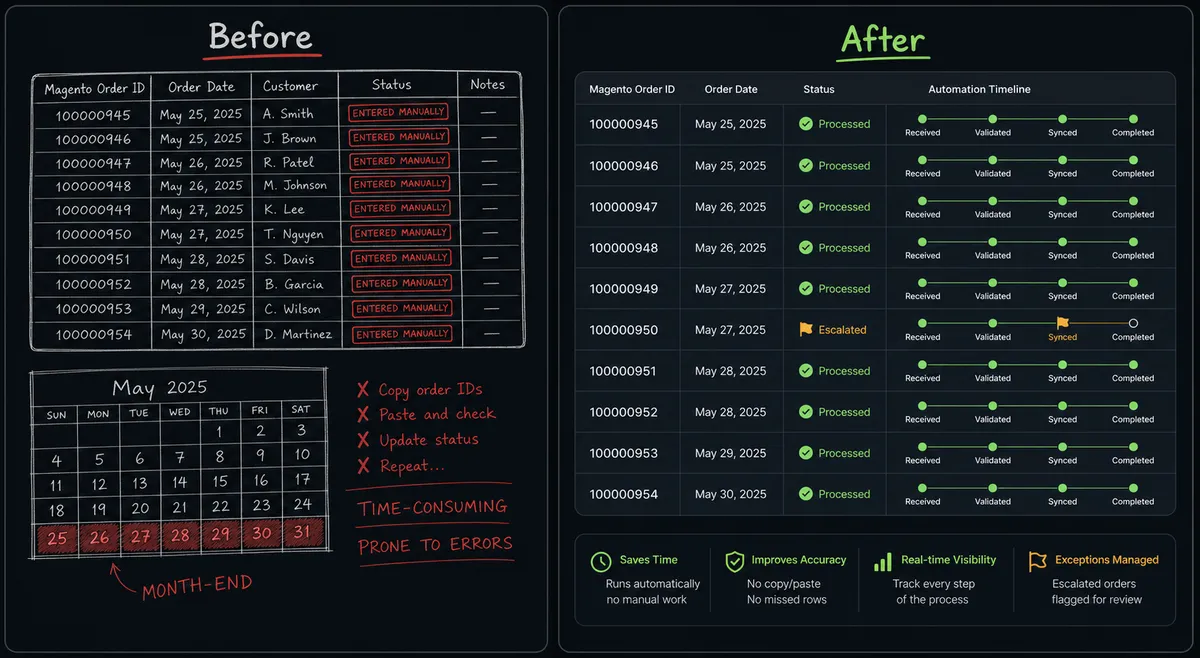
Before and after
| Metric | Before | After |
|---|---|---|
| Order-to-ERP lag | 1-2 days; manual entry backlog grows on busy weeks | Orders in NetSuite within 15 minutes of placement in Magento |
| Customer record creation | Manual lookup and creation in NetSuite per new business buyer | Agent runs Get Customer and Create Customer automatically; no manual entries |
| Exception handling | Exceptions found during month-end reconciliation | Exceptions surfaced in the ops channel at the time they occur |
| High-value order approval | No formal approval process; orders entered by whoever has access | Every order above threshold paused for named approver before ERP record is created |
| Audit trail | Verbal or email-based; not searchable | Every decision, approver identity, and timestamp captured in the workflow audit log |
| Team workload | Billing coordinator spends hours daily on data entry | Coordinator reviews exceptions queue; agent handles the routine cases unattended |
What you can build
Order-to-cash automation for B2B buyers. When a new Magento order arrives from a business account, the agent looks up the NetSuite customer, creates a sales order with the full line items, and creates the NetSuite invoice when Magento confirms fulfillment. The full order-to-cash cycle runs without a manual entry.
New customer provisioning. When a Magento order comes in from a buyer with no NetSuite record, the agent calls Create Customer to provision the ERP record before any order or invoice is created. The customer exists in NetSuite before finance even opens their inbox.
High-value order approval workflow. Orders above a configured threshold trigger a Slack approval request before any NetSuite record is created. The agent packages the order details, the customer’s billing terms, and the line items, then waits. Finance or sales leadership approves or flags for follow-up. Every decision is logged.
SKU reconciliation and catalog sync. The agent runs List Products in Magento and List Items in NetSuite on a schedule, identifies SKUs that exist in one system but not the other, and posts a reconciliation report to the ops channel. Gaps are visible before they cause a failed order sync.
Sales reporting across both systems. At week-end, the agent queries List Orders and List Invoices in Magento alongside List Sales Orders and Run SuiteQL Query in NetSuite, reconciles revenue per order, and posts the consolidated summary to the finance channel. Net sales across both systems without a manual export.
Getting started
Start on the free plan: 100 executions a month, every integration included, no credit card required, plus 14 days of Professional for new accounts.
The Magento 2 integration page at /integrations/magento covers connector setup, available actions, and the Bearer token authentication flow. The NetSuite integration page at /integrations/netsuite covers the OAuth2 SuiteTalk setup and the full list of 27 available actions.
Start your free trial at flowrunner.ai or book a 30-minute intro call at calendly.com/flowrunner/intro to see the Magento-to-NetSuite flow running against a live store.
Frequently asked questions
Is it free to connect Magento 2 and NetSuite on FlowRunner?
FlowRunner has a free plan with 100 executions a month, every integration included, and no credit card required, and new accounts get 14 days of Professional on top. No credit card is required to start. After the trial, Growth is $45 per month with 12,000 workflow executions included, and all tiers include unlimited users and unlimited workflows.
Can I self-host FlowRunner if my ERP data cannot leave our network?
Yes. FlowRunner offers a self-hosted Community Edition at no cost and an Enterprise self-hosted tier for organizations that need multi-instance clustering, full audit trails, and SSO. Both let you run the orchestration layer inside your own infrastructure.
Does the AI agent require my own OpenAI or AI provider key?
Yes. FlowRunner uses a bring-your-own-key model, so you connect whichever AI provider your organization already uses. The agent accesses your key and your data stays within your accounts; FlowRunner never stores your AI credentials or your ERP records.
What happens when the agent is not sure whether to create a record in NetSuite?
The agent pauses and routes to a human via Slack, email, or another channel you configure. It packages the full context: the Magento order, the matched or proposed NetSuite customer, the line items, and the reason for escalation. The human approves or rejects, the agent resumes, and the decision is logged with the approver identity and timestamp in the audit trail.
How does FlowRunner handle duplicate customer records between Magento and NetSuite?
The agent runs Get Customer in NetSuite before creating a new record. If a match is found, it links the Magento order to the existing NetSuite customer. If no match is found, it calls Create Customer to provision the record. The agent can escalate ambiguous matches to a human before writing anything to the ERP.
Does the integration support Magento 2 triggers, or does it run on a schedule?
The Magento 2 connector has no native webhook triggers. The agent runs on a schedule, calling List Orders with a date filter that covers the window since the last run. For near-real-time processing, you can run the flow on a short interval such as every 5 or 15 minutes.