How to Connect Shopify with NetSuite (With or Without an AI Agent)
Connect Shopify and NetSuite so every new order triggers customer creation, sales order, invoice, and payment recording in your ERP automatically, with a human in the loop on orders that carry real consequence.
How do you connect Shopify to NetSuite?
You connect Shopify and NetSuite by triggering a FlowRunner workflow on the Shopify On New Order event, which fires the Create Customer, Create Sales Order, Create Invoice, and Create Payment actions in NetSuite without manual data entry. FlowRunner is a visual AI-agent orchestration platform where automations run autonomously and pause for human judgment on the steps that carry real consequence. That same connection can run as an AI agent that reads each order, decides whether it is routine or exceptional, and invokes human review on the orders that move real money before touching your ERP.
What breaks when Shopify and NetSuite are not connected?
Every order that leaves Shopify without a matching record in NetSuite creates work. The AP clerk opens Shopify, pulls the order details, logs into NetSuite, finds or creates the customer, creates the sales order, creates the invoice, and keys in the payment when it clears. For a business processing 50 orders a day, that is a full-time job. For a business processing 500, it is a team.
The failure modes compound. A customer record that exists in Shopify but not in NetSuite means the invoice goes to the wrong entity or does not get created at all. An order that ships before the sales order is created in NetSuite breaks the audit trail. A refund processed in Shopify without a corresponding adjustment in NetSuite leaves the books out of balance. Finance finds out at month end, not when the order ships. By then, the exceptions have multiplied, the disputes are past their evidence deadlines, and the reconciliation is a spreadsheet that belongs to one person and nobody else understands.
The underlying problem is that Shopify and NetSuite speak different languages and have no native way to stay in sync. The connection has to be built, and every time it breaks, someone falls through the cracks.
How does the Shopify-NetSuite connection work?
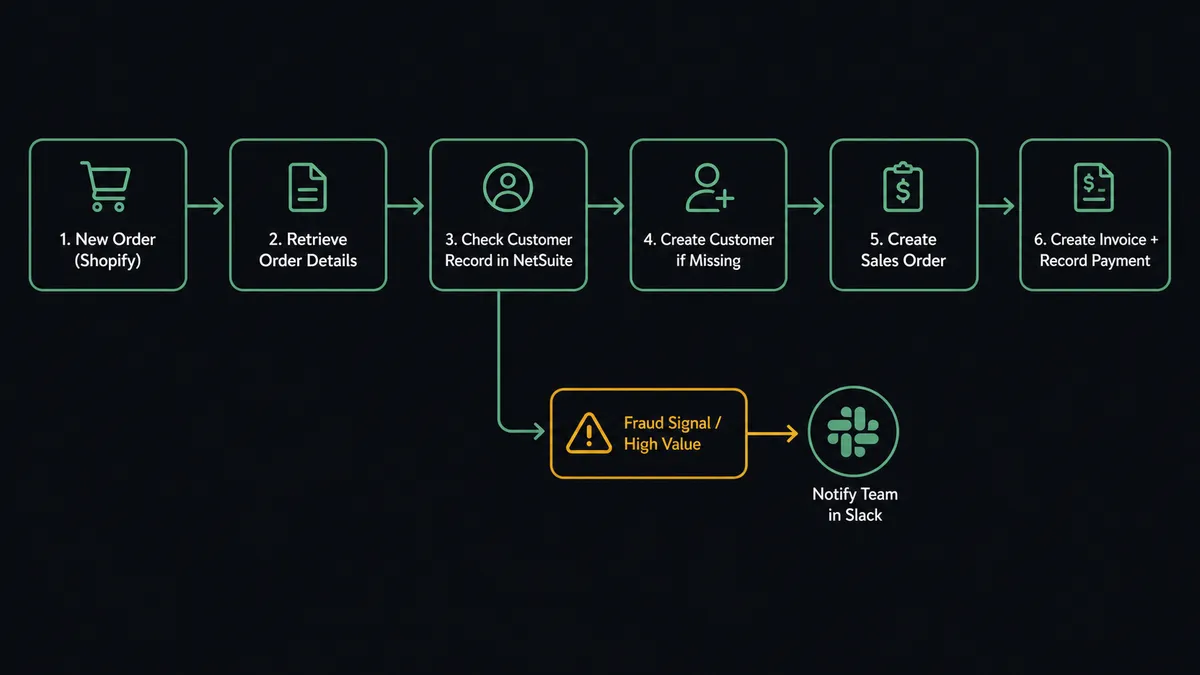
The connection starts with a Shopify trigger. On New Order fires the moment a customer checks out. The flow reads the order using Get Order, which returns the full record: line items, SKUs, quantities, customer email, shipping address, and order total.
The agent then looks up the customer in NetSuite using List Customers with the customer email as the filter. If no match exists, it calls Create Customer and provisions the record so invoicing can begin immediately. If a match exists, it calls Get Customer to verify billing terms and subsidiary routing before proceeding.
With the customer record confirmed, the agent calls Create Sales Order using the Shopify line items as the source. Each line item maps to a NetSuite sales order line: SKU to item, quantity to quantity ordered, price to unit rate. The agent uses Get Item to pull the NetSuite item record for each SKU, which provides the correct GL account and unit of measure.
When the order ships and payment is confirmed, the agent calls Create Invoice against the sales order, then Create Payment to record the application. The Shopify order gets tagged via Add Tags so downstream flows and reports can filter by processing status.
The entire sequence runs without a login, a copy-paste, or a manual entry. An order that used to require 15 minutes of ERP work closes in under 60 seconds.
Can an AI agent run it, and why does a human stay in the loop?
Yes. The plain Shopify-to-NetSuite connection handles the routine case. An AI agent handles every case, including the ones that break a simple sync.
The agent reads each Shopify order and evaluates it before touching NetSuite. It checks the order total, the customer’s history, the inventory levels using Get List of Inventory Levels, and the fraud signals Shopify surfaces on the order record. Most orders are clean and the agent processes them without interruption. But the agent is not following a script. It is making a decision.
When the agent encounters an order it cannot process cleanly on its own, it invokes the human-in-loop flow as a callable tool. Here is what that looks like in practice.
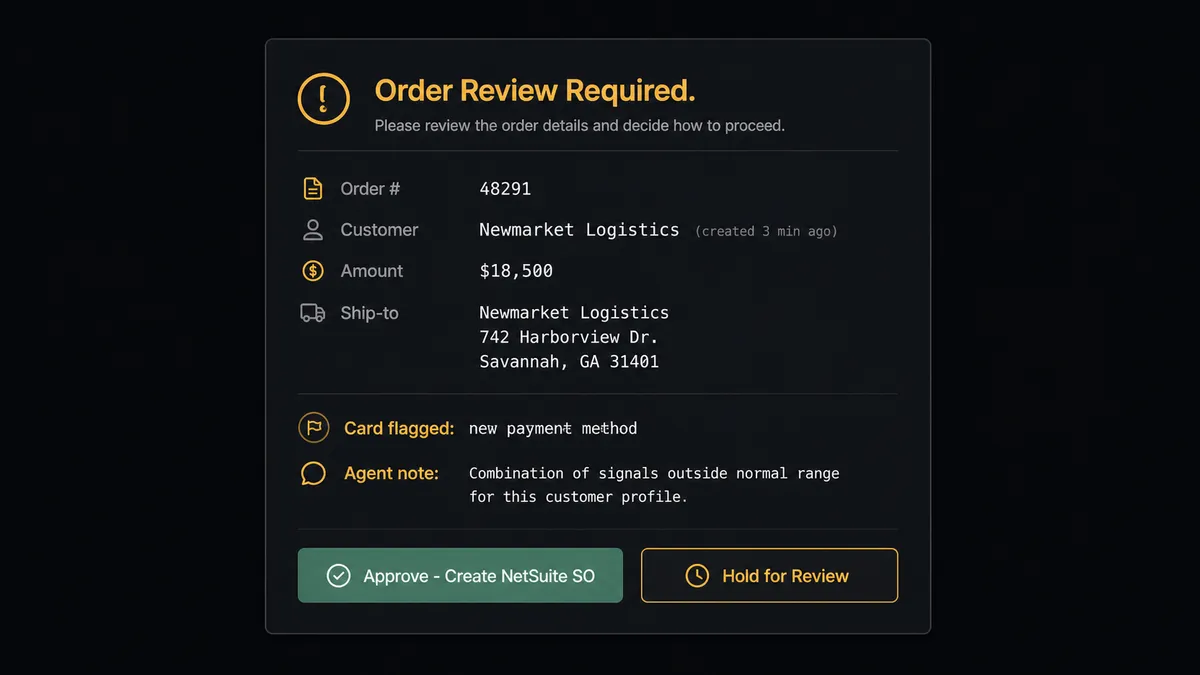
A new order comes in for $18,500 from a customer whose Shopify account was created three minutes ago, shipping to a freight forwarder address, paying with a card the customer has never used before. The agent reads that combination, calculates that the risk profile is outside the range of orders it has been processing successfully, and stops. It does not create the sales order. It routes to the operations channel with the full context: order number, customer name, order total, the specific signals that triggered the review, and two options: approve to proceed or hold for manual review.
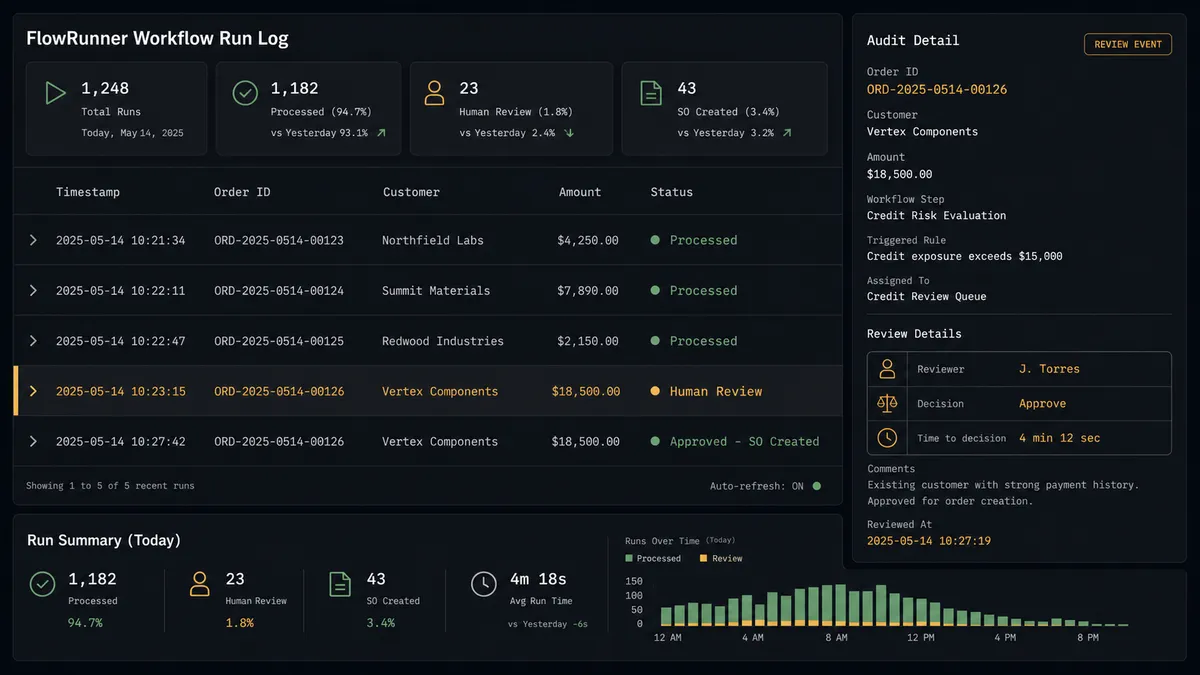
The reviewer sees exactly what the agent saw. They click approve or hold. The agent resumes with that decision as input and creates or holds the NetSuite record. The reviewer’s identity, the decision, and the timestamp are captured in the audit trail.
This is not a threshold rule. A $5,000 order from a known wholesale customer with 3 years of clean history and a verified business address processes automatically. A $2,000 order from a new account with mismatched shipping data gets flagged. The agent evaluates context, not just dollar amount.
FlowRunner vs Celigo (and other Shopify-NetSuite connectors)
The searcher most likely comparing FlowRunner is already using Celigo, Tray, or a similar iPaaS connector built specifically for ecommerce-to-ERP. These tools are worth naming honestly.
Celigo has deep NetSuite expertise and pre-built integration templates that reduce initial configuration time. If your use case is a standard order-to-cash sync with no custom logic, a pre-built Celigo template gets you live faster than building from scratch in any tool.
The differences matter when your process has exceptions, and every ecommerce operation has exceptions.
| Feature | Celigo / Tray | FlowRunner |
|---|---|---|
| Human-in-loop on exceptions | Not native; requires external approval tools | Native agent tool: the agent invokes a human-in-loop flow, receives the decision, and resumes automatically |
| AI agent decision-making | Not available; sync tools follow fixed field maps | AI agent reads order context, evaluates risk, and decides what to do before touching NetSuite |
| Audit trail on approvals | Not included | Every human decision logged with approver identity and timestamp |
| Pricing model | Per-connector or per-record pricing; scales with volume | Workflow-based tiers; unlimited users and workflows on every plan |
| Self-host option | Cloud-only | Cloud-hosted and self-hosted (Community Edition free) |
| BYOK for AI | Not applicable | Bring your own AI provider key; you control model and cost |
If your Shopify-NetSuite process is a clean sync with no exceptions, Celigo is a reasonable choice. If your process has high-value orders, fraud signals, dispute deadlines, or any step where the wrong automated decision costs real money, FlowRunner’s agent layer is the difference between automation that handles the routine case and automation that handles the whole case.
Before and after
| Category | Before | After |
|---|---|---|
| Order-to-cash cycle | Staff manually create NetSuite customer, SO, invoice, and payment for each Shopify order | Full order-to-cash runs automatically; zero manual NetSuite entries for clean orders |
| Exception handling | High-value or flagged orders wait in the admin queue until someone notices | Agent flags and routes exceptions in real time; reviewer gets full context in Slack |
| Dispute response | Finance team discovers disputes during manual report pulls; evidence deadline sometimes missed | On New Dispute fires immediately; agent assembles evidence and routes to finance before the deadline |
| Inventory accuracy | Stock levels drift between Shopify and the warehouse feed; oversells surface at fulfillment | Agent calls Set Inventory Quantities from the supplier feed as counts change |
| Audit trail | Approval decisions made in DMs with no consistent record | Every human decision logged with approver identity and timestamp in the FlowRunner audit trail |
| Month-end reporting | Finance exports Shopify and NetSuite data separately and reconciles in a spreadsheet | Agent runs SuiteQL across NetSuite and posts the reconciled report to the finance channel |
What you can build
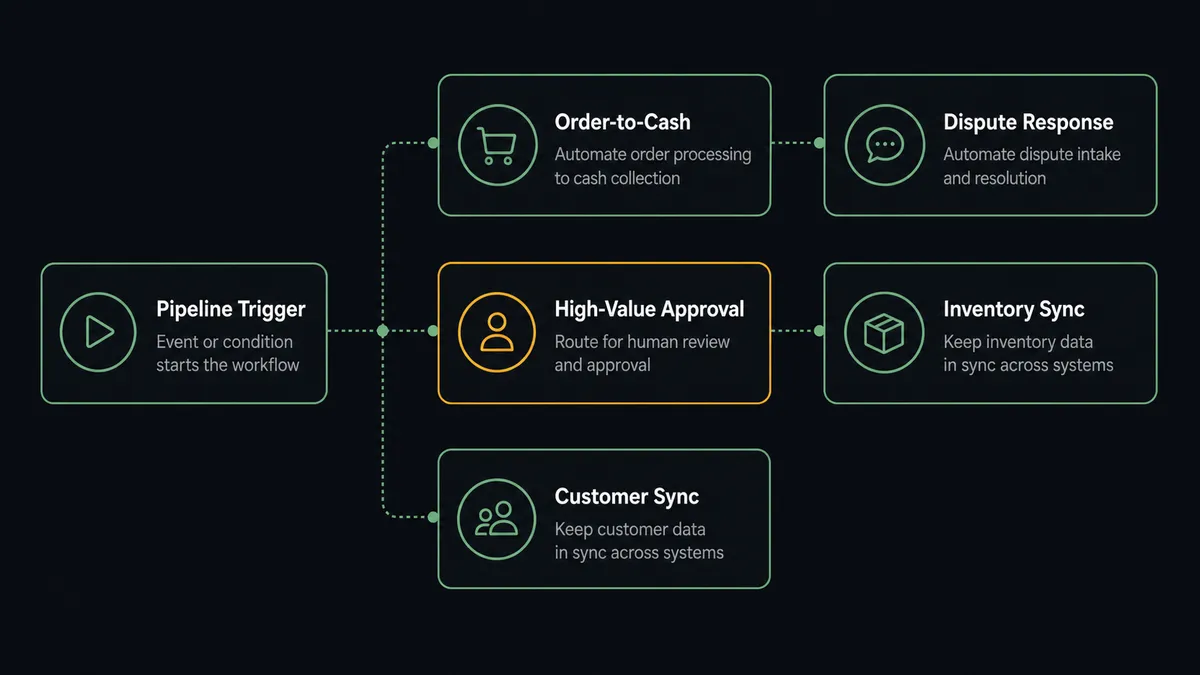
Order-to-cash automation. On New Order fires in Shopify. The agent creates or verifies the NetSuite customer, creates the sales order, waits for the fulfillment trigger, creates the invoice, and records the payment when Stripe confirms. The entire cycle closes without a manual entry.
Dispute response before the deadline. On New Dispute fires in Shopify. The agent calls Get Order and Get Customer to assemble the full context, runs Get List of Disputes to pull the evidence deadline, and posts a summary to the finance channel with the dispute amount and decision options. The reviewer decides; the agent logs the outcome.
High-value order approval. An AI agent evaluates every new Shopify order against your threshold. Orders below the threshold and with clean signals create the NetSuite sales order automatically. Orders above the threshold or with fraud signals pause and route to the VP of Sales via Slack before any NetSuite record is created.
Inventory sync from supplier feed. A scheduled flow reads the supplier restock feed, matches each row to a Shopify SKU, and calls Set Inventory Quantities for the correct location. When a variant drops below the reorder threshold, the agent posts a low-stock note to the buying team’s channel.
Customer record sync. On New Customer fires in Shopify. The agent calls Create Customer in NetSuite to provision the record immediately. On Customer Updated, the agent calls Update Customer to keep billing terms, addresses, and contact details consistent across both systems.
Getting started
FlowRunner has a free plan with 100 executions a month, every integration included, and no credit card required, and new accounts get 14 days of Professional on top. Corporate email required to start.
Connect both integrations from the FlowRunner integrations panel: Shopify and NetSuite. Both authenticate via OAuth2. The Shopify triggers and NetSuite actions are available the moment you connect.
Start your free trial at flowrunner.ai or book a 30-minute walkthrough at calendly.com/flowrunner/intro if you want to see the order-to-cash agent running against your actual order data before you build anything.
Frequently asked questions
Is it free to connect Shopify and NetSuite on FlowRunner?
FlowRunner has a free plan with 100 executions a month, every integration included, and no credit card required, and new accounts get 14 days of Professional on top. No credit card is required to start. Beyond the free plan, Growth is $45 per month.
Can I self-host the Shopify-NetSuite connection?
Yes. FlowRunner offers a self-hosted Community Edition at no cost for single-instance deployments, and an Enterprise self-hosted option with clustering and a full compliance suite. The cloud-hosted tiers are available if you prefer not to manage infrastructure.
Does the agent need my own AI provider key?
FlowRunner uses a bring-your-own-key model for AI. You connect your own OpenAI, Anthropic, or other provider credentials. FlowRunner orchestrates the agent; you control which model it calls and what it costs.
What happens when the agent is not sure about an order?
The agent invokes a human-in-loop flow as a callable tool. It packages the order details, the reason for uncertainty, and the available options, then routes to the designated reviewer via Slack, email, or WhatsApp. The workflow pauses until the human responds. The decision and reviewer identity are logged in the audit trail.
Can the agent handle multi-currency or multi-subsidiary NetSuite environments?
Yes. The NetSuite connector supports multi-subsidiary and multi-currency environments. The agent can run SuiteQL queries across subsidiaries, route records to the correct entity, and surface consolidated data to your finance team.
What Shopify events can trigger a NetSuite workflow?
Shopify provides six polling triggers: On New Order, On Order Updated, On New Customer, On Customer Updated, On New Product, and On New Dispute. Any of these can start a FlowRunner workflow that writes to or reads from NetSuite.