How to Connect Mindee with QuickBooks Online (With or Without an AI Agent)
Connect Mindee's document extraction to QuickBooks Online so vendor invoices and receipts move from image to verified bill automatically, with a human in the loop before uncertain data posts to your books.
How do you connect Mindee to QuickBooks Online?
You connect them through a FlowRunner workflow: a document arrives, the Extract Document action sends it to Mindee, and the returned fields map directly to a QuickBooks Create Bill or expense record. FlowRunner is a visual AI-agent orchestration platform where automations run autonomously and pause for human judgment on the steps that carry real consequence. The same connection runs as a basic automation or as an AI agent that reads the extracted fields, checks vendor history, and holds any bill with an uncertain field for your AP team before it ever touches your books.
The problem with manual document intake
Your AP team receives vendor invoices in PDF, JPEG, and PNG formats from dozens of suppliers. Someone opens each one, reads the fields, types them into QuickBooks, and files the original. Every keystroke is a reconciliation risk. A transposed digit on a $12,000 bill does not surface until month-end close, if it surfaces at all. The team that should be reviewing vendor relationships and cash position is spending its time on data entry.
The same problem exists with expense receipts. Employees submit images from their phones. Finance staff key merchant, date, amount, and category into the reimbursement system by hand. An out-of-policy expense or a field that the camera clipped does not get caught by a spreadsheet. It gets caught by an auditor, or it does not get caught at all.
How it works: the connection
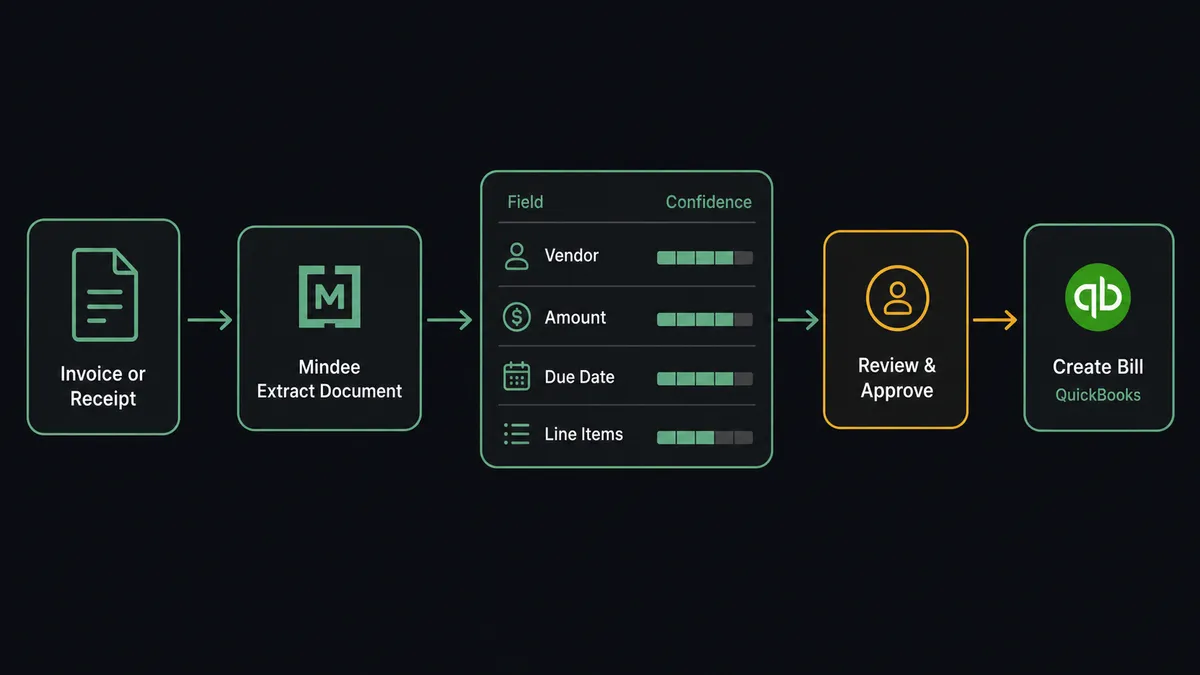
When a vendor invoice lands in your designated inbox or a receipt is submitted through your expense form, the FlowRunner workflow fires. The Extract Document action sends the document URL to Mindee using the model you select: the prebuilt Invoice model for standard vendor bills, the Receipt model for employee expenses, or a custom model for your own document formats.
Mindee returns the extracted fields along with a per-field confidence value. The agent reads the result. It maps the vendor name to a QuickBooks vendor lookup using Get Vendor, pulls the invoice number, total, due date, and line items, and validates that the extracted total matches the sum of line items.
For a matched, high-confidence result, the agent calls Create Bill in QuickBooks with all mapped fields. The bill appears in your AP queue, properly attributed, with no human data entry. For receipts going through expense reimbursement, the agent creates the corresponding record using the confirmed fields.
Both integrations run on your own credentials: your Mindee API key and your QuickBooks OAuth2 connection. FlowRunner does not proxy or store document content.
Can an AI agent run it? (And why a human stays in the loop)
A basic Mindee-to-QuickBooks connection moves documents, but it applies the same logic to every invoice regardless of what it finds. An AI agent in FlowRunner reasons about the data.
The agent has the full Mindee and QuickBooks action sets as tools: Extract Document, Enqueue Inference, Get Job Status, Get Inference Result on the Mindee side; Get Vendor, Create Vendor, Create Bill, Get Bill, Update Bill, and Create Payment on the QuickBooks side. It picks which tools to use and in what order based on what it finds in each document.
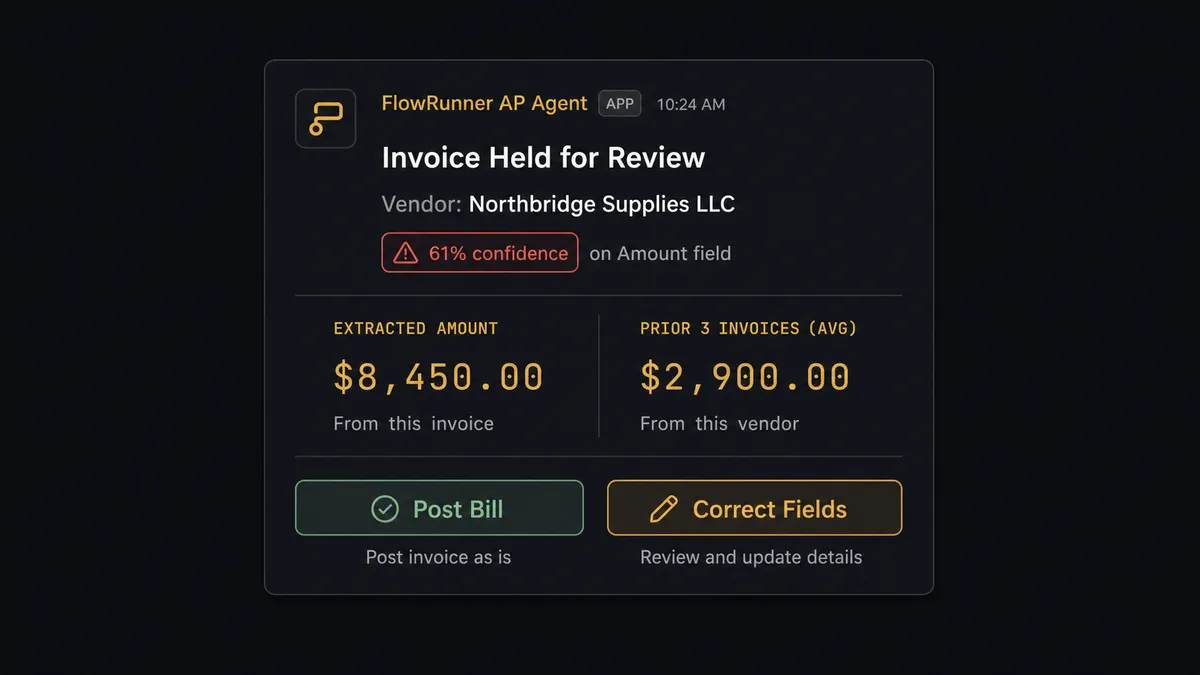
Here is what that looks like in practice. A vendor invoice arrives for $8,450. Mindee extracts the fields and returns a 61% confidence score on the amount. The agent does not post the bill. It checks the vendor’s QuickBooks history using Get Bill and List Bills and finds that the previous three invoices from this supplier averaged $2,900. Two signals are off: low confidence and an amount that is three times the vendor’s normal. The agent pauses execution. It packages the original document image, the extracted fields, the confidence scores, and the vendor history and sends all of it to the AP manager via Slack.
The manager sees exactly what the agent saw. They correct the amount field or confirm it. The agent resumes with that decision as input, calls Create Bill in QuickBooks with the confirmed data, and logs the approver’s identity and timestamp in the audit trail.
This is not a hardcoded threshold. The agent decides to escalate because two contextual signals both pointed toward an exception. A $15,000 bill from a vendor with a decade of clean invoices and a perfect confidence score processes automatically. A $3,000 bill with an unusual field combination does not.
Prospects call this a “digital andon cord.” The agent stops the line when it hits uncertainty. That is the differentiator.
FlowRunner vs Zapier for Mindee and QuickBooks Online
Zapier is the right comparison for non-technical teams evaluating no-code document automation. It handles a large library of integrations, has a clean interface, and has been reliable for years. That matters.
The differences appear at the exception layer.
| Feature | Zapier | FlowRunner |
|---|---|---|
| Mindee field confidence routing | Not available; all extractions pass through | Native: hold any field below your threshold for human review |
| Human-in-loop orchestration | Basic conditional paths; no native pause-for-approval with context packaging | Agent pauses, packages context, routes to human, resumes on response |
| AI agent reasoning | Rule-based Zaps only; no multi-step agent reasoning across tools | Agent reads extracted fields, checks vendor history, decides when to escalate |
| Pricing model | Per-task execution pricing; costs rise with document volume | Workflow-based tiers with clear execution limits; unlimited users on every tier |
| Self-hosting | Cloud only | Cloud-hosted and self-hosted options at Enterprise tier |
| Bring your own AI key | Not available | BYOK for all AI providers; you control model and cost |
If your document volume is low and every invoice is clean, Zapier’s Mindee-to-QuickBooks Zap does the job. If you process mixed-format documents from multiple vendors, need an audit trail on every decision, and want the system to stop itself when confidence is low, the exception layer is where the comparison breaks apart.
Before and after
| Before | After | |
|---|---|---|
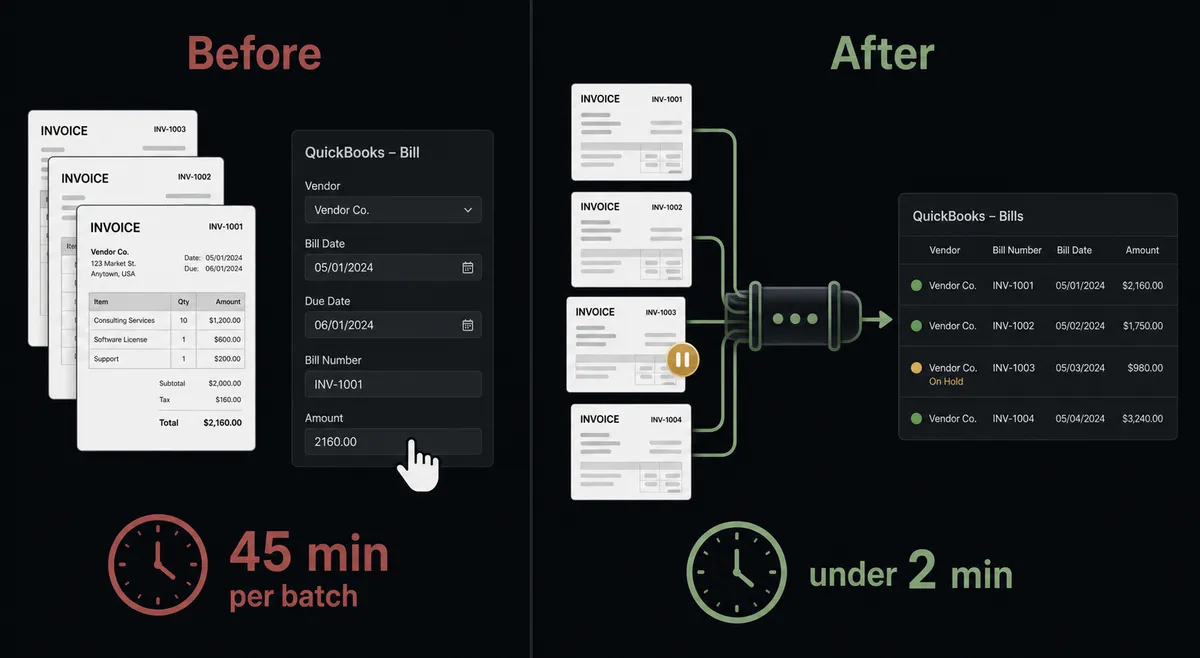
| Document entry | AP clerk keys every field from the invoice image | Mindee extracts fields automatically; agent maps them to QuickBooks |
| Error detection | Transposed digits surface at month-end reconciliation | Low-confidence fields held before posting; human corrects before the bill exists |
| Vendor matching | Staff looks up vendor in QuickBooks manually for each invoice | Agent runs Get Vendor automatically; creates vendor record if missing |
| Exception handling | Unusual invoices sit in an inbox until someone notices | Agent escalates with full context in Slack; manager approves in one click |
| Audit trail | No record of who entered what or when | Approver identity, decision, and timestamp captured on every escalated bill |
| Throughput | Batch processed when staff has time | Each document processed within seconds of arrival |
What you can build
Vendor invoice automation with confidence gating. The agent extracts every incoming vendor invoice with Mindee’s Invoice model, validates totals, checks confidence per field, and calls Create Bill in QuickBooks for clean results. Any bill with a low-confidence field or a total that does not match the line-item sum is held for AP with the original document attached.
Expense receipt processing for reimbursement. Employee submits a receipt image. The agent runs Extract Document with the Receipt model, pulls merchant, date, amount, and tax, and checks the amount against the employee’s expense policy. In-policy, high-confidence receipts create the reimbursement record automatically. Out-of-policy or uncertain receipts route to finance with the image and extracted values side by side.
New vendor onboarding from a first invoice. When a vendor invoice arrives from a supplier with no QuickBooks record, the agent calls Create Vendor with the extracted vendor fields, then proceeds to Create Bill on the new record. AP receives a notification that a new vendor was created so they can complete the vendor profile.
Async extraction for large document batches. For overnight processing of large invoice batches, the agent calls Enqueue Inference for each document, polls Job Status, and retrieves results with Get Inference Result. Completed extractions map to Create Bill. The batch completes before the team arrives in the morning.
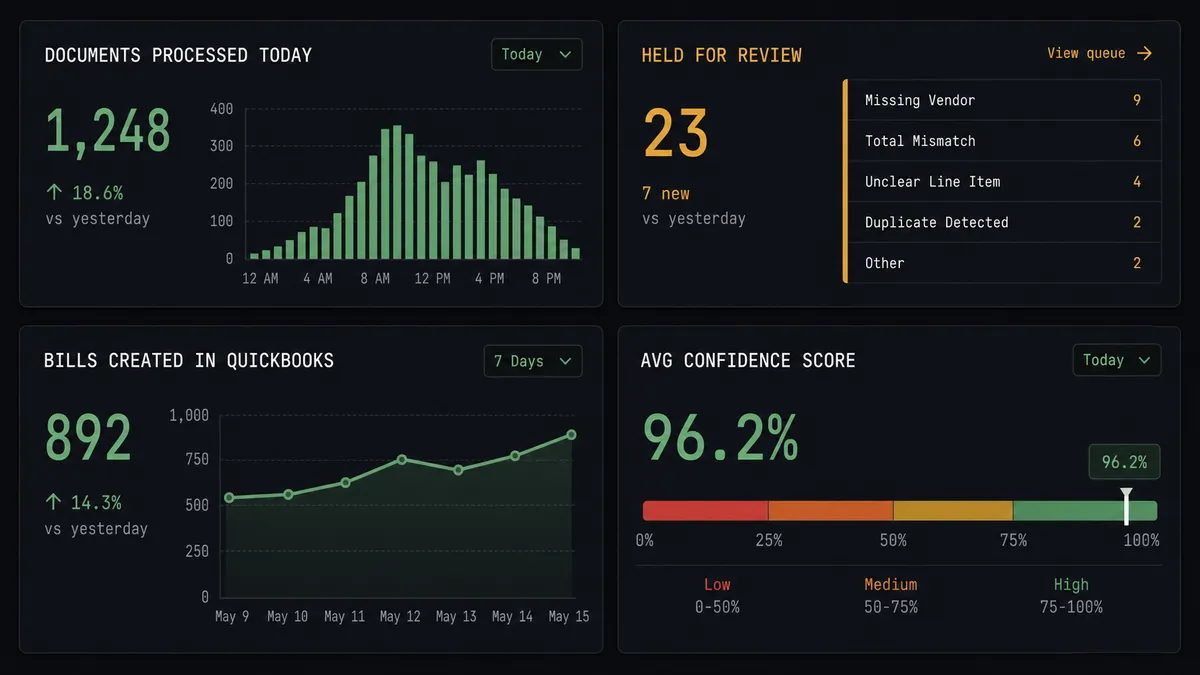
Duplicate bill detection before posting. Before calling Create Bill, the agent queries List Bills filtered by vendor and amount range. If a matching bill from the same vendor already exists within the prior 30 days, the agent holds the new document and alerts AP to the potential duplicate rather than creating a duplicate record in QuickBooks.
Getting started
FlowRunner has a free plan with 100 executions a month, every integration included, and no credit card required, and new accounts get 14 days of Professional on top. Corporate email gets you in.
Connect both integrations from the FlowRunner catalog:
- Mindee integration: add your Mindee V2 API key to the credential vault
- QuickBooks Online integration: authorize via OAuth2 in under a minute
From there, build the workflow visually: trigger, Extract Document, confidence check, Create Bill, and the human-in-loop step for exceptions. Most teams have their first flow running in an afternoon.
Start free at flowrunner.ai or book a 30-minute walkthrough at calendly.com/flowrunner/intro if you want to see the exception routing before you build it yourself.
Frequently asked questions
Is it free to connect Mindee and QuickBooks Online on FlowRunner?
FlowRunner has a free plan with 100 executions a month, every integration included, and no credit card required, and new accounts get 14 days of Professional on top. Both the Mindee and QuickBooks Online connectors are included on every paid tier.
Does FlowRunner need my own Mindee API key?
Yes. FlowRunner uses a bring-your-own-key model for Mindee. You create an API key in your Mindee account, add it to FlowRunner's credential vault, and the agent uses it to run extractions. You keep full control of your Mindee usage and billing.
Can I self-host FlowRunner?
Yes. FlowRunner offers a self-hosted Community Edition at no cost and an Enterprise self-hosted tier with multi-instance clustering and full compliance features. The cloud-hosted tiers start at $45 per month.
What happens when the Mindee extraction has a low-confidence field?
FlowRunner records the confidence value Mindee returns on each field. When any field falls below the threshold you configure, the agent pauses the bill before it reaches QuickBooks and routes the document to your AP team with the original image alongside the extracted value. The bill posts only after a human confirms or corrects the field.
Does the agent need its own AI provider key?
Only if you want the AI agent reasoning layer. FlowRunner is a bring-your-own-key platform. You connect your preferred AI provider (Anthropic, OpenAI, and others are supported) and the agent uses it to reason about the data. The basic Mindee-to-QuickBooks connection runs on automation logic alone and does not require an AI key.
What happens when the agent is not sure whether a bill should post?
The agent does not guess. It pauses execution, packages the document context (original image, extracted fields, vendor history, and the reason it is uncertain), and sends that package to your AP manager via Slack, email, or WhatsApp. The workflow resumes only after the manager responds.