How to Connect Notion with Aircall (With or Without an AI Agent)
Log every Aircall conversation into a Notion account database automatically, with an AI agent that reads call notes for churn signals and pauses for a human before an account is flagged at risk and the save play begins.
How do you connect Notion to Aircall?
You connect Notion to Aircall by polling finished calls with List Calls on a schedule and logging each one into your Notion account database: the workflow reads the detail with Get Call, matches the caller to an account with Find Database Item, writes the entry with Create Database Item, and appends the notes and recording link with Append Block Children. FlowRunner is a visual AI-agent orchestration platform where automations run autonomously and pause for human judgment on the steps that carry real consequence. Run the same connection as an AI agent and it reads what the calls actually say, notices when an account’s conversations are turning, and pauses for the account owner before Update Database Item flips the health flag that mobilizes your save play.
The problem it solves
For teams that run their account brain in Notion, phone calls are the missing memories. Email threads paste themselves into the record; calls evaporate. A rep finishes a hard conversation, the next call rings, and whatever was said survives only as a line of shorthand in Aircall that nobody working in Notion will ever see. Account pages show a tidy history of everything except the highest-bandwidth interactions the relationship has. Whoever preps for a renewal reads the page, feels informed, and walks in blind to the last three phone conversations.
The subtler failure is trend blindness. Churn rarely announces itself in one call. It shows up as a pattern: shorter calls, a new stakeholder asking about data export, the champion’s tone cooling across a month. When call records live outside the account database, nobody sees the pattern until the cancellation email arrives, and the postmortem finds every warning sign was captured somewhere and read nowhere.
How it works: the connection
The connection reads Aircall and writes Notion. Here is the plain version, grounded in the real connector actions.
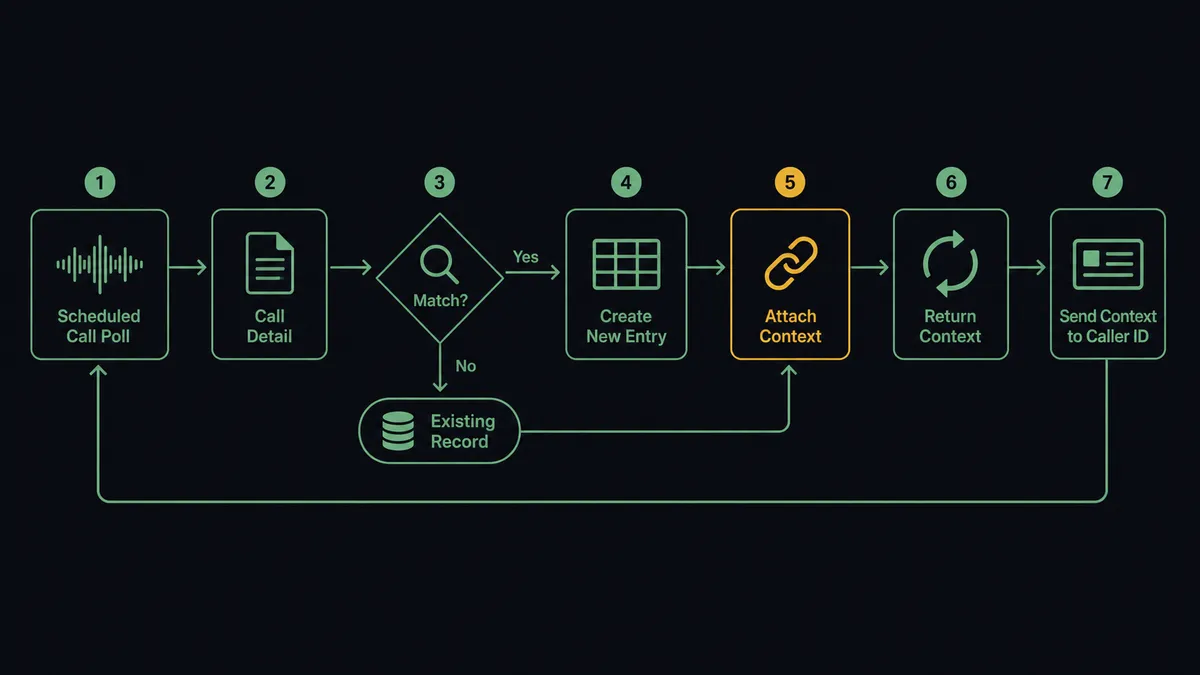
- Trigger: On a schedule, the workflow calls List Calls and picks up finished calls not yet tagged as logged.
- Read: Get Call pulls the caller, direction, duration, agent notes, and recording link.
- Match the account: Find Database Item locates the account row by the caller’s contact; Find or Create Database Item adds a row for a first-time caller.
- Log the call: Create Database Item writes the call entry, related to the account, with date and duration as properties.
- Attach the substance: Append Block Children adds the notes and the recording link to the entry’s page body.
- Mark it done: Add Tags to Call tags the call as logged, and Comment on Call stores the Notion reference on the Aircall side.
- Push context back: Before scheduled calls, Get Page reads the account’s recent history and Add Insight Cards puts it on the rep’s screen mid-call.
That is the “just connect them” answer. Every conversation lands in the account record within minutes, and the phone stops being where relationship history goes to disappear.
Can an AI agent run it? (and why a human stays in the loop)
Yes, and reading is the part that matters. A sync can move a call record into a database row. It cannot notice that this quarter’s calls from one account keep circling contract language, or that the champion who used to talk roadmap now only talks tickets. The agent can. It holds the actions as tools: List Calls, Get Call, Find Database Item, Create Database Item, Update Database Item, Append Block Children, Get Page, Add Insight Cards, Comment on Call. It logs every call, but it also reads each account’s recent entries together and forms a view of where the relationship is heading.
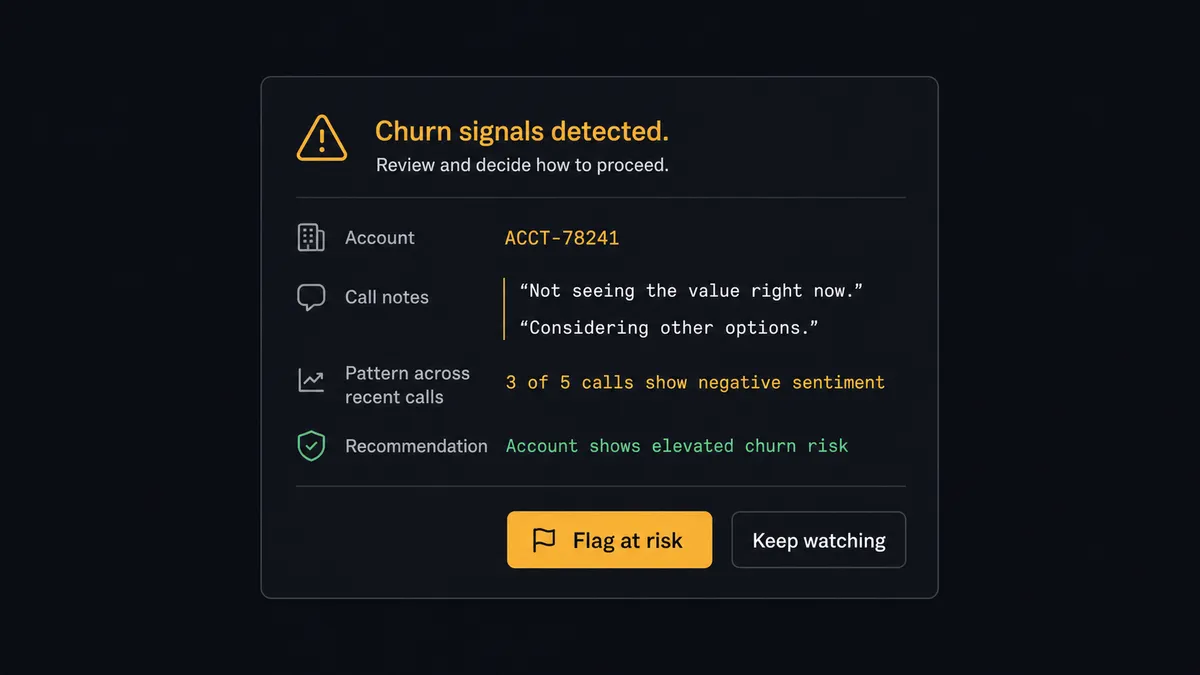
The consequential step is the at-risk flag. In an account database, health status is not a label; it is a trigger. Flipping an account to at risk mobilizes people: the owner reprioritizes, leadership starts asking, and the save play reaches the customer as calls and concessions. A false flag spends scarce attention and can teach the customer to negotiate through alarm. So the agent never flips it alone. When the pattern crosses its threshold, it assembles the case: the specific calls, quoted language from the notes, the trend across entries, and what changed. Then it invokes a human-in-loop flow it holds as a callable tool. The workflow pauses and posts to the account owner: “Churn signals on [account]: [summary]. Supporting calls linked. Recommend flagging at risk and starting the save play. Agree?” Only after the owner confirms does the agent call Update Database Item to set the flag, and the decision, its evidence, and its approver are all on the record.
Prospects call this the digital andon cord: like Toyota’s production line pull cord, the workflow stops the line when the stakes jump from logging to intervening, and the person who owns the relationship makes the call.
FlowRunner vs Zapier
Zapier is the obvious first stop for this pair, and it earns the reputation. The connector library is huge, the editor is friendly to exactly the customer-success ops people who own this problem, and the template gallery has call-logging Zaps that work within the hour. For “every call creates a Notion row,” Zapier is genuinely quick.
The gap is between logging calls and reading them. A Zap files the record; it does not read a month of notes for a cooling relationship, and holding a status change for a named approval is not its native shape. Here is the honest side-by-side.
| What matters for this pair | FlowRunner | Zapier |
|---|---|---|
| Human-in-the-loop on the at-risk flag | Native. The agent invokes an approval flow as a callable tool before Update Database Item mobilizes the save play | Available via added approval steps or paths, not a native agent decision |
| Who runs the flow | An AI agent reads call notes across entries, reasons, and picks actions as tools | Predefined step sequence you configure per Zap |
| Users included | Unlimited users on every tier | Priced by task volume; seats vary by plan |
| Bring your own AI keys | Yes, BYOK. Connect the AI provider key you already have | AI features tied to Zapier’s own AI offering |
| Self-hosted option | Yes, cloud-hosted or self-hosted | Cloud only |
| Pricing model | Transparent workflow-based tiers with clear execution limits | Per-task pricing that can be hard to predict as call volume grows |
If you only need calls copied into Notion, Zapier will do it well. If you want the call history read, the churn pattern surfaced, and the escalation held for the account owner’s judgment, this pairing on FlowRunner is the better fit.
Before and after
| Category | Before | After |
|---|---|---|
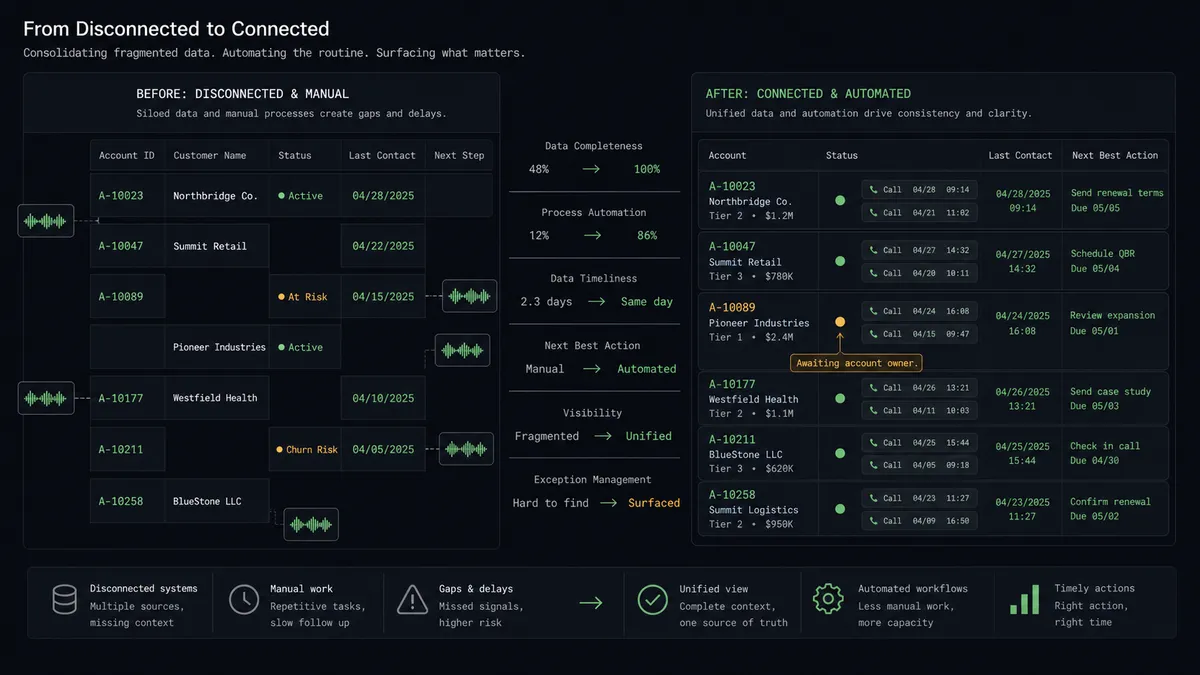
| Call history | Phone conversations survive as shorthand in Aircall that Notion users never see | Every call lands in the account record with notes and recording link attached |
| Renewal prep | The account page shows everything except the last three phone conversations | Get Page shows the full relationship, calls included, before anyone dials |
| Churn detection | Warning signs sit unread across scattered call logs until the cancellation arrives | The agent reads entries together and surfaces the pattern while there is time to act |
| At-risk discipline | Health flags flip on gut feel, or never | Update Database Item runs only after the account owner approves the evidence |
| Rep context | Reps dial from memory and a cold contact card | Add Insight Cards puts recent account history on screen during the call |
What you can build
Call to account record, hands off. The schedule fires List Calls, the agent reads Get Call, matches the account with Find Database Item, logs the entry with Create Database Item, and appends the substance with Append Block Children. The account page finally remembers the phone.
At-risk gate. The agent reads an account’s recent calls, spots a cooling pattern, packages quotes and trend evidence, invokes the human-in-loop tool, and only flips Update Database Item after the account owner agrees. The flag always has a named decision behind it.
Pre-call briefing. Before a scheduled call, the agent pulls the account page with Get Page and posts the last interactions, open issues, and relationship notes to the rep’s screen with Add Insight Cards, so nobody dials blind.
First-caller intake. An unknown number becomes a relationship: Find or Create Database Item creates the account row, Create Contact fills the Aircall side, and the first call is already logged when a human first looks.
Weekly relationship digest. On a Friday schedule, the agent reviews the week’s entries across accounts, writes a summary page with Create Page covering notable conversations and watch-list movements, and posts the link where the team plans the next week.
Getting started
Start on the free plan: 100 executions a month, every integration included, no credit card required, plus 14 days of Professional for new accounts. Both connectors are available on every tier, and every tier includes unlimited users and unlimited workflows.
Explore the integration details:
- Notion integration (23 actions covering pages, databases, blocks, and comments)
- Aircall integration (33 actions covering calls, contacts, tags, teams, and webhooks)
Start building free at flowrunner.ai or book a demo to see a live Notion to Aircall workflow, at-risk approval and all.
Frequently asked questions
Is it free to connect Notion and Aircall on FlowRunner?
You can build and run the connection on FlowRunner's free plan, which includes 100 executions a month and every integration with no credit card required, and new accounts also get 14 days of Professional. Both connectors are available on every FlowRunner tier, and every tier includes unlimited users and unlimited workflows.
Can I self-host the Notion to Aircall workflow?
Yes. FlowRunner offers a cloud-hosted option and a self-hosted option, so the connection can run inside your own environment.
Does the AI agent need my own OpenAI or Claude key?
FlowRunner uses a bring-your-own-keys model, so you connect the AI provider key you already have. You are not locked to one model.
What happens when the agent spots churn signals in an account's calls?
It does not flip the account status on its own. The agent packages the calls involved, the specific language that concerned it, and the account's recent history, then posts it to the account owner. Update Database Item only sets the at-risk flag after a named person agrees, because that flag mobilizes the save play.
Which actions log an Aircall call into Notion?
The workflow polls List Calls on a schedule, reads each call with Get Call, matches the account with Find Database Item, writes the entry with Create Database Item, appends the notes with Append Block Children, and tags the call processed with Add Tags to Call.
Can the phone team see account context before they dial?
Yes, in the other direction the workflow pushes context into Aircall. Before a scheduled call, it reads the account page with Get Page and posts recent history to the call with Add Insight Cards, so the rep sees the relationship state on screen while talking.