How to Connect Okta with Slack (With or Without an AI Agent)
Connect Okta and Slack so security events, user provisioning changes, and access decisions surface in Slack automatically, with an AI agent that pauses for human judgment before any irreversible identity action.
How do you connect Okta to Slack?
You connect Okta and Slack by setting the Okta On New System Log Event trigger as the start of a FlowRunner workflow, mapping the event data to a Slack Send Message to Channel action, and optionally adding Suspend User, Revoke All User Grants, or Revoke All User Sessions as intermediate steps the agent runs before notifying your team. FlowRunner is a visual AI-agent orchestration platform where automations run autonomously and pause for human judgment on the steps that carry real consequence. The same connection that posts a containment summary to your security channel can also pause the workflow and ask your on-call analyst whether to fully deactivate the account or reinstate it.
The problem operations teams run into
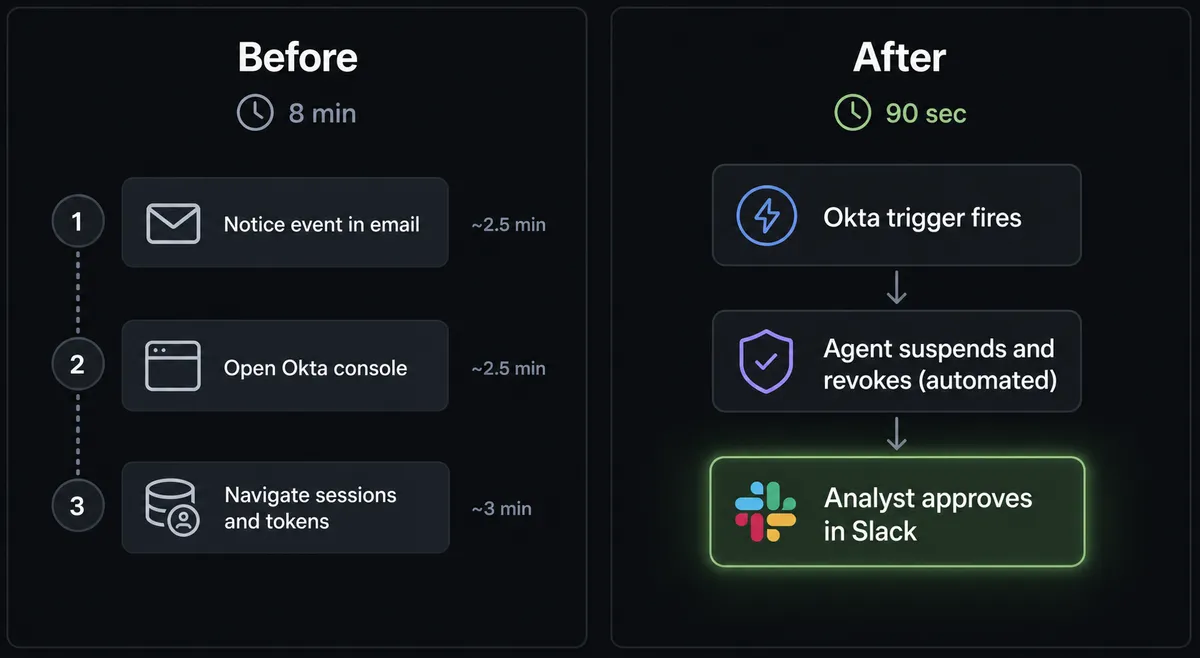
When a suspicious sign-in hits the Okta System Log, the clock starts. A help-desk manager or security lead has to open the Okta admin console, find the user, suspend them, then navigate to sessions, tokens, and OAuth grants one at a time. By the time the session is revoked, several minutes have passed and the account may still be accessible through an active token. The manual containment process was designed for a world where incidents were rare. Now they are not.
The same gap shows up in onboarding. A new hire starts Monday and their identity setup depends on whoever handled the last onboarding remembering which groups to add, which applications to assign, and which MFA factor to enroll. The tenth new employee of the month gets a slightly different setup from the first, and the help desk rebuilds the checklist from memory each time. Access that should have been consistent is inconsistent. Audit time surfaces the drift.
How it works: the connection
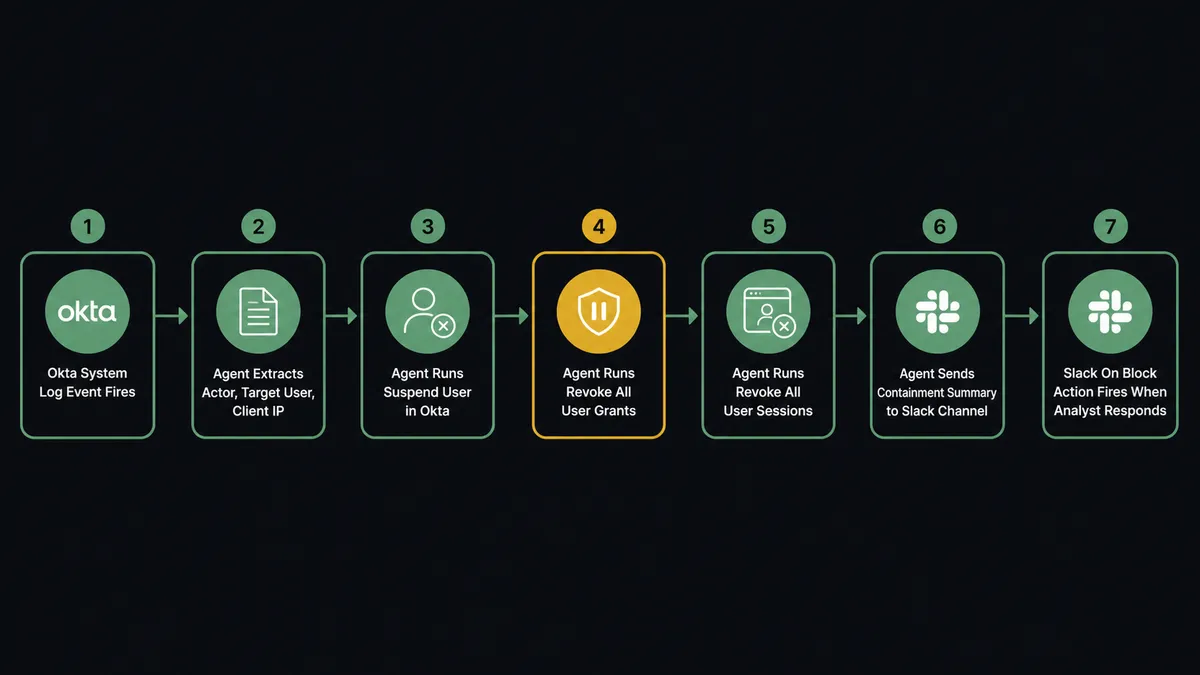
The Okta On New System Log Event trigger polls the System Log and fires the moment a new event is recorded. A suspicious sign-in, an admin privilege change, or a policy violation starts the flow immediately rather than waiting for a scheduled review.
The agent reads the raw log entry: the actor who triggered the event, the target user, the client device and IP address, and the event type. With that context, it runs three Okta actions in sequence. Suspend User blocks the account immediately without deleting it. Revoke All User Grants cancels every OAuth token and refresh token the user holds. Revoke All User Sessions clears every active sign-in. These three actions together contain the account in a reversible state.
The agent then uses Send Message to Channel in Slack to post a containment summary to the security channel. The message names the user, the event type, the IP address, and lists exactly what was revoked. Your team sees what happened and what was done before anyone opens the Okta console.
For onboarding, the flow starts from a new-hire record in your HR system. The agent runs Create User in Okta, then Add User to Group to apply department-level access, Assign User to Application for each tool the role requires, and Enroll Factor to complete MFA setup. A confirmation posts to the relevant Slack channel. Every new hire gets the same setup, in the same order, with no checklist.
Can an AI agent run it? (and why a human stays in the loop)
The plain connection posts a notification. An AI agent does something different: it reads the Okta System Log event, reasons about what it found, picks the right containment actions from its toolbox, and decides for itself whether the situation warrants involving a human. This is the step that Zapier and n8n cannot replicate in the same way. Those tools follow the sequence you define. The FlowRunner agent evaluates the situation and chooses the sequence.
Here is a real decision moment. The agent receives a System Log event: a sign-in from a user’s standard account, but the IP is in a country where no company infrastructure exists and the login happened 20 minutes after the user’s last authenticated session in headquarters. The agent reads the actor, checks the target user’s admin roles, counts the active OAuth grants, and reasons through what it knows. Containment steps are reversible. Full deactivation is not.
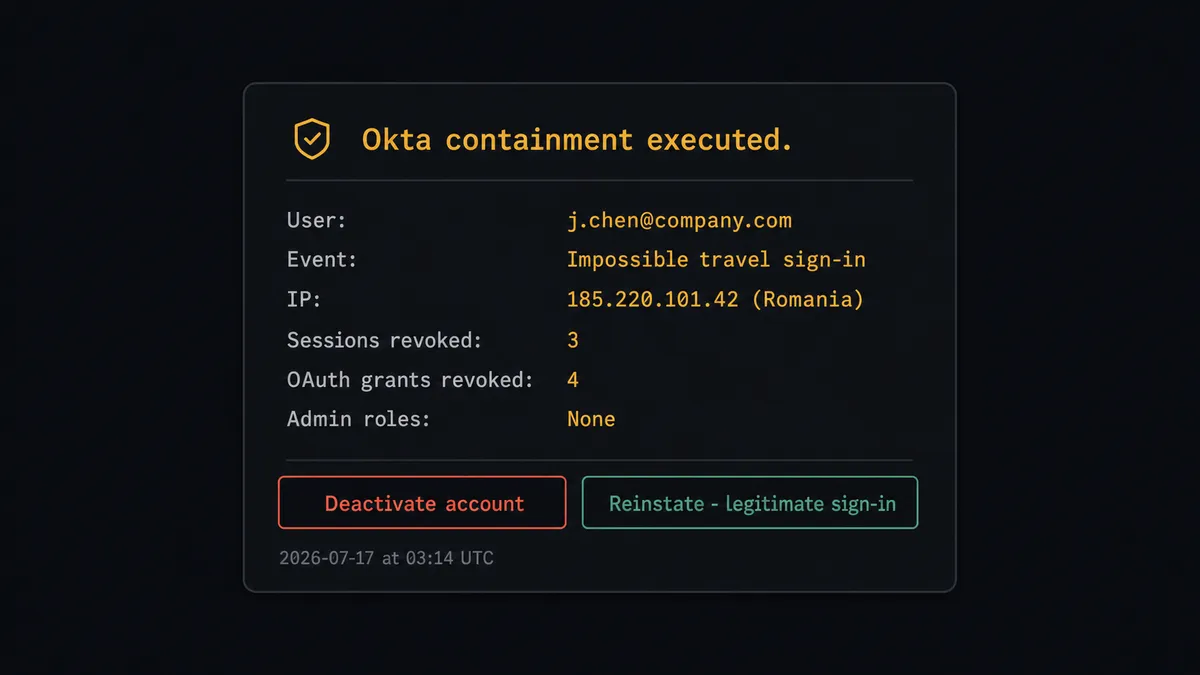
So the agent suspends the user, revokes all grants and sessions, and then pauses. It sends a direct Slack message to the on-call analyst: “Suspended j.chen and revoked 4 grants and 3 sessions after an impossible-travel sign-in from Romania. Deactivate the account, or reinstate it if this was a legitimate sign-in?”
The analyst sees full context: event type, IP, what was already done, and what the options are. They respond with a button click. The agent resumes with that decision as input, executes the chosen Okta action, and logs the decision with the responder’s identity and timestamp. The agent never deletes an identity on a guess. It never leaves a compromised session live while it waits for a meeting to be scheduled.
This is what prospects mean when they call it a digital andon cord. The agent stops the line when it hits the step where being wrong costs too much.
FlowRunner vs Zapier
Zapier is the tool most non-technical teams already use for connecting apps. It is fast to set up, has a large connector library, and the interface is approachable for teams without engineering resources. For simple notification flows, Zapier works.
The gaps appear when the flow needs judgment.
| Capability | Zapier | FlowRunner |
|---|---|---|
| Human-in-loop decisions | Requires external form or email link; no native interactive button flow | Native: agent invokes a human subflow as a callable tool, analyst responds in Slack, flow resumes |
| Agent reasoning | Zaps follow a fixed sequence; no per-event reasoning | AI agent reads event data, chooses which actions to run based on context |
| Okta actions available | Basic user management actions | 276 Okta actions including full lifecycle, session control, grant revocation, and policy management |
| Audit trail | Execution logs | Decision captured with approver identity, timestamp, and full event context |
| Unlimited users | Seat-limited on most tiers | All FlowRunner tiers include unlimited users and unlimited workflows |
| BYOK for AI | No native AI agent with your own keys | Bring your own OpenAI, Anthropic, or other model credentials |
Zapier is a reasonable choice for simple notification flows that do not require judgment calls. When the flow touches identity decisions where a wrong action grants or removes access, the gap matters.
Before and after
| Category | Before | After |
|---|---|---|
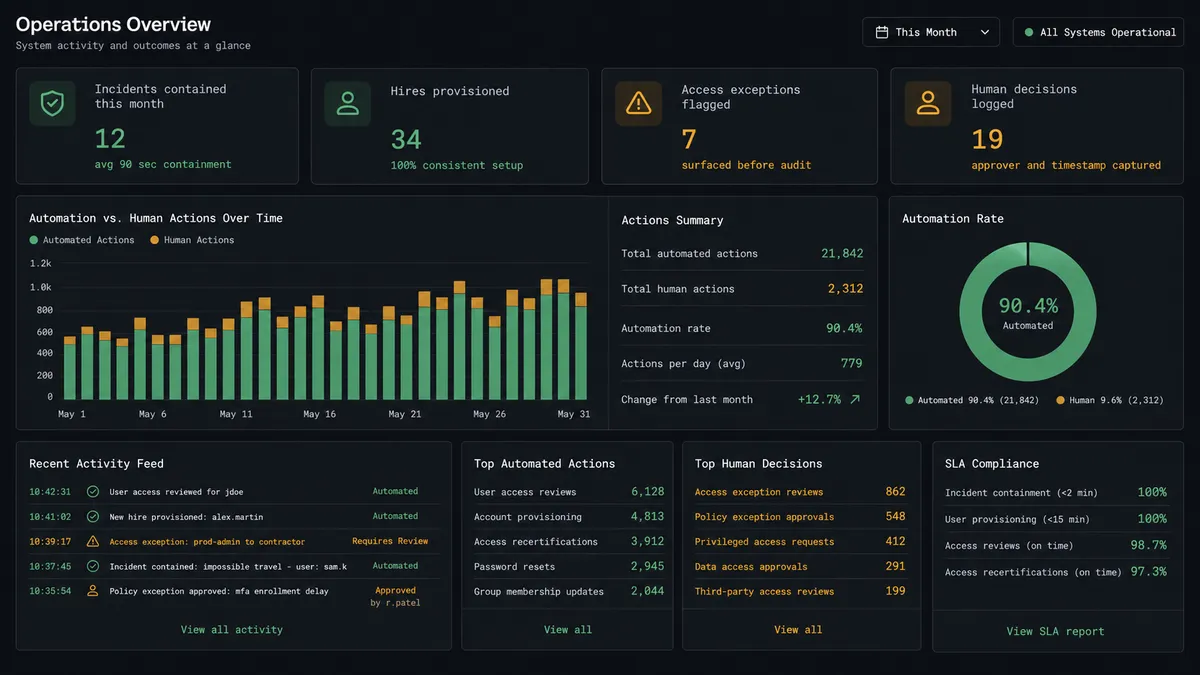
| Incident containment time | 6-10 minutes clicking through Okta screens under time pressure | Reversible containment runs in seconds; analyst decision takes 90 sec via Slack |
| Session and token revocation | Manual navigation to users, sessions, and grants separately | Suspend User, Revoke All User Grants, and Revoke All User Sessions run in a single flow |
| Onboarding consistency | Help desk reconstructs checklist from memory per hire; access varies | Create User, Add User to Group, Assign User to Application, and Enroll Factor run identically for every hire |
| Irreversible decisions | Made under pressure without documented approval | Agent pauses, analyst decides in Slack, decision logged with identity and timestamp |
| Stale access discovery | Found during audits, often months after the access should have been removed | Scheduled recertification flow surfaces exceptions on a routine before audit |
What you can build
Security incident response from the System Log. On New System Log Event fires on a suspicious event. The agent reads the actor and target, runs Suspend User, Revoke All User Grants, and Revoke All User Sessions, then posts a containment summary to the security channel with Send Message to Channel. The on-call analyst sees what happened and what was already contained, then decides via Slack interactive button whether to run Deactivate User or reinstate the account.
Automated new-hire identity provisioning. A new-hire record starts the flow. The agent runs Create User, Add User to Group by department, Assign User to Application for each role-required tool, and Enroll Factor for MFA. A completion message posts to the HR or IT Slack channel. The tenth new hire gets the same setup as the first, every time.
Scheduled access recertification with exception routing. On a recurring schedule, the agent uses Get Logs and lists admin roles and OAuth grants for users in a target group, compares them against an expected baseline, and posts exceptions to a governance channel via Send Message to Channel. Reviewers respond in Slack. Access that should have been removed at a role change surfaces before the auditor finds it.
Help-desk MFA and password flows. On Mention fires when an employee tags the agent in a Slack channel asking for an MFA reset or password reset. The agent runs Reset Factors or Reset Password in Okta and sends a Direct Message confirming completion. Help-desk tickets for common account issues resolve in one Slack thread without console access.
Offboarding with channel cleanup. When an employee is deactivated in Okta, the agent uses Kick User from Channel in Slack to remove them from project channels, posts a summary of removed access to the IT channel, and creates a record for compliance. The offboarding sequence runs the same way for every departure.
Getting started
FlowRunner has a free plan with 100 executions a month, every integration included, and no credit card required, and new accounts get 14 days of Professional on top. Any real email address works; disposable domains are not accepted.
Connect both integrations from the FlowRunner dashboard: Okta and Slack. Both connectors are verified against the official APIs and ready to use.
Start a flow at flowrunner.ai or book a 30-minute walkthrough at calendly.com/flowrunner/intro to see the Okta and Slack connection running with a real security incident scenario.
Frequently asked questions
Is it free to connect Okta and Slack on FlowRunner?
FlowRunner has a free plan with 100 executions a month, every integration included, and no credit card required, and new accounts get 14 days of Professional on top. No credit card is required to start. Beyond the free plan, Growth is $45 per month, and all tiers include unlimited users and unlimited workflows.
Can I self-host FlowRunner for this integration?
Yes. FlowRunner offers a self-hosted Community Edition at no cost for teams that need to keep orchestration inside their own infrastructure. Enterprise self-hosted adds multi-instance clustering and the full compliance suite.
Does the agent need my own OpenAI key?
FlowRunner uses a bring-your-own-key model. You connect your own AI provider credentials, whether that is OpenAI, Anthropic, or another supported model. FlowRunner orchestrates the agent; you control which model it uses and what it costs.
What happens when the agent is not sure whether to deactivate an account?
The agent takes the reversible containment steps on its own, suspending the user and revoking active sessions and OAuth grants. It then pauses and sends a Slack message to the on-call analyst with the full event context and two options: deactivate or reinstate. The flow resumes when the analyst responds. The decision, the responder, and the timestamp are all captured in the audit trail.
What Okta actions can the agent run without human approval?
Reversible actions, such as Suspend User, Revoke All User Grants, and Revoke All User Sessions, are safe for the agent to run on its own during incident containment. Irreversible actions, such as Deactivate User or Delete User, are the moments where the agent pauses and routes to a human before proceeding.
Can FlowRunner connect Okta and Slack for onboarding, not just security?
Yes. The same orchestration layer that handles security incident response also handles new-hire provisioning. The agent creates the Okta user, assigns groups and applications, enrolls an MFA factor, then posts a confirmation to a Slack channel. The whole identity setup runs consistently every time.