How to Connect PayPal with Xero (With or Without an AI Agent)
Connect PayPal and Xero so every captured payment is recorded in Xero automatically, with an AI agent that pauses for a human before releasing batch payouts or voiding invoices.
How do you connect PayPal to Xero?
You connect PayPal to Xero by using FlowRunner’s Capture Order or Record Payment action in PayPal alongside Xero’s Create Payment action: when a buyer approves an order, the agent captures it in PayPal and records the payment against the matching Xero invoice automatically. FlowRunner is a visual AI-agent orchestration platform where automations run autonomously and pause for human judgment on the steps that carry real consequence. That same connection can run as an AI agent that decides which captures to process on its own and which to hold for a human before funds move.
The problem it solves
Billing teams that run on both PayPal and Xero spend a significant portion of every week doing work that is, at its core, copying numbers from one screen to another. A payment lands in PayPal. Someone opens Xero, finds the invoice, records the payment, and checks it off. Multiply that by dozens of transactions and you have an AP or AR clerk spending hours on reconciliation that should take minutes. The spreadsheet in the middle, the one that tracks what has been reconciled and what has not, becomes a liability the moment a step is missed.
The exceptions are where it gets expensive. A refund issued informally in PayPal with no corresponding credit note in Xero. A batch payout released before anyone checked the total against the recipient list. A PayPal invoice voided in one system but still showing open in the other. These are not edge cases. They are the normal friction of running two financial systems that do not talk to each other, and they fall through the cracks during high-volume periods when the team is already stretched.
How it works: the connection
The core integration maps PayPal’s payment surface to Xero’s accounting layer. Here is how the data flows at the action level.
When a buyer approves a checkout order, FlowRunner’s agent picks it up. It calls PayPal’s Get Order to read the amount, currency, and buyer details. It runs Find Invoices in Xero to locate the matching open invoice by reference or contact. If the amounts align, the agent calls Capture Order in PayPal to collect the funds and then calls Create Payment in Xero to record the allocation against the invoice. The Xero invoice moves from outstanding to paid. The PayPal capture is logged. No one opens either system.
For outbound billing, the flow runs the other direction. The agent calls Generate Invoice Number in PayPal, builds the invoice from Xero line items retrieved via Get Invoice, and calls Create Draft Invoice followed by Send Invoice in PayPal. The Xero trigger On Invoice Updated fires when the PayPal invoice is paid, and the agent records the payment back in Xero via Create Payment.
For refunds and corrections, Xero’s On Credit Note Created trigger fires. The agent retrieves the credit detail, calls Refund Captured Payment in PayPal with the original capture ID, and creates the corresponding credit note allocation in Xero using Allocate Credit Note.
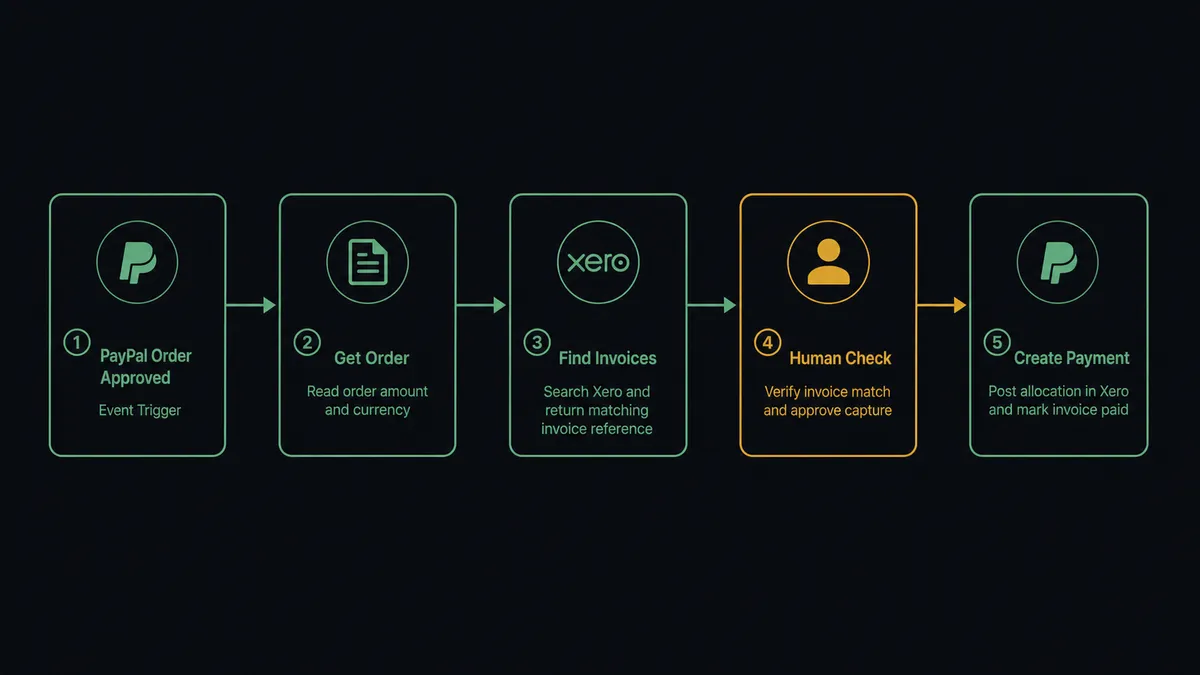
Can an AI agent run it? (and why a human stays in the loop)
A plain connection between PayPal and Xero is a sync tool. An AI agent running the same connection is something different: it reads each transaction, reasons about whether it is routine, and decides which tool to call next. That distinction matters most when the wrong call is expensive.
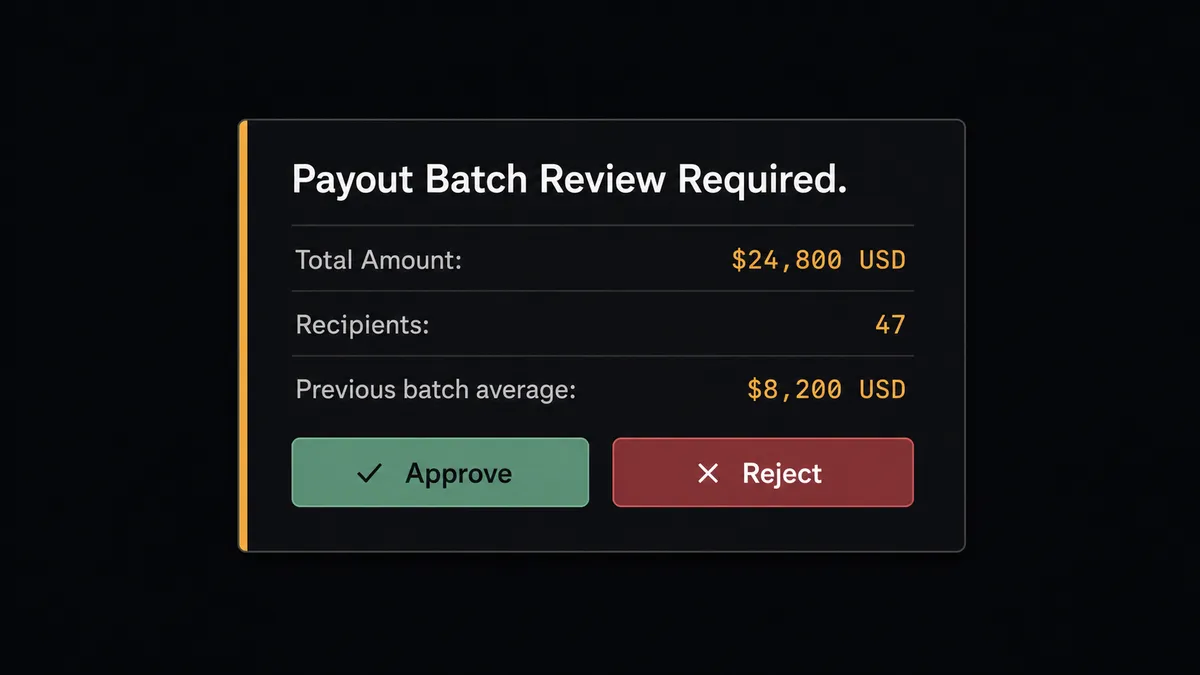
Take a contractor payout batch. The agent assembles the recipients and amounts using Create Batch Payout parameters from your payout list. Before it sends, it calls Get Payout Batch on a similar previous batch to compare totals. If this batch is 3x the usual amount, the agent does not apply a hardcoded threshold check. It reads the total, compares it to historical runs, and decides that the variance is too large to release without a human seeing it. It invokes its human-in-loop tool: a subflow that sends the finance manager a Slack message with the batch total, the recipient count, the currency, and a direct question: “This payout batch totals $24,800 across 47 recipients. Release it?”
The manager sees the same data the agent assembled. They click Approve. The agent calls Create Batch Payout and releases the funds. After the batch settles, it calls Get Payout Batch to confirm each recipient’s status and posts the results to the finance channel. The approver’s identity and the timestamp are written to the audit trail.
This is the digital andon cord. The agent stops the line when the cost of being wrong is too high. It does not ask about every transaction. It asks about the ones that warrant a question.
The same pattern applies to Xero-side actions. Xero’s Void Invoice is irreversible. Before the agent calls it, it packages the invoice number, the customer name, the amount, and the reason for voiding, sends it to the accounting manager via Slack, and waits. The manager confirms. The agent voids and logs the decision. Your books have a human-approved paper trail for every reversal.
FlowRunner vs the tool you are probably comparing
Most teams reaching for a PayPal-to-Xero connection land on Zapier first. Zapier is genuinely good at simple, trigger-action connections. It has a large library of templates, an easy setup experience, and it works well for straightforward event-to-record flows where the same action runs every time.
The differences that matter for financial workflows show up when the transaction is not routine.
| Feature | Zapier | FlowRunner |
|---|---|---|
| Human-in-loop before a payment action | Not available natively; requires branching workaround | Native tool the AI agent invokes on its own judgment |
| AI agent reasoning about transaction context | Not available | Agent reads data, compares to history, decides when to escalate |
| Audit trail with approver identity and timestamp | Not available | Built into every human-in-loop decision |
| Unlimited users on every plan | Per-user pricing on higher tiers | Unlimited users on every tier |
| Pricing model | Per-task execution pricing | Workflow-based tiers with clear execution limits |
| Self-hosted option | Not available | Community Edition free; Enterprise self-hosted available |
The core difference is not a feature list. It is what happens when a $24,000 payout batch looks different from every previous one. Zapier runs the action. FlowRunner’s agent notices the variance and asks.
Before and after
| Category | Before | After |
|---|---|---|
| Payment reconciliation | AP clerk manually records each PayPal capture in Xero after checking the PayPal dashboard | Agent calls Create Payment in Xero automatically after each confirmed capture; no one opens PayPal manually |
| Batch payout release | Finance manager reviews a spreadsheet of recipients and amounts, then releases from PayPal | Agent assembles the batch, pauses for one Slack approval showing total and recipient count, then releases |
| Invoice void decisions | Accountant voids invoices in Xero without a recorded approval; audit trail is missing | Agent pauses before Void Invoice, routes to accounting manager via Slack, logs approver and timestamp |
| Refund recording | Refund issued in PayPal; credit note created in Xero days later, sometimes with mismatched amounts | Agent calls Refund Captured Payment in PayPal and Allocate Credit Note in Xero in the same workflow run |
| AR visibility | Outstanding invoices discovered during weekly review | Xero’s On Invoice Updated trigger fires immediately; agent updates records and notifies the team within seconds |
What you can build
Order capture with a value guardrail. A buyer approves a Checkout order in your storefront. The agent calls Get Order to read the amount, runs a check against the originating invoice in Xero with Find Invoices, and captures the payment with Capture Order. For most orders, the agent records the payment in Xero via Create Payment and moves on. For captures above a configured amount, it holds for a controller’s sign-off before funds move.
Subscription billing reconciliation. A subscription event fires in your billing system. The agent calls Get Subscription in PayPal to confirm the subscription is active and the billing amount is correct, then uses Xero’s Create Invoice to generate the corresponding invoice and Email Invoice to deliver it. When payment posts in PayPal, Xero’s On New Payment Received trigger fires and the agent records the payment with Create Payment.
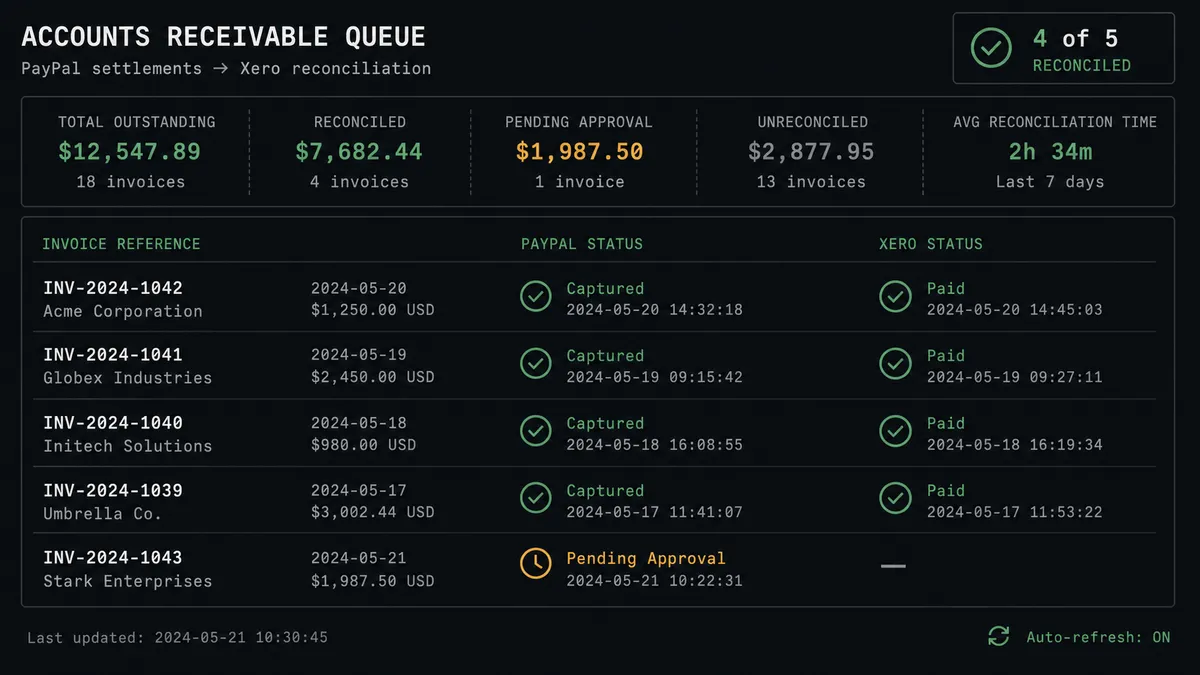
Aged receivables with an escalation gate. Every Monday, the agent calls Get Aged Receivables in Xero to pull the AR aging report. For invoices 30 to 60 days overdue, it sends an automated reminder email. For invoices over 60 days, it pauses and routes to the AR manager via Slack with the invoice details: “Send final notice or escalate?” The manager decides. The agent acts.
Batch payout with a release gate. Payout day arrives. The agent assembles the recipient list and amounts, prepares the Create Batch Payout parameters, and posts the batch total and recipient count to the finance team on Slack before releasing a single dollar. The manager approves. The agent releases the batch. After Get Payout Batch confirms delivery, the agent records each recipient’s status and notifies the team.
Refund processing with a credit note. A customer dispute triggers a Xero credit note via On Credit Note Created. The agent retrieves the original PayPal capture ID, calls Refund Captured Payment with the credit amount and a note visible to the payer, then calls Allocate Credit Note in Xero to match the credit against the open invoice. The books stay in sync without manual intervention.
Getting started
FlowRunner has a free plan with 100 executions a month, every integration included, and no credit card required, and new accounts get 14 days of Professional on top. Any real email address works; disposable domains are not accepted.
Connect both integrations in your account: PayPal and Xero. Build the trigger-action flow first, then add the AI agent and the human-in-loop subflow once the basic connection is working. Most teams have a working reconciliation flow within an afternoon.
Start at flowrunner.ai or book a 30-minute walkthrough at calendly.com/flowrunner/intro to see the human-in-loop step in a live demo.
Frequently asked questions
Is it free to connect PayPal and Xero on FlowRunner?
FlowRunner has a free plan with 100 executions a month, every integration included, and no credit card required, and new accounts get 14 days of Professional on top. Beyond the free plan, Growth starts at $45 per month. Every tier includes unlimited users and workflows.
Can I self-host the PayPal and Xero integration?
Yes. FlowRunner offers a self-hosted Community Edition at no cost and an Enterprise self-hosted tier for teams that need multi-instance clustering and a full compliance suite. The integration works the same way on both.
Does the AI agent need my own API keys for PayPal or Xero?
FlowRunner uses your own PayPal and Xero credentials via OAuth 2.0. For the AI agent's reasoning layer, FlowRunner uses a bring-your-own-key model, so you connect whichever AI provider you already use.
What happens when the agent is not sure about a transaction?
FlowRunner's human-in-loop works as a callable tool for the agent. When the agent evaluates a capture or payout and decides the amount or context warrants a second opinion, it pauses the workflow, packages the full transaction detail, and sends it to the right person on Slack or by email. The workflow resumes the moment they respond.
Does FlowRunner support Xero's real-time triggers?
Yes. FlowRunner supports all eight Xero event triggers, including On New Payment Received, On Invoice Updated, On Contact Created, On Credit Note Created, and On New Bank Transaction. Workflows fire the moment Xero posts the event.
Can I use FlowRunner to record PayPal payments against existing Xero invoices?
Yes. The agent can capture a PayPal order, retrieve the matching Xero invoice with Find Invoices or Get Invoice, and then call Create Payment to record the allocation in Xero. The reconciliation step runs without anyone opening either system.