How to Connect ServiceNow with Slack (With or Without an AI Agent)
Connect ServiceNow to Slack so incidents and change requests fire Slack alerts automatically, optionally with an AI agent that pauses for human approval on changes that touch production.
How do you connect ServiceNow to Slack?
You connect ServiceNow to Slack by building a FlowRunner workflow that reads ServiceNow records using actions like List Incidents or Get Change Request, then posts structured updates to Slack using Send Message to Channel or Send Direct Message. FlowRunner is a visual AI-agent orchestration platform where automations run autonomously and pause for human judgment on the steps that carry real consequence. The same connection can run as an AI agent that reasons about each ServiceNow record, decides which fields matter, and pauses in Slack for a named approver before advancing any change that touches production.
The problem: incidents and change requests disappear into email
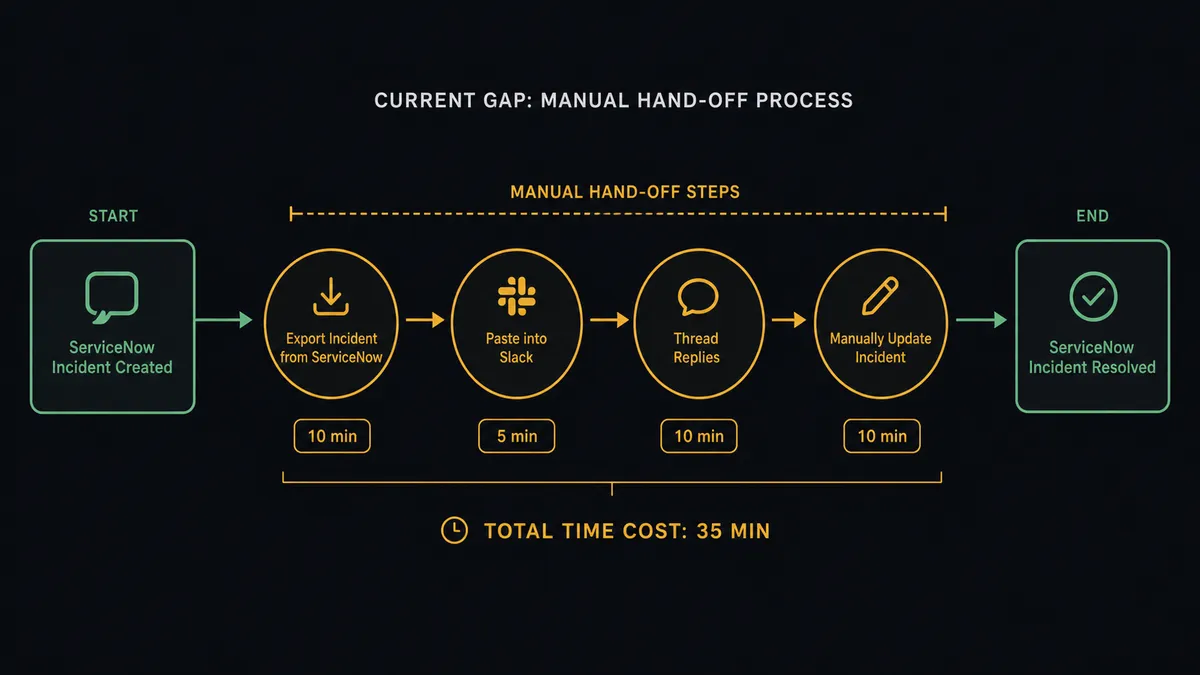
A change request filed in ServiceNow is complete inside the ITSM tool. The team that needs to act on it works in Slack. Bridging those two systems today means someone exports a record, pastes details into a message, waits for replies in a thread no one can trace back to the original ticket, and then manually updates the ServiceNow record with whatever decision came back. For a single change, that process takes 20 to 40 minutes and leaves no structured record of who approved what and when.
Incidents follow the same pattern. An alert fires. Someone creates an INC record. Then the on-call team learns about it through a separate channel, usually a group text or an email that arrived after the incident was already escalating. By the time the right people have context, the urgency and impact fields in ServiceNow no longer match what is actually happening. The discrepancy is small, but it accumulates. Over weeks, the ITSM data drifts from operational reality. Reporting becomes unreliable. Exceptions fall through the cracks.
How it works: the connection
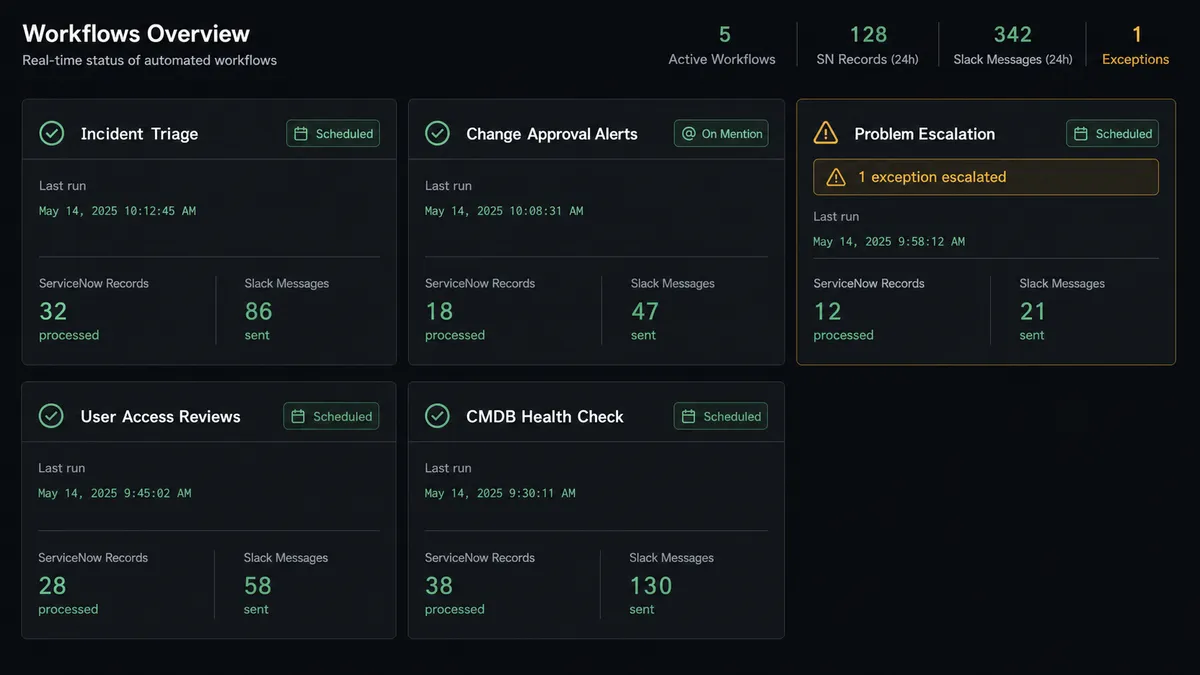
The ServiceNow-to-Slack connection in FlowRunner works without webhooks on the ServiceNow side. Because ServiceNow exposes no polling or webhook triggers in this integration, the flow starts from the system that does have triggers: Slack. The On Mention trigger lets your team mention FlowRunner with a command like “escalate incident P1-0042” and kick off the agent immediately. A scheduled sweep using List Incidents or List Change Requests with an encoded query like active=true^priority=1 handles proactive monitoring on a defined interval.
Once the flow starts, the agent calls Get Change Request or Get Incident to pull the full record, including the state, risk rating, affected configuration items, and assigned group. It maps those fields into a structured Slack message using Send Message to Channel, formats impact and urgency as plain-English labels (not raw numeric codes), and posts to the relevant channel. If the record needs routing to a specific person, Send Direct Message targets that user by resolving their Slack identity with Find Member first.
When the ServiceNow record changes state, Update Message in Channel edits the original Slack post to reflect the new status in real time. The thread stays accurate without anyone touching it manually.
Can an AI agent run it? (And why a human stays in the loop)
An AI agent in FlowRunner treats every ServiceNow action as a tool it can pick and call in any order based on what the data shows. When the agent is given an incident number, it does not follow a fixed script. It calls List Incidents to check for duplicates on the same service, calls Get Incident to read the full record, checks the impact and urgency against the assignment group’s current load, and decides what to post to Slack and how urgently to route it.
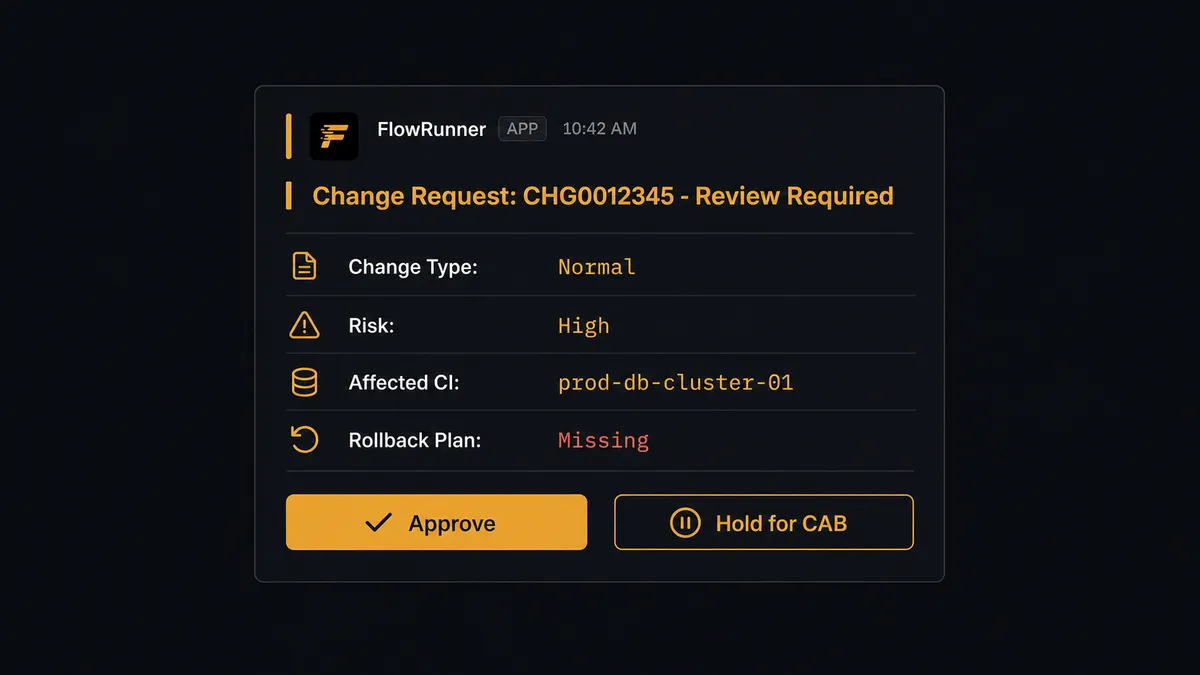
The moment where the agent stops and asks is not a hardcoded threshold. It is a judgment call. Consider a change request the agent is processing: standard change type, low risk rating, routine vendor. The agent advances it automatically and posts a summary to the change advisory channel. Now a second change comes in: same type, but the configuration item is a production database with no completed rollback plan attached. The agent recognizes the gap. It does not advance the record. It invokes a human-in-loop flow as a callable tool.
The human-in-loop flow sends a Slack message to the change advisory board channel with the full context the agent assembled: the change type, the risk rating, the affected CI, and the specific gap it found (missing rollback plan). The message includes two Block Kit buttons: Approve to advance and Hold for next CAB. The On Block Action trigger fires when the approver clicks. The agent receives the decision, calls Update Change Request to set the state accordingly, and posts the result back to the thread with the approver’s identity and timestamp. The audit trail captures the whole sequence, not just the outcome.
This is not a sync tool. The agent knows when to stop and ask.
FlowRunner vs Zapier for ServiceNow and Slack
Zapier is the right starting point for many teams. It handles the simple case well: a record changes in ServiceNow, a Slack message fires. The connector catalog is large, the setup is fast, and non-technical users can build a basic flow in an afternoon.
The gap shows up when the workflow needs to reason. Zapier executes a fixed sequence. It does not read a change request, evaluate the rollback plan, decide whether to escalate, and then ask a human through Slack before updating the ServiceNow record. That is an agent workflow, not a Zap. Zapier also charges per task, which makes multi-step ITSM workflows expensive to predict, and user limits on lower tiers mean not everyone who needs to act on Slack approvals can be part of the workflow.
| Feature | Zapier | FlowRunner |
|---|---|---|
| Basic ServiceNow-to-Slack notifications | Yes | Yes |
| AI agent that reasons about ITSM records | No | Yes |
| Human-in-loop as agent tool (not hardcoded branch) | No | Yes |
| Unlimited users on every tier | No (task + seat limits apply) | Yes |
| BYOK for AI model | No | Yes |
| Transparent execution-based pricing | Per task (can multiply unexpectedly) | Per workflow execution, hard limits |
| Self-hosted option | No | Yes (Community Edition free) |
Before and after
| Category | Before | After |
|---|---|---|
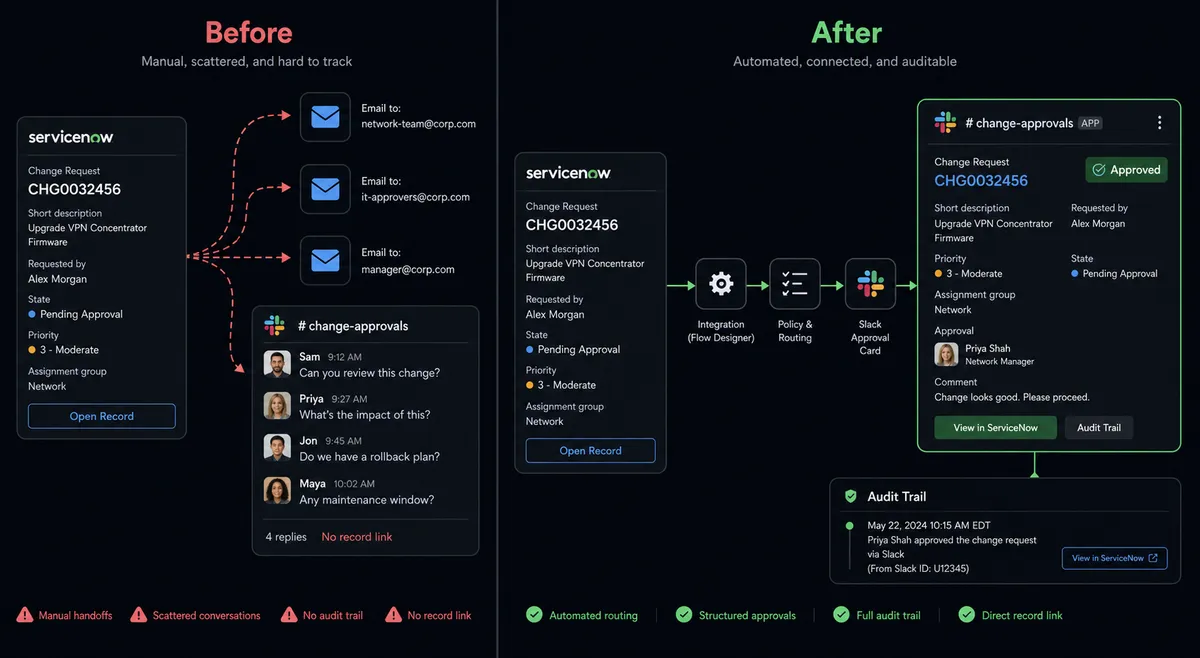
| Change routing time | 20 to 40 minutes per change, manual hand-off | Change advisory channel notified in under 2 min from record creation |
| Approval record | Decision lives in a Slack thread with no link to the ServiceNow record | Approver identity and timestamp captured on the change record automatically |
| Incident context | On-call team learns about incidents from separate group texts | Incident routed to the right Slack channel with impact, urgency, and CI already populated |
| Duplicate detection | None. Multiple INC records for the same outage are common | Agent calls List Incidents first and links rather than creates when a matching open record exists |
| Exception handling | Exceptions fall through the cracks when no one checks the ServiceNow queue | Agent sweeps open records on schedule and surfaces exceptions to Slack before anyone asks |
| Audit trail | Verbal approvals with no structured record | Every decision captured with channel, approver, timestamp, and change state in FlowRunner’s audit trail |
What you can build
Incident escalation with on-call routing. The agent calls List Incidents with active=true^priority=1^assigned_to=NULL to surface unassigned P1s. For each one, it calls Find Member to resolve the on-call contact and routes a Send Direct Message with the INC number, affected service, and urgency. The on-call engineer sees it in Slack within seconds of the incident opening.
Change request approval flow. The agent reads a change request with Get Change Request, evaluates the risk rating and CI, and posts a structured approval card to #change-advisory. Approvers click Approve or Hold from Slack. The On Block Action trigger fires, and the agent calls Update Change Request to advance or freeze the state. The approver’s name and timestamp are captured on the change record.
Recurring open-record sweeps. A scheduled flow calls List Change Requests with active=true^state=2 (in-progress) every morning and posts a digest to #operations using Send Message to Channel. Operations leads get a daily view of changes mid-flight without logging into ServiceNow.
Problem tracking behind recurring incidents. When the agent notices three or more incidents with the same affected CI using List Incidents, it calls Create Problem to open a root-cause record, then posts a summary to #engineering. The engineering lead decides whether to assign it immediately or queue it for the next sprint, using a Slack button to update the problem state with Update Problem.
Vendor or partner onboarding via Slack. When a new user joins a provisioning channel via On New Member, the agent calls Create User in ServiceNow to create their platform record, then Create Requested Item to file the access request. It posts a confirmation to the channel with the RITM number. No one files a manual ticket.
Getting started
FlowRunner has a free plan with 100 executions a month, every integration included, and no credit card required, and new accounts get 14 days of Professional on top. Corporate email required for signup.
Connect both integrations in FlowRunner: ServiceNow links your instance via OAuth2 against the same Table API your team already uses. Slack connects via OAuth2 with multi-workspace support.
Start at flowrunner.ai or book a 30-minute walkthrough at calendly.com/flowrunner/intro to see the change approval flow running live.
Frequently asked questions
Is it free to connect ServiceNow and Slack on FlowRunner?
FlowRunner has a free plan with 100 executions a month, every integration included, and no credit card required, and new accounts get 14 days of Professional on top. Growth costs $45 per month beyond the free plan and includes unlimited users and workflows.
Can I self-host FlowRunner?
Yes. FlowRunner offers a free Community Edition for single-instance self-hosting and an Enterprise tier with multi-instance clustering and a full compliance suite. Cloud and self-hosted options are available at every level.
Does the AI agent need my own AI provider key?
FlowRunner uses a BYOK (Bring Your Own Keys) model. You connect your own key for whichever AI provider you choose. FlowRunner orchestrates the agent; you control the model and the cost.
What happens when the agent is not sure what to do?
The agent invokes a human-in-loop flow as a callable tool. It pauses, sends a Slack message with the full record context and the question it needs answered, and waits. The human's response and identity are captured in the audit trail before the workflow resumes.
Does FlowRunner support ServiceNow tables beyond incidents and change requests?
Yes. In addition to named actions for incidents, change requests, problems, requested items, and users, FlowRunner includes Generic Table actions that read and write any ServiceNow table. No flow is blocked by a table the named actions do not cover.
How is FlowRunner priced compared to Zapier for this use case?
FlowRunner charges per workflow execution with transparent tier limits and unlimited users on every plan. Zapier charges per task and limits users on lower tiers. For teams routing change approvals through Slack, where one execution may involve several actions and multiple team members, FlowRunner's model is easier to predict and scales to your whole team without per-seat costs.