How to Connect Shopify with ShipStation (With or Without an AI Agent)
Connect Shopify's On New Order trigger to ShipStation's Create Shipment Label action, optionally as an AI agent that rate-shops carriers and pauses for a human before buying a costly label.
How do you connect Shopify to ShipStation?
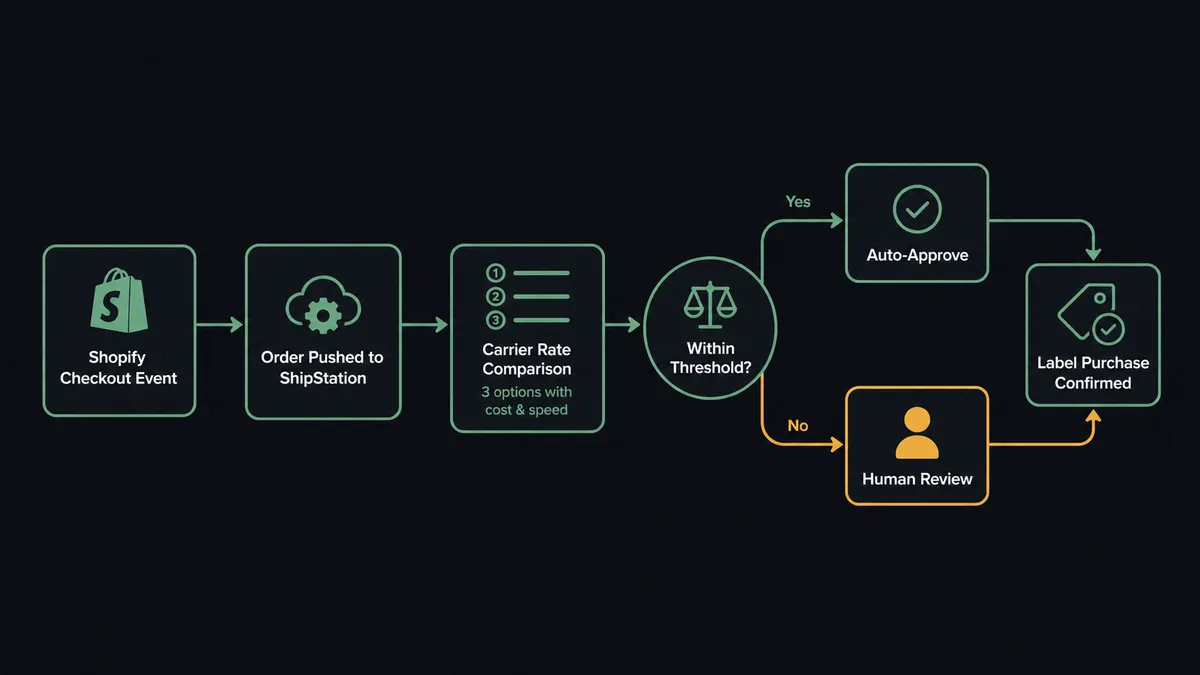
When a customer checks out, Shopify fires On New Order. A FlowRunner workflow picks up that event, pushes the order into ShipStation using Create or Update Order, calls Get Shipment Rates to compare live carrier options, and runs Create Shipment Label to buy the label and mark the order as shipped. FlowRunner is a visual AI-agent orchestration platform where automations run autonomously and pause for human judgment on the steps that carry real consequence. The same connection runs as an AI agent that shops carriers, applies your service rules, and routes a high-cost label to ops for approval before spending a dollar.
The problem with manual fulfillment
Every Shopify store above a few dozen orders a month runs into the same wall. Someone opens the admin queue each morning, works through the new orders, copies the address and line items into ShipStation, compares two or three carrier quotes by eye, buys a label, and pastes the tracking number back into the order. That loop takes two to four minutes per order and scales linearly with volume. The people doing it are not making decisions. They are doing data entry.
The exceptions are where the real work is. A label that costs $47 on a $95 order. A high-value order from a customer flagged for a previous chargeback. An order that comes in after the last warehouse cutoff. Those cases need a person. But when the same person who handles exceptions also handles every routine order, the exceptions fall through the cracks. They get buried in the queue, processed too fast, or caught at the wrong moment by the wrong person.
How it works: the connection
The foundation of the Shopify and ShipStation integration is a trigger-action chain that runs the moment a customer checks out.
Shopify’s On New Order trigger fires as soon as an order is placed. The FlowRunner agent reads the order’s line items, ship-to address, and requested service. It calls Create or Update Order to push the record into ShipStation so the fulfillment desk has a clean order to work from.
Then the agent calls Get Shipment Rates. This is a live API call to ShipStation that returns current carrier options with actual cost and transit time. The agent applies the order’s service rule: if the customer paid for two-day delivery, the agent filters for services that meet that promise. If no single carrier wins outright, the agent picks the lowest cost option that meets the delivery window.
Once the carrier is selected, the agent calls Create Shipment Label. ShipStation buys the label, returns a tracking number, and the agent immediately calls Mark Order as Shipped to close the order in both systems. The customer gets their shipping confirmation. No one opened the queue.
If the order is later cancelled, the agent calls Void Shipment Label. Labels that go unused and unvoided are a direct postage loss. The agent handles the void in the same flow that processes the cancellation, so postage recovery is automatic rather than a task someone remembers to do on a good day.
Can an AI agent run it? (And why a human stays in the loop)
A rule-based connection runs the same steps in the same order every time. An AI agent running on FlowRunner reads the data and decides what to do. That distinction matters when the order in front of the agent is not routine.
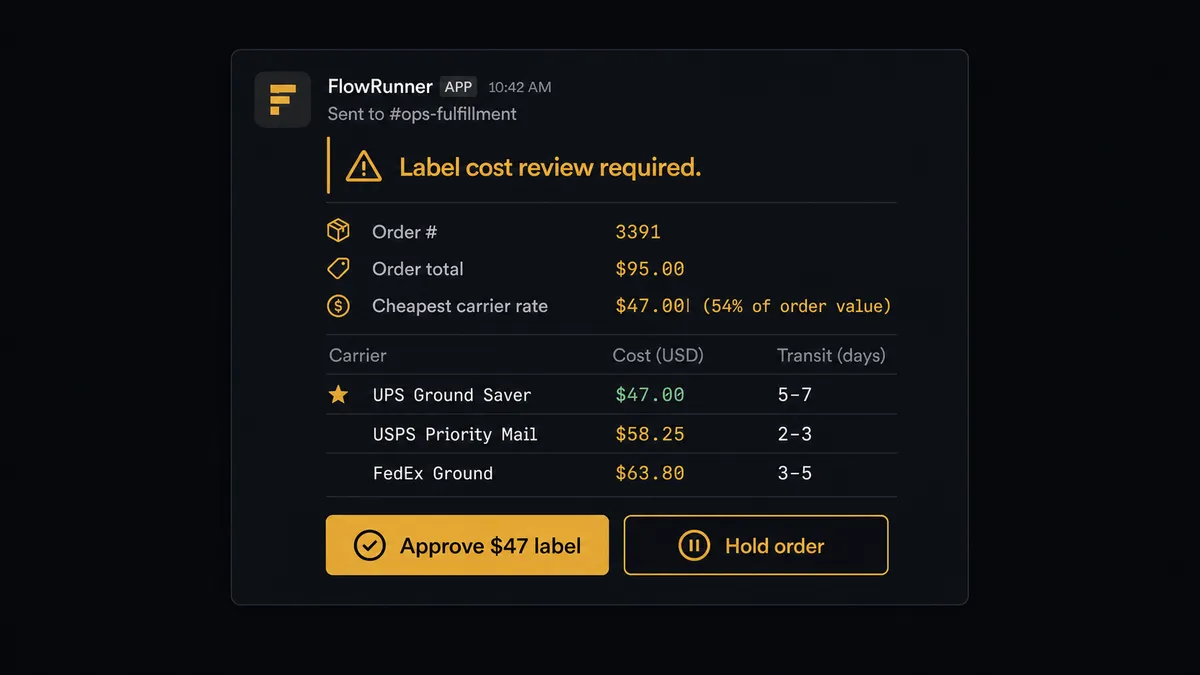
Consider an order where Get Shipment Rates returns a cheapest option of $47 on a $95 order. A script buys the label. An AI agent pauses. It recognizes that label cost as a margin event, assembles the context, and invokes the human-in-loop subflow it has been given as a tool.
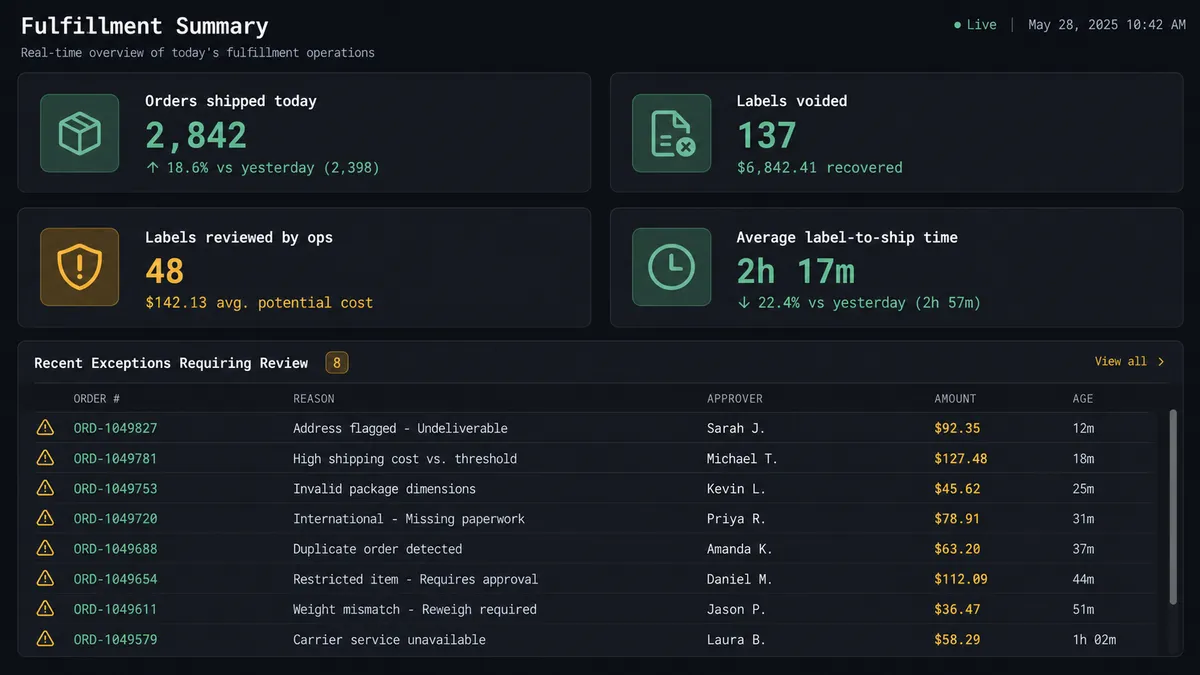
The agent posts to your Slack ops channel: “Order #3391, ShipStation. Cheapest label: $47 on a $95 order via USPS Priority. Next option: $31 with two extra transit days. Options: approve $47, downgrade to $31, or hold for review.” The agent supplies the order total, the customer’s order history, and the delivery promise from the Shopify record. The ops reviewer sees everything they need in a single card.
The reviewer clicks Approve. The agent receives that decision, calls Create Shipment Label with the approved service, marks the order as shipped, and records the approver’s name, the rate chosen, and the timestamp in the audit trail. If the reviewer clicks Hold, the agent calls Hold Order Until and parks the ShipStation order until someone unblocks it.
This is what FlowRunner means by human-in-loop. The agent does not hit a hardcoded threshold and fire a generic alert. It evaluates the data in front of it, decides the label cost is a judgment call, and surfaces exactly the information the person needs to make that call. The human stays in the loop because the agent put them there on purpose.
FlowRunner vs Zapier
Zapier is the right choice for teams that want a connector-first integration without a learning curve. It has thousands of apps, reliable polling triggers, and a user interface that anyone can navigate in an hour. If you want Shopify On New Order to push an order into ShipStation and buy a label, Zapier can do that in a Zap.
Where Zapier stops is where FlowRunner starts.
| Feature | Zapier | FlowRunner |
|---|---|---|
| Shopify and ShipStation connectors | Yes, both supported | Yes, both supported |
| Live carrier rate comparison before label purchase | Not natively; requires workarounds | Built into the agent via Get Shipment Rates |
| Human-in-loop on costly labels | Requires a separate approval Zap; linear, not agent-driven | Native: agent calls the human-in-loop subflow as a tool when it decides the label needs review |
| AI agent that reasons about order data | No; Zaps follow fixed step sequences | Yes; the agent reads the data and picks its next action |
| Unlimited users on every tier | No; Zapier charges per seat above free | Yes; all FlowRunner tiers include unlimited users |
| Audit trail for label approvals | Not built in | Every approval, approver, rate, and timestamp captured natively |
| Self-hosted deployment | No | Yes; Community Edition is free |
The real difference is not a feature list. It is the nature of the execution. Zapier executes a script. FlowRunner runs an agent. For a team processing hundreds of orders a week where label cost management and fulfillment exceptions matter, that difference shows up in the operations review every week.
Before and after
| Category | Before | After |
|---|---|---|
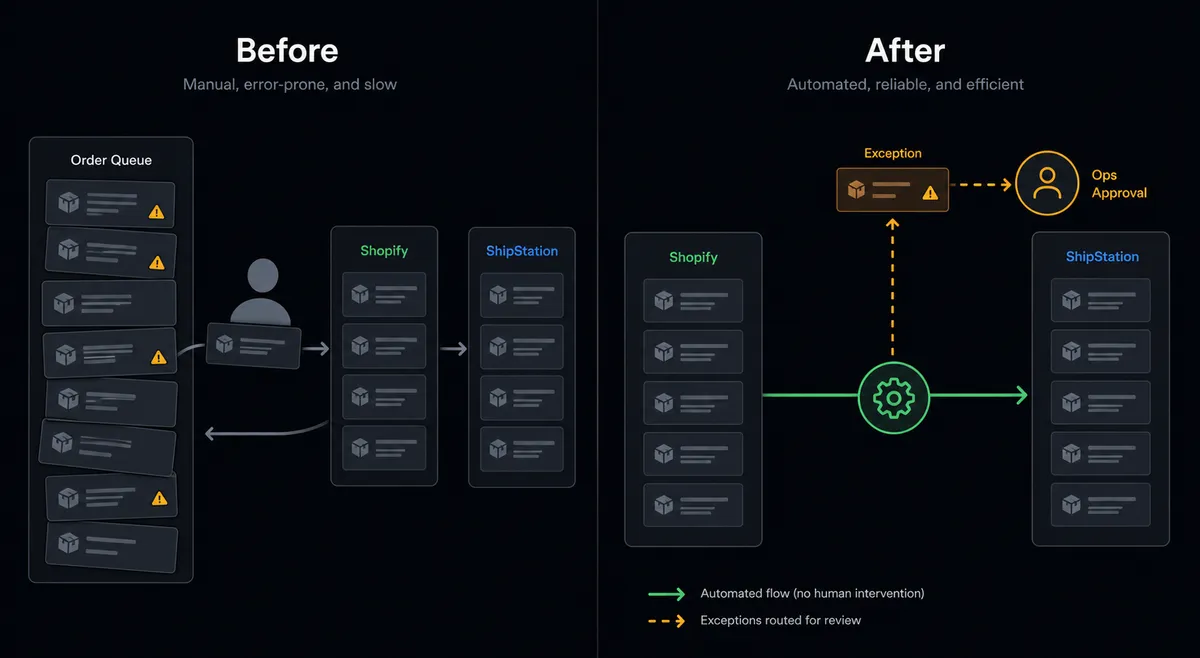
| Order processing time | Two to four minutes per order for manual ShipStation entry and label purchase | Orders routed and labeled the moment checkout fires; team touches only exceptions |
| Carrier rate shopping | Someone compares two or three options by eye before buying | Get Shipment Rates returns live options automatically; best option selected per service rule |
| High-cost label handling | Labels purchased without checking margin; discovered at the profit review | Labels above threshold pause for ops approval before purchase; margin protected per order |
| Voided labels | Easy to forget after a cancellation; postage lost | Void Shipment Label runs in-flow on cancellation; postage recovered automatically |
| Audit trail | Label decisions made in chat and email with no record | Every label decision, approval, and void logged with approver identity and timestamp |
| Exception routing | Exceptions buried in the same queue as routine orders | Flagged orders surface to ops via Slack; routine orders ship straight through |
What you can build
Order-to-label on checkout. Shopify On New Order triggers the agent. It pushes the order to ShipStation via Create or Update Order, calls Get Shipment Rates, and buys the label with Create Shipment Label. The order is shipped before anyone looks at the queue.
Margin-aware label approval. The agent calls Get Shipment Rates and evaluates the cheapest option against the order value. Orders where the label cost exceeds your configured percentage route to ops in Slack for a hold-or-approve decision before a dollar is spent.
Cancellation and void handling. Shopify On Order Updated fires when an order is cancelled. The agent checks whether a label was already purchased, calls Void Shipment Label in ShipStation to recover the postage, and logs the void in the audit trail.
Inventory-aware hold queue. The agent reads inventory levels via Get List of Inventory Levels before pushing an order to ShipStation. If a SKU is unavailable, it calls Hold Order Until to park the order and Restore Order from Hold when the supplier confirms the restock.
Shipment notification on label creation. ShipStation’s On New Shipment trigger fires when a label is created. The agent reads the carrier and tracking number and sends the customer their shipping confirmation the moment the label exists, not at the end of a batch.
Getting started
FlowRunner has a free plan with 100 executions a month, every integration included, and no credit card required, and new accounts get 14 days of Professional on top.
Connect your Shopify account and your ShipStation account, add the On New Order trigger, map the order fields, configure the carrier rate check, and set your cost threshold for human review. The first label the agent routes to ops for approval is the moment the value of the whole setup becomes obvious.
Start at flowrunner.ai or book a 30-minute walkthrough at calendly.com/flowrunner/intro if you want to see the agent decision logic before you build it yourself.
Frequently asked questions
Is it free to connect Shopify and ShipStation on FlowRunner?
FlowRunner has a free plan with 100 executions a month, every integration included, and no credit card required, and new accounts get 14 days of Professional on top. No credit card is required to sign up. Both the Shopify and ShipStation connectors are included on every paid tier.
Can I self-host FlowRunner for this integration?
Yes. FlowRunner offers a self-hosted Community Edition at no cost and a self-hosted Enterprise tier for teams that need multi-instance clustering and the full compliance suite. The Shopify and ShipStation connectors work the same on cloud or self-hosted.
Does the agent need my own API keys for OpenAI or another AI provider?
FlowRunner uses a bring-your-own-key model for AI providers. You connect your own key from any supported provider. The platform orchestrates the agent; you control which model it runs on.
What happens when the agent is not sure which carrier to use?
The agent calls Get Shipment Rates to pull live options, applies the order's service rule, and picks a carrier. If no option meets the rule or a label cost exceeds your configured threshold, the agent pauses, posts the options and margin impact to your ops channel, and waits for a person to decide before purchasing the label.
Does this replace a ShipStation employee or a Shopify admin?
No. The agent handles the routine order-to-label loop so your team can focus on the exceptions that actually need judgment. Holds, high-cost labels, disputed orders, and edge cases still come to a person. The agent scales what your team already does well.
What if an order is cancelled after the label is already purchased?
The agent can call Void Shipment Label when it detects a cancellation. Without automation, voiding is easy to forget and the postage spend is lost. The FlowRunner flow handles the void in-step with the cancellation event.