How to Connect Shopify with Slack (With or Without an AI Agent)
Connect Shopify's On New Order trigger to Slack's Send Message to Channel action so your team sees every order, refund, and dispute the moment it happens, optionally as an AI agent that pauses for a human before moving money.
How do you connect Shopify to Slack?
You connect Shopify to Slack by using the On New Order trigger in Shopify to fire a flow that calls Send Message to Channel in Slack, mapping the order number, customer name, total, and line items into the message body. FlowRunner is a visual AI-agent orchestration platform where automations run autonomously and pause for human judgment on the steps that carry real consequence. That same connection can run as an AI agent that reads each order, reasons about whether it is clean or flagged, routes routine orders automatically, and pauses in Slack for a human decision on anything that needs one.
The problem with manual order and exception handling
Right now, every order that lands in Shopify sits in the admin queue until someone opens the dashboard and works through it. For a team running dozens or hundreds of orders a day, that means a staff member is triaging a queue instead of doing anything else. Flagged orders, refunds, and disputes wait in the same pile. A dispute with a five-day evidence deadline gets no different treatment from a clean $40 order. Things fall through the cracks because the system has no way to separate routine from consequential.
Refunds are worse. The decision gets made in a Slack DM or an email thread, then someone manually keys the refund into Shopify. There is no consistent record of who approved what, and no way to know after the fact whether the refund was issued correctly or by the right person. When a chargeback dispute surfaces two weeks later, the audit trail is a chat history and a memory.
How it works: the connection
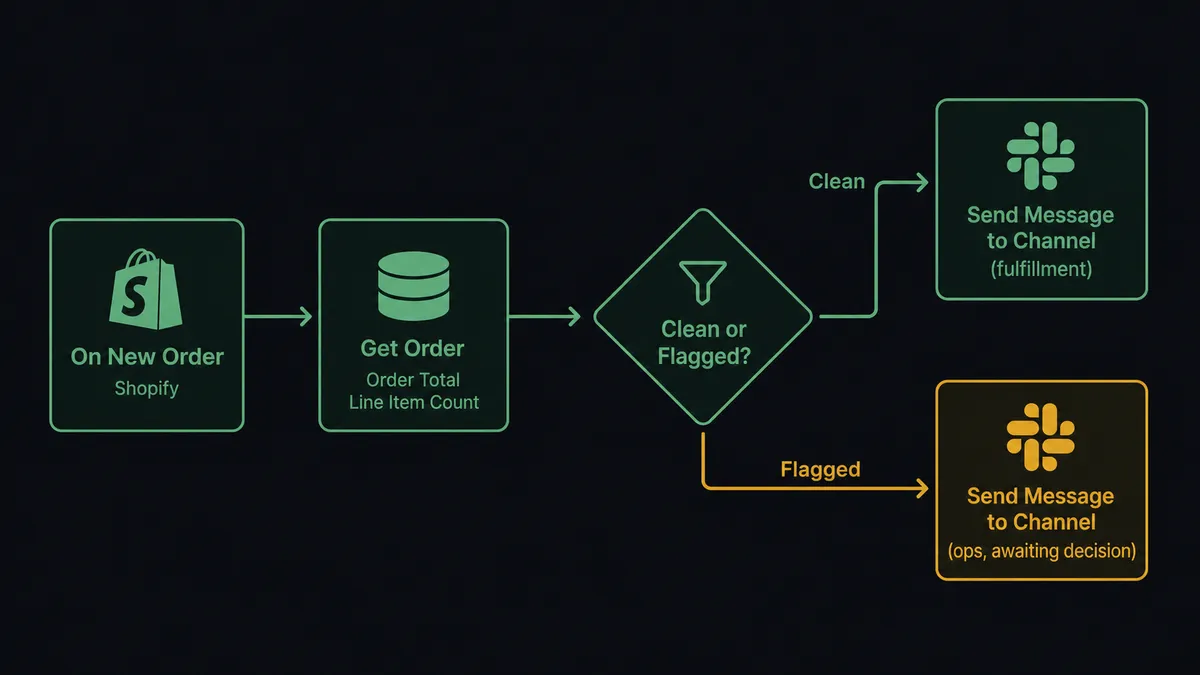
The foundation is a two-step flow. Shopify’s On New Order trigger fires the moment a customer completes checkout. The flow calls Get Order to pull the full order: line items, customer record, shipping address, and total. It then calls Send Message to Channel in Slack, posting a structured summary to your operations or fulfillment channel. The team sees the order immediately, formatted with the detail they need, without opening the Shopify admin.
For order lifecycle tracking, On Order Updated fires when anything changes, like a fulfillment status, a shipping update, or a cancellation. The flow reads the updated state and posts the delta to Slack so the team knows what changed without checking the dashboard.
For disputes, On New Dispute fires when a cardholder challenges a charge. The flow calls Get List of Disputes to pull the case, pairs it with the original order via Get Order, and posts a summary to the finance channel: dispute amount, reason, evidence deadline, and the full order context. The team has everything they need to act before the window closes.
Can an AI agent run it? (and why a human stays in the loop)
A notification flow tells your team what happened. An AI agent decides what to do about it.
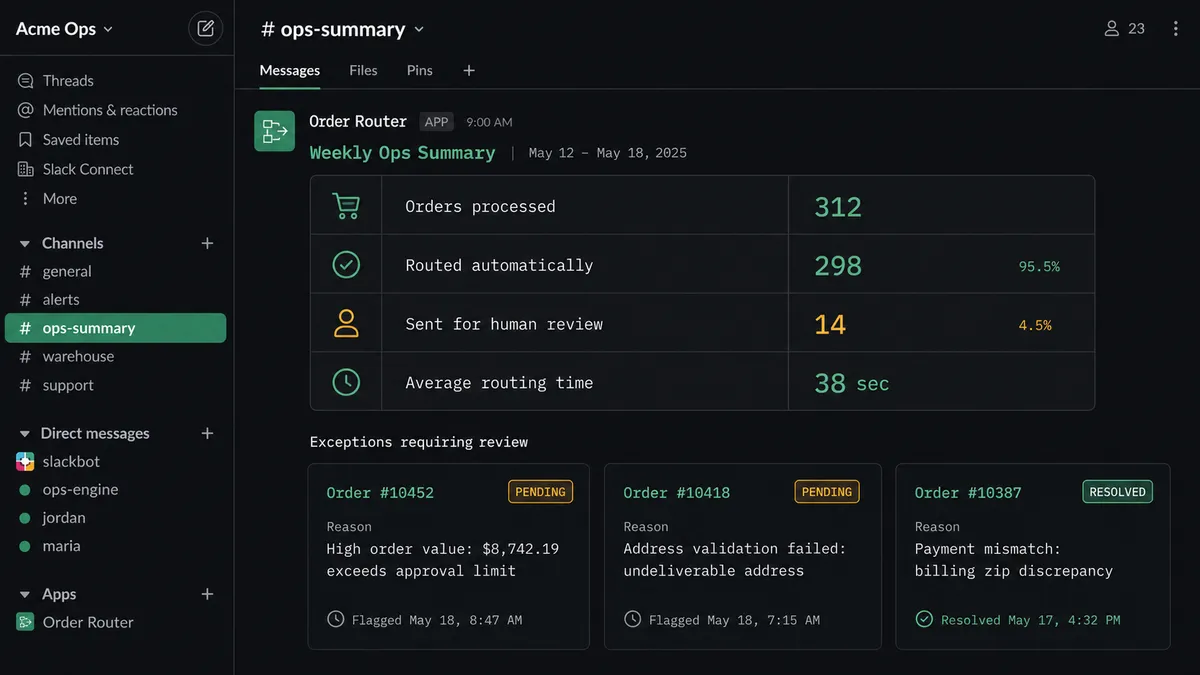
When you add an Agent node to the Shopify-to-Slack flow, the agent becomes the decision-maker. It has Get Order, Get List of Inventory Levels, Add Tags, Send Message to Channel, Send Direct Message, and Create Refund as tools. It reads the order, evaluates what it finds, and chooses which tools to use and in what order. A $55 order from a repeat customer with a clean address? Tagged, routed to fulfillment, confirmation sent. A $1,800 order from a first-time customer in a flagged postal code, paying with an address that does not match the card? The agent stops.
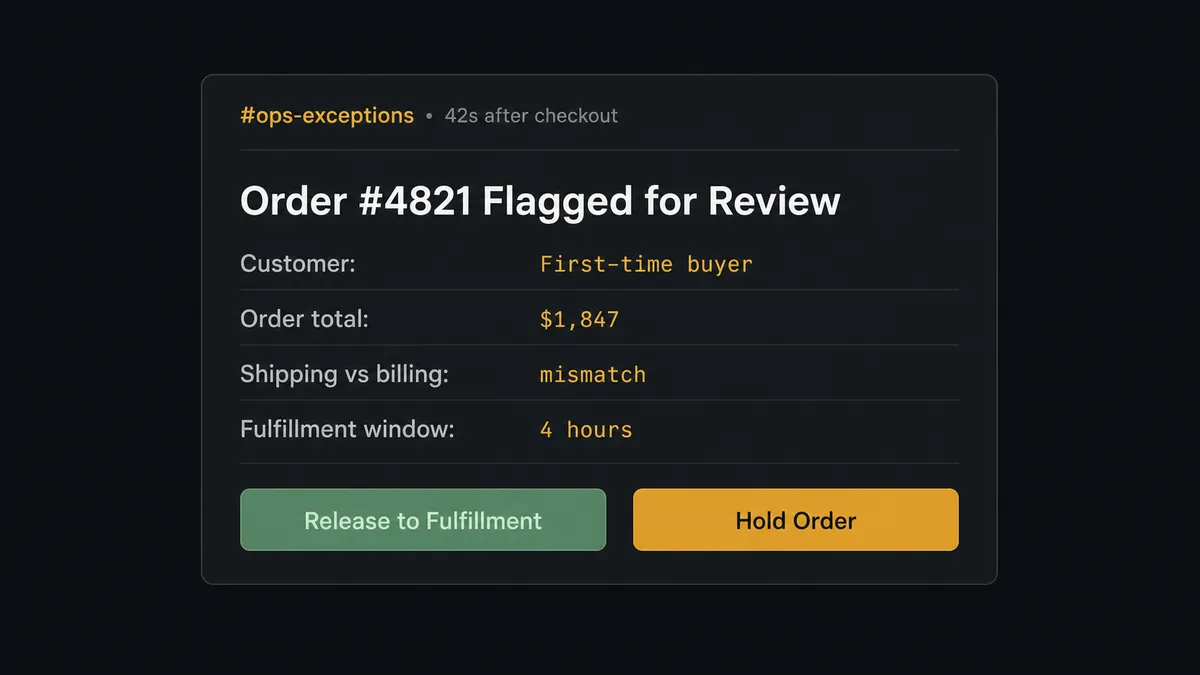
Here is what stopping looks like. The agent packages the order number, the customer record, the specific signals that raised its concern (mismatched address, first-time buyer, order total relative to this customer’s history), and posts to the operations channel in Slack: “Order #4821 flagged for review. First-time customer, order total $1,847, shipping address does not match billing. Hold or release to fulfillment?” Two buttons: Hold and Release. The ops manager taps Release from their phone. The agent resumes, tags the order, and hands it to fulfillment. The decision, the decider’s identity, and the timestamp are in the audit trail.
This is not a threshold. The agent does not flag every order over $1,000. It reasons about context. A $3,000 order from a wholesale account with two years of clean history routes automatically. A $300 order that trips three signals in combination gets escalated. Prospects call this the “digital andon cord”: the agent stops the line when it hits something it should not decide alone.
The same logic applies to refunds. Create Refund is a tool the agent has, but it does not call it without a named approver. When a return flow reaches the refund step, the agent posts to Slack with the order details, the refund amount, the restock intent, and a single-button approval. The money does not move until a person says so.
FlowRunner vs Zapier
Zapier is the tool most non-technical teams reach for first, and for good reason. It has a large integration library, a familiar interface, and a shallow learning curve. For a simple “new Shopify order posts to Slack” notification, Zapier works.
The gap appears when orders need reasoning, not just routing.
| Feature | Zapier | FlowRunner |
|---|---|---|
| Basic order-to-Slack notifications | Yes, works well | Yes |
| AI agent reads and reasons about order data | No native agent node | Yes, agent node with tool selection |
| Human-in-loop as a callable tool (agent decides when) | No; approvals require manual zap branching | Yes; agent invokes the human step on its own judgment |
| Interactive Slack buttons that resume the workflow | Limited; requires multi-step Zap + webhook | Native On Block Action trigger |
| Unlimited users on every plan | No; user-based pricing on most tiers | Yes, every tier |
| Audit trail for every human decision | No | Yes, with approver identity and timestamp |
Zapier is a sync tool. FlowRunner is an orchestration layer. The difference shows up at the exception.
Before and after
| Category | Before | After |
|---|---|---|
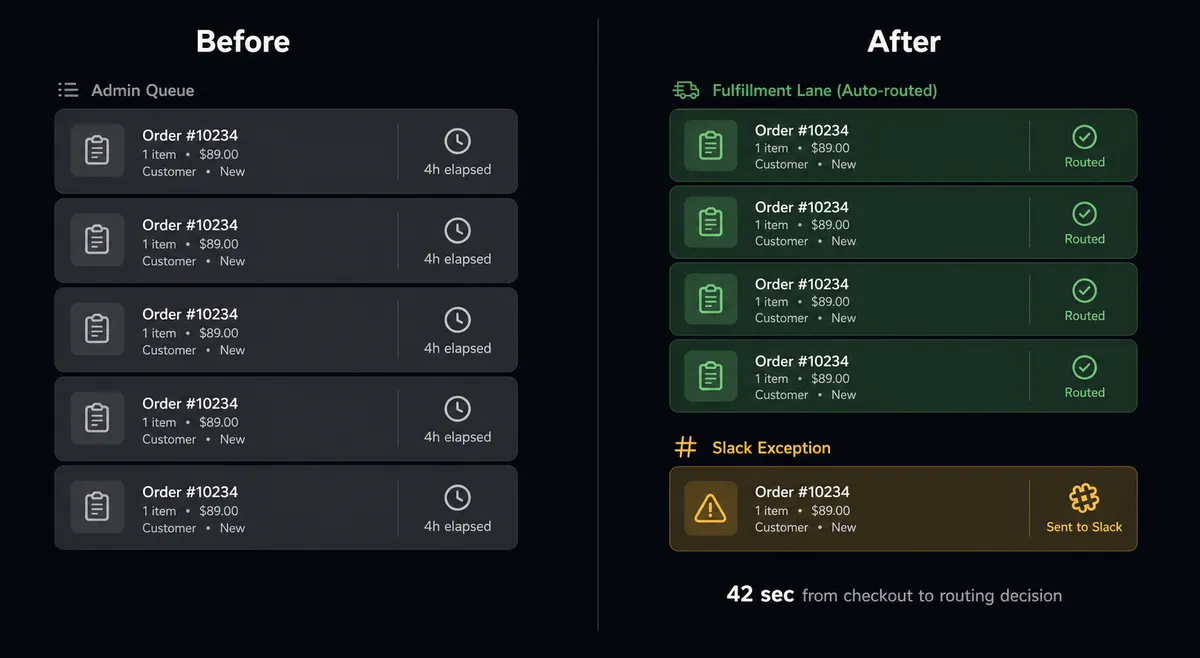
| Order triage | New orders wait in the admin queue until a staff member opens the dashboard and routes each one manually | Orders are validated, tagged, and routed the moment they are placed; routine orders require no one |
| Exception visibility | Flagged orders sit in the same queue as clean ones; nothing separates routine from consequential | Flagged orders post to Slack immediately with full context; the team sees exceptions, not the full queue |
| Refund approvals | Refund decisions made in DMs, keyed manually into Shopify, no consistent record of approver | Every refund posted to Slack with context, issued only after a named approver responds, decision captured in audit trail |
| Dispute response | Finance learns about disputes when they check the Shopify Payments dashboard; deadline risk is real | On New Dispute fires immediately; evidence summary and deadline posted to Slack within seconds of the dispute opening |
| Inventory drift | Stock counts fall out of sync between storefront and warehouse; oversells surface at fulfillment | Set Inventory Quantities syncs counts per location as the supplier feed updates; low-stock alerts post to Slack before a stockout |
What you can build
Order fraud review with one-tap Slack approval. The agent reads every new order via Get Order, checks Get List of Inventory Levels to confirm stock is available, and scores the order against fraud signals. Clean orders route automatically. Flagged orders stop at a Slack message with Hold and Release buttons. One tap resumes or parks the order. No queue management, no dashboard toggling.
Dispute response before the deadline. On New Dispute fires and the agent calls Get Order and Get List of Disputes to pull the full case. It posts a structured Slack summary to the finance channel with the dispute amount, reason, evidence deadline, and the original order details. The finance team has everything they need without opening Shopify Payments.
Refund approval gate. When a return or dispute flow reaches the refund step, the agent posts to Slack with the order number, customer name, refund amount, and restock intent. Create Refund does not run until a named approver clicks Approve. Every decision is logged with identity and timestamp.
Inventory low-stock alerts. A scheduled flow reads Get List of Inventory Levels across locations. When any SKU drops below its reorder threshold, the agent posts a low-stock note to the operations channel via Send Message to Channel. Buying sees the dip when it happens, not at the next stockout.
Customer lifecycle sync to Slack. On New Customer fires when a buyer creates an account. The agent reads the customer record, tags them via Add Tags based on acquisition source or order history, and posts an onboarding summary to the appropriate Slack channel so the right team member can follow up.
Getting started
FlowRunner has a free plan with 100 executions a month, every integration included, and no credit card required, and new accounts get 14 days of Professional on top. Connect your Shopify store and your Slack workspace, build your first order routing flow in the visual builder, and test it against a real order before you turn it on.
Start with the integrations: Shopify and Slack.
Start your free trial at flowrunner.ai. If you want to walk through the setup with someone first, book a 30-minute call at calendly.com/flowrunner/intro.
Frequently asked questions
Is it free to connect Shopify and Slack on FlowRunner?
FlowRunner has a free plan with 100 executions a month, every integration included, and no credit card required, and new accounts get 14 days of Professional on top. After that, Growth is $45 per month and includes 12,000 executions, unlimited users, and unlimited workflows.
Can I self-host FlowRunner?
Yes. FlowRunner offers a Community Edition that runs on a single instance at no cost, and a self-hosted Enterprise tier for teams that need multi-instance clustering, full audit trails, and SSO. Cloud-hosted plans start free, with paid plans from $5 a month and Growth at $45 a month.
Does the agent need my own OpenAI or Claude API key?
FlowRunner uses a bring-your-own-key model. You connect your own AI provider keys, whether that is OpenAI, Anthropic, or another supported provider. FlowRunner orchestrates the calls; your keys stay under your control.
What happens when the agent is not sure whether to process an order?
The agent pauses and sends a Slack message with the full order context, the reason it flagged the order, and Approve or Hold buttons. The team member decides. The agent resumes the moment they respond, and the decision is captured in the audit trail.
How is this different from a Shopify Slack app or a Zapier workflow?
A basic Shopify-to-Slack connection forwards notifications. FlowRunner agents read the order data, reason about it, and route it based on what they find. Exceptions go to a human with full context; routine orders route automatically. The agent decides which path, not a hardcoded rule.
Can the agent handle Shopify disputes and refunds, not just new orders?
Yes. The On New Dispute trigger starts a dispute-response flow, and the Create Refund action is gated behind a human approval step. The agent assembles the order context and evidence summary, then waits for a named approver in Slack before issuing the refund.