How to Connect Slack with Baserow (With or Without an AI Agent)
Turn Slack requests into Baserow rows and keep your tracker current from the channel, with an AI agent that reads, creates, and updates rows on its own and pauses for a human before any batch update or batch delete touches the table.
How do you connect Slack to Baserow?
You connect Slack to Baserow by having Slack’s On Channel Message trigger drive Baserow actions: a request posted in the intake channel is parsed and written into your table with Create Row, checked against existing entries with List Rows, and confirmed back in the thread with Send Message To Channel, so the tracker fills itself from the conversation. FlowRunner is a visual AI-agent orchestration platform where automations run autonomously and pause for human judgment on the steps that carry real consequence. The same connection can run as an AI agent that maintains the table conversationally, answering questions with List Rows and fixing single rows with Update Row, while holding Update Rows (Batch) and Delete Rows (Batch) behind a named approval because batch operations rewrite the table wholesale.
The problem it solves
Baserow is where the team’s operational truth is supposed to live: the request tracker, the asset registry, the vendor list. Slack is where the requests actually arrive. Between them sits a person who is supposed to notice “hey, can someone order a new laptop for the Austin hire” in the channel and turn it into a row with an owner, a status, and a date. Some days that happens. Other days the request lives and dies as a message, and three weeks later nobody can say whether the laptop was ordered because the table never heard about it.
The table rots at the edges too. Statuses go stale because updating a row means switching apps mid-conversation. Duplicates pile up because nobody checks before adding. And the periodic cleanup, closing out a quarter’s worth of done rows, reassigning an offboarded teammate’s items, is a batch edit performed by one person, late, with no one reviewing which rows are about to change. A tracker the team cannot trust is worse than no tracker, because decisions still get made on it.
How it works: the connection
The connection listens to Slack and writes to Baserow. Here is the plain version, grounded in the real connector actions.
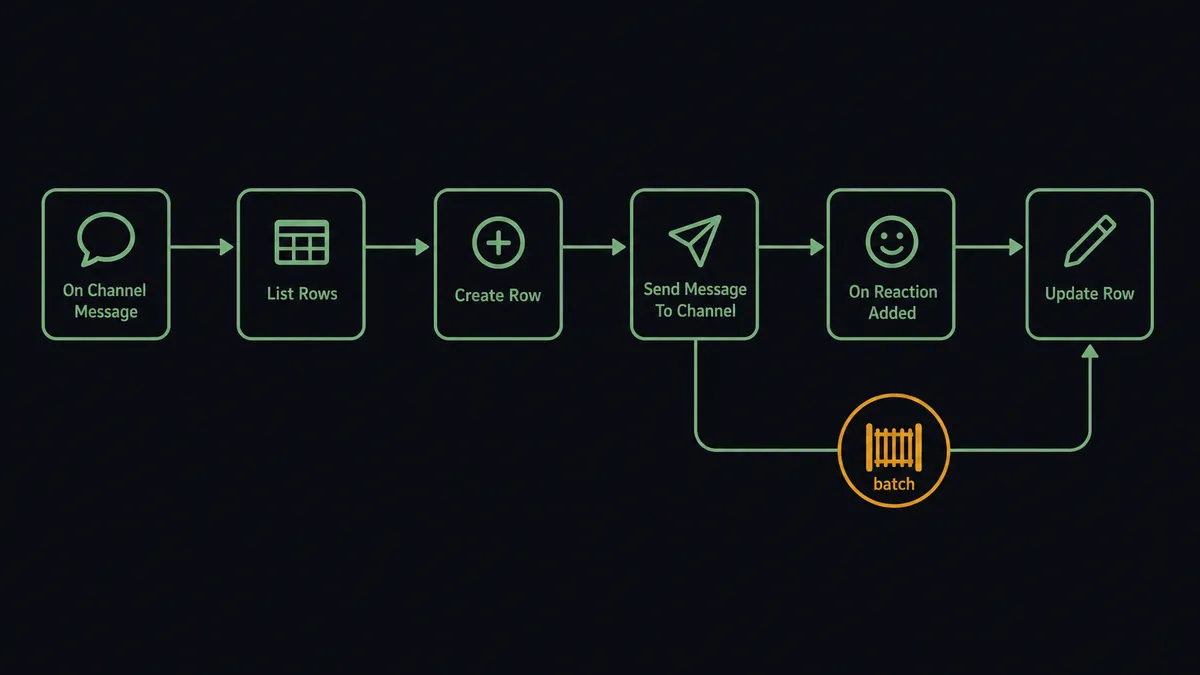
- Trigger: Slack fires On Channel Message when a request lands in the intake channel.
- Check for duplicates: The workflow calls List Rows with a search on the request’s key details, using Baserow’s filter syntax keyed by human-readable field names.
- Write the row: It calls Create Row with a field-keyed object: requester, description, status, date.
- Confirm: It calls Send Message To Channel in the thread with the new row’s contents and owner, so the requester knows it is tracked.
- Status by emoji: On Reaction Added fires when a teammate marks the message done with the agreed emoji, and the workflow calls Update Row to flip the row’s status.
- Answer questions: On Mention lets anyone ask “what’s still open for the Austin office?”, and the workflow answers from List Rows with ordering and filters.
- Import in bulk: When a list arrives as a message or file, the workflow calls Create Rows (Batch) to land it in one request instead of row by row.
That is the “just connect them” answer. The tracker stays current because updating it costs nothing: the conversation is the interface, and the table is the memory.
Can an AI agent run it? (and why a human stays in the loop)
Yes, and the agent is the difference between message-parsing and table-keeping. It holds the Baserow actions as tools: List Rows, Get Row, Create Row, Update Row, Move Row, Create Rows (Batch), Update Rows (Batch), Delete Rows (Batch), plus List Fields to understand the table’s shape before writing to it. Given a loosely worded request, the agent decides what it means for the table: a new row, a status change on an existing row it finds with List Rows, or just a question that needs an answer, not a write.
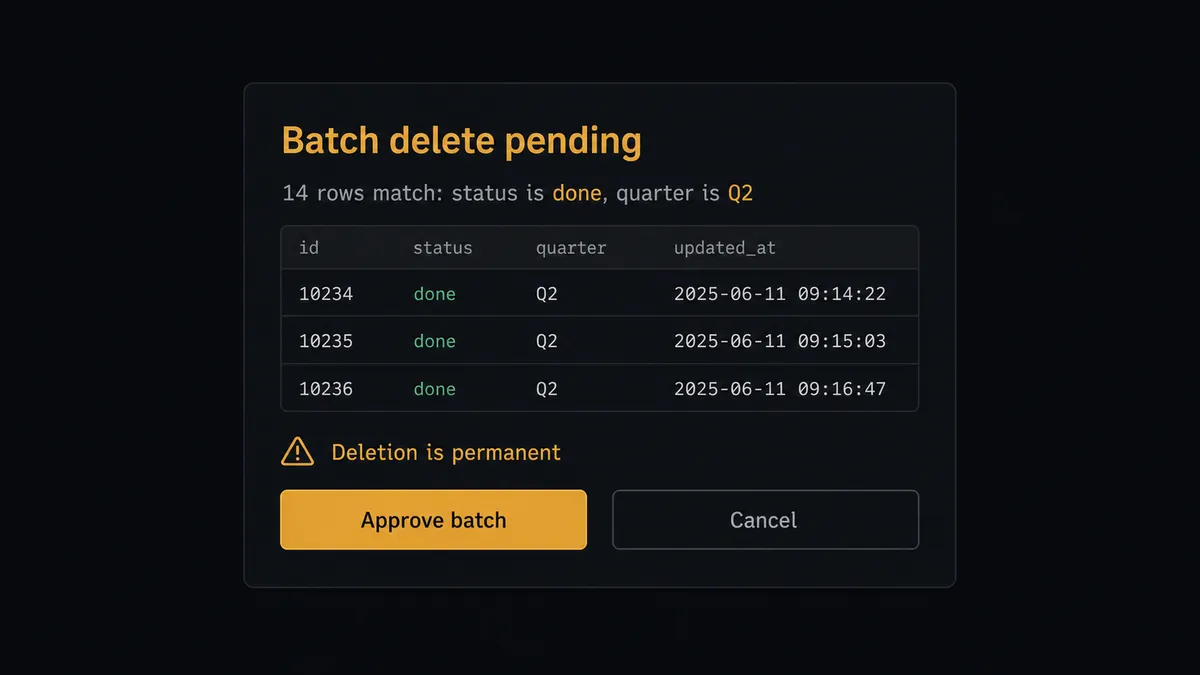
The consequential step is the batch. Update Row on one row is a small, visible, correctable act. Update Rows (Batch) and Delete Rows (Batch) rewrite or remove many rows in a single request, and a filter that matches more than intended quietly damages the team’s memory. So the agent’s rule is structural: before any batch operation, it runs the same filter through List Rows, then invokes the human-review flow it holds as a callable tool. The card in Slack reads: “Proposed: Delete Rows (Batch) on [table], [n] rows matching [filter], sample attached. These rows are gone permanently. Approve?” A named teammate approves, the batch runs, and the operation, approver, and timestamp are recorded. Single-row fixes never queue behind approvals; wholesale changes never skip them.
That split is the digital andon cord in table form: the line keeps moving for the everyday writes, and stops exactly when a change is big enough to deserve eyes. The team gets a tracker that maintains itself without ever waking up to a table someone’s filter emptied overnight.
FlowRunner vs Fivetran
Fivetran is the benchmark for managed data replication, and that reputation is earned: point it at a source, and it lands clean, incremental copies in your warehouse with schema drift handled and almost nothing to maintain. If the job is analytics, getting operational data into Snowflake or BigQuery for dashboards, Fivetran is built for exactly that.
This pair is a different job. A request tracker is not a replication target; it is a live table that needs rows created from conversations, statuses flipped from reactions, and cleanups reviewed before they run. That is per-row judgment and mid-flow human decisions, which is orchestration territory, not pipeline territory.
| What matters for this pair | FlowRunner | Fivetran |
|---|---|---|
| Human-in-the-loop on batch updates and deletes | Native. The agent posts matched rows and waits for a named approver | Not applicable; replication has no approval concept |
| Who runs the flow | An AI agent parses requests, reasons, picks row actions as tools | Scheduled sync pipelines, no per-row logic |
| Users included | Unlimited users on every tier | Priced per connector and consumption, not per collaborator |
| Bring your own AI keys | Yes, BYOK | No agent layer to bring keys to |
| Self-hosted option | Yes, cloud-hosted or self-hosted, and Baserow itself can be self-hosted too | Cloud service |
| Pricing model | Transparent workflow-based tiers | Consumption-based (MAR), which grows with row volume |
If you need Baserow data mirrored into a warehouse for BI, Fivetran-style replication is the right tool for that lane. If you need the table itself operated, filled from Slack, queried in plain language, and cleaned up under approval, this pairing is the fit.
Before and after
| Category | Before | After |
|---|---|---|
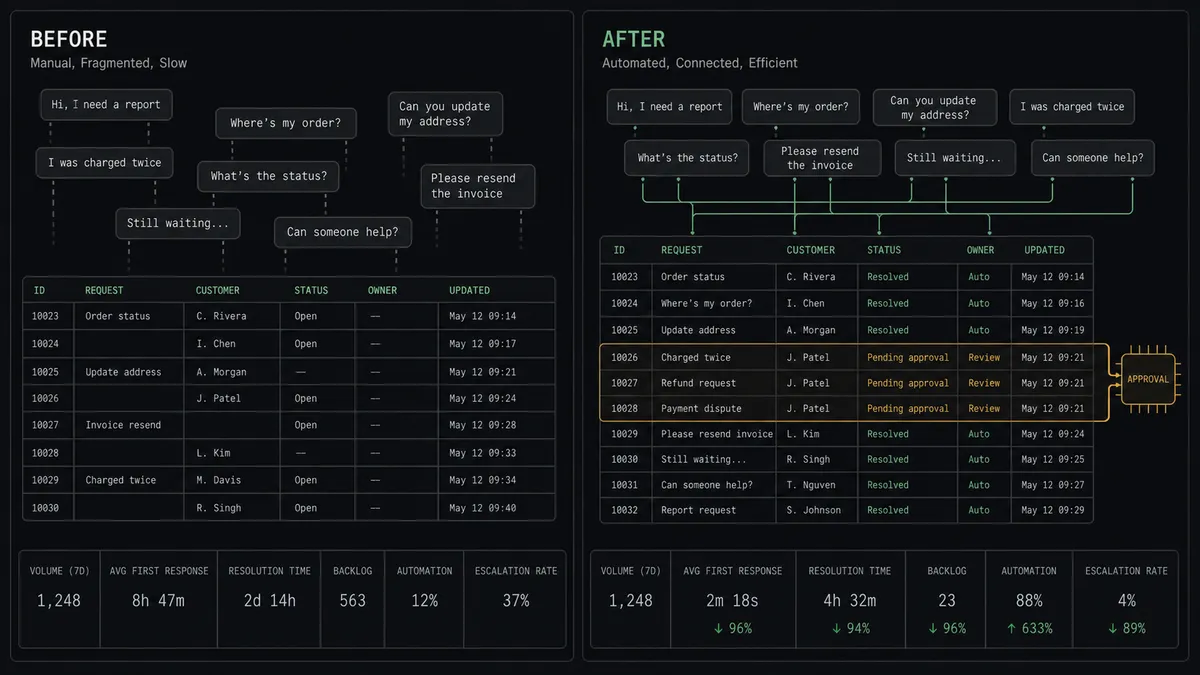
| Request intake | Requests live as messages until someone remembers to add a row | On Channel Message turns each request into a Create Row with an owner |
| Status accuracy | Rows go stale because updating means leaving the conversation | On Reaction Added flips status via Update Row from the thread itself |
| Duplicates | Nobody checks the table before adding | List Rows runs a match before every insert |
| Bulk cleanups | One person’s filter, applied late at night, unreviewed | Batch operations show matched rows and wait for a named approval |
| Answering “what’s open?” | Open Baserow, filter, screenshot, paste | Ask the agent in the channel; List Rows answers in seconds |
What you can build
Channel-to-tracker intake. On Channel Message parses each request, List Rows checks for an existing match, Create Row writes it, and the thread gets a confirmation with the owner. Nothing asked in the channel goes untracked.
Emoji status board. On Reaction Added flips a request’s row through Update Row when the agreed emoji lands, and Move Row reorders the queue when priorities change. The tracker mirrors the conversation without anyone opening it.
Conversational lookups. On Mention answers “what’s still open for Austin?” straight from List Rows with filters and ordering, formatted into the thread. The table becomes queryable by anyone, not just table people.
Reviewed quarter-close. The agent proposes closing out finished rows with Update Rows (Batch), posts the matched set, and runs it after approval. Delete Rows (Batch) for true removals gets the same gate with a permanence warning.
Import desk. A pasted list or shared CSV becomes a Create Rows (Batch) proposal: the agent posts the column mapping and row count it parsed, and lands the whole batch in one request once a teammate confirms the mapping.
Getting started
Start on the free plan: 100 executions a month, every integration included, no credit card required, plus 14 days of Professional for new accounts. Both connectors are available on every tier, and every tier includes unlimited users and unlimited workflows.
Explore the integration details:
- Slack integration (8 triggers and 16 actions covering messages, reactions, files, and channel management)
- Baserow integration (15 actions covering rows, batches, tables, and fields)
Start building free at flowrunner.ai or book a demo to see a live Slack to Baserow workflow, batch-approval gate and all.
Frequently asked questions
Is it free to connect Slack and Baserow on FlowRunner?
You can build and run the connection on FlowRunner's free plan, which includes 100 executions a month and every integration with no credit card required, and new accounts also get 14 days of Professional. Both connectors are available on every FlowRunner tier, and every tier includes unlimited users and unlimited workflows.
Can I self-host the Slack to Baserow workflow?
Yes. FlowRunner offers a cloud-hosted option and a self-hosted option, so the connection can run inside your own environment. It works with Baserow Cloud or a self-hosted Baserow instance, so both sides can live on your infrastructure.
Does the AI agent need my own OpenAI or Claude key?
FlowRunner uses a bring-your-own-keys model, so you connect the AI provider key you already have. You are not locked to one model.
What happens when the agent is asked to change many rows at once?
It stops first. The agent runs List Rows with the same filter, posts how many rows match and a sample of them to Slack, and waits. Update Rows (Batch) or Delete Rows (Batch) executes only after a named teammate approves, and the approval is captured in the audit trail.
Which Slack triggers work best with Baserow?
On Channel Message turns a request channel into table intake, On Mention lets anyone query or update the table by asking the agent, and On Reaction Added works as a lightweight status change, for example marking a request row done when someone reacts with the agreed emoji.
Can the workflow import a whole list into Baserow at once?
Yes. Create Rows (Batch) creates many rows in a single request, which is the right tool for imports and syncs. The agent posts a preview of what it parsed, the column mapping and row count, before the batch lands in the table.