How to Connect Slack with Linear (With or Without an AI Agent)
Connect Slack and Linear so that alerts, decisions, and status updates flow between your team's communication hub and issue backlog, with an AI agent that searches before it creates and pauses for a human on ambiguous calls.
How do you connect Slack to Linear?
You connect Slack to Linear in FlowRunner by setting an On Channel Message trigger in Slack as the starting point, then using Create Issue or Create Comment in Linear as the action. FlowRunner is a visual AI-agent orchestration platform where automations run autonomously and pause for human judgment on the steps that carry real consequence. The same connection can run as an AI agent that searches for duplicate issues before creating anything and pauses for a human when the match is unclear.
The problem operations teams run into
When your team reports production issues or operational problems through Slack, someone has to decide whether that report is a new Linear issue or a duplicate of something already open. In practice, that decision falls through the cracks. Engineers create duplicate issues because they do not have time to search the backlog. Triage leads scan threads manually to catch the repeats. The backlog fills with noise, and real problems get buried under repeated entries for the same incident.
The downstream consequence is equally slow. When an issue in Linear moves to Done, the original requester rarely hears about it unless someone remembers to loop them in. Stakeholders are left checking Linear themselves, or not checking at all and assuming work is still in progress. The two tools that should form a complete loop, Slack for communication and Linear for tracked work, operate as disconnected silos connected only by the effort of whoever happens to notice the gap.
How it works: the connection
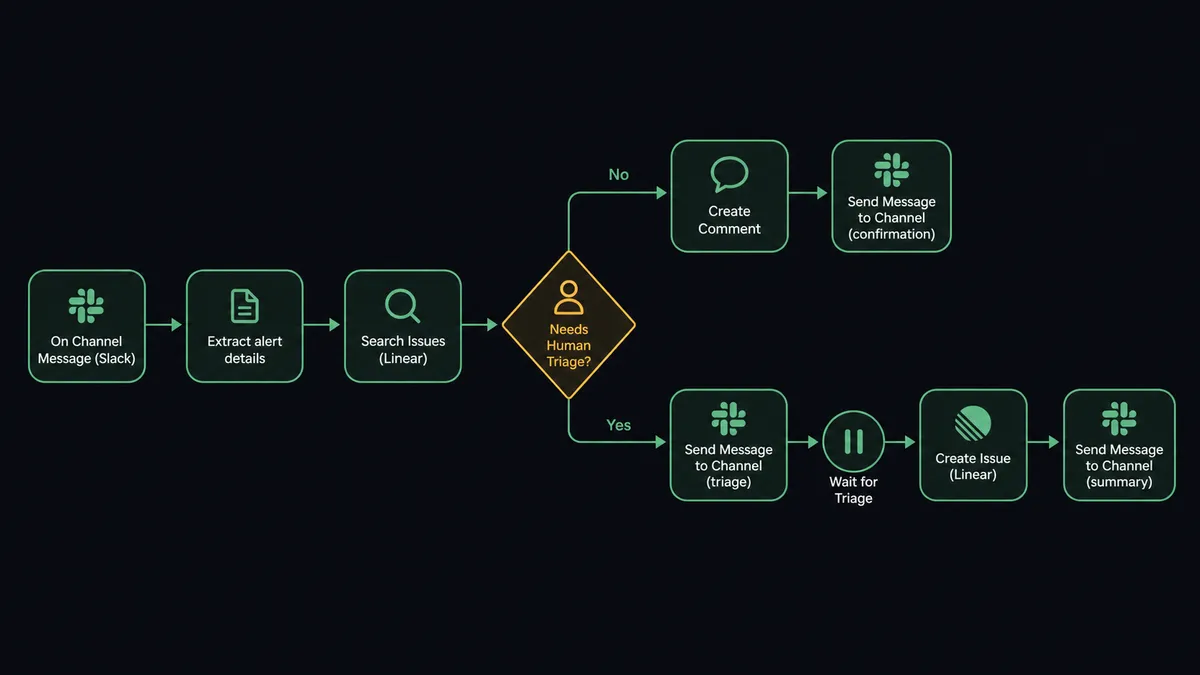
The core connection works like this. A team member posts a message in a designated Slack channel, for example a #incidents or #eng-triage channel, and On Channel Message fires. The workflow reads the message, extracts the relevant component or keyword, and runs Search Issues in Linear. If it finds an open match, it calls Create Comment to add the new report to the existing issue. If it finds no match, it creates a new issue using Create Issue on the correct Linear team, setting title, description, and priority from the incoming message.
On the reverse side, you can use On Linear Event to start a workflow the moment an issue moves to a Done state in Linear. The workflow reads the issue details and uses Send Message to Channel to notify the original requester in Slack that their request is resolved. That loop closes without anyone manually checking Linear.
The data mapping covers what both tools need. From Slack you get the message content, the channel, and the sender. Linear’s Create Issue takes a title, description, team, assignee, priority (Linear’s numeric scale), and optional labels and workflow state. If you are using Send Message to Channel to report back, you can include a link to the issue and the status in a single formatted message.
Can an AI agent run it? (and why a human stays in the loop)
A plain Zapier or n8n integration runs the same action every time. If a message arrives, create an issue. There is no reasoning, no dedup, and no pause for a human on the ambiguous call. An AI agent in FlowRunner works differently.
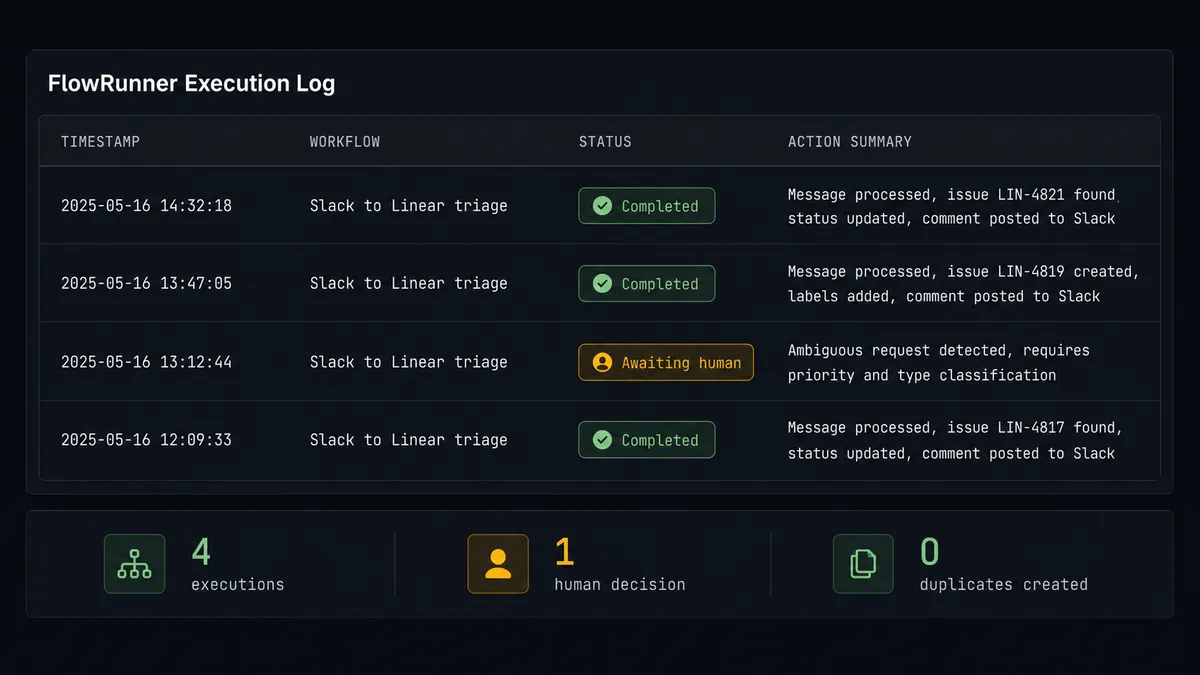
The agent reads the incoming Slack message and evaluates it against context. It runs Search Issues and looks at what comes back. If it finds a clear match, it handles it with Create Comment and moves on, no human involved. If the match is uncertain, say the alert references a component that has an open issue but the symptoms look different, the agent does not guess. It stops.
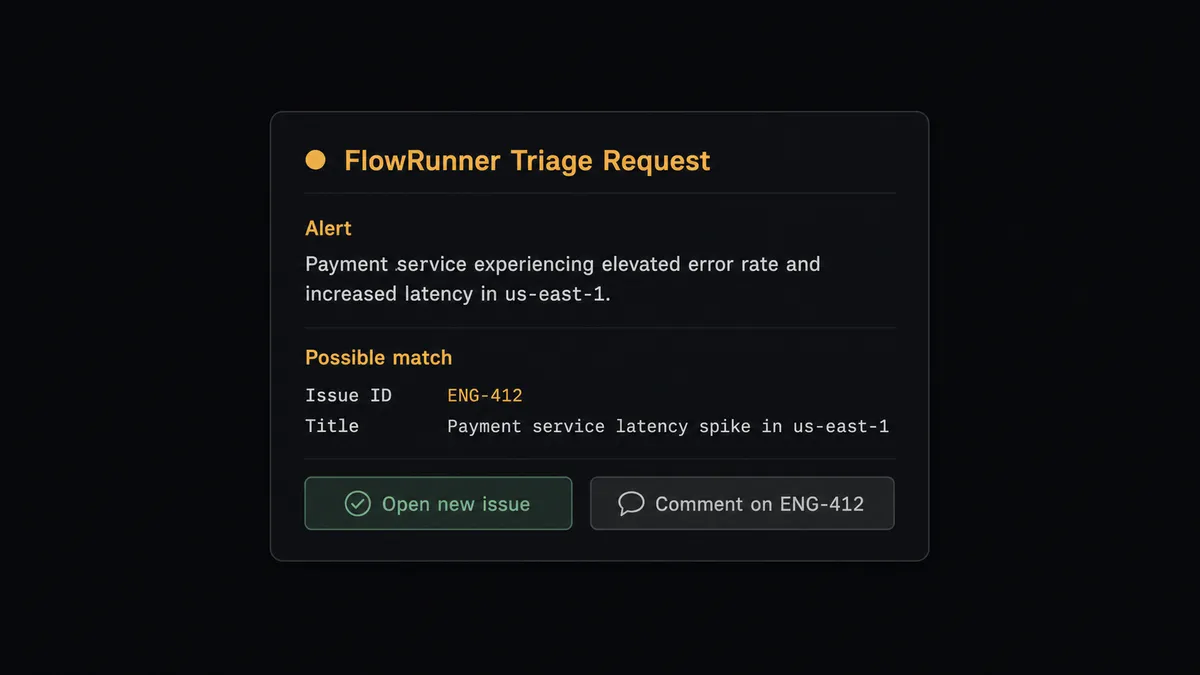
The agent packages the full alert context, the proposed new issue title, and the closest existing match (for example, “This alert may match issue ENG-412 or may be new”). It posts this to your Slack triage channel using Send Message to Channel with interactive buttons: “Open new issue” or “Comment on ENG-412.” The On Block Action trigger fires when the triage lead clicks a button. The agent resumes with the human’s decision and calls Create Issue or Create Comment accordingly.
This is not a hardcoded threshold. The agent decides to escalate based on what it found in Search Issues and the specifics of the incoming alert. A clear match gets handled automatically. An ambiguous one gets a human. The triage lead’s identity, the decision, and the timestamp all land in the FlowRunner audit trail. Your team touches the cases that need judgment. The agent handles everything else.
This is what prospects call a digital andon cord: the agent stops the line when it hits uncertainty rather than guessing and creating noise in the backlog.
FlowRunner vs Zapier (the tool you are probably comparing)
Zapier does trigger-action connections well, and its Slack and Linear steps are straightforward to set up. For a simple one-way flow where every matching message becomes a new issue, Zapier works. The gap shows up when the logic requires judgment.
| Capability | Zapier | FlowRunner |
|---|---|---|
| Basic Slack-to-Linear trigger and action | Yes | Yes |
| Dedup check before creating an issue | No (requires a workaround via lookup steps) | Native: agent runs Search Issues before acting |
| Human-in-loop on ambiguous cases | No native support | Agent pauses, posts to Slack with buttons, resumes on response |
| Agent reasons about context before acting | No | Yes: agent evaluates the match and decides whether to create, comment, or escalate |
| Audit trail with decision and decider identity | No | Yes: every human response captured with timestamp |
| Unlimited users on every plan | Per-seat pricing on most plans | Yes: all FlowRunner tiers include unlimited users |
| Self-host option | No | Yes: Community Edition is free |
Zapier’s strength is speed of setup for simple automations. FlowRunner’s value shows when the automation involves a decision that could go wrong.
Before and after
| Category | Before | After |
|---|---|---|
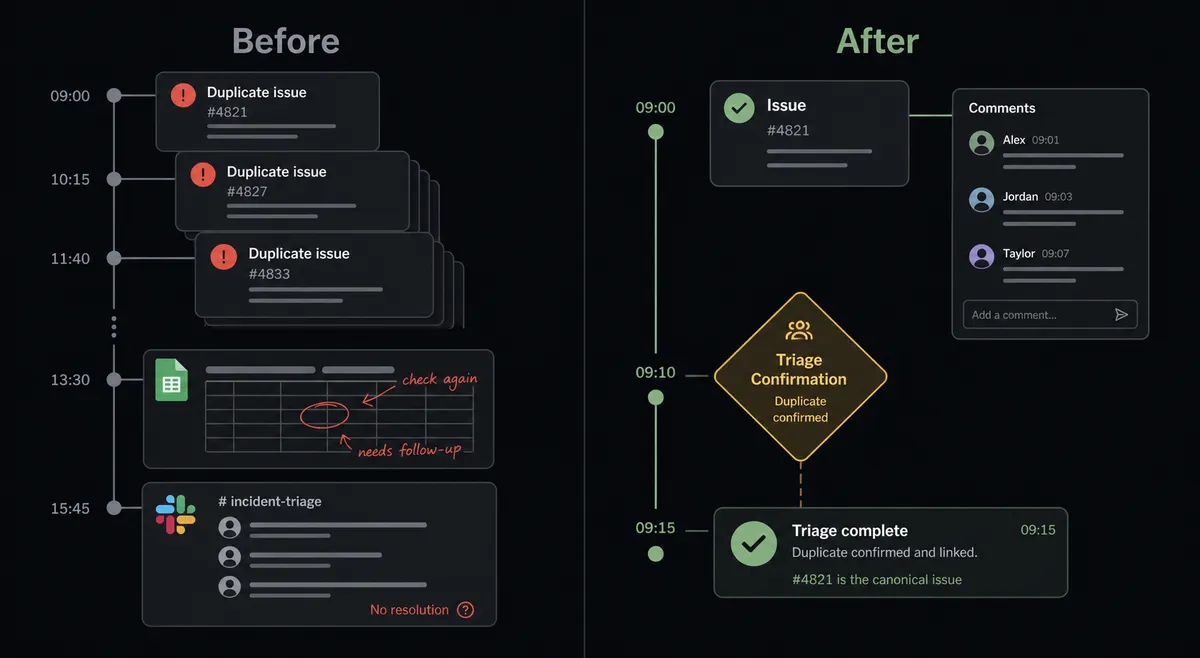
| Duplicate issues | Every alert opens a fresh issue; the backlog fills with repeats | Agent runs Search Issues first; clear matches become comments, not new issues |
| Triage time | Someone scans the backlog manually to merge duplicates after the fact | Agent posts ambiguous cases to Slack for a one-click decision from the triage lead |
| Status loop | Requesters check Linear themselves or assume work is still open | On Linear Event notifies the Slack requester the moment an issue moves to Done |
| Audit trail | No record of who decided to open or close an issue | Every human confirmation captured with identity and timestamp in FlowRunner |
| Team access | Tool costs scale with the number of people who need to interact | Unlimited users on every FlowRunner tier; the whole team interacts at no additional cost |
What you can build
Alert-to-issue with a dedup gate. Connect your monitoring tool to a Slack channel. The agent reads each alert, runs Search Issues against the affected component, and either adds a comment on the open issue or proposes a new one for a triage lead to confirm. No manual backlog scanning.
Bulk backlog import from Slack. A team posts a list of tasks in a Slack channel. The agent parses each item, calls Create Issue on the correct Linear team, maps priority and assignee from the message, and posts a formatted summary back to the channel confirming what was created.
Status notifications back to Slack. On Linear Event fires when an issue moves to Done. The agent uses Get Issue to retrieve the details, then Send Message to Channel or Send Direct Message to notify the original requester in Slack that their item is resolved. Close the loop without manual follow-up.
Triage digest on a schedule. Each morning, the agent calls List Issues filtered to In Progress and posts a formatted status report to your #eng-standup channel using Block Kit. Leadership gets operational visibility without pulling reports from Linear.
Project creation from Slack command. A team lead mentions the FlowRunner agent in a Slack channel with a project name. On Mention fires. The agent calls Create Project in Linear, sets up the initial issues from a template, and confirms back in Slack with the project link.
Getting started
Start on the free plan: 100 executions a month, every integration included, no credit card required, plus 14 days of Professional for new accounts. Corporate email gets you in.
Connect both integrations to see the full action library: Slack integration details and Linear integration details. The dedup gate and human-in-loop steps are built the same way you would add any other action node, no code required.
To see it running before you build, book a 30-minute walkthrough at calendly.com/flowrunner/intro. Or start building now at flowrunner.ai.
Frequently asked questions
Is it free to connect Slack and Linear on FlowRunner?
FlowRunner has a free plan with 100 executions a month, every integration included, and no credit card required, and new accounts get 14 days of Professional on top. After that, Growth is $45 per month. You can connect Slack and Linear on any paid tier.
Can I self-host FlowRunner?
Yes. FlowRunner offers a free Community Edition for self-hosted single-instance deployments. Enterprise self-hosted plans add multi-instance clustering and a full compliance suite.
Does the agent need my own API keys for Slack or Linear?
FlowRunner connects to Slack via OAuth2 and to Linear via a Linear personal API key. You supply your own credentials. For AI model calls inside the agent, FlowRunner uses a bring-your-own-keys model, so you control which AI provider and API key the agent uses.
What happens when the agent is not sure whether to open a new Linear issue?
The agent runs Search Issues first. If it finds a clear match, it posts a comment on the existing issue. If the match is uncertain, it stops and posts the alert and a proposed issue to your Slack triage channel and asks a team member to decide. The agent only calls Create Issue after a human confirms.
Can multiple teammates use the same FlowRunner workflow?
Yes. All FlowRunner tiers include unlimited users. Your entire operations team, engineers, and triage leads can interact with the same workflow through Slack without paying per seat.
How is FlowRunner different from a simple Slack-to-Linear Zap?
A Zapier integration runs the same action every time a trigger fires. FlowRunner agents reason about what they find before acting: they search for duplicates, evaluate context, and call a human on the steps that carry real consequence, like creating an issue that could either surface a real problem or bury the board in noise.