How to Connect Slack with Monday.com (With or Without an AI Agent)
Connect Slack and Monday.com so that Monday.com item changes post to Slack automatically, with an optional AI agent that routes exceptions to humans before writing bulk updates.
How do you connect Slack to Monday.com?
You connect Slack and Monday.com by setting the On New Item or On Item Column Change trigger in Monday.com to fire a Send Message to Channel action in Slack, passing the item name, status, and key column values into the message. FlowRunner is a visual AI-agent orchestration platform where automations run autonomously and pause for human judgment on the steps that carry real consequence. That same connection can run as an AI agent that reads each incoming item, routes exceptions to a board owner in Slack before writing anything, and resumes the moment the person responds.
The problem it solves
Today, keeping Monday.com boards and Slack conversations in sync is a manual job. When a new client intake lands on a board, someone reads it, decides which group it belongs in, sets the owner and priority, and then pastes a summary into the relevant Slack channel. When a status column flips to “Done,” someone notices, opens a different tab, and writes a message to the client or teammate. Neither of those handoffs fails spectacularly. They just fall through the cracks at scale: the wrong group, the forgotten Slack message, the status update posted two days late.
The deeper problem is the bulk update. When a pricing rule changes or a project phase closes, an operations lead needs to update dozens of Monday.com items at once. That is when manual entry really breaks down. Items get missed. Column values are filled inconsistently. Why a change was made lives in someone’s memory rather than on the board. By the time anyone audits the data, the reasoning is gone.
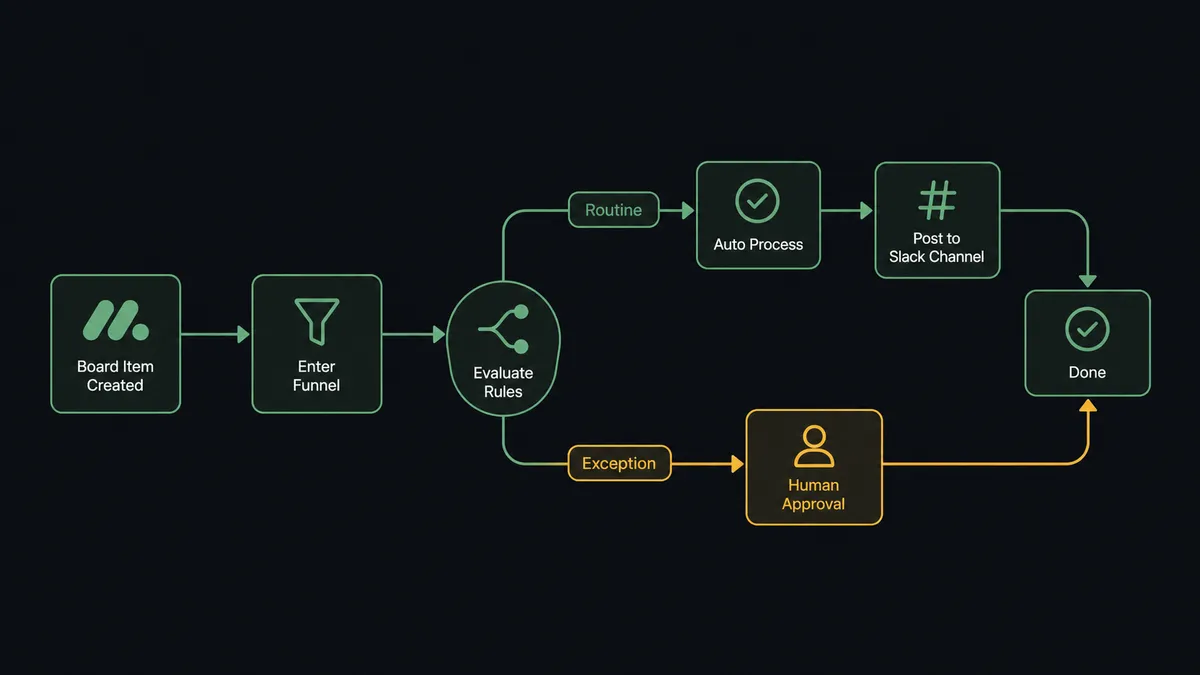
How it works: the connection
The core connection runs in two directions depending on which system you treat as the source of truth.
Monday.com to Slack: The On New Item trigger fires on a polling interval when a new item appears on a monitored board. FlowRunner reads the item’s name and column values, then calls Send Message to Channel with a structured summary. If you want to react to progress rather than creation, On Item Column Change fires whenever a specific column, like a Status column, changes value. The agent reads the changed column, confirms the flip was intentional, and posts to the right Slack channel.
Slack to Monday.com: The On Channel Message or On Mention trigger fires when a team member posts in a designated channel or mentions the FlowRunner agent. The agent parses the message, calls Create Item on the right board, pre-fills column values from the message content, and places the item in the correct group. It then calls Create Update on the new item to log what it parsed and where it was placed.
Real action names the agent uses as tools: Create Item, Get Item, Change Column Value, Change Multiple Column Values, Move Item to Group, Create Update, Send Message to Channel, Send Direct Message, and Update Message in Channel.
Can an AI agent run it? (and why a human stays in the loop)
A plain Zapier-style trigger-action connection handles the routine case: new item fires, Slack message sends. It cannot handle the step that carries weight.
Consider a batch repricing event. A business rule changes, and 40 Monday.com items need their pricing column updated before the next billing cycle. A simple automation would apply Change Multiple Column Values to all 40 items immediately. That is expensive to reverse if the rule was wrong or the filter was too broad.
A FlowRunner agent approaches this differently. It calls List Items to find every item matching the criterion. It inspects each one, not just the count, to verify the filter is pulling the right records. Then, before writing a single change, it pauses. The agent routes to the operations lead through Slack with a structured message: “Ready to update 40 items on the Client Projects board where Status is Active. This changes the Pricing column to [new value] on all of them. Approve the batch?”
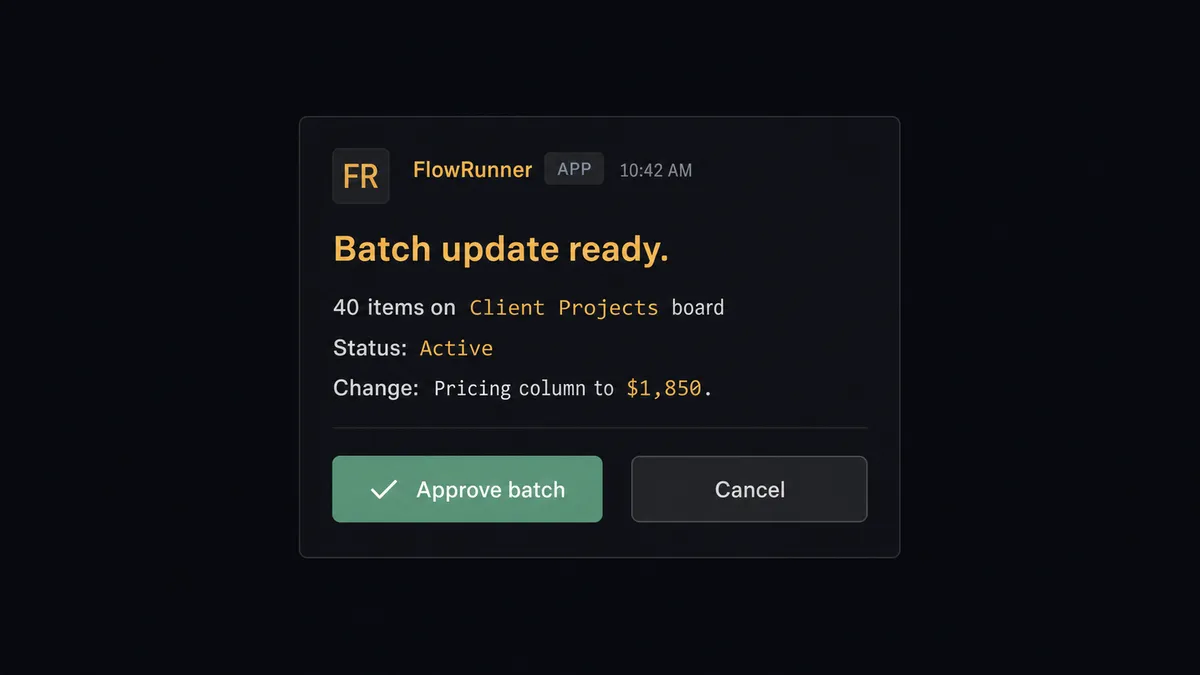
The operations lead sees the exact scope of the change before it happens. They click Approve. The On Block Action trigger fires, the agent resumes, and it applies Change Multiple Column Values item by item. The entire decision, the approver’s identity, and the timestamp are captured in the audit trail.
This is not a hardcoded threshold. The agent decides to escalate because a bulk write across client-facing columns is the kind of move that is expensive to reverse. Prospects call this a “digital andon cord.” The agent stops the line when it hits a decision it should not make alone. Single routine column updates, like flipping one Status field when a task completes, run on their own.
FlowRunner vs Zapier
Zapier handles this integration well for teams that need a simple trigger-action connection with no coding required. It has a large library of pre-built Zaps, a familiar interface, and reliable uptime. For a one-way sync where Monday.com items post to Slack, Zapier is a reasonable choice.
The differences that matter for this specific pair:
| Feature | Zapier | FlowRunner |
|---|---|---|
| AI agent with native reasoning | No. Zapier’s AI features are add-ons, not a native orchestration layer. | Yes. The agent reads item data, scores it against rules, and decides what to do. |
| Human-in-loop as a callable tool | No. Conditional branches can route to email, but the agent does not decide when to escalate. | Yes. The agent invokes a human-in-loop subflow as a tool, same as any integration action. |
| Bulk update with sign-off gate | No. Zapier applies the action to every matching record without a pre-flight check. | Yes. The agent pauses before Change Multiple Column Values and routes for approval. |
| Unlimited users on every tier | No. Zapier pricing includes user seats at higher tiers. | Yes. All FlowRunner tiers include unlimited users and workflows. |
| BYOK for AI providers | No. Zapier’s AI uses its own infrastructure. | Yes. Connect the Claude, OpenAI, or other model account you already use. |
| Self-hosted option | No. | Yes. Community Edition is free. Enterprise self-hosted adds clustering and compliance. |
Before and after
| Category | Before | After |
|---|---|---|
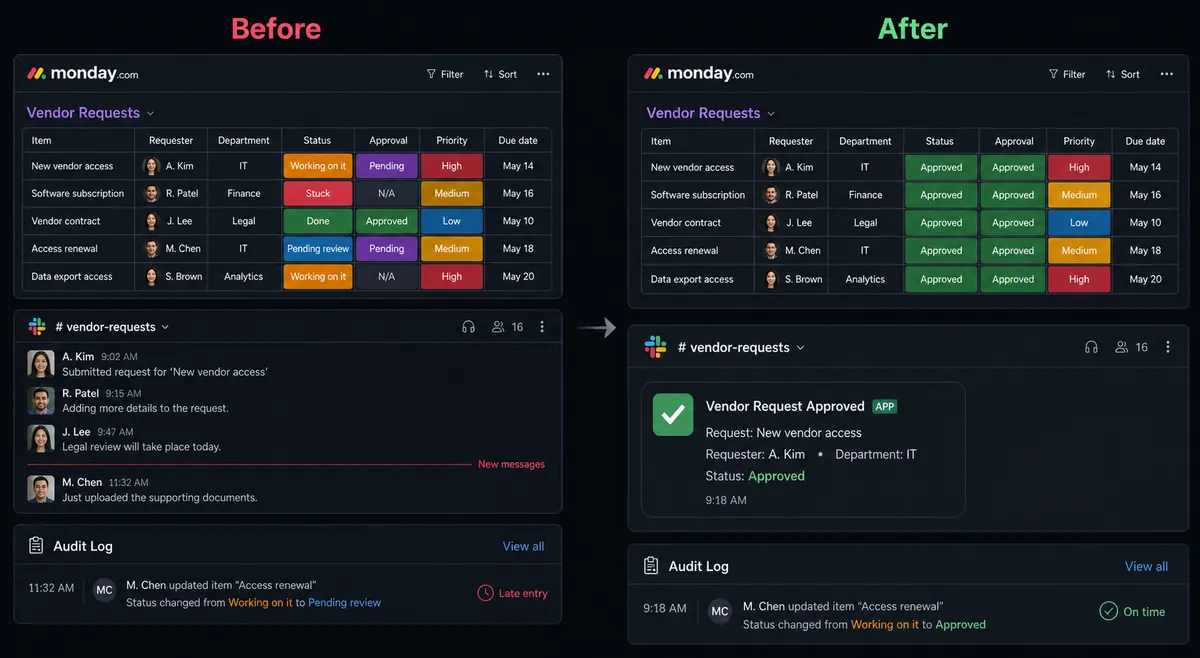
| New item notifications | Someone reads the board and pastes a Slack summary by hand, often hours after the item was created. | Send Message to Channel fires automatically when On New Item triggers, with the item name, group, and key columns mapped in. |
| Exception routing | Ambiguous or incomplete items sit in the wrong group until someone notices in a standup. | The agent flags the item owner in Slack with the specific missing field and waits for their input before placing the item. |
| Bulk column updates | An ops lead opens Monday.com, filters the board, and edits items one by one to avoid mistakes. | The agent prepares the full batch, routes for one Slack approval, then applies Change Multiple Column Values across all matching items. |
| Audit trail | Why an item was routed a certain way lives in someone’s memory or a buried Slack message. | The agent calls Create Update on every item it touches, logging the routing decision and the approver identity directly on the board. |
| Status-change notifications | The “Done” flip happens, and no one tells the client until someone remembers to check. | On Item Column Change fires the moment the status flips; the agent confirms the work is complete and notifies the right channel. |
What you can build
Form-to-board intake with field validation. A Slack message or form submission fires On Channel Message. The agent parses the content, calls Create Item on the right board, and pre-fills column values. If a required field is missing, it routes a Send Direct Message to the submitter asking for the missing value before the item lands.
Status-flip client notifications. On Item Column Change fires when a Status column moves to “Done.” The agent calls Get Item to confirm the work is complete against a linked record, then sends a formatted Slack message to the client-facing channel. The notification is tied to a real status flip, not a timer.
Weekly board digest. On a Monday morning schedule, the agent calls List Items with a filter for items created or updated in the past seven days, compiles a structured summary, and posts it to #operations using Send Message to Channel. Leadership gets board visibility without pulling reports.
Project provisioning on demand. An @mention in Slack fires On Mention. The agent reads the project name and type from the message, calls Create Board from a template using Duplicate Board, creates the relevant groups with Create Group, and invites the right users to the new Slack channel with Invite User to Channel.
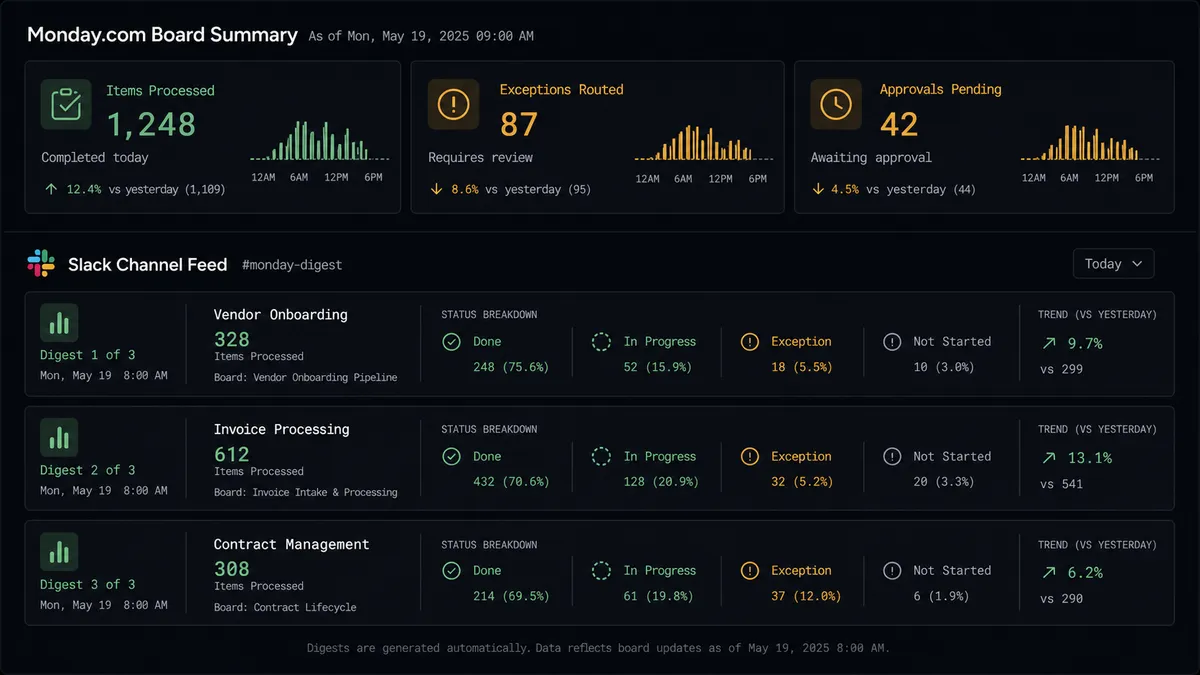
Bulk reprice with approval gate. A pricing rule changes. The agent calls List Items to find every Active item on the Client Projects board, prepares the Change Multiple Column Values payload, and routes to the ops lead in Slack for a one-click approval before writing any changes.
Getting started
FlowRunner has a free plan with 100 executions a month, every integration included, and no credit card required, and new accounts get 14 days of Professional on top. Any real email address works; disposable domains are not accepted.
Start by connecting both integrations: Slack and Monday.com. The workflow builder walks you through the trigger, the action mapping, and the human-in-loop subflow setup.
To start a free trial, visit flowrunner.ai. To see the platform live with your specific use case, book a 30-minute intro at calendly.com/flowrunner/intro.
Frequently asked questions
Is it free to connect Slack and Monday.com on FlowRunner?
FlowRunner has a free plan with 100 executions a month, every integration included, and no credit card required, and new accounts get 14 days of Professional on top. Beyond the free plan, Growth starts at $45 per month.
Can I self-host FlowRunner?
Yes. FlowRunner offers a free Community Edition for self-hosting on a single instance. The Enterprise self-hosted tier adds multi-instance clustering and the full compliance suite.
Does the AI agent need my own OpenAI or Claude API key?
Yes. FlowRunner uses a bring-your-own-key model, so you connect the AI provider you already use. The platform orchestrates the agent; it does not provide or bill for model usage.
What happens when the agent is not sure what to do?
The agent pauses and routes to a human through the channel you configured, Slack, email, or WhatsApp, with full context on what it found and what it needs. It resumes the moment the person responds.
Can I connect more than two systems in the same workflow?
Yes. FlowRunner workflows can chain any number of integrations. A common extension of this pair is to pull in a CRM or ERP so Monday.com items and Slack notifications are always in sync with your records of truth.
How many users can run FlowRunner workflows?
All FlowRunner tiers include unlimited users and unlimited workflows. There are no per-seat charges.