How to Connect Typeform with Aha! (With or Without an AI Agent)
Turn Typeform feature-request survey responses into Aha! ideas automatically, with an AI agent that clusters signal on its own and pauses for a human before Delete Responses purges the source data.
How do you connect Typeform to Aha!?
You connect Typeform to Aha! by polling the feature-request survey with Get Form Responses on a schedule and filing each new response into Aha!: the workflow reads the question structure with Get Form, resolves the destination with List Products, checks List Ideas for duplicates, and writes genuinely new requests with Create Idea. FlowRunner is a visual AI-agent orchestration platform where automations run autonomously and pause for human judgment on the steps that carry real consequence. Run the same connection as an AI agent and it clusters responses by meaning, files ideas on its own, and pauses for a named owner before Delete Responses purges the source data, because a retention policy should never execute itself against records you cannot get back.
The problem it solves
Product teams run feature-request surveys because Typeform makes asking easy. The results pile up in the responses view, and the pipeline from there is manual: someone exports to a spreadsheet, reads a few hundred free-text answers, tries to group them, and hand-enters the highlights into Aha!. It happens once a quarter if it happens at all. By the time the themes reach a roadmap discussion, the survey is stale, the grouping reflects one person’s afternoon, and most individual voices were compressed away without a trace.
Then there is the data itself. Survey responses carry names, emails, and candid customer commentary, so someone eventually decides the raw responses should be purged once processed. That decision is genuinely dangerous to automate. Delete Responses in Typeform is irreversible, and a purge that runs before the import is verified erases evidence the roadmap was supposed to be built on. So teams do the rational thing: they never delete anything, and years of identifiable customer data sit in a form tool nobody audits. Both failure modes, the rotting spreadsheet and the immortal response pile, come from the same missing piece: nothing trustworthy sits between collection and cleanup.
How it works: the connection
The connection reads Typeform and writes Aha!. Here is the plain version, grounded in the real connector actions.
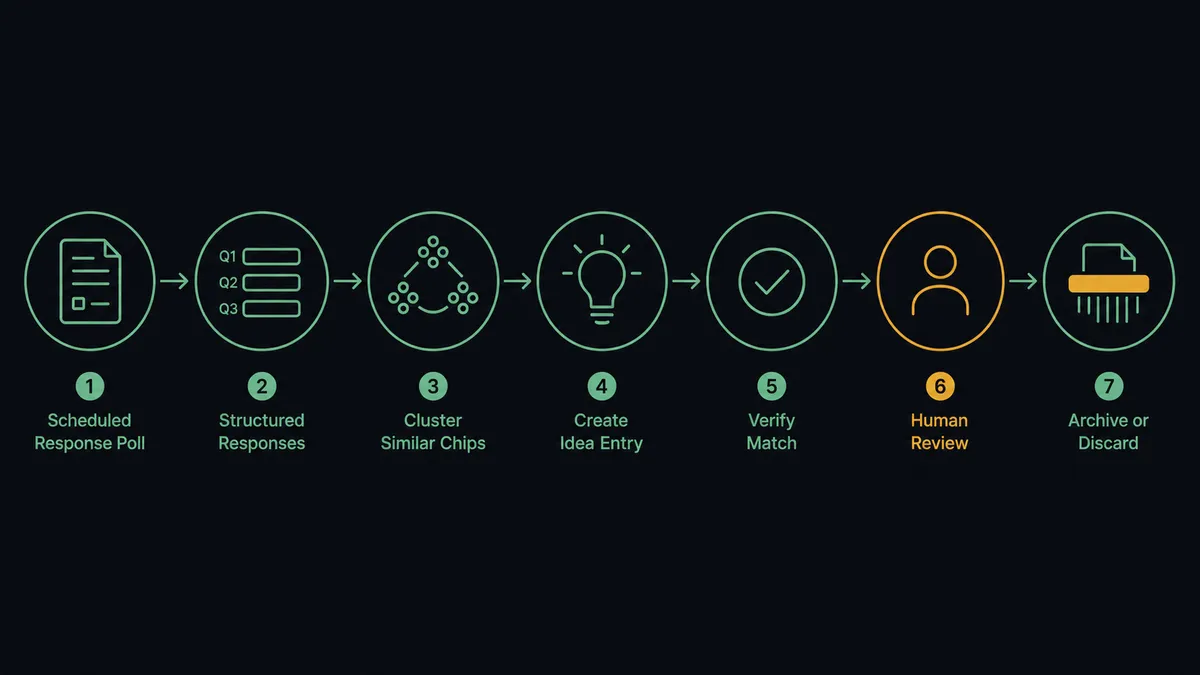
- Trigger: On a schedule, the workflow calls Get Form Responses on the survey and picks up new submissions.
- Read: Get Form pulls the question structure, so each answer maps to a named field instead of a column index.
- Resolve the product: List Products maps the product-area answer to the right Aha! product line.
- Dedupe: List Ideas checks whether the request already exists before anything is created.
- Write the idea: Create Idea files each genuinely new request with the respondent’s account as the source.
- Verify: The workflow confirms every processed response has a matching idea reference before it is marked imported.
- Retain or purge: On your retention schedule, imported responses are queued for Delete Responses, behind an approval gate.
That is the “just connect them” answer. Responses become deduplicated ideas within minutes of arriving, and the retention step exists as a governed workflow instead of a someday task.
Can an AI agent run it? (and why a human stays in the loop)
Yes, and the clustering is where the agent replaces the quarterly spreadsheet afternoon. A mapping can copy an answer into an idea. It cannot read three hundred free-text responses and recognize that “let me export the dashboard,” “need this in Excel,” and “reporting is trapped in the app” are one request. The agent can. It holds the actions as tools: Get Form Responses, Get Form, List Products, List Ideas, Create Idea, Get Form Insights, Delete Responses. It groups responses by meaning, files one well-sourced idea per real theme, attaches respondent accounts as evidence, and notes repeats against existing ideas instead of duplicating them.
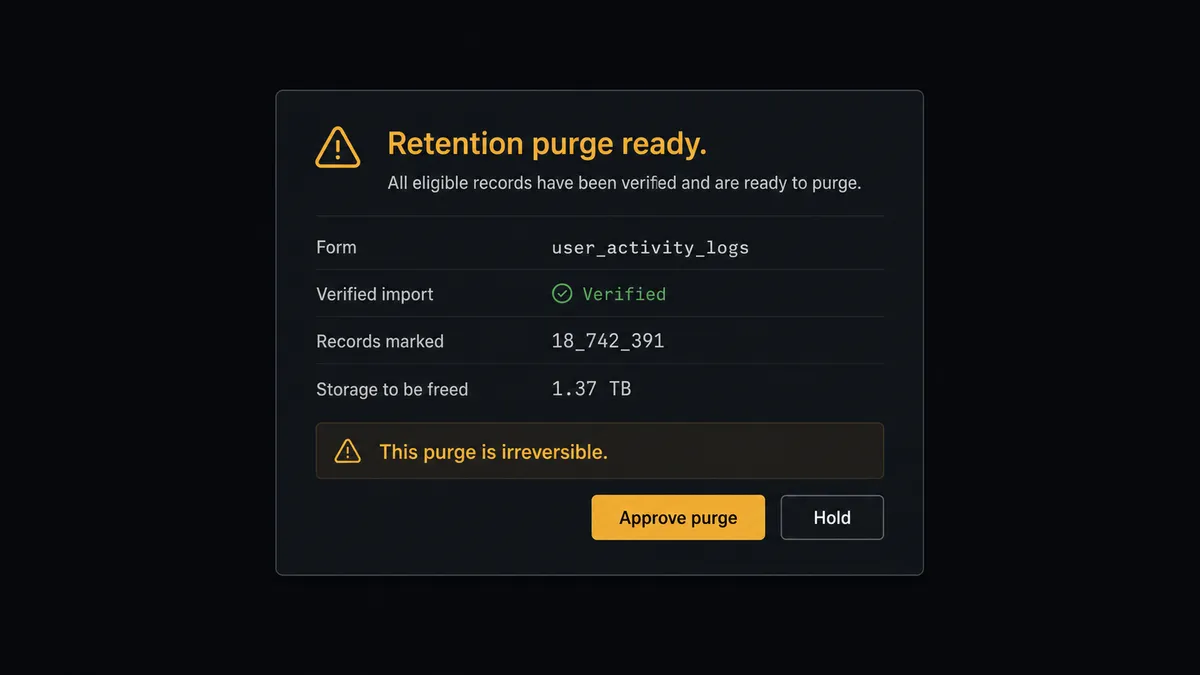
The consequential step is Delete Responses. It is the one action in this workflow that cannot be undone, and it touches identifiable customer data. So the agent never runs it autonomously. When the retention schedule comes due, it first verifies the import: every response queued for purging must have a matching idea reference in Aha!. Then it invokes a human-in-loop flow it holds as a callable tool. The workflow pauses and posts to the data owner: “Retention purge ready for [form name]. All queued responses are verified as imported into Aha!. This purge is irreversible. Approve?” If even one response fails verification, the agent excludes it, says so in the message, and asks how to proceed. Only after a named approver signs off does Delete Responses run, and the approval, the scope of the purge, and the timestamp land in the audit trail.
That is the difference between automation you tolerate and automation you can defend to an auditor. Prospects call it the digital andon cord: like Toyota’s production line pull cord, the workflow stops the line before the irreversible step, and a human pulls it forward deliberately.
FlowRunner vs n8n
A developer can wire this pair in n8n. Both services have nodes there, the fair-code self-hosting model is genuinely good, and the community template library covers survey-processing patterns a technical team can adapt quickly. If your team wants to hand-build the clustering and the retention logic in a node graph, n8n makes that possible.
The difference is what you trust with an irreversible delete. In n8n, the safety around Delete Responses is whatever error handling and approval plumbing you build. In FlowRunner, the agent’s pause before a destructive action is a native pattern: verification, a named approver, and an audit record are the default shape, not custom work. Here is the honest side-by-side.
| What matters for this pair | FlowRunner | n8n |
|---|---|---|
| Human-in-the-loop on Delete Responses | Native. The agent verifies the import and invokes an approval flow as a callable tool before the irreversible purge | Buildable with wait nodes and webhooks; you assemble and maintain the approval logic yourself |
| Who runs the flow | An AI agent clusters responses, reasons, and picks actions as tools | A node graph you design and debug, with AI available as LangChain nodes |
| Users included | Unlimited users on every tier | Cloud plans meter executions and gate collaboration features by tier |
| Bring your own AI keys | Yes, BYOK | Yes, via your own credentials in AI nodes |
| Self-hosted option | Yes, cloud-hosted or self-hosted | Yes, fair-code self-hosting is a core n8n strength |
| Pricing model | Transparent workflow-based tiers with clear execution limits | Execution-based cloud pricing; self-hosting shifts cost to your own infrastructure and upkeep |
If your team has engineers who want full control of a custom survey pipeline, n8n is a credible choice. If you want survey signal reaching the roadmap weekly and a purge process you can show an auditor, this pairing on FlowRunner is the better fit.
Before and after
| Category | Before | After |
|---|---|---|
| Response processing | A quarterly export-and-read session compresses hundreds of answers into one person’s summary | Responses are clustered and filed as sourced Aha! ideas within minutes of arriving |
| Duplicates | The same request enters Aha! under several wordings across quarters | List Ideas is checked by meaning before anything is created |
| Data retention | Raw responses with customer PII accumulate indefinitely because deleting is scary | Verified purges run on schedule, each behind a named approval |
| Evidence trail | Nobody can show which responses backed a roadmap theme | Each idea carries its source accounts, and each purge its verification record |
| Survey health | Nobody knows the form’s completion rate until responses dry up | Get Form Insights feeds drop-off patterns into the weekly digest |
What you can build
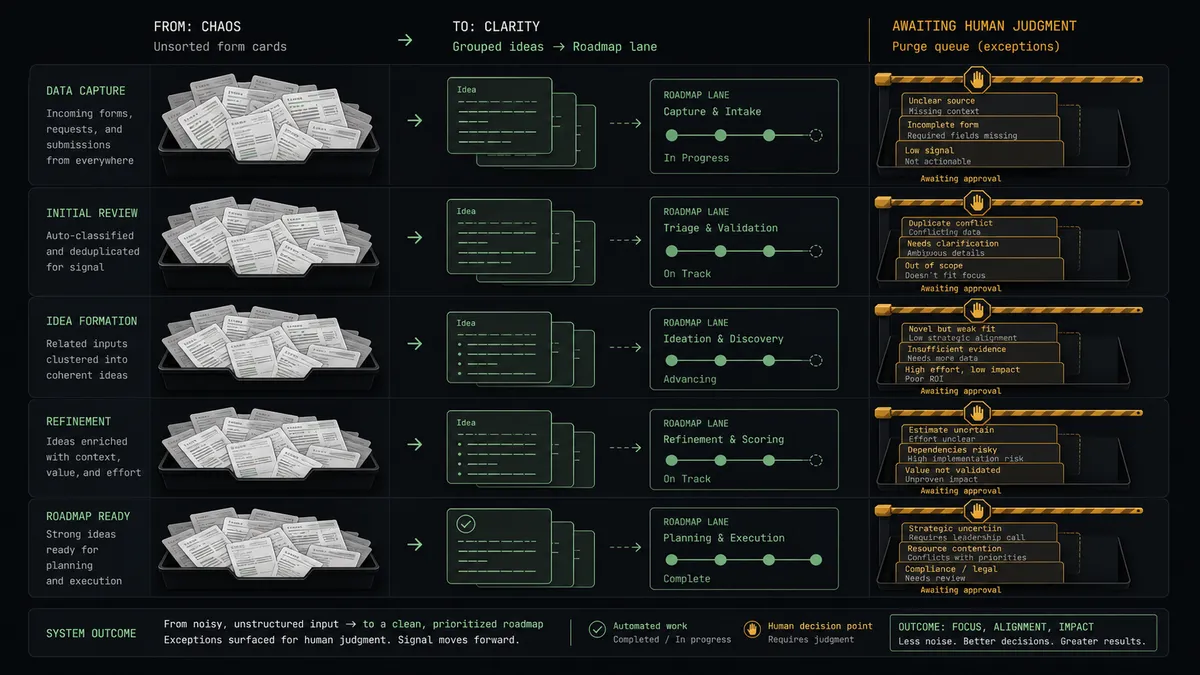
Survey to sourced idea, hands off. The schedule fires Get Form Responses, the agent clusters by meaning, checks List Ideas, and files each real theme with Create Idea, respondent accounts attached. The quarterly spreadsheet session disappears.
Governed retention purge. On the retention date, the agent verifies every queued response has a matching idea, invokes the human-in-loop tool with the import summary, and only runs Delete Responses after the data owner approves. Irreversible, but never unaccountable.
Signal digest for prioritization. On a weekly schedule, the agent summarizes new ideas by product and account spread, pulls List Releases and List Initiatives for context, and delivers a digest the product team reads before prioritization instead of after.
Survey health monitor. The agent calls Get Form Insights weekly, flags drop-off shifts, proposes wording fixes, and applies approved ones with Update Question Options, so the form keeps earning responses.
Localized feedback capture. For a regional launch, the agent duplicates the survey with Copy Existing Form and localizes it with Auto-Translate Form, then merges responses from both forms into the same clustering pass so global signal stays unified.
Getting started
Start on the free plan: 100 executions a month, every integration included, no credit card required, plus 14 days of Professional for new accounts. Both connectors are available on every tier, and every tier includes unlimited users and unlimited workflows.
Explore the integration details:
- Typeform integration (36 actions covering forms, responses, themes, translations, and workspaces)
- Aha! integration (10 actions covering products, ideas, features, releases, and initiatives)
Start building free at flowrunner.ai or book a demo to see a live Typeform to Aha! workflow, governed purge and all.
Frequently asked questions
Is it free to connect Typeform and Aha! on FlowRunner?
You can build and run the connection on FlowRunner's free plan, which includes 100 executions a month and every integration with no credit card required, and new accounts also get 14 days of Professional. Both connectors are available on every FlowRunner tier, and every tier includes unlimited users and unlimited workflows.
Can I self-host the Typeform to Aha! workflow?
Yes. FlowRunner offers a cloud-hosted option and a self-hosted option, so the connection can run inside your own environment.
Does the AI agent need my own OpenAI or Claude key?
FlowRunner uses a bring-your-own-keys model, so you connect the AI provider key you already have. You are not locked to one model.
What happens before the agent deletes anything from Typeform?
It stops and asks, every time. Delete Responses is irreversible, so the agent first verifies each response was captured in Aha!, then posts a purge summary to the data owner showing what was imported and what would be erased. Nothing is deleted until a named person approves, and the approval is logged.
Which actions move survey responses into Aha!?
The workflow polls Get Form Responses on a schedule, reads the question structure with Get Form, resolves the product with List Products, dedupes with List Ideas, and files new requests with Create Idea. The retention step uses Delete Responses, always behind the approval gate.
Can the workflow tell me how the survey itself is performing?
Yes. On a weekly schedule it calls Get Form Insights for completion and drop-off patterns and includes them in the digest, so you learn whether the form is earning the responses the roadmap depends on.